

A rival disappears into a doorway while explosions, music, and team chat compete for your attention. If you cannot tell whether the next footstep is behind you or off to one side, it is fair to ask whether surround sound will sharpen your awareness or simply add another audio setting to manage.
This guide separates useful positional audio from marketing language, whether you play at a desk with a headset or from a couch with a TV speaker setup. Players building a smoother co-op experience can also pair their audio plans with our graphics hardware guide for Helldivers 2.
Quick answer
This guide compares 10 picks, with WebsLand 70W 2.1 Soundbar with Wired Subwoofer for TV ranked first. BENGOO G9000 Gaming Headset with 7.1 Surround Sound has the most customer reviews.

For readers who decide surround sound headsets aren't the right fit and want room filling audio instead, this 2.1 channel soundbar with a wired subwoofer adds low end impact to game audio directly from the TV setup. Tabletop mounting keeps installation simple, offering a straightforward alternative to headset based surround for shared or living room gaming.
Pros
- 70W output with dedicated subwoofer adds real bass depth to gameplay
- Sound modes and 10 bass levels allow fine audio tuning
- Bluetooth 5.3 plus Optical and AUX cover most TV setups
- Slim profile fits under most TVs or monitors without clutter
Cons
- No HDMI ARC or USB support limits compatibility with newer smart TVs
- May require manual TV audio configuration to avoid static or silence
Surround sound for gaming isn't only about headsets, and this 2.1 soundbar is a reminder that room audio can deliver some of the same immersive payoff for couch-based or shared gaming setups. The 70W system pairs dual full-range speakers with a dedicated 4-inch subwoofer, adding bass depth that makes explosions and ambient effects land with more weight than TV speakers alone. It includes a dedicated sound mode selection along with 10 bass levels and 32 volume steps, so you can tune the balance between dialogue, music, and effects depending on what you're playing. Bluetooth 5.3 plus Optical and AUX inputs cover most setups, and the slim 14.2-inch profile tucks under a TV or monitor without clutter. It's not true multichannel surround, and there's no HDMI ARC or USB, so some newer TVs may need manual audio configuration to PCM or Stereo to avoid static. For gamers who want a fuller soundstage without a headset clamped on, it's a reasonable, budget-friendly layer.
Audio and Power: 70W peak power, 2.1 channel stereo output, 4-inch woofer driver
Connectivity: Bluetooth 5.3 (10-meter range), Optical, 3.5mm AUX. Note: HDMI ARC and USB not supported.
Dimensions and Weight: Soundbar 17.1 inches D x 2.56 inches W x 3.94 inches H; total system weight 2.37 kg
Sound Modes: Movie, Music, News with advanced DSP tuning
Controls: Remote with 10 bass levels and 32 volume steps
Compatibility: Smart TVs, PCs, laptops, desktop monitors, projectors, smartphones, tablets. Compatible with Fire TV, Apple TV, Google Chromecast remotes; Roku support available upon request (not compatible with Roku Stick).
Warranty: One-year limited warranty
Included Accessories: Soundbar, wired subwoofer, remote control, power adapter, Optical cable, 3.5mm AUX cable, user manual
Good for couch or desktop gamers who want louder, bassier audio for shared or social gaming without wearing a headset, and who have a TV with Optical or AUX input available. Skip it if you need true discrete surround channels or HDMI ARC compatibility, or if your TV setup requires audio features this doesn't support, since you'll be stuck manually adjusting output settings.

This headset's 7.1 surround sound combined with a durable aluminum frame appeals to readers wanting surround audio that holds up over years of use, not just a one season gimmick. Memory foam ear pads and a detachable mic round out comfort and voice chat clarity, making it a solid benchmark for comparing surround sound value against standard stereo headsets.
Pros
- 7.1 virtual surround sound on PC, Mac, and PS4 via USB sound card
- 53mm drivers reveal positional detail other headsets miss
- TeamSpeak and Discord certified mic for clear communication
- Aluminum frame and memory foam built for long-term durability
Cons
- Console and mobile users get stereo audio, not surround
- Best sound quality may require a motherboard USB port over front panel
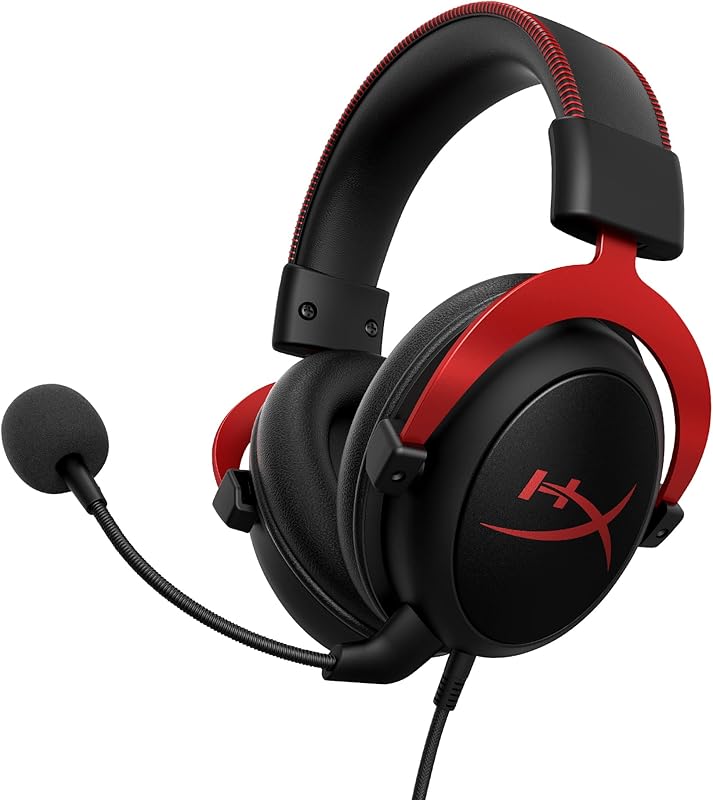
The Cloud II is a useful reference point for this guide because it shows both the upside and the real limitation of surround sound in gaming: it only delivers true 7.1 virtual surround on PC, Mac, and PS4 through its USB sound card, while console and mobile users are left with stereo. That matters if you are deciding whether surround sound is worth it for your specific setup, since the answer here depends heavily on platform. Where it does work, the 53mm drivers and hardware sound card reveal positional detail that gives a real edge, and the TeamSpeak and Discord certified mic keeps team communication clean. Build quality is a strong point too, with an aluminum frame and memory foam cushioning that many users report lasting well beyond a decade of regular use. One practical note: sound quality can improve when the USB sound card is connected to a motherboard port rather than a front panel one, which is worth knowing if you want the surround effect at its best.
Audio Performance: Frequency response 10 Hz to 23 kHz, 53mm dynamic drivers, 98 dB sensitivity, 60 ohm impedance, 7.1 virtual surround sound on PC/Mac/PS4
Design: Over-ear, closed-cup design with memory foam ear cushions and padded leatherette headband. Aluminum frame with faux leather and memory foam materials. Weight 11.29 ounces. Includes airplane headphone adapter.
Connectivity: Wired USB connection with detachable cable. USB sound card control box included. Passive noise cancellation via closed-cup design. Headphone jack USB type.
Microphone: Detachable, noise-cancelling microphone. TeamSpeak and Discord certified. Compatible with universal phone control.
Platform Support: PC, Mac, PS4, PS4 Pro, Xbox One (with Microsoft adapter), Nintendo Switch, and mobile devices. Warranty coverage 2 years manufacturer.
Suited to PC, Mac, and PS4 players who want the full 7.1 surround experience and are willing to use the USB sound card for best results. Also fits anyone prioritizing long-term durability. Skip it if you primarily game on Xbox or mobile, since you will only get stereo sound and miss the main reason to consider this headset.
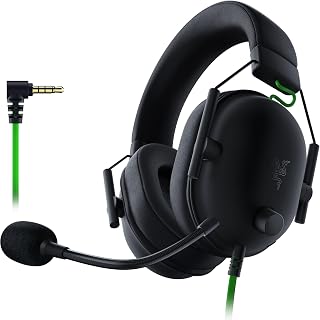
If you're weighing surround sound against simplicity, the 50mm drivers paired with 7.1 virtual surround give gaming headset territorial cues without needing a receiver or extra speakers. Memory foam cushions keep long raid nights comfortable, and the 3.5mm jack means it works across PC and consoles alike, making it a low friction entry point into surround sound gaming.
Pros
- TriForce Titanium drivers sharpen directional audio cues
- HyperClear cardioid mic isolates voice from background noise
- Lightweight 240g design with memory foam comfort
- Wired 3.5mm connection means zero latency
Cons
- Full 7.1 surround sound only works on Windows 10 64-bit
- PS5 and Switch users get stereo instead of surround
If you are weighing whether surround sound actually helps you win games, the BlackShark V2 X is a good test case because its 7.1 implementation is tied directly to competitive performance rather than cinematic flair. The TriForce Titanium driver system splits each 50mm driver into three tuned sections, which sharpens the directional cues that matter most in shooters, footsteps, reloads, and off-screen positioning. That detail is exactly what surround sound is supposed to deliver for gaming, and here it is paired with a HyperClear cardioid mic that keeps callouts clear instead of muddy. The catch is that full 7.1 surround only activates on Windows 10 64-bit, so PS5 and Switch owners are working with stereo despite the headset's surround branding. On PC, though, this is a legitimate case for surround sound being worth it: a lightweight 240g build with memory foam cushioning means you can run long sessions without the audio gains being undercut by discomfort.
Audio Performance: TriForce Titanium 50mm dynamic drivers, 28 kHz frequency response, 100 Hz to 10 kHz frequency range, 100 dB sensitivity, 32 ohm impedance.
Microphone: HyperClear cardioid pattern with improved pickup toward the front and tapering toward rear and sides for noise reduction.
Design: Lightweight wired construction at 240g, over-ear with oval memory foam ear cushions, closed earcups for passive noise isolation. Materials include memory foam and titanium components.
Connectivity: Universal 3.5mm audio jack, wired only, includes audio and mic splitter extension cable. Compatible with PC, Mac, PS4, PS5, Xbox One (may require separate stereo adapter), and Nintendo Switch.
Software: 7.1 surround sound available on Windows 10 64-bit. Standard stereo output on other platforms.
Warranty: 2-year manufacturer coverage. Model RZ04-03240100-R3U1.
Best for PC gamers who want 7.1 surround sound to actually function and give them a competitive edge in positional audio. Esports players and ranked grinders benefit most from the TriForce drivers and clear mic. Skip it if you play primarily on PS5 or Switch, since you will lose the surround sound feature entirely and be left with standard stereo.

For gamers testing whether surround sound matters before investing heavily, the 7.1 surround processing and noise cancelling design let you compare positional audio against stock headphones at minimal commitment. Soft memory earmuffs support extended sessions, and the LED accents add gaming flair, making this a sensible first step for evaluating surround sound's actual impact on gameplay.
Pros
- 7.1 surround sound works across PS4, PS5, Xbox, PC, and Nintendo
- 40mm neodymium drivers add noticeable punch to spatial audio
- Omnidirectional mic filters background noise for clearer calls
- Braided cable with rotary volume and dedicated mute button
Cons
- Comfort may decline for larger heads after six hours of use
- Older Xbox One controllers require a separate adapter
For anyone asking whether surround sound is worth it before spending real money on gaming audio, the BENGOO G9000 is a low-risk way to find out. It brings 7.1 surround sound to nearly every platform, PS4, PS5, Xbox One, Series X|S, PC, and Nintendo systems, so you are not locked into one ecosystem to test the benefit. The 40mm neodymium drivers give that surround effect enough punch to be noticeable in spatial-awareness-heavy titles, which is the whole point of this guide: does the positional cue actually help you play better. The omnidirectional mic adds voice clarity on top, filtering background noise so teammates hear callouts cleanly. Comfort-wise, the protein leather ear pads and ergonomic headband hold up for standard sessions, though longer stretches past six hours can get uncomfortable for larger heads. Older Xbox One controllers need a separate Microsoft adapter. As an entry point for evaluating surround sound's value in gaming without committing to a premium headset, this covers the basics well.
PlayStation: Works natively with PS4 and PS5 via 3.5mm connection. RGB lighting power is independent from controller power, so lights remain active even when the controller battery is low. Simply connect the headset to the controller and plug the RGB power adapter into a USB port on your console.
Xbox: Compatible with Xbox One, Xbox Series X, and Xbox Series S. For older Xbox One controllers, a separate Microsoft adapter is required (not included with purchase). Newer Xbox controllers have built-in 3.5mm jacks that work directly without adapters. RGB lighting can be powered independently through console USB ports.
PC and Laptop: Connect via 3.5mm jack to any Windows PC, Mac, or Linux system. The microphone and audio will work immediately without driver installation. RGB lighting will illuminate when connected to power via included USB adapter, adding visual flair to your gaming desk setup.
Mobile and Tablet: Works with any device featuring a 3.5mm headphone jack or Bluetooth adapter. Nintendo 3DS, iPads, and PSP systems all support direct connection. Modern phones without 3.5mm jacks will require an external USB-C or Lightning adapter (not included).

DTS:X 7.1 surround sound processing sets this apart for readers wanting a tested, branded virtual surround implementation rather than a generic claim. The leatherette build suits long sessions, and since DTS:X is a recognized spatial audio standard, it directly answers the article's core question of whether dedicated surround processing actually improves footstep and directional awareness in competitive play.
Pros
- DTS Headphone:X 2.0 delivers genuinely three-dimensional positional audio
- Works across PC, Mac, PlayStation, Xbox, and Switch
- Lightweight leatherette build suited to long test sessions
- Wired connection avoids wireless latency variables
Cons
- Full surround sound on PC requires installing G HUB software
- Wired-only design limits movement compared to wireless options
For gamers weighing whether surround sound justifies the upgrade, the Logitech G432 is a low-risk way to find out. It runs DTS Headphone:X 2.0 through 50mm drivers, producing a soundscape that goes beyond basic 7.1 channel separation to genuinely three-dimensional audio, the kind that makes a difference when you're trying to place an enemy before you see them. Since it's wired, you avoid the latency and connection drops that can undercut surround sound's benefits on wireless gear, which matters if you're testing whether the effect is worth it at all. The tradeoff is a setup step: getting the full surround experience on PC means installing Logitech's G HUB software first. Comfort-wise, the leatherette ear cups and lightweight headband are built for sessions long enough to actually judge the audio fairly, and the headset works across PC, Mac, PlayStation, Xbox, and Switch, so you can test the surround sound difference no matter which system you game on most.

App control and a 5.25 inch wireless subwoofer make this soundbar appealing to readers who want tunable bass without wiring a sub across the room. Listed compatibility with surround sound systems and gaming consoles means it can anchor a budget home theater setup, giving gamers who skip headsets a way to still feel directional impact in explosions and effects.
Pros
- Wireless subwoofer gives flexible placement near a gaming setup
- 240W output adds real impact to game audio over TV speakers
- VoiceMX keeps dialogue and callouts clear
- App EQ with 121 presets for tuning to game genres
Cons
- 2.1 channel layout means no true surround positioning
- Audio quality still depends on how well the game's sound is mixed
If you're asking whether surround sound is worth it for gaming, the Poseidon M30 is a good reality check: it's a 2.1 system, not true surround, and that matters for this guide. What it does offer is a real step up from TV speakers at a much lower complexity level than a full multi-speaker setup. The wireless subwoofer can sit anywhere near your gaming setup, and the 240W output with BassMX tuning gives explosions and impacts in games noticeably more weight across the 45-150Hz range. VoiceMX keeps in-game dialogue and callouts intelligible, which helps in competitive titles even without rear channels. The app's 10-band EQ and 121 presets let you tune the sound profile per game genre. For gamers who want punchier audio without committing to a surround system or dealing with speaker placement around a desk or couch, this is a practical middle step. It will not deliver positional audio cues the way true surround or surround-emulating headphones can, so treat it as an upgrade to your TV sound, not a surround sound replacement.
Audio Output: 2.1 channel stereo system with wireless subwoofer
Power Output: 240W peak power
Frequency Response: 45Hz to 18kHz
Maximum SPL: 95dB
Subwoofer Driver: 18mm high-excursion driver with 5.25 inch diameter
Cabinet Volume: 6.5L tuned enclosure
Connectivity: HDMI ARC, optical input, Bluetooth 6.0
Control: Smart app with 10-band EQ and 121 presets
Soundbar Dimensions: 23.62 inches wide, 2.76 inches tall, 3.54 inches deep
Mounting Options: Tabletop or wall mount with included brackets
Included Accessories: Soundbar, wireless subwoofer, power adapters, HDMI cable, wall brackets, mounting screws, wall kit
Warranty: 1 year manufacturer coverage
Model: Poseidon M30 (UC000)

With genuine rear surround speakers and a wireless subwoofer, this 4.1 channel system is for readers who've decided true multi speaker surround beats virtual surround headsets for immersion. Dolby Audio and AI Sound Pro process game audio across the room, giving a tangible comparison point against headset based 7.1 for anyone building a dedicated gaming space.
Pros
- True 4.1 surround with wireless rear speakers, no receiver needed
- Dolby Audio and DTS Digital support enhanced game audio formats
- Clear Voice Plus keeps in-game dialogue intelligible
- Smart Up-Mixer expands stereo-only game audio into fuller sound
Cons
- Limited bass punch for action-heavy or explosion-heavy games
- WOW Interface convenience features only work with LG TVs
For anyone weighing whether surround sound is actually worth it for gaming, the LG S40TR answers with a practical yes, minus the usual hassle. This 4.1 system includes wireless rear surround speakers and a wireless subwoofer, so you get genuine multi-directional sound for gaming without running a receiver or speaker wire across your room. That matters for games where hearing footsteps or off-screen action behind you adds real competitive or immersive value. Dolby Audio and DTS Digital compatibility mean many modern games will output enhanced surround sound properly, and Clear Voice Plus helps in-game dialogue and mission audio stay clear amid chaotic sound effects. The Smart Up-Mixer is useful for older or stereo-only games, expanding them into a fuller soundstage rather than leaving you stuck with flat audio. The tradeoff for gaming specifically is power: this system is tuned more for dialogue clarity than deep bass impact, so bass-heavy action games may feel a bit less punchy than with a dedicated subwoofer-forward system. Still, for true rear-channel surround without complexity, it's one of the more accessible options.
Channel Configuration: 4.1 (Left, Center, Right, Subwoofer, plus rear surrounds)
Connectivity: Bluetooth, Optical, Wireless
Audio Formats: Dolby Audio, DTS Digital
Mounting: Tabletop Mount
Input Voltage: 240 volts
Design: Crest design with metal grill
Control: Single remote via WOW Interface, LG Soundbar App control available
Good for gamers who want real rear-channel surround sound for immersive single-player or story-driven games without installing a receiver or running speaker wire. Also suits those with compatible LG TVs who want one-remote convenience. Skip it if you want heavy bass impact for action games or if you don't own an LG TV, since the WOW Interface convenience features are LG exclusive.

Pros
- Affordable entry point for testing if better audio improves gaming
- DSP modes help game dialogue and effects stay clear
- Flexible connectivity covers consoles, PCs, and older setups
- Compact size fits easily in gaming setups without clutter
Cons
- No subwoofer, so bass-heavy game effects feel thin
- Stereo only, won't deliver true surround positional audio
If you're asking whether surround sound is really worth it for gaming, the honest answer is: it depends on your setup, and the RIOWOIS 17-inch soundbar is a useful reality check. This is a stereo bar, not a multi-channel system, so it won't deliver the positional cues competitive gamers chase. What it does offer is a cheap, low-friction upgrade over flat-screen TV speakers, which is often the real bottleneck for casual gaming audio. The DSP sound modes help dialogue and game audio cut through without needing a full home theater investment, and Bluetooth, optical, and aux inputs mean it slots into almost any console or PC setup without hassle. For gamers still deciding whether to commit to true surround, this is a good way to test if better audio actually improves your experience before spending more. Just know that without a subwoofer, explosions and bass-heavy effects will feel flat. Think of this as the stepping stone product in the surround sound conversation, not the destination.
Dimensions and Weight: 17 inches wide by 3.5 inches deep by 2.5 inches tall. Weighs approximately 3-4 lbs.
Audio Performance: 60 watts power output, 2-channel PCM stereo, 80db signal-to-noise ratio, 20 kHz frequency response, 100 programmable volume levels.
Connectivity: Bluetooth 10-meter range, optical digital audio (SPDIF), 3.5mm auxiliary input. Compatible with desktop computers, projectors, televisions, and most streaming devices.
Controls and Power: Remote control (without batteries) and button controls. Corded electric power adapter included. Compatible with Fire TV remotes and Roku devices.
Warranty and Support: 3-year manufacturer warranty with 5-year spare parts availability. Free lifetime replacements for optical cables, auxiliary cables, wall mount kits, and remote controls. 24/7 customer support.
Good for casual gamers who want clearer in-game dialogue and effects without buying a full surround setup, especially in bedrooms or secondary rooms. Also useful as a low-cost way to decide if upgrading from TV speakers even matters before investing in true surround sound. Skip it if you're chasing positional audio cues for competitive play or want cinematic bass impact, since this stereo bar has no subwoofer and no multi-channel separation.

Going wireless removes cable clutter while still delivering 7.1 surround sound, which matters to readers deciding if cutting the cord sacrifices positional accuracy. The 100 hour battery life supports marathon sessions without recharging mid game, and compatibility across PC, PS5, PS4, Mac and Switch makes it a flexible pick for testing surround performance on multiple systems.
Pros
- 7.1 surround sound aids directional awareness in-game
- Up to 100-hour battery life in Bluetooth mode
- 5ms latency keeps audio synced during fast action
- Multiple connectivity options including 2.4GHz, Bluetooth, and aux
Cons
- No Xbox Series support, and PS5 requires the dongle over Bluetooth
- Plastic build feels less durable than premium alternatives
If you're asking whether surround sound is worth it for gaming, the Valorise UG-08S makes a practical case for yes, without demanding a big investment. It uses 7.1 surround processing with dynamic drivers to reproduce directional cues like footsteps and callouts, which is exactly the kind of detail that turns surround sound from a gimmick into a competitive edge. What makes it worth considering specifically for gaming marathons is the battery life: up to 100 hours in Bluetooth mode, or a still-strong 45 hours running the full 2.4GHz experience with RGB on. The 5ms latency keeps audio locked to the action, so positional cues arrive when they happen rather than a beat late. Memory foam cushions and breathable fabric keep ears comfortable through long raid nights, though the ABS and polycarbonate housing is a reminder of where the cost savings went. Just confirm your platform first: Xbox Series isn't supported, and PS5 needs the dongle, not Bluetooth.
Audio & Sound: 7.1 surround sound, dynamic drivers, 20Hz to 20,000Hz frequency response, 32-ohm impedance, 5ms ultra-low latency wireless, passive noise cancellation
Connectivity: 2.4GHz USB-A and Type-C dongle, Bluetooth 5.4 (10-meter range), 3.5mm wired jack, dual-mode support for simultaneous connectivity options
Battery: 100-hour playtime (Bluetooth mode, RGB off), 45-hour playtime (2.4GHz mode, all features on), 2-3 hour full recharge, supports use while charging, low battery alert
Microphone: Retractable 360-degree noise-canceling with one-touch mute, high-definition voice clarity, optimal for gaming and calls
Design: Over-ear, memory foam cushions, breathable fabric, rotating ear cups, adjustable angles, black and red color, 32-ohm driver impedance
Compatibility: PlayStation 5/4, PC, Mac, Nintendo Switch, mobile phones, tablets, gaming consoles (note: invalid microphone on Switch, not compatible with Xbox Series)
Warranty: 3-year manufacturer warranty with 24-hour customer support response time
Good for PC and PlayStation players who want to actually hear surround sound's benefit during long sessions without paying premium prices. Skip it if you're on Xbox Series, since it's not supported, or if you want a headset that doubles as a daily-wear accessory outside gaming. Also skip it if active noise cancellation matters to you, since isolation here is passive only.

For gamers weighing whether surround sound actually matters, this wired headset offers a practical entry point across Xbox Series X|S, Xbox One, PS5, PS4, PC, Switch, and Mac. Its broad console compatibility means you can test positional audio cues like footsteps and gunfire across multiple systems without buying separate gear, and the 4.3 star rating from over 2,600 reviewers suggests consistent real world performance for competitive and casual play alike.
Pros
- Virtual 7.1 surround via 50mm drivers for directional cues
- Zero latency wired connection keeps audio synced to gameplay
- Works across Xbox, PlayStation, Switch, PC, and Mac
- Comfortable memory foam cushions for long sessions
Cons
- Virtual surround can't match dedicated multi-driver hardware
- Wired-only design limits movement freedom
If you're asking whether surround sound is worth it for gaming, the GD-900 is a low-risk way to find out. Instead of a dedicated multi-driver setup, it uses virtual 7.1 surround through 50mm drivers to simulate directional cues like footsteps and gunfire positioning. That makes it a practical entry point for anyone curious about positional audio without committing to premium hardware. The wired 3.5mm connection is actually an advantage here: zero latency means the surround processing lines up with on-screen action consistently, something wireless setups can struggle with. It also works across Xbox, PlayStation, Switch, PC, and Mac, so you're not locked into one console if you want to test surround sound benefits across different games and platforms. Memory foam cushions and a self-adjusting headband keep multi-hour sessions comfortable, and the flip-to-mute mic with 120-degree positioning handles squad communication cleanly. For gamers trying to decide if surround sound actually improves their gameplay before spending more, this headset answers that question affordably.
Audio: Virtual 7.1 surround sound, 50mm drivers, balanced frequency response with enhanced bass and treble
Microphone: Directional noise-reducing, 120-degree flexible boom, flip-to-mute, inline mute button
Comfort: Memory foam ear cushions, self-adjusting headband, over-ear design, breathable materials
Connectivity: 3.5mm wired connection, 2.4-meter braided cable, inline volume and mute controls, PC splitter support
Lighting: Built-in RGB lighting with USB power option (optional, does not affect audio-only mode)
Compatibility: PS5, PS4, Xbox Series X/S, Xbox One, Nintendo Switch, PC, Mac, compatible mobile devices
Physical: Package dimensions 8.19 x 8.11 x 3.94 inches, weight 15.8 ounces, model GD-900
Good for gamers testing whether surround sound improves awareness in competitive or immersive titles, especially across multiple platforms. Also fits streamers who need clear mic input alongside directional audio. Skip it if you want true multi-driver hardware surround rather than virtual processing, or if you need wireless freedom for couch gaming. Also skip if RGB lighting and cable management are dealbreakers for your setup.
Buying Guide: What Makes Surround Sound Useful for Gaming?
We evaluated the stated connection options, surround processing, comfort features, microphone design, and room requirements across these choices. The right answer is less about channel counts on a box and more about matching the audio format to how and where you actually play.
Know the difference between virtual and physical surround
Virtual surround uses software or a USB audio device to reshape multi-channel game audio for two headset drivers. In a well-supported game, it can make footsteps, reloads, and movement cues feel more distinct around your head, although results still depend on the game mix, software, fit, and your hearing.
Physical surround uses speakers placed around the room, which gives rear effects a real location behind you. The LG S40TR 4.1 ch. Home Theater Soundbar with Rear includes wireless rear speakers and a subwoofer, while the Sound Bar with Wired Subwoofer for TV and ULTIMEA Sound Bar with Wireless Subwoofer are 2.1 systems that prioritize a wider front stage and stronger low end rather than discrete rear effects.
Games with dense environments benefit from clear visuals alongside clear audio cues. Our GPU recommendations for Baldur’s Gate 3 can help if you are refining a full setup for expansive, detail-heavy worlds.
Confirm surround support on your gaming platform
A 7.1 label does not mean every device receives virtual surround in the same way. The HyperX Cloud II Gaming Headset offers its virtual 7.1 feature on PC and Mac, while its console and mobile connections use stereo. The Razer BlackShark V2 X Gaming Headset also reserves its software-enabled 7.1 mode for supported Windows systems.
The Logitech G432 Wired Gaming Headset – Black works by USB DAC or 3.5 mm connection, but its DTS Headphone:X 2.0 processing requires Logitech G HUB software. If your display is also the hub for work devices and gaming hardware, our monitor guide for MacBook Pro users can help you think through ports and multi-device connections before choosing audio gear.
Balance latency, comfort, and voice communication
Wired headsets keep the connection simple and are a sensible route for competitive play. The Wireless Gaming Headset for PC PS5 PS4 Mac Switch adds 2.4 GHz wireless, Bluetooth, and a 3.5 mm cable, offering more flexibility for different devices. Its wireless function is not compatible with Xbox Series consoles, so check each connection mode instead of relying on a broad compatibility claim.
Comfort matters because a surround effect loses value if you remove the headset after one match. The Razer BlackShark V2 X Gaming Headset uses breathable foam cushions in a lightweight design, while the BENGOO G9000 Stereo Gaming Headset for PS4 PC Xbox uses over-ear pads and an adjustable microphone. The Gaming Headset for Xbox Series X|S Xbox One PS5 adds memory foam, a self-adjusting headband, and flip-to-mute control for long voice sessions.
Plan for your room, your TV, and your audio source
Speaker-based surround rewards thoughtful placement. Rear speakers need space behind or beside your seating area, so the LG arrangement makes the most sense when you can create that layout. In a bedroom, dorm, or compact desk area, a smaller front-facing solution is easier to live with and can still deliver clearer dialogue and more satisfying bass than built-in TV speakers.
Trace the path from console or PC to display and then to speakers before buying. The Sound Bar with Wired Subwoofer for TV supports Bluetooth, optical, and AUX but not HDMI ARC or USB, while the RIOWOIS 17" Sound Bar, Home Theater Surround Sound requires PCM output for optical use. Students combining classes, voice calls, and games on one compact setup can also consult our laptop guide for cybersecurity students when planning ports and desk space.
Final Thoughts
Surround sound is worth it when your games, platform, and room can actually use it, not merely because 7.1 appears on a box. Choose the HyperX Cloud II Gaming Headset for a comfortable PC-centered headset route, or the LG S40TR 4.1 ch. Home Theater Soundbar with Rear when physical rear speakers can make a shared screen feel more enveloping.
Frequently Asked Questions
Is virtual 7.1 surround sound useful for FPS games?
Virtual 7.1 can help separate directional effects such as footsteps, reloads, and nearby movement when a game provides a strong positional mix. It is not an automatic competitive advantage, because stereo imaging can also be highly precise. Use the mode supported by your platform and stay with the option that makes directions easiest for you to identify.
Is a surround gaming headset better than stereo headphones?
Not universally. A capable stereo headset can create clear left-to-right placement, while virtual surround may make certain scenes feel wider or more layered. Surround is often appealing for cinematic single-player games and open environments, but the more useful choice is the one that gives you confident directional awareness without making the mix feel muddy.
Do PS5 and Xbox consoles use a headset’s 7.1 mode?
Often, a headset connected through a controller’s 3.5 mm port delivers stereo, while its advertised surround processing may reside in PC software or a USB sound device. Console spatial-audio options can still contribute to positional sound, but compatibility differs by headset, cable, dongle, and console. Review the product’s stated platform notes before expecting a particular surround mode.
Is a soundbar worth it for gaming in 2026?
Yes, a soundbar is worthwhile if your TV speakers make dialogue hard to hear or leave action scenes feeling thin. A 2.1 model adds fuller bass and a stronger front soundstage, while rear speakers create a more convincing wraparound effect when your room allows proper placement. If your gaming desk also handles video work, our PC hardware guide for Premiere Pro can help you plan the broader creative setup.





Write Your Review
No reviews yet. Be the first to share your experience!