

At the end of a late game or long workday, your keyboard should keep each command comfortable without turning the room into a distraction. The mechanical vs membrane keyboard decision becomes real when you balance typing feel, game inputs, desk space, lighting, and the needs of people working, studying, or resting nearby. Small details, including bottom-out sound and tactile feedback, shape satisfaction long after the RGB novelty fades.
These six gaming-ready models show the practical divide clearly: membranes favor low-noise comfort and spill resistance, while mechanical boards bring more distinct feedback and switch-focused customization. Our comparison considers listed switch styles, rollover, layouts, lighting, macros, and comfort features so you can prioritize what you will notice every day. If you want polished all-purpose layouts beyond this group, our Keychron keyboard guide for work, gaming, and typing offers useful alternatives.
Quick answer
This guide compares 6 picks, with Corsair K55 CORE TKL RGB Gaming Keyboard - Compact ranked first. Redragon K671 Mechanical Gaming Keyboard, Hot-Swappable has the most customer reviews.
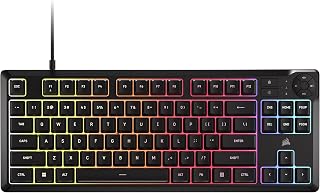
For anyone leaning toward membrane because mechanical clatter bothers them, the quiet membrane keys here directly address that noise concern while the tenkeyless layout saves desk space often lost to a full-size board. Eight-zone RGB and 1000Hz polling add gaming responsiveness, proving membrane boards can still feel snappy for everyday use.
Pros
- Quiet membrane keys suit shared or noise-sensitive spaces
- Tenkeyless design frees up desk space
- 300mL spill resistance protects against accidents
- 1000Hz polling keeps input lag low despite membrane switches
Cons
- Membrane switches wear faster than mechanical ones
- No numpad, which affects number-heavy productivity work
If you're trying to decide between mechanical and membrane, the K55 CORE TKL makes the case for membrane loud and clear: quiet, consistent, and easy to live with. For a desk shared with roommates, family, or office neighbors, quiet matters as much as feel, and the membrane keys here deliver reliable feedback without the clatter mechanical switches bring. The tenkeyless layout also frees up desk space, something membrane boards in full-size form often ignore. Spill resistance adds a practical safety net that most mechanical boards in this class skip. The 1000Hz polling and 12-key rollover mean you're not giving up responsiveness for quiet operation, so this doesn't feel like a compromise pick, it feels like the right pick for anyone whose priority is a calm, low-noise typing feel over tactile clicks or bumps. The 8-zone RGB is a bonus, not the main event.
Buy this if quiet operation and compact desk space matter more than tactile switch feel, especially in shared rooms or offices. Good for gamers moving to a smaller desk setup. Skip it if you came to this comparison already leaning mechanical for the feel and feedback, or if you need per-key RGB and a numpad for spreadsheet-heavy work.
Layout and Design: Tenkeyless form factor with 87 keys, compact dimensions of 14.56 inches wide by 5.56 inches deep.
Backlighting: 8-zone RGB with 16.8 million colors, per-zone programmable through iCUE software.
Performance: 1000Hz polling rate, 12-key selective rollover, responsive membrane switches.
Connectivity: USB 2.0 Type-A with 6-foot cable, compatible with Windows PC.
Controls: Four dedicated media hotkeys (play/pause, mute, volume up/down), brightness adjustment, Windows lock key, adjustable height.
Durability: 300mL spill resistance, 2-year manufacturer warranty.

This fits readers prioritizing quiet, responsive switches as their deciding factor between mechanical and membrane feel, since the quieter keystroke suits shared spaces or late-night sessions. Ten-zone RGB and spill resistance round out a membrane option built for everyday typing comfort rather than the sharper tactile feedback mechanical fans seek.
Pros
- Quiet rubber dome membrane switches
- Ten-zone customizable RGB via iCUE
- 300ml spill resistance
- Lightweight and compact with included wrist rest
Cons
- No tactile click or bump like mechanical switches
- Components feel generic next to premium mechanical boards
If the mechanical versus membrane debate has you leaning toward membrane for a quieter desk, the K55 CORE RGB is a straightforward way to test that preference. It uses rubber dome membrane switches, which means softer keystrokes and far less clatter than a mechanical board, a real plus if you share a room or work near others on calls. The ten-zone RGB through iCUE still gives you the customization feel of a gaming keyboard, and the 12-key rollover plus 1,000Hz polling rate show that membrane doesn't automatically mean laggy. Spill resistance up to 300ml is a practical safety net membrane boards in this category often skip. At 1.7 pounds with a compact footprint and included wrist rest, it fits comfortably into a mixed work-and-game desk setup. The tradeoff is the one membrane boards always carry: no tactile click or bump, so if the title's question tilts you toward mechanical feel, this won't deliver it. For anyone prioritizing quiet over feedback, it's a sound pick.
Connectivity: USB-A wired, 1,000Hz polling rate
Switch Type: Membrane with rubber dome
Layout: QWERTY US, 104 keys
Backlighting: Ten-zone RGB, fully customizable via iCUE
Media Controls: Four dedicated buttons plus Win lock and brightness
Durability: 300ml spill resistance, water resistant
Compatibility: Windows 10+, Mac OS 10.15 Catalina+, PC and laptop
Dimensions: 17.77L x 5.57W x 1.38H inches
Weight: 1.7 pounds
Warranty: 2-year manufacturer warranty
Buy this if you've decided quiet, cushioned keystrokes matter more than tactile feedback, especially for shared spaces or long work sessions mixed with gaming. It also suits anyone wanting spill protection and RGB without a mechanical price tag. Skip it if you're drawn to mechanical boards for their distinct click or bump, or if you're a competitive gamer who relies on tactile cues to judge actuation during fast inputs.

Readers set on membrane for a softer keystroke will find linear switches here that mimic some of that smooth, consistent travel without full mechanical clack. Compatibility across gaming console, laptop, and PC makes it a flexible pick for anyone undecided on desk setup, while USB power keeps the connection simple and reliable.
Pros
- Quiet linear membrane switches
- IP42 dust and spill resistance
- Macro keys with Stream Deck integration
- Detachable rubber palm rest
Cons
- No tactile feedback for competitive-style play
- Requires Windows 11, limiting older system compatibility
For readers weighing membrane against mechanical, the K55 RGB PRO makes the case for membrane by leaning into durability and extras rather than typing feel. Its linear membrane switches keep things quiet, a clear advantage over the sharper sound of mechanical switches if your desk is near others. What sets it apart from a typical membrane board is the IP42 dust and spill resistance, which adds real everyday protection that many membrane keyboards at this level don't offer. Five-zone RGB through iCUE and six macro keys with Stream Deck integration bring gaming-keyboard features without asking for a mechanical premium. A detachable rubber palm rest helps during longer sessions, and the plastic and rubber build feels sturdy for daily use. The honest tradeoff, as with any membrane board, is the absence of tactile feedback mechanical switches provide, so competitive players chasing precise actuation cues may find it lacking. It also requires Windows 11, worth checking before you commit if your setup runs older software.
Key Specs: Full-size 104-key QWERTY layout, membrane switches, USB-A connectivity, USB powered. RGB lighting zones: 5. Macro keys: 6 dedicated keys. Dimensions: 19 inches L x 6.58 inches W x 1.42 inches H. Weight: 1.8 pounds.
Compatibility: Windows operating system (Windows 11 minimum). Works with PC, laptop, and gaming consoles via USB-A. Hand orientation: ambidextrous. CORSAIR iCUE software support, plus Elgato Stream Deck integration.
Protection Rating: IP42-rated dust and spill resistance. Warranty: 2-year manufacturer coverage.
Consider this if you want a membrane keyboard that still feels feature-rich, with macro keys, RGB, and genuine spill and dust resistance for a mixed work and gaming desk. Streamers benefit from the Stream Deck integration. Skip it if you're set on mechanical tactile feedback for competitive play, or if your system doesn't meet the Windows 11 requirement.

Readers weighing mechanical feel against membrane quiet will notice this one skips the tradeoff debate by offering hot-swappable red linear switches, so you can tune actuation force without buying a second board. Double-shot PBT keycaps resist shine over years of typing, giving the tactile crowd a durable entry point into mechanical switching without committing to a single switch feel permanently.
Pros
- Hot-swappable switches let you change feel over time
- Double-shot PBT keycaps resist fading and chipping
- Full anti-ghosting handles complex key combos reliably
- Linear red switches suit both gaming and typing
Cons
- Audible mechanical feedback isn't ideal for shared spaces
- RGB is limited to 11 preset modes, no custom colors
For readers weighing mechanical against membrane, the K671 is a good example of what mechanical actually offers beyond the hype: hot-swappable red switches, double-shot PBT keycaps, and full anti-ghosting across 104 keys. The linear reds need minimal actuation force, so this won't feel like the heavy, clattery mechanical stereotype some membrane users worry about. Hot-swap support means you're not locked into one switch feel forever, you can try different switches as your preference evolves, something no membrane board allows. Four spare switches and two replacement keycaps are included, reinforcing that this board is built to be maintained and tuned rather than replaced. The muted clack typing sound and solid ABS enclosure show mechanical can still feel refined, not just loud. If the question is whether mechanical switches are worth the step up from membrane, this keyboard answers with upgrade potential and build quality rather than just raw clickiness.
Buy this if you want to try mechanical switches with room to experiment later, or you type and game in roughly equal measure. Good for anyone curious about hot-swap tinkering without a high entry cost. Skip it if quiet operation is non-negotiable, you share a workspace, or you need wireless freedom instead of a wired connection.
Model: Redragon K671
Switch Type: Cherry MX Red Linear
Key Count: 104 Keys (Full Size QWERTY)
Backlighting: 11 RGB Modes, 5 Brightness Levels
Connectivity: Wired USB
Special Features: Hot-Swappable, Anti-Ghosting, Macro Editing, Programmable Keys
Keycaps: Double-Shot PBT (Durable, Clear Backlight)
Dimensions: 17.13 inches L x 4.88 inches W x 1.42 inches H
Material: ABS Enclosure
Water Resistance: Water Resistant
Included Accessories: 4 Spare Switches, 2 Red Replacement Keycaps, Switch Removal Tool
Warranty: 24 Months
Compatibility: Windows PC, Mac, Most USB-Compatible Devices
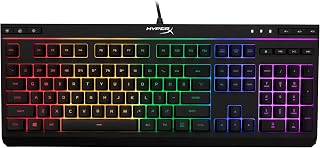
For readers who've decided membrane's softer, quieter keystroke fits their desk better, the comfortable quiet silent keys here are the exact feel being described in that comparison. Spill resistance adds peace of mind for everyday desk use, while compatibility with gaming console and PC keeps it practical across different setups and use cases.
Pros
- Exceptionally bright and vivid RGB lighting effects that stand out visually
- Excellent build quality and solid construction that feels premium despite affordable pricing
- Quiet keys ideal for work, study, and gaming without disturbing others
- Responsive, reliable anti-ghosting technology with consistent keystroke registration
- Spill-resistant protection provides peace of mind for desk environments
Cons
- Larger footprint may not suit compact desk spaces or portable setups
- Membrane switches lack the tactile feedback some experienced gamers prefer over mechanical alternatives
- Long-term durability concerns reported in some reviews after extended daily use
The HyperX Alloy Core RGB is a budget-friendly gaming keyboard designed for players and professionals who want style, comfort, and reliability without excessive cost. It appeals to casual gamers, esports enthusiasts on a budget, office workers seeking quiet typing, and anyone wanting RGB aesthetics on a limited budget.
The standout feature is the bright, customizable RGB lighting system with six preset effects and three brightness levels, all controllable without software. The quiet membrane switches deliver responsive, comfortable typing with anti-ghosting technology and full key rollover, ensuring every keystroke registers accurately during intense gaming sessions. Dedicated media controls and quick-access buttons for lighting and game mode keep essential functions at your fingertips.
Build quality impresses for the price point. The reinforced plastic frame paired with metal components creates a sturdy, durable keyboard that resists wobbling and feels solid underhand. The spill-resistant design, tested to withstand 120ml of liquid, protects against accidental beverage spills. The braided cable resists fraying, and overall construction suggests longevity despite the budget positioning.
The main drawback is the larger form factor, which consumes desk space and may not suit compact setups. Some experienced gamers prefer mechanical switches over the membrane design for tournament play. A few users reported key degradation after months of heavy daily use, though this remains uncommon relative to the review volume.
The HyperX Alloy Core RGB delivers excellent value for gamers and professionals seeking an affordable, attractive keyboard with proven durability and comfort. Its quiet keys, vibrant lighting, and solid build quality make it a compelling choice for budget-conscious buyers unwilling to compromise on performance or aesthetics.
Switch Type: Membrane with anti-ghosting and full key rollover
Layout: QWERTY, 87 keys, single section
Lighting: RGB backlit with 6 preset effects and 3 brightness levels
Connectivity: USB 2.0 wired
Dimensions: 17.4 inches long, 6.9 inches wide, 1.4 inches tall
Weight: 1,121 grams (approximately 2.5 pounds)
Materials: Metal and reinforced plastic frame
Spill Resistance: Tested to withstand 120ml of liquid
Warranty: 2 years manufacturer coverage
Compatibility: Windows 10, 8.1, 8, and 7
Model Number: HX-KB5ME2-US
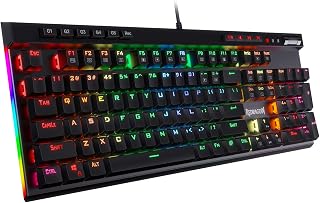
Someone comparing switch feel for console gaming benefits from this board's hot-swappable mechanical switches, letting them experiment with linear or tactile feel without extra purchases. The macro key and media wheel suit players who want physical control over functions mid-game, a tactile convenience membrane boards in this comparison rarely offer.
Pros
- Clicky switches deliver pronounced tactile and audible feedback
- Five macro keys program without software
- Hot-swappable sockets allow switch experimentation
- Double-shot keycaps rated for 50 million keystrokes
Cons
- Clicky switches are loud for shared or quiet spaces
- USB-C only, with no wireless option
The K580 leans hard into what makes mechanical keyboards distinct from membrane ones: a tactile bump and audible click on every keystroke, courtesy of its clicky switches. If the deciding factor in mechanical versus membrane is wanting to feel and hear each press, this is a clear example of that experience, reinforced by a hot-swappable socket so you can experiment with other switches later. Five dedicated macro keys program directly on the keyboard, no software needed, which is a convenience membrane boards rarely offer at this level. The aluminum plate and double-shot keycaps rated for 50 million keystrokes point to a build meant to outlast casual use. Full anti-ghosting keeps rapid, multi-key inputs accurate. The trade-off is exactly what you'd expect from mechanical switches: more noise, which matters if your desk sits in a quiet or shared room, something worth weighing against the tactile payoff.
Design and Layout: Full-size 104-key QWERTY layout with ergonomic design and ambidextrous hand orientation. Dimensions are 15.75 inches by 5.91 inches by 0.98 inches.
Switches and Feel: Outemu blue mechanical switches with tactile bump and audible click. Rated for 50 million keystrokes. Double-shot keycaps resist fading over time.
Customization: Hot-swappable socket accepts nearly any mechanical switch. Five dedicated programmable macro keys (G1-G5) with on-board memory, no software required.
Connectivity: Wired USB-C connection. Compatible with Windows, MacOS, and Linux. Optional companion software available for advanced RGB effects and macro profiles.
Additional Features: Full anti-ghosting on all 104 keys, media wheel for volume control, dedicated media keys for play/pause/skip, built-in keycap puller. Water-resistant construction. Includes 1-year manufacturer warranty.
How to Choose Between Mechanical and Membrane Keyboards
Choose the key feel you want to repeat all day
Mechanical keyboards use individual switches, so travel, weight, and feedback can change dramatically by switch type. The Redragon K580 Wired RGB Mechanical uses clicky Blue switches for a tactile bump and audible response, while the Redragon Mechanical Gaming Keyboard Wired uses linear Red switches for a smoother, lighter press. That choice has more impact on your hands than RGB colors or chassis styling.
Membrane designs use a softer rubber-dome mechanism that feels cushioned at the press. The Corsair K55 CORE TKL RGB Gaming Keyboard and Corsair K55 CORE RGB Membrane Wired both focus on quiet, responsive membrane keys, making them sensible when typing and casual gaming share the same desk. You give up some of the crisp switch identity, but gain a gentler, less intrusive feel.
Match sound level to your room
Keyboard noise comes from more than the switch itself. Keycaps, desk material, stabilizers, and how firmly you type all contribute to the final sound, but clicky Blue switches remain intentionally pronounced. Linear mechanical switches can be calmer, though keycap contact and bottoming out still create more audible activity than many membrane boards.
If quiet operation matters most, the HyperX Alloy Core RGB pairs responsive membrane keys with anti-ghosting, a spill-resistant frame, dedicated media controls, and six preset lighting effects. It suits shared rooms where you still want a full gaming look without frequent clatter. A membrane board is not silent, but it is usually the easier route when you want less attention from nearby people.
Pick a layout that supports your mouse movement and tasks
Tenkeyless and full-size layouts change your hand position more than many shoppers expect. By omitting the number pad, the Corsair K55 CORE TKL RGB Gaming Keyboard creates more room for wide mouse movements, which can be helpful for low-sensitivity play. Pairing a compact board with one of these Pulsar gaming mouse picks for different hand shapes can make a crowded desk feel far more usable.
Full-size models keep the number pad available for spreadsheets, shortcuts, and data entry. The Corsair K55 CORE RGB Membrane Wired adds ten-zone RGB lighting, while the Corsair K55 RGB PRO Membrane Wired Gaming Keyboard combines five-zone lighting, six macro keys, and a detachable palm rest. For more boards that work with a familiar software ecosystem, see our Corsair keyboard roundup for gaming setups.
Prioritize controls, lighting, and long-term upkeep
Decide which commands should sit within reach before focusing on lighting effects. The Redragon K580 Wired RGB Mechanical includes five on-board macro keys and dedicated media controls, while the Corsair K55 RGB PRO Membrane Wired Gaming Keyboard provides dedicated volume and media keys alongside programmable macros. The Redragon Mechanical Gaming Keyboard Wired also supports macro editing and offers 11 backlight modes, giving it flexibility beyond its switch feel.
Hot-swappable mechanical designs make it easier to replace compatible switches as preferences change, a capability offered by both Redragon mechanical options here. Membrane designs instead appeal through straightforward upkeep and accident resistance: Corsair lists 300 mL spill resistance for the K55 CORE pair, while the K55 RGB PRO carries IP42 dust and spill protection. Those safeguards help with everyday mishaps, but you should still wipe spills promptly and avoid submerging any keyboard.
Final Thoughts
When a compact, quiet board fits your room and desk, the Corsair K55 CORE TKL RGB Gaming Keyboard is a sensible membrane route, particularly when mouse space and spill resistance matter. Choose the Redragon Mechanical Gaming Keyboard Wired when you want smooth linear mechanical input, hot-swappable switches, and deeper command flexibility, because the stronger choice is always the one that matches how you type and play.
Frequently Asked Questions
Is a mechanical keyboard better than a membrane keyboard for gaming?
Neither is automatically better for every game or player. A mechanical board can provide a switch feel tailored to fast taps, deliberate presses, or smooth holds, and applicable models may allow switch replacement later. Membrane boards can still deliver effective anti-ghosting, responsive polling, and quieter play in shared spaces. For more gaming-oriented choices, our SteelSeries keyboard picks for different gaming styles provide another helpful point of comparison.
Are membrane keyboards good for typing and office work?
Yes, especially when you prefer a softer press and need to keep your workspace calm. Membrane keys generally feel more cushioned than clicky mechanical switches, and spill-resistant designs offer useful reassurance around drinks and everyday desk accidents. They are also easy to use without learning switch terminology. If you enjoy crisp tactile feedback or want every keypress to feel more defined, however, a mechanical option may be more satisfying.
How loud is a mechanical keyboard compared with a membrane keyboard?
Sound varies more by switch type than by the word mechanical. Clicky switches create a clear audible report, while linear and tactile switches may be more restrained; membrane boards are usually the easier choice for limiting overall noise. Keycaps, desk material, and typing force can also change the result dramatically. If sound is a major concern, choose quiet membrane keys or avoid clicky mechanical switches.
Should I choose a hot-swappable mechanical keyboard in 2026?
Choose one if you expect to refine your typing feel or want a straightforward way to address a failed compatible switch without replacing the whole board. It adds welcome flexibility, but it is not essential when you already like a membrane feel or prefer a simple, sealed design. Our Glorious keyboard guide for hot-swap and custom layouts can help you explore that route further. You can also browse the site’s Keyboards & Mice category for more options matched to different work and play habits.



Write Your Review
No reviews yet. Be the first to share your experience!