

Prime Big Deal Days is one of the best moments of the year to grab a new router at a serious discount. Whether your current setup drops connections in the back bedroom or simply can’t keep up with a house full of streaming, gaming, and video calls, a hardware upgrade makes a real difference. This guide rounds up 10 strong options across every budget and use case so you can shop with confidence.
We evaluated routers across a range of standards, from reliable AC1200 dual-band models to cutting-edge WiFi 7 tri-band powerhouses. If you’re also building out a full home setup, our guide to the best portable SSDs for gaming pairs well with a faster network upgrade.
Quick answer
This guide compares 10 picks, with TP-Link Archer AX21 AX1800 WiFi 6 Dual-Band Router ranked first.

TP-Link Archer AX21 AX1800 WiFi 6 Dual-Band Router
Anyone shopping deal days for a straightforward upgrade will appreciate that this pick covers 802.11ax alongside older ac, n, and g standards, so it plays nice with whatever older laptops or smart plugs are still lingering on the network. Beamforming helps direct signal to gaming consoles and tablets scattered around the house, making it a sensible entry point into WiFi 6 without overcomplicating setup.
Pros
- WiFi 6 performance at a budget-friendly tier
- OFDMA and beamforming manage multiple devices well
- Built-in VPN server included
- Simple setup via Tether app
Cons
- Dual-band only, no 6 GHz WiFi 6E support
- Larger homes may need multiple units or mesh
If your Prime Big Deal Days shopping list starts with 'router that finally gets us off WiFi 5,' the Archer AX21 is the pick that makes sense for most households. This dual-band WiFi 6 router is built for exactly the deal-hunting crowd: people who want a real upgrade in streaming and gaming performance without chasing flagship specs. With 1.8 Gbps of combined bandwidth, OFDMA, and beamforming, it handles the typical mix of phones, tablets, laptops, and smart home gadgets that fill a modern house. Four high-gain antennas and a front-end module chipset back up the signal, and the Tether app keeps setup approachable for non-technical buyers. A built-in VPN server is a nice inclusion at this level, since many routers save that feature for pricier lineups. For shoppers using deal days to replace an aging router without overspending, this is a straightforward, low-risk upgrade rather than a splashy showpiece. It will not satisfy anyone chasing 6 GHz speeds, but that is not who it is built for.
Model: TP-Link Archer AX21 V5
WiFi Standard: 802.11ax (WiFi 6), 802.11ac, 802.11n, 802.11g, 802.11b
Total Bandwidth: AX1800 with 1200 Mbps on 5 GHz and 574 Mbps on 2.4 GHz
Antenna Configuration: 4 high-gain antennas with beamforming technology
Technology: OFDMA, Beamforming, CISA Secure-by-Design certified
Security: VPN Server support (OpenVPN and PPTP)
Connectivity: WiFi and Ethernet, compatible with Gaming Consoles, PCs, Smartphones, and Tablets
Included: Power Adapter, Quick Installation Guide, RJ45 Ethernet Cable
Color: Black
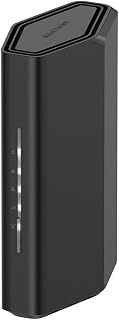
Shoppers wanting a future-ready home network will notice this one supports the newer 802.11be standard, positioning it ahead of the WiFi 6 crowd while still covering up to 2,000 square feet. Built-in internet security suits households running security cameras and smart TVs alongside phones and computers, giving those devices a layer of protection without extra software.
Pros
- WiFi 7 speeds up to 3.6 Gbps across dual bands
- MU-MIMO and OFDMA reduce lag when devices compete
- Supports up to 50 connected devices
- 2.5 Gigabit WAN port plus four Gigabit LAN ports
Cons
- Coverage rated to about 2,000 sq ft, needs central placement in larger homes
- Requires a separate modem or gateway with an RJ45 port
For deal shoppers who want to jump straight to WiFi 7 without buying into a full mesh system, the Nighthawk RS90 is a strong stop on this list. It fits households where several people are streaming, gaming, working from home, and running smart devices at once, all common triggers for a router upgrade during a big sale. The dual-band WiFi 7 setup pushes up to 3.6 Gbps combined, and MU-MIMO with OFDMA keeps 4K streams smooth even while someone else is gaming on the same network. It supports up to 50 connected devices, which covers tech-heavy homes with cameras, speakers, and consoles layered on top of the basics. NETGEAR's build includes a quad-core processor, a 2.5 Gigabit WAN port for modern internet plans, and four Gigabit LAN ports for wired gear. The Nighthawk app makes setup and remote management easy, including device pausing and speed tests. Coverage tops out around 2,000 sq ft, so it is best suited to single-story homes or smaller multi-story layouts rather than sprawling houses.
Wireless Technology: WiFi 7 (802.11be) Dual-Band
Maximum Speed: 3.6 Gbps (BE3600)
Frequency Bands: 2.4 GHz and 5 GHz
Coverage Area: 2,000 square feet
Connected Devices: Up to 50 devices
Processor: Quad-core 2.0 GHz
Connectivity: 1x 2.5 Gigabit WAN port, 4x 1 Gigabit LAN ports
Antennas: 4 fixed antennas
Security: WPA2, WPA3 protocols, Advanced Router Protection, automatic firmware updates
Power: 12V/1.5A adapter
Control: Nighthawk mobile app (iOS and Android)
Warranty: 1 Year Limited
In the Box: RS90 router, 2.5A power adapter, 2-meter ethernet cable, quick start guide
Model: RS90-100NAS
Buy this if you want next-gen WiFi 7 speed for a single-story or smaller multi-story home and prefer one capable router over a mesh setup. It suits families juggling streaming, gaming, remote work, and smart home devices at once. Skip it if you have a large or heavily walled multi-story home, since you may need better placement or additional coverage, and remember you'll need a separate modem or gateway.

For readers with larger homes or many connected devices, the tri-band setup here separates traffic across three bands instead of two, easing congestion when gaming consoles, cameras, and smart TVs are all active at once. Coverage up to 2,500 square feet paired with the 802.11be standard makes this a pick for buyers who've outgrown a basic dual-band setup.
Pros
- Tri-band WiFi 7 with dedicated 6 GHz band
- Up to 9.3 Gbps combined speed across three bands
- Coverage up to 2,500 sq ft with up to 100 devices supported
- Quad-core processor with 2 GB RAM and 2.5 Gbps ports
Cons
- Requires a separate modem and ongoing NETGEAR Armor subscription for full protection
- Some rural users report occasional connectivity issues requiring reboots
If this year's Prime Big Deal Days router shopping is about future-proofing rather than just fixing a slow connection, the Nighthawk BE9300 earns its spot as the higher-end pick on this list. Its tri-band WiFi 7 setup delivers up to 9.3 Gbps across 2.4 GHz, 5 GHz, and dedicated 6 GHz bands, and that 6 GHz lane keeps compatible devices fast and uncongested even with dozens of connections active. It is built for households running 4K and 8K streaming, gaming, and video calls simultaneously, with coverage rated to 2,500 sq ft and support for up to 100 devices. Hardware includes a quad-core 2.0 GHz processor, 2 GB RAM, two 2.5 Gbps ports, and two gigabit ethernet ports, giving it real headroom for demanding setups. The mobile app handles setup, channel optimization, parental controls, and guest networks remotely. Some rural users report occasional reboots needed, which looks more environment-related than a router flaw. It also needs its own modem and an eventual NETGEAR Armor subscription for full security features after the trial ends.
Connectivity: WiFi 7 tri-band (2.4 GHz, 5 GHz, 6 GHz), 802.11be standard, WPA3 security protocol. Ports include 1x 2.5 Gbps WAN, 2x 2.5 Gbps LAN, 2x 1 Gbps LAN, plus USB 3.0.
Performance: Total throughput 9,300 Mbps, 2.0 GHz quad-core processor, 2 GB RAM, 4 antennas. Coverage up to 2,500 sq ft supporting up to 100 connected devices simultaneously.
Physical: Model BE9300-1AZPAS, black color, 4 pounds weight. Includes 12V/3.5A power adapter, 2m ethernet cable, and quick start guide. 1-year limited warranty.
Buy this if you want the most capable WiFi 7 router on this list, with 6 GHz speed, large device capacity, and coverage for bigger homes. It fits households serious about future-proofing their network during the sale. Skip it if you want a simpler, lower-maintenance setup, don't need tri-band speeds, or would rather avoid an ongoing security subscription after the trial period.

For anyone setting up a shared household network, this dual-band router covers the basics well. It supports 802.11ac speeds alongside older 802.11a/b/g/n devices, so aging laptops and new smart TVs connect without issue. Guest Mode keeps visitors off your main network, while Parental Control and QoS let you manage bandwidth for gaming consoles and streaming devices without constant tinkering.
Pros
- AC1900 speeds across dual bands for smooth multitasking
- MU-MIMO handles several devices without lag
- Beamforming extends coverage, even outdoors
- Tether app makes setup and monitoring simple
Cons
- No USB port or VPN support
- Basic firewall may need extra security software
If you're browsing Big Deal Days for a router that just works without a learning curve, the Archer A8 deserves a spot on your shortlist. It's built for households and small offices that want dependable dual-band coverage rather than a feature checklist. The AC1900 spec sheet backs this up with real bandwidth: 600 Mbps on 2.4GHz and 1300 Mbps on 5GHz, plus MU-MIMO so multiple devices stream, video call, and game at once without stepping on each other. Beamforming focuses the signal for better range, including into outdoor areas, which matters if your household spreads across a yard or patio. Setup through the Tether app keeps the whole process approachable, and the web interface stays available for anyone who wants manual control. For a deals event where buyers are comparing routers side by side, this one earns its place through consistency rather than flash. It's not aimed at power users chasing VPN or USB features, but for general home networking during a big shopping event, it's an easy, low-risk pick.
Good fit for families, remote workers, and casual gamers who want a straightforward dual-band upgrade without a complicated setup. Also solid for small offices needing multiple wired connections. Skip it if you rely on USB sharing, need built-in VPN support, or handle sensitive data that requires stronger firewall protection than the basic security here offers. Also skip if you're expecting a modem included, since one is required separately.
Wireless Performance: AC1900 speeds up to 1900 Mbps total, 600 Mbps on 2.4GHz band, 1300 Mbps on 5GHz band. Supports WiFi 5 with 802.11ac, 802.11n, 802.11g, 802.11b, and 802.11a standards.
Connectivity: 5 Gigabit ports total (4 LAN, 1 WAN), MU-MIMO with 3 simultaneous data streams, coverage up to 1200 square feet, dual-band simultaneous transmission.
Antenna and Design: 3 fixed external antennas, beamforming technology, compact mid-sized form factor. Power requirement 100-240V, weighs 14.56 ounces.
Security and Controls: WPA2-PSK security protocol, parental controls, guest WiFi mode, access point mode, QoS management, WPS button, basic firewall protection.
Management: Free Tether app for iOS and Android, web-based interface, firmware updates via app, includes 2-year manufacturer warranty, quick installation guide and Ethernet cable included.
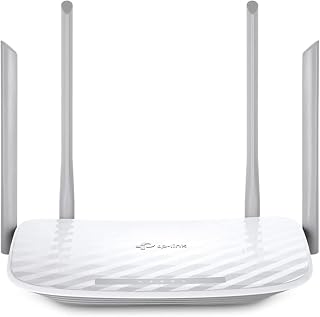
Budget-focused shoppers who mainly need reliable coverage for computers will find the dual-band AC setup handles everyday browsing and streaming without fuss. Guest mode and parental control features add household management options, while WPS support simplifies connecting new devices, making this a fit for anyone wanting simple router replacement during the sale rather than a major performance jump.
Pros
- WPA3 security plus WPA2-Enterprise support
- 1200 Mbps combined dual-band throughput
- IGMP proxy and VLAN support for IPTV setups
- EasyMesh compatible for future coverage expansion
Cons
- Wi-Fi 5 only, no Wi-Fi 6 efficiency gains
- Requires a separate modem
For shoppers using Big Deal Days to replace an aging router without overspending, the Archer A54 fits the brief. It's positioned as an entry to mid-range Wi-Fi 5 router for households that want dependable coverage and modern security rather than top-tier speed. The combined 1200 Mbps across dual bands, with 867 Mbps on 5GHz for streaming and gaming and 300 Mbps on 2.4GHz for range, covers typical household needs, and four external antennas help push signal across roughly 1,000 square feet. What stands out for a deals-driven purchase is the security angle: WPA3 protection, IGMP proxy for IPTV, VLAN support, and Access Point mode for extending wired connections wirelessly. Parental controls round out the household-focused feature set. The Tether app handles day-to-day management, and EasyMesh compatibility means you can pair it with mesh systems later without being locked into one brand. It's a practical, no-frills option for anyone comparing routers on value during a sale rather than chasing the newest wireless standard.
Wireless Performance: Wi-Fi 5 (802.11ac), dual-band, 1200 Mbps total (867 Mbps on 5 GHz, 300 Mbps on 2.4 GHz), four external antennas, coverage up to 1,000 sq ft.
Connectivity: 5 ports total (4x 10/100 Mbps LAN ports, 1x WAN port), Ethernet and Wi-Fi connectivity, compatible with 802.11a, 802.11ac, 802.11b, 802.11g, and 802.11n devices.
Security: WPA3, WPA2-PSK, WPA2-Enterprise, WPA-PSK protocols, Internet Security, Guest Mode, Parental Controls, medium-level firewall protection.
Features: EasyMesh compatible, Access Point mode, Beamforming, IPTV optimization (IGMP Proxy/Snooping, Bridge and Tag VLAN), IPv6 support, LED indicators, WPS, app-based control via TP-Link Tether.
Power and Warranty: 100-240V compatible power adapter, 2-year manufacturer warranty, includes Quick Installation Guide and RJ45 Ethernet cable.

ASUS RT-AX1800S WiFi 6 Dual Band Router, 1800Mbps
Families concerned about online safety will value the subscription-free network security and parental control tools built into this dual-band router, removing the need for ongoing service fees. AiMesh compatibility means it can expand into a mesh setup later, and support for gaming consoles, smart TVs, and tablets makes it a flexible choice for a mixed-device household.
Pros
- Wi-Fi 6 efficiency with 1800 Mbps combined speed
- Handles 9 to 16 devices via MU-MIMO and OFDMA
- Subscription-free VPN and AiProtection Classic security
- Five Gigabit ports for fast wired connections
Cons
- 5GHz band struggles with wall penetration in larger homes
- May need mesh nodes for multi-story coverage
If this year's Big Deal Days shopping list includes stepping up to Wi-Fi 6 without a big jump in complexity, the RT-AX1800S is worth comparing against the other picks here. It's built for homeowners and apartment dwellers who want modern wireless without premium pricing, delivering 1800 Mbps combined throughput across dual bands. What sets it apart in a lineup of deal-focused routers is the device capacity: MU-MIMO and OFDMA let it handle 9 to 16 connected devices, which suits homes with several smart home gadgets, phones, tablets, and streaming devices running at once. Five Gigabit ports, including four LAN, mean wired devices like consoles or desktop PCs get fast, stable connections too. Security is a genuine highlight since AiProtection Classic and the built-in ASUS Instant Guard VPN come without added subscription costs, a detail that matters when you're trying to get more value out of a deal. Setup runs through the ASUS app or web interface, keeping onboarding simple for non-technical buyers picking this up during a sale.
Core Specs: WiFi 6 (802.11ax), 1800 Mbps total speed (1201 Mbps upstream), dual-band (2.4GHz and 5GHz), 2x2 MIMO configuration.
Hardware: Dual-core processor with 4 VPE, 256MB RAM, four external antennas, five Gigabit Ethernet ports. Power supply: AC 110V-240V (50-60Hz), DC output 12V at 1.5A max.
Features: MU-MIMO and OFDMA support, AiMesh compatibility, AiProtection Classic security, ASUS Instant Guard VPN, WPS, parental controls, app and web GUI control. Compatible with Windows, Mac, Linux, iOS, and works with gaming consoles, smart TVs, and smartphones.
Physical: Dimensions 9.06 x 5.28 x 2.2 inches, weight 13.12 ounces, black color. Includes power adapter, Ethernet cable, quick-start guide, and warranty card.
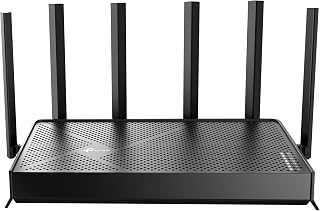
Readers wanting an affordable taste of WiFi 7 will note this model supports the 802.11be standard while remaining backward compatible with ac, ax, n, and g devices. Quality of service settings help prioritize bandwidth for gaming consoles or streaming devices, and built-in parental controls make it a practical entry point for households easing into next-gen wireless.
Pros
- WiFi 7 with 6.5Gbps combined bandwidth
- Dual 2.5Gbps ports for NAS or multi-gig plans
- Comprehensive HomeShield security suite
- Compact design with strong 2,400 sq. ft coverage
Cons
- No compatibility with TP-Link Deco mesh
- Premium hardware wasted on slower internet plans
When you're hunting for a Prime Big Deal Days router upgrade that actually future-proofs your home, the Archer BE400 earns its spot on this list through sheer headroom. WiFi 7 with Multi-Link Operation gives you 6.5Gbps of combined bandwidth, and owners report steady 500-850 Mbps wireless downloads on fiber lines even with 90+ devices connected. That kind of stability matters if deal season is when you're finally consolidating smart cameras, consoles, and streaming boxes onto one network. Dual 2.5Gbps ports also mean this pick doubles as an upgrade for anyone adding NAS storage or multi-gig internet down the line, not just this year. Setup through the Tether app takes under 10 minutes, and the compact six-antenna design covers up to 2,400 sq. ft without dominating a shelf. HomeShield adds real-time threat detection and IoT isolation, backed by WPA3 and CISA Secure-by-Design status. It's not compatible with Deco mesh, so factor that in if expansion is part of your plan. For a deal-day purchase meant to last several upgrade cycles, this is the router built for it.
Real-world performance metrics consistently exceed specifications. Users report sustained 500+ Mbps downloads on 1 Gbps fiber connections and 780+ Mbps on superior plans. The 2.5Gbps ports enable wired transfers at near-theoretical maximums, making this ideal for content creators and network enthusiasts.
Coverage extends reliably throughout 2,400 sq. ft. with minimal dead zones. The beamforming and six-antenna array intelligently direct signals, maintaining strong connections even in challenging environments like dense apartment buildings or multi-story homes with interference from neighboring networks.
Multi-Link Operation (MLO) dramatically improves stability compared to Wi-Fi 6 routers. By simultaneously using multiple frequency bands for single data streams, the BE400 reduces latency and packet loss, resulting in lag-free gaming and buffer-free streaming regardless of connection density.
HomeShield transforms network security from optional to essential. The real-time scanner identifies threats instantly, parental controls block inappropriate content by category and time window, and Quality of Service (QoS) ensures gaming or work devices get priority bandwidth when needed.
The ability to create separate SSIDs for IoT devices prevents smart home gadgets from accessing sensitive personal data. Combined with WPA3 encryption, VPN server capabilities, and access control features, your network gains protection rivaling enterprise solutions at consumer pricing.
Automatic firmware updates through the cloud keep security patches current without manual intervention, eliminating the common vulnerability window where routers run outdated security code.
Buy this if you're using deal season to future-proof a busy household with gaming, streaming, and many connected devices, or if you need multi-gig wired ports for NAS. Skip it if your internet plan is modest, since the premium hardware goes underused, or if you already own Deco mesh gear, since it won't integrate with that ecosystem.

Small office or home users chasing efficient multi-device performance will benefit from OFDMA support, which splits channels so laptops, tablets, and phones each get a dedicated slice of bandwidth instead of waiting their turn. Target Wake Time also helps battery-powered devices sip less power, making this a sensible pick for a mixed fleet of work and personal gadgets.
Pros
- WiFi 6 performance at accessible renewed pricing
- OFDMA improves efficiency with multiple devices
- Target Wake Time helps connected device battery life
- Simple Tether app setup
Cons
- Only one Gigabit LAN port
- Mid-range speeds, not built for heavy multi-device throughput
If your deal-day goal is simply getting off an aging router without overspending, the Archer AX1450 fits that brief well. It brings WiFi 6 fundamentals, OFDMA for smoother performance when several devices compete for bandwidth, and Target Wake Time to ease battery drain on connected gadgets. Combined dual-band speed tops out at 1.45 Gbps, which covers typical browsing, streaming, and remote work needs without chasing flagship numbers. Four antennas with beamforming keep coverage steady across a normal home or small office footprint, and setup through the Tether app stays quick and simple. Being a renewed unit, it's an especially good match for shoppers using this shopping event to stretch their budget further, though expect possible minor cosmetic wear. The single Gigabit LAN port is the one real constraint, so if your household leans on several wired connections, this won't be enough on its own. For anyone whose deal-day mission is basic WiFi 6 adoption at a sensible cost rather than maximum throughput, this router checks the right boxes.
Core Performance: WiFi 6 (802.11ax), 1.45 Gbps total speed, 1201 Mbps (5 GHz), 250 Mbps (2.4 GHz), dual-band configuration
Technology Features: OFDMA, Beamforming, Target Wake Time, MU-MIMO capability
Connectivity: 1 Gigabit LAN port, WiFi + Ethernet connectivity, backward compatible with 802.11 standards
Security: WPA2 and WPA3 protocols
Setup: TP-Link Tether app for iOS and Android
Coverage: Home and small office environments with four antennas
Physical: 13.44 ounces, designed for tabletop or wall mounting
Warranty: 90 days limited warranty on renewed unit
Good for budget-focused shoppers and small offices wanting a straightforward WiFi 6 upgrade during a sale, especially if only one wired device needs an Ethernet connection. Skip it if you need several wired ports, want top-tier throughput, or expect flagship-level features, since this is intentionally a mid-range, value-first pick.

Travelers and remote workers who need reliable connectivity away from home will appreciate the compact, portable build here. Its Access Point Mode lets it plug into hotel or rental Wi-Fi and rebroadcast a secured signal, while USB connectivity adds flexibility for tethering or external storage. Dual-band support keeps phones, tablets, and even security cameras online without dropping speed.
Pros
- Extremely compact and lightweight for travel
- Pre-installed OpenVPN and WireGuard support
- Physical VPN toggle switch for quick activation
- Three gigabit ports despite its small size
Cons
- Limited RAM slows multiple simultaneous VPN connections
- Advanced customization requires technical knowledge
Not every deal-day router purchase is about home network speed. If you're shopping this event for a secondary router that solves a specific problem, like securing hotel WiFi or backing up your main setup while traveling, the GL.iNet Opal is the practical pick on this list. It's a genuinely portable AC1200 dual-band router weighing just 145 grams, small enough to carry alongside a laptop. Pre-installed OpenVPN and WireGuard support with access to 30+ VPN providers means secure browsing is available anywhere, and a physical toggle switch activates VPN protection without digging through settings. Three gigabit ports still allow wired connections when needed, and retractable antennas help stabilize signal in unfamiliar spaces. Its 128 MB RAM and modest processor are the tradeoff, so running several VPN connections at once can slow things down, and deeper customization assumes some technical comfort. As a deal-day add-on rather than a primary router replacement, this is the one to grab for travel, remote work on the road, or as a spare unit for a second location.
Wireless Performance: AC1200 dual-band router with 300 Mbps on 2.4 GHz band and 867 Mbps on 5 GHz band. Wi-Fi 5 (802.11ac) with backward compatibility for older devices.
Connectivity: 3 gigabit ports total: 1 WAN port and 2 LAN ports for wired device connections. Gigabit Ethernet supports 10/100/1000 Mbps speeds. USB connectivity for power and potential future expansions.
Security & VPN: OpenVPN and WireGuard pre-installed with support for 30+ VPN service providers. WPA2-PSK and WPA3 security protocols. IPv6 support. Cloudflare encryption available. Physical VPN toggle switch for quick enable/disable.
Hardware: 128 MB RAM, 2 retractable antennas, OpenWrt operating system. Weighs 145 grams (0.3 kg). Dimensions: 4.65 x 3.35 x 1.18 inches. Includes 5V power adapter, Ethernet cable, and 2-year warranty.
Operating Modes: Router mode, Access Point mode for extending existing networks, and Repeater mode to convert public Wi-Fi hotspots into private networks. App control available for remote management.
Ideal for frequent travelers, remote workers, or anyone wanting a compact backup router with built-in VPN protection for hotels and cafes. Skip it if you need a primary home router or expect strong performance running multiple simultaneous VPN sessions, since limited processing power makes this better suited to lighter, on-the-go use.

Households with security cameras and smart TVs running alongside everyday devices will appreciate the built-in internet security paired with coverage rated up to 1,500 square feet. The 802.11ax standard keeps things current for gaming consoles and smartphones, making this a solid mid-size home upgrade for someone replacing an aging dual-band router during the sale.
Pros
- WiFi 6 speeds up to 1.8 Gbps
- Four Gigabit Ethernet ports for wired connections
- WPA3 security and guest network enabled by default
- Simple setup and management via the Nighthawk app
Cons
- Coverage limited to about 1,500 sq ft
- Requires a separate modem or gateway
If your Prime Big Deal Days router shopping list starts with 'something that just works without a huge learning curve,' the Nighthawk R6700AX earns a spot on this list for that reason alone. It's a solid entry point into WiFi 6 for anyone still running older hardware, with dual-band support and speeds up to 1.8 Gbps that easily handle a household full of phones, laptops, and smart devices. Coverage tops out around 1,500 sq ft, which lines up well with apartments and single-story homes rather than sprawling properties. Four Gigabit Ethernet ports give you the option to hardwire a console or streaming box for a more stable connection. Setup runs through the Nighthawk app, and security basics like WPA3 encryption and a guest network are already switched on, so there's nothing extra to configure. For deal hunters looking for dependable, no-fuss networking rather than a flashy mesh system, this is a practical pick worth comparing against the other routers here.
Network Standards: WiFi 6 (802.11ax), backward compatible with WiFi 5 and earlier
Speed: Up to 1.8 Gbps combined (AX1800), with maximum upstream data transfer of 900 Mbps
Coverage: Up to 1,500 sq ft, dual-band (2.4 GHz and 5 GHz)
Device Capacity: Supports up to 20 connected devices simultaneously
Connectivity: 4 Gigabit Ethernet LAN ports, 1 Gigabit WAN port, WiFi 6 wireless
Security: WPA2 and WPA3 encryption, firewall, automatic firmware updates, guest network
Antennas: 2 internal antennas for compact design
Management: Free Nighthawk app for iOS and Android, web browser interface
Additional Features: 30-day free trial of NETGEAR Armor, NETGEAR Genie operating system
Warranty: 1 year limited warranty
Best for renters, small home owners, and anyone upgrading from an older router who wants WiFi 6 speeds without a complicated setup. Also a fit for households that want built-in security features active by default. Skip it if you live in a multi-story or large home, since coverage is capped at 1,500 sq ft, or if you need a built-in modem, as this is router-only hardware.
What to Look for When Buying a Router This Prime Big Deal Days
WiFi Standard: AC, WiFi 6, or WiFi 7
The WiFi standard your router supports sets the ceiling on speed and device capacity. AC routers like the TP-Link AC1900 Smart WiFi Router Dual Band Router are a solid, affordable choice for smaller homes with lighter traffic. If your household has a dozen or more connected devices, WiFi 6 routers like the TP-Link AX1800 WiFi 6 Router (Archer AX21 V5) or the ASUS RT-AX1800S handle congestion far better thanks to OFDMA and MU-MIMO technology.
WiFi 7 is the latest standard and delivers the highest throughput. The NETGEAR Nighthawk WiFi 7 Router reaches up to 9.3 Gbps across three bands, including a dedicated 6 GHz band for your fastest devices. It’s worth the investment if your ISP plan and devices can take advantage of it.
Coverage Area and Number of Devices
Match the router’s coverage rating to your actual square footage. The TP-Link AC1200 WiFi Router Dual Band covers up to 1,000 sq. ft., which is plenty for a studio or small apartment. Larger homes benefit from something like the TP-Link BE6500 Dual-Band WiFi 7 Router (BE400), which handles up to 2,400 sq. ft. and 90 simultaneous devices.
Also consider EasyMesh or AiMesh compatibility if you plan to expand later. Both the TP-Link BE400 and the ASUS RT-AX1800S support mesh pairing with compatible extenders, so you’re not locked into a single node forever.
Wired Port Speed
Gigabit LAN ports are standard on most routers here, but multi-gig ports are increasingly worth checking for. The NETGEAR Nighthawk WiFi 7 Router RS90 includes a 2.5 Gbps WAN port that unlocks the full potential of multi-gig internet plans. If you connect a NAS, gaming PC, or smart TV via ethernet, faster wired ports remove a bottleneck that wireless improvements alone can’t fix.
For a compact travel option, the GL.iNet GL-SFT1200 Opal Travel Router still includes full Gigabit ports in a 145g pocket-sized form factor, which is impressive for its size. If you’re building a broader PC and peripherals setup, our roundup of the best PC speakers for gaming covers another key piece of the puzzle.
Security and Easy Management
Every router in this list supports modern WPA3 encryption, and several go further. The ASUS RT-AX1800S includes AiProtection Classic, powered by Trend Micro, at no ongoing subscription cost. NETGEAR’s Nighthawk lineup offers NETGEAR Armor with a 30-day trial, adding device-level protection against malware and identity theft.
App-based management matters too. TP-Link’s Tether app and NETGEAR’s Nighthawk app both make setup and monitoring straightforward from your phone. Parental controls, guest networks, and firmware updates are all accessible without logging into a web interface. If you want to go deeper on home network hardware and tech builds, our list of the best PCIe 5.0 SSDs is worth a look for your next storage upgrade.
Final Thoughts
Prime Big Deal Days router deals cover a wide range from budget-friendly basics to future-ready flagships, and there’s a strong option for every type of home network. If you want a reliable WiFi 6 upgrade that won’t break the bank, the TP-Link AX1800 WiFi 6 Router (Archer AX21 V5) is a crowd-tested choice with over 24,000 ratings to back it up. For households ready to invest in next-generation performance across a larger space, the TP-Link BE6500 Dual-Band WiFi 7 Router (BE400) delivers MLO technology, multi-gig wired ports, and broad coverage that should stay relevant for years to come.
Frequently Asked Questions
Are Prime Big Deal Days router deals actually worth it?
Yes, Prime Big Deal Days consistently delivers meaningful discounts on networking gear from major brands like TP-Link, NETGEAR, and ASUS. In 2026, deals on WiFi 6 and even WiFi 7 routers make it a particularly good time to upgrade. Just verify that the discounted model matches your actual coverage and speed needs before buying.
What’s the difference between WiFi 6 and WiFi 7 routers?
WiFi 6 (802.11ax) introduced OFDMA and MU-MIMO for better handling of many simultaneous devices, which remains plenty capable for most homes in 2026. WiFi 7 adds Multi-Link Operation (MLO), 4K-QAM, and a 6 GHz band for significantly higher throughput and lower latency. WiFi 7 is worth considering if you have the latest smartphones, laptops, or game consoles that support the standard.
Do I need a new modem when I buy a new router?
Not necessarily. Every router in this guide connects to your existing modem via ethernet, so if your modem is working and compatible with your ISP, you can keep it. The exception is if you’re moving to a multi-gig internet plan, in which case a multi-gig capable modem helps unlock the full speed of routers like the NETGEAR Nighthawk RS90. Check with your ISP to confirm modem compatibility.
Is a travel router useful if I already have a home router?
A travel router like the GL.iNet GL-SFT1200 Opal solves a different problem than a home router. It converts hotel ethernet or public WiFi into a private, VPN-protected network for your devices, which is especially useful for remote workers or frequent travelers. At home, your main router handles everything, but on the road it fills a gap that your home hardware can’t. Our portable SSD guide covers another travel-friendly tech upgrade worth pairing with it.




Write Your Review
No reviews yet. Be the first to share your experience!