

Your old webcam is blurry, your mic sounds like a wind tunnel, and your next big video call is tomorrow. Prime Big Deal Days is the moment to fix all of that. Whether you are working from home, streaming gameplay, or teaching online, the right camera makes an immediate difference in how you come across on screen.
This guide rounds up 10 of the strongest webcam deals available during the sale, covering everything from budget-friendly 1080p options to sharp 4K cameras with noise-canceling microphones. If you are also upgrading the rest of your setup, check out our picks for the best PC speakers for gaming to round things out.
Quick answer
This guide compares 10 picks, with TRAUSI 1080P Webcam with Noise-Canceling Mic, Auto ranked first. Logitech C920x HD Pro Webcam 1080p/30fps with Dual Mics holds the highest customer rating among them.
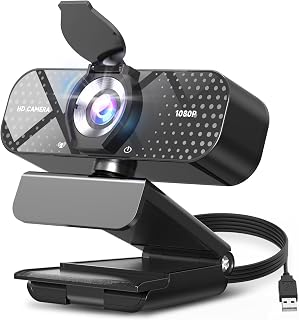
If you're hunting for a deal that covers video calls and casual streaming alike, this one earns its spot with a wide-angle lens that keeps more of your room in frame plus a built-in noise-canceling mic so your voice stays clear over background chatter. The privacy shield is a nice bonus for anyone leaving it clipped to a laptop full-time between meetings.
Pros
- 1080P with wide angle lens for calls and group framing
- Automatic light correction for inconsistent home lighting
- Built-in noise canceling mic for shared or noisy spaces
- Slide-over privacy cover and simple plug and play setup
Cons
- Fixed focus, no manual adjustment for close-up work
- 30fps cap limits fluid motion for fast streaming
Deal hunting for a webcam usually means weighing how much you actually need to spend, and the TRAUSI TW05 is a solid answer for buyers who want the essentials covered without paying for extras they won't use. It fits this roundup because it hits the core boxes that matter for everyday video calls: 1080P resolution, a wide angle lens for framing yourself or a small group, and automatic light correction that adjusts for home offices with inconsistent lighting. The noise canceling mic is worth calling out for anyone in a shared apartment or house with background noise during calls. Setup is plug and play, so there's no software fuss involved. A sliding privacy cover adds peace of mind between meetings, and the compact black design stays out of the way on a monitor or laptop. This is the pick for shoppers who want a straightforward upgrade over a built-in laptop camera without overthinking specs. It won't satisfy anyone chasing high frame rates or manual focus control, but for standard remote work and teaching, it covers the basics well.
Video Quality: 1080P Full HD (1920x1080) at 30fps, 16:9 aspect ratio, AVI format capture
Lens: Wide-angle lens with 2.8-4mm focal length range and fixed focus design for consistent sharpness
Audio: Built-in noise-canceling microphone with AAC audio format support
Connectivity: USB 2.0, 3.0, 3.1, and OTG compatible, plug-and-play with no driver installation needed
Compatibility: Windows PC, Mac, laptops, desktops, plus Zoom, Skype, Teams, and streaming platforms
Physical: Compact minimalist design, privacy cover included, 5ft USB power cable, 90-day manufacturer warranty
Buy this if you're a remote worker, student, or casual streamer who wants a dependable upgrade from a built-in laptop camera and values simple setup over advanced controls. It also suits anyone who wants a physical privacy cover included. Skip it if you need smooth motion for fast-paced streaming or gaming, since it's capped at 30fps with fixed focus, or if you frequently shoot close-up and need manual focus adjustment.
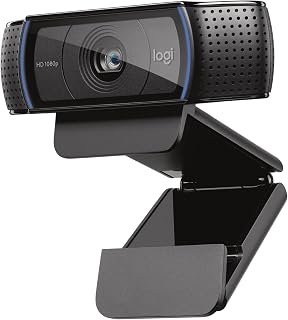
Logitech C920x HD Pro Webcam 1080p/30fps with Dual
For shoppers who want a proven name during the sale rather than an unfamiliar brand, the Full 1080p/30fps video output from this Logitech model is the kind of dependable spec that has anchored home office and streaming setups for years. XSplit VCam compatibility also makes it a sensible pick for anyone dabbling in virtual backgrounds without a green screen.
Pros
- Autofocus with automatic light correction for consistent image
- Five-element glass lens with wide 78-degree field of view
- Dual stereo mics for noticeably better call and recording audio
- Includes 3-month XSplit VCam license for background replacement
Cons
- No physical privacy shutter included
- 30fps frame rate may feel limiting for fast-paced streaming
If this year's deals event is the moment to finally upgrade to a camera you won't need to replace again soon, the Logitech C920x is the pick that justifies stepping up. It fits this list as the option for buyers who want proven, dependable performance rather than a budget gamble. Intelligent autofocus paired with automatic light correction means the image stays sharp and properly exposed as you move or as room lighting shifts, and the five-element glass lens keeps detail consistent across the frame. The 78-degree field of view is wide enough to fit more than one person in frame, useful for demos or two-person calls. Dual stereo microphones flanking the lens give it a real edge in audio quality over single-mic webcams, which matters for anyone recording or presenting. A bundled 3-month XSplit VCam license lets you swap or blur your background without a green screen. There's no physical privacy shutter, and frame rate tops out at 30fps, so dedicated streamers chasing higher frame rates may want more, but for professional calls and content creation this is a dependable, well-proven pick.
Video Performance: Full HD 1080p at 30fps, 720p at 30fps, 78-degree viewing angle, autofocus with light correction
Audio: Dual stereo microphones for natural sound capture
Lens: Five-element glass lens, 1.8 f-stop maximum aperture, auto focus
Sensor: CMOS 1/2.9 inch, FHD maximum display resolution
Connectivity: USB, plug-and-play compatibility with Windows 11 and multiple operating systems
Physical: 3.7 inches wide, 2.7 inches tall, 1.7 inches deep, weighs 5.7 ounces
Included: C920x Webcam, USB cable, user documentation, 3-month XSplit VCam license
Warranty: 1 Year Limited Hardware Warranty
Best for professionals, remote workers, and content creators who want reliable autofocus, strong audio, and consistent image quality for calls, demos, or recording. Also a good fit for anyone who wants background replacement without buying a green screen. Skip it if you specifically need a built-in privacy shutter or want frame rates above 30fps for fast-paced gaming or action streaming.

Shoppers who dread wrestling with software will like that this one is driver-free, meaning it's genuinely plug-and-play the moment it's plugged in. The 95 degree field of view is wide enough to fit a second person in frame during calls, and the lightweight compact build makes it easy to toss in a bag for hybrid work.
Pros
- Driver-free setup across Windows, Mac, Linux, Android, iPadOS
- Lightweight and compact for travel between setups
- 95° field of view shows more than a narrow headshot
- Built-in microphone included
Cons
- Fixed optics with no autofocus
- Actual resolution is 1080P despite 2K name
For shoppers browsing deal day webcams who just want something light, simple, and compatible with whatever machine they own, the UGREEN 2K stands out for its flexibility. It works across Windows, Mac, Linux, Android, and even iPadOS, which makes it a safe pick if you're shopping for a household with mixed devices rather than a single dedicated PC. The driver-free setup keeps things quick, a real advantage when you want to unbox a deal day purchase and get on a call minutes later. At 3.52 ounces it's genuinely lightweight, so it travels well for hybrid workers bouncing between office and home. The 95 degree field of view gives a bit more room in frame than narrower webcams, useful for calls where you want to show more than just a headshot. Its minimalist grey styling keeps it unobtrusive on a monitor. As a Prime Big Deal Days pick, it fits the shopper looking for broad compatibility and simplicity over top-tier specs.
Good for anyone who needs a webcam that just works across multiple operating systems and devices without installing anything, and for hybrid workers who want something compact and light to carry. Skip it if you're chasing the sharpest possible image, since this sits at 1080P despite the 2K branding, and the fixed optics mean no autofocus flexibility for close-up or moving subjects.
Video Performance: 2K and 1080P resolution, 30fps, 4MP CMOS sensor, 16:9 aspect ratio, MP4 format, 95-degree field of view
Audio: Dual integrated microphones, AAC and MP3 audio format support, background noise suppression
Design: Compact form factor, 3.52 ounces, privacy cover included, 360-degree rotation, universal mount compatibility
Compatibility: Windows 7/8/10/11, Mac OS X 10.6+, Linux, Android 5.0+, iPad OS 17+. Works with Zoom, Skype, YouTube, FaceTime, Twitch, Facebook, and other platforms. Driver-free, plug-and-play installation.
Technical Specs: Fixed-focus lens, 2.2 f-stop aperture, 1x optical zoom, digital zoom not supported, USB connectivity, indoor antenna

This is a solid grab for anyone building a basic home study or gaming setup on a budget during the sale, since it checks the essential boxes of HD 1080p resolution and a built-in microphone. It's aimed squarely at online classes and casual video conferencing rather than professional production, which keeps things simple for first-time buyers.
Pros
- Simple USB plug-and-play setup
- Built-in microphone included
- Compact, unobtrusive black design
- Suits classes, conferencing, streaming, and gaming
Cons
- Limited to 1080p with no 4K or low-light feature
- Fixed short focal length with no zoom flexibility
If your goal this deal season is simply checking the box on a webcam upgrade without overthinking it, this HD 1080P camera is built for exactly that. It's aimed at the basics: online classes, video conferencing, live streaming, and casual gaming, which covers most reasons someone shops webcam deals in the first place. USB plug-and-play means setup is immediate, no drivers, no configuration, so it suits anyone who wants to open the box and be on a call minutes later. The compact black form factor keeps it unobtrusive on top of a laptop or monitor, and the CMOS sensor with built-in microphone means you're not buying a second accessory just to be heard clearly. It doesn't try to be a premium pick, and that's the point. Among the top picks in a roundup like this, it fills the role of the budget-friendly, no-frills option for anyone who wants dependable 1080p video without paying for features they won't use, like 4K resolution or advanced autofocus range.
Video Performance: 1080P resolution, 30fps frame rate, 16:9 aspect ratio, CMOS sensor, 3.5mm focal length
Connectivity: USB 2.0/3.0, 5-foot braided cable included
Compatibility: Windows XP through Windows 11, Mac, and all major video platforms (Zoom, Teams, FaceTime, Google Meet, YouTube)
Design: Compact form factor, adjustable clip, portable and lightweight
Features: Automatic low-light adjustment, stable transmission chip, plug-and-play setup with no drivers required
Model: Xweiryn K1, ASIN B0GG3JNQGF
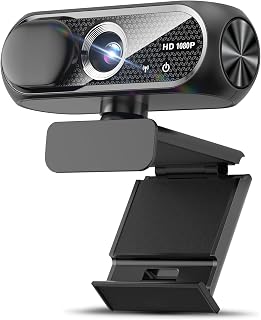
Anyone shopping this sale for a home office upgrade will appreciate the low light special feature here, since it means the CMOS sensor actively compensates when your desk setup isn't near a window. Paired with a wide-angle lens and privacy cover, it covers the basics reviewers scan for without asking you to fuss over settings before every call.
Pros
- 1080p CMOS sensor with wide angle lens and 16:9 view
- Automatic light correction across varied lighting
- Noise canceling mic keeps voice clear in shared spaces
- Privacy cover included with plug and play setup
Cons
- Fixed focus and 30fps max, not built for fast action
- Mounting can be tricky on curved laptop screens
For shoppers comparing webcam deals, this pick stands out for buyers who want a well-rounded feature set rather than a single standout spec. It's built around the fundamentals that most video calls and streaming setups actually need: a 1080p CMOS sensor for sharp video, a wide angle lens for a natural field of view, and automatic light correction that adapts across low light rooms and bright windows. The noise canceling microphone is a practical addition for anyone working near roommates, family, or coworkers, keeping voices clear without picking up every background sound. Plug and play setup means it's ready to go without hunting for drivers. The compact, sturdy build sits neatly on a monitor, and the included privacy cover is a thoughtful touch for anyone conscious about always-on cameras. The fixed focus and 30fps ceiling are the trade-offs to know about going in, along with a noted quirk mounting on curved laptop screens. For flat monitor setups doing typical video conferencing or online teaching, none of that gets in the way of a reliable experience.
Video Capture: 1080p Full HD at 30fps, 1920x1080 resolution, 16:9 aspect ratio, AVI format
Lens and Focus: Wide-angle lens with fixed focus, 1-2 meter focal length range
Sensor: CMOS photo sensor for reliable low-light performance
Audio: Built-in noise-canceling microphone, supports AAC and MP3 formats
Connectivity: USB 2.0, 3.0, and 3.1 compatible, plus OTG support. Includes 5-foot USB power cable. No additional drivers required.
Compatibility: Windows PC, Mac, Linux, tablets, and smartphones. Works with Zoom, Skype, and all major video conferencing platforms
Design: Compact form factor, black color, includes privacy cover slide
Warranty: 90-day manufacturer warranty
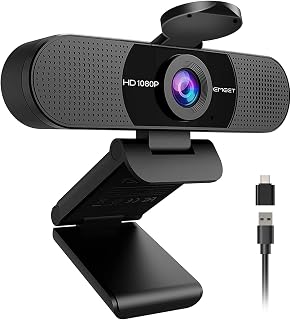
Podcasters and remote workers focused on audio clarity should note the dual omnidirectional microphones here, which pick up voices from multiple directions better than a single mic setup. The 90 degree field of view and clip base design make it easy to mount flexibly, and the privacy cover adds peace of mind when the camera isn't in use.
Pros
- Wide 90-degree field of view good for group calls
- Dual omnidirectional microphones for clearer audio
- Removable privacy cover for genuine lens security
- Compact form factor with USB-A and USB-C compatibility
Cons
- Needs good ambient lighting for best results
- No Windows Hello support and no built-in speakers
For this roundup of deal-season webcam picks, the EMEET C960 stands out for buyers who want more than the bare minimum without paying for extras they won't use. Its wide 90-degree field of view is the key differentiator here, useful for anyone on calls that involve more than one person in frame, like a shared home office or a small team huddle. Dual omnidirectional microphones pick up clear audio from multiple directions, so you're not stuck relying on a headset. Automatic light correction and a 5-layer anti-glare lens help keep video steady and clean even in inconsistent lighting, which matters for daily video conferencing. The ultra-compact build won't crowd a desk, and a removable privacy cover offers real peace of mind. It does require decent ambient lighting to look its best, and Windows Hello isn't supported, so biometric login users should look elsewhere. For deal hunters comparing value across webcams, the combination of wide FOV and dual mics makes this one of the more versatile entries.
Video and Image: 1080P (1920x1080) resolution, 16:9 aspect ratio, CMOS sensor, fixed focus (11.8 to 118.1 inches), 90-degree wide-angle lens, 5-layer anti-glare lens
Audio: Dual omnidirectional microphones, supports AAC, MP3, and PCM formats, no built-in speakers
Connectivity: USB Type-A and USB-C adapter, compatible with Windows 10/11, macOS 10.14+, and Android TV 7.0+
Design: Ultra-compact form factor, 2.65 inches wide x 2.04 inches high x 4.88 inches deep, 0.16 kg weight, includes removable privacy cover and clip base
Compatibility: Works with Zoom, Teams, FaceTime, Google Meet, YouTube and more. Not compatible with Windows Hello, game consoles, or tablets. Includes 2-year warranty and USB cable with user manual
Best for remote workers and educators who need a wider field of view for group calls, plus anyone who wants built-in dual microphones instead of relying on a headset. It also suits budget-conscious upgraders replacing a laptop camera. Skip it if you need Windows Hello facial recognition, built-in speakers, or a webcam that performs well in low light without help.
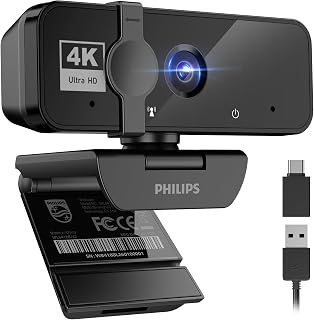
Buyers looking to jump straight to 4K resolution during this sale will find the sharper detail useful for presentations or client-facing meetings where clarity matters. The low light feature rounds it out for early morning or evening calls, so image quality doesn't fall apart just because the sun isn't cooperating.
Pros
- 4K resolution sharper than typical 1080p webcams
- Built-in microphone good for everyday meetings
- Low light feature keeps video usable indoors
- Physical privacy shutter and USB plug-and-play setup
Cons
- Microphone isn't professional-grade audio
- Digital zoom reduces image quality when used heavily
When you're stacking up webcam deals this shopping season, the PHILIPS 4K earns its spot by covering the one thing a deal-day impulse buy needs to nail: dependable video calls without extra shopping. Instead of pairing a cheap webcam with a separate mic, this one bundles a built-in microphone that handles everyday conversation fine for meetings, classes, or presentations. The 4K sensor is the real upgrade here, producing sharper, more vibrant footage than the 1080p webcams that dominate this price tier, and the low light special feature means it still looks decent under ordinary indoor lamps rather than requiring a ring light. A mechanical privacy shutter adds a tangible security layer, which matters more now that webcams sit on desks year round. USB plug and play means no driver hunting after unboxing. If you're comparing top picks for a one and done conferencing upgrade, this is the pick that skips the compromises typical of entry level 4K cameras.
Video Performance: 4K resolution (3840 x 3840 pixels), CMOS sensor, auto-focus, digital zoom, MP4 capture format, effective UHD display resolution.
Audio: Built-in integrated microphone with natural voice capture for clear communication during video calls and meetings.
Connectivity: USB connection with included USB cable, plug-and-play operation requiring no driver installation.
Compatibility: Works with Windows and macOS systems, compatible with Zoom, Microsoft Teams, Skype, Google Meet, and other major video conferencing platforms.
Security: Physical privacy shutter for mechanical lens blocking, CMOS photo sensor technology. Warranty includes 3-month manufacturer protection.
Physical Design: Black color, compatible with laptops and desktop computers, compact form factor suitable for various mounting positions.
Buy this if you're a remote worker, student, or educator who wants one device to replace a webcam and mic combo, and you value a physical privacy shutter. Skip it if you need studio grade audio for podcasting or streaming, since the built in mic is meant for conversation, not production. Also skip it if you plan to rely heavily on digital zoom, as quality drops off there.
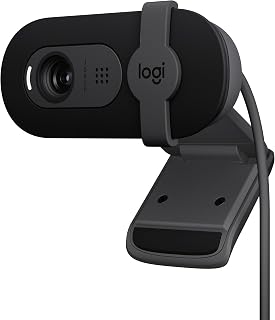
Streamers and remote workers who want a trusted brand at a lower entry point will appreciate that this model still runs Logitech's fluid crystal sensor and includes a low light feature for dim home offices. Full HD 1080p output keeps it relevant for both video meetings and casual streaming setups without overcomplicating the spec sheet.
Pros
- RightLight brightens the image automatically in dim rooms
- Physical privacy shutter for quick, reliable coverage
- Lightweight and portable at under 5 ounces
- True plug-and-play setup with major video call apps
Cons
- Fixed focus with no manual override
- Narrow 60-degree field of view limits framing multiple people
If your Prime Big Deal Days shopping list is about upgrading video calls without overspending, the Brio 101 is worth a look. It's built for exactly this scenario: remote workers, students, and casual streamers who want a clear step up from a laptop camera. The RightLight feature automatically brightens your image in dim rooms, which matters most for anyone who works from a home office with imperfect lighting. A sliding privacy shutter and built-in microphone round out the practical basics, and plug-and-play support for Zoom, Teams, and Google Meet means you can unbox it and be on a call minutes later. At 4.96 ounces, it's easy to toss in a bag if you split time between a home desk and an office. The tradeoffs are real but narrow: fixed focus and a 60-degree field of view mean it's built for one person, not a group shot. For shoppers hunting deals on a dependable, no-fuss upgrade, this is a strong candidate.
Video: 1080p Full HD resolution, H.264 video capture, 60-degree viewing angle, fixed focus with 4mm maximum focal length
Audio: Built-in microphone with mono audio support for clear communication during calls
Connectivity: USB-A connection with integrated cable, works with Windows 7+, macOS 10.10+, and Chrome OS
Physical: Compact rectangular design measuring 2.87in W x 2.62in H x 1.26in D, weighs 4.96 ounces, available in black
Features: RightLight auto-brightness, integrated privacy shutter, customizable settings via Logi Options+ app, 1-year limited hardware warranty
Good for remote workers, online students, and beginner streamers who just need clearer video than a built-in laptop camera. Also fits anyone furnishing a second home office setup on a budget. Skip it if you need to frame multiple people, want manual focus control, or plan to shoot content requiring optical zoom, since digital zoom through the app won't match that quality.

Shoppers setting up a shared conference room or classroom during the sale might lean toward this one for its projector special feature, which signals it's built with presentation environments in mind. A 1/2 inch photo sensor size also helps it hold up in larger rooms where lighting and distance vary more than at a single desk.
Pros
- Compact and lightweight at 4.8 ounces
- Standard USB connectivity for easy setup
- 1080p resolution suitable for basic video meetings
- Small footprint fits easily on any desk
Cons
- Limited available detail on field of view and focus
- No confirmed low-light or image stabilization features
Rounding out a list of webcam deals worth considering, the Acer A610 is a compact 1080p option built around simplicity. It's a small, light camera at 4.8 ounces, easy to fit into any desk setup without taking up much space, and its compact housing makes it a reasonable pick for anyone assembling a minimal home office rig during a sale. It uses a standard CMOS sensor with a 1/2-inch photo sensor size and connects over USB, so setup should be straightforward for most PC users. Beyond the core spec sheet, there isn't much detail available to speak to real-world performance, low-light handling, or field of view, so shoppers who want those specifics should check current listings before buying. For this article's focus on finding solid deal-season picks, it earns a spot as a basic, no-frills 1080p webcam for meetings rather than a feature-packed choice.
Consider this if you want a simple, compact 1080p webcam for basic meetings and don't need extras like a wide field of view or advanced light correction. It may suit anyone replacing a broken or missing laptop camera on a tight budget. Skip it if you want documented specifics on field of view, focus type, or low-light performance, since those details aren't confirmed here.
Setup is simple: connect the webcam to your computer via the included USB adapter. No driver installation is required on Windows 7, 8, 10, 11, or macOS.
The camera works with all major video calling platforms including Zoom, Skype, Google Meet, and Microsoft Teams. After initial connection, configure the A610 as your default microphone in your computer's sound settings and in your specific applications for optimal microphone performance.
The included USB Type-A to Type-C adapter provides compatibility with modern laptops and devices. Audio formats supported include AAC and MP3.

Buyers wanting 4K clarity without being tied to a single port type will like the USB-C and USB-A adapter combo here, which covers older and newer laptops alike. A physical sliding lens cover offers straightforward privacy, and the 90 degree field of view with 360 degree flexibility suits streamers who reposition their camera often.
Pros
- 4K Ultra HD video resolution
- Built-in noise-canceling microphone
- Works with both USB-C and USB-A via included adapter
- Physical sliding lens cover for privacy
Cons
- No mention of adjustable zoom beyond fixed 30mm focal length
- No software features like auto-framing mentioned
If your webcam shopping list for Prime Big Deal Days is built around 4K clarity without a complicated setup, the AOC 4K Webcam earns its spot on this list. It delivers 4K Ultra HD video with a noise-canceling mic built in, so you get clean video and clear audio from a single device rather than juggling separate accessories. Setup is true plug-and-play, and it works across both USB-C and USB-A ports thanks to the included adapter, so it fits whatever machine you're pairing it with. The 90 degree field of view gives you room to move without cropping yourself out of frame, and the 360 degree flexibility means you can angle it exactly how you want on a monitor or stand. A physical sliding lens cover handles privacy without software, which is a nice touch for anyone who wants a hardware-level off switch. Its compact, minimalist black design keeps it from looking out of place on a desk. For shoppers comparing webcams during this sale, it hits the core needs of resolution, audio, and compatibility in one lightweight package.
Video Performance: 4K Ultra HD (UHD) resolution, 8MP still image capture, 16:9 aspect ratio, MP4 format, auto-focus system
Optics: 80-degree field of view, 28-30mm focal length, wide-angle lens, digital zoom
Connectivity: USB-C with included USB-A adapter, compatible with Zoom, Microsoft Teams, Skype, and major video platforms
Audio: Built-in noise-canceling microphone, supports AAC and MP3 formats
Design: 2.5 inches D x 2.5 inches W x 3.5 inches H, weighs 0.16 kg, minimalist black design, 180-degree tilt, 360-degree rotation, physical sliding lens cover
Warranty: 3-year manufacturer warranty
Good for anyone upgrading a desktop or laptop setup who wants 4K video and a built-in mic without buying accessories separately, and who values a physical privacy cover over a software toggle. Also a solid pick for people who switch between USB-C and USB-A machines. Skip it if you need adjustable zoom beyond a fixed focal length, or if you're after a webcam with advanced software controls like auto-framing or exposure presets.
Webcam Buying Guide: What to Look For During Prime Big Deal Days
Resolution and Frame Rate
For most people, 1080p at 30fps is the sweet spot. It delivers crisp, clear video without demanding too much from your USB bandwidth or your computer’s processing power. Options like the Logitech C920x HD Pro PC Webcam Full 1080p/30fps have built a strong reputation in this category over many years of consistent performance.
If you present frequently or want a more professional-looking stream, stepping up to 4K is worth considering. The AOC 4K Webcam for PC, Streaming Computer Camera and the PHILIPS 4K Webcam for PC with Microphone both bring ultra-high-definition clarity to meetings and recordings without requiring complex setup.
Microphone Quality
A built-in microphone is only useful if it actually sounds good. Look for models that include noise-canceling or noise-reduction technology, especially if your workspace has background noise from fans, traffic, or household activity.
The EMEET C960 1080P Webcam with Microphone, 2 Mics uses two omnidirectional microphones to capture voice from multiple angles, which helps if you tend to shift position during calls. The Acer A610 1080p Webcam for PC with Microphones also features dual noise-reduction mics, making it a solid choice for remote workers who rely heavily on clear audio. If you want to dig deeper into your audio setup, our guide to the best PC speakers for gaming covers complementary audio gear worth pairing with your new camera.
Field of View and Light Correction
A wider field of view (FOV) lets you capture more of your environment, which is useful for group calls or when you need to show physical objects on screen. The UGREEN 2K Webcam for PC Ultra HD 1080P Computer offers a 95-degree FOV, giving you noticeably more room in the frame compared to standard webcams.
Automatic light correction is equally important if your lighting situation is inconsistent. The TRAUSI 1080P FHD Webcam with Noise-Canceling Mic and the 1080P HD Webcam with Microphone both feature auto light correction technology that dynamically adjusts brightness and color, so you look clear whether you are in a dim room or sitting in front of a bright window.
Privacy and Ease of Setup
A physical privacy cover is a small feature that makes a real difference. Being able to slide a lens cover shut when you are not on a call is faster and more reliable than disabling software permissions. Most options on this list include one, from the budget-friendly Webcam for PC, HD 1080P USB Plug-and-Play Computer all the way up to the Logitech Brio 101 Full HD 1080p Webcam.
Plug-and-play compatibility is the other factor worth confirming before you buy. Every webcam on this list works without installing additional drivers, so you can connect it and start a call within seconds. That simplicity is especially valuable if you are setting up on a new machine or switching between devices regularly. If you are building out a full workstation, our roundup of the best portable SSDs for gaming is worth a look for fast, reliable storage on the go.
Final Thoughts
Prime Big Deal Days webcam deals offer a genuine opportunity to upgrade your video setup without overpaying. If you want a proven, widely compatible 1080p camera with great autofocus and stereo audio, the Logitech C920x HD Pro PC Webcam Full 1080p/30fps remains one of the most dependable choices available. For those who want 4K clarity and flexible mounting at a more accessible point, the AOC 4K Webcam for PC, Streaming Computer Camera delivers sharp, professional-grade video with noise-canceling audio and full 360-degree rotation built in.
Frequently Asked Questions
Are Prime Big Deal Days webcam deals actually worth it?
Yes, Prime Big Deal Days consistently brings meaningful discounts on webcams from well-known brands like Logitech, UGREEN, EMEET, and AOC. The sale in 2026 covers a wide range of options, from simple 1080p plug-and-play cameras to full 4K models with advanced microphones. It is one of the better times of year to buy if you have been holding off on an upgrade.
What webcam resolution is best for video calls and remote work?
For most remote workers and professionals, 1080p is more than sufficient. It produces a sharp, clean image that looks polished in Zoom, Teams, or Google Meet without taxing your internet connection. If you frequently present to large audiences, record content, or stream, a 4K model like the PHILIPS 4K Webcam for PC with Microphone gives you noticeably more detail and future-proofing. If you are also thinking about the broader performance of your workstation in 2026, our guide to the best PCIe 4.0 SSDs covers fast storage upgrades worth pairing with a new camera.
Do I need a separate microphone if my webcam has one built in?
For casual video calls and meetings, a quality built-in microphone is usually enough. Webcams like the EMEET C960, which uses dual omnidirectional mics, and the Acer A610, which features dual noise-reduction microphones, both perform well in typical home office conditions. If you do a lot of podcasting, voice-over work, or professional streaming, a dedicated USB microphone will give you more control over your sound.
Which webcam is best for streaming in 2026?
For streaming, you want a combination of sharp video, a reliable frame rate, and clean audio. The Logitech C920x HD Pro PC Webcam Full 1080p/30fps is a long-standing favorite in the streaming community for its consistent autofocus and stereo dual-microphone setup. The AOC 4K Webcam for PC is also a strong contender if you want 4K resolution with wide-angle coverage and a noise-canceling mic included out of the box.




Write Your Review
No reviews yet. Be the first to share your experience!