

Your game can run smoothly until a browser full of guides, voice chat, recording software, and a large mod collection share the same memory pool. That is when the 64GB vs 32GB RAM for gaming decision becomes more than a spec-sheet question, especially if your graphics card handles advanced visual features covered in our guide to GPUs for video upscaling.
This guide explains when 32GB is the practical choice, when 64GB creates valuable headroom, and how DDR4 and DDR5 affect your upgrade path. A balanced build matters even more for a dual-purpose system used for games and code projects, so consider our CPU picks for compiling code if your PC does both jobs.
Quick answer
This guide compares 10 picks, with CORSAIR Vengeance RGB PRO 32GB DDR4 3200MHz Gaming ranked first.

CORSAIR Vengeance RGB PRO 32GB DDR4 3200MHz
For a 32GB gaming setup, this kit balances 3200MHz speed with broad compatibility across Z390, 400 Series, 500, and X570 chipsets, so it slots into a wide range of existing gaming PCs. The CL16 timing keeps latency low, and the RGB bars suit builds where 32GB covers gaming needs without excess capacity.
Pros
- CL16 latency with CORSAIR's custom PCB for stability
- Individually addressable RGB, adjustable or disabled
- Compatible with current Intel and AMD chipsets
- Low 1.2 volt operation
Cons
- Requires iCUE software for full RGB control
- 32GB may not suit heavier multitasking workloads outside gaming
In the context of choosing between 32GB and 64GB for gaming, this CORSAIR Vengeance RGB PRO kit shows what you gain by staying at 32GB and investing in quality instead of raw capacity. The 3200MHz speed with CL16 latency is tuned for current Intel and AMD platforms, and the custom PCB with screened ICs gives you overclocking headroom if you want to push further, something a 64GB kit at similar price points often can't match as easily. For most gamers, 32GB with strong timings outperforms 64GB with mediocre timings, since game performance tracks speed and latency more closely than sheer capacity. The individually addressable LEDs sync through CORSAIR iCUE and can be dialed back or turned off, so the RGB feels like a genuine option rather than a fixed cost. Signal integrity under heavy loads is a plus if you plan to tune the kit yourself. For this article's purpose, the Vengeance RGB PRO illustrates that 32GB, when it's fast and well-built, is often the smarter choice over 64GB for players who aren't running memory-intensive production work alongside their games.
Capacity: 32GB (2x16GB dual-channel)
Speed: 3200MHz
Latency: CL16-20-20-38
Voltage: 1.35V
Form Factor: DIMM (288-pin)
Data Transfer Rate: 12 GB/s
Compatibility: Intel Z390 and newer, AMD Ryzen 400 Series, 500 Series, X570 chipsets
Features: Dynamic multi-zone RGB lighting, iCUE software control, Light Link synchronization
Warranty: Limited lifetime
Weight: 0.12 kg
Recommended if you want 32GB that's built for tuning and visual customization, and you're confident your gaming workload doesn't need 64GB. Works well for Intel Z390, AMD 400 Series, 500, or X570 systems. Skip it if you need guaranteed 64GB headroom for heavy multitasking or production work, or if you'd rather not manage iCUE software for the RGB features.

For gamers settling on 32GB as their sweet spot, this kit's 3600MT/s speed and CL18 latency give a noticeable edge in CPU-limited titles over slower DDR4 kits. Intel XMP 2.0 profiles make reaching that speed a one-step BIOS setting, and the RGB styling suits builds where 32GB is plenty for gaming plus background apps.
Pros
- 3600MT/s with one-click XMP 2.0 setup
- 32GB covers nearly all current gaming workloads
- RGB syncs with major motherboard software
- Lifetime warranty backing
Cons
- CL18 latency is mid-pack for this speed tier
- Must be run as a matched pair, no mixing with other kits
If you're deciding between 32GB and 64GB, this G.SKILL Trident Z RGB kit makes a strong case for stopping at 32GB rather than overspending on capacity you won't use. Two 16GB modules running at 3600MT/s with CL18-22-22-42 timings give you plenty of headroom for current games, streaming, and background apps, which is where most gaming rigs actually top out. Unless you're running memory-hungry creative software or dozens of simultaneous VMs alongside your games, 64GB mostly sits idle while costing more and offering no frame rate benefit. The XMP 2.0 profile makes hitting that 3600MT/s speed a one-click BIOS change rather than a tuning project, so you get strong real-world performance without manual overclocking. The RGB styling and dark heatspreader design let you build a good-looking rig without the premium of pushing to double the capacity. For a title focused on matching memory to play, this kit represents the case that gaming performance scales with speed and timings more than sheer capacity, and 32GB at this speed class covers the vast majority of gaming use cases.
Memory Technology: DDR4 SDRAM, Non-ECC
Capacity: 32GB total (2x16GB modules)
Speed: 3600 MT/s with Intel XMP 2.0
Timings: CAS 18-22-22-42
Voltage: 1.35V
Form Factor: 288-pin U-DIMM
Data Transfer Rate: 3600 megabits per second
Model: F4-3600C18D-32GTZR
Warranty: Limited Lifetime
Buy this if you're building or upgrading a gaming PC and want fast, reliable 32GB rather than paying for 64GB you won't use for gaming alone. Good fit if your motherboard and CPU support XMP 2.0 and you want an RGB-themed build. Skip it if you already know you need 64GB for heavy multitasking, large creative workloads, or many background apps alongside gaming, or if your platform doesn't support XMP speeds.

Stepping up to 64GB on current-gen platforms, this kit hits 5600MHz with support for 13th Gen Intel Core and Ryzen 7000 chipsets, covering the newest gaming rigs. Running at just 1.1 volts keeps power draw low even with both 32GB sticks installed, useful for anyone pushing high core counts alongside demanding titles.
Pros
- 64GB suits gaming combined with streaming or content creation
- Supports both Intel XMP 3.0 and AMD EXPO out of the box
- Lower 1.1V voltage reduces heat versus aggressive DDR5 kits
- Reported stable operation under XMP with no manual tuning
Cons
- CAS 46 is loose, not ideal if chasing overclocked frame gains
- Overkill capacity for gaming-only setups without multitasking
For a 64GB vs 32GB gaming decision, this DDR5 kit answers the question of when the extra capacity actually pays off. Gaming alone won't fill 32GB, but running a modern game while recording footage, streaming, and keeping a browser full of tabs open is where 64GB starts to matter, and this kit is built for exactly that kind of layered workload. The 5600MHz speed with 5200 and 4800MHz downclock options adapts to whatever platform you're on, and dual XMP 3.0 and AMD EXPO support means you get rated speed without manual tuning on either Intel or AMD gaming rigs. Micron's 1.1V spec keeps power draw and heat lower than many aggressive DDR5 kits, which helps in smaller gaming cases. The CAS 46 timing is loose compared to tighter DDR5 kits, so if you're chasing the last few frames through overclocking, it's not the top pick. But for a stable 64GB upgrade that just works at boot, it covers the gaming plus multitasking case well.
This kit works with Intel Core Ultra, 13th Gen and 14th Gen Core processors, and AMD Ryzen 7000 and 9000 series CPUs. Verify your motherboard supports DDR5 memory (LGA1700 for Intel, AM5 for AMD). The 5600MHz, 5200MHz, and 4800MHz speeds accommodate different BIOS configurations and aging motherboards that may have limited JEDEC support.
If you own an Alienware Aurora R16, Dell XPS 8960, or similar premium pre-built system with a DDR5 motherboard, this kit is confirmed compatible and significantly cheaper than OEM memory upgrades. Always check your system specifications before purchasing to ensure the DDR5 form factor matches your motherboard's memory slots.
Good fit if you game and also edit, stream, or render alongside it, and want 64GB without fiddling with timings. Also fits builders who want both Intel and AMD platform flexibility since EXPO and XMP 3.0 are both supported. Skip it if you're chasing tight latency for competitive frame-rate gains, or if you only game casually, where 32GB and a tighter-timing kit would serve better.

When 32GB is the target rather than 64GB, tighter timings matter more than raw capacity, and this kit's CL16 latency at 3200MT/s is quick for DDR4. Intel XMP 2.0 support simplifies setup, making it a straightforward choice for gamers who want responsive memory without paying for capacity they won't use.
Pros
- CL16 latency is tight for its speed class
- 1.35V keeps power draw and heat in check
- Falls back cleanly to JEDEC defaults if XMP isn't supported
- Lifetime warranty included
Cons
- No RGB lighting for themed builds
- Must be used as a matched pair, not mixed with other kits
For gamers weighing 32GB against 64GB, this G.SKILL Ripjaws V kit is a practical argument for right-sizing instead of overbuying. The 2x16GB configuration at 3200MT/s with CL16 timings delivers snappy, responsive performance for gaming and multitasking, and the tighter CAS latency of 16 actually edges out some higher-speed kits in latency-sensitive scenarios. Since most games today are comfortable within 32GB, choosing this kit over a 64GB option means your money goes toward a proven, stable configuration rather than capacity headroom you may never touch during play. The 1.35V operation keeps thermals and power draw modest, which matters if you're also running a power-hungry GPU. XMP 2.0 makes enabling full speed simple, and the kit falls back cleanly to JEDEC defaults on older boards, so it's not an all-or-nothing proposition. The black heatspreader design is understated enough to fit any build without forcing an aesthetic choice. If your use case is primarily gaming rather than heavy content creation or multitasking at scale, this kit demonstrates why 32GB remains the sensible default.
Capacity: 32GB (2x16GB DIMM)
Technology: DDR4 SDRAM
Speed: 3200MT/s (with XMP), JEDEC default speed with standard BIOS
Timing: CAS Latency 16, 18, 18, 38
Voltage: 1.35V
Form Factor: U-DIMM, 288-pin
Compatibility: Intel and AMD desktop systems supporting DDR4
Features: Intel XMP 2.0, Non-ECC
Warranty: Limited Lifetime
A good match if you want dependable 32GB performance for gaming without paying for 64GB capacity you won't use. Suited to builders who value tight latency and low power draw over flashy extras. Skip it if your workload genuinely needs 64GB, such as heavy video editing or running many applications alongside games, or if you specifically want RGB lighting, since this kit skips that feature.

For gamers who want to jump to 64GB without ditching their current build, this kit runs at 3200MHz DDR4 with CL22 timings, a safe match for most Intel and AMD boards still on DDR4 platforms. The 1.2V operation keeps thermals and power draw modest, which matters when you're loading up all four DIMM slots for heavy multitasking alongside gaming.
Pros
- 64GB headroom for gaming plus streaming or heavy multitasking
- Broad compatibility across Intel and AMD DDR4 platforms
- XMP 2.0 keeps rated speed even with 4 DIMMs installed
- Low 1.2V operation keeps heat and power draw down
Cons
- DDR4 is legacy tech, not an option for new DDR5 builds
- 64GB is more than most gaming-only setups need
If you're deciding between 32GB and 64GB for gaming, this kit makes sense when your rig does more than game. Games rarely touch past 32GB, but if you stream, record, run Discord, a browser with dozens of tabs, and the game itself at once, this 2x32GB DDR4 set gives you room so none of that background load steals frames. It runs at 3200MHz with downclock options to 3000 and 2666MHz, so it slots into Intel 8th through 13th Gen and the full AMD Ryzen 1000 to 5000 lineup without compatibility worries. CL22 timing is ordinary for DDR4 but not a bottleneck for gaming workloads. XMP 2.0 support means you still hit rated speed even in a 4 DIMM setup, useful if you ever add two more sticks. At 1.2V it runs cool and doesn't demand extra case airflow planning. The catch for a gaming-focused build is that DDR4 is aging technology, so this fits best if you're upgrading an existing DDR4 system rather than building fresh.
Buy this if you're on an existing Intel or AMD DDR4 gaming rig and want to multitask heavily alongside gaming, like streaming or running capture software. Skip it if you're building a new DDR5 system, since this kit won't fit those boards. Also skip it if you're a pure gamer with no multitasking needs, since 32GB already covers that and this capacity would go unused.

Pros
- Large 64GB capacity helps with demanding games, creative applications, and extensive multitasking
- 3600 MT/s speed and XMP support can provide a noticeable upgrade over lower-speed memory
- Straightforward installation and BIOS XMP setup were praised in customer feedback
- RGB styling complements enthusiast and gaming PC builds
- Limited lifetime manufacturer warranty provides long-term coverage
Cons
- Reaching the advertised 3600 MT/s speed requires compatible hardware and BIOS or XMP adjustments
- Performance and stability can vary depending on the motherboard, processor, and system configuration
- G.SKILL advises against mixing this kit with other memory kits because doing so can cause instability or boot failures
The G.SKILL Trident Z RGB F4-3600C18D-64GTZR is a 64GB DDR4 desktop memory kit with two 32GB modules. It is aimed at gamers, creators, and power users who need more capacity for demanding software and multitasking.
With speeds up to 3600 MT/s, CL18 timings, and an Intel XMP 2.0 profile, the kit offers a practical performance upgrade on compatible systems. Customer feedback highlights easy installation, smoother gaming, faster loading, and improved multitasking after enabling XMP.
The matched 2x32GB configuration is designed to run as a unified kit, while the Trident Z RGB design adds customizable lighting to an enthusiast build. Its non-ECC, 288-pin UDIMM format is intended for compatible desktop motherboards.
Reaching the rated speed is not guaranteed on every computer and may require BIOS adjustments, with results depending on the CPU and motherboard. G.SKILL also recommends using the kit without combining it with other memory kits to avoid stability issues.
Overall, this is a capable high-capacity DDR4 upgrade for compatible gaming and productivity desktops. It is especially appealing to buyers who want 64GB, 3600 MT/s performance, and RGB styling in one matched kit.

For a 64GB build where looks matter as much as headroom, this kit pairs 6400MT/s DDR5 speed and CL32 latency with RGB lighting that syncs through AMD EXPO-ready motherboards. Gamers running memory-hungry mods or multiple background apps get the capacity bump without sacrificing the fast timings modern titles can lean on.
Pros
- High 6400MT/s speed with CL32 for gaming plus multitasking
- Reported stable performance on Ryzen 7000X3D and X870/X670 boards
- AMD EXPO support for quick rated-speed configuration
- Synced RGB lighting across modules via Infrared Sync Technology
Cons
- RGB control software can reset lighting profiles on reboot
- Runs at 1.4V, higher than typical DDR5 power draw
This kit speaks directly to the 64GB vs 32GB gaming question for Ryzen builders who want both capacity and raw speed. At 6400MT/s with CL32 timing, it's tuned for performance rather than just headroom, and reported stability on Ryzen 7000X3D systems with X870 or X670 boards makes it a strong match for high-end AMD gaming rigs. AMD EXPO profiles get you to rated speed with minimal BIOS fiddling, and some users have pushed tighter CL30 timings at 6000MT/s, suggesting good binning if you want to tune further. The 64GB capacity means a game, chat app, browser, and recording software can all run together without memory becoming the limit. Dual heat spreaders in black or white and Infrared Sync Technology keep the RGB lighting synced across modules, which matters if your build is on display. The RGB control software can reset lighting profiles after a reboot, a minor annoyance that doesn't touch memory performance. It runs at 1.4V, higher than typical DDR5, worth factoring into your system's thermal headroom.
Memory Type: DDR5 DIMM
Capacity: 64GB (2x32GB)
Speed: 6400MT/s (51.2GB/s data transfer rate)
CAS Latency: CL32
Voltage: 1.4V
Pin Count: 288
Heat Spreader: Black or White aluminum
Form Factor: DIMM 288-pin
AMD EXPO: Yes (EXPO Profile 1 at 6400MT/s, EXPO Profile 2 at 6000MT/s)
Intel XMP: Yes (XMP 3.0)
Warranty: Limited Lifetime
Model: KF564C32BBEAK2-64
Best for Ryzen 7000X3D gamers who want high speed and 64GB capacity together, especially if you also stream or multitask while gaming and like RGB aesthetics. Skip it if you're on Intel, since this is tuned and tested around AMD EXPO and Ryzen boards. Also skip it if you don't care about lighting or want to avoid an extra piece of software to manage.
Pros
- Exceptional performance gain in gaming (VR, DCS World, MSFS 2020) and creative applications with minimal setup
- Dual EXPO/XMP profiles eliminate guesswork, reaching rated speeds with a single BIOS toggle
- Compact 32GB modules and low-profile design solve cooler clearance issues without sacrificing capacity
- Runs stable out of the box at default settings or enables XMP for immediate speed boost
- Great value for a 64GB high-performance kit targeting serious enthusiasts and professionals
Cons
- Requires compatible Z790/Z690/X870/X670 motherboards, so older systems need full platform upgrade
- Premium pricing reflects performance tier, not ideal for budget builds prioritizing capacity over speed
- BIOS overclocking required to reach advertised 6000MT/s on some systems, not plug-and-play for all configurations
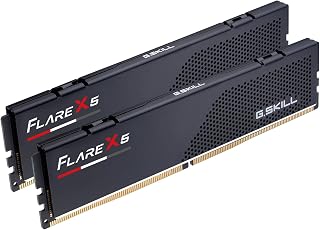
The G.SKILL Flare X5 is a professional-grade DDR5 memory kit designed for enthusiasts, gamers, and content creators who demand both performance and reliability. This 64GB kit (2x32GB) targets modern AMD Ryzen 9000/7000 series and Intel 12th+ gen platform builders who refuse to compromise on speed or capacity.
Real-world performance shines in demanding workloads. Users report significant improvements in VR gaming, flight simulation, and 4K video editing after upgrading. The dual EXPO/XMP profile system is the standout feature, allowing AMD and Intel users to hit rated 6000MT/s speeds with a single BIOS setting rather than manual tweaking. CL36 latency remains tight enough for competitive gaming while maintaining system stability under sustained loads.
The design reflects G.SKILL's attention to detail. Low-profile matte black heat spreaders eliminate cooler conflicts and fit aesthetic builds cleanly. The compact form factor lets enthusiasts pair this 64GB kit with high-end air and liquid cooling without compromises, a critical advantage in compact or enthusiast-focused builds.
The main trade-off is platform compatibility. This kit requires Z790/Z690 or X870/X670 motherboards paired with appropriate CPUs, making it unsuitable for older systems without significant upgrades. Additionally, reaching rated speeds requires either enabling XMP/EXPO in BIOS or manual overclocking on some configurations, though user feedback confirms this process is straightforward.
Verdict: The Flare X5 delivers premium DDR5 performance with excellent out-of-the-box stability and dual-platform compatibility. For builders upgrading to modern platforms and seeking 64GB capacity without sacrificing speed, this kit represents strong value and proven reliability backed by real-world user success.
Memory Type: DDR5 Non-ECC U-DIMM
Capacity: 64GB (2x32GB)
Speed: 6000MT/s CAS Latency 36-36-36-96
Voltage: 1.35V
Form Factor: 288-pin DIMM
Data Transfer Rate: 768 MB/s per module
Model Number: F5-6000J3636F32GX2-FX5
Heat Spreader: Low-profile matte black aluminum
Platform Support: Intel Z890, Z790, Z690, B860, B760, B660; AMD X870, X670, B850, B840, B650
Profiles: JEDEC default, AMD EXPO, Intel XMP 3.0
Warranty: Limited Lifetime
Included: 2x32GB modules per kit
Who Should Buy This Kit: Gamers and content creators building or upgrading modern AM5 or Intel 12th+ gen systems prioritize performance and multitasking capacity. Ideal for VR gaming, flight simulation, 4K video editing, 3D rendering, and streaming workflows.
Who Should Skip: Budget-conscious builders should consider slower, cheaper DDR5 or DDR4 alternatives. Users with pre-2022 systems cannot use this kit without replacing motherboard and CPU. Those uncomfortable with BIOS settings should verify XMP/EXPO is enabled on their specific motherboard model using G.SKILL's QVL tool.
Compatibility Check: Verify your motherboard appears on G.SKILL's official QVL (Qualified Vendor List) and RAM Configurator tool before purchasing. Pair with Ryzen 9000/7000 series, Intel Core Ultra, 14th/13th/12th gen, or newer CPUs for optimal compatibility.
Setup Tips: Install both modules in matching slots (usually slots 2 and 4 on most boards), enable XMP 3.0 or AMD EXPO in BIOS, and verify rated speed in system information. For first-time DDR5 users, enable the profile first and test stability before attempting manual overclocking adjustments.
Chasing 64GB on a modern DDR5 rig means bandwidth matters as much as capacity, and 6400MT/s with CL32 timings delivers that for CPU-bound titles and background streaming. AMD EXPO support means Ryzen builders get one-click stability at full speed, so the extra 32GB over a typical 32GB kit doesn't come at the cost of latency.
Pros
- 64GB capacity suits heavy multitasking alongside gaming
- 6400MT/s with one-click AMD EXPO and Intel XMP 3.0 setup
- On-die ECC adds stability during long sessions
- Low-profile heat spreaders clear most high-end coolers
Cons
- CL32 latency trails tighter-timing kits for pure frame-rate chasing
- 64GB is more capacity than most single-game workloads need
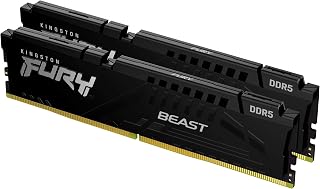
If you're trying to decide whether 64GB actually makes sense for your rig, this Kingston FURY Beast kit is a good test case for the upgrade. Two 32GB DDR5 modules running at 6400MT/s give you the headroom to game, stream, and run background apps without the system reaching for swap space, which is really the whole argument for jumping from 32GB to 64GB in the first place. AMD EXPO and Intel XMP 3.0 profiles mean enabling that speed takes one BIOS toggle, no manual tuning required. On-die ECC quietly corrects single-bit errors in the background, so long gaming or streaming sessions stay stable rather than flaky. The low-profile heat spreaders also mean you won't be fighting your CPU cooler for clearance once you've committed to the extra capacity. CL32 latency is the one number worth knowing: it's not the tightest on the market, but at these speeds the real-world gaming impact is small. For AM5 builds specifically chasing capacity over last-frame latency, it's a solid match.
Memory Type: DDR5 SDRAM
Capacity: 64GB (2x32GB kit)
Speed: 6400MT/s
Latency: CL32
Voltage: 1.4V
Data Transfer Rate: 51,200 MB/s
Form Factor: DIMM (288-pin)
Heat Spreader: Low-profile aluminum
Features: AMD EXPO, Intel XMP 3.0, On-die ECC
Warranty: Limited Lifetime
Buy this if you're moving to 64GB because you multitask heavily, stream while gaming, or run creative work alongside games and want AM5 compatibility with EXPO auto-overclocking. Skip it if you're strictly chasing the lowest latency for competitive frame rates, or if 32GB already covers your workload since the extra capacity would go unused and CL32 offers no latency advantage over tighter kits.

Reaching 64GB across four 16GB sticks instead of two 32GB modules, this kit runs at 3200MHz with tight CL16 timings, giving gamers room to add more sticks later if their board has open slots. Intel XMP 2.0 support makes hitting that rated speed straightforward on compatible gaming motherboards.
Pros
- 64GB across four modules suits heavy multitasking setups
- CL16 latency is tight for this capacity tier
- One-click XMP 2.0 and AMD Ryzen profile support
- Conservative 1.35V voltage keeps thermals manageable
Cons
- DDR4 only, no upgrade path to DDR5 platforms
- Four-module kit requires four free DIMM slots
For anyone weighing 64GB against 32GB on an existing DDR4 system, this GIGASTONE Game PRO kit answers the capacity question without forcing a platform change. Four 16GB modules at 3200MHz give you the full 64GB most multitaskers are after, letting background apps, browser tabs, and streaming software run alongside your game without competing for memory. CL16 latency is tighter than you'd expect at this capacity, so the jump to 64GB doesn't come with a responsiveness penalty on DDR4 boards. Intel XMP 2.0 and AMD Ryzen profiles make hitting rated speed straightforward, and the 1.35V voltage keeps thermals in check even with four modules populated. Because this is a four-DIMM kit, check your motherboard has four slots free before buying, since mixing it with existing modules isn't the same as a clean install. The obvious ceiling is DDR4 itself: there's no upgrade path to DDR5 speeds here. But if your platform is already DDR4 and you just need more headroom at 64GB, this covers that need directly.
Capacity: 64GB (4x16GB modules)
Technology: DDR4
Speed: 3200MHz (PC4-25600)
Timings: CL16-18-18-40
Voltage: 1.35V
Form Factor: UDIMM (Unbuffered)
Pin Count: 288 pins
ECC: Non-ECC
Warranty: 5 years
Platform Support: Intel systems with XMP 2.0 support and AMD Ryzen systems. Compatible with most standard ATX and micro-ATX motherboards supporting DDR4 memory.
Buy this if you're on a DDR4 platform and want to move from 32GB to 64GB for multitasking, streaming, or background-heavy gaming setups without changing motherboards. Skip it if you're building new or already on DDR5, since this kit can't be used on those boards, or if your motherboard only has two memory slots available for this four-module kit.
How to Choose Between 32GB and 64GB RAM for Gaming
Start with your actual memory load
RAM capacity determines how much data your operating system, game, and active apps can keep available without leaning as heavily on storage. A 32GB configuration is usually ample for one current game, voice chat, a browser, music, and normal background utilities. Large mod packs, high-resolution texture assets, and simulation-heavy saves can raise memory demand quickly.
For a focused DDR4 gaming build, a matched 2x16GB kit is the sensible place to begin. The CORSAIR Vengeance RGB PRO DDR4 RAM 32GB (2x16GB) combines 3200MT/s operation with CL16 timings and customizable lighting, while the G.SKILL Trident Z RGB Series DDR4 RAM (XMP) offers a 3600MT/s CL18 alternative. Check cooler clearance and the number of open memory slots before choosing either style.
Account for streaming, mods, and demanding side tasks
Move to 64GB when gaming is only part of what happens on your PC. Streaming with local recording, keeping many browser tabs open, editing clips, running virtual machines, or playing heavily modded games can all make extra capacity worthwhile. The benefit is smoother multitasking and more room for applications, not an automatic frame-rate increase in every game.
The Crucial Pro 64GB DDR5 RAM Kit (2x32GB) is geared toward modern DDR5 desktops and operates up to 5600MT/s, with lower supported operating speeds when required by the platform. For mature DDR4 systems, the Crucial Pro 64GB DDR4 RAM Kit (2x32GB) supplies a straightforward 3200MT/s 2x32GB route. If your gaming machine also edits footage, our guide to the PC hardware that matters for Premiere Pro helps put that extra multitasking capacity into perspective.
Match the generation, slot layout, and memory profile
DDR4 and DDR5 modules are not interchangeable, so your motherboard decides the generation you can buy. Confirm your board’s supported capacity, DIMM count, processor support, and BIOS version before ordering. A 64GB kit is only a good upgrade when it fits the platform you already own or the new system you plan to build.
Two matched modules preserve dual-channel operation and leave room for a later upgrade on many boards. The 【DDR4 RAM】 GIGASTONE Game PRO 64GB Kit (4x16GB) is useful when you need all four DIMM positions filled, but it leaves no slots open and may require more attention to memory settings. For a DDR5 option with AMD EXPO and Intel XMP 3.0 support, the G.SKILL Flare X5 Series DDR5 RAM provides a flexible 2x32GB layout; pair memory planning with a balanced graphics card by reviewing our GPU recommendations for video encoding if media work is also on your schedule.
Compare speed and latency after choosing capacity
Capacity comes first when 32GB is close to your normal usage, but speed and timings still shape overall responsiveness. DDR4-3200 CL16 remains a balanced target for many established platforms, while DDR4-3600 CL18 can suit compatible systems. Avoid judging a kit by transfer rate alone, because frequency, latency, processor behavior, and motherboard support work together.
On a DDR5 platform, the Kingston FURY Beast RGB 64GB (2x32GB) and Kingston FURY Beast 64GB (2x32GB) pair 6400MT/s speed with CL32 timings, with the former adding RGB lighting. The G.SKILL Trident Z RGB Series DDR4 RAM (XMP) 64GB kit offers 3600MT/s capacity for DDR4 users who want illuminated modules. Enable the appropriate EXPO or XMP profile in BIOS when your hardware supports it, and do not combine separate memory kits, even if their labels look identical.
Final Thoughts
Choose 32GB when gaming is your main task and your normal background load stays modest, then choose 64GB for demanding mods, creator work, or abundant multitasking headroom. For a compatible DDR5 system that needs that extra working room, Crucial Pro 64GB DDR5 RAM Kit (2x32GB) is a capable route, while G.SKILL RipjawsV Series DDR4 RAM (XMP) keeps a DDR4 gaming upgrade focused and practical.
Frequently Asked Questions
Is 32GB RAM enough for gaming in 2026?
For a gaming-first desktop, 32GB is generally enough in 2026. It gives most players room for a game, communication apps, a web browser, launchers, and common background software.
Consider 64GB if you regularly stream and record at the same time, use large mod collections, or switch between games and memory-intensive creative tools. Watching your normal memory use during a busy session is more useful than upgrading solely because a larger number sounds appealing.
Does 64GB RAM increase FPS compared with 32GB?
Not routinely. If your games and background tasks stay comfortably within 32GB, moving to 64GB usually does not create a dramatic frame-rate gain.
Extra memory can still help when the system runs short of capacity, which may reduce stutters or slowdowns caused by heavy multitasking. Your graphics card, processor, game settings, and memory speed often have a larger effect on average frame rates.
Is 32GB of DDR5 better than 64GB of DDR4 for gaming?
The right answer depends on your platform and how you use the computer. A new DDR5 build with 32GB can be an excellent gaming setup, while 64GB of DDR4 may be the stronger fit for someone who needs more active workspace right now.
Do not replace a capable DDR4 motherboard solely to gain DDR5 if your actual need is capacity. If your PC also handles 3D workloads, our GPU guide for Blender rendering can help you prioritize the rest of the build alongside memory.
Should I choose 2x16GB, 2x32GB, or 4x16GB RAM?
Choose 2x16GB for a standard 32GB dual-channel configuration, and choose 2x32GB for 64GB while keeping additional slots available on a four-slot board. Both layouts are easy to understand and commonly suit gaming desktops.
A 4x16GB kit can make sense if you need 64GB on a board where every slot is available, but it uses all expansion room. Whatever layout you choose, buy one matched kit and confirm the motherboard supports its rated profile and total capacity.


Write Your Review
No reviews yet. Be the first to share your experience!