

A complex Cycles scene can turn an otherwise productive modeling session into a long wait, especially when high-resolution textures, geometry nodes, and denoising compete for limited VRAM. The right GPU is not simply the card with the highest clock figure, it needs to suit your renderer, project complexity, case dimensions, and power plan.
This guide to the best GPU for Blender rendering compares compact professional cards, high-memory workstation options, and capable gaming GPUs for artists, animators, and 3D generalists. If you move large project folders between machines, pair your graphics upgrade with one of these portable SSDs for Mac creative work to keep assets close at hand.
Quick Comparison
Ratings reflect the most recent data pull. Check each listing for current price and availability.
Quick answer
This guide compares 10 picks, with NVIDIA RTX PRO 4000 SFF Blackwell 24GB GDDR7 PCIe 5.0 ranked first. GIGABYTE Radeon RX 9070 XT Gaming OC 16GB GDDR6 PCIe holds the highest customer rating among them. PNY NVIDIA RTX A6000 48GB GDDR6 Professional Graphics leads this list on VRAM.

24GB of ECC GDDR7 sets this apart for artists rendering large scenes with dense meshes or high-poly asset libraries where memory errors could silently corrupt a long render. The low-profile dual-slot design fits compact workstation builds, and ECC protection matters specifically for unattended overnight Cycles renders where a single bit flip could ruin hours of GPU compute time.
Pros
- Exceptional compute density for the professional workstation category
- ECC memory ensures data integrity in production environments
- Low-profile dual-slot design fits standard tower PCs and compact systems
- Ray tracing capabilities accelerate rendering pipelines for design teams
- Perfect balance of performance and power efficiency for always-on systems
Cons
- High price point limits adoption for smaller studios and independent creators
- Requires PCIe 5.0 motherboard and adequate power supply for optimal performance
- Limited customer review pool available for detailed real-world feedback
The NVIDIA RTX PRO 4000 SFF Blackwell is a professional-grade graphics accelerator engineered for demanding workloads in AI development, 3D animation, and scientific computing. This card targets creative studios, research institutions, and data centers where space constraints meet high-performance requirements.
The standout feature is its 24GB of GDDR7 memory paired with ECC error correction, enabling reliable processing of massive datasets without memory bottlenecks. Blackwell architecture and ray tracing support translate to faster rendering times and smoother simulation iterations, directly improving production workflows.
The compact small form factor design is a game-changer for space-limited installations. At 6.6 inches long and weighing just 5 pounds, it installs into standard PCIe slots while dissipating heat efficiently through a single well-engineered fan. The Mini DisplayPort 2.1b outputs support ultra-high-resolution monitoring up to 7680x4320 pixels.
The main consideration is the professional-tier pricing, which reflects the enterprise-grade components and ECC memory. Users will also need a PCIe 5.0 compatible motherboard and adequate power delivery to maximize the GPU's bandwidth advantages. For these users, the investment pays clear dividends in reduced rendering times and improved system reliability.
The RTX PRO 4000 SFF Blackwell is the ideal choice for professionals and organizations prioritizing compact installation, data integrity, and sustained high-performance computing in mission-critical applications.
Memory and Architecture: 24GB GDDR7 with ECC support, 1125 MHz memory clock, Blackwell architecture
Performance: 577 MHz GPU clock, PCIe 5.0 x8 interface, ray tracing acceleration, up to 7680x4320 resolution support
Physical Design: 6.6 inches length, 2.7 inches width, low-profile dual-slot format, single cooling fan, 5 pounds weight
Connectivity: 4x Mini DisplayPort 2.1b outputs for multi-monitor setups and professional displays
Warranty and Support: 3-year manufacturer warranty, manufactured by PNY, model RTX PRO 4000 SFF Blackwell
Who Should Buy: This GPU is designed for professional users including 3D artists, AI researchers, data scientists, and engineering firms needing high-capacity memory and reliable performance in compact installations.
System Requirements: Your workstation needs a PCIe 5.0 slot for full bandwidth utilization, adequate case ventilation, and a power supply rated for professional GPU workloads. Verify your motherboard supports PCIe 5.0 before purchasing.
Ideal Workflows: Complex 3D rendering pipelines, machine learning model training, scientific simulations, architectural visualization, and real-time ray-traced graphics development benefit most from this hardware.
Value Consideration: While premium-priced, the combination of compact form factor, ECC memory, and Blackwell performance justifies the investment for organizations where rendering time directly impacts revenue or where space constraints make standard-size GPUs impractical.

A 3250 megahertz clock makes this one of the faster-clocked cards here, which helps Cycles viewport interaction feel fluid while sculpting or arranging scenes in Blender. 16GB of GDDR6 gives comfortable headroom for mid-size projects, and the native DisplayPort 2.1a and HDMI 2.1b outputs support high refresh monitors for smoother real-time preview work.
Pros
- 16GB GDDR6 memory prevents out-of-memory errors in complex Blender scenes
- Dual BIOS switch toggles between silent modeling and full-speed rendering
- Compact 2.5-slot design fits smaller workstations without thermal compromise
- Dual ball bearing fans last twice as long under constant rendering loads
Cons
- Requires adequate case airflow to handle rendering heat output
- Demands robust power supply for stable operation under sustained loads
Blender rendering on AMD architecture benefits from the RX 9060 XT's generous 16GB GDDR6 memory, which prevents the out-of-memory errors that plague smaller cards when handling production scenes. The dual Axial-tech fans with barrier rings generate focused airflow that keeps temperatures controlled during extended Cycles renders without excessive noise. What makes this card particularly useful for Blender workflows is the dual BIOS switch: set it to 0dB mode for silent modeling and shader work, then flip to performance mode when starting a render batch to unlock the full 3250 MHz boost clock. The compact 2.5-slot design fits into smaller workstations without sacrificing the cooling headroom needed for sustained GPU loads. Dual ball bearing fans are rated for twice the lifespan of sleeve bearings, important when your card runs hot for hours daily. DisplayPort 2.1a and HDMI 2.1b outputs support high-refresh preview monitors that make viewport navigation smoother when working with complex rigs. The card handles both geometry-heavy scenes and shader-intensive materials without throttling. AMD's Radeon architecture provides competitive rendering performance in HIP-accelerated Cycles while maintaining compatibility with open-source Blender development.
GPU and Memory: AMD Radeon RX 9060 XT with 16GB GDDR6 memory running at 3250 MHz
Clock Speeds: OC Mode: up to 3250 MHz boost, 2640 MHz game clock. Default Mode: up to 3230 MHz boost, 2620 MHz game clock
Connectivity: PCIe 5.0, 2x DisplayPort 2.1a, 1x HDMI 2.1b
Physical Design: 2.5-slot form factor, 8 inches long, 4.7 inches wide, 1.3 pounds, dual Axial-tech fans with ball bearings
Maximum Display Resolution: 7680 x 4320 at 60Hz
Warranty: 3 years manufacturer warranty
This card fits Blender artists building compact workstations who need serious rendering capability without tower-sized cases. The dual BIOS switch benefits freelancers who model during client calls (silent mode) then render overnight (performance mode). Choose this if you value longer fan lifespan from extended rendering sessions. Skip this if you already have a spacious case and prefer NVIDIA's OptiX rendering path. Also pass if your power supply or case airflow is marginal, as the card still generates substantial heat under full rendering load.
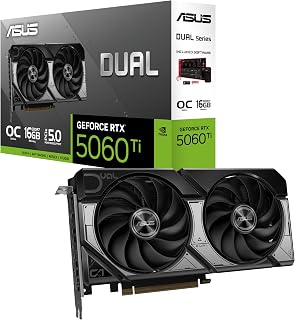
16GB of GDDR7 on a card this accessible is notable for Blender work, since Cycles scenes with heavy texture sets or particle systems can lean hard on VRAM. The 2632 megahertz clock keeps viewport interaction responsive, and modern Displayport 2.1b outputs mean a high refresh reference monitor setup is easy to drive alongside the main render display.
Pros
- 767 AI TOPS accelerates OptiX raytracing and denoising in Cycles
- 16GB GDDR7 eliminates VRAM limits in complex Blender scenes
- 0dB fan mode maintains silence during modeling and scripting
- Compact 2.5-slot design fits small-form-factor render workstations
Cons
- Compact sizing limits overclocking headroom for extreme render optimization
- Higher-tier cards render faster for time-sensitive commercial work
Blender rendering on the ASUS Dual RTX 5060 Ti leverages 767 AI TOPS of computational power from NVIDIA's Blackwell architecture, accelerating OptiX raytracing and denoising workflows that Blender artists rely on daily. The 16GB GDDR7 memory handles large scenes with complex geometry and high-resolution textures without hitting VRAM bottlenecks that plague smaller cards. DLSS 4 support extends to viewport rendering, letting you preview changes in real-time before committing to final renders. The compact 2.5-slot design fits into small-form-factor workstations without sacrificing the thermal performance needed for sustained rendering sessions. Axial-tech fans with 0dB technology keep your workspace silent during modeling and scripting, then ramp up efficiently when you launch batch renders. Dual ball bearing fans promise longevity through thousands of render hours. The dual BIOS toggle between Quiet and Performance modes gives you control over noise versus speed depending on whether you're working in a shared studio or running overnight render farms. PCIe 5.0 connectivity and 16GB capacity position this card to handle Blender's growing demands as procedural workflows and physics simulations become more complex.
GPU and Memory: NVIDIA GeForce RTX 5060 Ti, 16GB GDDR7, 2632 MHz (OC Mode), 2602 MHz (Default Mode). Supports DLSS 4 and Blackwell architecture for AI-accelerated performance.
Connectivity and Cooling: 3x DisplayPort 2.1b, HDMI 2.1b, PCIe 5.0 x16 interface. Dual Axial-tech fans with dual ball bearings, 2.5-slot compact form factor, 0dB technology for silent idle operation.
Physical and System Requirements: Dimensions 9 inches long by 4.7 inches wide, weighs 0.66 kg. Supports maximum resolution of 7680x4320 pixels. Includes 3-year warranty and SpeedSetup manual. Compatible with standard desktop builds requiring adequate power supply and proper case ventilation.
Blender artists building compact workstations or upgrading ITX systems will appreciate the 2.5-slot footprint and silent operation during interactive work. The 16GB buffer suits freelancers handling client projects with detailed models and multiple 4K texture sets. Skip this if you're rendering massive architectural visualizations that exceed 16GB VRAM or need the absolute fastest render times for commercial production pipelines where the RTX 5070 or higher tier cards justify their cost through reduced billable hours.

GIGABYTE Radeon RX 9070 XT Gaming OC 16GB GDDR6
This card pairs 16GB of GDDR6 with a fast 3060 megahertz clock, giving Blender's HIP-RT rendering path plenty of memory for complex scenes and dense geometry. Creators working on AMD-friendly pipelines get real headroom for high-res textures and multiple viewports without hitting VRAM limits mid-project, and PCIe 5.0 keeps data moving quickly between GPU and system memory.
Pros
- 16GB GDDR6 handles large texture libraries without VRAM errors
- HIP-RT raytracing provides capable alternative to NVIDIA OptiX
- WINDFORCE cooling maintains thermal stability during batch renders
- Price allows budget allocation to storage and RAM upgrades
Cons
- NVIDIA RTX cards still render faster in direct benchmarks
- Requires 750W power supply minimum for stable rendering
The GIGABYTE Radeon RX 9070 XT delivers Blender rendering performance without the premium NVIDIA tax, making it the smart choice for studios watching their hardware budget while still needing capable GPU acceleration. AMD's latest architecture handles Blender's HIP-RT raytracing in Cycles, offering a genuine alternative to OptiX for artists willing to adapt their workflow. The 16GB GDDR6 memory outpaces 12GB cards when working with large texture libraries and detailed architectural models, preventing the mid-render VRAM errors that kill productivity. PCIe 5.0 support ensures bandwidth headroom as Blender's GPU memory transfers grow with each release. The WINDFORCE cooling system with server-grade thermal gel keeps temperatures controlled during overnight batch renders, while Hawk fans remain quieter than expected given the card's performance level. The 11.34-inch length fits most workstation cases without requiring chassis upgrades. Build quality proves reliable for daily rendering work once drivers stabilize after installation. The silver and black design suits professional studio environments better than aggressive gaming aesthetics. For Blender artists rendering product visualizations, motion graphics, and architectural walkthroughs at 1440p and 4K, this card handles the compute demands while leaving budget for faster storage, more RAM, or better displays.
Core Specifications
GPU: AMD Radeon RX 9070 XT
Memory: 16GB GDDR6
Memory Clock: 2600 GHz
GPU Clock: 3060 MHz
Interface: PCIe 5.0 x16
Max Resolution: 7680 x 4320 (8K)
Physical and Connectivity
Dimensions: 11.34 inches (L) x 5.2 inches (W)
Weight: 1.78 kg
Output: DisplayPort
Power Connectors: Dual 8-pin (750W+ PSU recommended)
Cooling: WINDFORCE system with Hawk fans and thermal gel
Warranty and Support
Manufacturer: GIGABYTE
Warranty: 3 years
Model: GV-R9070XTGAMING OC-16GD
Gaming Performance at Common Resolutions
1440p Gaming: 160-220fps on most modern AAA titles at high settings. Excellent for competitive gaming and high-refresh monitors.
4K Gaming: Playable at high settings on most titles, medium settings on demanding new releases. Solid for content creators monitoring in 4K.
Esports Titles: 300+ fps possible on optimized competitive games for ultra-high refresh gameplay.
Real-World Use Cases
Best suited for 1440p gaming at 144+ fps, 4K content creation workflows, professional 3D rendering, and VR gaming. Handles flight simulators like DCS at high settings with 4K head tracking. Eliminates VRAM constraints for media professionals working with large files.
Driver Recommendations
Run DDU (Display Driver Uninstaller) before installation if upgrading from another card. Install latest AMD drivers for maximum stability and performance. Update BIOS if required by your system for PCIe 5.0 compatibility.

With 12GB of GDDR7 and a 2640 megahertz clock, this card gives Cycles renders enough VRAM headroom for mid-complexity scenes while keeping OptiX denoising snappy. Blender artists juggling textured character models or product shots will appreciate that the memory ceiling rarely becomes the bottleneck, and the triple DisplayPort 2.1a outputs support a proper multi-monitor viewport and reference setup.
Pros
- Military-grade components and thermal pads survive sustained render workloads
- Maintains 65°C under long Cycles renders without thermal throttling
- 12GB GDDR7 handles production scenes with complex procedural textures
- DLSS 4 accelerates viewport navigation in subdivided geometry
Cons
- 13-inch length and 2-inch thickness require case compatibility verification
- 12GB VRAM may constrain next-generation scene complexity
The ASUS TUF RTX 5070 OC targets Blender professionals who render daily and need a card that survives years of sustained workloads without thermal throttling or component failure. Military-grade components and protective PCB coating withstand the heat cycling that comes with launching renders after lunch and letting them run until morning. The 12GB GDDR7 memory and 2640MHz boost clock handle production scenes with subdivision surfaces, particle systems, and procedural textures that bog down entry-level cards. Three Axial-tech fans with phase-change thermal pads maintain 65°C under sustained Cycles renders, preventing the performance degradation that occurs when GPUs hit thermal limits during long batch jobs. DLSS 4 support accelerates viewport navigation in heavy scenes, letting you iterate on lighting and composition without waiting for real-time feedback to catch up. The included bracket and stand prevent PCB stress during transport between studio and home office. PCIe 5.0 connectivity and the 3.125-slot cooling solution balance current performance with future-proofing as Blender's GPU requirements grow. The card excels in hybrid workflows, handling AI texture generation and lighter video compositing alongside traditional 3D rendering without requiring separate hardware for each task.
GPU and Memory: NVIDIA GeForce RTX 5070, 12GB GDDR7, 2640MHz boost clock, PCIe 5.0 interface
Cooling and Design: 3.125-slot form factor, three Axial-tech fans, phase-change thermal pad, protective PCB coating, military-grade components, GPU Guard bracket
Connectivity: 3x DisplayPort 2.1a, 2x HDMI 2.1b, 7680x4320 maximum resolution support
Physical: 13 inches long, 5.5 inches wide, 3.4 pounds, includes cooling bracket and stand
Warranty and Support: 3-year manufacturer warranty, GPU Tweak III software for performance monitoring and thermal control
Professional Blender artists billing clients for rendering hours need the reliability and sustained performance this card delivers through long render sessions. Freelancers juggling modeling, rendering, and AI texture tools benefit from the versatility across creative workloads. Skip this if you're a hobbyist rendering simple scenes where a more affordable card suffices, or if your case cannot accommodate a 13-inch card over 2 inches thick without modification.

The WINDFORCE cooling system on this 16GB GDDR7 card is built to sustain the kind of long, thermally demanding Cycles renders that Blender artists run overnight. A 256-bit memory bus keeps data throughput high when shading complex materials, and the near 2.73 gigahertz clock helps viewport denoising and final frame renders complete noticeably faster.
Pros
- Enhanced Tensor Cores accelerate OptiX denoising in Cycles renderer
- 16GB GDDR7 memory accommodates production scenes with heavy assets
- PCIe 5.0 bandwidth speeds up large scene file transfers
- Three-fan WINDFORCE cooling maintains stability during overnight batch renders
Cons
- Substantial power draw requires robust PSU with 8-pin connectors
- Generates significant heat requiring good case airflow
Blender's Cycles renderer thrives on raw GPU compute power, and the GIGABYTE RTX 5080 Gaming OC provides exactly that with enhanced Tensor Cores that accelerate rendering through OptiX denoising. The 16GB GDDR7 memory buffer handles production scenes with massive texture sets and high-poly models without forcing you to simplify assets. NVIDIA's Blackwell architecture brings architectural improvements that translate directly to faster render times compared to previous generations. The WINDFORCE three-fan cooling system keeps the card stable during the sustained 100% GPU utilization typical of batch rendering overnight. PCIe 5.0 bandwidth ensures scene data transfers quickly when working with large Blender files. The enhanced RT Cores accelerate viewport rendering with real-time ray tracing, letting you iterate faster before committing to final renders. At 2.73 GHz boost clock and 30000 MHz memory speed, this card maintains high throughput. The 7680x4320 output resolution supports 8K preview monitors for detailed work. Build quality withstands the thermal stress of constant rendering workloads. The included VGA holder prevents PCB flex under the card's weight during transport or repositioning.
GPU Architecture: NVIDIA GeForce RTX 5080 (Blackwell)
Memory: 16GB GDDR7, 256-bit interface
Memory Speed: 30,000 MHz
GPU Clock: 2.73 GHz boost
Interface: PCIe 5.0 x16
Cooling: WINDFORCE triple-fan system
Power Connectors: 1x 12V connector, 2x 6-pin to 3x 8-pin adapter
Display Outputs: DisplayPort, HDMI
Max Resolution: 7680x4320 pixels
Physical Dimensions: 13.46 inches (L) x 5.59 inches (W)
Weight: 4 pounds
Warranty: 3-year manufacturer
Model: GV-N5080GAMING OC-16GD
Choose this if you render professionally in Blender and need maximum speed for client deadlines or complex animation projects. The enhanced Tensor Cores and 16GB memory suit studios handling feature film assets or architectural visualization with extreme detail. Skip this if you render simple scenes occasionally or work primarily in Eevee where mid-tier cards perform adequately. Also avoid if your power supply lacks the necessary 8-pin connectors or your case airflow cannot handle the heat output from sustained rendering loads.

This card's 16GB GDDR7 buffer combined with a 2730 megahertz clock makes it well suited to heavier Blender projects involving volumetrics or dense subdivision geometry that eat through VRAM fast. The dual HDMI 2.1b and triple DisplayPort 2.1a outputs also mean render previews can be checked on a secondary color-accurate display without swapping cables.
Pros
- Phase-change thermal pad maintains consistent performance during marathon Blender renders
- 16GB GDDR7 memory handles complex scenes without bottlenecks
- Military-grade components and protective coating ensure long-term reliability
- GPU Tweak III enables workflow-specific performance tuning
Cons
- Requires 850W PSU minimum with appropriate connectors
- Large 348mm length and 3.6-slot design demands spacious case
Blender rendering demands GPU stability under marathon sessions, and the ASUS TUF Gaming RTX 5080 delivers exactly that with its phase-change thermal pad technology. Unlike conventional thermal paste that degrades over time, this solution maintains consistent temperatures during the multi-hour renders Blender artists regularly face. The three Axial-tech fans work with an optimized fin array to dissipate heat efficiently, preventing thermal throttling that would slow your render times. Built on NVIDIA's Blackwell architecture with 16GB GDDR7 memory, this card handles complex scenes with heavy geometry, volumetrics, and ray-traced lighting without memory bottlenecks. The military-grade components and protective PCB coating ensure reliability during the constant heavy loads typical of production rendering. GPU Tweak III software provides monitoring and performance tuning specific to your workflow needs. The Auto-Extreme manufacturing process reduces failure points. While it requires an 850W PSU and occupies 3.6 slots across 348mm of length, the card's thermal engineering and build quality make it a dependable rendering workstation foundation for serious Blender artists.
GPU: NVIDIA GeForce RTX 5080
Memory: 16GB GDDR7
Boost Clock: 2730 MHz (OC Mode), 2700 MHz (Default Mode)
Physical Dimensions: 348mm length, 3.6-slot design, 4.3 lbs
Video Outputs: 3x DisplayPort 2.1a, 2x HDMI 2.1b
Power Requirement: Minimum 850W PSU with 16-pin 12V-2x6 (12VHPWR) connector
Manufacturing: Auto-Extreme precision automated manufacturing
Cooling: Three Axial-tech fans, phase-change GPU thermal pad, protective PCB coating
Power Supply: Verify your PSU is rated for 850W minimum and includes the required 16-pin 12V-2x6 (12VHPWR) connector. Standard 6-pin or 8-pin connectors are insufficient for this card.
Physical Clearance: Confirm your case accommodates the 348mm length and can support the 3.6-slot width requirement. Measure internal dimensions and account for storage drives, fans, and other components that may interfere with the card's placement.
System Integration: The card includes a GPU bracket for secure installation. Ensure your motherboard provides adequate PCIe slot access and that your monitor cables support DisplayPort 2.1a or HDMI 2.1b for optimal performance.

With a substantial 48GB of GDDR6, this professional card is aimed at Blender users pushing extremely large scenes, like architectural visualizations or VFX shots with dense geometry and 8K textures that would choke smaller VRAM pools. PCI Express connectivity and workstation-grade build quality make it a dependable choice for studios rendering feature-heavy files without memory swapping slowdowns.
Pros
- Enormous 48GB memory footprint perfect for running cutting-edge AI models and large datasets without throttling
- Strong real-world performance for AI LLM inference confirmed by users running models like Qwen 27B successfully
- Professional-grade build quality and reliability with enterprise-class support and warranty coverage
- Scalable solution, users report stacking multiple cards for exponential VRAM expansion
- Exceptional value proposition for AI workloads compared to cloud-based alternatives over time
Cons
- High initial cost makes it less accessible for hobbyists or small teams exploring AI applications
- Not optimized for gaming or consumer graphics applications, existing options offer better performance-per-dollar
- Requires compatible motherboards and power delivery, some older server configurations may not support it
The PNY RTX A6000 is a professional-grade graphics processing unit built on NVIDIA's Ampere architecture, delivering workstation-class performance for artificial intelligence, deep learning, and professional visualization. This card targets data scientists, researchers, and enterprises who need significant computational power for running large language models locally, training neural networks, and handling memory-intensive applications without cloud dependencies.
What sets this card apart is its 48GB of GDDR6 memory, enabling researchers to run sophisticated AI models like Qwen 27B on a single GPU. Real-world users report exceptional performance for local LLM inference, making it a practical choice for organizations seeking to control data privacy while avoiding expensive cloud compute costs. The PCI Express 4.0 x16 interface maximizes bandwidth for data-heavy workloads, while four DisplayPort outputs support professional multi-monitor setups at extreme resolutions.
The physical design reflects professional heritage, weighing just over 1kg with compact dimensions of 10.51 inches length and 4.41 inches width. The single-fan cooling solution operates quietly enough for server environments, though expect noticeable humming under full load. Build quality appears solid, with the card housed in professional enclosures that prioritize function over flashy aesthetics.
Primary limitations include the premium pricing which makes entry challenging for smaller teams, and this card simply is not designed for gaming or consumer graphics work where consumer RTX options deliver better gaming performance. Additionally, compatibility requires careful motherboard selection, as some older server platforms maintain restricted GPU approval lists.
For professionals and organizations serious about local AI inference, advanced CAD work, or scientific computing, the RTX A6000 delivers exceptional value when amortized over its lifespan compared to ongoing cloud computing fees. The 3-year warranty and professional support ensure reliability in demanding production environments.
AI researchers and data scientists deploying large language models locally without cloud dependencies. The 48GB memory capacity handles models from Qwen to other enterprise-scale LLMs efficiently.
Deep learning engineers training neural networks and working with large datasets that require significant VRAM. Stacking multiple cards enables exponential memory scaling for massive model training.
Professional visualization and CAD specialists requiring high-resolution multi-monitor support for complex technical graphics and simulations at 7680x4320 resolution.
Organizations seeking privacy-critical computing solutions where sensitive data cannot be processed in external cloud environments.
Gaming enthusiasts should skip this card entirely. Consumer RTX 40 and 50 series GPUs deliver superior gaming performance at lower prices, and this professional architecture prioritizes compute over gaming optimization.
Casual users exploring AI as a hobby will find the premium price tag hard to justify. Consumer-grade alternatives or cloud services may provide better value for casual experimentation.
Budget-conscious teams should evaluate used professional GPUs or dual consumer-grade cards as potential cost-saving alternatives for specific workloads.

Pros
- Substantial speed boost for professional applications like Photoshop, Lightroom, and video editing software
- Real-time ray tracing capability brings immersive rendering to professional workflows
- Reliable OpenGL performance optimized for CAD, modeling, and design tools
- Compact single-slot design maximizes compatibility with existing desktop workstations
- Strong customer satisfaction with proven stability for creative professionals
Cons
- Requires external power connector, limiting portability and adding cable management considerations
- Warranty registration requires original packaging and documentation, or coverage may be voided
- Premium pricing positions it primarily for professional users rather than budget-conscious consumers
The PNY NVIDIA Quadro RTX 4000 is a workstation graphics card engineered for professionals who demand real-time rendering capabilities. Whether you are a 3D artist, architect, video editor, or CAD designer, this card bridges the gap between professional-grade stability and next-generation ray tracing performance. It is not intended for gaming but rather for intensive professional workflows where accuracy and reliability matter.
Performance stands out as the key strength. Users report a 3X speed improvement over the previous Quadro P2000 generation, making previously time-consuming tasks like photo stabilization or large-scale video production dramatically faster. The 36 RT cores enable photorealistic ray tracing in real time, while 288 Tensor cores accelerate AI-powered features and deep learning applications. For those working with massive datasets in modeling or animation software, the 8GB GDDR6 memory prevents the bottlenecking issues that plague less capable cards.
Design and build quality reflect professional-grade construction. The single-slot form factor is a significant advantage, allowing installation in standard workstations without extensive reconfiguration. However, the card does require an external power connector, adding one more cable to manage. Support for four simultaneous displays at extreme resolutions makes it ideal for sprawling multi-monitor production environments.
One notable consideration is the warranty structure. PNY requires original documentation and matching serial numbers for warranty registration. Some users have encountered issues when purchasing from third-party sellers without full original packaging, potentially voiding coverage. Buying from authorized retailers helps mitigate this risk.
The RTX 4000 delivers exceptional value for professional workstations. If your software demands GPU acceleration and your budget accommodates a premium graphics card, this is a proven workhorse that will accelerate your creative output and justify its investment through time savings alone.
This card is ideal for professional content creators including architects, 3D modelers, video editors, photographers using AI-powered plugins, and CAD professionals. If your work involves rendering, deep learning, or processing large datasets, the Quadro RTX 4000 will pay for itself through productivity gains.
Gamers should look elsewhere. This is not optimized for gaming and significantly overbuilt for that use case. Casual users who only need web browsing, office work, or light photo editing should consider less expensive alternatives.
GPU Architecture: NVIDIA Turing (Quadro RTX series)
Memory: 8GB GDDR6
CUDA Cores: 2304
RT Cores: 36
Tensor Cores: 288
Peak Performance: 7.1 TFLOPS (FP32), 14.2 TFLOPS (FP16), 28.5 TOPS (INT8), 57.0 TFLOPS (Deep Learning)
Memory Bandwidth: High-speed GDDR6
Display Outputs: 3x DisplayPort 1.4, 1x Virtual Link Connector (USB Type-C)
Maximum Resolution: 7680x4320 at 60Hz (4 simultaneous displays)
Form Factor: Single-slot design
Power Requirements: External power connector
Interface: PCI-Express x16
Cooling: Single-fan active cooling
Warranty: 3 years (with documentation and registration)

32GB of GDDR6 memory puts this card in a different league for Blender artists working on massive scenes, since that buffer can hold huge texture libraries and complex node graphs without spilling to system RAM. The blower cooler design suits multi-GPU render rigs, and AI-accelerator hardware complements denoising workflows that lean on machine learning passes.
Pros
- Exceptional memory capacity ideal for large language models and complex AI training tasks
- Professional-grade cooling design exhausts heat directly, perfect for dense server configurations
- Strong ray tracing and compute performance benefits both AI and creative professionals
- Robust build quality with metal shroud and backplate rated for continuous operation
Cons
- Requires verification of software and driver support for specific professional applications before purchase
- Two-slot form factor may require significant case planning in existing single-GPU workstations
The ASRock Radeon AI PRO R9700 is a workstation-class graphics processor designed specifically for professionals in AI development, 3D rendering, and content creation. Its 32GB GDDR6 memory and RDNA 4 architecture make it a powerhouse for handling massive models and compute-intensive projects that consumer GPUs simply cannot sustain.
What sets this card apart is the combination of specialized AI accelerators, robust cooling, and enterprise-level design choices. The 64 Compute Units paired with 2nd Gen AI Accelerators deliver meaningful acceleration for machine learning workflows, while the quad DisplayPort 2.1a outputs let professionals drive multiple 8K displays simultaneously. The 2920 MHz boost clock and 256-bit memory bus ensure sustained performance during extended rendering or training sessions.
Build quality reflects its professional positioning. The vapor chamber heatsink with Honeywell PTM7950 thermal interface material, metal shroud, and die-cast backplate are engineered for 24/7 operation in server environments. The blower cooling design is particularly smart for multi-GPU setups where card-to-card cooling would struggle, making this ideal for workstation farms and render clusters.
The main limitation is compatibility verification. ASRock recommends confirming that your professional software stack supports this card before purchase, as driver availability varies across different AI frameworks and creative applications. Additionally, the price point and two-slot footprint demand careful planning in existing workstations.
For AI researchers, motion graphics studios, and 3D visualization teams ready to invest in professional infrastructure, the R9700 delivers legitimate performance gains and reliability. It is not a gaming card, nor a value play, but a purposeful tool for demanding professional workflows where memory, cooling, and specialized compute matter more than raw consumer benchmarks.
GPU Architecture: AMD Radeon AI PRO R9700, RDNA 4 with 64 Compute Units
Memory: 32GB GDDR6 on 256-bit bus
Clock Speed: 2920 MHz boost
Ray Tracing: 3rd Generation
AI Accelerators: 2nd Generation dedicated AI accelerators
Cooling: Vapor chamber heatsink with Honeywell PTM7950 thermal interface, single blower design
Power Interface: PCIe 5.0
Display Outputs: Four DisplayPort 2.1a
Form Factor: Standard 2-slot design
Build: Die-cast metal shroud, metal backplate
Brand: ASRock
Who Should Buy This Card? AI researchers and engineers training large language models, 3D studios rendering complex scenes, video professionals editing 8K content, and system integrators building multi-GPU workstations or servers. This is a professional tool, not an entry-level option.
Before You Purchase: Verify that your target software (PyTorch, TensorFlow, DaVinci Resolve, Maya, Blender, etc.) has confirmed driver support for the R9700. Contact ASRock directly through Amazon if you are uncertain. Ensure your power supply can handle the card and that your case or server rack accommodates the two-slot form factor.
Expected Use Cases: Machine learning inference and training, 8K and higher video editing, complex 3D rendering, scientific computing, data visualization, and multi-display professional workstations. The 32GB memory is particularly valuable when working with models larger than 16GB.
Value Consideration: At this price, this is an investment. It makes sense when the time saved in rendering or training justifies the cost, or when the 32GB memory is genuinely needed. For smaller studios or academic labs, consider total cost of ownership versus renting cloud GPU time.
How to Choose a GPU for Blender Rendering
Focus on the renderer you use most, the VRAM required by your largest scenes, and the physical limits of your workstation. A powerful card is only useful when its software support, cooling needs, and power connector requirements fit the rest of your build.
Long renders also create files worth protecting. Consider a reliable external hard drive for backups, and look at NAS hard drive options for shared creative storage when several machines need access to the same assets.
Choose your Cycles rendering path first
Blender Cycles can use NVIDIA CUDA and OptiX or AMD HIP, but support depends on your Blender build, operating system, and installed driver. Choose that software path before shopping, then confirm that the card is supported by the Blender version you plan to use.
For NVIDIA-focused workflows, the ASUS TUF Gaming GeForce RTX™ 5080 16GB GDDR7 OC and GIGABYTE GeForce RTX 5080 Gaming OC 16G Graphics provide 16GB of GDDR7 memory on Blackwell architecture. The ASUS TUF Gaming GeForce RTX 5070 12GB GDDR7 OC is a practical alternative for more moderate scenes, while the PNY NVIDIA Quadro RTX 4000 is an older Turing-based professional option whose 8GB capacity requires careful scene management.
Match VRAM capacity to your real scenes
VRAM creates a firm boundary for GPU rendering. Large texture sets, dense subdivision, particle systems, hair, geometry nodes, and heavy asset libraries all consume memory, so plan around your largest active scene rather than a simple viewport project.
The GIGABYTE Radeon RX 9070 XT Gaming OC 16G Graphics, ASUS Dual GeForce RTX 5060 Ti 16GB GDDR7 OC, and ASUS Dual Radeon RX 9060 XT 16GB GDDR6 each offer 16GB for creators who want more breathing room. For substantially larger work, the NVIDIA RTX PRO 4000 SFF Blackwell 24GB GDDR7 ECC supplies 24GB with ECC, the ASRock Radeon AI PRO R9700 Creator 32GB reaches 32GB, and the PNY VCNRTXA6000-PB NVIDIA 48GB GDDR6 Graphics Card delivers 48GB for memory-intensive professional workloads.
Measure case clearance and sustained cooling
Rendering can maintain a demanding load for hours, which makes airflow and card dimensions central buying factors. The ASUS Dual GeForce RTX 5060 Ti 16GB GDDR7 OC and ASUS Dual Radeon RX 9060 XT 16GB GDDR6 use compact 2.5-slot designs with dual Axial-tech fans, making them useful starting points for smaller cases that still need meaningful cooling.
Larger cards need more planning. The ASUS TUF Gaming GeForce RTX™ 5080 16GB GDDR7 OC measures 348mm long and occupies 3.6 slots, while the ASUS TUF Gaming GeForce RTX 5070 12GB GDDR7 OC uses a 3.125-slot cooler. For dense workstations, the low-profile dual-slot NVIDIA RTX PRO 4000 SFF Blackwell 24GB GDDR7 ECC and the two-slot blower-cooled ASRock Radeon AI PRO R9700 Creator 32GB can be more practical fits.
Plan for power, displays, and your full workspace
Verify your power supply, available PCIe slots, and connector arrangement before committing to a GPU. In particular, the ASUS TUF Gaming GeForce RTX™ 5080 16GB GDDR7 OC calls for an 850W power supply and a 16-pin 12V-2×6 connector, so it is a card that rewards careful system planning rather than an impulsive upgrade.
Your workspace also affects how comfortable Blender feels during long projects. A tenkeyless keyboard for a compact desk can leave more room for mouse movement, while a dedicated number pad for Blender input preserves convenient access to numerical entries without crowding your main layout.
Final Thoughts
For creators who need ECC memory and a compact professional form factor, the NVIDIA RTX PRO 4000 SFF Blackwell 24GB GDDR7 ECC is a focused workstation choice. If you want 16GB of NVIDIA memory in a more broadly compatible dual-fan design, the ASUS Dual GeForce RTX 5060 Ti 16GB GDDR7 OC offers a balanced direction for serious Blender projects.
Frequently Asked Questions
What GPU is best for Blender Cycles rendering in 2026?
The right choice depends on whether you use CUDA and OptiX or HIP, plus the size of your scenes. A 16GB GPU such as an RTX 5080 model can suit demanding creator desktops, while the NVIDIA RTX PRO 4000 SFF Blackwell 24GB GDDR7 ECC gives complex projects more memory headroom in a smaller professional form factor. Always confirm Blender, driver, and operating-system support before buying.
How much VRAM do I need for Blender rendering?
For lighter scenes, 8GB to 12GB can be workable when you manage textures and geometry carefully. A 16GB card is a more flexible target for many active Blender users, particularly for detailed assets and larger texture libraries. If you routinely handle very complex scenes, 24GB, 32GB, or 48GB can prevent memory capacity from becoming the main constraint.
Can I use an AMD GPU for Blender rendering?
Yes, Blender Cycles can use supported AMD GPUs through HIP. The GIGABYTE Radeon RX 9070 XT Gaming OC 16G Graphics and ASUS Dual Radeon RX 9060 XT 16GB GDDR6 offer 16GB options, while the ASRock Radeon AI PRO R9700 Creator 32GB is aimed at professional creator and compute workloads. Confirm HIP support for your specific Blender version and operating system before making a final decision.
What else should I upgrade for a Blender workstation?
Besides the GPU, make room for fast project storage, dependable backups, adequate system memory, and cooling that can sustain lengthy renders. A custom keyboard kit for shortcut-focused work will not change render duration, but it can make navigation and repeated commands more comfortable. Put reliability first when your workflow includes long renders or client delivery deadlines.





Write Your Review
No reviews yet. Be the first to share your experience!