

Choosing the right gaming mouse can transform your performance, whether you’re competing in ranked FPS matches or grinding through MMO raids. ASUS offers a diverse lineup spanning the premium ROG brand and budget-friendly TUF series, each engineered with distinct features for different gaming needs.
This guide examines 8 ASUS gaming mice across wireless and wired options, from featherweight 54-gram esports models to ergonomic designs with swappable switches. You’ll find options for MMO-focused button layouts, ultra-precise sensors, and connectivity solutions that fit your setup.
Quick answer
This guide compares 8 picks, with ASUS ROG Keris P509 65g Lightweight FPS Gaming Mouse ranked first. ASUS TUF M4 Wireless Gaming Mouse | 12K DPI, 6 holds the highest customer rating among them. ASUS TUF Gaming M3 Gen II Wired Gaming Mouse - 59g has the most customer reviews.

Pros
- Genuinely lightweight at 65 grams without compromising durability or build quality
- Versatile ergonomic design accommodates different grip preferences and hand sizes
- Professional tournament-grade sensor with no acceleration or angle snapping
- Highly customizable through Armoury Crate software with Aura Sync RGB support
- Excellent value for the quality and feature set compared to higher-priced competitors
Cons
- Small to medium size may feel cramped for larger hands in some grip positions
- Wired design limits mobility compared to wireless alternatives, though the long paracord mitigates this
- Requires Windows 10 and Armoury Crate software for full customization features
The ASUS ROG Keris P509 is a competition-ready gaming mouse engineered for esports professionals and serious FPS players who demand responsiveness without sacrificing comfort. At just 65 grams, it's built to minimize hand fatigue during marathon gaming sessions while maintaining the rigidity needed for consistent performance. This mouse excels for players using palm, claw, or fingertip grips, making it genuinely versatile despite its compact profile.
The star feature is the specially tuned 16,000 DPI optical sensor paired with a blazing 1000 Hz polling rate and 400 IPS tracking speed. These specs translate to zero input lag and pixel-perfect accuracy in fast-paced shooters. The ROG Micro Switches deliver consistent click feedback with a rated 70-million-click lifespan, while the push-fit socket design lets you adjust click force and swap switches as needed. The premium PBT polymer buttons maintain their matte finish and grip even after heavy use.
Build quality reflects ASUS's premium ROG positioning without excessive pricing. The honeycomb inner structure keeps weight down while maintaining structural integrity. The included ROG Paracord and 100% PTFE rounded-edge mouse feet provide a swift, smooth glide across any mousepad. Armoury Crate software offers intuitive DPI adjustments, button remapping, and Aura Sync RGB customization, though setup requires Windows 10.
The main drawback is the compact size, which may feel restrictive if you have larger hands, particularly for claw grip users. The wired connection eliminates wireless convenience, though the long paracord and included cable management help mitigate mobility concerns. For competitive play, this is an advantage rather than a limitation.
The ASUS ROG Keris P509 delivers tournament-caliber performance at a competitive price. It's the ideal choice for FPS enthusiasts who prioritize lightweight responsiveness, durable construction, and proven ergonomic design. Customer feedback consistently highlights exceptional comfort and reliability, making it one of the best values in gaming mice.
Sensor: ROG 16,000 DPI optical sensor with 400 IPS tracking speed and 1000 Hz polling rate
Design: 65-gram honeycomb construction, ambidextrous ergonomic profile with 4.65" x 2.44" dimensions
Switches: ROG Micro Switches rated for 70 million clicks, push-fit socket design for customizable click force
Buttons: 8 programmable buttons, premium PBT polymer left and right buttons with matte finish
Feet: 100% PTFE rounded-edge mouse feet with 5-meter range
Connectivity: Wired USB with ROG Paracord cable
Lighting: Aura Sync RGB with Armoury Crate software control
Compatibility: Windows 10, PC and laptop
Best For: Competitive FPS players, esports enthusiasts, and anyone seeking a lightweight gaming mouse with professional-grade precision. Ideal for players with small to medium hands who use palm, claw, or fingertip grips.
Consider Alternatives If: You have large hands and need extra room, prefer wireless connectivity, or use exclusively non-FPS games where extreme DPI and polling rate are less critical.
Not Recommended For: Mac users, those requiring wireless convenience as a primary feature, or budget shoppers looking for sub-$30 options without performance compromises.
Pros
- Responsive and tactile click feedback with separated left/right buttons for faster actuation
- True ambidextrous design works equally well for left and right-handed gamers
- Dual connectivity modes provide flexibility to switch between PC and mobile devices seamlessly
- Lightweight construction combined with premium build materials balances speed and durability
- Armoury Crate software offers deep customization for buttons, DPI profiles, and performance tuning
Cons
- Battery-powered design means ongoing cost and maintenance compared to wired alternatives
- Limited information about battery life duration, which varies based on usage and connectivity mode
- No mention of grip texture beyond the PBT cover, which may feel plain for some users
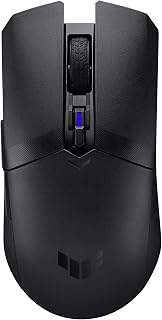
The ASUS TUF M4 is a wireless gaming mouse engineered for competitive players who demand precision and reliability. It's designed for esports enthusiasts, FPS gamers, and anyone who spends long hours gaming and needs a responsive, customizable peripheral that won't bog them down.
The standout feature is its 12K DPI optical sensor paired with six programmable buttons, giving you pixel-perfect accuracy and complete control customization. The 62-gram weight keeps your arm fresh during marathons, while the dual wireless modes let you switch between your PC and mobile without missing a beat. Real-world performance benefits from 100% PTFE feet that glide smoothly on any pad and tactile clicks that fire faster than most mice in this class.
Build quality impresses with its PBT top cover and ionic silver-treated side buttons, materials that resist wear and shine over time. The ambidextrous shape works for both left and right-handed gamers equally well, and the alcohol-safe surface means you can keep it clean without worry. The included AA/AAA battery converter is a nice touch for weight-conscious players looking for that extra edge.
The main drawback is reliance on batteries, which adds ongoing costs and maintenance compared to wired mice. Battery life specifics aren't detailed here, so that's something to research for your usage pattern. The grip texture is functional but minimal, which some players may find less comfortable during extended sessions.
Verdict: The ASUS TUF M4 delivers solid competitive gaming performance at a reasonable price point. Its combination of responsive controls, dual connectivity, and lightweight design makes it a smart choice for gamers who won't compromise on precision or customization. If battery maintenance doesn't bother you, this is a genuine contender in the mid-range wireless gaming mouse category.
Connectivity: 2.4 GHz wireless and Bluetooth dual mode
Sensor: 12,000 DPI optical sensor with adjustable sensitivity
Buttons: Six tactile programmable buttons including clickable scroll wheel
Weight: 62 grams (10% lighter with AAA battery and converter)
Materials: PBT top cover with ionic silver-treated side buttons, 100% PTFE mouse feet
Power: AA or AAA batteries, converter included
Software: ASUS Armoury Crate for button mapping, DPI profiles, and performance customization
Design: Ambidextrous form factor suitable for both left and right-handed users
Color: Black
Best For: This mouse excels for esports competitors, FPS players, and anyone prioritizing speed and precision. The programmable buttons and lightweight design make it ideal for players with specific in-game control needs. The dual wireless modes appeal to players who switch between PC and mobile gaming.
Consider Alternatives If: You prefer wired mice to avoid battery maintenance, need extended battery life specifications before committing, or want a heavier mouse for stability. Players sensitive to minimal grip texture may find other options more comfortable.
Setup Tips: Use the Armoury Crate software immediately to map buttons to your game of choice and lock in your preferred DPI settings. Test both 2.4 GHz and Bluetooth modes to determine which offers better stability in your specific setup. Start with the AAA battery and converter for optimal weight reduction if you value speed.

Pros
- Exceptionally lightweight at 59 grams minimizes hand strain and improves flick accuracy
- High 8000 DPI sensor with four on-the-fly sensitivity levels suits multiple game genres
- IP56 protection and antibacterial coating extend product lifespan and hygiene
- Right-handed ergonomic design with well-placed 6 buttons for accessibility
- Reliable wired connection eliminates lag and battery concerns
Cons
- Right-handed design only, not suitable for left-handed gamers
- Wired connection limits mobility compared to wireless gaming mice
- Entry-level positioning means fewer advanced features than premium gaming mice
The ASUS TUF Gaming M3 Gen II is an entry-level wired gaming mouse built specifically for competitive right-handed FPS players. At $22.99, it targets budget-conscious gamers who want reliable performance without premium pricing. This mouse delivers solid fundamentals for shooters and fast-paced competitive titles.
The standout feature is its 59-gram ultralight construction, which significantly reduces hand fatigue during marathon gaming sessions. The 8K DPI optical sensor provides pixel-precise tracking with four adjustable sensitivity levels accessible via a DPI button, allowing quick adaptation to different games. Smooth PTFE feet ensure consistent gliding across various mousepad surfaces, critical for maintaining aim precision.
Build quality reflects the TUF gaming line's durability focus. The IP56 dust and water resistance protects against accidental spills and dust accumulation, extending the mouse's lifespan. The ASUS Antibacterial Guard adds a hygienic layer that inhibits bacterial growth, a practical feature for mice used daily. Six programmable buttons provide room for custom macros and game controls.
The main limitation is the wired connection, which eliminates wireless freedom but ensures zero latency and battery concerns. The right-handed ergonomic design excludes left-handed gamers entirely. Additionally, as an entry-level model, it lacks advanced features like adjustable weight systems or RGB lighting found in premium alternatives.
The ASUS TUF Gaming M3 Gen II is an excellent choice for right-handed competitive gamers on a budget who prioritize lightweight design and sensor accuracy. Its durability features and programmable buttons justify the modest price tag for players seeking straightforward, reliable performance.
Design and Ergonomics: Right-handed ergonomic design, 59 grams ultralight weight, modern black finish, PTFE enclosure material, dimensions 6.1 inches L x 4.1 inches W.
Sensor and Performance: 8000 DPI optical sensor, four DPI sensitivity levels, 5-meter range, pixel-precise tracking for competitive gaming.
Durability and Hygiene: IP56 dust and water resistance, ASUS Antibacterial Guard, smooth PTFE mouse feet for consistent gliding.
Controls and Connectivity: 6 programmable buttons, wired USB connection, corded electric power source, compatible with Windows 10 and Windows 11.
Warranty and Included Items: 1-year manufacturer warranty, includes gaming mouse, quick start guide, and warranty card.

Pros
- Exceptional build quality at a competitive price point under $50
- Hot-swappable switch sockets provide flexibility to customize or repair without replacing entire mouse
- Lightweight construction combined with ergonomic design reduces hand and wrist strain
- High-quality PTFE feet and 12K DPI sensor deliver smooth, responsive gameplay
- Browser-based configuration means no software bloat or driver headaches
Cons
- Plastic construction feels less premium than higher-end models, though perfectly adequate for the price
- Right-handed only, not suitable for left-handed users
- Lacks rubber grip coating that some users prefer for extended gaming sessions
The ASUS ROG Gladius III Core is a purpose-built gaming mouse designed for everyday gamers, esports enthusiasts, and students who demand performance without breaking the bank. It combines ASUS's proven ROG engineering with an accessible price point, making it an excellent entry point into quality gaming peripherals.
The standout feature is the hot-swappable switch design paired with the 100-million-click lifespan ROG Micro Switch II. This means you can customize your click feel by swapping mechanical switches, and if one fails, you replace just the switch instead of the entire mouse. The 12,000 DPI optical sensor delivers sub-3% deviation tracking, while the 1000 Hz polling rate ensures responsive input that competitive gamers demand.
Build quality emphasizes function over flash. The 72g ultralight frame and ergonomic right-handed shape prioritize comfort during marathon sessions, while 100% PTFE mouse feet provide smooth, predictable glide. The dual RGB zones add personality without overwhelming your desk setup. Configuration happens through Gear Link, a web-based tool that eliminates driver clutter.
The main trade-off is material quality. Reviewers note the plastic construction feels less premium than pricier competitors, though it's perfectly durable for its price range. There's no rubber grip, so users with sweaty hands may prefer adding grip tape. The right-handed-only orientation excludes left-handed gamers entirely.
Verdict: The ROG Gladius III Core delivers genuine gaming performance and durability at a price that makes sense for your wallet. If you value reliability, customization, and precision over luxury aesthetics, this mouse offers exceptional value.
Sensor: 12,000 DPI optical with less than 3% deviation
Polling Rate: 1000 Hz
Connectivity: Wired USB 2.0 (USB-C to USB-A)
Buttons: 6 programmable buttons
Weight: 72 grams
Dimensions: 4.8 inches L x 2.7 inches W
Mouse Feet: 100% PTFE material
Switches: Hot-swappable compatible mechanical switches
RGB Zones: 2 customizable zones
Compatibility: Windows 10, Windows 11, Mac (web-based Gear Link configuration)
Warranty: 1 year manufacturer warranty

Pros
- Incredibly lightweight at 65 grams, reducing fatigue during extended gaming sessions
- Hot-swappable switch sockets let you customize your mouse feel without buying new hardware
- Three connectivity options cover every gaming scenario from competitive play to office use
- Track-on-glass technology expands your gaming surface options beyond traditional mousepads
- Includes all premium accessories: paracord, PTFE feet, and grip tape out of the box
Cons
- Right-handed ergonomic design may not suit left-handed or ambidextrous gamers
- 42,000 DPI may be more than casual gamers need, potentially complicating the control curve
- Learning curve for customizing switches and RGB zones through Gear Link software
The ASUS ROG Keris II Origin is a premium wireless gaming mouse engineered for competitive FPS players and enthusiasts who prioritize precision and customization. At 65 grams, this is a lightweight option designed to reduce hand fatigue and improve reaction times during intense gaming sessions. Its ergonomic right-handed shape has been validated by professional players, making it a trusted choice for serious competitors.
The standout feature is the 42,000 DPI AimPoint Pro optical sensor combined with track-on-glass technology, giving you exceptional precision on virtually any surface. Tri-mode connectivity via 2.4GHz wireless, Bluetooth 5.1, and USB-C wired ensures seamless switching between gaming PC, Mac, and other devices. The ROG Omni Receiver allows multiple supported devices to connect wirelessly with a single receiver, streamlining your setup.
Build quality is exceptional throughout. The hot-swappable switch design sets this apart from competitors, letting you experiment with different switch types without replacing the entire mouse. You get premium components including Micro Switch II switches rated for 100 million clicks, PTFE mouse feet for smooth gliding, and a durable paracord cable. The included grip tape enables the 3-zone RGB lighting to shine through, adding visual customization without compromising grip texture.
The main limitation is its right-handed ergonomic focus, which excludes left-handed users or those seeking an ambidextrous design. Additionally, the 42,000 DPI ceiling may feel like overkill for casual players, though it delivers headroom for any competitive scenario. The ASUS Gear Link software offers robust customization but requires a web-based setup rather than traditional software installation.
The ASUS ROG Keris II Origin is a top-tier choice for competitive FPS gamers, esports enthusiasts, and players who value modular customization and multi-device flexibility. Its combination of lightweight design, precision tracking, and premium components justifies the investment for serious gaming setups.
Connectivity: 2.4 GHz RF, Bluetooth 5.1, USB 2.0 Type-C
Sensor: ROG AimPoint Pro optical, 42,000 DPI maximum, track-on-glass technology
Weight: 65 grams
Design: Right-handed ergonomic with 3-zone customizable RGB lighting
Buttons: 5 programmable buttons + 1 DPI button + 1 pairing button
Switch: ROG Micro Switch II, 100-million-click lifespan, hot-swappable
Cable: 2-meter ROG Paracord (for wired mode)
Mouse Feet: 100% PTFE for smooth movement
Compatibility: ASUS Gear Link software, AURA SYNC RGB ecosystem, PC and Mac
Included Accessories: ROG Omni Receiver, USB-C cable, grip tape, cleaning cloth
Colors: Black or Moonlight White
Who Should Buy This? Competitive FPS gamers, esports enthusiasts, and players who frequently switch between multiple gaming devices will get the most value. If you prioritize customization, lightweight design, and precise tracking, this mouse delivers on all fronts.
Who Might Want to Skip It? Left-handed gamers should look elsewhere due to its right-handed ergonomic design. Casual or budget-conscious players may find the feature set and price point excessive for their needs.
Key Questions to Consider: Do you game on multiple devices and need seamless switching? Are you willing to learn customization software for optimal performance? Do you prefer the lightweight, competitive feel over ergonomic wrist support? If yes to these, this is an excellent fit.
Value Assessment: The ROG Keris II Origin sits in the premium gaming mouse category. You're paying for professional-grade components, exceptional build quality, customization options, and proven competitive performance. If those elements matter to your gaming setup, the investment is justified.

Pros
- Hot-swap socket design allows switch customization without tools, a major advantage for enthusiasts
- Tri-mode connectivity eliminates need to switch devices when moving between gaming PC, laptop, and mobile
- High polling rate and low DPI deviation deliver competitive-grade accuracy
- Lightweight build with premium cable and feet reduce fatigue during extended gaming sessions
- Strong 4.3/5 rating reflects reliable quality and user satisfaction
Cons
- No brand name listed in product data, which may impact trust for first-time buyers unfamiliar with ROG
- Complex tri-mode setup may require learning curve for users seeking simple plug-and-play functionality
The ASUS ROG Gladius III is a premium wireless gaming mouse designed for competitive players and productivity enthusiasts who demand both performance and flexibility. This tri-mode mouse caters to gamers who switch between desktop gaming rigs, laptops, and mobile devices, offering seamless connectivity without the friction of constantly pairing new devices.
The standout feature is the revolutionary hot-swap Push-Fit Switch Socket II design, which lets users swap mechanical and optical switches on the fly. Combined with a precision-tuned 19,000 DPI optical sensor, 1000 Hz polling rate, and zero-click latency, the Gladius III delivers competitive-grade responsiveness. The 400 IPS tracking and 1% DPI deviation ensure consistent accuracy across all gaming scenarios, from fast-paced shooters to strategy titles.
Build quality reflects its premium positioning. The lightweight ergonomic frame reduces hand fatigue during marathon sessions, while the ROG Paracord cable and 100% PTFE rounded-edge mouse feet provide smooth, rapid gliding across any surface. Laser-engraved ROG side markings with RGB illumination add professional gaming aesthetics without unnecessary bulk.
The main drawback is complexity: tri-mode connectivity and switch customization require more setup than traditional gaming mice. The $96.72 price point also positions it as a high-end option, making it a bigger investment than entry-level alternatives. Battery life details are not provided, which may concern wireless-focused buyers.
Verdict: The ASUS ROG Gladius III earns its premium price through customization, multi-mode connectivity, and tournament-grade sensor performance. It is ideal for serious gamers and professionals who value flexibility and precision, and the strong 4.3/5 user rating validates its quality. Casual players or budget-conscious buyers may find mid-range alternatives more practical.
Connectivity: Wireless 2.4GHz, Bluetooth LE, Wired USB
Sensor: Optical, 19,000 DPI (tunable to 26,000 DPI), 400 IPS, 1% DPI deviation
Polling Rate: 1000 Hz
Switches: Hot-swappable Push-Fit Switch Socket II, compatible with ROG Omron Optical Micro Switches
Switch Lifespan: 70 million clicks
Cable: ROG Paracord
Mouse Feet: 100% PTFE rounded-edge
Design: Ergonomic shape with RGB illumination, laser-engraved ROG markings
Color: Black
Who Should Buy: Competitive gamers, esports enthusiasts, and professionals who value customization, multi-device connectivity, and high-precision performance. Best for players who already own or plan to purchase mechanical switch collections.
Who Should Skip: Budget-conscious buyers seeking entry-level gaming mice, casual users without technical interest in switch customization, and those who prefer simple, out-of-the-box functionality.
Key Considerations: Verify your gaming platform supports one of the three connectivity modes (wireless 2.4GHz, Bluetooth, or USB). Consider purchasing compatible mechanical switches separately if you want to experiment with different click profiles. Ensure your mouse pad can accommodate a high-DPI sensor for optimal tracking.
Compare With: Other tri-mode gaming mice in the $80-$120 range, or consider wired alternatives if you do not need wireless flexibility. The hot-swap feature justifies the premium if customization appeals to you.

The ROG Strix Impact III Wireless stands out with its 36K DPI AimPoint sensor and featherlight 57g build, giving you the pixel-precise tracking and effortless flicks that competitive gaming demands. Bluetooth and 2.4GHz RF connectivity offer flexibility, while the exceptional 618-hour battery life means you can game for weeks without charging interruptions. Replaceable switches extend its lifespan for serious players.
Pros
- 36K DPI sensor delivers accurate tracking at extreme sensitivities
- 450-hour battery life on a single AA reduces maintenance
- 57g lightweight design enables fast, fatigue-free movements
- Dual wireless modes with Bluetooth multi-device pairing
Cons
- Limited to four buttons for complex game bindings
- Plastic build feels less premium than metal alternatives
ASUS built the ROG Strix Impact III Wireless for gamers who need precision without the cable drag. The 36,000 DPI AimPoint optical sensor tracks with exceptional accuracy across the full sensitivity range, making it capable of handling everything from tactical shooters to fast-paced MOBAs. The 57-gram weight keeps the mouse agile during rapid flicks and extended sessions, while the 2.4GHz RF connection eliminates the input lag that can cost you kills in competitive play. Battery performance stands out with up to 450 hours on a single AA, so you won't be scrambling for replacements mid-match. The ambidextrous shape accommodates different grip styles, and the four-button layout keeps things simple without overwhelming you with unnecessary macros. Bluetooth connectivity adds flexibility for pairing with laptops or secondary devices when you're not gaming. The ROG Omni Receiver consolidates peripherals into one USB port, cleaning up your desk. Hot-swappable switches mean you can replace worn components instead of buying a new mouse. For ASUS ecosystem users, this mouse integrates seamlessly with other ROG gear.
Connectivity: 2.4GHz RF (via ROG Omni Receiver) and Bluetooth (up to 3 paired devices)
Sensor: ROG AimPoint optical, 36,000 DPI maximum sensitivity, less than 1% deviation
Weight: 57 grams (excluding battery and receiver)
Battery: Single AA battery (included), 450-hour average life
Design: Ambidextrous, compact form factor, four programmable buttons
Range: 10 meters wireless coverage
Compatibility: Windows 11 and macOS 14 Sonoma or later
Warranty: 1-year manufacturer coverage

Pros
- Exceptional lightweight construction at 54g makes flick shots and micro-adjustments feel effortless
- Aim Labs integration actually delivers personalized settings rather than generic presets, improving aim consistency
- Incredible battery life of 90+ hours means weeks of use between charges for most gamers
- Professional-grade optical sensor tracks movement with industry-leading precision and minimal lag
- Versatile tri-mode connectivity supports gaming on PC, Mac, and other devices simultaneously
Cons
- Software can be unstable on Windows 11, with some users reporting launch failures after firmware updates
- Right-handed only design excludes left-handed gamers
- Semi-symmetrical form factor may feel awkward for users with palm or fingertip grips
The ASUS ROG Harpe Ace Aim Lab Edition is a purpose-built esports mouse created through collaboration between ASUS and Aim Labs, the leading aim-training platform. It's designed specifically for competitive FPS gamers who demand lightweight responsiveness, low-latency wireless connectivity, and software that actually helps you play better, not just looks cool.
The standout feature is the Aim Labs Setting Optimizer, which uses AI to analyze your strengths, habits, and play style to recommend optimal DPI, angle tuning, and lift-off distance settings. Combined with the 36,000 DPI optical sensor featuring less than 1% CPI deviation, this mouse delivers the precision needed to compete at high levels. Real-world performance is backed by reviews from gamers who've switched from premium competitors like the Razer DeathAdder V3 and report immediate improvement in aim consistency.
Build quality reflects the ROG premium positioning. The 54-gram ultralight design doesn't sacrifice durability, and the semi-symmetrical form factor is optimized for claw grip users favored by esports pros. Battery life reaches 90 hours on a single included AA battery, meaning you'll charge it roughly once a month with regular use. Tri-mode connectivity (2.4GHz RF, Bluetooth, wired USB-C) provides flexibility across gaming and work setups.
The primary drawback is software stability issues reported on Windows 11, where the ROG software occasionally fails to launch after firmware updates, requiring manual troubleshooting. Additionally, the right-handed-only design and semi-symmetrical profile may not suit all grip styles or left-handed users.
For competitive FPS gamers seeking a lightweight wireless mouse with AI-powered performance optimization and proven low-latency hardware, the Harpe Ace Aim Lab Edition delivers on all fronts. The software instability is frustrating but doesn't diminish the exceptional mouse hardware itself, making this a solid choice for serious players willing to troubleshoot occasionally.
Sensor: ROG AimPoint optical, 36,000 DPI max, less than 1% CPI deviation
Design: 54g ultralight, semi-symmetrical, right-handed, PTFE feet material
Connectivity: 2.4GHz wireless (ROG SpeedNova), Bluetooth, wired USB Type-C, 10-meter wireless range
Buttons: 5 programmable buttons with responsive mechanical switches
Battery: 1 AA battery (included), 90-hour average life
Software: Aim Labs Setting Optimizer, NVIDIA Reflex verified
Compatibility: Windows 10/11, Mac support, works with any USB-equipped device via wired mode
Included: Mouse, USB dongle, USB extender, grip tape, replacement feet, ROG paracord, documentation
Best For: Competitive FPS gamers (Valorant, CS2, Apex Legends, Overwatch 2) who play claw grip and want wireless performance without performance compromise. Also suitable for esports players transitioning from wired to wireless.
Consider Alternatives If: You use palm or fingertip grip (the semi-symmetrical design favors claw), you're left-handed, or you require absolute software stability without any troubleshooting tolerance.
Setup Recommendation: Use 2.4GHz wireless mode for competitive gaming to minimize latency. The Aim Labs optimizer works best after 5-10 hours of gameplay as it collects data on your natural play style before making recommendations.
Value Proposition: At this price point, you're getting esports-grade hardware co-developed with pro players plus AI-powered personalized settings, making it highly competitive against similarly priced alternatives while offering better software integration than most competitors.
Buying Guide: Choosing Your ASUS Gaming Mouse
Sensor Precision and DPI Range
The sensor determines tracking accuracy and responsiveness. ASUS equips its mice with optical sensors ranging from 8,000 DPI in entry-level models like the ASUS TUF Gaming M3 Gen II Wired USB Gaming Mouse to 42,000 DPI in premium options like the ASUS ROG Keris II Origin Wireless Gaming Mouse.
Higher DPI enables finer cursor control at lower physical movement, crucial for precision aiming in competitive shooters. ROG AimPoint sensors feature industry-leading deviation under 1%, ensuring your crosshair lands exactly where you intend. Consider your gaming genre: FPS players benefit from 16,000-36,000 DPI with precise tracking, while MMO gamers prioritize button count over extreme sensitivity.
Weight and Form Factor
Mouse weight directly impacts control and fatigue during extended sessions. ASUS offers ultralight designs starting at 54 grams with the ASUS ROG Harpe Ace Aim Lab Wireless Esports, ideal for low-sensitivity flick shots and rapid movements.
Heavier mice around 65-72 grams provide more tactile feedback and stability for controlled tracking. Form factor matters equally: ambidextrous designs suit claw grip players, while ergonomic right-handed shapes like the Gladius series support palm grip comfort during marathon gaming sessions. Your grip style and sensitivity settings should guide this choice.
Connectivity Options
Modern ASUS gaming mice deliver three connectivity modes: 2.4GHz wireless for low-latency gaming, Bluetooth for multi-device pairing, and wired USB for zero battery concerns. ROG SpeedNova wireless technology in models like the ASUS ROG Strix Impact III Wireless Gaming Mouse achieves response times matching wired connections while lasting up to 618 hours on a single battery.
The ROG Omni Receiver lets you connect multiple compatible devices through one USB dongle, reducing port clutter. Wired options eliminate charging anxiety and weight from batteries, making them popular for stationary desktop setups. Evaluate your desk arrangement and whether you game across multiple devices when selecting connectivity.
Switch Customization and Durability
ASUS pioneered hot-swappable switch technology with Push-Fit Socket designs, allowing you to replace mechanical switches without soldering. This extends mouse lifespan and lets you adjust click force to your preference. ROG Micro Switches II deliver 100-million-click ratings, far exceeding typical 50-million specifications.
The ASUS ROG Gladius III Wireless Gaming Mouse even supports Omron Optical Micro Switches for zero-click latency through light-beam actuation. Premium models include PBT polymer buttons resisting wear and shine better than ABS plastic. For competitive players who click thousands of times per session, switch quality directly impacts consistency and longevity.
Final Thoughts
ASUS delivers gaming mice spanning every performance tier and budget, from wireless freedom to wired reliability. For competitive FPS players demanding ultralight precision, the ROG Harpe Ace Aim Lab combines 54-gram weight with Aim Labs optimization software for personalized settings. If you prefer ergonomic comfort with hot-swappable switches and tri-mode connectivity, the ROG Keris II Origin offers premium build quality and 42,000 DPI precision for desktop or laptop gaming setups.
Frequently Asked Questions
What DPI should I use for FPS gaming with an ASUS mouse?
Most competitive FPS players use 400-1600 DPI paired with low in-game sensitivity for precise aiming. Higher DPI reduces pixel skipping during micro-adjustments but requires steady hand control. ASUS mice let you switch between DPI presets on the fly, so experiment with settings between 800-3200 DPI to find your comfortable range for tracking and flicking.
How long do ASUS wireless gaming mice last on a single charge?
Battery life varies by model and usage intensity. The ASUS ROG Strix Impact III Wireless Gaming Mouse achieves up to 618 hours in Bluetooth mode thanks to ROG SpeedNova efficiency. RGB lighting drains batteries faster, so disable effects during competitive play to maximize runtime. Most ASUS wireless mice support charging while gaming via USB-C, eliminating downtime.
Can I use ASUS gaming mice with Mac or Linux systems?
All ASUS gaming mice function as plug-and-play devices on Mac and Linux through standard USB HID protocols. Basic functions like clicking, scrolling, and DPI switching work immediately without software. However, advanced features like button remapping, RGB customization, and profile management require Armoury Crate or Gear Link, which run on Windows only. macOS and Linux users lose some customization but retain core gaming functionality.
Are ASUS ROG mice worth the premium over TUF models in 2026?
ROG mice justify their cost through superior sensors with lower deviation, lighter weight designs, hot-swappable switches, and premium materials like PBT buttons and PTFE feet. The ASUS TUF M4 Gaming Wireless Gaming Mouse offers excellent value for casual gamers who don’t need extreme precision or sub-60-gram weight. Competitive players benefit from ROG features that provide measurable performance advantages in reaction time and tracking consistency.



Write Your Review
No reviews yet. Be the first to share your experience!