

You’re mid-race, chasing down the car ahead, and you need to adjust brake bias or toggle DRS without losing a tenth. Reaching for the keyboard breaks your focus and your lap time. A dedicated button box solves that by moving your most-used controls to a panel within arm’s reach, exactly where a real race driver would expect them. Whether you’re deep into Assetto Corsa Competizione, grinding Euro Truck Simulator 2, or pushing through an iRacing season, the right button box makes your sim cockpit feel like the real thing. If you’re building out your rig, our guide to the best handbrake for sim racing is worth a look alongside this one.
This guide covers ten of the most capable options available right now, ranging from compact panels with essential controls to fully featured boards with RGB telemetry lighting and carbon fiber construction. We evaluated each one on input count, build quality, ease of setup, and real-world usability in a sim cockpit.
Quick answer
This guide compares 10 picks, with Obokidlyamor 27-Button USB Box for Truck Simulator ranked first. PXN CB1 Racing Button Box - 30 Programmable Buttons holds the highest customer rating among them. PXN CB1 Sim Racing Button Box - 30 Programmable has the most customer reviews.

Pros
- Offers 27 programmable inputs in a compact control box.
- Realistic ignition, PTT, parking brake, and lever controls improve truck simulator immersion.
- Broad compatibility with many popular racing wheel bases.
- Includes a mounting clamp and USB cable for a more complete installation.
- Metal switches and a PCB-based circuit are designed for a sturdy, dependable feel.
Cons
- The unit is intended for PC use and requires USB connection and in-game button mapping.
- 3D-printed construction may show small print lines and cosmetic variations.
- LED customization may require SimHub software and additional setup.
The Obokidlyamor 27-button box is a dedicated USB control panel for PC truck and racing simulators. It is aimed primarily at ATS and ETS2 players who want essential driving functions within easy reach instead of relying on a keyboard.
Its standout controls include a three-stage ignition switch, PTT control, an electronic parking brake, and four spring-return levers. The 27 inputs can be mapped to in-game commands, while compatible LED effects can be customized through SimHub.
The box combines a plastic enclosure with metal switches and a PCB circuit, providing a solid control-focused design. It includes a clamp and USB cable, and its stated mounting compatibility covers many Logitech, MOZA, Thrustmaster, FANATEC, and other simulator bases.
There are a few practical limitations to consider. It is designed for PC USB use, mapping is required, and the 3D-printed housing may show visible print lines. LED features may also require extra software configuration.
For PC truck sim enthusiasts, this is a useful way to expand a wheel setup with realistic and programmable controls. Its broad base compatibility and dedicated ignition and parking brake functions make it a strong choice for players seeking a more hands-on ATS or ETS2 experience.

Pros
- Large selection of 37 programmable control positions
- Varied switch and knob styles provide useful tactile differentiation
- Carbon fiber faceplate and metal enclosure suit dedicated racing cockpits
- USB connectivity supports straightforward setup on compatible Windows PCs
Cons
- Designed for Windows PC setups and may not support consoles or other platforms
- Control mapping and accessory compatibility depend on the game, simulator software, and individual configuration
- Additional expansion accessories are not included
The Sim Racing Button Box is a dedicated control panel for Windows PC racing setups. It is designed for sim racers who want frequently used commands closer to the wheel instead of relying on a keyboard.
Its 37 programmable positions can be assigned to functions such as ignition, lights, wipers, brake settings, and pit controls in supported games. The mix of push buttons, rotary controls, toggle switches, covered switches, and an engine-start style button should make important commands easier to identify by touch.
A carbon fiber faceplate and sturdy metal enclosure give the unit a cockpit-ready appearance, while the different switch types add visual and tactile variety. Horizontal and vertical layout options help accommodate wheel decks, desktops, monitor areas, or cockpit frames.
The main limitations are platform and configuration related. It is intended for compatible Windows PC simulators, mapping depends on each game or software setup, and the side expansion connections require separately purchased supported accessories.
Overall, this button box is a practical choice for sim racers who want a broad set of dedicated controls in one panel. Its strongest advantages are the 37 customizable positions, tactile control variety, USB connection, and flexible installation options.

Pros
- Large 34-input layout reduces reliance on keyboard shortcuts and menu navigation.
- 100 RGB LEDs support attractive lighting and compatible SimHub telemetry feedback.
- Carbon fiber faceplate and aluminum enclosure provide a premium, sturdy feel.
- Rotary controls and toggle switches offer useful tactile feedback while driving.
- Flexible control mapping supports different simulators and personal cockpit layouts.
Cons
- Windows PC compatibility is specified, while console compatibility is not.
- SimHub telemetry effects and control behavior require compatible games, software and configuration.
- The many inputs and lighting options may take time to map and customize.
This programmable sim racing button box is designed for Windows PC drivers who want essential cockpit controls within easy reach. It suits custom simulator rigs, driving enthusiasts and racers who prefer physical controls over keyboard shortcuts and on-screen menus.
Its 34 inputs provide room for ignition, lighting, pit functions, brake bias, ABS, traction control, DRS and other supported commands. The combination of illuminated buttons, rotary controls and toggle switches makes common adjustments easier to locate by feel, and user feedback indicates that the layout is especially useful during races.
The 100-LED RGB system adds more than decorative lighting when configured with compatible SimHub software. Supported telemetry effects can react to RPM, flags, braking, ABS, traction control, DRS and other vehicle or session data, although the available effects depend on the game and software setup.
A genuine carbon fiber faceplate and aluminum alloy enclosure give the unit a rigid, premium appearance beside a wheel base and other sim hardware. Tactile switches and precise-feeling rotary controls reinforce its cockpit-focused design compared with a basic keyboard or simple plastic control panel.
The main drawback is that it is intended for Windows PC setups, with console compatibility not specified, and advanced telemetry features require configuration. For serious PC sim racers who want extensive physical controls, customizable lighting and a durable cockpit aesthetic, this button box is a versatile upgrade.

Pros
- Instant Windows compatibility with no driver installation required
- Excellent value and professional appearance for an entry-level button box
- 30 programmable inputs cover all essential racing functions like wipers, lights, and traction control
- Generous button layout and larger physical size make controls easy to locate during intense gameplay
- Solid construction with quality feel despite predominantly plastic design
Cons
- Plastic construction lacks the premium feel of higher-priced alternatives
- RGB lighting customization limited to basic color and brightness adjustments
- Larger footprint may be problematic for space-constrained setups
The PXN CB1 is a dedicated racing simulator button box designed for PC users who want expanded control options beyond their racing wheel. It's ideal for competitive sim racers using titles like iRacing and Euro Truck Simulator 2, as well as flight and farming simulator enthusiasts who need quick access to frequently-used functions. This device transforms the sim racing experience by eliminating dangerous mid-corner button hunting on wheel controllers.
The standout feature is its 30 programmable inputs combining push buttons, toggle switches, rotary dials, and a directional joystick. Real-world users report measurable lap time improvements after switching to dedicated controls, as the button box keeps your hands and focus exactly where they need to be. Setup is genuinely plug-and-play: connect via USB, and Windows immediately recognizes it as a game controller without any driver installation. The RGB lighting system offers 7 customizable effects with adjustable color and brightness, adding visual appeal to your cockpit setup.
Build quality proves solid for the price point. The ABS resin housing includes a carbon-fiber-style texture that feels weighty and professional, though reviewers note it attracts dust. The larger physical dimensions work in its favor, making buttons easy to reach during gameplay, though this does require adequate desk space. Mounting flexibility is excellent with included desk clamp support up to 70mm and 100x100mm VESA holes for rig integration.
The main drawbacks center on the plastic-dominant construction, which doesn't feel premium despite its solid build, and fairly basic RGB lighting customization options. The larger size might frustrate users with cramped racing setups. However, these compromises are reasonable trade-offs for the entry-level price point.
The PXN CB1 delivers exactly what sim racers need at this price tier: reliability, functionality, and zero setup hassle. It's the logical next step for dedicated sim enthusiasts ready to graduate beyond wheel-only controls, offering professional-grade performance without the premium price tag.
Connectivity: USB plug-and-play, no drivers required for Windows 7/8/10/11
Input Capacity: 30 programmable inputs including 19 push buttons, toggle switches, rotary encoders, and directional joystick
Lighting: RGB with 7 effects, adjustable color and brightness
Mounting: Desk clamp support up to 70mm, 100x100mm VESA holes for bracket mounting
Physical Dimensions: 7.24 inches depth x 5.67 inches width x 3.09 inches height, weighing 1.2 pounds
Compatibility: Windows PC, gaming PC, racing simulators, truck simulators, flight simulators, farming simulators
Materials: ABS resin housing with carbon-fiber-style texture
Best For: Competitive sim racers and simulator enthusiasts who want dedicated controls. Perfect for iRacing competitors, Euro Truck Simulator 2 players, and anyone juggling too many functions on their wheel buttons.
Space Requirements: The larger size makes buttons accessible but requires adequate desk space. If your setup is cramped, measure your available area before purchasing.
Setup Expectations: Expect true plug-and-play operation. No software installation or configuration hassles. Simply connect, let Windows recognize it, and start mapping buttons in your game's control settings.
Upgrade Consideration: This is an excellent entry-level option. If you're new to button boxes, the CB1 lets you test the waters before investing in premium alternatives. Experienced sim racers seeking advanced features may want higher-end models.

Pros
- Exceptional value at under $90 for a feature-rich button box with 30 inputs
- Flexible mounting options accommodate virtually any sim racing setup configuration
- Seamless integration with major racing and truck simulator titles out of the box
- Customizable RGB lighting adds visual appeal and helps identify button functions during gameplay
- Solid build quality with responsive mechanical switches rated for extended use
Cons
- Product description contains some translation issues that may make setup instructions unclear
- Limited to PC compatibility, does not support console-based racing simulators
- 30 buttons may be excessive for casual sim racers, adding unnecessary complexity for basic gameplay
The PXN CB1 is a dedicated sim racing button box designed for PC enthusiasts who want to eliminate keyboard and gamepad fumbling during intense racing sessions. This control panel bridges the gap between entry-level sim racing setups and high-end racing rigs by providing quick access to critical in-game functions without the expense of a full cockpit upgrade.
What sets the CB1 apart is its deep customization potential with 30 programmable buttons across multiple input types. Whether you need dedicated controls for gear shifting, menu navigation, or complex racing commands, each button remaps to your preference. The metal-contact dial switch delivers tactile feedback for engine power adjustments, while RGB lighting with seven preset effects and custom color support creates an immersive racing atmosphere that responds to on-screen action.
Build quality is solid for the price point. The high-grade ABS construction feels durable without being overly heavy, and the responsive mechanical switches are rated for extended gaming sessions. Mounting flexibility is a major strength, too. Whether you clamp it to your desk, rig it to a monitor arm, or secure it to your sim cockpit, the adjustable mounting bracket handles surfaces up to 7cm thick without requiring permanent modifications.
The main limitation is the PC-only design, which excludes PlayStation and Xbox users. Additionally, the extensive feature set may overwhelm casual sim racers who only need basic controls. Product documentation also shows some translation quirks that could confuse setup processes, though basic USB plug-and-play functionality minimizes this issue for most users.
The PXN CB1 delivers strong performance for dedicated sim racers seeking affordable, programmable control without breaking the bank on a complete cockpit upgrade. With robust compatibility across leading racing titles, reliable construction, and extensive customization options, it represents excellent value in the mid-range button box category.
The PXN CB1 works with Windows PC systems and connects via standard USB without requiring driver installation. Fully compatible with major racing simulators including Assetto Corsa, iRacing, Project Cars 2 and 3, Euro Truck Simulator 2, American Truck Simulator, and other titles using standard controller protocols.
The button box pairs seamlessly with the PXN V9 Gen2 racing wheel and other compatible steering controllers. Each button programs independently, allowing you to map any in-game function from gear changes to menu commands. Setup typically takes under five minutes through your game's control customization menu.

Pros
- Easy way to customize a racing wheel or button box
- PVC material is suitable for compatible plastic and metal surfaces
- Colored, letter-print design adds visual distinction
- Compact and lightweight format
Cons
- Single-use design limits repositioning and reuse
- Not water resistant, so it is better suited to indoor setups
- Only one sticker is included, which may limit larger customization projects
The SIMPUSH SIM Racing Sticker Decal is made for adult gamers who want to personalize a racing wheel, button box, or similar sim racing control. Its compact STYLE A format adds a focused visual accent to an indoor gaming setup.
Its PVC material is designed for application to compatible plastic and metal surfaces, while the colored letter-print pattern gives the decal a distinctive appearance. The irregular shape can help create a more custom look than a conventional rectangular sticker.
In real-world use, this decal is best viewed as a simple styling and identification accessory rather than a protective component. It is lightweight and compact, making it practical for adding detail without significantly changing the feel of a control.
There are some limitations to consider before buying. The decal is intended for single use, is not water resistant, and includes only one piece, so it may not suit buyers planning extensive customization or outdoor use.
Overall, the SIMPUSH decal is a straightforward choice for sim racing enthusiasts who want an inexpensive-looking, visually distinctive addition to a compatible indoor racing wheel or button box setup.
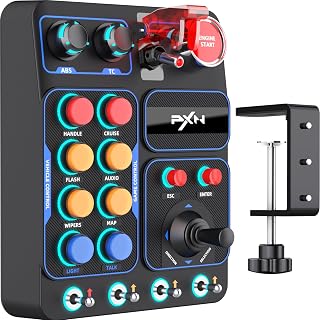
Pros
- Significantly reduces hand fatigue and gameplay interruptions by eliminating constant keyboard switching
- Extensive control flexibility with 9 different input types lets you map any in-game function to your preferred physical control
- Universal compatibility with major simulators means one device works across your entire simulation library
- Tool-free mounting system makes setup quick and adjusts to virtually any desk or sim rig configuration
- Driver-free operation saves setup time and eliminates compatibility headaches
Cons
- Limited to PC Windows systems, no support for Mac, console, or Linux platforms
- Requires individual game configuration to map controls, which can be time-consuming for users with many simulators
- No wireless option available, corded USB connection may clutter desk setups or limit placement flexibility
The PXN CB1 Sim Racing Button Box is a dedicated hardware control panel built for serious simulation enthusiasts who spend significant time in racing, trucking, flight, or farming simulators on PC. Rather than fumbling with keyboard shortcuts during intense gameplay, this device puts 30 programmable controls directly under your fingertips for immediate access to essential in-game functions.
The control layout demonstrates thoughtful design with nine different input types including rotary encoders for smooth adjustments, toggle switches for system control, dedicated push buttons for quick commands, a joystick for directional input, and hardware keys for common actions like engine start and menu navigation. This variety enables intuitive mapping that matches how different functions are naturally used during gameplay, creating a more natural and responsive control experience than layered keyboard commands.
Build quality stands out with stable mounting options that accommodate virtually any setup. The tool-free desk clamp supports surfaces up to 70mm thick, while VESA mounting compatibility works with aluminum profiles and modular sim rigs. The 1.2-pound weight feels solid without excessive bulk, and the integrated RGB lighting system adds both functional visibility in dark rooms and immersive cockpit aesthetics. Setup is genuinely plug-and-play, with Windows recognizing the device instantly via USB without requiring separate driver installation.
The main limitation is the Windows-only requirement and the per-game configuration process needed to map controls. Each simulator handles custom input differently, so your initial setup investment depends on how many games you play. Additionally, the corded USB connection may not suit everyone's desk arrangement or wireless preference.
For dedicated sim racers and simulation enthusiasts willing to invest time in proper configuration, the PXN CB1 delivers substantial immersion gains and operational efficiency. The combination of flexible control types, stable mounting, and genuine driver-free operation makes it a strong choice in the mid-range sim equipment market.
Physical Specifications: Weight: 1.2 pounds, Color: Black, Programmable Functions: 30, Physical Controls: 19
Input Types: 9 different input types including rotary encoders, toggle switches, push buttons, joystick, and dedicated system keys (ESC, ENTER, Engine Start)
Connectivity: USB wired connection, plug-and-play driver-free operation, compatible with PC Windows systems
Mounting: Tool-free clamp supports surfaces up to 70mm thick, VESA mounting compatibility 100 x 100mm for aluminum profiles and modular sim rigs
Features: Customizable RGB lighting with adjustable color and brightness, independent input mapping within supported games
Who Should Buy: Dedicated sim racers, trucking simulator enthusiasts, flight sim pilots, and farming simulator players who spend regular time in PC-based simulations and want tactile control panel precision. Also ideal for anyone experiencing repetitive strain from constant keyboard use during gaming.
Who Might Want to Wait: Casual sim players who only occasionally play one or two games will likely find the investment and setup time unnecessary. Users who require Mac, console, or Linux support should look for alternatives. Those prioritizing wireless setups over corded connections may find this limiting.
Setup Expectations: Plan to spend 20-40 minutes per simulator setting up control mappings to match your preferences. The device itself requires no installation, but getting your preferred layout for each game takes individual configuration. Start by mapping your most frequently used functions first.
Value Consideration: At this price point, the PXN CB1 offers excellent versatility with its nine input types and 30 programmable functions. The dual mounting options eliminate additional purchases, and universal simulator compatibility means your investment works across your entire library.

Pros
- Extensive button programming eliminates need to reach for keyboard during races, improving immersion and lap times
- Exceptional value compared to premium alternatives, delivering quality features at competitive pricing
- Reliable metal contact switches withstand extended use without degradation
- Works seamlessly across multiple racing games and wheel brands with minimal setup required
- Customizable RGB lighting and PXN Wheel app offer personalization and easy in-game mapping
Cons
- Some switches may not map to all game functions depending on title compatibility and control mapping options
- Reported occasional issues with start button LED flickering, suggesting potential quality control inconsistencies
- Bottom toggle switches have limited practical use in most racing scenarios, reducing effective functionality
The PXN CB1 Racing Button Box is a dedicated sim racing control center designed for PC gamers who want authentic, keyboard-free racing experiences. This device targets serious sim racers using titles like F1 2025, Assetto Corsa, Euro Truck Simulator 2, and Forza Motorsport who are tired of reaching for keyboards mid-race or struggling with complex control schemes.
The standout feature is its 30 programmable buttons, which allow racers to map every critical function from turn signals and wipers to cruise control and engine start/stop directly to hardware buttons. Real-world testing shows this dramatically improves immersion and lap consistency, particularly in VR racing where keyboard access becomes impractical. The metal contact switches provide reliable, low-latency input, and the joystick-style controls handle menu navigation smoothly.
Build quality reflects its industrial-grade ABS construction with refined texture and robust mechanical properties. The device mounts securely to tables up to 70mm thick via included clamps, making it adaptable to various sim rig configurations. The customizable RGB lighting system offers 7 preset effects plus full color palette adjustment through the PXN Wheel mobile app, allowing personalization of racing atmosphere.
Minor drawbacks exist: some switches don't map universally across all racing titles due to game-specific control limitations, and isolated reports mention LED flickering on the start button. The bottom toggle switches provide less practical value than button alternatives. However, these issues don't significantly impact the core racing experience for most users.
The PXN CB1 delivers exceptional value as a gateway into dedicated sim racing hardware. It eliminates keyboard friction at a price point significantly lower than premium competitors, making it a smart investment for serious sim racers seeking improved control and immersion without premium pricing.
The PXN CB1 works with Windows 7, 8, 10, and 11 via standard USB connectivity and requires no additional drivers. It pairs directly with PXN V9 GEN2 steering wheels for integrated control but functions independently with any PC racing simulator.
Confirmed compatible games include F1 2025, Assetto Corsa, Assetto Corsa Competizione, Forza Motorsport series, Euro Truck Simulator 2, American Truck Simulator, BeamNG, Dirt Rally 2.0, WRC series, and Farming Simulator titles. Game-specific button mapping varies, so test critical controls in your primary titles before racing competitively.
Installation is straightforward: plug the USB cable into any available port, launch your racing game, and access in-game control settings to map desired functions to individual buttons. The PXN Wheel app enhances functionality on connected wheel bases but isn't required for basic operation.
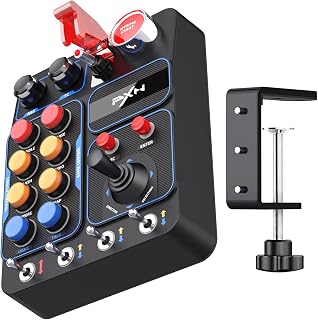
Pros
- Up to 30 programmable inputs provide broad control customization
- Wide mix of switch types supports realistic and quick-access simulator controls
- Driver-free PC connection simplifies initial hardware setup
- Adjustable RGB lighting and multiple mounting options suit different simulator rigs
Cons
- Initial in-game button mapping is required for accurate operation
- Direct wheel-base compatibility is limited to specified PXN models
- The joystick does not include the RGB halo lighting featured on most buttons
The PXN CB1 is a dedicated programmable button box for PC racing, truck, and farming simulators. It is designed for players who want frequently used vehicle functions within reach instead of relying on a keyboard or in-game menus.
Its standout feature is the broad control layout, combining rotary encoders, momentary and latching buttons, toggle switches, an engine start button, and a directional joystick. With up to 30 programmable inputs, it can organize engine, lighting, traction, and auxiliary commands across compatible simulation titles.
Setup is straightforward on PC because the unit uses a driver-free connection, although each simulator still requires initial button mapping. Most buttons add adjustable RGB halo lighting, while the rear lighting switch provides a quick way to turn the illumination off.
The CB1 also offers practical installation flexibility for a dedicated rig or desk setup. Included metal clamps support desks up to 70 mm thick, and the 100 mm x 100 mm VESA mounting holes provide another option for attaching it to a compatible stand.
Its main limitations are the need for manual in-game configuration and the restricted list of PXN wheel bases supported for direct connection. Overall, the CB1 is a versatile control upgrade for sim players who value tactile access, varied switches, and a cleaner cockpit layout.

Pros
- Exceptional customization with individually programmable buttons adapts to any sim racing setup
- Horizontal layout design provides superior ergonomics and faster button recognition than vertical alternatives
- Multiple mounting options, VESA compatible and desk clamp included, work with compact desks or full racing rigs
- Precision input response built for high-intensity competitive racing environments
- Customizable backlighting adds functionality and professional appearance to your cockpit
Cons
- PC only, not compatible with PlayStation or Xbox consoles, limiting use for console sim racing
- Limited customer reviews available to assess real-world durability and long-term reliability
- Horizontal layout may not suit users who prefer vertical button arrangements or already have vertical setups
The SIM-PANEL R Gen 2 Horizontal Edition is a specialized button box built for serious PC sim racing enthusiasts. It's designed for drivers who need instant access to multiple functions like adjusting brake bias, toggling telemetry, managing fuel consumption, or controlling pit crew commands without taking their hands off the wheel. This box targets competitive racers and multi-discipline sim pilots who value precision and control.
The standout feature is the horizontal layout combined with individually programmable buttons. Every button can be assigned custom functions for different racing disciplines, meaning you can switch setups with a quick software change. The ergonomic design keeps all controls clearly visible and within immediate reach, cutting the mental load during intense races. Customizable backlighting adds another layer of functionality and helps you locate buttons quickly during high-pressure moments.
Build quality appears solid with high-precision input response, 75mm VESA mounting compatibility, and an integrated desk clamp that accommodates both compact desktop setups and elaborate racing rigs. The USB connectivity integrates seamlessly with PC-based sim racing platforms like iRacing, Assetto Corsa, and rFactor 2. The compact dimensions of 8.5 x 3 x 6.75 inches make it easy to position exactly where you need it.
The main limitation is PC exclusivity. This box won't work with PlayStation or Xbox consoles, so console sim racers should look elsewhere. With only eight customer reviews posted, long-term durability data is still limited, though the 1-year manufacturer warranty provides baseline protection. The horizontal orientation, while ergonomic for most setups, may not suit users who prefer vertical button arrangements or have existing vertical mounting infrastructure.
This is a legitimate tool for competitive PC sim racing. If you need customizable button control, precision input, and thoughtful ergonomic design, the SIM-PANEL R Gen 2 Horizontal delivers on those fronts. It's worth considering if you're serious about optimizing your sim rig or upgrading from basic keyboard controls.
Consider the SIM-PANEL R Gen 2 Horizontal if you actively race multiple sim titles and need quick access to discipline-specific controls. Drivers who jump between iRacing oval racing, Assetto Corsa road courses, and rFactor 2 endurance events will appreciate the programmable button flexibility. Desktop racers with limited space benefit from the compact footprint and integrated desk clamp.
Skip this if you race exclusively on console platforms or prefer single-discipline setups. If you're new to sim racing or use only keyboard commands, a dedicated button box may be overkill. Budget buyers might want to compare against simpler button boxes without programmable features, though the horizontal layout and build quality justify the price point for serious enthusiasts.
Mounting matters. Check your current setup before purchasing. The desk clamp works for most desks, but the VESA compatibility option is crucial if you're mounting to a cockpit frame or steering wheel deck. Confirm USB port availability on your PC and that your sim software supports customizable controller mapping. The 1-year warranty covers hardware defects, but check the manufacturer's support resources for driver updates and programming guides.
What to Look for in a Sim Racing Button Box
Input Count and Control Variety
The number of programmable inputs determines how many functions you can assign without returning to the keyboard. A panel with around 19 controls, like the PXN CB1 Sim Racing Button Box for PC, covers most everyday functions. If you want to map every in-game command for a full endurance race, something like the 37-input Sim Racing Button Box for PC gives you much more headroom.
Control variety matters just as much as raw count. A mix of rotary encoders for incremental adjustments, toggle switches for latching functions, and momentary push buttons for instant actions means each input type is matched to the right job. A joystick for directional input or a covered safety switch for ignition adds an extra layer of authenticity.
Build Quality and Materials
Sim rigs take a beating over long sessions, so the materials used in your button box matter. ABS resin panels are lightweight and durable enough for most setups, and they’re what you’ll find on the PXN CB1 lineup. If you want something with a more premium feel, the Sim Racing Button Box for PC with 34 inputs uses genuine carbon fiber for its front panel paired with an aluminum alloy enclosure.
Metal contact points on switches are a detail worth noticing. They wear better than plastic contacts over thousands of presses, and you’ll feel the difference in tactile feedback during intense racing stints. If you plan to run long endurance sessions, prioritize boxes with metal switches over all-plastic builds.
Mounting and Cockpit Integration
How you mount the box is often an afterthought until it slides around mid-race. Look for VESA-compatible mounting holes (100x100mm is the standard) if you’re attaching to an aluminum profile rig, and desk clamp support if you’re working with a wheel stand or table setup. Most PXN CB1 variants support both, clamping onto surfaces up to 70mm thick. The SIM-PANEL PC Sim Racing Gen 2 Button Box is optimized for horizontal mounting on wheel decks specifically.
For truck and farming simulator fans, some boxes like the Obokidlyamor Simulator American Truck 27 are designed to mount directly onto popular wheel bases from Logitech, MOZA, Fanatec, and others, keeping everything in one compact cluster rather than spread across your desk. That kind of integration is a significant quality-of-life upgrade for daily drivers of ATS or ETS2. If your sim rig PC setup is still coming together, pairing a solid button box with a reliable PSU for a high-end gaming PC ensures your hardware keeps pace with your peripherals.
RGB Lighting and SimHub Compatibility
RGB lighting on a button box isn’t purely cosmetic. In a dark sim cockpit, halo lighting around buttons helps you find the right control quickly without looking away from the screen. Most options here offer at least seven switchable lighting effects via a rotary knob. The standout in this area is the 34-input carbon fiber panel, which supports SimHub telemetry so LEDs can respond live to RPM, flag status, ABS activation, and DRS availability.
If SimHub integration isn’t a priority, the standard RGB on any PXN CB1 variant still looks sharp and is adjustable for both color and brightness directly on the device. The SIM Racing Sticker Decals from SIMPUSH are a low-effort way to label your buttons with function indicators, which pairs well with any RGB setup you already have. A well-lit, organized cockpit also benefits from good ambient lighting, and a quality softbox lighting kit can reduce eye strain during long sessions.
Final Thoughts
For most sim racers, the PXN CB1 Sim Racing Button Box for PC hits the right balance of input variety, solid build quality, and straightforward USB plug-and-play setup across a wide range of simulators. If you want to step up to a flagship-level panel with live telemetry lighting and a premium carbon fiber and aluminum build, the Sim Racing Button Box for PC with 34 RGB inputs is the one to consider, especially for iRacing and ACC setups where real-time flag and ABS feedback makes a genuine difference on track.
Frequently Asked Questions
Do I need a button box for sim racing?
You don’t strictly need one, but it significantly improves immersion and lap consistency. Assigning brake bias, pit limiters, and DRS to physical buttons means you stop fumbling with keyboard shortcuts during critical moments. For anyone racing competitively in 2026, a button box is one of the higher-impact upgrades you can make after your wheel and pedals.
Are sim racing button boxes compatible with consoles?
Most button boxes reviewed here, including all PXN CB1 variants and the carbon fiber panels, are designed exclusively for Windows PC. Console compatibility is generally not supported or confirmed by these manufacturers. If you race on a PlayStation or Xbox, check the product specifications carefully before purchasing, as the vast majority of options on the market target PC sim setups.
Do sim racing button boxes require special software or drivers?
Most connect via USB and are recognized by Windows as a standard input device, with no proprietary drivers needed. Button mapping is handled directly inside your simulator, whether that’s Assetto Corsa, iRacing, or Euro Truck Simulator 2. Some panels, like those supporting SimHub telemetry, use optional third-party software to unlock lighting effects tied to live game data, but this is separate from the core control mapping. If you want smooth, low-latency connectivity across your entire sim rig, pairing your setup with the best WiFi extender for gaming keeps your online racing sessions stable.
How many inputs do I actually need on a sim racing button box?
For a typical racing simulator setup in 2026, 19 to 30 inputs covers almost every function you’d realistically want at your fingertips. Lights, wipers, ignition, pit limiter, brake bias, traction control, ABS adjustment, and DRS together consume fewer inputs than most people expect. Where higher input counts shine is in truck and farming simulators, where complex vehicle systems benefit from dedicated physical controls for each function.




Write Your Review
No reviews yet. Be the first to share your experience!