

You are deep into a mission in DCS World or Microsoft Flight Simulator and your keyboard and mouse just are not cutting it anymore. A quality HOTAS setup, short for Hands On Throttle And Stick, puts authentic control inputs directly under your fingers and completely changes how connected you feel to the aircraft. Whether you are chasing realism in a combat sim or just want smoother landings in a civil aviation title, the right HOTAS makes a measurable difference. If you are also exploring other sim peripherals, check out our guide to the best joystick for flight sim for standalone stick options.
This guide covers ten of the strongest options available right now, ranging from entry-level plug-and-play kits to precision-engineered metal replicas built for hardcore sim enthusiasts. We evaluated each one based on build quality, button layout, axis precision, and overall value for your setup.
Quick answer
This guide compares 10 picks, with Thrustmaster HOTAS Warthog A-10C Flight Stick - Hall ranked first. Thrustmaster T-Flight Hotas X Flight Stick and Throttle has the most customer reviews.

Modeled after the A-10C's actual stick, this metal-built joystick gives PC simmers precise, durable control with 19 buttons for weapons, trims, and views without reaching for the keyboard. The ergonomic grip suits long combat sim sessions where hand fatigue matters, and its all-metal construction holds up under the repeated force feedback of dogfighting or CAS runs.
Pros
- Hall Effect sensors give 16-bit precision with no drift
- 19 programmable buttons plus multiple hats and switches
- All-metal handle adds serious desktop stability
- Expandable with the HOTAS Cougar base
Cons
- Steep learning curve for T.A.R.G.E.T. software
- Heavy investment of time and setup for casual users
When a ranking of the best HOTAS systems gets down to what actually earns a top spot, the Warthog keeps coming up because it is not styled after a fighter jet, it is a direct replica of the A-10C stick real pilots use. That distinction matters for this list because it separates gaming peripherals from genuine flight hardware. The Hall Effect sensors deliver 16-bit resolution across each axis, so precision holds steady over long-term use without drift or dead zones forming, which is exactly the kind of durability a top-10 pick needs to justify its ranking. With 19 programmable buttons, three 8-way hats, a 4-way hat, dual metal trigger, and pinkie switches, it covers combat sim controls without forcing a reach for the keyboard. The all-metal handle alone weighs over 6 lbs, anchoring the whole setup during hard maneuvers. T.A.R.G.E.T. software scales from simple drag-and-drop mapping to full scripting, and compatibility with the HOTAS Cougar base means this stick can anchor a cockpit setup for years.
Technical Specifications
Controller Type: Joystick with Hall Effect sensors
Connectivity: USB corded connection
Resolution: 16-bit Hall Effect per axis with 65536 values
Button Count: 19 action buttons plus multiple hat switches
Programmable Controls: 3 eight-way hat switches, 1 four-way hat with push button, metal dual trigger, pinkie switches
Weight: 9.8 lbs total package, stick weighs over 6 lbs
Dimensions: 10.55" D x 9.65" W x 12.36" H
Detachable Handle: Yes, all-metal construction
Software: Thrustmaster T.A.R.G.E.T. with drag-and-drop programming
Compatibility: PC via USB, cross-compatible with HOTAS Cougar base
Warranty: One year manufacturer warranty
Included: Flight stick and instruction manual
Best suited to DCS World and combat sim pilots who want authentic military-grade hardware and plan to stick with the hobby long term. Also right for anyone building a modular cockpit around the HOTAS Cougar base. Skip it if you want to fly casually or need a plug-and-play system, since the metal build, button count, and T.A.R.G.E.T. software represent a real learning investment that casual players won't need.

Bundling a throttle, joystick, and rudder pedals gives Windows-based simmers a complete three-axis setup out of the box, which matters for anyone flying combat jets that need coordinated turns. With 189 programmable buttons, every radar mode, countermeasure, and comms function gets a dedicated control, cutting down on menu diving mid-flight.
Pros
- Complete three-axis bundle with joystick, throttle, and pedals
- 189 programmable buttons and controls total
- Four adjustable spring tensions for custom stick feel
- Rudder pedals include differential toe brakes
Cons
- Requires significant desk or mounting space for three units
- Configuring profiles across 189 controls takes real time
A best-of list for HOTAS setups needs at least one full-system entry, and the X56 bundle earns that spot by pairing the joystick and throttle with Pro Flight Rudder Pedals for genuine three-axis control out of the box. That completeness is the whole case for ranking it highly here: instead of piecing together a stick, throttle, and pedals separately, this bundle delivers all three with military-grade 16-bit non-contact sensors for accurate input. The 189 programmable buttons and controls across the joystick and throttle mean nearly every function in a demanding flight sim can be mapped without compromise. Four adjustable spring tensions plus configurable response curves and deadzones let the feel scale from light aircraft to fighters to spacecraft. The ergonomic layout is built for long VR sessions, with RGB lighting for personalization. The rudder pedals add self-centering action, adjustable damping, and differential toe brakes that mirror real aircraft response, rounding out a setup that covers everything a serious sim pilot needs in one purchase.
Controller Type: Joystick, Throttle, and Rudder Pedals
Programmable Controls: 189 total
Sensor Technology: 16-bit non-contact sensors
Connectivity: Dual USB (corded)
Compatibility: Windows PC
Colors: Black and Gray
Spring Options: 4 customizable settings
Rudder Pedal Features: Self-centering with adjustable tension, differential toe brakes, adjustable foot rests
Additional Features: RGB lighting, ergonomic design, VR-ready
Ideal for sim pilots who want a complete, matched joystick, throttle, and pedal system rather than building one piece by piece, especially VR users doing long sessions. It also suits anyone flying a range of aircraft types who wants adjustable spring tension and response curves. Not a fit for players who want quick setup, since nearly 200 programmable controls and three physical components demand real desk space and configuration time.

For simmers wanting a reliable entry point, this stick and throttle pairs USB plug-and-play simplicity with 12 buttons that cover throttle, trim, and view controls without overwhelming a newcomer. Its ergonomic design supports both desktop and laptop setups, making it a flexible choice for someone building their first flight sim rig.
Pros
- Detachable throttle for compact or spread-out desk setups
- Dual rudder control via twist grip or tilt lever
- Adjustable stick resistance dial
- Built-in memory retains programmed profiles
Cons
- Only 12 programmable buttons limits complex sim mapping
- Lighter build than higher-end HOTAS systems on this list
Ranking the best HOTAS setups for 2026 has to include an entry point, and the T-Flight Hotas X earns its spot as the pick for pilots who want real HOTAS mechanics without a steep buy-in. It brings the core experience that defines this category: a separate stick and throttle, dual rudder control through twist grip or tilt lever, and 12 programmable buttons across 5 axes for mapping civil or military functions. The wide hand rest and full-size throttle keep hands comfortable through long simulator sessions, and the adjustable resistance dial means you can tune stick feel rather than accept whatever tension it ships with. What makes it stand out on a ranked list is the detachable throttle. You can spread the two halves out for a wider cockpit-style desk setup or dock them together when space is tight, which few HOTAS units at this level offer. Built-in memory retains your button mapping without needing software running, and a preset button swaps profiles mid-session. For anyone comparing top picks who wants HOTAS fundamentals covered simply and reliably, this belongs on the shortlist.
Connectivity and Compatibility: USB wired connection, compatible with PC and PlayStation 3. Requires Windows operating system on desktop or laptop.
Control Configuration: 12 fully programmable action buttons, 5 programmable axes, dual rudder control options (handle rotation or progressive tilting lever), multi-directional hat switch for panoramic view, trigger for brakes or rapid fire.
Physical Design: Detachable full-size throttle control, high-precision joystick with adjustable resistance dial, weighted base for stability, ergonomic hand rest. Dimensions: 10.39 x 9.53 x 10.43 inches. Weight: 4.3 pounds. Color: Black.
Features and Memory: Exclusive preset button for mid-flight profile switching, built-in memory stores custom programming, preconfigured controls for instant setup, one-year manufacturer warranty included.
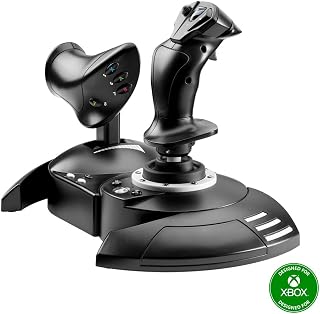
Cross-platform support across PC and every current Xbox console makes this stick and throttle combo a practical pick for simmers who split time between a gaming PC and a console. Its 14 buttons cover the essentials for arcade and mid-level sims, while the ergonomic shape keeps extended flight sessions comfortable on either platform.
Pros
- Works across PC, Xbox One, and Xbox Series X|S
- Detachable throttle fits lap or desk positioning
- Plug-and-play USB with no software required
- Adjustable stick resistance for different aircraft types
Cons
- No force feedback or haptic features
- Throttle feel less refined than premium alternatives
Not every pilot ranking HOTAS options is chasing military-replica hardware, and this pick fills the spot for readers who want a genuine step up from a gamepad without a steep entry cost. The T-Flight HOTAS One pairs a joystick with a detachable throttle, both usable across PC and Xbox Series X|S, so it belongs on this list as the accessible, cross-platform option. Its 14 programmable buttons, trigger, hat switch, and dual rudder control cover the essentials for commercial jets, helicopters, or fighters, and adjustable stick resistance lets the feel change with the aircraft. The joystick carries enough weight to stay stable during maneuvers, and the throttle detaches to sit on a lap or desk, whichever setup fits the space available. USB plug-and-play means no software install stands between unboxing and flying, which matters for a list meant to include options at every commitment level, not just enthusiast-grade rigs.
A strong fit for players moving up from a gamepad or those who want console and PC flexibility without a big software learning curve. Also works for anyone short on desk space, thanks to the detachable, repositionable throttle. Skip it if force feedback or haptic response matters to your flying, or if you're chasing the refined throttle feel found on higher-end HOTAS systems.
The T-Flight HOTAS One connects via USB and requires no drivers or complex setup on Windows PC, Xbox One, Xbox Series S, or Xbox Series X. Simply plug it in and begin flying with compatible titles including Microsoft Flight Simulator, DCS, War Thunder, and other major flight sim software. The detachable throttle can be positioned on your desk alongside the joystick or held in your lap for added immersion. The system is expandable, working seamlessly with Thrustmaster TFRP rudder pedals to create a complete multi-axis control setup as your sim experience grows.


Built around an Airbus-style sidestick, this pack targets simmers focused on commercial and airliner flight rather than combat jets, matching the control layout found in real Airbus cockpits. Compatibility across Xbox and PC means the same authentic sidestick feel travels between console and desktop setups without buying separate hardware.
Pros
- Officially licensed Airbus-style sidestick and throttle design
- 31 action buttons and 4 axes cover most in-flight functions
- Integrated thrust reverser mechanism for realistic landings
- 14 remappable buttons with 4 swappable joystick head modules
Cons
- Learning curve with software mapping and occasional programming issues
- Niche fit for pilots not focused on Airbus-style flying
If you are ranking HOTAS setups for flight sim in 2026, the TCA Captain Pack X earns a spot for anyone specifically chasing Airbus authenticity rather than generic joystick feel. This is an officially licensed sidestick and throttle quadrant built to replicate real A320 controls, which sets it apart from more generic-shaped HOTAS units on this list. With 31 action buttons and 4 axes, it covers nearly every in-flight function you would need, and the built-in thrust reverser mechanism on the throttle brings realistic landing procedures into reach. The rotating sidestick handle also means you can skip rudder pedals for now and still have a workable control scheme. Build quality stands out among peers, with solid construction and tactile switch and detent feedback that holds up over long sessions. Fourteen remappable buttons and four swappable joystick head modules give you room to adapt the setup as your aircraft preferences change. The tradeoff for this level of specialization is a real learning curve, particularly around software mapping in Microsoft Flight Simulator, so budget time for setup before your first flight.
Best for flight sim fans committed to Airbus-style flying who want authentic sidestick and thrust reverser behavior rather than a generic joystick layout. Also a good fit for anyone who wants to delay buying rudder pedals thanks to the rotating handle. Skip it if you fly a mix of aircraft types and want a more universal stick shape, or if you are not ready to spend time troubleshooting button mapping in your sim software.

Space combat sims demand more inputs than atmospheric flight, and 58 buttons across the stick and throttle quadrant give room to map thrusters, targeting systems, and weapon groups separately. USB-C connectivity is a modern touch, and the ergonomic layout keeps hands comfortable through the fast, multi-axis maneuvering these titles require.
Pros
- Hall Effect sensors give drift-free 16-bit precision
- 58 programmable buttons across stick and base
- Repositionable throttle detent with 3.1 inches of travel
- Customizable RGB and ambidextrous grip design
Cons
- Feels stiff out of the box
- 58 buttons still may require mode-switching in complex sims
For a 2026 top 10 ranking, the Sol-R4 represents the step up from entry-level HOTAS into genuinely precise, professional-feel flight control. Its Hall Effect magnetic sensors deliver drift-free 16-bit input across all three axes, which matters most in combat sims and space sims where fine stick movement decides outcomes. With 58 programmable buttons spread across an ambidextrous grip and a feature-rich base, this system covers civil aviation, combat, and space sim scenarios in a single package. The grip alone packs 21 action buttons, two triggers, dual hat switches, a mini stick, and a thumbwheel, while the base adds switches, directional pads, a selector, and a mini throttle with customizable RGB. The throttle offers 3.1 inches of travel with a repositionable detent, giving granular engine control whether you are managing an approach or pushing to afterburner. Build quality reads as solid rather than flashy, with a slightly stiff feel out of the box that reflects sturdy construction rather than a flaw. For a ranked list built around serious flight sim use, this earns a high slot on precision and button count alone.
Buy this if you want a HOTAS ranked for accuracy and button capacity across combat, space, and civil sims without going ultra premium. It suits pilots who value drift-free Hall Effect sensors and a repositionable throttle detent. Skip it if you play sims like Star Citizen that demand more than 58 buttons without mode-switching, or if you want the lightest, most beginner-friendly option on this list.

Rather than a stick itself, this adjustable desk mount solves the stability problem that comes with heavier HOTAS setups like the X56 or T.16000M, letting simmers clamp their gear firmly to a desk instead of it sliding during hard maneuvers. It's the accessory that makes an existing HOTAS actually usable long-term.
Pros
- Compatible with Logitech X56, Thrustmaster HOTAS, T.16000M, TCA and more
- Adjustable height (-175mm to +175mm) and depth (80mm to 300mm)
- 91N.m clamp force keeps controllers stable during intense maneuvers
- Two-pack lets you mount joystick and throttle together
Cons
- Requires sufficiently thick desk surface for the clamp to grip
- Heavy at 3.74kg per mount, less suited to portable setups
A top 10 HOTAS ranking is only as good as the setup holding your gear steady, and the Hikig 2 Set Desk Mount solves the mounting problem that comes with nearly every stick and throttle on this list. It is built to work with a wide range of controllers, including Logitech X56, Thrustmaster T-Flight HOTAS, T.16000M, and TCA systems, so it pairs naturally with several other entries in this article. The adjustable positioning system is the main draw, with height adjustment spanning -175mm to +175mm and front-to-back positioning from 80mm to 300mm, letting you dial in a setup that matches your desk and posture. The 91N.m force clamp mechanism holds controllers firmly in place without slipping, which matters during precision maneuvers or sustained combat flying. Each mount weighs 3.74kg and is built from heavy-duty materials meant to last. Since this is a two-pack, you can mount both a joystick and a throttle at once for a proper dual-stick HOTAS layout. The main limitation is desk compatibility, since the clamp design needs adequate surface thickness to grip securely.
Good for anyone building a HOTAS setup from this list who needs a stable, adjustable way to mount both a joystick and throttle without buying two separate mounts. Especially useful if you already own or plan to buy a Logitech or Thrustmaster stick, since compatibility is confirmed. Skip it if your desk is too thin for a strong clamp, or if you need a mount for consoles beyond PS4 and PS5, since this is primarily a PC-focused accessory.

RGB lighting and four spring tension options let simmers tune stick resistance to match anything from light general aviation to twitchy fighter jet feel. With 189 programmable controls and dual USB ports for the throttle and stick, this setup suits PC pilots who want deep customization across complex sim aircraft.
Pros
- 189 programmable controls across stick and throttle
- 16-bit hall-effect sensor with dual mini analog sticks for 6DOF
- 4-spring adjustment system with customizable response curves
- Dual throttle handles with friction adjustment and lock
Cons
- Plastic construction rather than metal
- Throttle needs direct USB connection to avoid ghost inputs
A best-of list for 2026 needs at least one HOTAS built for players who map everything, and the Logitech G X56 fits that role. With 189 programmable controls across the stick, throttle, and ancillary buttons, it leaves room for secondary control modes even in demanding sims like Elite Dangerous, Star Citizen, and DCS World. The 16-bit hall-effect sensor joystick is one of the more accurate consumer options available, and dual mini analog sticks add true 6 degrees of freedom for maneuvering outside the standard flight axes. A 4-spring adjustment system plus customizable response curves and deadzones let you tailor control feel per aircraft type, which matters when a ranked list has to account for different simulator genres. The dual throttle handles include friction adjustment and a throttle lock for authentic engine management. Construction uses plastic rather than metal throughout, and the throttle needs a direct USB connection to avoid ghost inputs, both worth noting on a comparison list. For pilots who want maximum programmability and VR-friendly precision without leaving the cockpit view, the X56 ranks among the most capable choices here.
Buy this if you want the most programmable controls on this list and play complex sims that reward extensive button mapping, including VR flight sims. It suits pilots who want adjustable spring tension and response curves per aircraft. Skip it if you have small hands, since reaching all hat switches and buttons can be a stretch, or if you want metal construction over plastic.
The X56 requires Logitech G Hub software to access full programmability, RGB lighting controls, and response curve adjustments. Download is required and the software is generally reliable, though some users report occasional reconnection issues if the throttle is connected to an unpowered hub.
Key setup note: connect the throttle directly to a USB 2.0 port on your PC or a powered hub with sufficient current draw. Shared, unpowered hubs cause ghost inputs and erratic throttle behavior. The stick can tolerate hub connection more gracefully, but direct connection is recommended for best results.
Compatibility spans Windows 7 through Windows 11, and the system works flawlessly with all major flight sims including VR titles through SteamVR.

Pros
- Hall Effect AccuRate Technology guarantees precision stability over thousands of gaming hours
- Detachable throttle offers genuine customization for comfort and gameplay preference
- Dual rudder system provides multiple control options for different combat scenarios
- Immersive vibration feedback adds tactile realism to every in-game action
- Official Ace Combat 8 license ensures optimized controls and seamless integration
Cons
- Requires dedicated desk or lap space due to overall size and throttle component
- No reviews available yet to verify long-term durability claims in real-world use
The Thrustmaster T.FLIGHT HOTAS NEO Ace Combat 8 Edition is a professional-grade flight control system built specifically for the Ace Combat 8 community and serious flight sim players. This officially licensed controller bridges the gap between casual gaming and full cockpit simulation, offering authentic stick-and-throttle controls that veteran pilots expect without the extreme price tag of professional-grade hardware.
Where this HOTAS truly shines is in its control precision and customization. The 16-bit Hall Effect technology with 7 axes delivers movements accurate to the millimeter, while the dual rudder system gives you control flexibility that adapts to your flying style. The detachable throttle is a game-changer for comfort, letting you rest the stick on your lap for casual sessions or mount it to a desk for intense multiplayer dogfights. The 16 programmable buttons and rapid-fire trigger mean you'll never reach for a keyboard mid-mission.
Build quality appears solid with a one-year warranty backing the product. The vibration feedback system adds genuine immersion, simulating everything from missile launches to landing impacts. The ergonomic button layout is specifically tuned for Ace Combat's aircraft roster, meaning you get optimized controls out of the box rather than spending hours in configuration menus. USB plug-and-play compatibility across PS4, PS5, and PC keeps setup friction-free.
The main considerations are the premium positioning and physical footprint. At $149.99, this targets serious enthusiasts rather than casual players. The unit requires dedicated space, though the detachable throttle mitigates this somewhat. Additionally, with no user reviews currently available, long-term durability under sustained competitive play remains unverified, though Thrustmaster's 15-year Hall Effect track record is reassuring.
The Thrustmaster T.FLIGHT HOTAS NEO Ace Combat 8 Edition is the definitive choice for players who want authentic flight stick controls tailored to Ace Combat 8's demands. If you're committed to mastering the skies and value precision controls and customizable comfort, this officially licensed system delivers professional-grade performance without requiring a cockpit in your living room.
Compatibility: PS5, PS4, PS4 Pro, PS4 Slim, PS5 Pro, PS5 Slim, and PC via USB
Controller Type: Flight Stick and Throttle (Detachable)
Connectivity: USB Plug and Play
Precision Technology: 16-bit Hall Effect AccuRate Technology (H.E.A.R.T.)
Control Axes: 7 (including Z-axis rudder control)
Buttons: 16 action buttons, rapid-fire trigger, multidirectional hat switch, mini-stick
Rudder System: Dual control via joystick Z-axis and tilting throttle lever
Feedback: Built-in vibration motor
Weight: 1,188g (approximately 2.6 lbs)
Dimensions: 11.6 x 11 x 10.1 inches
Color: Black
Warranty: One year
Model Number: 4160947
Who Should Buy This: Serious Ace Combat 8 players, flight simulation enthusiasts, and console gamers seeking premium flight controls. If you're investing significant time in aerial combat gaming and value precision, customization, and long-term durability, this official HOTAS is worth the investment.
Who Might Want to Reconsider: Casual gamers looking for a budget option, players with limited desk or lap space, or those unsure about committing to a dedicated flight stick setup. If you play flight games occasionally rather than regularly, entry-level alternatives may offer better value.
Setup Considerations: Ensure you have adequate space for either lap mounting or desk placement. The detachable throttle helps with flexibility. USB connectivity is straightforward across all supported platforms. Allow time to familiarize yourself with the 16 buttons and axes, though the Ace Combat 8 optimized mapping accelerates the learning curve.
Value Assessment: At $149.99, this positions itself as mid-premium pricing in the HOTAS market. You're paying for official Ace Combat licensing, Hall Effect durability, and Thrustmaster's reputation. If you plan to play Ace Combat 8 extensively or maintain interest in flight games for years, the cost-per-hour becomes reasonable. Consider it an investment in your gaming setup rather than a one-off purchase.
What to Look for When Buying a HOTAS
Sensor Technology and Axis Precision
The biggest technical differentiator between budget and premium HOTAS units is the sensor type. Hall effect magnetic sensors, used in products like the Thrustmaster HOTAS Warthog A-10C replica metal and the Thrustmaster Sol-R4 HOTAS Space Combat Flight, deliver 16-bit resolution with zero drift over time because there are no physical contacts to wear out.
Potentiometer-based sticks, common in lower-cost options, work well initially but can develop center drift after extended use. If long-term accuracy matters to you, prioritize a stick that advertises H.E.A.R.T. or hall effect sensors.
Button Count and Layout
Complex simulators like DCS or Star Citizen demand a high number of assignable inputs. The Thrustmaster Sol-R4 HOTAS Space Combat Flight ships with 58 action buttons across the grip and throttle, while the Logitech G X56 H.O.T.A.S Throttle and Joystick offers over 189 programmable controls. Having that density means fewer keyboard reaches during critical moments.
For casual or beginner pilots, a simpler layout is actually preferable. The Thrustmaster T-Flight Hotas X USB Flight Sim Stick keeps things approachable with 12 action buttons and a detachable throttle, which is plenty for getting started without feeling overwhelmed.
Build Material and Desk Stability
Plastic bodies are fine at entry level, but if you fly aggressively or log long sessions, a heavier all-metal construction pays off. The Thrustmaster HOTAS Warthog A-10C replica metal weighs over six pounds, which keeps it planted on your desk without clamps or mounts during hard maneuvering.
If you go with a lighter unit, a dedicated mount helps enormously. The Hikig 2 Set Desk Mount for Flight Sim Game is compatible with nearly every major HOTAS brand and adjusts both height and fore-aft position, giving you an ergonomic cockpit feel regardless of which stick and throttle you choose. For a similar approach to sim peripheral mounting, our roundup of the best wheel stand for racing covers the same principles applied to sim racing rigs.
Platform Compatibility and Ecosystem
Most HOTAS units are PC-only, but a few extend to console. The Thrustmaster T-Flight Hotas One Flight Stick works on both Windows PC and Xbox Series X or S, making it a practical choice if you split time between platforms. The Thrustmaster T.FLIGHT HOTAS NEO ACE COMBAT 8 WINGS edition covers PS5, PS4, and PC.
Also consider whether you plan to add rudder pedals later. The Thrustmaster TFRP Precision Flight Sim Rudder integrates cleanly with most Thrustmaster sticks via the S.M.A.R.T. rail system, and the TCA Captain Pack X Airbus Sidestick uses a single USB ecosystem hub so you can chain accessories without cluttering your ports. If you enjoy building out full sim rigs, our coverage of the best shifter for sim racing shows how dedicated peripheral ecosystems work across different genres.
Final Thoughts
There is a strong HOTAS option here for every type of sim pilot. If you want the most authentic military combat experience on a PC, the Thrustmaster HOTAS Warthog A-10C replica metal is the benchmark with its all-metal construction and drift-free hall effect sensors. For civil aviation enthusiasts who want an officially licensed Airbus cockpit feel with Xbox and PC compatibility, the Thrustmaster TCA Captain Pack X Airbus Sidestick delivers a uniquely immersive experience that no other unit in this lineup replicates.
Frequently Asked Questions
What does HOTAS stand for and why does it matter for flight sims?
HOTAS stands for Hands On Throttle And Stick. It refers to a controller setup where both the joystick and throttle are separate units you hold simultaneously, mirroring how real fighter pilots manage their aircraft. In a flight sim, it means you can manage speed, weapons, and flight surfaces without ever moving your hands to a keyboard, which dramatically improves immersion and reaction time.
Is a HOTAS setup worth it for Microsoft Flight Simulator?
Absolutely, especially if you fly anything beyond basic general aviation. A HOTAS gives you analog throttle control, hat switches for camera views, and dedicated axes for trim and rudder that a gamepad simply cannot replicate cleanly. Even an entry-level option like the Thrustmaster T-Flight Hotas X USB Flight Sim Stick gives you a noticeably more natural flying feel compared to a standard controller. In 2026, Microsoft Flight Simulator continues to be one of the most popular titles driving HOTAS adoption among new sim pilots.
Do I need rudder pedals if I already have a HOTAS?
Many HOTAS units include a twist axis or a tilting throttle lever for rudder control, which works well for casual flying. Dedicated pedals like the Thrustmaster TFRP Precision Flight Sim Rudder add a longer travel range and independent toe brakes, which makes a real difference for taxiing, crosswind landings, and combat maneuvering. For serious sim pilots, pedals are a worthwhile upgrade rather than a requirement from day one. You can explore more sim controller options in our controllers category.
What is the difference between a HOTAS and a regular joystick?
A standard joystick handles flight axes but bundles throttle control into a slider or twist on the same unit. A HOTAS separates the throttle into its own dedicated unit with its own button layout, giving you far more inputs and a more ergonomic grip on both hands simultaneously. The separation also lets you position each unit at the ideal height and angle for your seating position, which reduces fatigue over long sessions. If you are comparing options across the two categories, our guide to the best joystick for flight sim breaks down standalone sticks worth considering alongside a separate throttle.




Write Your Review
No reviews yet. Be the first to share your experience!