

You’re mid-match, your character starts moving on its own, and you haven’t touched the stick. That’s controller drift, and it’s one of the most common complaints among console and PC gamers. Whether it’s a slow creep or a full-on spin, drift kills immersion and can cost you the game. Understanding why it happens is the first step toward fixing it or avoiding it entirely. If you’re shopping for a replacement, check out our full roundup of controllers to find options built with longevity in mind.
This guide covers the root causes of analog stick drift, what you can do about it, and which controllers are worth picking up if you want to sidestep the problem. Whether you’re on Xbox, PlayStation, Nintendo Switch, or PC, there’s a practical option here for you.
Quick answer
This guide compares 8 picks, with PlayStation DualSense Wireless Controller Midnight ranked first. Nintendo Joy-Con (L/R) Neon Red/Blue Wireless holds the highest customer rating among them.

If stick drift keeps pulling your aim off target, the DualSense's wireless Bluetooth setup across Playstation 5, PC, Mac and mobile means you can swap devices the moment a thumbstick starts wearing unevenly, rather than being locked into one ecosystem while you troubleshoot or replace the unit.
Pros
- Haptic feedback and adaptive triggers enhance supported games
- Works across PS5, PC, Mac, Android, and iOS
- Improved textured grip over the original PS5 controller
- Premium build and finish
Cons
- Stick drift or dead zones may develop with heavy use over time
- Black finish shows marks and needs regular cleaning
If you're researching controller drift, you've likely seen the DualSense come up as both a victim and a case study. Sony's official PS5 pad is the one most associated with public attention around stick drift, since dead-zone and drift issues can develop after heavy use, a pattern seen across modern controllers generally rather than something unique to this unit. That context matters for anyone deciding whether to buy one. What you get in exchange is genuine next-gen feedback: haptic vibration and adaptive triggers that make recoil, resistance, and environmental cues feel distinct in supported titles, plus a textured grip that holds up better than the original PS5 controller during long sessions. It works across PS5, PC, Mac, and mobile, so the investment isn't locked to one box. The Midnight Black finish looks clean, though it shows smudges and needs occasional wiping down. For this article's purposes, the honest takeaway is that the DualSense delivers excellent immersion now, but buyers should go in aware that thumbstick longevity is the trade-off, and know a drift fix may eventually be needed down the line.
Compatibility: PlayStation 5, Windows PC, Mac, Android, iOS
Connectivity: Bluetooth, USB Type-C wireless
Design: 14 buttons, textured grip underside
Features: Haptic feedback, adaptive triggers, built-in microphone with mute button, 3.5mm audio jack
Weight: 14.4 ounces
Dimensions: 8.27 x 7.48 x 2.87 inches
Color: Midnight Black
Manufacturer: Sony Interactive Entertainment
Model Number: CFI-ZCT2W
Worth buying if you want the best-in-class haptic and adaptive trigger experience on PS5, PC, or Mac and are comfortable addressing drift later if it develops. Skip it if you've already been burned by drift on a previous DualSense and want a unit built specifically to avoid that failure mode, since this uses the standard design rather than a drift-resistant alternative.

Switch owners dealing with drift know it's almost always the detachable Joy-Con sticks at fault, and since these are sold as standalone Bluetooth units with 16 buttons, you can simply swap out the worn left or right controller instead of replacing the whole system or living with imprecise analog input.
Pros
- Genuine Nintendo build quality and calibration
- 20 hour battery life, 3.5 hour recharge
- Works solo, in grip, or attached to console
- Lightweight at under 2 ounces per controller
Cons
- Costs more than third-party stick replacements
- Still subject to drift over time like any analog stick
Stick drift is almost always a hardware wear issue, and when it hits official Joy-Cons, replacement units matter. These are the genuine Nintendo part, so swapping a drifting Joy-Con for a fresh pair gets you back to factory-spec joysticks with accurate accelerometer and gyroscope calibration, not a clone that may introduce its own dead zones. Each controller works independently or combines into a grip, so you can replace just one side if only one stick drifted, or go with a matched pair for consistent feel on both sticks. The 20 hour battery life and 3.5 hour recharge keep sessions uninterrupted once you're back up and running. Customer feedback cited in the broader write-up points to these holding up longer than third-party replacements, which matters if drift is what sent you shopping in the first place. They're not cheap, and official Nintendo pricing is the tradeoff, but for drift specifically, sticking with the real hardware rather than an off-brand stick replacement is the safer bet for longevity.
Connectivity: Bluetooth 3.0 on both controllers, NFC on right controller only
Controls: 16 total buttons across both controllers, dual analog sticks, directional pad, motion controls
Sensors: Accelerometer and gyroscope on both controllers, IR motion camera on right controller
Battery: Built-in rechargeable lithium-ion, 525 mAh capacity, approximately 20 hours per charge, 3.5-hour recharge time
Physical: Left controller weighs 49g, right controller weighs 52.1g, total package dimensions 2.05 x 11.18 x 10 inches
Compatibility: Exclusively compatible with Nintendo Switch
Warranty: Limited warranty included

Pros
- Exceptional 40-hour battery life reduces charging frequency significantly
- True multi-device support works across Xbox, PC, mobile, and VR platforms
- Premium build quality with textured surfaces and refined ergonomic design
- Customization options via Xbox Accessories app for tailored gaming profiles
- Solid 4.6-star rating backed by nearly 20,000 verified customer reviews
Cons
- Requires AA batteries, which means ongoing battery purchase costs
- Xbox Accessories app customization limited to select Windows and Xbox devices
- Cloud gaming features require separate Game Pass subscription and compatible device
The Xbox Wireless Controller in Electric Volt is a premium gamepad designed for modern multi-platform gamers. Whether you're a console enthusiast, PC gamer, or mobile player who uses Xbox Cloud Gaming, this controller bridges all your gaming ecosystems with unified wireless connectivity, making it ideal for players who refuse to be tethered to a single device.
The standout feature is undoubtedly the 40-hour battery life on standard AA batteries, a significant advantage over rechargeable competitors that require frequent charging cycles. Beyond endurance, the controller excels in precision with its hybrid D-pad, textured grip surfaces on triggers and bumpers, and refined ergonomic geometry that accommodates extended gaming sessions without hand fatigue or discomfort.
Build quality reflects Microsoft's attention to detail. The Electric Volt color option provides visual appeal while the sculpted surfaces and updated geometry feel premium in hand. The hybrid D-pad delivers responsive input for both fighting games and platformers, while the textured triggers offer reliable grip during intense competitive moments. The included 3.5mm audio jack adds practical value for direct headset connectivity without additional adapters.
Customization through the Xbox Accessories app lets you remap buttons and create game-specific profiles, though this feature is limited to Windows 10/11 and Xbox Series X/S devices. Some users may find the lack of built-in rechargeable batteries less convenient than fully integrated solutions, and cloud gaming capabilities require a separate Game Pass subscription and compatible device.
This controller earns its reputation as the versatile centerpiece of any multi-device gaming setup. Its combination of ergonomic excellence, exceptional battery life, cross-platform compatibility, and customization options makes it a strong choice for serious gamers who value flexibility and reliability across their entire gaming library.
Connectivity: Xbox Wireless, Bluetooth 5.3, USB-C (plug-and-play)
Compatibility: Xbox Series X/S, Xbox One, Windows 10/11, mobile devices, supported VR headsets
Power Source: 2x AA batteries (40-hour battery life)
Buttons: 18-button configuration
Audio: 3.5mm audio jack for headset support
Design: Sculpted surfaces, textured grips, hybrid D-pad
Customization: Button remapping via Xbox Accessories app
Dimensions: 7.2 x 7.1 x 2.8 inches
Weight: 15.84 ounces
Model Number: QAU-00021
Manufacturer: Microsoft
Who Should Buy This: Multi-device gamers who play on Xbox consoles, PC, and mobile platforms will appreciate the seamless connectivity. Players with longer gaming sessions benefit from the impressive 40-hour battery life. Competitive gamers value the precision controls and customization features for optimizing their playstyle.
Who Might Want to Look Elsewhere: Players preferring fully integrated rechargeable batteries without ongoing battery purchases may prefer alternatives. Those exclusively gaming on a single platform might find more budget-friendly single-platform controllers. Casual players with minimal customization needs can find simpler, less expensive options.
Key Considerations: Battery sourcing becomes a recurring cost compared to rechargeable designs. Customization features require compatibility with Windows 10/11 or Xbox Series devices. Cloud gaming adds subscription costs beyond the controller purchase. Verify device compatibility on Xbox.com before purchase for your specific hardware setup.

Drift almost always traces back to worn analog stick potentiometers, and this split pad sidesteps that fatigue point with its ergonomic, portable design built for handheld mode rather than cramming full-size sticks into a tight shell. Officially licensed by Nintendo and wired through a reliable wireless connection, its 16-button gamepad layout gives drift-weary Switch owners a sturdier daily driver without hacking apart their original Joy-Cons.
Pros
- Larger sticks and buttons reported to resist drift longer
- Full-size ergonomic design with proper D-pad
- Assignable rear triggers and turbo functionality
- Fits Switch and Switch OLED, docks while attached
Cons
- No motion controls, HD rumble, or NFC
- Handheld mode only, not usable docked or tabletop
If stick drift keeps creeping back into your Joy-Cons, the Split Pad Pro sidesteps the problem by using a different control layout and build than standard Joy-Cons, and user reports cited in its existing coverage specifically call out years of use without the drift issues that plague the stock sticks. For handheld-only players, this makes it a practical long-term fix rather than a repeated repair cycle. The larger analog sticks, full D-pad, and bigger buttons also just feel more durable in daily use. Assignable rear triggers and turbo functions are a bonus on top of the core fix. It fits directly onto the Switch or Switch OLED in handheld mode and even slides into the dock while attached. The tradeoffs are real: no motion controls, no HD rumble, no NFC, and it won't work for docked or tabletop play, so this is a dedicated handheld solution, not a full Joy-Con replacement. For anyone whose drift complaints are tied to handheld sessions, though, it addresses the root cause rather than just replacing worn parts.
Good for handheld-only Switch players frustrated by recurring Joy-Con drift who want a sturdier alternative rather than another pair of stock sticks. Also suits anyone with larger hands. Skip it if you play docked or tabletop, or need motion controls, HD rumble, or NFC, since this controller doesn't support any of those.
Connectivity: Wireless via Nintendo Switch rails
Button Configuration: 16 buttons including analog sticks, D-pad, shoulder buttons, and assignable rear triggers
Weight: 8 ounces
Dimensions: 6.69 x 6.22 x 2.17 inches
Color: Translucent Black
Compatibility: Nintendo Switch, Nintendo Switch OLED Model
Power Source: Draws power from Switch handheld unit
Certification: Officially Licensed by Nintendo
Model Number: NSW-298U
Features: Assignable rear triggers, Turbo functionality, dock-compatible design

Drift is largely a wireless and analog-stick wear problem, so a wired USB gamepad like this one sidesteps both failure points, giving PC and Chromebook-certified users a stable, ergonomic 10-button layout that reports consistent input without the signal or potentiometer issues that plague aging wireless sticks.
Pros
- Four-switch D-pad design differs structurally from drift-prone sticks
- Wired USB connection removes wireless calibration issues
- 10 programmable buttons with Profiler software support
- Reported to survive years of regular use
Cons
- No rumble or vibration feedback
- Trigger buttons reported as stiff during extended sessions
Controller drift is largely an analog stick wear problem, and one way to dodge it entirely on PC is choosing a controller built around a different mechanism for directional input. The F310's D-pad rests on four individual switches instead of a single pivot, which is a structurally different setup from the potentiometer-based sticks that typically wear into drift. For PC gamers who mainly need directional precision and don't want to worry about stick degradation, that design choice is relevant. It still has two analog sticks for games that require them, plus 10 programmable buttons and 8-way D-pad customization through Profiler software for titles without native gamepad support. The wired USB connection also removes battery and wireless calibration drift from the equation entirely. Build quality holds up over years of regular use according to user reports, with some owners replacing worn analog sticks rather than the whole unit, which speaks to repairability if drift does eventually show up on the stick side rather than the D-pad.
Connectivity: Wired USB connection with 6-foot cord
Buttons: 10 programmable buttons with 8-way D-pad
Design: Floating D-pad with four-switch architecture for responsive control
Compatibility: Windows XP, Vista, 7, Chrome OS certified, Android TV
Features: Ergonomic rubber grips, customizable via Profiler software
Weight: 14.4 ounces
Warranty: 1 Year Limited Hardware Warranty
Fits PC gamers who want a wired, drift-resistant D-pad for precise directional input and don't mind a no-frills gamepad. Also good for budget-conscious players who want a backup controller. Skip it if you need wireless play, rumble feedback, or console compatibility beyond Xbox 360 and PC, since those aren't part of this controller's feature set.

Hall effect joysticks and triggers are the real anti-drift upgrade, since they use magnetic sensing instead of the wear-prone potentiometers that cause most stick drift, making this wired Xbox Series X|S and Windows controller a practical pick for anyone specifically trying to avoid the problem long-term.
Pros
- Hall Effect joysticks and triggers eliminate stick drift
- Programmable back buttons for per-game customization
- Ergonomic grip with laser-engraved texture
- Detachable wired USB connection, lighter than stock pads
Cons
- Wired only, no wireless option
- 3.5mm audio jack shows durability issues for some users
This one goes straight at the article's core question. The GameSir G7 SE replaces the mechanical potentiometers that cause drift in most controllers with Hall Effect sensors, which read joystick and trigger position magnetically instead of through physical contact. No contact wear means no drift developing over time, which is the actual fix rather than a workaround. For Xbox Series X|S, Xbox One, or PC players tired of replacing drifting pads, this addresses the root cause directly. Beyond the drift solution, it's built for precision: smooth linear stick activation, programmable back buttons for per-game control locking, and an ergonomic laser-engraved grip. Asymmetric dual vibration motors add tactile feedback without going overboard. The detachable wired USB connection keeps latency low and lets you swap cables as needed. At 420 grams it's lighter than an official Xbox controller but doesn't feel flimsy. The one flagged weak point is the 3.5mm audio jack, which some users report wearing out with frequent headset swapping. For anyone whose main complaint is drift specifically, this is the most direct answer among wired options.
Compatibility: Xbox Series X/S, Xbox One, PC Windows 10/11, Steam
Connection: Wired USB (removable cable)
Joysticks: Hall Effect magnetic sensors (no stick drift)
Triggers: Hall Effect technology with linear activation
Buttons: Programmable back buttons, ABXY dome switches, D-pad, micro switches on secondary buttons
Vibration: Dual asymmetric motors (pulsating trigger vibration and grip motor)
Audio: 3.5mm audio jack for headset connection
Design: Ergonomic grip with laser-engraved texture
Weight: 420 grams
Dimensions: 8.27 x 4.53 x 2.56 inches
Color: White
Power: USB powered (corded electric)
Ideal for Xbox Series X|S, Xbox One, or PC players who want a permanent fix to stick drift through Hall Effect joysticks and triggers, especially competitive players who also want programmable back buttons. Skip it if you need wireless play, since this is wired only, or if you swap headsets constantly, as the 3.5mm jack has reported durability concerns with heavy use.
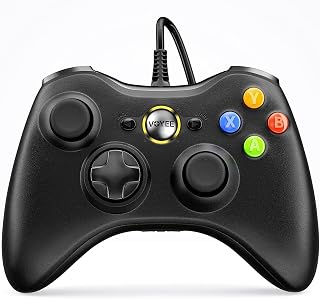
For readers chasing a reliable fix rather than another drift-prone pad, this wired USB controller skips wireless signal variance entirely, and its 21-button, rumble-equipped joystick layout gives Xbox 360 and Windows PC users consistent, direct input that doesn't degrade the way battery-powered wireless sticks tend to over time.
Pros
- Plug-and-play on Xbox 360 and Windows 7 through 11
- Fresh joysticks and triggers with no prior wear
- 21 buttons cover RPGs, platformers, and adventure games
- Long 7.2-foot cord and ergonomic grip for comfort
Cons
- Wired only, no wireless flexibility
- Not optimized for fast-paced competitive FPS play
Stick drift usually shows up after months of wear on the mechanical potentiometers inside a stock controller's joysticks, which is exactly why having a cheap backup matters. The VOYEE wired controller makes sense as that backup: a plug-and-play Xbox 360 and PC gamepad you keep in a drawer for when your main controller starts drifting mid-match. Its upgraded joysticks and enhanced trigger buttons are built fresh, so there's no accumulated wear to worry about yet. The 21-button layout covers RPGs, platformers, and adventure titles well, and dual-shock rumble adds feedback without needing any wireless pairing or batteries that could fail. Being wired also removes one entire category of drift-adjacent frustration: signal interference and connection drops that wireless pads sometimes get blamed for. The manufacturer is upfront that this isn't tuned for competitive FPS precision, so don't expect it to replace a high-end pad for ranked shooters. But as a low-stakes, always-ready fallback that sidesteps the wireless variables entirely, it fills a specific gap: something reliable to switch to the moment your primary controller starts acting up.
Compatibility: Microsoft Xbox 360, Xbox 360 Slim, Windows 7, Windows 8, Windows 8.1, Windows 10, Windows 11
Connectivity: Wired USB connection
Cable Length: 7.2 feet
Button Count: 21 buttons
Features: Ergonomic grips, dual-shock rumble control, upgraded joysticks, enhanced trigger buttons
Weight: 7.2 ounces
Dimensions: 6.69 x 4.33 x 2.36 inches
Model Number: XB-01
Warranty: 365-day guarantee against manufacturing defects, 45-day money-back guarantee, 24-hour customer support

Pros
- Outstanding cable length provides genuine freedom and comfort compared to standard short cables
- Dual rumble and impulse trigger technology creates tangible, immersive feedback that enhances gameplay
- Lightweight construction reduces hand strain during marathon gaming sessions
- Precision controls with anti-friction rings deliver competitive-level accuracy for shooters and action games
- Official Xbox licensing ensures seamless compatibility and reliability across all supported platforms
Cons
- Wired connection limits mobility and requires proximity to gaming device, unlike wireless alternatives
- Some users may prefer premium controllers with additional customization options
- Entry-level build quality compared to higher-end PowerA or official Xbox controllers
The PowerA Wired Controller is a solid mid-range gamepad designed specifically for Xbox Series X|S owners seeking responsive, feature-rich gameplay without breaking the bank. It caters to casual to intermediate gamers who value reliability and immersive feedback over wireless convenience, making it an excellent option for couch gaming setups where cable length isn't a constraint.
This controller excels in delivering tactile feedback through its dual rumble motors and impulse triggers, which translate in-game actions into real sensations that significantly enhance immersion. The precision-tuned analog sticks with embedded anti-friction rings provide smooth, accurate control inputs ideal for shooters, action titles, and competitive gaming. The extra-long 10-foot USB-C cable is a genuine quality-of-life improvement that reduces awkward positioning and cable strain during extended sessions.
Build quality reflects its accessible price point with a lightweight, ergonomic design that prioritizes comfort over premium materials. The bright blue finish is eye-catching, and the overall construction feels sturdy enough for regular use. The built-in 3.5mm headset jack adds practical value for voice chat without requiring separate adapters or complex setup.
The primary limitation is the wired connection, which restricts mobility and requires your gaming setup to accommodate a cable. Additionally, while the controller performs well, it lacks some advanced features found in premium alternatives, such as programmable buttons or extensive customization options via dedicated software beyond basic calibration through the Gamer HQ App.
The PowerA Wired Controller is a well-executed, dependable choice for Xbox Series X|S gamers who want immersive feedback, comfortable ergonomics, and reliable performance at a reasonable price. The 2-year warranty reinforces PowerA's confidence in durability, making this a smart investment for anyone seeking quality without premium pricing.
Compatibility: Xbox Series X, Xbox Series S, Xbox One, Windows 10, Windows 11
Connection Type: USB-C wired (10 feet / 3 meters)
Features: Dual rumble motors, impulse triggers with haptic feedback, precision analog sticks with anti-friction rings, 3.5mm stereo headset jack, 10 buttons
Design: Ergonomic, lightweight (7.2 oz), bright blue finish
Warranty: 2-year limited warranty
Included: Wired controller, 10ft USB-C cable, user manual
Model Number: 1519367-01R
Best For: Casual to intermediate Xbox gamers, couch gaming enthusiasts, players who value immersive haptic feedback, budget-conscious buyers seeking official performance, and anyone with a stationary gaming setup where cable length is not a concern.
Consider Alternatives If: You require wireless connectivity for mobile gaming, prefer premium controller features like programmable buttons, or prioritize the absolute latest in build materials and aesthetics.
Not Ideal For: Competitive esports players demanding tournament-grade specs, users with limited desk or console space, or anyone who needs freedom from tethered connections.
What Causes Controller Drift and How to Choose a Better Controller
The Root Cause: Analog Stick Wear
Most controllers use potentiometer-based analog sticks, which rely on a physical contact point that wears down over time. As the carbon resistive material degrades, the stick loses its ability to register a true center position, causing phantom inputs even when you’re not touching it.
Dust and debris can accelerate this process significantly. Compressed air around the base of the stick can help in early stages, but once the potentiometer itself is worn, the drift typically returns. This is why some controllers fail far sooner than others depending on build quality and usage intensity.
Hall Effect Joysticks: The Drift-Resistant Alternative
Hall Effect technology uses magnets instead of physical contact to detect stick position, which means there’s no surface wear over time. Controllers like the best Hall Effect controllers for PC gamers are specifically engineered to sidestep the drift problem at a hardware level.
The GameSir G7 SE Wired Controller for Xbox Series is a standout here. It features Hall Effect joysticks and Hall Effect triggers, delivering precise inputs with a much longer service life than traditional potentiometer sticks. If drift is your main concern, this is one of the most practical upgrades you can make.
Build Quality and Stick Sensitivity
Not all controllers age the same way. Premium options like the PlayStation DualSense™ Wireless Controller and the Xbox Wireless Gaming Controller | Electric Volt are built with tighter tolerances and more durable components than budget alternatives. That said, even high-end controllers can drift if the underlying mechanism is still potentiometer-based.
If you’re on PC and want a no-fuss wired option with reliable stick performance, the Logitech G F310 Wired Gamepad Controller Console has a well-established track record for consistent inputs over extended use. Its floating D-pad design also reflects the kind of mechanical thoughtfulness that contributes to longer controller life overall.
Nintendo Switch Joy-Con Drift: A Special Case
Joy-Con drift became a widely discussed issue due to the compact design of the controllers and the small potentiometers used inside. The sticks are exposed to more mechanical stress in handheld mode, which speeds up wear. Nintendo has acknowledged the issue and offered free repairs in many regions.
If you’re dealing with Joy-Con drift and want a long-term fix, the Hori Nintendo Switch Split Pad Pro (Black) is an officially licensed alternative that attaches directly to the Switch in handheld mode. It features full-size analog sticks that are far easier to maintain and far less prone to the drift issues common with stock Joy-Cons. It’s one of the most practical solutions for Switch players who game primarily in handheld mode. For more options in this space, our guide to top-rated GameSir controllers covers additional third-party alternatives worth considering.
Deadzone Settings as a Temporary Fix
Before replacing a drifting controller, check your in-game deadzone settings. Increasing the inner deadzone tells the game to ignore small stick movements below a certain threshold, which can mask minor drift without any hardware changes.
This isn’t a permanent solution since drift tends to worsen over time, but it can extend the usable life of a controller while you decide on a replacement. Steam and most modern consoles allow you to configure deadzones at the system level, which applies across all games at once. If you’re a budget-conscious PC gamer, the VOYEE PC Controller, Wired Compatible with Xbox offers an affordable backup option while you sort out a longer-term fix, and the PowerA Wired Controller for Xbox Series X|S steps things up with precision-tuned analog sticks and embedded anti-friction rings designed for more consistent performance over time.
Final Thoughts
Controller drift comes down to hardware wear, and the best way to address it is either through a controller built with drift-resistant technology or a well-engineered replacement that will hold up over time. For players who want the most future-proof solution, the GameSir G7 SE Wired Controller for Xbox Series delivers Hall Effect precision that avoids the problem at a fundamental level, while the Hori Nintendo Switch Split Pad Pro (Black) is the go-to fix for Switch users tired of dealing with Joy-Con drift in handheld sessions.
Frequently Asked Questions
Why does my controller drift even when I’m not touching the stick?
This happens because the potentiometer inside the analog stick has worn down and can no longer accurately register the neutral center position. The controller interprets the degraded signal as deliberate movement, resulting in phantom inputs. Cleaning around the stick base can help temporarily, but worn hardware usually needs to be replaced.
Can controller drift be fixed without buying a new controller?
In some cases, yes. Spraying compressed air around the stick base can dislodge debris causing false inputs. Adjusting the inner deadzone in your game or system settings can also mask minor drift. For Joy-Con drift specifically, Nintendo has offered free repairs in many regions, so it’s worth checking eligibility before purchasing a replacement.
Which type of controller is least likely to drift?
Controllers with Hall Effect joysticks are the most drift-resistant option available in 2026. Because they use magnetic sensing instead of physical contact, the sticks don’t degrade the same way traditional potentiometer sticks do. Our guide to the best Hall Effect controllers for PC gamers covers the top picks in this category in detail.
Does wired vs. wireless make a difference for controller drift?
The wired or wireless connection doesn’t directly cause drift, since drift is a hardware issue with the physical sticks rather than a signal problem. However, wired controllers like the Logitech G F310 Wired Gamepad Controller Console tend to have simpler internal designs with fewer components that can fail, which some players find more reliable for long-term use. Wireless controllers add battery cycles and more complex electronics, but a well-built wireless pad won’t drift faster solely because of its connection type.
Common questions
Does potentiometer wear actually cause controller stick drift over time?
Yes, potentiometer wear is one of the most common causes of stick drift. Potentiometers read stick position through physical contact with a resistive track, and repeated movement gradually wears down that surface. Once the track degrades unevenly, the sensor sends inconsistent position readings even when the stick sits still. This is why older gamepads tend to drift more as hours of use pile up, regardless of brand.
How do hall effect and TMR sticks help prevent drift?
Hall effect and TMR sticks help prevent drift because they use magnets and contactless sensors instead of physical contact to detect position. Without parts rubbing together, there is nothing to wear down over time the way a potentiometer's resistive track does. That makes these sensor types far more resistant to the drift issues common in older or heavily used controllers, which is why newer gamepads increasingly advertise this sensor type as a selling point.
Can deadzone calibration fix a controller that is drifting?
Deadzone calibration can mask mild drift, but it will not fix the underlying hardware problem. Increasing the deadzone tells the system to ignore small stick movements near center, which hides minor false inputs caused by a worn sensor. It is a useful temporary workaround while deciding on repairs or a replacement, but if drift is severe or getting worse, calibration alone will not solve it long term.




Write Your Review
No reviews yet. Be the first to share your experience!