

You’ve got your emulator set up, your ROMs organized, and your Raspberry Pi humming along. The one thing standing between you and a perfect retro session is a controller that actually feels right. Keyboard inputs just don’t cut it for platformers and RPGs, and not every gamepad plays nicely with popular emulation software.
This guide is built for retro gaming fans, emulation hobbyists, and anyone setting up a home arcade. Whether you’re running RetroArch on a PC, playing classics on a Raspberry Pi, or using a Steam Deck, you’ll find a solid option here. If you’re also exploring other retro input options, our roundup of the best retro USB controllers is worth a look too.
Quick answer
This guide compares 9 picks, with 8BitDo SN30 Pro Wireless Retro Gamepad with Hall Effect ranked first. 8BitDo SN30 Pro Wireless Controller with Hall Effect holds the highest customer rating among them. Logitech G F310 Wired Gamepad for PC - Budget-Friendly has the most customer reviews.

Built around Nintendo Switch compatibility, this controller appeals to emulation fans who want a wireless retro-style pad that also doubles as a legitimate Switch controller. With 16 buttons on board, it has enough inputs to map extra emulator functions like save states or fast-forward without running out of assignable buttons.
Pros
- Hall Effect joysticks prevent stick drift
- Works across Switch, PC, Steam Deck, and Android
- Up to 18 hours battery life with USB-C charging
- Compact size suits portable emulation setups
Cons
- Occasional button mapping quirks on some platforms
- Pairing can be inconsistent with hardware like Raspberry Pi 5
The SN30 Pro earns its spot on an emulation controller list because it was built with retro gaming in mind from the start. Hall Effect joysticks eliminate the drift that undermines precise platforming and racing emulation, while the SNES inspired layout feels natural for classic library titles. Its real strength for emulation fans is reach: it pairs with Switch, PC, Steam Deck, and Android, so the same controller follows you whether you are emulating on a handheld, a Steam Deck, or a desktop RetroArch setup. Dual rumble motors and 6-Axis motion add feedback that some emulator cores support, and the compact size makes it easy to store with a portable rig. USB-C charging and up to 18 hours of battery life mean fewer interruptions during longer sessions. Occasional button mapping quirks show up on certain platforms, and pairing with niche hardware like Raspberry Pi 5 can be inconsistent, so it is worth checking compatibility with your specific emulation setup before committing.
The SN30 Pro connects instantly to Nintendo Switch, PC Windows, Steam Deck, Android devices, Raspberry Pi, iPhone, iPad, macOS, and Apple TV. Setup varies by platform: on Switch, hold B and Start to power on before pairing. Windows and Steam require standard Bluetooth pairing or wired USB-C connection. The controller uses X-Input, D-Input, and Switch-compatible firmware modes for universal game support.
Dual connectivity provides flexibility: use wireless Bluetooth 4.0 for freedom of movement, or connect via USB-C cable for zero-latency competitive gaming and simultaneous charging. Firmware updates are available through the 8BitDo app, ensuring compatibility with new games and platforms as they release.

Modeled after classic console layouts, this pad leans into the retro aesthetic that emulation enthusiasts often want alongside accurate button mapping. Its Bluetooth wireless connection lets you sit back from the screen the way you would with an original console, making it a natural fit for recreating that vintage gaming feel digitally.
Pros
- Hall Effect joysticks eliminate stick drift for long-term reliability
- Retro-styled design fits the emulation aesthetic
- 18-hour battery life with USB-C charging
- Broad compatibility across Switch, PC, Steam Deck, and Android
Cons
- Compact size may feel tight for larger hands during long sessions
- Costs more than budget wired alternatives
Emulation enthusiasts tend to care about two things above all: authentic retro feel and rock-solid stick performance, and the SN30 Pro delivers both. Its retro-inspired design immediately suits the aesthetic of classic game emulation, while Hall Effect joystick technology uses magnetic sensors instead of potentiometers, eliminating the stick drift that can ruin long emulation sessions on analog-heavy platforms. A complete button set, including clickable joysticks and a proper D-pad, means it maps cleanly to systems ranging from SNES to PS2 emulation. Six-axis gyro adds an extra input option for certain emulated titles that support motion controls. Wireless Bluetooth connectivity keeps your setup tidy, and at 18 hours of battery life with USB-C charging, you won't be tethered to a cable or hunting for proprietary chargers. Its compact, pocket-sized shape also suits portable emulation setups like handheld PCs or Steam Deck. Broad platform support across Switch, PC, Steam Deck, and Android makes it a strong fit if your emulation library spans multiple devices rather than a single dedicated box.
This controller supports an impressive range of platforms including Nintendo Switch, Windows PC, Steam Deck, Android devices, Raspberry Pi, and now officially supports iPhone, iPad, macOS, and Apple TV. Wireless Bluetooth connectivity works with all platforms, while USB cable connectivity provides an alternative connection method. Firmware updates can expand compatibility and add features over time.
For Switch users, the SN30 Pro functions as a standard Pro Controller replacement. On PC and Steam Deck, it integrates seamlessly with Steam's controller configuration system. Android gamers benefit from native support, while Raspberry Pi enthusiasts can use it for retro emulation gaming. Cross-platform flexibility means one controller can serve multiple gaming systems without requiring additional purchases.
Joysticks feature Hall Effect magnetic sensors for precision and durability. Motion controls include 6-axis gyro and somatosensory functions. Dual micro-vibration motors provide contextual haptic feedback. The rechargeable 480mAh lithium-ion battery delivers 18 hours of playtime per charge, with charging time of 1-2 hours via USB-C. Dimensions are compact at 144 x 63.5 x 32.5mm, making it highly portable.
Connectivity options include wireless Bluetooth 4.1 and wired USB-C connection. The controller includes home and screenshot buttons for streamlined navigation. Turbo function helps with rapid-fire gameplay scenarios. Firmware updates can be applied to optimize performance and add new features.

Designed for the Analogue 3D, this pad speaks directly to emulation fans running N64-era software, and its wide compatibility across Android, Nintendo Switch, PC, and Windows means it doubles as a general-purpose emulation controller. Bluetooth wireless connectivity keeps cables out of the way during long retro gaming sessions.
Pros
- Hall Effect joystick prevents stick drift
- D-input and S-input modes add emulator flexibility
- Works across Android, Nintendo Switch, and PC
- Haptic feedback adds tactile response
Cons
- Right Z button placement can trigger accidental suspension
- Switch 2 compatibility needs a firmware update first
For anyone focused on N64 and retro console emulation specifically, the 8Bitdo 64 is shaped around that exact use case. Its layout echoes the original N64 pad while adding a modern two-handed grip, so classic titles feel authentic without the fatigue of the original three-pronged design. Hall Effect joysticks keep analog input accurate, which matters for N64 emulation where precise stick movement drives so much gameplay. D-input and S-input modes give flexibility depending on which emulator or platform you are running, and it connects across Android, Nintendo Switch, and PC, covering most emulation setups. Haptic feedback adds a tactile layer that many retro pads skip entirely. Build quality holds up well against first-party controllers, with buttons and a D-pad that respond crisply for both 2D and 3D retro titles. The right Z button sits close enough to the grip that it can occasionally trigger accidental suspension, so it is worth being mindful of hand placement during longer sessions.
Ideal for N64 emulation fans and retro collectors who want a controller shaped specifically for that library, with cross-platform reach into Android, Switch, and PC. It suits anyone prioritizing authentic feel over a generic modern layout. Skip it if you mainly emulate other systems where the N64-style layout offers no advantage, or if accidental Z button presses during normal grip shifts would bother you.

A straightforward wired USB gamepad removes the latency and pairing hassle that wireless setups can introduce, which is handy when configuring emulators that expect a consistent, always-on input device. Its ergonomic 10-button layout covers the basics for most retro emulation frontends running on a desktop or PC without extra setup.
Pros
- Familiar Xbox-style layout works instantly with most emulators
- Floating D-pad design improves precision for retro-style directional inputs
- Wired USB connection avoids pairing and battery concerns
- Durable build with repairable parts for long-term use
Cons
- No rumble or vibration feedback
- Stiff triggers can fatigue hands during extended sessions
Emulation setups often mean juggling dozens of systems, and the F310 earns its place through sheer versatility rather than flash. Since retro emulators are built around Xbox-style input mapping, this controller's familiar button layout means most emulation frontends and cores recognize it instantly, with little to no configuration needed. The 8-way D-pad rides on four separate switches instead of one pivot point, which matters a lot for emulating older platformer and fighting games where diagonal inputs need to register cleanly. Ten programmable buttons combined with Profiler software let you remap controls for emulated systems that used unusual button counts, from SNES to PS1 titles. It runs over a wired USB connection, so there's no pairing hassle or battery to manage mid session, and a 6-foot cord gives enough room to sit back from the screen. Owners report these controllers lasting years, with worn parts being replaceable rather than forcing a full repurchase. For anyone assembling an emulation rig without wanting to spend heavily per controller, the F310 covers the basics reliably.
Connectivity: Wired USB connection with 6-foot cord
Buttons: 10 programmable buttons with 8-way D-pad
Design: Floating D-pad with four-switch architecture for responsive control
Compatibility: Windows XP, Vista, 7, Chrome OS certified, Android TV
Features: Ergonomic rubber grips, customizable via Profiler software
Weight: 14.4 ounces
Warranty: 1 Year Limited Hardware Warranty
Good for emulation fans setting up a budget-friendly rig, especially multi-console setups where you might want several identical controllers on hand. Also solid for anyone who wants plug-and-play USB simplicity without pairing wireless devices. Skip it if you want vibration feedback for era-appropriate immersion, or if you're emulating racing games extensively, since the stiff triggers can tire your hands during long sessions.

With Hall effect joysticks and triggers, this pad resists the drift that plagues potentiometer-based sticks over long emulation sessions, and the 1000 Hz polling rate helps inputs register precisely for twitchy retro titles. Being built specifically for Windows PC, it slots easily into most emulator software without extra configuration.
Pros
- Hall Effect joysticks and triggers resist stick drift long term
- 1000Hz polling rate keeps input lag minimal
- Remappable L4/R4 bumpers work without extra software
- Wired or wireless on both Windows and Android
Cons
- Best performance depends on the 2.4G dongle rather than standard Bluetooth
- Profile switching between devices is manual, not automatic
Emulation setups live and die by stick accuracy, and the Ultimate 2C is built around exactly that problem. Hall Effect joysticks and triggers mean the analog inputs used in N64, GameCube, and PS2 emulation stay accurate instead of drifting after months of use, which is a common failure point on cheaper pads. The 1000Hz polling rate is overkill for most emulators but ensures zero input lag when you are fine tuning frame perfect platformers or fighting games. Metal joystick rings hold up to the repetitive stick movement that emulation sessions demand. Remappable L4/R4 bumpers let you assign save state or fast forward hotkeys without digging into emulator software menus. It works wired or wireless across Windows and Android, covering PC emulation boxes and Android handhelds alike. Build feels sturdy rather than flashy, and the D-pad holds up for 2D titles. For anyone assembling an emulation rig where input precision and long term reliability matter more than looks, this is a strong pick.
Connectivity: Wireless 2.4G and USB wired
Polling Rate: 1000Hz (2.4G and wired)
Input Technology: Hall Effect joysticks and Hall Effect triggers with metal joystick rings
Programmable Buttons: 13 total buttons including custom L4/R4 bumpers
Compatibility: Windows PC and Android devices
Additional Features: Turbo function, custom button mapping without software, refined D-pad and bumpers
Power Source: Rechargeable battery
Weight: 0.33 kg (11.6 oz)
Dimensions: 2.91 x 4.96 x 5.98 inches
Color Options: Purple
Buy this if you are running emulators on Windows PC or Android and want drift free sticks plus hardware remapping for quick access to emulator functions. It suits users who care about responsiveness in fast paced or precision heavy emulated games. Skip it if you need Switch or console compatibility, or if you prefer automatic cloud profile syncing across devices, since switching between Windows and Android here means manual reconfiguration.
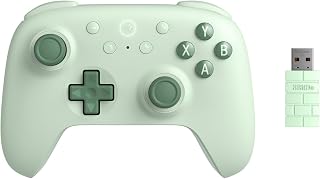
Emulating older systems means fighting stick drift more than anything else, so Hall effect joysticks and triggers matter since they use magnetic sensing instead of physical contacts that wear out. The 1000 Hz polling rate also keeps input lag negligible, which counts when timing-sensitive platformers or fighting games are part of your emulation library on PC or Android.
Pros
- 1000Hz polling rate minimizes input lag for fast-paced emulated games
- Hall Effect joysticks and triggers prevent stick drift
- Extra L4/R4 bumpers and remapping suit complex emulated control schemes
- Durable metal joystick rings for frequent long-term use
Cons
- Limited compatibility outside Windows and Android
- Battery life details are not clearly specified
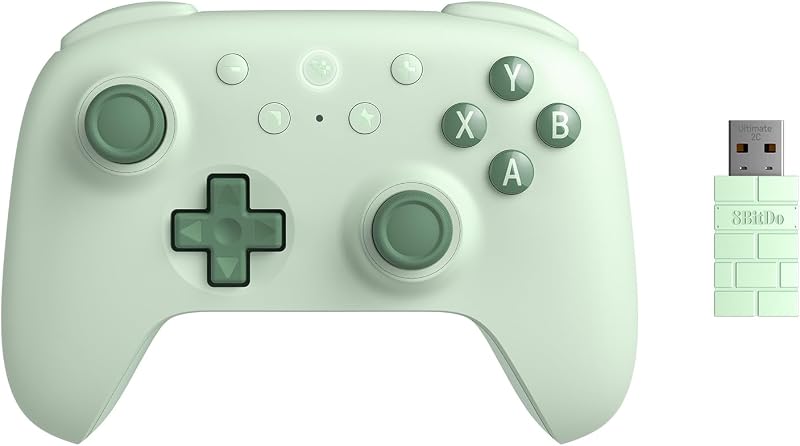
For emulation setups where responsiveness matters, particularly fighting games, shoot-em-ups, or precision platformers, the Ultimate 2C brings esports-level hardware to a multi-platform gamepad. Its 1000Hz polling rate ensures inputs register with minimal delay, which is especially valuable when emulating fast-paced arcade titles where timing is everything. Hall Effect joysticks and triggers remove stick drift from the equation entirely, a common failure point in older or budget controllers used for heavy emulation sessions. Metal joystick rings add durability for controllers that will see frequent use across many emulated titles. Extra L4/R4 bumpers and full remapping let you assign additional inputs for emulated systems that used more buttons than a standard modern gamepad offers. At 280 grams, it feels substantial without being heavy, and the wireless design keeps your emulation setup free of extra cables. It works with Windows PC and Android, covering two of the most common platforms for running emulators and frontends.
Connectivity: Wireless 2.4G and wired USB
Polling Rate: 1000Hz (2.4G and wired only)
Joysticks: Hall Effect technology with metal reinforcement rings
Triggers: Hall Effect triggers
Buttons: 14-button layout including remappable L4/R4 bumpers
Compatibility: Windows PC and Android devices
Power: Battery powered (rechargeable via USB)
Weight: 280 grams
Dimensions: 7.48 x 5.51 x 7.87 inches
Color: Green
Best for emulation users running Windows PC or Android who want top-tier responsiveness and remapping flexibility for complex control schemes. Well suited to fast reflex games where input lag matters. Skip it if your emulation setup lives on a console or other platform outside Windows and Android, or if you need firm clarity on battery life specs before buying, since that information isn't well documented.

Styled after the original SNES pad, this wired USB controller is aimed squarely at retro emulation setups, including Raspberry Pi builds running RetroPie or similar frontends. Its cross-platform support for Windows, Mac, and Raspberry Pi makes it a practical pick for anyone assembling a dedicated emulation rig rather than a general PC.
Pros
- Works across PC, Mac, and Raspberry Pi without drivers
- Authentic SNES-style layout suits classic emulator libraries
- Frosted concave D-pad aids precision in retro genres
- Two-pack supports local co-op emulation sessions
Cons
- Requires manual button mapping in each emulator
- USB-only, no compatibility with original consoles or Switch
Emulation setups live or die on how well a controller plays nice with your platform of choice, and the KIWITATA 2X earns its spot here through sheer compatibility. It runs on PC, Mac, and Raspberry Pi without drivers, which matters if you are building a multi-system emulation station rather than a single dedicated rig. The SNES-style layout with 10 buttons maps cleanly onto RetroArch, Snes9x, OpenEmu, and similar cores, so classic library emulation feels natural rather than forced through an unfamiliar control scheme. The frosted concave D-pad is worth calling out for emulation specifically, since precise directional input matters more in retro platformers and fighters than in modern games. Getting two controllers in one purchase also fits the emulation use case well, since local co-op is a big part of why people revisit these libraries. The tradeoff is that button mapping is manual in every emulator you use, so expect a short setup pass per program rather than instant recognition.
This controller supports a wide range of platforms and emulators. On Windows, it works with OS versions from Windows 98 through Windows 11, ensuring compatibility across decades of systems. Mac users can run OS X 10.0 and later, while Linux users on RedHat, SUSE, Debian, Ubuntu, and Gentoo distributions are fully supported.
For emulator software, recommended options include VirtuaNES and Jnes for PC, OpenEmu for Mac, and RetroArch for cross-platform support. Setup involves downloading your emulator of choice, connecting the controller via USB, and manually mapping the D-pad, SELECT, START, A, B, X, and Y buttons within the emulator's settings. The process typically takes under 5 minutes per emulator.
Important compatibility notes: these controllers do not work with Android TV boxes, iPad, Nintendo Switch, or the original SNES console. Raspberry Pi users report full compatibility across Pi Zero, Pi 1, Pi 2, and Pi 3+ models. If you encounter compatibility issues on Mac or Raspberry Pi, the seller provides direct support for troubleshooting.

Coming as a two-pack, this wireless SNES-style controller suits multiplayer emulation setups where two people want to relive classic co-op titles together. Its compatibility spans Windows PC, Mac, Linux, and Raspberry Pi, making it a fit for RetroPie boxes and other DIY emulation stations built around Raspberry Pi hardware.
Pros
- 2.4GHz wireless range up to 33 feet suits TV-connected rigs
- 10-hour rechargeable battery for long sessions
- Plug-and-play across Windows, macOS, and Linux
- 12 buttons give extra room for emulator shortcuts
Cons
- Some Raspberry Pi and RetroPie setups need reboots or rebuilds
- Exclusive to emulators and select Linux apps, no Steam or console support
For an emulation setup where cable clutter or couch distance is a factor, the SAFFUN wireless SNES controller solves a problem the wired options in this category do not: freedom from the desk. Its 2.4GHz connection reaches up to 33 feet, which makes it a genuinely better match if your emulation rig is hooked up to a TV rather than a monitor, something increasingly common with Raspberry Pi and RetroPie builds. A 10-hour rechargeable battery means it can carry a long emulation session without a mid-game swap. It pairs cleanly with SNES9X and OpenEmu once initial mapping is done, and plug-and-play support across Windows, macOS, and Linux keeps the setup process reasonably light. The 12-button layout gives a bit more headroom for emulator front-end shortcuts than a stock SNES pad would. The known friction point is Raspberry Pi and RetroPie configuration, where some setups need a reboot or rebuild to get recognition working reliably, so patience during first setup helps.
Works Great With: Windows PC, macOS, Linux, Raspberry Pi (3+), RetroPie, SNES9X emulator, OpenEmu (Mac), Retro Arch. Simply plug in the USB receiver before launching your emulator or booting your Raspberry Pi.
Does Not Work With: Steam games, Nintendo Switch, Android TV boxes, Fire TV, Chromebooks, SteamOS, Tesla, Commodore 64 emulators. The controller lacks the button configuration required for these platforms.
Emulator Configuration Tip: If you experience dual joystick and keyboard input, check your emulator's control settings. SAFFUN recommends SNES9X for Windows and OpenEmu for Mac to minimize mapping issues. For Raspberry Pi, power down and reconnect the controller after RetroPie installation if the system doesn't detect it initially.

This two-pack of retro-style USB controllers targets emulation setups where you need multiple identical pads ready to go, such as split-screen or co-op retro gaming on PC. Its classic layout mirrors older console controllers, helping emulated games feel closer to how they were originally meant to be played.
Pros
- Two-pack suits couch co-op on classic emulated titles
- Six fire buttons plus Start and Select cover most retro libraries
- Responsive D-pad with no noticeable input delay
- 1.5-meter cable gives comfortable seating distance
Cons
- Manual button mapping required, no plug-and-play
- Limited to computer-based emulation, no console or TV box support
The Rii Classic Retro USB Controller earns its place in an emulation lineup through straightforward practicality rather than standout features. It works across RetroArch, MAME, and similar emulators once buttons are mapped, and the six fire buttons plus Start and Select cover the control demands of most classic-era game libraries without feeling cramped. Where this pick stands out for emulation specifically is the two-pack format, which makes couch co-op sessions on classic titles simple to set up without buying twice. The 1.5-meter cable gives enough slack for a normal seating distance from a PC or Raspberry Pi, and the D-pad handles directional input without noticeable delay, which matters for genres like platformers where timing is everything. Build quality is plastic and lightweight, which keeps cost down but still holds up through regular sessions. As with most USB emulator controllers, there is no plug-and-play button recognition, so expect to configure mappings by hand in whatever emulator you run, and know that it sticks strictly to computer-based emulation rather than any console or TV box setup.
These controllers support a wide range of operating systems including Windows 98 through Windows 11, Mac OS X and newer, and all Raspberry Pi models including Pi Zero, Pi 1, Pi 2, and Pi 3. This broad compatibility makes them suitable for both legacy computers and modern single-board computers.
Emulator compatibility spans most popular retro gaming software, including RetroArch, MAME, Dolphin, and platform-specific emulators. Users must download their preferred emulator first and manually configure button bindings within the software. On Steam, Universal Controller Configuration Support must be enabled before launching emulated games.
Important note: these controllers are not compatible with Nintendo Switch, PlayStation, Xbox, television boxes, or automotive systems. They function exclusively with computer systems and Raspberry Pi running compatible emulation software.
How to Choose the Right Emulation Controller
Compatibility with Your Emulator and Platform
Not every controller works out of the box with every emulator. Before committing to a pick, confirm it supports your target platform, whether that’s Windows, macOS, Linux, or a Raspberry Pi running RetroPie. Most USB controllers are plug-and-play, but wireless options may require extra setup steps.
Controllers like the 8Bitdo Sn30 Pro Wireless Bluetooth Controller carry official compatibility with Switch, PC, Steam Deck, Android, and Raspberry Pi, making them a flexible choice across multiple setups. The KIWITATA 2X Classic SNES USB Controller for PC lists explicit emulator compatibility including RetroArch, Snes9x, and OpenEmu, which takes the guesswork out of configuration.
Wired vs. Wireless
Wired controllers offer zero-lag input and no battery management, which makes them ideal for precision-heavy genres like fighting games and platformers. The Logitech G F310 Wired Gamepad Controller Console and Rii Classic Retro USB Wired Game Controller for PC both use standard USB connections with no driver installation needed.
Wireless controllers add freedom of movement and a cleaner desk setup. The SAFFUN 2 Pack 2.4 GHz Wireless USB Controller delivers a stable 10-meter range via a plug-and-play USB receiver, while the 8Bitdo Ultimate 2C Wireless Controller for Windows pushes performance further with a 1000Hz polling rate for nearly instantaneous response.
D-Pad Quality and Button Layout
For retro emulation, the D-pad is often more important than the analog sticks. A mushy or imprecise D-pad ruins 2D platformers and classic RPGs. The 8Bitdo SN30 Pro Bluetooth Wireless Gamepad Retro is widely praised for its accurate, clicky D-pad, which mirrors the feel of original SNES hardware. The Logitech F310 also uses a floating D-pad design resting on four individual switches for snappy directional response.
If you’re emulating Nintendo 64 titles, the 8Bitdo 64 Bluetooth Controller for Analogue 3D is purpose-built with the N64 layout in mind. It supports both D-input and S-input modes and works with the Analogue 3D, Switch, and Windows platforms. For more controller options across different gaming categories, browse the full Controllers category.
Build Quality and Long-Term Durability
Hall Effect joysticks are a major upgrade over traditional potentiometer-based sticks because they use magnetic sensors that resist wear over time. Both the 8Bitdo Sn30 Pro Wireless Bluetooth Controller and the 8Bitdo Ultimate 2C Wireless Controller for Windows feature Hall Effect joysticks and triggers, which means less drift and longer lifespan compared to budget alternatives.
Budget picks like the Rii Classic Retro USB Wired Game Controller for PC are great for casual use or introducing a second player without a large commitment. For daily retro gaming sessions, investing in a controller with Hall Effect technology pays off in the long run. You can also explore other quality peripherals in the broader Electronics category to round out your setup.
Final Thoughts
For most emulation setups, the 8Bitdo SN30 Pro Bluetooth Wireless Gamepad Retro delivers the best all-around balance of authentic retro feel, modern wireless convenience, and broad platform support. If you need something more performance-driven for PC and Android with cutting-edge input response, the 8Bitdo Ultimate 2C Wireless Controller for Windows is the stronger choice, thanks to its 1000Hz polling rate and Hall Effect hardware.
Frequently Asked Questions
What is the best controller for emulation on a Raspberry Pi?
The 8Bitdo SN30 Pro and the KIWITATA SNES USB controller both work well with Raspberry Pi running RetroPie or similar distributions. USB controllers are generally the easiest to configure since they are recognized immediately without Bluetooth pairing. You’ll still need to manually map buttons inside your emulator frontend, which most setups walk you through on first launch.
Do I need to install drivers for a USB emulation controller?
Most USB controllers reviewed here are plug-and-play and require no additional drivers on Windows, macOS, or Linux. However, button mapping within the emulator itself is usually a manual process. Keep in mind that wireless controllers using 2.4GHz USB receivers, like the SAFFUN 2 Pack, are also driver-free on supported systems.
Is a wireless controller good enough for retro emulation in 2026?
Yes, modern wireless controllers have closed the gap significantly on input latency. Controllers using 2.4GHz receivers, like the 8Bitdo Ultimate 2C, achieve polling rates up to 1000Hz, which is more than fast enough for any retro title. Bluetooth options like the SN30 Pro are slightly less snappy but still perfectly responsive for the vast majority of emulated games. If you want a deeper look at input devices, the guide to the best joystick for flight sim covers wireless latency considerations in a similar context.
Can I use these controllers with Steam and RetroArch?
Most of the controllers here work with RetroArch out of the box after manual button mapping. Steam compatibility varies: the Rii and KIWITATA controllers require enabling Steam’s Universal Controller Configuration Support before they register properly. The 8Bitdo lineup and the Logitech F310 tend to have the most consistent Steam recognition without extra configuration steps.




Write Your Review
No reviews yet. Be the first to share your experience!