

You sit down to fly a cross-country route in Microsoft Flight Simulator, and within minutes your keyboard-and-mouse setup has you fighting the controls instead of enjoying the skies. That frustration is exactly why a dedicated flight sim joystick changes everything. The right stick puts authentic, responsive control at your fingertips and keeps you focused on the horizon rather than hunting for hotkeys.
This guide covers ten of the most compelling flight sim joysticks available right now, from budget-friendly entry points to full military-replica HOTAS systems. Whether you fly commercial airliners, dogfight in combat sims, or explore open space, there is a strong option here for you. If you are also building out a broader gaming station, our roundup of top gifts for gamers is worth a look for complementary accessories.
Quick answer
This guide compares 10 picks, with Thrustmaster HOTAS Warthog A-10C Flight Stick - Hall ranked first. Thrustmaster T-Flight Stick X USB Flight Simulator has the most customer reviews.

Modeled after the actual A-10C stick, this metal replica gives combat sim pilots the weighty, authentic feel that plastic alternatives can't match. With 19 buttons packed into an ergonomic grip, it handles the layered command inputs modern combat sims demand, letting you keep hands on the stick during intense dogfights instead of reaching for the keyboard.
Pros
- 16-bit Hall Effect sensors
- A-10C replica metal handle
- 19 programmable buttons
- Advanced T.A.R.G.E.T. programming
Cons
- PC compatibility only
- No throttle included
For a flight-sim ranking, the HOTAS Warthog stands out by prioritizing highly detailed stick input and an aircraft-style command layout. It is a PC joystick built as a replica of the A-10C Warthog control stick used by U.S. Air Force pilots, making it especially relevant to combat-focused simulation setups. Hall Effect sensors deliver 16-bit resolution, or 65,536 values per axis, for precise control that resists drift and dead zones over long-term use. Its 19 programmable buttons are supported by three 8-way hats, a 4-way hat with push button, a metal dual trigger, and pinkie switches. That concentration of controls can reduce reliance on the keyboard during demanding maneuvers. The detachable all-metal handle and 9.8-pound overall weight give the unit a substantial, stable presence for a desk or cockpit installation. T.A.R.G.E.T. software offers Basic, Advanced, and Script programming options, while compatibility with the HOTAS Cougar base gives dedicated PC simmers room to develop a larger setup. This is a specialized joystick for pilots who value realism, precision, and extensive control mapping over simplicity.
Technical Specifications
Controller Type: Joystick with Hall Effect sensors
Connectivity: USB corded connection
Resolution: 16-bit Hall Effect per axis with 65536 values
Button Count: 19 action buttons plus multiple hat switches
Programmable Controls: 3 eight-way hat switches, 1 four-way hat with push button, metal dual trigger, pinkie switches
Weight: 9.8 lbs total package, stick weighs over 6 lbs
Dimensions: 10.55" D x 9.65" W x 12.36" H
Detachable Handle: Yes, all-metal construction
Software: Thrustmaster T.A.R.G.E.T. with drag-and-drop programming
Compatibility: PC via USB, cross-compatible with HOTAS Cougar base
Warranty: One year manufacturer warranty
Included: Flight stick and instruction manual
Buy the HOTAS Warthog if your PC flight-sim setup centers on detailed combat flying and you want an A-10C-inspired stick with a large number of programmable commands. It suits committed simmers who will use T.A.R.G.E.T. to build profiles and who value a heavy, all-metal controller. Skip it if you need console compatibility, want a throttle included, or prefer a lighter controller with a minimal setup process. Its command density and customization are better matched to dedicated use than casual flying.

For sim pilots building a full cockpit setup, this bundle pairs throttle, joystick, and rudder pedals with a staggering 189 buttons across the system. That button count matters when you're flying complex aircraft with dozens of switches and levers to manage, letting you assign nearly every function without menu diving mid flight.
Pros
- Joystick, throttle, and pedals included
- 189 programmable controls
- 16-bit non-contact sensors
- Adjustable springs and pedal damping
Cons
- Requires substantial setup space
- Complex profiles take time to configure
The Logitech G X56 H.O.T.A.S. bundle is a strong flight-sim choice because it covers the major controls of an aircraft in one package: joystick, throttle, and rudder pedals. For Windows pilots building a more complete desktop or cockpit arrangement, the bundle adds rudder input and differential toe brakes alongside the primary stick and throttle controls. Its 189 programmable buttons and controls provide enough mapping capacity for complex aircraft systems without depending as heavily on a keyboard. The X56 uses military-grade 16-bit non-contact sensors for precise stick control, with configurable response curves and deadzones to tailor behavior across light aircraft, high-performance fighters, and spacecraft. Four adjustable spring options further let users alter stick resistance. The ergonomic layout places controls where fingers naturally rest, an advantage for extended sessions and VR use, while RGB lighting can be customized to suit a setup. The Pro Flight Rudder Pedals use smooth self-centering action, adjustable damping, and differential toe brakes. This is an expansive Windows control suite, but its three components, nearly 200 controls, and profile configuration needs demand both space and commitment.
Controller Type: Joystick, Throttle, and Rudder Pedals
Programmable Controls: 189 total
Sensor Technology: 16-bit non-contact sensors
Connectivity: Dual USB (corded)
Compatibility: Windows PC
Colors: Black and Gray
Spring Options: 4 customizable settings
Rudder Pedal Features: Self-centering with adjustable tension, differential toe brakes, adjustable foot rests
Additional Features: RGB lighting, ergonomic design, VR-ready
Buy this bundle if you fly on Windows and want joystick, throttle, and rudder pedals together for a fuller flight-sim control layout. It is particularly suitable for VR pilots, users who map many in-sim functions, and anyone who wants adjustable stick resistance, response curves, and pedal damping. Skip it if desk or mounting space is limited, if you prefer quick profile setup, or if a simpler controller better fits your flying. The extensive control count rewards time spent configuring it.
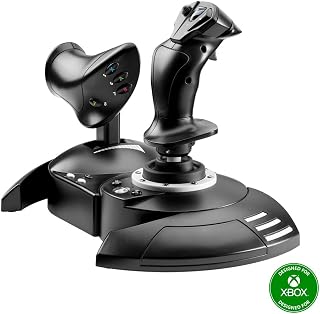
Cross platform flexibility is the draw here, since this stick and throttle combo works across PC and the full Xbox lineup. With 14 buttons and an ergonomic shape, it suits sim fans who split time between console and desktop and want one controller that carries over without relearning a layout.
Pros
- Works with PC and Xbox consoles
- Detachable throttle unit
- Adjustable stick resistance
- 14 programmable buttons
Cons
- No force feedback or haptics
- Throttle is less refined than higher-end options
The T-Flight HOTAS One fits a best-flight-joystick list by bringing a separate joystick and throttle to both PC and Xbox players without moving into a full multi-component cockpit system. Compatibility with Xbox One, Xbox Series S, Xbox Series X, and PC gives it a broad role for Microsoft flight-sim users who want more aircraft-like control than a standard gamepad provides. The throttle detaches from the stick, so the two pieces can stay together or be positioned separately on a desk or lap. Fourteen programmable buttons, a responsive trigger, hat switch, and dual rudder control keep important commands close to hand. Adjustable stick resistance allows the feel to be tuned for commercial jets, helicopters, and combat fighters, while USB connectivity supports straightforward plug-and-play use without software installation. At 1,644 g, the controller has enough weight to support stable input during active maneuvers, and the throttle attaches securely and moves through its range smoothly. It does not offer force feedback or haptic features, and experienced simmers may want a more refined throttle. Still, its platform support, detachable throttle, and accessible HOTAS layout make it a practical all-rounder for PC and Xbox flight simulation.
Buy the T-Flight HOTAS One if you fly on Xbox or PC and want a joystick-plus-throttle arrangement that is more flexible than a gamepad. It suits newer sim pilots, casual flyers, and users who need a detachable throttle for different desk layouts. Skip it if force feedback or haptic features are essential, or if you already want the more refined throttle feel associated with higher-end HOTAS hardware. Dedicated cockpit builders may also prefer a system with more controls and components.
The T-Flight HOTAS One connects via USB and requires no drivers or complex setup on Windows PC, Xbox One, Xbox Series S, or Xbox Series X. Simply plug it in and begin flying with compatible titles including Microsoft Flight Simulator, DCS, War Thunder, and other major flight sim software. The detachable throttle can be positioned on your desk alongside the joystick or held in your lap for added immersion. The system is expandable, working seamlessly with Thrustmaster TFRP rudder pedals to create a complete multi-axis control setup as your sim experience grows.

Built specifically for precision combat flying, this flight stick's 16 button layout and ergonomic grip give dogfighting sim players quick access to weapons and countermeasures without losing hand position. It's a fit for PC pilots who prioritize fine control response over bundled extras like throttles or pedals.
Pros
- H.E.A.R.T. magnetic sensor technology
- Four independent axes with integrated throttle
- 16 programmable buttons and 8-way hat
- Ambidextrous grip with swappable components
Cons
- Twist rudder may feel awkward
- Reports note twist-control durability concerns
For a PC flight-sim setup that needs one controller to cover the fundamentals, the T.16000M FCS brings four independent axes into a compact corded stick. Pitch and roll sit alongside an integrated twist rudder and throttle, so a new cockpit can start without separate pedals or a throttle unit. Its H.E.A.R.T. magnetic sensor technology is the key reason it belongs in a flight-sim ranking: the contactless design is intended to avoid the wear associated with traditional potentiometers and supports precise inputs over extended use. There are 16 programmable buttons, an 8-way hat switch, and tactile braille markings, giving pilots controls they can distinguish without constantly checking the stick. The ergonomic, fully ambidextrous grip uses three removable, swappable components, allowing either hand to take the controls. A sturdy base is designed to remain in place through more forceful maneuvers. At 1.9 pounds and 8.18 by 9.44 by 7.79 inches, it keeps the desk footprint relatively contained. The caveat for dedicated aircraft simulation is yaw: integrated twist control is convenient, but some pilots may prefer pedals for natural coordinated turns.
Buy the T.16000M FCS if you fly on PC and want a self-contained flight stick with pitch, roll, yaw, and throttle controls, especially if desk space or an ambidextrous layout matters. Its programmable inputs and 8-way hat also suit pilots who want more commands at hand. Skip it if you already know you want dedicated rudder pedals: the twist rudder can feel less natural for coordinated turns, and reports have raised durability concerns around that control.
Compared to older potentiometer-based joysticks like the Logitech Extreme 3D Pro, the T16000M FCS's hall effect sensors eliminate drift and calibration drift that plagued previous generations. Users who owned older Thrustmaster models note the FCS version feels noticeably more refined and responsive.
Versus high-end alternatives like the Warthog, the T16000M sacrifices some premium build materials and feels less robust, but delivers surprisingly similar precision at a fraction of the cost. Many experienced simmers own both, using the T16000M as a primary stick and the Warthog as a backup or specialized HOTAS setup.
The key advantage over budget competitors is the hall effect technology combined with four independent axes and T.A.R.G.E.T software customization. These features justify the mid-range price and explain why this stick consistently ranks number one in PC flight controls across major retailers.

Modeled on Airbus sidestick design, this controller suits sim pilots who fly airliners rather than fighters and want cockpit accuracy over combat features. Its 17 buttons and compatibility with both desktop and laptop setups make it practical for enthusiasts recreating commercial flight decks in confined desk space.
Pros
- Officially licensed A320 1:1-scale replica
- Contactless magnetic Hall sensors
- 17 programmable buttons with braille markings
- Integrated throttle, thrust reverser, and rudder
Cons
- Extensive customization takes time to learn
- Limited user-review data on longevity
Airbus-style simulation gets a more specific answer with the TCA Sidestick Airbus Edition. It is an officially licensed 1:1-scale replica of the Airbus A320 sidestick, so it is particularly fitting for Windows pilots building an Airbus-oriented flight-sim station rather than simply seeking a generic joystick. Contactless magnetic Hall sensors avoid mechanical friction, while its 17 programmable buttons with braille identification place a substantial set of cockpit functions on the stick. The controller combines a built-in throttle axis with a thrust-reverser mechanism and rotatable rudder control that can be locked. This makes it a practical compact choice for pilots who do not want the extra equipment of separate throttle quadrant and pedals. Four swappable head modules let you alter its configuration, and its ergonomic form works with desktop or laptop Windows systems through USB. Its 7.68-ounce weight keeps it a lightweight addition to a desktop setup. This stick is strongest where A320-style cockpit realism and space-efficient integrated controls are priorities. However, broad customization takes time to learn, and a lack of user reviews provides little independent evidence on long-term durability.
Buy this stick if your Windows flight-sim time centers on Airbus flying and you want an officially licensed A320-style sidestick with throttle, thrust reverser, and rudder functions integrated into one unit. It also fits a desktop where separate pedals and a throttle quadrant would add clutter. Skip it if you prefer a conventional general-purpose stick, need well-established long-term user feedback, or do not want to spend time learning extensive button customization.
Physical Specs: Dimensions 9 inches depth, 10.5 inches width, 8.5 inches height. Weight 7.68 ounces. Color black. Package includes instructions manual and flight stick controller only.
Technical Specs: USB plug-and-play connectivity. Compatible with Windows desktop and laptop systems. Features contactless magnetic Hall effect sensors, 17 action buttons, 4 swappable joystick head modules, integrated throttle axis with thrust reverser, and rotatable rudder control with lockable twist mechanism.
Support: One year manufacturer warranty included. Model number 2960844. Made by Thrustmaster VG. UPC 663296422309. Currently ranks number 12 in PC Game Flight Controls and number 1,623 in overall Video Games category.

Pros
- Exceptional realism with authentic Airbus replica controls that transform flight simulator experience
- Extensive button mapping and customization options adapt to any aircraft or flight scenario
- Built-in thrust reverser and integrated rudder control eliminate need for additional hardware purchases
- Solid construction with satisfying tactile feedback from switches and throttle detents
- Clean cable management through single Ecosystem Hub simplifies cockpit organization
Cons
- Some users report programming and software compatibility issues requiring troubleshooting
- Learning curve for full feature utilization requires time investment beyond basic setup
The Thrustmaster TCA Captain Pack X is a professional-grade flight simulator controller designed for serious enthusiasts who demand authentic cockpit controls. This is not a casual gaming accessory but rather a hobby-grade setup that appeals to flight simulation devotees, aspiring pilots, and anyone seeking true-to-life Airbus A320 aircraft control replication.
What sets this package apart is the combination of form and function. The officially licensed sidestick and throttle quadrant deliver the look and feel of real Airbus controls, while the 31 action buttons and 4 axes cover virtually every in-flight function. The integrated thrust reverser mechanism on the throttle provides realistic landing procedures, and the rotating sidestick handle eliminates the immediate need for separate rudder pedals, making this a complete control solution.
Build quality is excellent, with users consistently praising the sturdy construction and satisfying tactile feedback from switches and throttle detents. The controls feel smooth and precise during extended flight sessions, and the 14 remappable buttons with 4 swappable joystick head modules provide customization flexibility for different aircraft and scenarios. Setup is straightforward thanks to the integrated Ecosystem Hub, and the single USB cable keeps your flight deck organized while allowing expandable connectivity.
The main drawback is the learning curve and software integration. While most users report excellent results with Microsoft Flight Simulator, some have encountered programming issues requiring troubleshooting. Additionally, at this price point, this is an investment best suited for committed flight simulation enthusiasts rather than casual players.
Verdict: The Thrustmaster TCA Captain Pack X delivers uncompromising authenticity and control depth for serious flight simulator pilots. If you're willing to invest in premium hardware and commit time to mastering its features, this setup will transform your flight simulation experience into something remarkably close to the real thing.
Consider this product if you fly regularly with Microsoft Flight Simulator or other advanced flight simulators and want controls that match professional aviation standards. The investment makes most sense for dedicated flight simulation hobbyists who already spend significant time in the virtual cockpit.
Skip this if you play flight games casually or want a budget-friendly entry point into flight simulation. The Thrustmaster entry-level controllers offer better value for occasional players. Additionally, ensure your simulator software version is up to date to avoid reported compatibility issues that require driver updates.
Before purchasing, verify compatibility with your specific flight simulator software and check community forums for the latest software solutions if you encounter initial setup challenges. The learning investment is substantial, but rewards committed users with an unmatched immersive experience.
Pros
- True plug-and-play design works immediately on Windows 11 and modern systems
- Built-in throttle and rudder twist saves desk space and money
- Adjustable resistance knob lets you dial in perfect stick tension for your style
- Sturdy weighted base eliminates wobbling during demanding flight scenarios
- Good value package with all essential controls in one compact device
Cons
- Limited to 12 buttons, which may feel constraining for complex aircraft or advanced simulations
- Entry-level build quality, not designed to compete with high-end professional flight sim gear
- Some users report the throttle lacks multiple detents, offering only midway indent
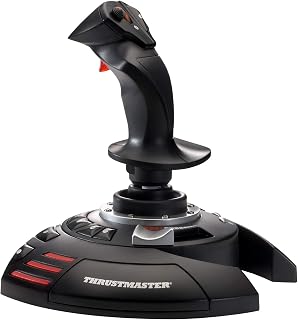
The Thrustmaster T-Flight Stick X is a compact, all-in-one flight joystick designed for PC gamers and flight sim enthusiasts who want a complete control system without the expense and desk clutter of separate components. It's ideal for casual to intermediate pilots flying Microsoft Flight Simulator, combat flight games, space sims, and helicopter scenarios on Windows-based PCs.
The joystick's standout feature is its combination of a responsive stick with adjustable resistance, an integrated throttle lever, and a twist rudder mechanism, all working together seamlessly. The adjustable stick tension lets you customize the feel to match your preference, whether you prefer light, responsive inputs or heavier resistance for precision maneuvers. Real-world testing shows zero axis drift, and the weighted base keeps the entire unit stable even during aggressive dogfights or turbulent weather scenarios.
Build quality is solid for the price point, with robust button construction that feels more durable than older flight stick models. The device is genuinely plug-and-play, requiring no driver downloads on Windows 11 and modern systems, making it accessible to newcomers who want to avoid technical setup headaches. The 12 fully programmable buttons and onboard preset memory allow you to create and store custom profiles for different aircraft or gaming scenarios.
The main limitation is the button count of 12, which may feel constraining if you fly complex aircraft with many systems to control. Additionally, the throttle features only a midway indent rather than multiple positions, and the overall build is entry-level rather than professional-grade, so it won't satisfy serious simulation enthusiasts seeking competition-level precision.
The Thrustmaster T-Flight Stick X delivers excellent value as an accessible, complete flight control solution for PC gamers. If you're upgrading from keyboard controls or old flight sticks that don't work with modern Windows versions, this joystick offers the features and reliability needed to enjoy modern flight sims without breaking the bank.
Choose the T-Flight Stick X if you're a casual or intermediate flight sim player who wants all essential controls in one device without purchasing separate throttle and rudder accessories. It's perfect for players of Microsoft Flight Simulator, DCS World, Prepar3D, and arcade-style combat games on PC.
Skip this model if you're a serious simulation enthusiast seeking professional-grade precision, frequent flyer with highly complex aircraft requiring 20+ buttons, or someone who specifically needs analog rudder pedals separate from the stick for better heel-toe control. For those users, a dedicated HOTAS system with separate pedals would be more appropriate.
Verify Windows compatibility before purchasing, though most modern PC systems from Windows 10 onward should recognize this joystick immediately without driver installation. Check your flight simulator's button mapping to ensure 12 programmable buttons are sufficient for your intended aircraft types.
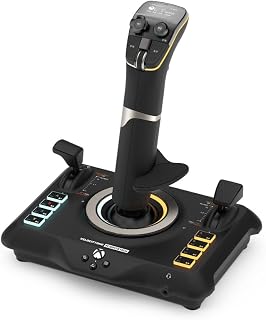
This universal controller's 27 buttons and USB-C connection make it a versatile pick for sim pilots who move between Xbox consoles, PC, and laptop setups. The broad hardware compatibility suits players who want one flightstick to follow them across devices without needing separate peripherals for each platform.
Pros
- Windows and Xbox compatibility
- 27 programmable buttons and eight precision axes
- Dual throttle levers with swappable heads
- OLED display for on-device adjustments
Cons
- Xbox pedal expansion requires a custom cable
- Limited long-term user feedback
Rather than restricting a flight-sim setup to PC, the VelocityOne Flightstick supports Windows, Xbox One, Xbox Series X, and Xbox Series S, making it a particularly versatile ranked option for multi-platform pilots. Its control count is the central attraction: 27 programmable buttons, eight precision axes, and dual multi-function throttle levers with swappable heads give users a broad pool of inputs for airliners, fighter jets, and space simulators. Hall-effect non-contact sensors address stick drift associated with conventional potentiometer designs. The built-in OLED Flight Management Display lets pilots alter control profiles, trim sensitivity, rudder lock, and RGB lighting without leaving the cockpit or opening software. A touch sensor pad can control a mouse cursor, while Xbox-licensed navigation buttons help with console control. The ergonomic body is ambidextrous, and its wrist rest is reversible for left- or right-handed use. At 1.8 pounds, it is manageable despite its 6.46-by-8.54-by-9.07-inch footprint. For flight sim in 2026, its strongest case is putting a high number of controls and setting options in one USB-C controller across PC and Xbox. Setup may be more complicated for Xbox pilots adding optional rudder pedals, which require a custom USB-C pass-through cable obtained by contacting Turtle Beach.
Compatibility: Windows 10/11 PC, Xbox One, Xbox Series X|S. Supports Microsoft Flight Simulator 2020/2024, Elite Dangerous, DCS World, X-Plane 11/12, War Thunder, Star Citizen, Ace Combat, and others.
Controls: 27 programmable buttons, 8 high-precision Hall-effect axes, 8-way digital POV hat, rapid-fire trigger, nano trim wheel, analog POV hat, multi-function throttle and flap levers with precision detents, touchpad navigation sensor.
Display: Integrated OLED Flight Management Display with rotary configuration dial and click-to-select interface. On-board memory stores all settings and profiles in real-time.
Connectivity: USB-C with 10-foot cable (USB-A to USB-C included). Integrated input mode switch for Xbox/PC selection. Bluetooth app available for iOS and Android.
Design: Ambidextrous with reversible wrist rest. Adjustable RGB LED lighting across multiple zones. Dimensions: 6.46 x 8.54 x 9.07 inches. Weight: 1.8 pounds. Color: Black.
Warranty: 1-year limited manufacturer warranty. Manufacturer: Turtle Beach. Model: TBS-0722-05.

Pros
- Exceptional universal compatibility covers premium flight sim controllers worth hundreds of dollars
- Smooth height adjustment from -175mm to +175mm and depth positioning from 80mm to 300mm accommodates any desk setup
- Secure clamping mechanism keeps expensive controllers stable during aggressive stick movements without slipping
- No tools needed for installation, setup is straightforward and can be completed in minutes
- Two-pack bundle provides everything needed for realistic dual-stick HOTAS gaming configuration
Cons
- Heavy weight of 3.74kg per unit may limit portability if you frequently switch desks or transport gear
- Requires desk space and appropriate desk thickness to accommodate the clamp mechanism
- Some users may need to adjust clamp pressure settings to find optimal balance between security and controller material protection
The Hikig 2 Set Desk Mount is a universal solution for flight sim enthusiasts who want to transform their desk into a professional-grade cockpit. This two-pack mount is engineered to accommodate virtually any flight sim controller on the market, from popular Logitech X56 and Thrustmaster HOTAS systems to specialized options like VKB Gunfighter and WinWing Orion devices. Whether you're a casual flight sim player or a hardcore enthusiast with thousands invested in your setup, this mount provides the stability and flexibility you need.
The standout feature is the adjustable positioning system that gives you complete control over your controller placement. Height adjustment ranges from -175mm to +175mm, while the front-to-back positioning spans 80mm to 300mm, allowing you to dial in the exact ergonomic position that works for your body and playing style. The powerful 91N.m force clamp mechanism grips controllers securely without any slipping or vibration, even during intense aerial combat or precision maneuvers. Real-world performance is solid, with users reporting that expensive controllers remain perfectly stable throughout extended gaming sessions.
Build quality is substantial, with each mount weighing 3.74kg and constructed from heavy-duty materials designed to withstand years of use. The clamp mechanism operates smoothly and intuitively, making height and depth adjustments quick and easy. The two-pack configuration means you can mount both your joystick and throttle simultaneously for an authentic dual-stick HOTAS experience, creating a more immersive and responsive flight sim environment than single-controller setups.
The main consideration is space and permanence. The clamps do require appropriate desk thickness and won't work with very thin surfaces or cable management boxes. Additionally, if you frequently change gaming setups or need to travel with your equipment, the weight and bulk may be impractical. Some users have also noted that finding the perfect clamp pressure balance takes a bit of experimentation to avoid over-tightening on sensitive controllers.
Overall, the Hikig 2 Set Desk Mount delivers excellent value for anyone serious about flight simulation. It solves the fundamental problem of keeping expensive controllers stable and positioned correctly, and its universal compatibility means it will work with your current gear and any future controllers you add to your collection. The build quality and adjustability justify the investment for dedicated flight sim gamers.
Before purchasing, ensure your desk can accommodate the clamping mechanism. The mount works best on desks with edge thickness between 16-25mm. If you have a particularly thin desk or prefer not to use desk clamps, this mount may not be ideal. Measure your desk edge thickness and available desk real estate to confirm compatibility.
Consider the two-pack bundle carefully based on your needs. If you only fly with a single joystick, one mount may be sufficient, though two mounts offer flexibility for future expansion. For HOTAS enthusiasts, the two-pack is essential for mounting both joystick and throttle simultaneously, enabling more intuitive and responsive control.
This mount works with PC, PlayStation 4, and PlayStation 5, making it compatible with popular flight sim titles across platforms. Verify your flight sim game supports your controller before purchasing to ensure full compatibility beyond just the physical mount hardware.

Pros
- Exceptional button density and ergonomic layout minimize hand fatigue during long sessions
- Hall Effect sensors provide consistent, drift-free performance across extended play
- Modular design with detachable grip and expandable base future-proofs your investment
- Comprehensive control scheme covers combat, navigation, and targeting without keyboard switching
- Sturdy base construction with stability supports handles aggressive maneuver inputs reliably
Cons
- Premium price point may exceed budgets of casual flight sim players
- Steep learning curve for the 44-button layout requires significant setup and customization time
- No onboard profiles or presets for different games, requiring manual programming per title
The Thrustmaster Sol-R1 is a high-end flight simulation joystick engineered for combat and space exploration games on PC. This is purpose-built hardware for serious sim pilots and competitive players who demand precision control and comprehensive input options during extended gaming sessions.
The standout feature is the sheer volume of programmable actions, with 44 total inputs spread across a detachable ambidextrous grip and integrated throttle base. The 21 dedicated buttons on the stick itself include dual triggers, dual hat switches, a ministick, and thumbwheel, ensuring every critical maneuver from targeting locks to throttle adjustments stays within fingertip reach. Hall Effect H.E.A.R.T. technology delivers 16-bit precision across all three axes with zero drift, meaning your inputs translate immediately and consistently whether navigating asteroid fields or executing tight dogfights.
Build quality and ergonomics shine throughout the design. The interchangeable wrist and thumb rests accommodate both left and right-handed pilots comfortably, while robust stability supports keep the base locked firmly during aggressive maneuvers. The backlit sci-fi inspired aesthetic adds immersion to your setup, and the modular design integrates with the broader Thrustmaster ecosystem, allowing you to expand with additional grips and bases as your simulation ambitions grow.
The primary drawback is accessibility, not in functionality but in complexity. With 44 inputs, first-time setup requires significant customization and learning time to map controls effectively for each game. The premium price also positions this as an investment for dedicated enthusiasts rather than casual players. Additionally, you'll need to program profiles manually for different titles since there are no pre-loaded game presets included.
Verdict: The Thrustmaster Sol-R1 is exceptional for flight simulation aficionados who value precision, comfort, and extensive control options. If you're serious about space combat or advanced flight sims and have the budget to match your ambitions, this joystick delivers the responsiveness and reliability competitive play demands.
This joystick is ideal for players who spend significant time in flight simulation titles like Star Citizen, Elite Dangerous, or DCS World. If you're using keyboard and mouse or a basic gamepad for these games, upgrading to the Sol-R1 will immediately improve your precision and control responsiveness.
Competitive sim racers and space combat enthusiasts benefit most from the 44 programmable actions and Hall Effect accuracy. Casual players or those new to flight sims may find the complexity and price point overwhelming and should consider entry-level alternatives first.
Connectivity: USB
Compatible Platforms: PC (Windows)
Total Programmable Actions: 44
Buttons on Grip: 21
Precision Technology: Hall Effect H.E.A.R.T. (16-bit, 3-axis)
Controls: 2 Triggers, 2 Hat Switches, 1 Ministick, 1 Thumbwheel, Integrated Central Throttle
Grip Options: Ambidextrous, Detachable
Ergonomic Features: Interchangeable Wrist Rest, Interchangeable Thumb Rest
Weight: 1,270g
Dimensions: 8.07 x 8.39 x 8.39 inches
Color: White with Backlit Design
Warranty: One Year
Manufacturer: Thrustmaster
What to Look for When Buying a Flight Sim Joystick
Sensor Technology and Precision
The single most important factor in any flight stick is how accurately it reads your inputs. Hall effect magnetic sensors, found in options like the higher-end controllers popular with esports enthusiasts, never physically contact each other, which means zero wear and zero drift over time. Sticks using this technology, such as the Thrustmaster T16000M FCS and the Thrustmaster HOTAS Warthog A-10C replica metal, deliver 16-bit resolution per axis that holds up across thousands of flight hours.
Budget sticks with potentiometer sensors can still perform well out of the box, but they tend to develop center drift after extended use. If you plan to log serious hours in the sim, prioritizing hall effect precision now saves you from recalibration headaches later.
HOTAS vs. Standalone Stick
A HOTAS (Hands On Throttle and Stick) setup pairs a dedicated throttle unit with your joystick, so you never need to leave the controls mid-flight. The logitech G X56 H.O.T.A.S Throttle and Joystick bundle even includes rudder pedals, giving you a three-piece cockpit solution in one purchase. HOTAS configurations suit combat pilots and serious sim enthusiasts who want every control surface mapped and ready.
Standalone sticks with integrated throttle levers, like the Thrustmaster T-Flight Stick X USB Ergonomic Flight or the Thrustmaster TCA Sidestick Airbus Edition Flight, are more compact and often the smarter starting point. They handle the essentials without demanding extra desk space or a higher investment upfront.
Compatibility and Platform Support
Not every joystick works on every platform. If you fly on Xbox as well as PC, you need a stick officially certified for both, such as the Thrustmaster T-Flight Hotas One Flight Stick or the Turtle Beach VelocityOne Flightstick Universal Sim. PC-only sticks like the Thrustmaster HOTAS Warthog A-10C replica metal focus all their engineering on Windows performance and deep software integration.
Always confirm that your chosen stick is recognized natively by your sim of choice. Most major titles support DirectInput devices, but a few require specific driver packages. Thrustmaster’s T.A.R.G.E.T. software, available free, handles profile creation and axis mapping across their entire lineup.
Mounting and Ergonomics
Even the most precise joystick becomes frustrating if it slides around during aggressive maneuvers. Weighted bases help considerably, and desk clamp systems solve the problem entirely. The Hikig 2 Set Desk Mount for Flight Sim Game is a purpose-built solution compatible with nearly every popular joystick and throttle combination, from Logitech X56 to Thrustmaster Warthog hardware.
Ergonomics matter especially during long sessions. Ambidextrous designs like the Thrustmaster T16000M FCS and the Thrustmaster Sol-R1 Hall-Effect Space Combat accommodate both left- and right-handed pilots, while officially licensed grips such as the Thrustmaster TCA Captain Pack X Airbus Sidestick replicate the exact feel of real cockpit hardware. For anyone building a full sim station, our guide to practical picks for tech lovers covers additional gear worth pairing with your setup.
Final Thoughts
For most sim pilots stepping up from a basic controller, the Thrustmaster T16000M FCS offers an outstanding balance of hall effect precision, ambidextrous flexibility, and programmable controls at an approachable level, while dedicated airliner fans who want an authentic cockpit feel will find the Thrustmaster TCA Captain Pack X Airbus Sidestick delivers an officially licensed Airbus experience that genuinely elevates every flight session.
Frequently Asked Questions
What is the best joystick for flight sim beginners in 2026?
Beginners benefit most from a plug-and-play stick that requires minimal configuration. The Thrustmaster T-Flight Stick X USB Ergonomic Flight connects via USB and is recognized instantly by most simulators, making it an ideal first stick. As your skills grow, you can add rudder pedals or upgrade to a full HOTAS system without losing your investment in familiarity with the controls.
Do I need a HOTAS setup for Microsoft Flight Simulator?
A HOTAS is not required, but it significantly improves immersion and workflow once you move beyond casual flying. A standalone joystick with an integrated throttle, like the Thrustmaster TCA Sidestick Airbus Edition Flight, covers all the essential axes and works beautifully with Microsoft Flight Simulator right out of the box. If you find yourself wanting independent throttle control and more button real estate, stepping up to a HOTAS bundle becomes a natural next move. For gift ideas centered around this kind of gear, check out our picks for esports and simulation fans.
Is hall effect technology really worth it in a flight sim joystick?
Yes, particularly if you plan to use your joystick regularly over months or years. Hall effect sensors use magnetic fields rather than physical contact, so they do not wear down or develop the center drift that plagues older potentiometer-based designs. Sticks like the Thrustmaster Sol-R1 Hall-Effect Space Combat and the Thrustmaster HOTAS Warthog A-10C replica metal use this technology to maintain pinpoint accuracy across every session, which matters most during precision landings or tight formation flying.
Can I use a flight sim joystick on both Xbox and PC?
Several sticks in 2026 are certified for both platforms. The Thrustmaster T-Flight Hotas One Flight Stick and the Turtle Beach VelocityOne Flightstick Universal Sim both carry official Xbox compatibility alongside full Windows support. If you exclusively fly on PC, you gain access to a wider selection and often deeper software customization through tools like Thrustmaster’s T.A.R.G.E.T. platform, so it is worth clarifying your primary platform before you buy.




Write Your Review
No reviews yet. Be the first to share your experience!