

If you play with your fingertips barely grazing the mouse body, you know how unforgiving the wrong shape can be. A mouse built for palm grip sits too high, throws off your wrist angle, and costs you reaction time you can’t afford. Finding the right fingertip grip gaming mouse means prioritizing low profile, light weight, and a sensor that keeps up with the fastest flicks you can throw at it.
This guide is for competitive players, FPS enthusiasts, and anyone who wants the most direct, agile control possible. We evaluated five of the strongest options on the market right now, covering wireless performance, sensor fidelity, switch quality, and shape. Whether you’re building a full high-performance PC setup or just upgrading your mouse, there’s a pick here for you. Browse the full Keyboards and Mice category for more gear recommendations alongside this guide.
Quick answer
This guide compares 5 picks, with Razer Viper V3 Pro Wireless Gaming Mouse, 54g ranked first.
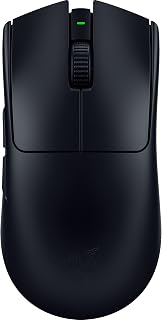
At just 54g, this Razer option sits in a sweet spot for fingertip grip users who want a lightweight feel without going to micro-shell extremes. Optical movement detection keeps tracking accurate during the fast, short strokes typical of fingertip technique, and the wireless connectivity removes cable drag that can disrupt precise repositioning. The slim, low-profile Viper shape naturally accommodates a fingertip contact style.
Pros
- 54g weight enables effortless fingertip control
- 8000 Hz polling matches fingertip grip speed
- Focus Pro 35K sensor with pixel-level precision
- Balanced design suits fingertip lift-and-reset movements
Cons
- Setup through Synapse required for full performance
- Lightweight feel requires adjustment period
Fingertip grip relies on speed and precision, and the Viper V3 Pro supplies both through its lightweight construction and sensor technology. At 54 grams, the mouse moves effortlessly under fingertip control, eliminating the resistance heavier mice create during rapid directional changes. The Focus Pro 35K sensor translates every fingertip micro-adjustment into accurate cursor movement, with 1-DPI granularity letting you fine-tune sensitivity to match your natural fingertip range of motion. The 8000 Hz HyperPolling wireless keeps up with the lightning-fast inputs fingertip grip generates, registering movements in under a millisecond. Gen-3 optical switches actuate at 0.2ms, matching the inherent speed advantage fingertip technique provides. The balanced weight distribution maintains control during the quick lifts and resets fingertip players perform constantly. The low-profile symmetrical shape naturally suits fingertip grip positioning, and the 95-hour battery eliminates mid-session charging interruptions. The sensor maintains tracking accuracy across surfaces, critical when fingertip players make sudden angle changes. This mouse removes technical limitations between your fingertip inputs and on-screen results.
Weight: 54g
Connectivity: USB wireless with HyperSpeed technology
Polling Rate: 8000 Hz (0.125ms)
Sensor: Focus Pro 35K optical, 1-DPI adjustments
Switches: Optical Gen-3, 0.2ms actuation, 90M click lifecycle
Battery Life: Up to 95 hours
Color: Black
Button Lifecycle: 90 million clicks guaranteed
This mouse targets competitive FPS players who rely on fingertip grip for their aiming technique. If you compete seriously and need a mouse that keeps pace with rapid fingertip movements while delivering tournament-grade sensor accuracy, the V3 Pro fits. Players using palm or claw grips won't extract value from the fingertip-optimized weight and balance. Budget-conscious buyers and casual players should skip this, as the specialized features serve competitive needs specifically.

The ambidextrous shell here suits fingertip grip players on either hand who want a no-compromise wireless option. Optical movement detection tracks cleanly during the short, precise strokes fingertip technique relies on, and six buttons give enough functionality without crowding the mouse body. The slim symmetrical profile fits naturally under fingertips without forcing the hand into an awkward arch, making it a solid everyday option for this grip style.
Pros
- Ambidextrous shape accommodates left and right-handed fingertip grips
- 280-hour battery provides weeks of use without charging
- Focus Pro 30K sensor handles rapid fingertip flick movements
- Optical switches respond instantly to light finger taps
Cons
- 82g weight is heavier than specialized lightweight fingertip mice
- 30K DPI ceiling may limit players wanting higher sensitivity ranges
Fingertip grip thrives on low weight and ambidextrous symmetry, both delivered by the Razer Viper V3 HyperSpeed at 82 grams. The symmetrical shell allows fingers to position naturally on either side without forced contours disrupting your grip points. Six buttons provide enough control without crowding the fingertip contact zones. Optical switches beneath those buttons respond crisply to light finger taps, important when your palm never rests on the shell for added pressure. The Focus Pro 30K optical sensor tracks rapid fingertip flicks accurately up to 750 IPS, handling the quick wrist movements common in fingertip aiming styles. Wireless connectivity through HyperSpeed removes cable interference, and the 280-hour battery life means weeks between charging stops even during extended sessions. The optical sensor and switch combination eliminates debounce delay for instant response. This mouse works across Mac and PC platforms with Windows 11 support. At 82 grams, it sits heavier than ultra-lightweight options but balances that with extended battery performance and ambidextrous versatility that most gaming mice lack.
Dimensions and Weight: 5 inches L x 2.51 inches W, weighing just 82 grams for maximum speed and minimal fatigue.
Sensor and Tracking: Focus Pro 30K optical sensor with up to 30,000 DPI, intelligent forward placement for accurate tracking on any surface including glass.
Connectivity: HyperSpeed Wireless with 5-meter range, multi-device support, and stable low-latency connection. Includes wireless dongle.
Battery: Single AA battery (included) providing up to 280 hours of high-performance gaming per charge.
Buttons: 6 buttons total with on-mouse DPI control toggle on top. Ambidextrous layout supports both left and right-handed use.
Durability: Gen-2 mechanical mouse switches rated for 60 million clicks with gold-plated contact points. 1-year manufacturer warranty included.
Compatibility: Windows 11 (minimum), Mac and PC platforms supported. Optimizable through Razer Synapse app.

The ambidextrous hand orientation here makes this Logitech a practical pick for fingertip grip users regardless of which hand they mouse with. LIGHTSPEED wireless delivers a lag-free connection that keeps up with rapid, low-pressure movements fingertip grip relies on, and the lightweight build reduces fatigue during long sessions where only the fingertips are doing the work. Six buttons cover most gaming needs without cluttering the shell.
Pros
- LIGHTSPEED wireless eliminates cable interference
- Optional 10g weight disc tunes feel for fingertip preference
- HERO 25K sensor tracks rapid fingertip movements accurately
- Metal-spring buttons provide immediate tactile response
Cons
- 95g weight heavier than ultra-lightweight competitors
- Scroll wheel may wear with heavy long-term use
Fingertip grip players seeking reliable wireless performance in a proven design will find the G703 Lightspeed delivers consistent results. The 95-gram base weight provides stability during fingertip movements, preventing the over-sensitivity lighter mice can create while still allowing controlled flicks and adjustments. The optional 10-gram weight disc lets you tune the feel to match your fingertip technique, adding mass if you prefer more resistance or removing it for quicker movements. The HERO 25K sensor tracks fingertip inputs with zero smoothing or acceleration, ensuring 1:1 accuracy at speeds exceeding 400 IPS, fast enough for even aggressive fingertip aim styles. LIGHTSPEED wireless technology eliminates cable drag that interferes with fingertip grip's natural motion path, while maintaining responsiveness that rivals wired connections. The 6 programmable buttons accommodate fingertip positioning without requiring awkward reaches. Metal-spring button tensioning delivers crisp clicks that respond immediately to fingertip pressure. The 35-hour battery life supports extended sessions, and the symmetrical design with rubber side grips provides secure control during rapid fingertip repositioning. The durable construction withstands the constant lifting and repositioning fingertip players perform.
Sensor: HERO 25K with 1:1 tracking, 400+ IPS, 100-25,600 max DPI, zero smoothing or acceleration
Connectivity: LIGHTSPEED wireless with 5-meter range
Weight: 95 grams (plus optional 10g weight disc)
Battery: 1 Lithium Polymer (included), up to 35 hours with default LIGHTSYNC RGB
Buttons: 6 programmable with metal-spring tensioning
Lighting: Full-spectrum LIGHTSYNC RGB with 16.8M colors, customizable via G HUB software
Dimensions: 43L x 68W inches (note: manufacturer dimension data appears inconsistent)
Compatibility: Windows 10 and later, requires G HUB software for advanced customization
Warranty: Manufacturer's warranty available upon request
Fingertip grip players who prefer moderate weight and proven reliability should consider the G703. If you want wireless freedom without sacrificing response time and appreciate adjustable weight tuning, this mouse works well. Competitive players seeking ultra-lightweight construction below 60 grams will find better options. Those wanting cutting-edge polling rates beyond standard wireless should look at newer models. Players with very small hands may find the 95-gram weight too heavy for sustained fingertip control.

Fingertip grip players who never want to feel the mouse beneath them will appreciate the ultra-lightweight 38g build here. The XS-1 sensor reaches 32000 DPI, giving precise cursor control with the minimal contact and quick wrist flicks that fingertip style demands. Seven buttons and a symmetrical shell keep the layout versatile, while the HUANO Blue Pink dot mechanical switches deliver crisp, consistent actuation without adding bulk.
Pros
- Ultra-lightweight 38g construction for fingertip agility
- 8K polling rate reduces input lag to near-zero
- XS-1 sensor with 32,000 DPI and 750 IPS tracking
- Rear-cut mini form factor purpose-built for fingertip grip
Cons
- Mini sizing uncomfortable for larger hands
- Niche design limits grip style versatility
The Pulsar Lab X2F is engineered specifically for fingertip grip competitive play, built with input from over 200 professional gamers who rely on this grip style. Its rear-cut mini form factor is purpose-designed to minimize wrist movement and maximize fingertip control, making it ideal for the fast flicks and micro-adjustments fingertip players depend on. At 38 grams, it ranks among the lightest mice available, reducing fatigue during intense sessions while maintaining the agility fingertip users need. The XS-1 flagship sensor handles 32,000 DPI with 750 IPS tracking and 50g acceleration, ensuring your fingertip movements translate to precise on-screen actions. The 8K polling rate in both wireless and wired modes delivers near-instantaneous response times that competitive fingertip players demand. HUANO Blue Pink Dot switches provide tactile feedback rated for millions of clicks. The symmetrical design accommodates both left and right-handed fingertip grippers, though the mini sizing specifically targets players with smaller hands or those prioritizing speed over palm contact.
Connectivity: Wireless (2.4GHz with 8K dongle) + Wired USB-C, 10-meter range
Sensor: XS-1 Flagship Optical, 32,000 DPI max, 750 IPS tracking, 50g acceleration
Switches: HUANO Blue Pink Dot mechanical switches, rated for millions of clicks
Polling Rate: 8,000 Hz (8K) in both wireless and wired modes
Weight: 38 grams ultra-lightweight
Design: Mini fingertip form factor, rear-cut, symmetrical orientation
Buttons: 7-button layout with Pulsar blue encoder
Power: 1x Lithium-ion battery included
Compatibility: Windows 10+, Linux (Ubuntu 20.04+)
Model: PX2F101, ASIN B0FM2K41Y6

Built for right-handed fingertip users who want tactile feedback, the Haptic Inductive Trigger System adds a layer of precision that pairs well with the light, controlled touches that fingertip grip produces. LIGHTSPEED wireless and USB connectivity offer flexibility, and the lightweight portable design keeps the mouse from feeling heavy under fingertips during extended play. The compact button count keeps the shell clean and easy to navigate by feel.
Pros
- HERO 2 sensor with 44,000 DPI and 888 IPS tracks micro fingertip movements
- Haptic trigger system delivers clicks 30ms faster with customizable actuation
- 61g weight with thin shell suits lifted palm fingertip posture
- 60-90 hour wireless battery life eliminates cable drag
Cons
- Right-hand design excludes left-handed fingertip users
- G HUB software required for customization adds setup complexity
Fingertip grip demands precision and speed above all else, and the Logitech G PRO X2 SUPERSTRIKE delivers both through its sensor and click technology. The HERO 2 sensor offers 44,000 DPI, 888 IPS, and 88 g-force tracking that responds to the smallest fingertip movements with zero latency. What sets this apart for fingertip users is the Haptic Inductive Trigger System with 8kHz polling, producing clicks 30ms faster than competing mice while allowing 10-level actuation customization to match your exact finger pressure. At 61 grams with a thin 0.7mm shell, the weight distribution supports the lifted palm posture fingertip grippers prefer. Oversized UHMWPE feet glide effortlessly under light contact pressure. LIGHTSPEED wireless removes cable drag entirely, crucial when your grip relies on finger control alone. The 60-90 hour battery keeps you in the game without interruption. POWERPLAY 2 charging requires a separate dock purchase. For fingertip users chasing competitive performance, the sensor responsiveness and click speed justify the investment.
Connectivity: LIGHTSPEED Wireless (8kHz polling), USB-C charging
Sensor: HERO 2 with 44,000 DPI max, 88 g-force, 888 IPS tracking speed
Buttons: 5 programmable buttons with haptic trigger customization
Weight: 61 grams (lightweight design)
Battery: 60-90 hours per charge with included USB-A to USB-C cable
Dimensions: 4.9 inches L x 2.5 inches W
Compatibility: PC and Mac with POWERPLAY 2 support (dock sold separately)
Warranty: 2-Year Limited Hardware Warranty
Material: 0.7mm thin-wall plastic case with UHMWPE gliding feet
Buy this if you fingertip grip in competitive FPS or MOBA games where millisecond advantage matters and you want the fastest sensor and click response available. Serious tournament players and high-rank grinders will benefit from the customizable actuation and polling rate. Skip it if you're left-handed, unwilling to spend time in software tuning settings, or if the premium price exceeds your peripheral budget. Casual players won't extract enough value from the advanced features to justify the cost.
Buying Guide: What to Look for in a Fingertip Grip Gaming Mouse
Shape and Size
Fingertip grip means only the tips of your fingers contact the mouse, so a low-profile, compact body is non-negotiable. Mice with a pronounced hump or wide base force your palm down onto the shell, which defeats the purpose entirely.
Look for a short body length and a flattened profile. The best gaming mice for competitive play tend to prioritize symmetrical or ambidextrous shapes that work equally well for fast directional changes. The Pulsar Gaming Gears Pulsar Lab X2F Wireless stands out here with its rear-cut mini form factor designed specifically for fingertip grip use.
Weight
Every gram matters when your control style relies on rapid, small movements. A lighter mouse reduces fatigue during long sessions and lets you reposition quickly without fighting inertia.
The Razer Viper V3 Pro Wireless Esports Gaming Mouse comes in at 54g, making it one of the lightest wireless options available. The Razer Viper V3 HyperSpeed Wireless PC sits at 82g, still competitive, and rewards you with exceptional battery life in return for that extra weight.
Sensor Performance
A high-quality optical sensor is the foundation of any serious fingertip grip mouse. Fingertip players rely on micro-adjustments, so even minor tracking inconsistencies register immediately.
The Razer Viper V3 Pro Wireless Esports Gaming Mouse uses the Focus Pro 35K Gen-2 sensor with 1-DPI step adjustments. The Logitech G PRO X2 SUPERSTRIKE Wireless runs Logitech’s HERO 2 sensor rated at over 888 IPS and 44,000 DPI, while the Pulsar Gaming Gears Pulsar Lab X2F Wireless pairs its shape with the proprietary XS-1 sensor at 32,000 DPI and 750 IPS. Any of these will hold up under the demands of competitive play.
Polling Rate and Wireless Reliability
Polling rate determines how often your mouse reports its position to your PC. At 8,000 Hz, the gap between your movement and on-screen response is essentially imperceptible. If you’re pairing your mouse with a high-refresh-rate display, check out our guide to the best monitors to make sure your whole setup keeps pace.
Both the Razer Viper V3 Pro Wireless Esports Gaming Mouse and the Pulsar Gaming Gears Pulsar Lab X2F Wireless support 8,000 Hz polling in wireless mode. The Logitech G703 Lightspeed Wireless Gaming Mouse uses Logitech’s LIGHTSPEED technology for reliable, low-latency connection, which remains a proven standard for wireless competitive play.
Switch Quality and Click Feel
For fingertip grip, switch responsiveness matters more than in other grip styles because your fingers have less leverage and rely entirely on direct button feel. Crisp actuation with minimal pre-travel is what you want.
The Razer Viper V3 Pro Wireless Esports Gaming Mouse uses Gen-3 optical switches rated at 90 million clicks with 0.2 ms actuation. The Logitech G PRO X2 SUPERSTRIKE Wireless introduces a Haptic Inductive Trigger System that delivers tactile feedback and customizable actuation points, which is a genuinely novel approach for players who want a personalized click feel. The Pulsar Gaming Gears Pulsar Lab X2F Wireless uses HUANO Blue Pink Dot switches, known for consistent tactile response across millions of inputs. Complement your mouse setup with a quality surface by exploring our silent mechanical keyboard roundup for a quieter, more focused workspace.
Final Thoughts
For most fingertip grip players, the Razer Viper V3 Pro Wireless Esports Gaming Mouse delivers the most complete package: exceptional sensor, 8K polling, ultra-light weight, and a shape that complements fast, precise movement. If you want something purpose-engineered from the ground up for fingertip use, with a rear-cut mini body and the same 8K wireless polling, the Pulsar Gaming Gears Pulsar Lab X2F Wireless is worth every bit of attention it has earned from the competitive community.
Frequently Asked Questions
What makes a mouse good for fingertip grip?
A fingertip grip mouse should be compact, lightweight, and low-profile so your palm never rests on the shell. A flat or slightly curved top, short body length, and responsive optical switches all contribute to the direct, agile feel that fingertip players depend on. Weight under 70g is a strong benchmark, though even 82g can work well if the shape is right.
Is wireless performance good enough for competitive gaming in 2026?
Yes, wireless technology has reached a point where the best gaming mice are indistinguishable from wired in real-world play. Options like the Razer Viper V3 Pro Wireless Esports Gaming Mouse with HyperSpeed and the Logitech G703 Lightspeed Wireless Gaming Mouse with LIGHTSPEED have been validated by professional esports players at the highest levels. The key is choosing a mouse with a dedicated 2.4 GHz dongle rather than relying on Bluetooth.
How does fingertip grip differ from claw and palm grip?
Palm grip means your entire hand rests on the mouse, providing stability but reducing agility. Claw grip arches the fingers over the buttons with the palm still partially in contact. Fingertip grip keeps only the fingertips touching, maximizing speed and micro-precision at the cost of some stability. If you’re still figuring out your grip style, it’s worth exploring different shapes before committing to a specific mouse profile. You can also check out our broader Keyboards and Mice guides for more context on building an ergonomic, performance-focused setup.
What DPI setting should fingertip grip players use?
Most competitive fingertip grip players prefer higher DPI settings, typically between 800 and 1600, because the style involves smaller physical movements that need to translate into broader on-screen distances. That said, DPI preference is personal, and the most important thing is pairing your chosen setting with a consistent in-game sensitivity you can replicate. All five mice in this guide offer more than enough DPI headroom to accommodate any preference.



Write Your Review
No reviews yet. Be the first to share your experience!