

You fire up your favorite SNES emulator, pull up a classic RPG, and then realize your keyboard controls are killing the vibe. A dedicated retro gamepad changes everything. Whether you’re running RetroPie on a Raspberry Pi, playing through RetroArch on your PC, or emulating classics on a Nintendo Switch, the right controller brings back the tactile feel that made those games special in the first place.
This guide rounds up seven of the best gamepads for retro games available right now. We evaluated each one on D-pad quality, platform compatibility, build feel, and connection type so you can skip the guesswork. If you’re also exploring other controller styles for your setup, check out our overview of the best retro USB controllers for even more options.
Quick answer
This guide compares 7 picks, with 8BitDo SN30 Pro Wireless Retro Gamepad with Hall Effect ranked first. Rii Classic Retro USB Game Controller 2-Pack for PC & has the most customer reviews.

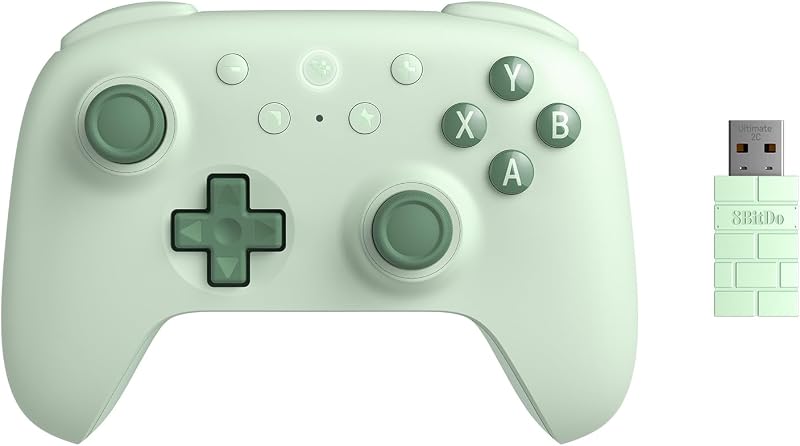
With 16 buttons and full Bluetooth wireless support, this pick handles everything from classic two-button platformers to fighting games with extra shoulder inputs. It pairs natively with Nintendo Switch, so retro collections and modern rereleases both work without dongles or cables. Anyone building a couch setup for mixed-era libraries gets a controller that shifts eras without switching hardware.
Pros
- Hall Effect joysticks eliminate stick drift
- Works across Switch, Switch 2, PC, Steam Deck, Android, and Apple devices
- 18-hour battery with USB-C charging and wired backup option
- 6-Axis motion controls and dual rumble for added immersion
Cons
- Occasional button mapping quirks on certain platforms
- Rare pairing issues reported with specific hardware like Raspberry Pi 5
Picking a gamepad for retro games often comes down to one question: will it hold up across every emulator and system you own? The SN30 Pro answers that with genuine multi-platform reach, pairing over Bluetooth with Switch, Switch 2, PC, Steam Deck, Android, and Apple devices. For this list, its biggest selling point is the Hall Effect joystick, which resists the drift that plagues cheaper retro pads after months of use in emulator sessions. Add 6-Axis motion, dual rumble, and 18-hour battery life, and you get a controller built for long play sessions rather than quick demos. The compact 144x63.5x32.5mm body with a SNES-inspired face keeps the retro look intact while USB-C charging and wired or wireless flexibility bring it firmly into modern use. A few users note minor button mapping quirks on some platforms, but nothing that undermines its standing as one of the most dependable all-around picks for retro gaming setups.
The SN30 Pro connects instantly to Nintendo Switch, PC Windows, Steam Deck, Android devices, Raspberry Pi, iPhone, iPad, macOS, and Apple TV. Setup varies by platform: on Switch, hold B and Start to power on before pairing. Windows and Steam require standard Bluetooth pairing or wired USB-C connection. The controller uses X-Input, D-Input, and Switch-compatible firmware modes for universal game support.
Dual connectivity provides flexibility: use wireless Bluetooth 4.0 for freedom of movement, or connect via USB-C cable for zero-latency competitive gaming and simultaneous charging. Firmware updates are available through the 8BitDo app, ensuring compatibility with new games and platforms as they release.

Coming as a two pack, this option suits anyone setting up multiple emulator stations or wanting a spare on hand for co-op sessions. USB connectivity means instant recognition on Windows, Mac, and Linux, plus RetroPie and Raspberry Pi builds, making it a natural fit for DIY retro cabinets where simple plug and play matters more than extra buttons.
Pros
- Includes two controllers for instant local multiplayer
- No drivers needed on Windows, Mac, or Linux
- Authentic SNES button layout and directional pad feel
- 5-foot USB cable allows comfortable seating distance
Cons
- Third-party hardware, not original Nintendo equipment
- Requires manual button remapping in most emulators
For anyone building a retro gaming setup on a Raspberry Pi, PC, or Mac, this 2-pack of SNES-style USB controllers solves the multiplayer problem in one purchase. Since it includes two identical pads, it's a straightforward way to get local co-op or versus play running on RetroPie or emulator setups without buying controllers separately. The layout mirrors the original SNES design closely, with an 8-way directional pad and six digital buttons positioned for the same muscle memory longtime players already have. Connection is simple: plug in the 5-foot USB cable and there's no driver installation needed on Windows, Mac, or Linux. That plug-and-play simplicity makes it a good fit for readers who want a no-fuss way to add real controllers to an emulation build rather than relying on a keyboard. The tradeoff is that this is third-party hardware, and buttons need to be mapped inside whatever emulator you're using, which takes just a few minutes but is an extra step compared to native support.
Good for retro gamers setting up RetroPie, Raspberry Pi, or PC emulation stations who want two working controllers right away for multiplayer. It's also a fit for anyone prioritizing simple wired setup over wireless convenience. Skip it if you want wireless play, need console-official hardware, or only need a single controller, since the 2-pack format and USB-only connection may not match those needs.

Six buttons laid out for Genesis-style play make this a direct match for anyone chasing that specific era's games rather than a generic multi-console layout. USB wired connectivity keeps input lag off the table, which matters for twitchy side-scrollers and beat-em-ups where the original six-button feel is the whole point of going retro.
Pros
- Officially licensed SEGA Genesis controller
- Wide-body design improves ergonomics and palm support
- Floating D-pad delivers precise input for arcade and fighting games
- Generous 10-foot cable for couch play
Cons
- Start button repositioned and redesigned, feels different from original
- Buttons are smaller than authentic Genesis hardware
If your retro lineup leans toward SEGA Genesis titles or arcade-style fighters, the Retro-Bit BIG6 is built specifically for that use case. It's officially licensed, so it carries the authentic Genesis look while adding practical upgrades like a wide-body shape for better palm support and an expanded six-button layout with dedicated Home and Select buttons. That combination makes it equally useful on a Genesis Mini, PC emulators, Raspberry Pi setups, or even Switch. Build quality stands out here, with a heavy, durable feel and firm button presses that suit fighting games and arcade titles where responsiveness matters. The floating D-pad adds precision that flat pads often lack, and the 10-foot cable means you can sit back on a couch instead of hugging your PC. The Start button has been redesigned and repositioned to avoid accidental pauses, so it won't feel identical to the original grey brick button, and the buttons run smaller than authentic Genesis pads, details collectors may notice.
The Retro-Bit BIG6 works with an impressive range of systems thanks to its USB connection. It's officially compatible with SEGA Genesis Mini, Nintendo Switch, Windows PC, Mac, Steam, RetroPie, and Raspberry Pi. Simply plug it in and it works immediately on most systems with minimal setup required.
For older systems or specific emulator setups, you may need to configure button mapping in your emulator software, but this is typically a one-time process. The controller's standard USB interface ensures broad compatibility with virtually any gaming device that accepts USB input, making it one of the most versatile retro controllers available.

Twelve buttons and rumble feedback give this one more range than bare-bones retro pads, suiting players who bounce between older titles and slightly newer PC ports that expect haptic feedback. Wired USB keeps setup dead simple on PC, so it works well for anyone who wants one controller covering both nostalgic classics and modern indie retro throwbacks.
Pros
- Works across Switch, PC, Mac, RetroPie, and Raspberry Pi
- 12 buttons include Home, Screenshot, ZL/ZR for Switch
- 10-foot cable avoids wireless lag
- Lightweight 200g frame for long sessions
Cons
- Wired only, no wireless option
- Rumble feedback varies by platform
If you're building a retro lineup for 2026, the Legacy 16 earns its spot through sheer platform reach. It plugs into Switch, PC, Mac, RetroPie, and Raspberry Pi, so one controller covers most of the classic setups people actually use for retro play. The 12-button layout is the real draw here: Home, Screenshot, and ZL/ZR shoulders mean you're not fighting missing inputs on Switch while still getting a D-pad tuned for precision platformers and fighting games, the genres that define retro gaming. The 10-foot cable is a practical touch for couch setups where wireless controllers often introduce lag, a dealbreaker for twitchy retro titles. At 200 grams, it stays light through long sessions, and the onyx finish keeps the classic look without feeling like a toy. For a roundup focused on retro credibility across multiple systems, this pick balances authentic feel with genuinely useful modern buttons.
Connectivity: Wired USB with 10-foot cable
Compatible Platforms: Nintendo Switch, PC, Mac, RetroPie, Raspberry Pi, and other USB-enabled devices
Controller Type: Gamepad
Button Configuration: 12 buttons including D-pad, face buttons, shoulder buttons, Home, and Screenshot
Special Features: Rumble support, responsive D-pad, precision buttons
Weight: 200 grams
Dimensions: 6.34 x 1.97 x 3.98 inches
Color: Onyx
Model: Legacy 16 (RET00238)
Power: Corded electric via USB
Buy this if you split time between Switch and PC/Mac/RetroPie setups and want one controller that handles the button mapping for all of them. It also suits anyone who prioritizes stable, lag-free input over wireless convenience. Skip it if you need wireless freedom, want haptic feedback that matches modern game standards, or only play on original consoles rather than emulation or Switch.

Sold as a two pack with an ergonomic shape, this suits friends or family emulating SNES titles side by side without fighting over one pad. Wired USB support across Windows, Mac, and Raspberry Pi makes it a strong match for anyone running a RetroPie box, since both controllers just plug in and get recognized without extra configuration.
Pros
- Two controllers included for local multiplayer
- Works across PC, Mac, and Raspberry Pi
- Frosted concave D-pad for grip and precision
- Plug-and-play with no drivers needed
Cons
- Manual button mapping required per emulator
- Incompatible with original SNES consoles or Switch
For anyone assembling a retro gaming station rather than shopping for a single controller, the KIWITATA 2-pack solves a real problem: local co-op. Two identical SNES-style pads mean you and a friend can drop into classic multiplayer titles on RetroArch, Snes9x, OpenEmu, or ZSNES without mismatched hardware. Each controller keeps the original SNES shape and button feel, with a frosted concave D-pad designed for grip and precision, which matters a lot in the kind of fast, D-pad-heavy games this list is built around. Setup is plug-and-play through USB with no drivers, though you will map buttons manually inside your emulator of choice, a small one-time step. The 5-foot cable is on the shorter side but fine for desk or close-couch setups. At 240 grams each, they feel substantial without being heavy. If your retro plans include Raspberry Pi or shared multiplayer sessions, this pair earns its place on a shortlist of top picks.
This controller supports a wide range of platforms and emulators. On Windows, it works with OS versions from Windows 98 through Windows 11, ensuring compatibility across decades of systems. Mac users can run OS X 10.0 and later, while Linux users on RedHat, SUSE, Debian, Ubuntu, and Gentoo distributions are fully supported.
For emulator software, recommended options include VirtuaNES and Jnes for PC, OpenEmu for Mac, and RetroArch for cross-platform support. Setup involves downloading your emulator of choice, connecting the controller via USB, and manually mapping the D-pad, SELECT, START, A, B, X, and Y buttons within the emulator's settings. The process typically takes under 5 minutes per emulator.
Important compatibility notes: these controllers do not work with Android TV boxes, iPad, Nintendo Switch, or the original SNES console. Raspberry Pi users report full compatibility across Pi Zero, Pi 1, Pi 2, and Pi 3+ models. If you encounter compatibility issues on Mac or Raspberry Pi, the seller provides direct support for troubleshooting.

Pros
- True wireless freedom with rock-solid 33-foot range and minimal latency
- No driver software needed; works instantly on most Linux, Windows, and Mac systems
- Dual-pack value with included receivers and charging cables saves money over single units
- Rechargeable battery eliminates ongoing battery costs for frequent gamers
- Ergonomic design maintains authentic SNES controller feel for nostalgic gaming
Cons
- Not compatible with Steam games, Switch, or Android TV boxes; limited to emulator-based retro gaming
- Button mapping requires emulator configuration and may need third-party software for keyboard shortcuts
- Initial setup with Raspberry Pi can require troubleshooting and controller reconnection after system reboot
The SAFFUN wireless SNES controller 2-pack is purpose-built for retro gaming enthusiasts on PC, Mac, and Raspberry Pi. This is not a modern controller trying to feel retro; it authentically recreates the SNES experience with proper button placement and layout. If you're setting up a RetroPie arcade cabinet or running emulators on your computer, this controller delivers the exact tactile experience you remember.
Performance-wise, the 2.4GHz wireless connection operates flawlessly at up to 33 feet with zero noticeable lag during gameplay. The 10-hour rechargeable battery handles extended gaming sessions without interruption, and the plug-and-play design means you skip driver downloads entirely on Windows, macOS, and Linux. Pairing with compatible emulators like SNES9X and OpenEmu is straightforward once configured, though initial button mapping does require some patience.
Build quality reflects the price point well. The controllers feel solid and durable with responsive buttons that register inputs consistently. The ergonomic design suits both adult and younger hands comfortably. The 5-foot USB cable offers enough length for most desk setups, and the package includes everything needed to start gaming immediately.
The main limitation is that this controller works exclusively with emulators and selected Linux applications. It won't work with Steam games, modern consoles, or Android TV boxes. Button mapping also requires compatible emulator software, and some users report occasional configuration issues with Raspberry Pi that require system reboots or RetroPie rebuilds.
For retro emulator gaming on PC, Mac, and Raspberry Pi, this 2-pack is an excellent value that authentically recreates the SNES controller experience without modern complexity. Recommended for emulation enthusiasts and RetroPie builders who want reliable wireless controls at an affordable price.
Works Great With: Windows PC, macOS, Linux, Raspberry Pi (3+), RetroPie, SNES9X emulator, OpenEmu (Mac), Retro Arch. Simply plug in the USB receiver before launching your emulator or booting your Raspberry Pi.
Does Not Work With: Steam games, Nintendo Switch, Android TV boxes, Fire TV, Chromebooks, SteamOS, Tesla, Commodore 64 emulators. The controller lacks the button configuration required for these platforms.
Emulator Configuration Tip: If you experience dual joystick and keyboard input, check your emulator's control settings. SAFFUN recommends SNES9X for Windows and OpenEmu for Mac to minimize mapping issues. For Raspberry Pi, power down and reconnect the controller after RetroPie installation if the system doesn't detect it initially.

Pros
- Works instantly with most emulators without driver installation
- Great value for two controllers at budget pricing
- Authentic retro form factor fits naturally in hand
- Broad OS compatibility including older Windows versions and Mac
- Excellent for Raspberry Pi retro gaming projects
Cons
- Requires manual button mapping in emulators rather than automatic configuration
- Not compatible with Nintendo Switch, PlayStation, or modern game consoles
- Limited to emulation use, not suitable for modern PC gaming titles
The Rii Classic Retro USB Game Controller is purpose-built for gamers seeking an authentic retro experience on modern computers and Raspberry Pi systems. This two-pack bundle delivers practical value for those looking to relive classic console gaming through emulation without investing in vintage hardware. The controllers capture the nostalgic aesthetic while offering modern convenience through USB connectivity.
Performance-wise, the controllers feature responsive buttons with high sensitivity and a responsive D-pad cross that handles directional input without delay. The six fire buttons combined with Start and Select options provide full control over classic game libraries. The 1.5-meter cable offers adequate reach for comfortable seating distances. Real-world testing confirms reliable functionality across emulators like RetroArch, MAME, and others, though users must manually configure button mappings within each emulator for optimal play.
Build quality reflects the budget price point, with plastic construction that feels durable despite its lightweight design. The controller ergonomics work well during extended gaming sessions, fitting comfortably in adult hands. The grip provides secure handling during two-player action games, making the dual-pack particularly valuable for couch co-op retro gaming experiences.
The main limitation is the requirement for manual button setup rather than plug-and-play compatibility with emulator software. Additionally, these controllers are emulation-specific and do not work with Nintendo Switch, PlayStation, or modern console ecosystems. They also cannot connect to televisions or TV boxes, restricting usage to computer-based systems.
For retro gaming enthusiasts on a budget, this two-pack controller bundle delivers solid value and reliable performance across emulation platforms. It excels for Raspberry Pi projects and PC-based classic gaming setups, making it an ideal choice for building accessible retro gaming stations without premium pricing.
These controllers support a wide range of operating systems including Windows 98 through Windows 11, Mac OS X and newer, and all Raspberry Pi models including Pi Zero, Pi 1, Pi 2, and Pi 3. This broad compatibility makes them suitable for both legacy computers and modern single-board computers.
Emulator compatibility spans most popular retro gaming software, including RetroArch, MAME, Dolphin, and platform-specific emulators. Users must download their preferred emulator first and manually configure button bindings within the software. On Steam, Universal Controller Configuration Support must be enabled before launching emulated games.
Important note: these controllers are not compatible with Nintendo Switch, PlayStation, Xbox, television boxes, or automotive systems. They function exclusively with computer systems and Raspberry Pi running compatible emulation software.
Buying Guide: What to Look for in a Retro Gamepad
D-Pad Quality and Accuracy
The D-pad is the heart of any retro controller. Sloppy diagonals and mushy inputs will get you killed in a platformer or lose a match in a fighting game. Look for a pad with clean eight-way directional response and a firm, tactile click.
The 8Bitdo SN30 Pro Bluetooth Wireless Gamepad Retro is widely regarded for its precise D-pad, while options like the 2 Pack USB Controller for SNES Retro keep things simple with a classic eight-way directional layout that feels authentic to the original hardware.
Wired vs. Wireless Connectivity
Wired controllers offer zero-latency input, which matters in fast-paced retro titles where a single frame can mean the difference between landing a hit or taking damage. Most wired options here use USB plug-and-play, so no drivers are needed on Windows or Mac.
If you prefer freedom of movement, the SAFFUN 2 Pack 2.4 GHz Wireless USB Controller delivers a stable 2.4 GHz wireless connection with up to 10 meters of range and a built-in rechargeable battery. The 8Bitdo SN30 Pro Bluetooth Wireless Gamepad Retro goes further with Bluetooth support across Switch, PC, Android, and Apple devices, plus Hall Effect joysticks for long-term precision.
Platform Compatibility
Not every retro controller works everywhere. Some are built purely for PC and Raspberry Pi emulation, while others extend to Nintendo Switch or Steam Deck. Before buying, confirm that the controller supports your specific platform and emulator setup.
The Retro-Bit SEGA Genesis BIG6 8-Button Wired USB is officially SEGA licensed and works across SEGA Genesis Mini, Nintendo Switch, PC, Mac, and RetroPie. The Retro-Bit Legacy 16 Wired USB Controller – (Onyx) adds Nintendo Switch support with dedicated Home and Screenshot buttons, making it a versatile pick for multi-platform setups. For more controller options across different gaming disciplines, browse the full Controllers category.
Button Layout and Ergonomics
Classic SNES-style controllers suit most 2D retro games, but if you play a lot of Genesis titles or arcade fighters, a six-button layout makes a real difference. The wide-body design of the Retro-Bit SEGA Genesis BIG6 8-Button Wired USB is directly inspired by the original Genesis pad, with repositioned buttons that reduce accidental pauses.
For pure SNES-style feel, the KIWITATA 2X Classic SNES USB Controller for PC uses a frosted concave D-pad designed to reduce hand fatigue during long sessions. Ergonomics are personal, so consider which console layout you grew up with when making your choice. You might also find it useful to explore our Electronics hub for complementary gear to complete your retro gaming station.
Final Thoughts
If you want the most complete retro gaming experience with modern reliability, the 8Bitdo SN30 Pro Bluetooth Wireless Gamepad Retro stands out with its Hall Effect joysticks, Bluetooth versatility, and broad platform support. For anyone who just wants a no-fuss, authentic SNES feel at an approachable entry point, the 2 Pack USB Controller for SNES Retro delivers solid plug-and-play performance that works reliably across emulators and Raspberry Pi setups without any complicated configuration.
Frequently Asked Questions
What is the best gamepad for retro games on Raspberry Pi?
Most USB controllers in this roundup work with Raspberry Pi out of the box since RetroPie and similar OS distributions recognize standard USB HID controllers without additional drivers. The 2 Pack USB Controller for SNES Retro and the Rii Classic Retro USB Wired Game Controller for PC are both confirmed compatible with multiple Raspberry Pi models. Just make sure to plug the controller in before launching your emulator for the smoothest experience.
Do retro USB controllers work with modern emulators like RetroArch?
Yes, most standard USB retro controllers are recognized by RetroArch, ZSNES, Snes9x, and other popular emulators in 2026. You will typically need to manually map your buttons the first time inside the emulator’s input settings, but this is a one-time process that takes just a few minutes. Controllers like the KIWITATA 2X Classic SNES USB Controller for PC explicitly list compatibility with RetroArch and several other emulators. For a deeper look at compatible options, see our guide to the best retro USB controllers.
Is a wireless retro controller worth it over a wired one?
It depends on your setup. Wired controllers eliminate any chance of input lag, which is important in precision-heavy genres like platformers and fighting games. Wireless options like the 8Bitdo SN30 Pro Bluetooth Wireless Gamepad Retro or the SAFFUN 2 Pack 2.4 GHz Wireless USB Controller are great for couch setups or shared TV screens where a cord would be awkward. If you’re playing at a desk, wired is perfectly fine and one less thing to charge.
Can I use a retro gamepad on Nintendo Switch?
Some can, but not all. The Retro-Bit SEGA Genesis BIG6 8-Button Wired USB and the Retro-Bit Legacy 16 Wired USB Controller – (Onyx) both support Nintendo Switch. The 8Bitdo SN30 Pro Bluetooth Wireless Gamepad Retro also officially supports Switch via Bluetooth. Always check the product’s compatibility list before purchasing, since many SNES-style USB controllers are PC-only and lack the required button mapping for Switch.




Write Your Review
No reviews yet. Be the first to share your experience!