

In CS2, a missed flick rarely comes down to a headline DPI figure alone. A rear hump that fights your grip, a battery-heavy feel, or clicks that interrupt your rhythm can turn a clean pre-aim into an overcorrection when the round is on the line. The right mouse should feel like a predictable extension of your hand during sprays, micro-adjustments, and wide clears.
This guide compares ten strong options for competitive Counter-Strike 2 players, from ultra-light wireless models to familiar ergonomic wired designs. Whether you play on a large cloth pad or a compact desk, your mouse choice works alongside the rest of your setup, including a responsive display from our budget 1440p gaming monitor guide.
Quick answer
This guide compares 10 picks, with BenQ Zowie U2 Wireless Gaming Mouse - 60g Lightweight ranked first. Logitech G502 HERO Gaming Mouse - 25600 DPI Optical holds the highest customer rating among them.
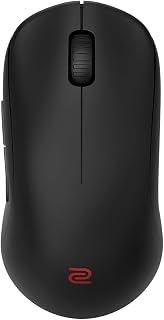
The Zowie U2 weighs just 60 grams and offers driverless plug-and-play operation, letting you jump straight into CS2 aim training or matchmaking without software delays. Its 70-hour battery life and 3200 DPI optical sensor support the fast, repeatable flicks and tracking that define consistent performance in competitive Counter-Strike, while the ambidextrous shape adapts to multiple grip styles.
Pros
- 60g lightweight build accelerates flick speed and reduces fatigue
- Ergonomic curves improve click speed and thumb stability
- 70-hour battery life eliminates mid-match recharge anxiety
- Driverless plug-and-play setup with ambidextrous design
Cons
- 3200 DPI maximum may limit high-sensitivity players
- Windows 10 or later required, excludes Mac and Linux
In CS2, every millisecond and every micro-adjustment counts, and the Zowie U2 strips away distractions to deliver pure competitive performance. The 60g lightweight build reduces inertia during counter-strafe flicks and tight angle holds, letting you snap between headshot angles with minimal wrist effort. The inward-curved sides provide grip stability during rapid repositioning without cramping your thumb during long sessions. Zowie's sport science ergonomics specifically target faster index finger click speed, which translates directly to faster tap shots and burst control. The enhanced receiver technology eliminates wireless interference, delivering lag-free response across scrims and ranked matches. Seventy hours of battery life means you can play for weeks without recharge anxiety interrupting your focus. The ambidextrous design works for both right and left-handed players, and the driverless plug-and-play setup means zero software bloat or configuration downtime. Five buttons cover essential binds without overwhelming your grip. The 3200 DPI sensor ceiling encourages lower sensitivity precision aiming that most professional CS2 players favor.
Perfect for competitive CS2 players who prioritize lightweight speed and wireless freedom, especially those who play at lower sensitivities and value instant setup with zero software. Ambidextrous design suits both left and right-handed aimers. Skip this if you need high DPI settings above 3200, play on Mac or Linux systems, or require extensive programmable buttons for utility binds and macros.
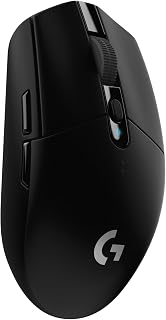
The G305 delivers wireless freedom without latency penalties, critical when tracking heads through smoke or holding tight angles in Counter-Strike 2. Its ambidextrous shape and optical sensor support both claw and palm grips, letting you maintain consistent crosshair placement across long matches. Six programmable buttons give you quick access to utility binds without reaching for the keyboard during clutch rounds.
Pros
- 1ms LIGHTSPEED wireless eliminates cable drag without input lag
- 99-gram weight enables fast crosshair repositioning
- 250-hour battery life survives months of competitive grinding
- Ambidextrous shape accommodates left and right-handed players
Cons
- 1-meter wireless range limits desk positioning flexibility
- Minimal RGB customization compared to wired competitors
CS2 punishes even tiny input delays, making the G305's LIGHTSPEED 1ms wireless response time a genuine competitive advantage without cable drag across your mousepad. The HERO 12K sensor tracks up to 400 IPS with adjustable DPI up to 12,000, covering everything from low-sensitivity rifling to high-sensitivity AWP flicking. At just 99 grams with a single AA battery, the lightweight construction enables the rapid crosshair adjustments CS2 demands when checking multiple angles or transferring between targets during spray downs. Six programmable buttons through G HUB software let you map utility throws, buy binds, and communication without reaching for the keyboard mid-round. The ambidextrous shape accommodates both left and right-handed players, a rarity in gaming mice. Battery life reaches 250 hours of active gameplay, meaning you can grind an entire season without worrying about dying batteries costing you crucial rounds. The nano receiver stores inside the mouse for LAN tournament portability.
Sensor: HERO 12k Optical Sensor, 200-12,000 DPI, 400 IPS
Connectivity: LIGHTSPEED Wireless, 1ms report rate
Buttons: 6 programmable buttons
Weight: 99 grams (3.4 oz)
Battery: 1 AA battery included, 250 hours runtime
Design: Ambidextrous, compact portable form factor
Compatibility: Windows 10+, Mac, works with PC and laptop
Storage: Built-in nano receiver storage compartment
Dimensions: 4.59 inches L x 2.45 inches W
Color: Black
Model Number: 910-005280
CS2 players who want wireless freedom without latency compromise should prioritize this mouse. The ambidextrous design serves left-handed gamers often ignored by ergonomic alternatives. Budget-conscious competitive players get premium sensor tech and wireless performance without breaking the bank. Skip this if you need extreme wireless range beyond your desk setup or want flashy RGB lighting. The 1-meter receiver range requires keeping your PC or laptop nearby during play.

The Basilisk V3 provides 11 programmable buttons for binding every grenade, jump throw, and buy command, speeding up your utility usage in Counter-Strike 2. Its ergonomic right-handed design and optical sensor support the low-sensitivity tracking required for controlling spray patterns at mid-range, making it ideal for holding sites or executing coordinated pushes.
Pros
- 0.2ms optical switches provide instant click response with zero misfires
- Eleven programmable buttons map utilities and buy commands
- HyperScroll wheel toggles between tactile weapon switching and free-spin
- Ergonomic thumb rest and 127g weight stabilize tracking during long holds
Cons
- Right-handed design excludes left-handed players
- Wired connection reduces portability compared to wireless options
CS2 demands instant response and unwavering accuracy, and the Basilisk V3 answers with optical switches that actuate in 0.2ms with zero accidental double-clicks. That speed advantage matters when tapping through smoke or landing the first shot in a duel. The 26000 DPI optical sensor provides tracking headroom well beyond what most CS2 players need, but the precision at lower sensitivities is where it shines for controlled sprays and micro-adjustments. Eleven programmable buttons let you map jump throws, utility lineups, voice comms, and buy binds without reaching for your keyboard during critical moments. The multi-function trigger adds another tactical layer for push-to-talk or quick utility access. The HyperScroll wheel toggles between tactile mode for precise weapon switching and free-spin for rapid buy menu navigation between rounds. The contoured right-hand shape with thumb rest keeps your grip stable during long matches, and the 127-gram wired design delivers direct, consistent response with zero wireless latency. The matte finish resists sweat buildup during tense overtime rounds.
Connectivity: Wired USB with Razer Speedflex Cable
Sensor: Optical, 26000 DPI maximum
Buttons: 11 programmable buttons with Razer Optical Mouse Switches Gen-2
Switch Lifespan: 70 million clicks
Actuation Speed: 0.2ms
RGB Lighting: 11 Chroma zones, 16.8 million colors, 150+ game integration
Design: Right-handed ergonomic with thumb rest
Scroll Wheel: HyperScroll dual-mode (free-spin and tactile)
Weight: 127 grams
Dimensions: 5.12 inches L x 2.95 inches W
Compatibility: Windows PC and Mac
Color: Black matte finish
Model Number: RZ01-04000100-R3M1
Ideal for CS2 players who want tournament-ready wired consistency combined with extensive programmability for utilities and comms, especially those with right-hand palm or claw grip. The ergonomic thumb rest suits players who anchor angles and hold sites. Skip this if you play left-handed, prioritize ultralight mobility for entry fragging, or need wireless freedom for LAN portability.
The Basilisk V3 provides 11 programmable buttons, letting you assign grenades, jump throws, and buy binds directly to the mouse for faster utility deployment in CS2. Its ergonomic right-handed shape supports extended aim training sessions, while the optical sensor ensures pixel-perfect tracking when holding common angles on Dust2 or Mirage.
Pros
- 26K DPI sensor delivers pixel-accurate crosshair control
- 0.2ms optical switch actuation for instant shot registration
- Eleven buttons accommodate full utility and buy bind setups
- Dual-mode scroll wheel adapts to weapon selection needs
Cons
- Wired cable limits movement during wide mouse pad swipes
- Synapse software required to unlock full button customization
Counter-Strike 2 rewards players who can fine-tune every aspect of their setup, and the Basilisk V3 delivers that control in spades. The 26K DPI optical sensor offers granular sensitivity adjustments that let you dial in the exact pixel-perfect tracking needed for AWP flicks and spray transfers. Eleven programmable buttons put utility selection, buy binds, and jump-throw lineups at your fingertips without awkward keyboard reaches mid-round. The dual-mode HyperScroll wheel switches instantly between precise notched scrolling for weapon swaps and smooth spinning for fast inventory checks. Optical switches with 0.2ms actuation mean your clicks register the instant you pull the trigger, critical when milliseconds separate headshots from deaths. The ergonomic right-handed shape with thumb rest supports the palm grip many CS2 players prefer during marathon competitive sessions. Eleven Chroma RGB zones add flair between rounds. The wired connection guarantees zero input lag during clutch situations where wireless interference could cost rounds.
Connectivity: Wired USB
DPI Sensor: Optical 26K DPI with FOCUS Plus technology
Programmable Buttons: 11 total
Mouse Switches: Optical Gen 2 with 0.2ms actuation and 70 million click lifespan
RGB Lighting: 11 Chroma zones, 16.8 million colors, 150+ game integration support
Scroll Wheel: Dual-mode HyperScroll (free-spin and tactile)
Compatibility: Windows 10 and 11, Mac, PC, and laptops
Weight: 3.56 ounces
Dimensions: 5.12 inches L x 2.96 inches W
Color: Black with rubberized finish
Warranty: 2-year manufacturer coverage
Included: Mouse, product information guide, Razer Synapse software access
CS2 players who want extensive button mapping for utility and buy scripts will appreciate the eleven programmable inputs. The high DPI ceiling suits those experimenting with sensitivity to find their ideal crosshair placement speed. Right-handed palm grip users benefit most from the ergonomic contours. Skip this if you play left-handed, prefer minimal buttons, or need wireless portability for LAN events. The feature-rich setup requires Synapse configuration time that casual players may not want to invest.

The G502 Hero offers 11 programmable buttons and adjustable weight tuning, allowing you to bind every grenade and configure the exact heft that suits your flick style in Counter-Strike 2. Its optical sensor delivers consistent tracking across low-sensitivity aiming common in competitive play, while the touch scroll lets you swap weapons instantly during retakes.
Pros
- Sub-micron HERO sensor with zero smoothing across full DPI range
- Eleven programmable buttons for utility binds and buy shortcuts
- Adjustable weight system tailors balance to your swipe style
- Wired connection removes latency and battery concerns
Cons
- Software configuration requires patience to master
- Right-hand design only, excludes left-handed players
CS2 rewards pixel-perfect crosshair placement and muscle memory consistency, which is exactly what the G502 HERO's optical sensor delivers. The HERO sensor tracks at sub-micron precision across the full 25600 DPI range with zero smoothing or acceleration, meaning your flick shots and spray transfers translate exactly as intended. Eleven programmable buttons let you bind utilities, jump throws, and quick buys without repositioning your keyboard hand mid-round. The dual-mode scroll wheel switches instantly between tactile steps for weapon cycling and free spin for rapid buy menu navigation. The adjustable weight system using five 3.6g weights lets you dial in the exact heft that matches your swipe speed and grip pressure. Metal spring tensioning in the switches produces crisp, responsive clicks with clear tactile feedback for tap firing. The ergonomic right-hand shape and 4.32-ounce balanced weight support stable tracking during long matches. Wired USB connection eliminates any wireless latency or battery anxiety during clutch situations.
Sensor Technology: HERO 16K Optical, 25600 DPI max, sub-micron precision tracking
Connectivity: Wired USB (1.0 meter range)
Buttons: 11 programmable buttons plus dual-mode scroll wheel
Customization: 5 adjustable weights (3.6g each), RGB LIGHTSYNC lighting, game profiles
Build: Metal spring tensioning and pivot hinges, ergonomic right-hand design
Weight: 4.32 ounces
Dimensions: 2.95L x 1.57W inches
Compatibility: PC, Windows 7 or later
Power: USB powered (no batteries required)
Warranty: 1-year hardware limited

The DeathAdder Essential combines an ergonomic right-handed shape with a reliable optical sensor, supporting the low-sensitivity wrist aiming that defines consistent spray control in CS2. Five programmable buttons cover essential utility binds, and the lightweight build reduces fatigue during long deathmatches or ranked sessions where muscle memory matters most.
Pros
- Ergonomic shape reduces hand fatigue during ranked grinds
- 6400 DPI sensor handles typical CS2 sensitivity ranges smoothly
- 10 million click durability survives intense firing repetition
- Wired connection provides zero-latency shot registration
Cons
- 6400 DPI ceiling may limit ultra-low sensitivity experimentation
- Right-handed design excludes left-handed players
Aim consistency in CS2 comes down to sensor reliability and hand comfort over thousands of rounds, which is where the DeathAdder Essential proves its value. The 6400 DPI optical sensor provides smooth tracking across common CS2 sensitivities without jitter or acceleration artifacts that throw off muscle memory. The ergonomic right-handed shape supports extended competitive sessions where fatigue directly impacts crosshair placement and spray control. Five programmable buttons handle essential binds like jump-throws, voice communication, and weapon switches without cluttering your grip. The textured scroll wheel with ridged surface ensures reliable weapon cycling even during intense retake situations when sweaty fingers might slip on smoother designs. Mechanical switches rated for 10 million clicks survive the repetitive firing patterns CS2 demands. The wired connection eliminates wireless latency and battery anxiety during crucial overtime rounds. The lightweight build allows quick flicks between angles without excess mass fighting your aim adjustments.
Sensor: 6400 DPI optical sensor with programmable sensitivity buttons
Buttons: 5 programmable buttons with macro support via Razer Synapse
Switches: Durable mechanical switches rated for 10 million clicks
Connectivity: Wired (5.0 meter range)
Scroll Wheel: Ridged, rubberized design for improved grip and accuracy
Design: Ergonomic right-handed orientation
Weight: 0.13 kg (lightweight construction)
Dimensions: 5 inches long x 2.43 inches wide
Compatibility: Windows, macOS, Linux, PC, laptop, gaming console
Warranty: 2-year manufacturer coverage
Model: RZ01-03850100-R3U1
New CS2 players building muscle memory will benefit from the consistent optical tracking and accessible price point. Right-handed riflers who play long sessions appreciate the proven ergonomic comfort. The five-button layout suits players who keep their setups simple and focused. Avoid this if you need ambidextrous support, wireless freedom for LAN mobility, or higher DPI options for extremely low sensitivity setups. Left-handed players must look elsewhere entirely.

The Viper V3 HyperSpeed weighs just 82 grams and uses wireless connectivity to eliminate cable friction during rapid crosshair adjustments in CS2. Its ambidextrous design and optical sensor support both fingertip and claw grips, ideal for the low-latency flicks and tracking needed when peeking mid doors or holding chokepoints in competitive matches.
Pros
- Focus Pro 30K sensor provides accurate tracking for precise aim
- 280-hour battery eliminates charging interruptions during practice
- HyperSpeed wireless delivers cable-like responsiveness
- Ambidextrous design works for multiple grip styles and hand orientations
Cons
- Runs slightly large and may feel awkward for smaller hands
- Requires Windows 11, excluding players on older systems
CS2 punishes input lag and rewards consistent accuracy, which makes the Razer Viper V3 HyperSpeed a strong contender for competitive players. The Focus Pro 30K optical sensor delivers precise tracking whether you're holding tight angles or executing wide crosshair sweeps. HyperSpeed wireless technology provides the responsiveness cable users expect without the drag that interferes with mouse control. The 82-gram weight strikes a balance between stability for tracking enemies and agility for snap shots. Gen-2 mechanical switches with gold-plated contacts are rated for 60 million clicks, meaning they'll maintain crisp feedback through thousands of deathmatch hours and competitive matches. The 280-hour battery life is a practical advantage for players who train extensively, eliminating the need to monitor charge levels during practice blocks or tournament days. On-mouse DPI adjustment lets you switch sensitivity profiles instantly without opening software mid-game. The ambidextrous shape accommodates claw and fingertip grips popular among CS2 players who favor quick, precise movements. Wireless stability holds up even in crowded LAN environments with competing signals. The slightly larger size may feel awkward for players with smaller hands, and Windows 11 requirement limits compatibility.
Dimensions and Weight: 5 inches L x 2.51 inches W, weighing just 82 grams for maximum speed and minimal fatigue.
Sensor and Tracking: Focus Pro 30K optical sensor with up to 30,000 DPI, intelligent forward placement for accurate tracking on any surface including glass.
Connectivity: HyperSpeed Wireless with 5-meter range, multi-device support, and stable low-latency connection. Includes wireless dongle.
Battery: Single AA battery (included) providing up to 280 hours of high-performance gaming per charge.
Buttons: 6 buttons total with on-mouse DPI control toggle on top. Ambidextrous layout supports both left and right-handed use.
Durability: Gen-2 mechanical mouse switches rated for 60 million clicks with gold-plated contact points. 1-year manufacturer warranty included.
Compatibility: Windows 11 (minimum), Mac and PC platforms supported. Optimizable through Razer Synapse app.

The ROG Strix Impact III combines a 36K DPI sensor with a featherlight 57-gram build, enabling ultra-precise micro-corrections when tapping heads at long range in Counter-Strike 2. Its 618-hour battery life means you can grind ranked queues for weeks without recharging, while Bluetooth and RF connectivity options adapt to your tournament or home setup seamlessly.
Pros
- 57g weight makes fast aim adjustments and flicks effortless
- 36,000 DPI sensor handles any sensitivity preference accurately
- 450-hour battery life eliminates frequent charging interruptions
- Works immediately without software installation or setup
Cons
- Lightweight plastic construction feels less premium than metal alternatives
- Black-only finish limits aesthetic flexibility for themed setups
CS2 rewards consistency and precision over flashy features, and the ASUS ROG Strix Impact III Wireless focuses on fundamentals. The 36,000 DPI AimPoint optical sensor tracks accurately across the full range of sensitivities CS2 players use, from low-sens riflers to high-sens entry fraggers. At 57 grams, this is one of the lightest wireless mice available, reducing fatigue during long practice sessions and making fast flicks feel effortless. The 2.4GHz RF mode delivers low-latency performance that competitive shooters require, while Bluetooth connectivity lets you pair up to three devices for players who alternate between gaming and other tasks. The 450-hour battery life on a single AA battery means you can focus on improving your aim rather than managing charge cycles. The ambidextrous design accommodates different hand sizes and grip styles without forcing you into a specific ergonomic mold. The matte finish maintains grip security even when your hands sweat during clutch rounds. No software installation is required to start using it, which appeals to players who want immediate functionality. The ROG Omni Receiver consolidates peripherals into one dongle, freeing up USB ports. The all-black finish and lightweight plastic construction may feel less premium than metal alternatives.
Connectivity: 2.4GHz RF (via ROG Omni Receiver) and Bluetooth (up to 3 paired devices)
Sensor: ROG AimPoint optical, 36,000 DPI maximum sensitivity, less than 1% deviation
Weight: 57 grams (excluding battery and receiver)
Battery: Single AA battery (included), 450-hour average life
Design: Ambidextrous, compact form factor, four programmable buttons
Range: 10 meters wireless coverage
Compatibility: Windows 11 and macOS 14 Sonoma or later
Warranty: 1-year manufacturer coverage

The PRO X2 SUPERSTRIKE uses LIGHTSPEED wireless and a laser sensor to eliminate cable drag when tracking opponents through smokes or site entries in Counter-Strike 2. Its lightweight rechargeable design and five programmable buttons suit minimalist setups where fast mouse movement and clean swiping define your one-tap consistency across hours of competitive play.
Pros
- 8kHz polling and 30ms faster clicks give measurable input advantage
- 44,000 DPI HERO 2 sensor handles both precision aiming and fast flicks
- 61g weight with UHMWPE feet allows effortless mouse control
- 60-90 hour battery life eliminates mid-session charging anxiety
Cons
- Advanced customization requires learning curve with G HUB software
- Right-hand design excludes left-handed players
CS2 demands precision at the pixel level, and the Logitech G PRO X2 SUPERSTRIKE delivers with hardware built for competitive shooters. The HERO 2 sensor tracks at 44,000 DPI with 888 IPS responsiveness, giving you the granular control needed for headshot angles and spray transfers. What sets this apart is the Haptic Inductive Trigger System with 8kHz polling rate, which registers clicks 30ms faster than standard mice. In a game where milliseconds separate kills from deaths, that advantage is measurable. The 10-level actuation customization lets you dial in trigger points that match your playstyle, whether you favor rapid taps for burst fire or deliberate clicks for AWP shots. At 61 grams with oversized UHMWPE feet, the mouse glides smoothly through low-sens flicks and high-sens micro-adjustments alike. LIGHTSPEED wireless eliminates cable drag without latency penalties, and the 60-90 hour battery ensures it survives marathon sessions. The right-hand ergonomic shape supports extended play without fatigue. The requirement for Logitech G HUB software to access all features adds setup complexity, and the learning curve for optimizing the advanced trigger settings requires patience.
Connectivity: LIGHTSPEED Wireless (8kHz polling), USB-C charging
Sensor: HERO 2 with 44,000 DPI max, 88 g-force, 888 IPS tracking speed
Buttons: 5 programmable buttons with haptic trigger customization
Weight: 61 grams (lightweight design)
Battery: 60-90 hours per charge with included USB-A to USB-C cable
Dimensions: 4.9 inches L x 2.5 inches W
Compatibility: PC and Mac with POWERPLAY 2 support (dock sold separately)
Warranty: 2-Year Limited Hardware Warranty
Material: 0.7mm thin-wall plastic case with UHMWPE gliding feet
This mouse is built for competitive CS2 players who need every technical edge and are willing to invest time customizing actuation points and DPI profiles. It suits tournament participants, high-rank matchmaking grinders, and players transitioning from pro-level cable mice to wireless without sacrificing response time. Skip this if you prefer plug-and-play simplicity, play casually, or are left-handed. The advanced features require software configuration that newcomers to competitive peripherals may find overwhelming.

The Sabre v2 PRO delivers ultralight wireless performance with an optical sensor tuned for the sub-millisecond reaction windows that define CS2 duels. Its ambidextrous shape and rechargeable design suit both fingertip and claw grippers who rely on fast wrist resets, while five buttons cover essential utility binds without cluttering your grip during tense post-plant situations.
Pros
- 8000Hz polling cuts input delay for faster aim response
- 36 grams keeps hand fatigue low during long sessions
- 70-hour battery life minimizes charging interruptions
- Ambidextrous shape fits multiple grip styles
Cons
- Requires Windows 11 or macOS 14 for full 8000Hz performance
- Hyper-polling demands a capable CPU to maintain speed
CS2 rewards clean flicks and tight crosshair control, and the Corsair Sabre v2 PRO delivers both with its featherweight 36-gram chassis and 8000Hz hyper-polling. That ultrafast polling rate sends your aim adjustments to the server eight times faster than standard gaming mice, shrinking the gap between your hand movement and on-screen response. The CORSAIR MARKSMAN S sensor tracks at 33000 DPI with 750 IPS and 50G acceleration, giving you headroom for low-sens AWP holds or high-sens entry fragging without spin-outs. The ambidextrous shape supports palm and claw grips equally well, and the 70-hour battery keeps you in the server through long practice sessions. Custom-tuned switches provide crisp feedback for taps and sprays, rated for 100 million clicks. Included grip tape and replacement skates let you dial in the exact friction and hand contact you want. Wireless connectivity runs over 2.4GHz for lag-free performance during clutch rounds.
Design and Comfort: Weight: 36g | Shape: Ambidextrous symmetrical | Grip: Standard grip with included textured tape | Dimensions: 4.69L x 2.46W inches
Performance Specs: Polling Rate: 8000Hz hyper-polling | DPI: 33000 maximum | Tracking Speed: 750 IPS | Acceleration: 50G | Movement Detection: Optical
Connectivity: Type: 2.4GHz wireless | Receiver: 8KHz USB wireless dongle (included) | Cable: USB Type-C to Type-A included for charging
Battery and Power: Capacity: Up to 70 hours per charge | Power: Built-in rechargeable battery | Charging: USB Type-C cable included
Buttons and Features: Button Count: 5 | Mechanical Switches: Custom-tuned, rated 100 million clicks | Included Accessories: Grip tape, replacement mouse skates, USB receiver, charging cable
Compatibility: Operating Systems: Windows 11, macOS 14 Sonoma, Linux | Platform: PC | Required: CORSAIR Web Hub software for customization
Warranty and Support: Coverage: 2-year manufacturer warranty | Model: CH-931G000-WW
How to Choose a Gaming Mouse for CS2
Use the comparison above as a starting point, then narrow the field by the factors that actually affect your hand and playstyle. Rather than chasing the largest sensor number, match the mouse to your grip, sensitivity, available pad space, preferred connection, and the buttons you genuinely use in a match.
Prioritize low weight and a secure shape
CS2 rewards repeatable movement, especially if you use low sensitivity and make broad arm swipes. A lighter mouse can reduce fatigue during long sessions, but shape remains the deciding factor because your fingers need consistent contact points for controlled stops, clean lift-offs, and confident crosshair placement.
The Corsair Sabre v2 PRO Wireless Ultralight FPS PC is the lightest option here at 36g, while the ASUS ROG Strix Impact III Wireless Gaming Mouse and BenQ Zowie U2 Wireless Gaming Mouse | Esports offer a compact, agile feel. The Razer Viper V3 HyperSpeed Wireless PC is heavier, yet its centered mass and claw-friendly profile may suit players who prefer more substance. If you game from a compact laptop setup, create room for your mousing arm with these vertical laptop stand options.
Decide between wired simplicity and wireless freedom
A wired mouse removes charging and battery management from the equation, although cable drag can still affect large swipes if the cord catches at the edge of your pad. Modern 2.4 GHz wireless models offer responsive competitive play, provided you position the receiver near the mouse and keep battery status in mind before longer sessions.
The ASUS ROG Strix Impact III Wireless Gaming Mouse adds Bluetooth for multi-device convenience, but its 2.4 GHz mode is the meaningful choice for CS2. Logitech G305 Lightspeed Wireless Gaming Mouse offers long AA-powered runtime, while the BenQ Zowie U2 uses an enhanced receiver intended to reduce interference. Mouse wireless and home internet are separate systems, but online matches also benefit from a solid connection, so see our gaming WiFi extender guide if your network coverage is inconsistent.
Treat sensor and polling specs as supporting tools
Every mouse in this group has enough tracking capability for CS2 when paired with a suitable pad and sensible in-game settings. Set a DPI value you can repeat, adjust game sensitivity gradually, and give your hand time to build muscle memory. Consistency matters far more than using an extreme sensitivity figure simply because the sensor supports it.
The Corsair Sabre v2 PRO Wireless Ultralight FPS PC supports 8,000Hz polling, while the Logitech G PRO X2 SUPERSTRIKE Wireless combines an advanced sensor with high-rate wireless capability. Those features can be worthwhile if your PC has enough headroom, but they are not mandatory for sharp aim. Input responsiveness is easier to appreciate on a fast display, so competitive players can also browse our 4K 240Hz monitor picks.
Keep buttons and ergonomics focused on your game
CS2 rarely requires a large macro layout, but accessible side buttons can be useful for push-to-talk, utility binds, or communication tools. Make sure you can reach them without shifting your grip, and pay attention to click feel. Crisp, predictable main clicks help when you are tapping at range or committing to a fast burst.
The Razer Basilisk V3 Customizable RGB Wired Ergonomic and Logitech G502 Hero Wired Gaming Mouse – Black offer extensive button layouts and versatile scroll wheels for players who also use their mouse for work or other game genres. For a more stripped-back CS2 approach, the Razer DeathAdder Essential Ergonomic Wired provides a classic right-handed shape with five programmable buttons. Choose extra controls only when they improve your routine rather than adding accidental inputs.
Final Thoughts
Your strongest choice comes down to comfort first, then weight and connection. Players who want a focused, low-mass wireless shape should consider the BenQ Zowie U2 Wireless Gaming Mouse | Esports, while anyone who prefers a familiar right-handed wired design may feel at home with the Razer DeathAdder Essential Ergonomic Wired.
Frequently Asked Questions
What mouse grip is most suitable for CS2?
Claw and fingertip grips are popular in CS2 because they can make rapid micro-corrections and quick vertical adjustments feel natural. Palm grip can be equally effective if you prefer a stable, supported hand position and a larger ergonomic body. The ideal grip is the one you can maintain without squeezing the mouse or changing finger placement when the pace accelerates.
Is a wireless gaming mouse reliable enough for CS2 in 2026?
Yes, a quality 2.4 GHz wireless gaming mouse is reliable enough for serious CS2 play in 2026 when its receiver is placed close to the pad. Bluetooth is convenient for office use and multiple devices, but it is generally not the preferred connection for a competitive match. Keep a charging cable or fresh battery available, and avoid placing the receiver behind thick metal obstacles or far from your mousing area.
What DPI should I use for CS2?
There is no universal DPI setting that guarantees better aim, because in-game sensitivity and mousepad space matter just as much. Start with a stable DPI value, make small sensitivity adjustments, and keep it unchanged long enough for your movement to become familiar. If your PC also doubles as a productivity station, our 32-inch 4K monitor recommendations can help you build a display setup that suits both play and everyday work.
Do I need 8,000Hz polling for CS2?
No, a standard 1,000Hz polling rate remains highly capable for CS2 and is a sensible baseline for most players. Higher polling can reduce input intervals, but the practical benefit depends on your PC, display refresh rate, and sensitivity to small differences. Prioritize a shape that supports repeatable aim before making high polling a deciding factor.



Write Your Review
No reviews yet. Be the first to share your experience!