

Whether you’re laying down complex redstone circuits or defending your base in a PvP server, your mouse matters more than most players realize. A sluggish or imprecise mouse can cost you a critical block placement or leave you scrambling in a sword fight. Finding the right gaming mouse for Minecraft means balancing responsive tracking, comfortable grip, and enough programmable buttons to streamline your workflow. If you’re also building out a full setup, check out our guide on the best silent mechanical keyboard to pair with your new mouse.
This guide covers ten strong contenders across wired and wireless options, from budget-friendly picks to performance-driven flagships. Whether you’re a casual builder or a competitive survival player, there’s something here for you.
Quick answer
This guide compares 10 picks, with BENGOO RGB Gaming Mouse Wired, 6-Button Ergonomic ranked first. Logitech G502 HERO Gaming Mouse - 25600 DPI Optical holds the highest customer rating among them.

Pros
- Excellent value at under $11 with high customer satisfaction ratings
- Immediate functionality out of the box without software installation
- Flexible side buttons for forward/back navigation in games and browsers
- Comfortable ergonomic design suitable for marathon gaming sessions
- Reliable optical sensor with consistent tracking accuracy
Cons
- No warranty coverage provided by manufacturer
- Limited to Windows XP and newer, potential compatibility issues with very recent OS versions
- RGB customization lacks software control for advanced lighting profiles
The BENGOO BX017B is a no-frills wired gaming mouse designed for budget-conscious gamers who refuse to compromise on essentials. It targets casual players, competitive esports enthusiasts on a tight budget, and anyone seeking a dependable peripheral without bloatware or complex setup procedures.
The standout feature is its four-stage DPI adjustment (1200-3600 DPI) paired with six responsive buttons, giving you tactical flexibility across MOBAs, shooters, and strategy games. The optical sensor delivers reliable tracking without lag, and the side buttons handle forward/back commands smoothly. Most users report the mouse performs comparably to premium alternatives at a fraction of the cost.
Build quality is straightforward plastic construction with a well-balanced ergonomic shape that supports extended play without hand cramping. The rubberized grip and contoured palm rest provide adequate comfort, though materials feel durable rather than premium. RGB lighting adds visual appeal to match gaming setups, though it cannot be customized beyond the built-in color cycles.
The main limitations are the lack of manufacturer warranty and driver support, which means no advanced button remapping or lighting customization. Older Windows XP compatibility is a non-issue for most modern gamers, but check your OS version before purchase. The wired connection eliminates battery concerns but sacrifices desk space mobility.
The BENGOO BX017B is a smart choice for gamers prioritizing reliability and functionality over premium aesthetics. At this price point with strong user reviews, it's difficult to find better value in the wired gaming mouse category.
Connectivity: Wired USB (5.0 meter range)
DPI Settings: 1200, 1600, 2400, 3600 DPI
Buttons: 6 programmable (left, right, forward, back, DPI switch, scroll wheel)
Sensor: Optical movement detection
Compatibility: Windows XP, Vista, 7, 8; Mac and Sega Dreamcast
Design: Ambidextrous ergonomic with plastic enclosure
Weight: 120 grams
Dimensions: 5.8" L x 4.5" W
Power: Corded electric (no batteries required)
Special Features: Multi-color RGB lighting, plug-and-play installation
Best For: Budget-conscious gamers, competitive esports players, office workers needing a responsive mouse, anyone avoiding driver installation hassles.
Consider This If: You play fast-paced shooters or MOBAs where DPI switching matters, you share a computer with others, or you want RGB lighting without software complexity.
Skip This If: You need advanced customization through software, require warranty coverage, prefer wireless convenience, or game on outdated systems below Windows XP.
Setup Tips: Plug the USB cable directly into your computer, then immediately test all six buttons in your preferred game. Use the DPI button to find your comfort zone during the first gaming session. The default RGB cycles automatically; no configuration needed unless you prefer a static color.
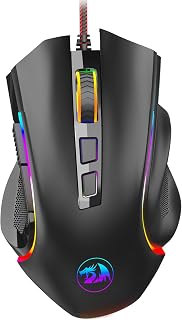
The 7200 adjustable DPI gives you the precision control Minecraft demands, whether you're placing blocks in creative builds or tracking enemies in PvP combat. Nine programmable buttons let you assign hotbar slots, sprint, or inventory access for faster reactions during intense gameplay. The ergonomic right-handed design supports extended building sessions without fatigue, while the professional software enables full customization of macros for repetitive crafting tasks.
Pros
- Exceptional durability, with owners reporting 3+ years of reliable daily use
- Ergonomic shape with dedicated finger positions eliminates hand fatigue
- Highly customizable with programmable buttons, macros, and RGB profiles
- Responsive optical sensor maintains consistent tracking at all DPI levels
- Excellent value for the price, delivering features found on premium competitors
Cons
- No lift-off calibration, so slight elevation from pad may cause cursor movement
- Right-handed design only, not suitable for left-handed users
- Software download required from Redragon website for full customization
The Redragon M602 is a wired gaming mouse built for performance without the premium price. Originally launched in 2015, it has become a reliable choice for competitive gamers, casual players, and office workers who demand ergonomic comfort and consistent tracking. Its track record speaks for itself, with thousands of users reporting multi-year reliability.
The standout feature is the adjustable 7200 DPI optical sensor paired with 9 programmable buttons and full macro editing through free software. Real-world performance is responsive and stable whether you're in competitive matches or everyday work tasks. The 7 customizable RGB lighting modes add flair without compromising functionality, controlled either by physical button or software interface.
Ergonomically, the M602 excels where others fail at this price point. The right-handed shape fits naturally in various grip styles, with textured side grips providing control during extended sessions. Owners consistently praise the weight balance and overall feel, noting it seems more premium than its budget price suggests. This level of comfort is typically reserved for mice costing significantly more.
One consideration is the lack of lift-off calibration, meaning slight elevation from the pad can cause cursor movement. Additionally, left-handed users won't find a suitable variant. The software download from Redragon's website is required for full customization, though basic functionality works out of the box.
The Redragon M602 delivers professional-grade performance, durability, and customization at an entry-level price. If you want a mouse that won't quit after a few years and performs as well as competitors charging triple the cost, this is a top-tier recommendation. The combination of ergonomic design, reliable sensor, and extensive programmability makes it one of the best value gaming mice available.
Connectivity: Wired USB connection with 6-foot range
Sensor: Optical with 7200 DPI adjustable setting
Buttons: 9 programmable buttons for gaming and macros
Lighting: 7 RGB modes and effects, software or button controlled
Design: Right-handed ergonomic shape, 5 inches long x 3.2 inches wide
Weight: 0.27 kg with substantial feel
Compatibility: Windows 8+, Mac, Linux, gaming consoles, laptops
Software: Professional customization software available free from Redragon.com
Included: User manual and software download access
Who Should Buy: The M602 is ideal for budget-conscious gamers, esports players on a tight budget, office workers seeking ergonomic quality, and anyone who values durability over flashy branding. It's perfect if you've had gaming mice fail within 1-2 years and want something built to last.
Best For: Competitive gaming, MOBA and FPS titles, productivity work, content creation, and any use case requiring precision tracking and programmable controls. The ergonomic design makes it equally comfortable for 2-hour gaming sessions or full workdays.
Consider Alternatives If: You're left-handed and specifically need a left-handed mouse, or you require lift-off calibration for techniques like 180-degree flick shots. Otherwise, the M602 outperforms most alternatives at comparable or higher price points.
Setup Tip: Download the official software from Redragon.com immediately to unlock full customization. The mouse works at basic functionality without it, but software access enables macro editing and advanced RGB control.

With 8000 DPI and 11 programmable buttons, this mouse handles both precision block placement and complex hotbar management in Minecraft. The rapid fire key feature accelerates repetitive actions like mining or combat clicking, crucial for efficient resource gathering and PvP scenarios. Its optical sensor delivers accurate tracking across different mouse pad surfaces, ensuring reliable cursor control whether you're navigating menus or executing precise redstone builds.
Pros
- Excellent value for money with features typically found in mice costing twice the price
- 11 programmable buttons and rapid-fire key enable advanced game customization and macros
- Ergonomic claw-grip design with quality materials reduces fatigue during extended gaming sessions
- Optical sensor provides reliable precision tracking for competitive and casual gaming
- RGB lighting with multiple modes adds visual appeal that matches modern gaming setups
Cons
- Wired connection limits desk positioning flexibility compared to wireless alternatives
- Software customization may require driver installation for full button remapping functionality
- Larger claw-grip design may not suit users with smaller hands or palm-grip preference
The Redragon M612 Predator is a wired optical gaming mouse designed for competitive gamers and professionals who demand customizable controls and responsive performance. With 11 programmable buttons and adjustable DPI up to 8000, this mouse targets players across all skill levels seeking precision and productivity enhancements at an accessible price point.
The standout feature is its impressive programmability. All 11 buttons are remappable through software, complemented by dedicated rapid-fire and macro buttons on the left side. The 5-level DPI system (500-4000 default, expandable to 8000 via software) lets you switch sensitivity instantly between games. The optical sensor delivers accurate tracking that competitive players expect, while the 10-meter range ensures responsive performance throughout your gaming space.
Build quality reflects its price positioning thoughtfully. The frosted matte coating on the main body resists fingerprints while providing comfortable tactile feedback. Textured rubber panels on the left side enhance grip control during intense gaming sessions. The ergonomic claw-grip design with solid ABS construction feels durable, and at 126 grams, it balances stability with the lightweight feel modern gamers prefer. The dynamic RGB lighting offers 5 backlit modes that coordinate well with other Redragon peripherals.
Some considerations exist for potential buyers. The wired USB connection, while eliminating battery concerns and latency issues, restricts cable management and desk setup flexibility. The software for full customization requires driver installation on Windows or macOS, adding a setup step. The ergonomic design specifically targets claw-grip users, so those preferring palm or fingertip grips should verify comfort before committing.
The Redragon M612 delivers excellent value for competitive gamers and professionals needing programmable controls. Its responsive optical sensor, extensive button customization, and solid ergonomic design punch well above its price class. Recommended for gamers upgrading from entry-level mice or anyone seeking high-quality performance without premium pricing.
Connectivity: Wired USB connection with 10-meter range
Sensor: Optical movement detection
DPI: 8000 maximum, 5 preset levels (500, 1000, 2000, 3000, 4000), software adjustable up to 8000
Buttons: 11 programmable buttons including 1 rapid-fire key and 2 side macro buttons
Design: Right-handed ergonomic claw-grip with frosted matte finish and textured grip panels
Lighting: RGB with 5 backlit modes
Weight: 126 grams
Dimensions: 5.43 inches length x 3.43 inches width
Compatibility: Windows 10+, macOS 10.15 Catalina+
Material: ABS plastic with matte finish
Warranty: 1 year manufacturer warranty
Best For: Competitive FPS and MOBA gamers seeking affordable precision performance with extensive customization. Productivity professionals needing programmable macro buttons. Gaming enthusiasts building budget-conscious setups. Players upgrading from entry-level or worn-out gaming mice.
Consider Alternatives If: You prioritize wireless connectivity or require a left-handed design. You prefer palm-grip ergonomics over claw-grip. You need ultra-lightweight mice under 100 grams. You want integrated charging without USB cables.
Value Assessment: Exceptional value proposition for the price tier. Delivers features comparable to mice costing 40-60% more. Quality construction and optical sensor justify the investment for gamers serious about performance enhancement.

The 6-button layout provides essential controls for Minecraft without overwhelming simplicity, perfect for players who prefer clean, focused gameplay. Its optical sensor delivers reliable tracking for block placement accuracy and smooth camera movement during exploration. The compact, lightweight design reduces hand strain during marathon building sessions, while Lightsync RGB adds visual customization to match your gaming setup without sacrificing performance.
Pros
- Excellent value at under $30 with professional-grade sensor performance
- Mechanical primary buttons feel crisp and responsive with zero lag
- LIGHTSYNC RGB syncs with other Logitech gear for unified lighting setup
- Intuitive G HUB software makes macro assignment and DPI tuning quick and easy
- Proven reliability with thousands of positive reviews from active gamers
Cons
- Wired design limits desk mobility compared to wireless alternatives
- Right-handed only orientation excludes left-handed gamers
- Lightweight build may feel less substantial than premium gaming mice
The Logitech G203 is a wired gaming mouse engineered for players who prioritize precision and performance without premium pricing. This mouse targets casual competitive gamers, esports enthusiasts on a budget, and anyone upgrading from standard office peripherals to dedicated gaming hardware.
The standout feature is the 8000 DPI optical sensor paired with zero filtering and smoothing, delivering tournament-grade tracking accuracy. Real-world performance is consistent across fast flick shots and precise aiming tasks. The six programmable buttons and five DPI profiles let you tailor controls to any game type, from MOBAs to fast-paced shooters. The LIGHTSYNC RGB system with 16.8 million colors and reactive modes adds immersion while remaining fully customizable through G HUB software.
Design and build quality emphasize durability over luxury. Metal spring tensioning in the primary buttons provides satisfying tactile feedback and longevity. The 2.1-meter USB cable is long enough for most desk setups, and the lightweight construction reduces hand fatigue during extended sessions. The form factor is ergonomic for right-handed grip, though left-handed users are not accommodated.
The main limitation is the wired connection, which reduces mobility and may require cable management on crowded desks. Additionally, the lightweight plastic body, while practical, lacks the premium feel of higher-end gaming mice. These tradeoffs are reasonable given the aggressive pricing.
The Logitech G203 is a smart choice for gamers seeking reliable, feature-rich performance without overspending. It's particularly recommended for PC and Mac users building their first gaming setup or upgrading from basic peripherals. The combination of precision sensors, customizable controls, and proven reliability makes it a legitimate competitor in the budget gaming mouse category.
Sensor and Performance: 8000 DPI optical sensor with 32-bit ARM processor, zero filtering and smoothing for accurate tracking.
Design: Six programmable buttons with mechanical primary buttons using metal springs. Right-handed ergonomic shape. Dimensions 4.59 inches length by 2.45 inches width. Weight 4.8 ounces.
Lighting: LIGHTSYNC RGB with 16.8 million colors, customizable patterns, wave effects, and reactive modes. Syncable with other LIGHTSYNC devices.
Connectivity: Wired USB Type-A connection. Cable length 2.1 meters (6.89 feet). Works with PC, Mac, and most laptops running Windows 7 or later.
Warranty and Support: Two-year limited hardware warranty. Compatible with Logitech G HUB software for customization and macro programming.
Best for: Budget-conscious gamers, esports players seeking reliable precision on a tight budget, PC and Mac users upgrading from standard mice, players building their first gaming setup, competitive FPS and MOBA enthusiasts.
Consider alternatives if: You require wireless connectivity, left-handed design, ultra-lightweight construction for competitive FPS gaming at the highest level, or premium build materials and aesthetics.
Avoid if: You need wireless functionality, are left-handed, or prefer mice with ambidextrous designs and side button accessibility.
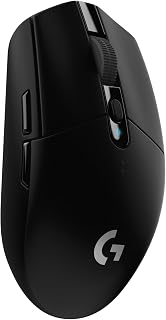
Wireless connectivity eliminates cable drag during intense Minecraft sessions, giving you unrestricted mouse movement for building and combat. The ambidextrous design accommodates both left and right-handed players, a rare advantage in gaming mice. Its optical sensor maintains tracking precision across various surfaces, ensuring accurate block placement and reliable camera control whether you're constructing elaborate structures or navigating cave systems.
Pros
- 250-hour battery eliminates frequent charging interruptions
- 1ms LIGHTSPEED wireless removes cable drag during building
- Ambidextrous shape fits left and right-handed players
- Lightweight 99-gram design reduces hand fatigue
Cons
- 1-meter wireless range limits placement flexibility
- Minimal RGB customization compared to competitors
Minecraft sessions often stretch for hours, making the G305's 250-hour battery life on a single AA a practical advantage for uninterrupted mining, building, or server play. The LIGHTSPEED 1ms wireless technology eliminates cable drag during fast mouse movements common in PvP combat or rapid block placement, while matching wired latency for competitive Bed Wars or UHC matches. The HERO 12k sensor tracks up to 400 IPS with precision suitable for both precise redstone wiring and quick 180-degree turns during combat. Six programmable buttons configured through Logitech G HUB let you bind frequent actions like sprint, inventory, or perspective changes without cluttering the layout. The ambidextrous shape accommodates both hand orientations, and the 99-gram weight keeps your hand agile during extended building projects or exploration. The design lacks the aggressive gamer aesthetic, making it suitable for players who also use their setup for schoolwork or professional tasks. The 1-meter wireless range requires keeping the nano receiver nearby, which matters less for desktop setups but could limit couch or living room play. Power-efficient mode extends battery life to 9 months for players who don't game daily.
Sensor: HERO 12k Optical Sensor, 200-12,000 DPI, 400 IPS
Connectivity: LIGHTSPEED Wireless, 1ms report rate
Buttons: 6 programmable buttons
Weight: 99 grams (3.4 oz)
Battery: 1 AA battery included, 250 hours runtime
Design: Ambidextrous, compact portable form factor
Compatibility: Windows 10+, Mac, works with PC and laptop
Storage: Built-in nano receiver storage compartment
Dimensions: 4.59 inches L x 2.45 inches W
Color: Black
Model Number: 910-005280
Minecraft players who split time between survival building and competitive PvP minigames benefit from the wireless freedom and reliable sensor. Students or remote workers who game between tasks appreciate the ambidextrous design and professional appearance. Avoid this if you sit farther than 1 meter from your PC, need extensive RGB lighting, or want more than six programmable buttons for heavily modded setups.

Eleven programmable buttons transform this mouse into a Minecraft command center, letting you bind hotbar slots, crouch, and inventory shortcuts for instant access. The ergonomic right-handed design minimizes wrist fatigue during extended creative builds or survival gameplay. Its optical sensor provides the tracking accuracy needed for precise block placement and smooth camera panning when admiring your architectural creations or scouting terrain.
Pros
- 11 programmable buttons for inventory and build shortcuts
- Dual-mode scroll wheel switches between smooth and notched
- 26K DPI sensor handles precise block placement and bridging
- Ergonomic design supports extended mining or PvP sessions
Cons
- Wired connection limits movement range
- Right-handed design only
Minecraft demands precision for PvP combat and benefits enormously from programmable shortcuts for inventory management, block placement, and hotbar switching. The Basilisk V3 addresses both needs with an 11-button layout that lets you bind frequent actions like sprint-jumping, weapon swaps, or potion throws to thumb buttons. The 26K DPI optical sensor tracks block-level movements accurately during building or bridging, while the dual-mode HyperScroll wheel switches instantly between smooth scrolling for inventory sorting and notched steps for precise hotbar navigation. The ergonomic right-handed shape with thumb rest supports marathon mining sessions or lengthy PvP practice without strain. The 70-million-click optical switches deliver fast 0.2ms actuation that responds instantly during sword combos or bow shots. Chroma RGB integration reacts to in-game events in over 150 titles, though Minecraft itself isn't officially supported. Setup requires time in Razer Synapse to map all buttons effectively, but once configured, the macro support transforms gameplay efficiency. The wired connection removes battery anxiety during long building projects while maintaining zero input lag for competitive Bed Wars or UHC matches.
Connectivity: Wired USB
DPI Sensor: Optical 26K DPI with FOCUS Plus technology
Programmable Buttons: 11 total
Mouse Switches: Optical Gen 2 with 0.2ms actuation and 70 million click lifespan
RGB Lighting: 11 Chroma zones, 16.8 million colors, 150+ game integration support
Scroll Wheel: Dual-mode HyperScroll (free-spin and tactile)
Compatibility: Windows 10 and 11, Mac, PC, and laptops
Weight: 3.56 ounces
Dimensions: 5.12 inches L x 2.96 inches W
Color: Black with rubberized finish
Warranty: 2-year manufacturer coverage
Included: Mouse, product information guide, Razer Synapse software access
Minecraft players focused on competitive PvP modes like Bed Wars, Sky Wars, or UHC will extract maximum value from the programmable buttons and high DPI precision. Survival builders managing complex redstone or large construction projects benefit from the customizable shortcuts and scroll wheel versatility. Skip this if you play casually without needing macros, prefer wireless freedom for couch gaming, or use a left-handed grip.

Eleven programmable buttons enable comprehensive hotbar and action binding, essential for quick inventory management and combat responses in Minecraft. The touch scroll wheel offers adjustable resistance, useful for cycling through items smoothly or locking in place during precision building. Its optical sensor guarantees accurate cursor control for detailed redstone circuits and pixel-perfect block placement in creative mode.
Pros
- HERO sensor with 25600 DPI and zero smoothing for pixel-accurate control
- 11 programmable buttons and dual-mode scroll wheel for extensive hotbar and inventory shortcuts
- Adjustable weight system tailors balance to your grip and playstyle
- Wired USB eliminates input lag during competitive PvP
Cons
- Right-hand only design excludes left-handed players
- G HUB configuration software has a learning curve
Minecraft rewards precision and quick reflexes, especially during PvP combat and speedrunning, and the G502 HERO delivers both with its advanced HERO optical sensor. The sensor tracks at up to 25600 DPI with sub-micron accuracy and zero smoothing or filtering, giving you pixel-perfect cursor control for building, mining, and combat. The 11 programmable buttons let you bind frequently used actions like weapon swaps, inventory shortcuts, or block placements directly to the mouse, reducing keyboard dependency during tense moments. The hyper-fast dual-mode scroll wheel is particularly useful for rapidly cycling through your hotbar. The adjustable weight system with five 3.6g weights helps you dial in the exact feel for your playstyle, whether you prefer light flicks for PvP or stable tracking for precise building. The ergonomic right-hand shape supports extended Minecraft sessions comfortably, and the metal spring tensioning system ensures every click feels crisp and responsive. The wired USB connection eliminates any input lag concerns, crucial for competitive servers where reaction time matters. LIGHTSYNC RGB lighting adds personalization without affecting performance.
Sensor Technology: HERO 16K Optical, 25600 DPI max, sub-micron precision tracking
Connectivity: Wired USB (1.0 meter range)
Buttons: 11 programmable buttons plus dual-mode scroll wheel
Customization: 5 adjustable weights (3.6g each), RGB LIGHTSYNC lighting, game profiles
Build: Metal spring tensioning and pivot hinges, ergonomic right-hand design
Weight: 4.32 ounces
Dimensions: 2.95L x 1.57W inches
Compatibility: PC, Windows 7 or later
Power: USB powered (no batteries required)
Warranty: 1-year hardware limited

The 12,800 DPI optical sensor delivers exceptional precision for intricate Minecraft builds and fast-paced PvP combat scenarios. Eight programmable buttons accommodate custom hotbar bindings and macros for repetitive crafting sequences, streamlining resource-intensive projects. The paracord cable reduces drag and snag issues compared to standard rubber cables, ensuring smooth mouse movement during exploration and construction without the weight or friction that disrupts fine cursor control.
Pros
- Exceptional comfort for users with larger hands, with ergonomic shape that reduces fatigue during long sessions
- Outstanding precision tracking with high polling rate and acceleration, delivering sniper-level accuracy in FPS games
- Programmable buttons and macro support give competitive gamers a real edge in complex games
- Braided USB cable is durable and soft, with quality connectors that resist wear
- Excellent value at under $20 with features typically found in much pricier models
Cons
- Scroll wheel can occasionally skip or double-scroll during rapid scrolling, potentially frustrating for precision work
- Larger size may be uncomfortable for users with small hands or palm grip preferences
- Requires driver download for full customization of RGB and DPI profiles, not out-of-box ready
The Acer OMW317 is a wired gaming mouse built for competitive players and enthusiasts who demand responsive performance without premium pricing. With its 12,800 DPI optical sensor, 1000Hz polling rate, and 20G acceleration, this mouse delivers the precision tracking gamers need for FPS titles, MOBAs, and fast-paced action. It's equally suited for everyday productivity tasks that require accuracy.
What sets this mouse apart is its ergonomic mid-hand design paired with balanced weight distribution, creating a comfortable platform for extended play sessions. The 8 programmable buttons and macro support give players tactical advantages, while the drag-free paracord and smooth skates produce a wireless-like gliding experience. Real-world users consistently praise its responsiveness and tracking consistency, with reviewers noting it performs equally well for competitive gaming and casual use.
Build quality impresses at this price point. The braided USB cable feels substantial and resists fraying, the rubber-coated grip provides secure handling, and the optical sensor maintains accuracy across different surfaces. The 12 customizable RGB modes, including music synchronization, add visual flair for those who want it, while an option to disable lighting keeps things professional for work environments.
The main drawback is scroll wheel inconsistency, with some users reporting occasional double-scrolls during rapid scrolling. The mouse's larger frame is a strength for bigger hands but may feel unwieldy for users with smaller hands or those preferring a palm grip. Driver installation is required to access the full customization suite, though the mouse functions as a standard input device without it.
For budget-conscious gamers seeking reliable precision and comfort, this Acer mouse delivers exceptional value. It competes with mice twice its price in terms of feature set and performance, making it an excellent starter mouse for competitive gaming or a solid backup for professionals who game on weekends.
Sensor: 12,800 DPI Optical Sensor with 7000 FPS scanning
Polling Rate: 1000Hz for ultra-responsive tracking
Acceleration: 20G maximum acceleration
Buttons: 8 programmable buttons with macro and rapid-fire support
Connectivity: USB-A wired connection with drag-free paracord
RGB Lighting: 12 customizable modes with music synchronization
DPI Settings: 4 preset levels (1200, 2400, 3200, 6400) or up to 12,800 via driver
Weight: 190 grams with balanced distribution
Dimensions: 4.7 inches long by 2.9 inches wide
Operating Systems: Windows, macOS, Linux, Chrome OS
Warranty: 1 year manufacturer warranty
Best For: Competitive FPS and MOBA players, large-handed users seeking ergonomic comfort, budget-conscious gamers, and anyone needing reliable precision for gaming or productivity work.
Consider If: You prioritize customization with programmable buttons, want 12,800 DPI capability without spending over $20, prefer wired connections for zero latency, or need cross-platform compatibility with Windows, Mac, and Linux systems.
Skip If: You have small hands or prefer a palm grip design, need a scroll wheel with flawless precision for spreadsheet work, want wireless convenience, or require out-of-box functionality without driver installation.
Setup Tips: Download the driver from Acer's website for full RGB and DPI customization. Mac users need a USB hub or adapter due to low-power port limitations. The mouse functions as a standard input device without drivers, but you'll miss macro and lighting options.
Value Proposition: This mouse delivers gaming-grade features found in $50+ competitors at a fraction of the cost. For the price, you're getting a professional-grade sensor, ergonomic design, and extensive customization options. It's a no-risk purchase for trying competitive gaming without financial commitment.

The ergonomic design provides comfortable support during long Minecraft sessions, reducing hand strain whether you're mining resources or constructing elaborate builds. Its optical sensor ensures reliable tracking for accurate block placement and smooth camera movement across various gameplay scenarios. Five programmable buttons cover essential functions like hotbar access and sprint, delivering practical customization without unnecessary complexity for focused gameplay.
Pros
- 6400 DPI handles Minecraft combat and building comfortably
- Ergonomic shape reduces fatigue during long sessions
- 10-million-click switches withstand block-breaking spam
- Wired connection provides consistent zero-latency input
Cons
- Only five programmable buttons
- Cable restricts movement range
Minecraft's combination of building mechanics and combat doesn't require extreme DPI counts or dozens of buttons, making the DeathAdder Essential an efficient match. The 6400 DPI optical sensor provides more than enough sensitivity for tracking enemies during PvP or placing blocks accurately during creative builds. Five programmable buttons through Razer Synapse let you assign essential shortcuts like sprint toggle, inventory access, or perspective switching without overwhelming casual players. The ergonomic right-handed shape reduces hand fatigue during long mining expeditions or server sessions, while the textured scroll wheel ensures reliable hotbar navigation even during frantic combat. The wired connection delivers consistent zero-latency input, critical for reaction-based gameplay like archer duels or lava dodging. Mechanical switches rated for 10 million clicks withstand repeated left-click spam for block breaking or sword swinging. The lightweight construction keeps your hand comfortable through extended gameplay without the bulk or complexity of feature-heavy alternatives. Setup is straightforward with minimal software configuration needed, letting you jump into gameplay quickly rather than spending hours tweaking profiles.
Sensor: 6400 DPI optical sensor with programmable sensitivity buttons
Buttons: 5 programmable buttons with macro support via Razer Synapse
Switches: Durable mechanical switches rated for 10 million clicks
Connectivity: Wired (5.0 meter range)
Scroll Wheel: Ridged, rubberized design for improved grip and accuracy
Design: Ergonomic right-handed orientation
Weight: 0.13 kg (lightweight construction)
Dimensions: 5 inches long x 2.43 inches wide
Compatibility: Windows, macOS, Linux, PC, laptop, gaming console
Warranty: 2-year manufacturer coverage
Model: RZ01-03850100-R3U1
New Minecraft players learning PvP fundamentals or casual survival builders who want reliable ergonomics without excessive features will appreciate the straightforward design. Players on tight budgets who still want durable hardware backed by a 2-year warranty should consider this. Pass if you need wireless portability, use your left hand, or require extensive macro buttons for modded gameplay with complex hotkey demands.

Wireless operation at 2.4GHz eliminates cable interference during Minecraft gameplay, providing unrestricted movement for building and exploration. The 10,000 DPI sensor offers high precision for detailed construction work and quick target acquisition in combat scenarios. Eight programmable buttons let you assign frequently used hotbar slots and actions, while the rapid fire key accelerates mining and combat clicking for efficient resource gathering and PvP encounters.
Pros
- 2.4GHz wireless with 1000Hz polling rate for cable-free responsive gameplay
- 45-hour battery life supports extended sessions without charging breaks
- Eight programmable buttons with macro support for streamlined Minecraft actions
- 10000 DPI sensor with five adjustable levels for building and combat versatility
Cons
- Right-handed design only
- Wireless may not satisfy esports players seeking wired latency elimination
Wireless freedom transforms your Minecraft experience, and the Redragon M810 PRO delivers that without sacrificing responsiveness. The 2.4GHz wireless connection with 1000Hz polling rate keeps your cursor movements fluid during building and combat, while the 45-hour battery life means you can play marathon sessions without charging interruptions. The 10000 DPI optical sensor offers five adjustable sensitivity levels, letting you switch between high DPI for quick camera turns and lower settings for precise block placement or PvP aiming. Eight programmable buttons with macro and rapid-fire support are perfect for binding Minecraft actions like eating, switching tools, or activating frequently used items, streamlining your workflow during complex builds or survival gameplay. The comfort grip design and matte ABS finish resist hand fatigue during long mining expeditions or multiplayer battles. The ergonomic right-hand shape fits naturally for extended use. RGB lighting adds visual flair to match your gaming setup. For Minecraft players who value cable-free movement and solid customization at an accessible price point, the M810 PRO handles everything from creative building to Hypixel minigames with confidence.
Connectivity and Performance: 2.4GHz wireless with 10-meter range, 1000Hz polling rate, USB-C charging
Sensor: PAW3325 optical sensor with up to 12000 DPI
Buttons: 8 programmable buttons including rapid-fire and 2 side macro buttons
Battery: Lithium polymer, 45-hour average life (eco-mode)
Design: Right-handed, ABS plastic with matte finish, comfort grip
Dimensions: 8.07 inches L x 6.1 inches W, 4 ounces
RGB: Customizable lighting with dynamic streaming, breathing, and waving modes
Compatibility: Windows XP/Vista/7/8/10, gaming consoles, tablets
Warranty: 1 year
Budget-conscious Minecraft players who want wireless convenience without compromising performance will find excellent value here. The macro support benefits survival and creative builders who repeat frequent actions, while the adjustable DPI suits both PvP combat and precision building. The 45-hour battery is ideal for players who game in long sessions or weekends without constant charging. Skip this if you're left-handed, demand the absolute lowest latency for professional esports competition, or prefer premium materials over functional design at a lower cost.
What to Look for in a Minecraft Gaming Mouse
DPI Range and Sensitivity Control
Minecraft doesn’t demand ultra-high DPI the way a fast-paced FPS does, but having adjustable sensitivity still gives you a real advantage. For building and inventory management, lower DPI settings around 800 to 1600 offer finer control, while PvP situations call for something quicker.
Options like the Logitech G502 Hero Wired Gaming Mouse – Black offer up to 25,600 DPI with zero smoothing, while the BENGOO Gaming Mouse Wired with RGB Backlit covers four solid DPI levels for players who want simplicity. On-the-fly DPI switching is a feature worth prioritizing.
Programmable Buttons
Minecraft’s hotbar, inventory shortcuts, and tool switching all benefit from extra programmable buttons. Side buttons mapped to your most-used items or macros can dramatically speed up your gameplay, especially in creative mode or during raids.
The Redragon M612 Wired RGB Optical Gaming Mouse 8000 packs 11 fully remappable buttons including rapid fire and macro side buttons. The Razer Basilisk V3 Customizable RGB Wired Ergonomic takes it further with 11 programmable buttons and a tilt scroll wheel that works great for cycling through your hotbar. For a broader setup overview, our complete component guide for RTX 5070 builds covers the full picture.
Ergonomics and Grip Style
Long Minecraft sessions demand a mouse that won’t fatigue your hand. Whether you prefer a palm, claw, or fingertip grip, the shape and weight of the mouse make a real difference over hours of play.
The Redragon M602 Gaming Mouse is shaped for a variety of hand sizes with dedicated finger positioning, making it a comfortable all-day option. The Acer Wired Gaming Mouse, 12,800 DPI RGB Ergonomic features a mid-hand ergonomic form and balanced weight that reduces strain during extended builds. If you’re planning a full rig, our RTX 5060 Ti build guide pairs well with a mouse upgrade.
Wired vs. Wireless
Wired mice offer zero latency and no battery concerns, which makes them a reliable default for most Minecraft players. That said, wireless options have improved dramatically and now rival wired performance in everyday play.
The Logitech G305 Lightspeed Wireless Gaming Mouse delivers lag-free wireless performance with up to 250 hours of battery life on a single AA battery. For a wireless option with even more programmability, the Redragon M810 PRO Wireless RGB Gaming Mouse 10000 runs up to 45 hours and connects via a 2.4GHz nano receiver. Both are solid choices if you prefer a cleaner desk setup. Those building a new system around their peripherals might also find our RX 9070 gaming setup guide useful.
Final Thoughts
For most Minecraft players, the Logitech G502 Hero Wired Gaming Mouse – Black stands out as a precision-first pick with its adjustable weights and industry-leading sensor, while the Logitech G305 Lightspeed Wireless Gaming Mouse is the go-to if you want reliable wireless freedom without sacrificing responsiveness. Both deliver the kind of consistent, accurate tracking that makes everything from detailed builds to intense PvP feel more natural and controlled.
Frequently Asked Questions
What DPI should I use for Minecraft?
Most Minecraft players find a DPI between 800 and 1600 offers the best balance of precision and speed. Lower settings work well for detailed building and crafting, while bumping up the sensitivity helps during combat. Mice with on-the-fly DPI switching, like the Logitech G203 Wired Gaming Mouse – Black, let you switch instantly without breaking your flow.
Do I need a lot of buttons on a gaming mouse for Minecraft?
Extra buttons aren’t required, but they can make a noticeable difference. Mapping your hotbar slots, inventory key, or sprint toggle to side buttons frees up your keyboard hand for other inputs. If you play with complex macro setups, a mouse like the Redragon M612 Wired RGB Optical Gaming Mouse 8000 with 11 programmable buttons is worth considering.
Is a wired or wireless mouse better for Minecraft in 2026?
Both are genuinely viable in 2026, and the gap has closed significantly. Wired mice like the Razer DeathAdder Essential Ergonomic Wired offer plug-and-play reliability with no battery management. Wireless options have improved enough that latency is rarely a concern for Minecraft, making them a practical choice for players who prefer a tidy setup. You can also check out our best open-back headphones for gaming to round out your audio setup alongside your new mouse.
Can a budget gaming mouse hold up for Minecraft?
Absolutely. Minecraft is far less demanding on hardware than fast-paced shooters, so a budget mouse can perform very well. The BENGOO Gaming Mouse Wired with RGB Backlit is a plug-and-play option that requires no drivers and covers four DPI levels, making it a practical choice for players who want solid performance without spending a lot. The Redragon M602 Gaming Mouse adds RGB customization and ergonomic comfort at a similarly accessible entry point.



Write Your Review
No reviews yet. Be the first to share your experience!