

You have a 1440p monitor with a 120Hz or higher refresh rate, and you want frames to match. That sweet spot where resolution stays sharp and motion stays fluid is absolutely achievable in 2026, but only if your GPU can keep up. Whether you are building a new rig or upgrading an aging card, picking the right option means balancing raw performance, memory capacity, power draw, and how well the card handles modern rendering features like ray tracing and AI upscaling. Browse the full Graphics Cards category to see how these picks fit into the broader landscape.
This guide covers nine GPUs evaluated specifically for 1440p gaming at 120 frames per second or better. We assessed each card on architecture, clock speeds, memory configuration, and real-world suitability for this resolution and refresh rate target. The lineup spans AMD RDNA 3 and RDNA 4 alongside NVIDIA Ampere and Blackwell, giving you a clear range of options regardless of your platform preference.
Quick Comparison
Ratings reflect the most recent data pull. Check each listing for current price and availability.
Quick answer
This guide compares 9 picks, with ASRock Radeon RX 9060 XT Challenger 16GB GDDR6 PCIe 5.0 ranked first. MSI RTX 3060 12GB Gaming Graphics Card - 1440p High has the most customer reviews.

The remarkable 3290 MHz boost clock stands out as class-leading, ensuring frame rates comfortably surpass 120 FPS targets at 1440p. The 16GB GDDR6 memory eliminates concerns about texture streaming or VRAM limitations in modern titles. DisplayPort 2.1a and HDMI 2.1b outputs guarantee compatibility with the latest high refresh rate monitors. The 0dB silent mode during light loads adds versatility, while dual fans handle thermal demands when pushing maximum frames in competitive scenarios.
Pros
- 3290 MHz boost clock and RDNA 4 architecture target smooth 1440p 120 fps gameplay
- 16GB GDDR6 provides ample buffer for high-texture 1440p titles
- Mid-60s temperatures under load with 0dB silent idle mode
- DisplayPort 2.1a and HDMI 2.1b match high-refresh 1440p displays natively
Cons
- 128-bit memory bus limits bandwidth headroom in the most demanding scenarios
- Dual-fan cooler is adequate but less aggressive than triple-fan premium alternatives
At 1440p with a 120 Hz target, the ASRock Radeon RX 9060 XT Challenger 16GB OC has the right ingredients: a 3290 MHz boost clock, RDNA 4 architecture with 32 compute units, and 16GB of GDDR6 memory that removes the buffer anxiety common at this resolution. Users report 60-plus fps on high settings in modern titles, and the architectural generation jump over cards like the RTX 3060 Ti means frame rates in demanding games step up meaningfully. Ray tracing is supported, so titles that lean on it stay playable rather than punishing. Thermals stay in the mid-60s under sustained load, and the 0dB idle mode keeps the card silent during desktop use. A single 8-pin connector and a 550W PSU requirement mean most existing mid-range builds can slot it in without a power supply swap. DisplayPort 2.1a and HDMI 2.1b ensure the output side matches any 1440p 120 Hz or higher-refresh display. The 249mm length also avoids clearance problems in compact cases.
GPU: AMD Radeon RX 9060 XT (RDNA 4, 32 Compute Units)
Memory: 16GB GDDR6 at 20 Gbps on 128-bit bus
Clock Speeds: 3290 MHz boost, 2700 MHz game clock
Output: DisplayPort 2.1a, HDMI 2.1b
Max Resolution: 7680x4320 pixels
Power: Single 8-pin connector, 550W PSU recommended
Size: 249mm (L) x 132mm (W) x 41mm (H), 2-slot design
Cooling: Dual fans, 0dB idle mode
Interface: PCIe 5.0 x16
Weight: 0.98 kg
Warranty: 2 years manufacturer
A strong pick for 1440p 120 Hz gamers upgrading from a previous-generation mid-range card who want headroom in VRAM without flagship power demands. The efficient cooling and single 8-pin power make it easy to drop into an existing system. Skip it if your primary goal is 4K gaming or heavy professional rendering work, where 128-bit memory bandwidth and the 16GB ceiling may become limiting.

The 1837 MHz boost clock and 12GB GDDR6 memory handle 1440p gaming adequately, though achieving consistent 120 FPS requires balanced settings in demanding titles. The 192-bit memory interface provides reasonable bandwidth for this resolution, while PCIe 4 support ensures compatibility with modern platforms. Torx Twin Fan cooling maintains thermal stability during extended sessions. This Ampere-based option serves gamers willing to adjust visual settings strategically to maintain smooth high refresh rate gameplay.
Pros
- 12GB GDDR6 exceeds the 8GB limit of the RTX 3060 Ti and 3070 at the same 1440p use case
- DLSS enables sustained high frame rates at 1440p without major image quality loss
- Twin Fan cooler keeps thermals low with minimal noise during extended sessions
- Three DisplayPort and one HDMI 2.1 output support high-refresh 1440p displays
Cons
- 2020 Ampere architecture trails newer generations in ray tracing efficiency and power performance
- 1837 MHz boost clock means the most demanding 2026 titles may require DLSS to hold 120 fps
For a 1440p 120 fps gaming target, the MSI RTX 3060 Ventus 2X brings a meaningful edge that often goes overlooked: 12GB of GDDR6 memory on an Ampere GPU. At 1440p with high texture settings, that buffer outpaces the 8GB found on the RTX 3060 Ti and RTX 3070, reducing texture pop-in and frame time spikes in VRAM-hungry 2025 and 2026 titles. DLSS support is the other key lever for hitting 120 fps targets, letting the card render at a lower internal resolution and reconstruct a sharp 1440p image with minimal visual penalty. The 1837 MHz boost clock and Ampere architecture handle esports titles at very high frame rates comfortably, and demanding AAA games stay smooth at 1440p with settings tuned appropriately. MSI's Twin Fan cooler keeps thermals low during extended sessions, and fan noise stays minimal. The card supports up to 7680x4320 output, and MSI's software allows custom fan curve adjustments. The Ampere architecture dates to 2020, so raw rasterization and ray tracing efficiency lag behind current RTX 40 and 50-series hardware.
GPU: NVIDIA GeForce RTX 3060 Ampere Architecture
Memory: 12GB GDDR6
GPU Clock Speed: 1837 MHz
Memory Clock Speed: 1807 MHz
Memory Interface: 192-Bit
Max Power Draw: 170W
Interface: PCI-Express 4.0 x16
Video Outputs: 3x DisplayPort 1.4a, 1x HDMI 2.1
Max Resolution: 7680x4320
Cooling: Twin-Fan Design
Dimensions: 9.25 inches L x 4.88 inches W
Weight: 340g
Warranty: 3 Years
Model: RTX 3060 Ventus 2X 12G OC
Manufacturer: MSI

The 12GB GDDR6 configuration provides adequate memory for 1440p textures, while the GeForce RTX 3060 architecture delivers playable frame rates when settings are optimized. The dual-fan cooling system with metal backplate ensures thermal management during demanding sessions, important for maintaining consistent performance near the 120 FPS target. DisplayPort and HDMI connectivity supports modern high refresh monitors. This represents an accessible option for gamers prioritizing smoothness over maximum visual fidelity at this resolution.
Pros
- DLSS support is a key tool for sustaining 120 fps at 1440p in supported titles
- 12GB GDDR6 handles high-texture 1440p workloads better than 8GB alternatives
- All-metal backplate adds structural rigidity and assists heat dissipation
- 3584 CUDA cores with ray tracing support for modern AAA titles
Cons
- 1882 MHz boost clock trails newer-generation cards at the same performance tier
- Fans can run audibly under heavy 1440p loads compared to previous-generation cards
Reaching 120 fps at 1440p asks more of a GPU than comfortable 60 fps play, and the EVGA RTX 3060 XC Gaming brings credible tools to that challenge. Its 3584 CUDA cores, 1882 MHz boost clock, and Ampere architecture support real-time ray tracing and DLSS, the latter being particularly valuable for hitting and sustaining high frame rates without sacrificing image quality. The 12GB GDDR6 buffer holds up well at 1440p when texture quality sliders are pushed, reducing the stutters that 8GB cards can show in VRAM-heavy titles. The all-metal backplate and dual-fan cooler keep thermals manageable under extended gaming sessions, and users confirm the build quality is substantial. The metal backplate also aids heat dissipation compared to plastic designs. Where the card runs into limits is at the very top of the 120 fps target: the 1882 MHz clock trails newer architectures, and in the most demanding modern titles at high settings, sustained 120 fps can require quality tradeoffs. DLSS helps close that gap significantly in supported games.
GPU and Memory: NVIDIA GeForce RTX 3060 with 12GB GDDR6, 3584 CUDA cores, 1882 MHz boost clock, 2nd Gen Ray Tracing Cores, 3rd Gen Tensor Cores
Connectivity and Compatibility: PCI-Express x16 interface, DisplayPort and HDMI outputs, compatible with any motherboard featuring a PCI-e x16 slot, supports up to 7680x4320 display resolution
Cooling and Design: Dual-fan cooling system, all-metal backplate, dimensions 8.39L x 4.93W inches, weight 907g
Specifications: Memory clock speed 15000 MHz, 3-year manufacturer warranty included
Best suited to gamers upgrading from GTX 1000-series or older hardware who want a proven DLSS-capable card for 1440p 120 Hz gaming on a mid-tier budget. The 12GB VRAM is a genuine advantage over 8GB contemporaries at this resolution. Skip it if you want the efficiency and ray tracing improvements of newer architectures, or if 120 fps in every demanding 2026 title without DLSS is a firm requirement.
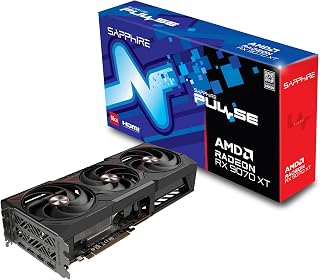
The 16GB GDDR6 memory configuration eliminates VRAM bottlenecks entirely at 1440p, while the impressive 2970 MHz boost clock pushes frames well past the 120 FPS target in most titles. RDNA 4 architecture brings efficiency improvements that maintain performance under sustained loads, crucial for competitive gaming where frame rate consistency matters. With both DisplayPort and HDMI outputs supporting high refresh rates, this card delivers the horsepower needed for ultra settings without sacrificing smoothness.
Pros
- Delivers 60-120 FPS at 1440p ultra in AAA titles consistently
- 16GB VRAM eliminates texture bottlenecks at high settings
- Runs under 50C during gaming with quiet triple-fan cooling
- Low power draw at 140-250W gaming, 10-30W idle
Cons
- Weaker VR anti-aliasing performance versus Nvidia
- RDNA 4 drivers still maturing for edge-case compatibility
The Sapphire Pulse RX 9070 XT attacks the 1440p 120 FPS target from a value angle without sacrificing capability. With 16GB GDDR6 and stable 3100MHz clocks under 50C, it pushes 60-120 FPS at 1440p ultra settings in current AAA titles, giving you the headroom to dial up details or maintain higher refresh on a 165Hz panel. The extra VRAM buffer over 12GB cards means texture-heavy games won't choke performance as settings climb. RDNA 4 architecture includes competent ray tracing, though not class-leading. Where this card separates itself is thermal efficiency: triple-fan cooling keeps memory at 78C and the GPU cooler while drawing only 140-250W during gaming, less than many competitors. Idle consumption drops to 10-30W, a bonus for always-on systems. The 2-year warranty and Sapphire's reputation add confidence. It also handles ultrawide 5120x1440 at 60+ FPS for immersive single-player experiences. The larger-than-expected physical size needs case verification beforehand. For 1440p high-refresh gaming, this represents serious performance per dollar.
Gaming Performance: 60-120 FPS at 1440p ultra settings with AAA titles. 180+ FPS possible in optimized games. Ultrawide support delivers 60+ FPS at 5120x1440 native resolution with quality settings maxed.
Thermal Performance: GPU core under 50C during sustained gaming, memory peaks at 78C. Idle temperatures around 32C. Consistent performance without throttling during extended sessions.
Clock Speeds: Stable overclocks to 3100MHz verified by users. Factory settings at 2970MHz provide reliable baseline performance with headroom for enthusiasts.
Power Efficiency: 10-30W idle, 140-250W gaming load at 1440p. Excellent power efficiency compared to competing high-end cards, reducing system power supply requirements.
Ideal for gamers targeting 1440p at 120Hz or higher who want strong performance without premium pricing. The 16GB buffer suits players who max texture settings or multitask with streaming software. Great for those reconsidering Nvidia or upgrading from older mid-range cards. Skip if you're heavily into VR, where anti-aliasing performance lags behind Nvidia, or if you need maximum ray tracing capability. Also pass if you prefer mature driver ecosystems, as RDNA 4 is still evolving.

The next-generation GDDR7 memory technology provides exceptional bandwidth that eliminates bottlenecks at 1440p, while the 2640 MHz boost clock ensures framerates consistently exceed 120 FPS thresholds. Three DisplayPort 2.1a outputs offer maximum flexibility for multi-monitor setups without compromising refresh rate capability. The combination of 12GB capacity and cutting-edge memory architecture means texture-heavy modern games maintain fluid performance, making this an excellent choice for gamers who demand both visual fidelity and competitive frame rates.
Pros
- DLSS 4 and 2640MHz clock maintain 120+ FPS at 1440p with ray tracing
- Stays at 65C under load with quiet triple-fan cooling
- Military-grade build with anti-sag bracket for long-term reliability
- GDDR7 memory handles high-refresh gaming without bottlenecks
Cons
- 13-inch length requires careful case compatibility check
- 12GB VRAM may limit longevity versus 16GB cards
Hitting 1440p at 120 FPS demands a card that balances raw power with thermal consistency, and the ASUS TUF RTX 5070 OC delivers exactly that. The 12GB GDDR7 memory and 2640MHz boost clock handle high-refresh gaming with ray tracing active, maintaining the frame rates competitive players need without thermal throttling. DLSS 4 support extends its lifespan by upscaling efficiently when native rendering falls short. Real-world reports confirm stable 65C temperatures under sustained loads thanks to the 3.125-slot cooling with three Axial-tech fans, meaning performance stays consistent during marathon sessions. The Blackwell architecture handles modern titles at 1440p high settings with headroom to spare. Military-grade components and protective PCB coating ensure this card won't falter mid-match. The included bracket prevents GPU sag in tower builds. While the 13-inch length and thick profile require case planning, the engineering quality justifies the space. This is built for gamers who need reliability at high refresh rates, not just peak benchmarks.
GPU and Memory: NVIDIA GeForce RTX 5070, 12GB GDDR7, 2640MHz boost clock, PCIe 5.0 interface
Cooling and Design: 3.125-slot form factor, three Axial-tech fans, phase-change thermal pad, protective PCB coating, military-grade components, GPU Guard bracket
Connectivity: 3x DisplayPort 2.1a, 2x HDMI 2.1b, 7680x4320 maximum resolution support
Physical: 13 inches long, 5.5 inches wide, 3.4 pounds, includes cooling bracket and stand
Warranty and Support: 3-year manufacturer warranty, GPU Tweak III software for performance monitoring and thermal control
Perfect for competitive gamers and enthusiasts building around 144Hz or 165Hz 1440p monitors who want ray tracing without compromise. The extra engineering and cooling suit players who run extended sessions and value stability over time. Skip this if your case can't fit a 13-inch card or you're on a strict budget. Also not ideal if you're planning to jump to 4K as primary resolution, where the 12GB VRAM may become a bottleneck sooner than the 16GB alternatives.

The 12GB of GDDR6 memory provides sufficient headroom for demanding 1440p textures without frame drops, while the 2584 MHz boost clock delivers the raw performance needed to push high refresh rate displays. The RDNA 3 architecture offers excellent efficiency for sustained high frame rates, and dual DisplayPort 2.1 outputs ensure compatibility with modern 1440p 120Hz monitors. This card balances VRAM capacity with clock speed specifically for the resolution and refresh rate combination that competitive and immersive gaming demands.
Pros
- 48 MB Infinity Cache reduces memory bandwidth pressure at 1440p high settings
- 0 dB idle mode makes the card silent during non-gaming tasks
- Three DisplayPort 2.1 outputs ready for high-refresh 1440p monitors
- Metal backplate adds structural rigidity and secondary heat dissipation
Cons
- White LED lighting is fixed and cannot be adjusted to match other RGB components
- 1-year warranty is shorter than what some competing cards in this tier offer
Hitting 120 FPS at 1440p consistently requires a card that can sustain high clocks without thermal throttling or memory starvation, and the ASRock RX 7700 XT Challenger addresses both. The 12 GB GDDR6 frame buffer on a 192-bit bus, combined with AMD's 48 MB Infinity Cache, keeps high-resolution assets streaming smoothly in demanding titles, avoiding the stutter that narrower memory configurations can introduce at 1440p ultra settings. The 2584 MHz boost clock on RDNA 3's 54 compute units translates to reported 70-plus FPS in populated open-world and simulation titles, with headroom to climb higher in less GPU-limited scenes. Cooling is a genuine strength: the 0 dB idle mode eliminates fan noise during desktop use, and the ultra-fit heatpipe layout keeps thermals stable at full load so performance does not tail off during long sessions. Three DisplayPort 2.1 outputs support high-refresh 1440p monitors directly. The metal backplate stiffens the PCB and assists heat dissipation, adding to long-term reliability. For a build centered on 1440p at 120 Hz, this card covers the target without demanding flagship power delivery.
Core Specifications: AMD Radeon RX 7700 XT GPU with RDNA 3 architecture, 54 Compute Units, RT and AI accelerators. 12GB GDDR6 memory on 192-bit bus with 48MB Infinity Cache. Game Clock 2226 MHz, Boost Clock up to 2584 MHz, Memory Clock 18,000 MHz.
Connectivity: 3x DisplayPort 2.1, 1x HDMI 2.1. PCIe 4.0 x16 interface. Dual 8-pin auxiliary power connectors. Maximum display resolution up to 7680x4320 pixels.
Physical: Dimensions 10.5 x 5.1 x 2.0 inches. Weight 2.2 pounds. Dual-fan cooling design. Metal backplate. 2-year spare part availability. 1-year warranty.
PC builders upgrading from a GTX 1070 or RTX 3060 class card who want smooth 1440p gaming at 120 Hz will find the RX 7700 XT a direct match for that goal. The quiet idle behavior suits living-room or home-office setups. Skip it if your monitor pushes past 165 Hz at 1440p and you want guaranteed headroom, or if you run workloads that benefit from a larger VRAM buffer.

The exceptional 3060 MHz boost clock represents one of the highest speeds available, translating directly to frames beyond 120 FPS even in demanding scenarios. Paired with 16GB GDDR6, this card handles 1440p textures effortlessly while maintaining headroom for future titles. PCIe 5.0 support ensures maximum data throughput, reducing potential system bottlenecks. The RDNA architecture efficiency means sustained performance during marathon gaming sessions, delivering the consistent high refresh rate experience competitive players require.
Pros
- Pushes 160-220 FPS at 1440p high settings with headroom to spare
- 16GB GDDR6 eliminates VRAM bottlenecks at high textures
- WINDFORCE cooling stays quiet while controlling temps
- PCIe 5.0 and 11.34-inch length fit modern builds easily
Cons
- Requires 750W PSU minimum for stable operation
- RTX 5090 offers higher raw performance for benchmark chasers
Achieving 120 FPS at 1440p doesn't require flagship spending, and the GIGABYTE RX 9070 XT proves it by pushing 160-220 FPS in modern AAA games at high settings. That overhead means you're not just hitting 120 FPS, you're exceeding it with room for visual upgrades or future-proofing. The 16GB GDDR6 memory removes VRAM anxiety that plagued 8GB and 10GB cards, letting you crank textures and details without stuttering. AMD's latest architecture with PCIe 5.0 ensures compatibility as games evolve. The 3060MHz GPU clock and WINDFORCE cooling with Hawk fans keep temperatures controlled while staying quiet, avoiding the thermal throttling that kills sustained high refresh rates. At 11.34 inches, it fits most modern cases without the clearance headaches of larger cards. Build quality holds up for long-term use once drivers are properly installed. The silver and black design blends into gaming builds. While it doesn't match an RTX 5090 in raw benchmarks, that comparison involves four times the cost for diminishing real-world gains at 1440p. Verify your PSU meets 750W minimum to avoid stability issues.
Core Specifications
GPU: AMD Radeon RX 9070 XT
Memory: 16GB GDDR6
Memory Clock: 2600 GHz
GPU Clock: 3060 MHz
Interface: PCIe 5.0 x16
Max Resolution: 7680 x 4320 (8K)
Physical and Connectivity
Dimensions: 11.34 inches (L) x 5.2 inches (W)
Weight: 1.78 kg
Output: DisplayPort
Power Connectors: Dual 8-pin (750W+ PSU recommended)
Cooling: WINDFORCE system with Hawk fans and thermal gel
Warranty and Support
Manufacturer: GIGABYTE
Warranty: 3 years
Model: GV-R9070XTGAMING OC-16GD
Gaming Performance at Common Resolutions
1440p Gaming: 160-220fps on most modern AAA titles at high settings. Excellent for competitive gaming and high-refresh monitors.
4K Gaming: Playable at high settings on most titles, medium settings on demanding new releases. Solid for content creators monitoring in 4K.
Esports Titles: 300+ fps possible on optimized competitive games for ultra-high refresh gameplay.
Real-World Use Cases
Best suited for 1440p gaming at 144+ fps, 4K content creation workflows, professional 3D rendering, and VR gaming. Handles flight simulators like DCS at high settings with 4K head tracking. Eliminates VRAM constraints for media professionals working with large files.
Driver Recommendations
Run DDU (Display Driver Uninstaller) before installation if upgrading from another card. Install latest AMD drivers for maximum stability and performance. Update BIOS if required by your system for PCIe 5.0 compatibility.

With 16GB GDDR6 memory, VRAM constraints disappear entirely at 1440p, allowing maximum texture quality without performance penalties. The 3030 MHz boost clock provides substantial computational power for exceeding 120 FPS in most titles, while three native DisplayPort 2.1a outputs offer future-proof connectivity for evolving monitor standards. The combination of generous memory capacity and high clock speeds ensures smooth performance across both competitive esports titles and visually demanding AAA games at this resolution.
Pros
- 16 GB GDDR6 provides comfortable headroom for high-texture 1440p workloads
- Dual BIOS lets you choose between near-silent cooling and maximum 3030 MHz boost
- Sub-60°C load temps under sustained stress testing keeps clocks stable
- Efficient 180 to 190 W power draw, 15 to 20 W below comparable-tier alternatives
Cons
- 12.3-inch length requires case clearance verification before purchase
- Early driver releases had reported issues, though updates resolved them within weeks
At 1440p with a 120 Hz target, headroom matters more than raw peak numbers, and the ASUS Prime RX 9070 XT has it in abundance. The 16 GB GDDR6 buffer means texture-heavy titles at high or ultra settings never starve for VRAM, while the 3030 MHz boost clock keeps frame pacing tight through dense scenes. Users moving up from older mid-range cards have measured roughly 50% FPS gains, which translates directly into sustained triple-digit frame rates at 1440p in modern AAA titles. Thermal management is equally reassuring: Performance mode holds GPU temperatures below 60°C under continuous load, so frame rates stay consistent rather than dipping when thermals climb. The dual BIOS gives you a genuine choice between near-silent operation and full clock headroom without any hardware modification. Three native DisplayPort 2.1a outputs pair naturally with high-refresh 1440p monitors, including those pushing beyond 120 Hz. Power draw of 180 to 190 W is notably efficient for this performance tier, easing PSU requirements in mid-range builds. PCIe 5.0 compatibility keeps the card relevant as platform upgrades arrive.
Memory and Bus: 16GB GDDR6, 256-bit interface, 3030 MHz memory clock
Architecture: AMD Radeon RX 9070 XT, PCIe 5.0 x16, 3030 MHz boost clock (OC mode), 2480 MHz game clock (OC mode)
Connectivity: 3x DisplayPort 2.1a, 1x HDMI 2.1b, maximum resolution 7680 x 4320
Cooling: 3x Axial-tech fans with dual-ball bearings, phase-change thermal pad, 0dB idle technology, 2.5-slot design
Software: Dual BIOS switch (Quiet and Performance profiles), GPU Tweak III for performance tuning and monitoring, ASUS GPU Guard protection
Dimensions and Power: 12.3 inches long, 5.1 inches wide, approximately 1500g, estimated 180-190W typical draw
Warranty: 3-year manufacturer coverage
Gamers upgrading from a mid-range card who want locked 120-plus FPS at 1440p without building around a flagship budget will find this card well suited to that goal. The silent idle mode and compact 2.5-slot footprint also appeal to home-office setups where acoustics matter. Skip it if you are already at the high-end tier and chasing maximum 4K performance, or if an NVIDIA-exclusive feature set is a hard requirement.
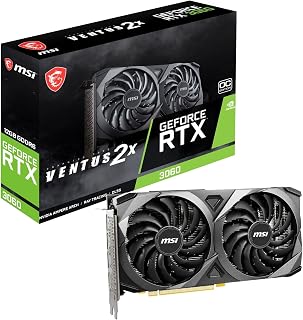
While the 1807 MHz boost clock and 12GB GDDR6 memory handle 1440p workloads adequately, this Ampere-based card targets the lower end of the 120 FPS spectrum. The 192-bit memory bus and PCIe 4 interface provide sufficient bandwidth for most modern titles at this resolution, though demanding AAA games may require settings adjustments. The Torx Twin Fan cooling keeps temperatures manageable during extended sessions, making it a functional entry point for gamers prioritizing frame rate consistency over maximum settings.
Pros
- 12 GB GDDR6 prevents VRAM bottlenecks in high-resolution texture scenarios
- 1807 MHz boost clock sustains high frame rates in competitive and esports titles
- Compact Ventus form factor fits most mid-tower cases without clearance issues
- Ampere ray tracing and tensor cores available for supported titles
Cons
- Sustaining 120 FPS in the heaviest modern AAA titles at max 1440p settings requires careful quality adjustments
- 4K gaming at maximum settings pushes the card to its thermal and performance ceiling
The MSI RTX 3060 Ventus 2X is worth considering for 1440p 120 FPS gaming primarily in competitive and esports-oriented titles where the 1807 MHz boost clock and Ampere architecture's efficient rendering pipeline keep frame rates well above the 120 FPS threshold. The 12 GB GDDR6 allocation on a 192-bit interface is a notable advantage at this tier, preventing the VRAM ceiling that narrower cards hit in texture-heavy scenes at 1440p. Ray tracing and tensor core support add visual options in titles that implement them, though enabling ray tracing at 1440p will draw on the card's limits. The Torx Twin Fan cooler manages thermals adequately in a well-ventilated mid-tower case. That said, sustaining 120 FPS in the most demanding modern AAA titles at maximum 1440p settings represents a stretch target: this card performs best when settings are tuned rather than maxed indiscriminately. For games like competitive shooters and titles with moderate graphical demands, it comfortably clears 120 FPS at 1440p. Builders who prioritize a proven, stable platform over cutting-edge performance will find it a dependable foundation.
GPU Chip: NVIDIA GeForce RTX 3060 (Ampere architecture)
Memory: 12GB GDDR6
Memory Interface: 192-bit
Boost Clock: 1807 MHz
Memory Clock: 1807 MHz
Max Resolution: 7680 x 4320 pixels
Video Outputs: 3x DisplayPort 1.4a, 1x HDMI 2.1
Interface: PCIe x16 4.0
Model: MSI Ventus 2X 12G OC V1
Included Accessories: Graphics card, quick setup guide
Esports players and 1440p gamers focused on competitive or moderately demanding titles who want a stable, proven card with a generous 12 GB buffer will get good value here. Less suitable for players who insist on maximum settings across all current AAA titles at 120-plus FPS, or for anyone planning a heavy ray tracing workload at 1440p resolution.
What to Look for in a 1440p 120 FPS GPU
Architecture and Shader Performance
The GPU architecture determines how efficiently a card handles the shader workloads that drive frame rates at 1440p. Newer architectures like AMD RDNA 4, found in the ASRock Radeon RX 9060 XT Challenger 16GB OC, deliver more performance per watt than their predecessors. NVIDIA Blackwell, powering the ASUS TUF Gaming GeForce RTX 5070 12GB GDDR7 OC, brings DLSS 4 into play for even higher effective frame rates.
Older Ampere-based cards like the MSI Gaming GeForce RTX 3060 12GB 15 Gbps GDRR6 and the EVGA GeForce RTX 3060 XC Gaming, 12G-P5-3657-KR can still reach 120 FPS in many titles at 1440p, especially with DLSS enabled. They are a reasonable entry point if you are working with tighter constraints on what you want to spend.
VRAM Capacity and Memory Bandwidth
At 1440p, 12GB of VRAM is generally sufficient for current titles, but 16GB gives you more headroom for texture-heavy games and future releases. Cards like the Sapphire 11348-03-20G Pulse AMD Radeon RX 9070 XT and the GIGABYTE Radeon RX 9070 XT Gaming OC 16G Graphics both ship with 16GB on a 256-bit bus, which translates to strong bandwidth for high-resolution assets.
The ASRock Radeon RX 9060 XT Challenger 16GB OC also offers 16GB despite using a narrower 128-bit bus, running memory at 20 Gbps to compensate. If you stream, create content, or run demanding mods alongside gaming, the extra VRAM buffer is worth prioritizing. Check out our Electronics hub for related hardware guides that can help round out your build.
Cooling and Noise Profile
Sustained 120 FPS gaming means the GPU is running hard for long sessions. Thermal management directly affects whether the card maintains its boost clocks or throttles under load. The ASUS Prime Radeon RX 9070 XT 16GB GDDR6 OC Edition uses a phase-change thermal pad and dual ball fan bearings rated for extended longevity, while its 0dB mode keeps things quiet during lighter workloads.
The ASRock Radeon RX 7700 XT Challenger 12GB OC also features 0dB silent cooling and ultra-fit heatpipe technology, making it one of the quieter options in the lineup. If your case has limited airflow or you sit close to your system, paying attention to the thermal design is just as important as raw clock speed. Enthusiasts building performance-focused rigs may also find insights in our coverage of RC and Drones electronics, where power and thermal efficiency are equally critical.
Upscaling and Ray Tracing Support
Reaching 120 FPS at native 1440p in every title is a tall order. That is where upscaling technologies close the gap. NVIDIA cards in this list support DLSS, with the ASUS TUF Gaming GeForce RTX 5070 12GB GDDR7 OC offering the latest DLSS 4 implementation. AMD RDNA 4 cards like the Sapphire RX 9070 XT and GIGABYTE RX 9070 XT bring FSR 4 and improved AI accelerators that make upscaling more competitive than ever.
Ray tracing performance varies more between generations than rasterization does. If you plan to run ray tracing in titles like Cyberpunk 2077 or Alan Wake 2 at high frame rates, the newer RDNA 4 and Blackwell cards have a meaningful edge over RTX 3060-class hardware. Factor in how many ray tracing-heavy games are in your library before assuming older cards will hit your targets. If you are curious how power delivery decisions affect performance builds, the same principles apply whether you are reading about GPUs or comparing options like LiPo vs NiMH for RC vehicles where sustained draw under load matters.
Final Thoughts
For most gamers chasing consistent 1440p 120 FPS performance in 2026, the Sapphire 11348-03-20G Pulse AMD Radeon RX 9070 XT delivers an excellent blend of memory bandwidth, RDNA 4 efficiency, and upscaling capability that keeps it competitive across a wide range of titles. If you want the highest ceiling with DLSS 4 and Blackwell’s generational leap, the ASUS TUF Gaming GeForce RTX 5070 12GB GDDR7 OC is the card to consider, particularly if ray tracing is a priority in your gaming library.
Frequently Asked Questions
What GPU do I need for 1440p at 120 FPS in 2026?
For consistent 120 FPS at 1440p in 2026, you generally want a card in the RX 9070 XT or RTX 5070 class for modern titles with all settings high. Cards like the GIGABYTE Radeon RX 9070 XT Gaming OC 16G Graphics and the ASUS Prime Radeon RX 9070 XT 16GB GDDR6 OC Edition hit this target reliably in most games. Older RTX 3060-class cards can reach 120 FPS in less demanding titles, especially with upscaling enabled, but may fall short in the most demanding releases.
Is 12GB of VRAM enough for 1440p gaming?
12GB of VRAM is sufficient for the majority of 1440p games available today. Cards like the MSI Gaming GeForce RTX 3060 12GB 15 Gbps GDRR6 and the EVGA GeForce RTX 3060 XC Gaming, 12G-P5-3657-KR handle current titles without running out of memory headroom in most scenarios. However, some newer open-world and texture-heavy games are beginning to push past 12GB at high settings, so opting for a 16GB card like the ASRock Radeon RX 9060 XT Challenger 16GB OC provides a more future-resistant buffer.
Does ray tracing affect 1440p frame rates significantly?
Yes, enabling ray tracing at 1440p can cut frame rates by 20 to 50 percent depending on the implementation and the card. Older Ampere architecture GPUs take a heavier hit than RDNA 4 or Blackwell cards, which have dedicated hardware improvements for ray traversal. If you want to run ray tracing and still hit 120 FPS, leaning on DLSS or FSR upscaling is the practical solution rather than relying on raw rasterization performance alone.
Is the RX 9070 XT worth it for 1440p gaming in 2026?
The RX 9070 XT is one of the strongest 1440p options available in 2026, particularly for gamers who want high frame rates without stepping up to flagship pricing. Its RDNA 4 architecture brings improved AI accelerators and ray tracing performance compared to RDNA 3, and 16GB of GDDR6 memory ensures it stays relevant as games grow more demanding. Both the Sapphire Pulse and GIGABYTE Gaming OC variants reviewed here carry strong user ratings, reflecting solid real-world satisfaction from verified buyers. You can explore more electronics picks across categories at the Graphics Cards section of our site.





Write Your Review
No reviews yet. Be the first to share your experience!