

You are deep into a multi-cam 8K project in Adobe Premiere Pro, and your timeline is stuttering on every scrub. The culprit is almost always the GPU. Premiere Pro leans heavily on the graphics card for hardware-accelerated decoding, Mercury Playback Engine rendering, and AI-powered features like Auto Reframe and Scene Edit Detection. Picking the right card upfront saves hours of frustration down the line.
This guide is built for video editors, colorists, and motion graphics artists who want a clear, honest breakdown of the top graphics cards available right now. Whether you are running a compact workstation or a full tower rig, you will find a card here that fits your workflow and your setup.
Quick Comparison
Ratings reflect the most recent data pull. Check each listing for current price and availability.
Quick answer
This guide compares 10 picks, with NVIDIA RTX 4000 SFF Ada 20GB Professional Graphics Card ranked first. ASUS ProArt RTX 5080 16GB GDDR7 Graphics Card holds the highest customer rating among them. PNY NVIDIA RTX A6000 48GB GDDR6 Professional Graphics leads this list on VRAM.

Pros
- Exceptional performance scaling with 2X throughput over previous generation RTX 4000
- Ample 20GB memory for handling demanding rendering, simulation, and machine learning projects
- Compact form factor and low-profile design perfect for space-limited professional environments
- Dual-precision support accelerates both traditional graphics workloads and modern AI tasks
- Enterprise-grade reliability and driver support for production design and simulation workflows
Cons
- Compact SFF design may limit cooling performance in thermally-constrained chassis
- Premium pricing reflects professional-grade positioning, not consumer-budget friendly
- Limited real-world review data available for independent performance validation
The NVIDIA RTX 4000 SFF Ada is a professional-grade workstation GPU engineered for design studios, architectural visualization teams, and data science professionals. The compact SFF form factor and low-profile dual-slot design make it ideal for space-constrained production environments where full-size cards create installation challenges.
Performance is the standout quality here. The Ada architecture delivers 2X faster FP32 calculations compared to previous generations, translating to dramatically reduced render times for complex 3D scenes, architectural walkthroughs, and photorealistic visualizations. The 20GB VRAM capacity handles large datasets and complex simulations without frequent memory swapping, a critical advantage for professionals working with heavy production loads.
Beyond traditional graphics, this card excels at AI acceleration with improved FP8 precision and mixed-precision computation. This dual capability makes it versatile for studios that balance visual effects rendering with machine learning tasks like real-time denoising or neural upscaling. Mini DisplayPort connectivity supports multi-monitor professional setups typical in design workflows.
The main consideration is thermal management in compact workstation chassis. While the low-profile design is convenient, airflow may be a factor in tightly-packed systems. Additionally, this is a professional-tier product reflected in its price point, making it an investment decision rather than a casual upgrade.
The NVIDIA RTX 4000 SFF Ada earns recommendation for studios and professionals who prioritize performance density and space efficiency. It delivers enterprise-grade computing power in a form factor designed specifically for modern workstation constraints, making it a smart choice for demanding 3D production and AI-accelerated workflows.
Graphics Processor: NVIDIA RTX 4000 SFF Ada
Architecture: Ada Lovelace
VRAM: 20GB GDDR6 Memory
Form Factor: Dual-slot, Low-profile SFF (Small Form Factor)
Video Interface: Mini DisplayPort
GPU Manufacturer: NVIDIA
Distributor: Japanese Authorized Distributor

The 24GB of GDDR7 memory provides ample headroom for timeline scrubbing and real-time playback of 8K footage without stuttering, while the Blackwell architecture accelerates hardware-encoded exports and GPU-accelerated effects like Lumetri Color. ECC memory protection ensures stability during long rendering sessions, preventing crashes that could corrupt project files. The PCIe 5.0 interface maintains fast data throughput when working with high-bitrate codecs, and the four Mini DisplayPort 2.1b outputs support multi-monitor setups for efficient editing workflows.
Pros
- 24GB GDDR7 with ECC error correction handles large Premiere Pro projects without memory-related dropped frames or corruption
- Low-profile dual-slot form factor fits compact and rack-mounted workstations that full-length cards cannot
- Four Mini DisplayPort 2.1b outputs support up to 7680x4320 for professional multi-monitor edit setups
- Blackwell architecture with ray tracing support accelerates GPU-rendered titles and motion graphics in Premiere
Cons
- 577 MHz base clock is substantially lower than consumer alternatives, meaning peak single-frame export speed trails larger cards
- Requires a PCIe 5.0 compatible motherboard and adequate power delivery to maximize available bandwidth
Premiere Pro's performance ceiling is often set by how much VRAM a GPU can offer before it starts offloading work to system RAM. The NVIDIA RTX PRO 4000 SFF Blackwell answers that directly with 24GB of GDDR7 memory, enough headroom to hold complex multi-stream timelines, high-bitrate proxies, and GPU-cached effects simultaneously. ECC error correction adds a layer of reliability that matters when a single corrupted frame could compromise a finished deliverable. Blackwell architecture brings ray tracing support that benefits motion graphics and titles rendered directly inside Premiere. The compact 6.6-inch, dual-slot, low-profile body is the key differentiator: it installs in small form factor workstations and compact editing suites where full-length cards physically cannot fit, without sacrificing professional-grade memory capacity. Four Mini DisplayPort 2.1b outputs support ultra-high-resolution monitoring up to 7680x4320, so editors can run a reference monitor alongside a primary display without a hub. PCIe 5.0 x8 connectivity keeps the memory bandwidth available for sustained read and write during export.
Memory and Architecture: 24GB GDDR7 with ECC support, 1125 MHz memory clock, Blackwell architecture
Performance: 577 MHz GPU clock, PCIe 5.0 x8 interface, ray tracing acceleration, up to 7680x4320 resolution support
Physical Design: 6.6 inches length, 2.7 inches width, low-profile dual-slot format, single cooling fan, 5 pounds weight
Connectivity: 4x Mini DisplayPort 2.1b outputs for multi-monitor setups and professional displays
Warranty and Support: 3-year manufacturer warranty, manufactured by PNY, model RTX PRO 4000 SFF Blackwell
Ideal for editors working inside small form factor or rack-mounted workstations where space rules out full-length GPUs. Also a strong fit for studios running multiple compact edit stations that need high VRAM and data integrity rather than peak clock speed. Less suitable for editors building a standard full-tower system, where larger alternatives can offer higher clock speeds for comparable or lower investment.
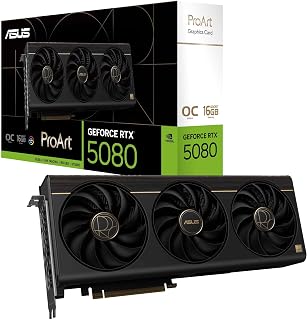
Premiere Pro editors benefit from the 16GB GDDR7 memory, which handles 4K and 8K timelines with multiple effects layers without stuttering. The 2730 MHz boost clock accelerates rendering and playback of complex sequences. Native HDMI 2.1b and dual DisplayPort 2.1b outputs let you connect reference monitors and client displays simultaneously, essential for professional color grading workflows. The OC Edition delivers consistent performance during extended export sessions.
Pros
- 2730 MHz OC clock and GDDR7 memory sustain fast 4K and 8K export performance in Premiere Pro
- 1858 AI TOPS accelerates Premiere's AI-powered tools like Auto Reframe and scene analysis
- Vapor chamber plus three-fan cooling keeps thermals stable during extended render sessions
- Integrated USB Type-C port streamlines connections to monitors and fast external storage
Cons
- 15 to 20 percent uplift over the previous ProArt 4080 generation may not justify an upgrade for editors already on that platform
- Older PCIe Gen 4 motherboards require a BIOS update for full compatibility
Premiere Pro workflows demand consistent GPU performance across long export queues, real-time playback of GPU-accelerated effects, and AI-assisted features like Auto Reframe and scene detection. The ASUS ProArt RTX 5080 addresses all three. Its 16GB of GDDR7 memory and 2730 MHz OC clock speed keep 4K and even 8K timelines moving without dropped frames, while 1858 AI TOPS means Premiere's Sensei-powered tools respond with noticeably less lag. The vapor chamber, three Axial-tech fans, and phase-change thermal pad hold temperatures steady during multi-hour renders, avoiding the throttling that can quietly stretch export times. The integrated USB Type-C port simplifies connections to external drives and monitors that editors commonly rely on. Auto-Extreme manufacturing and MaxContact heatsink design point to durability in a machine that stays powered on all day. For editors who also output to streaming platforms, the card handles live streaming alongside active editing sessions. The 2.5-slot chassis fits most full-tower workstations without blocking adjacent slots, preserving room for capture cards or audio hardware that professional edit bays often carry.
GPU: NVIDIA GeForce RTX 5080, Blackwell Architecture
Memory: 16GB GDDR7
Clock Speed: 2700 MHz (Default), 2730 MHz (OC Mode)
AI Performance: 1858 AI TOPS
Interface: PCIe 5.0 x16
Video Outputs: 1x HDMI 2.1b, 1x USB Type-C, 2x DisplayPort 2.1b
Max Resolution: 7680x4320 pixels
Cooling: 3x Axial-tech Fans, Vapor Chamber, Phase-Change GPU Thermal Pad
Form Factor: 2.5-slot, 12" Length x 5" Width
Weight: 3.1 pounds
Power Connectors: PCIe 5.0 compliant
Warranty: 3 Years
Software: GPU Tweak III for performance monitoring and overclocking
Best for professional video editors working in Premiere Pro daily, especially those cutting 4K or 6K material with heavy GPU-accelerated effects and AI tools. Also suits colorists and motion graphics artists who share a workstation. Less suitable for hobbyists or occasional editors who already own an RTX 4080-class card, since the generational performance jump is roughly 15 to 20 percent and may not justify the flagship investment.

Pros
- Four DisplayPort connections enable efficient multi-monitor workflows without splitters or adapters
- Exceptional Linux native support with zero-issue stability reported over extended use periods
- Dramatic performance upgrade for aging systems, delivering snappy responsiveness in professional applications
- Optimal for CAD, design, and content creation where GPU acceleration matters more than raw gaming power
- Compact form factor and efficient cooling keep workstations quiet and thermally stable
Cons
- Not suitable for gaming or graphics-intensive consumer applications requiring high FPS performance
- PCI-Express x8 interface may provide marginal bandwidth compared to x16 cards on some systems
- Limited to professional workload optimization, making it overspecced for basic office productivity
The AMD Radeon Pro W7500 is a professional workstation graphics card engineered for designers, engineers, and content creators who demand stable multi-monitor support and reliable performance. With four DisplayPort outputs and 8GB GDDR6 memory, this card serves professionals running CAD software, video editing suites, and design applications on multi-display setups, not gamers or casual users.
The standout feature is its four DisplayPort connectors, enabling effortless connection to up to four high-resolution displays without daisy-chaining or adapters. Users report instant page rendering in professional applications and smooth performance in 2D CAD work with occasional 3D tasks. The card delivers meaningful performance gains when upgrading from older GPUs, with responsive UI interactions and quick application launches that compound daily productivity improvements.
Design and build quality reflect professional standards. The single-fan cooling solution runs quietly and efficiently, and the full-height form factor fits standard workstation cases. At 1.9 ounces, it's lightweight and straightforward to install. The card's enterprise focus means it prioritizes stability and compatibility over flashy RGB or aggressive thermal designs.
One honest limitation: this card lacks the raw compute power needed for gaming or graphics-heavy consumer applications. It also uses PCI-Express x8 rather than x16, which provides marginal bandwidth reduction on certain motherboards. For professionals leveraging professional driver optimization and needing native Linux support, these trade-offs are irrelevant; for gamers or general users, they would be disappointing.
The AMD Radeon Pro W7500 earns strong recommendation for Linux workstations and professional multi-monitor setups. With proven plug-and-play Linux compatibility, four DisplayPort outputs, and enterprise-grade reliability backed by a 3-year warranty, it solves a specific and valuable problem for the professionals it targets.
Core Specifications: GPU: AMD Radeon Pro W7500, Memory: 8GB GDDR6, Memory Speed: 1.7 GHz, Video Outputs: 4x DisplayPort, PCI-Express Interface: x8, Maximum Resolution: 7680x4320, Form Factor: Full-height desktop card.
Physical Dimensions: 12 inches length x 7.25 inches width, 1.9 ounces weight. Single cooling fan. Power consumption optimized for workstation integration.
Compatibility: Desktop systems with available PCIe x8 slot. Native Linux driver support including Ubuntu variants and KDE Plasma. Professional driver optimization for CAD, design, and content creation software.
Ideal Users: CAD professionals, architects, and engineers requiring multi-display productivity setups. Video editors, 3D designers, and digital content creators needing GPU acceleration on Linux workstations. Photography and graphics professionals maintaining four-display editing environments.
Not Ideal For: Gamers seeking high-frame-rate gaming performance. General office users needing basic graphics. Systems already equipped with high-end consumer graphics cards. Budget-conscious buyers prioritizing cost over professional-grade stability.
System Requirements: Desktop computer with available PCIe x8 slot minimum. Ubuntu, Fedora, or other Linux distributions with modern kernel support. Adequate PSU capacity for full system draw. Four compatible monitors with DisplayPort inputs recommended for full capability utilization.

Pros
- 48GB of GDDR6 memory
- Four DisplayPort outputs
- Up to 7680 x 4320 display support
- PCI Express 4.0 x16 interface
Cons
- Single fan can hum under full load
- Older server platforms may restrict GPU support
Premiere Pro work can become GPU-bound when a project combines high-resolution footage, demanding effects, and a large multi-monitor editing environment. The PNY RTX A6000 approaches that kind of professional workload from a workstation angle rather than as a consumer graphics card. Its standout specification is 48GB of GDDR6 memory, a substantial pool for memory-intensive applications and professional visualization. NVIDIA's RTX A6000 GPU uses the Ampere architecture and connects through PCI Express 4.0 x16, providing the bandwidth expected of data-heavy workstation tasks. For an edit suite, the four DisplayPort outputs are particularly useful for building a multi-display workspace, with stated maximum display support of 7680 x 4320. The card's single-fan design and compact 10.51-inch by 4.41-inch dimensions are oriented toward professional enclosures, although the fan can produce a noticeable hum under full load. It is a desktop PCI Express card, so workstation and motherboard compatibility still deserve attention, especially on older server platforms with restricted GPU approval lists. Its professional focus makes it most appropriate where exceptional graphics memory and extensive display support matter more than gaming-oriented performance.
Buy the RTX A6000 for a Premiere Pro workstation that also has professional visualization or other memory-intensive duties, especially if 48GB of GDDR6 and four DisplayPort connections suit a multi-display editing setup. It is also sensible for organizations building around professional desktop hardware and PCI Express 4.0 x16. Skip it if the system is an older server platform with limited GPU approval, or if the priority is gaming performance. Editors who do not need this level of graphics memory or display capability should look beyond this workstation-focused card.
Gaming enthusiasts should skip this card entirely. Consumer RTX 40 and 50 series GPUs deliver superior gaming performance at lower prices, and this professional architecture prioritizes compute over gaming optimization.
Casual users exploring AI as a hobby will find the premium price tag hard to justify. Consumer-grade alternatives or cloud services may provide better value for casual experimentation.
Budget-conscious teams should evaluate used professional GPUs or dual consumer-grade cards as potential cost-saving alternatives for specific workloads.

The substantial 32GB GDDR6 capacity handles extensive media cache and timeline previews without running out of VRAM, crucial when working with high-bitrate 8K footage. The 2920 MHz boost clock speeds through Mercury Playback Engine acceleration. DisplayPort 2.1a connectivity supports the latest high-refresh reference monitors. AMD RDNA 4 architecture with AI accelerators enhances auto-reframe and speech-to-text features in recent Premiere versions, streamlining post-production workflows for content creators.
Pros
- 32GB GDDR6 on a 256-bit bus provides headroom for 8K RAW and multi-stream Premiere Pro timelines that exceed 16GB or 24GB limits
- 2920 MHz boost clock with RDNA 4 architecture sustains fast performance across extended exports
- Blower cooler exhausts heat away from neighboring components, suited for dense workstation and render farm builds
- Quad DisplayPort 2.1a outputs drive multiple high-resolution reference monitors without adapters
Cons
- AMD driver compatibility with Premiere Pro plugins and third-party tools requires verification before purchase
- Professional price point and workstation positioning make it impractical for editors who do not regularly push past 16GB VRAM
For Premiere Pro editors who also run AI-assisted workflows alongside their cuts, the ASRock Radeon AI PRO R9700 offers something most editing-focused GPUs do not: 32GB of GDDR6 memory on a 256-bit bus, sized for projects where conventional VRAM limits become a bottleneck. Working with RED RAW, ARRI, or multi-cam 8K timelines means keeping large decoded frames in memory, and the R9700 accommodates that without forcing Premiere to cache aggressively to disk. The RDNA 4 architecture with 64 Compute Units and 2nd Gen AI Accelerators can speed up Premiere's AI features, and the 2920 MHz boost clock sustains that performance across long rendering sessions. Blower-style cooling is a deliberate choice for workstation environments where the GPU sits between other cards or in a tight chassis, exhausting heat directly out the rear rather than recirculating it. Quad DisplayPort 2.1a outputs support multiple high-resolution reference monitors. The vapor chamber with Honeywell PTM7950 thermal interface is rated for 24/7 operation, which matches the demands of professional post-production facilities running overnight renders.
GPU Architecture: AMD Radeon AI PRO R9700, RDNA 4 with 64 Compute Units
Memory: 32GB GDDR6 on 256-bit bus
Clock Speed: 2920 MHz boost
Ray Tracing: 3rd Generation
AI Accelerators: 2nd Generation dedicated AI accelerators
Cooling: Vapor chamber heatsink with Honeywell PTM7950 thermal interface, single blower design
Power Interface: PCIe 5.0
Display Outputs: Four DisplayPort 2.1a
Form Factor: Standard 2-slot design
Build: Die-cast metal shroud, metal backplate
Brand: ASRock
Best suited for high-end Premiere Pro editors handling 8K, RAW, or multi-stream workflows who are consistently hitting VRAM limits with 16GB or 24GB cards. Also valuable for facilities running render farm nodes where blower cooling and 24/7 reliability matter. Editors should confirm their Premiere version and plugin stack support AMD drivers before purchasing, as compatibility varies more than with NVIDIA alternatives.
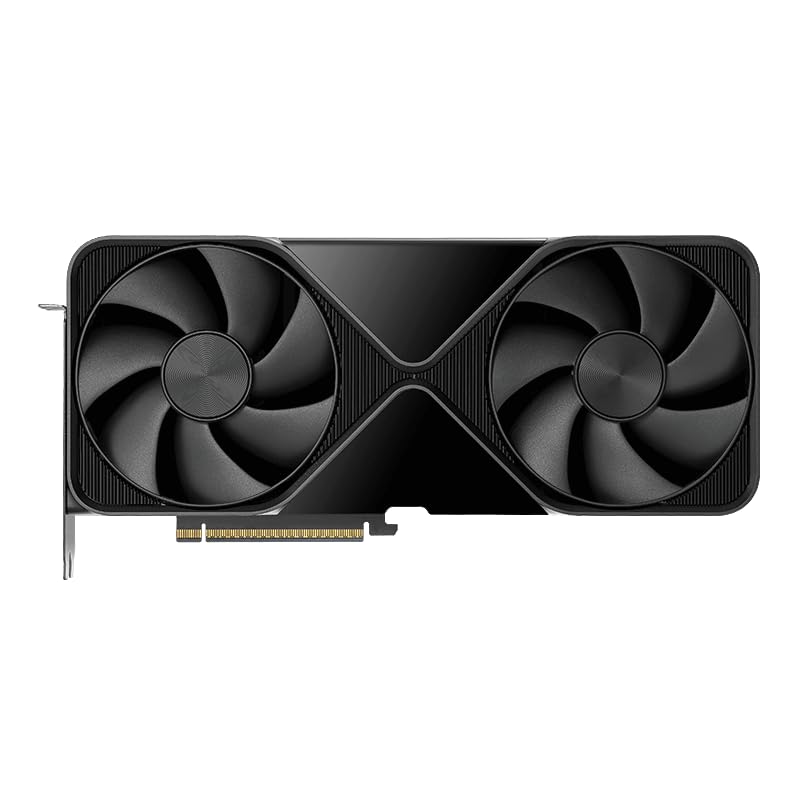
With a massive 96GB GDDR7 ECC memory pool, this card eliminates VRAM bottlenecks even with dozens of 8K ProRes tracks and real-time color grading nodes active simultaneously. Fourth-gen RT cores accelerate ray-traced effects and transitions, while fifth-gen Tensor cores power AI-driven features like content-aware fill and scene edit detection. The 600-watt power budget ensures sustained performance during multi-hour timeline renders without thermal throttling, perfect for high-volume production houses.
Pros
- 96GB GDDR7 ECC memory handles the largest 8K RAW and multicam timelines without dropping frames
- 5th-gen Tensor cores accelerate Premiere's AI tools up to 3X over the previous generation
- PCIe Gen 5 eliminates CPU-to-GPU bandwidth bottlenecks during high-bitrate playback and export
- Two-slot design fits crowded professional workstation builds without sacrificing expansion slots
Cons
- OEM packaging raises authenticity concerns; careful seller verification is required before purchase
- Side-mounted exhaust directs heat into the case interior, requiring deliberate airflow planning with supplemental fans
Adobe Premiere Pro rewards GPU memory above almost everything else, and the RTX PRO 6000 Blackwell's 96GB of GDDR7 ECC memory is in a class of its own for video editors pushing 8K RAW timelines, heavy effects stacks, or multi-stream multicam sequences. The 5th-generation Tensor cores accelerate Premiere's AI-driven tools, including Auto Reframe, Scene Edit Detection, and speech-to-text, delivering up to 3X the throughput of the previous generation. The 4th-gen ray tracing cores and RTX Mega Geometry support make real-time previews of complex motion graphics and After Effects compositions far more responsive. PCIe Gen 5 connectivity keeps CPU-to-GPU transfers from becoming a bottleneck when scrubbing high-bitrate footage. The two-slot form factor is a practical bonus in workstations already crowded with storage and capture cards. Double-flow-through cooling sustains performance during long export sessions. OEM packaging means you should vet your seller carefully, but the underlying hardware is the most capable Premiere workstation card available today.
Memory and Compute: 96GB GDDR7 ECC memory with 1.8TB per-second bandwidth. 5th-generation Tensor cores with FP4 precision support. 4th-generation ray tracing cores with double the ray-triangle intersection rate.
Connectivity: PCIe Gen 5 interface. DisplayPort 2.1 with support for 8K at 240 Hz or 16K at 60 Hz. Single HDMI output. Universal MIG for workload partitioning and isolation.
Thermal and Power: 600W power consumption. Double-flow-through cooling design. Two-slot form factor. Dimensions 17x10x5 inches, 4 pounds.
Warranty and Support: 3-year manufacturer warranty. OEM packaging. Compatible with Windows operating systems on desktop tower systems.
Artificial Intelligence and Machine Learning: Run and fine-tune large language models locally without relying on cloud services. The 96GB memory and high-bandwidth Tensor cores enable fast training and inference for generative AI applications.
3D Design and Visualization: Build photorealistic renderings with complex geometry, HDR color depth, and multi-monitor precision layouts. Perfect for architectural visualization, visual effects, and product design workflows.
Data Science and Simulation: Process massive datasets and run computationally intensive simulations. The PCIe Gen 5 bandwidth and memory capacity handle data-intensive tasks that would bottleneck lesser GPUs.
Multi-Tenant Workloads: Universal MIG partitioning enables running multiple isolated workloads concurrently, ideal for shared workstations and enterprise environments requiring secure resource separation.

The 24GB GDDR7 ECC memory with error correction ensures render integrity during overnight batch exports, preventing costly re-renders. The 1230 MHz clock and PCIe 5.0 x16 interface deliver smooth playback of multi-cam 6K sequences. Four DisplayPort 2.1b outputs accommodate comprehensive monitoring setups with scopes and client displays. The single-slot full-height form factor maximizes PCIe lane availability for capture cards and storage controllers in professional editing workstations.
Pros
- 24GB GDDR7 with ECC protection guards long overnight exports against silent memory errors
- PCIe 5.0 doubles bandwidth over Gen 4, reducing stalls when streaming high-bitrate footage to the GPU
- Single-slot form factor frees expansion slots for capture cards and storage controllers
- 3-year manufacturer warranty reduces risk for studio environments dependent on uptime
Cons
- Single-fan thermal design requires adequate case ventilation to sustain performance during extended exports
- 24GB VRAM, while generous for most workflows, may constrain editors regularly cutting 8K RAW with multi-layer effects
Premiere Pro's GPU-accelerated renderer leans hard on memory bandwidth and VRAM capacity, and the RTX PRO 4000 Blackwell answers both with 24GB of GDDR7 running over a PCIe 5.0 interface. That bandwidth doubling over PCIe 4.0 means large ProRes or BRAW files move from system RAM to the GPU with minimal stalling during playback and export. The 24GB buffer comfortably holds multiple 4K streams, Lumetri Color processing, and GPU-accelerated effects simultaneously without forcing Premiere to drop to software rendering. ECC memory protection is a genuine differentiator for long overnight exports, catching single-bit errors that could silently corrupt a render. Built-in ray tracing acceleration benefits editors who also work in After Effects or Cinema 4D linked projects. The single-slot, full-height design is unusually space-efficient, freeing room for additional capture cards or NVMe controllers in a tower workstation. The 3-year manufacturer warranty supports studios that cannot afford unplanned downtime during production.
GPU Architecture: Blackwell
Memory: 24GB GDDR7 with ECC
GPU Clock Speed: 1230 MHz
Memory Clock Speed: 1750 MHz
Interface: PCIe 5.0 x16
Display Outputs: 4x DisplayPort 2.1b
Max Resolution: 7680 x 4320 pixels
Power Configuration: Single-slot, full-height
Cooling: Single fan
Weight: 0.84 kg (1.85 lbs)
Dimensions: 9.5 inches L x 4.4 inches W
Warranty: 3 years manufacturer
Model Number: VCNRTXPRO4000B-PB

Intel Arc Pro's 24GB GDDR6 memory handles extensive proxy workflows and nested sequences common in documentary and narrative editing. The 2400 MHz clock accelerates hardware-accelerated H.264 and HEVC encoding, reducing export times significantly. Four DisplayPort 2.1 outputs support multi-monitor configurations for timeline, program, and reference viewing. The Xe2-HPG architecture includes dedicated media engines that offload encoding tasks from the CPU, maintaining responsive timeline performance during background renders.
Pros
- Dual media transcoders with native AV1, H.264, and HEVC hardware encoding accelerate Premiere export workflows
- Four DisplayPort 2.1 outputs enable simultaneous 8K multi-monitor configurations for colorist and editorial setups
- 24GB GDDR6 at a 200W TDP delivers substantial VRAM with lower power demands than higher-wattage alternatives
- PCIe 5.0 interface prevents system bandwidth from becoming a bottleneck with high-bitrate source footage
Cons
- Smaller driver and community ecosystem compared to NVIDIA means fewer optimization guides specific to Adobe workflows
- CUDA-dependent Premiere plug-ins and GPU effects may not perform equivalently without explicit Intel Arc optimization
Premiere Pro editors looking beyond the NVIDIA ecosystem will find the ASRock Arc Pro B60 a credible workstation option, particularly for facilities where 24GB of GPU memory matters more than brand loyalty. The Xe2-HPG architecture includes dual media transcoders with native AV1, H.264, and HEVC hardware encoding, which maps directly onto Premiere's export workflows and can offload transcode work from the CPU during sequence rendering. The 2400MHz clock speed and 192-bit GDDR6 bus keep timeline playback smooth across compressed 4K formats. Four DisplayPort 2.1 outputs support simultaneous 8K display connectivity, a practical advantage for colorists running a high-resolution reference monitor alongside an editing display. The compact two-slot, 200W design puts less pressure on power supplies and reduces heat output during multi-hour edit sessions. PCIe 5.0 keeps system-level bandwidth from becoming a constraint. The main caveat for Premiere users is that NVIDIA's CUDA ecosystem has deeper optimization in Adobe's GPU renderer, so some GPU-accelerated effects may perform differently than on an NVIDIA card of equivalent specification.
A practical pick for video editors and content creators who need 24GB of professional GPU memory at a lower power draw than competing NVIDIA options, and who work primarily with AV1, H.264, or HEVC delivery formats that benefit from hardware transcode acceleration. Also suits multi-monitor colorist setups requiring four simultaneous DisplayPort 2.1 outputs. Editors whose workflows depend heavily on CUDA-specific Premiere plug-ins or third-party GPU effects should verify compatibility before committing.
GPU Architecture: Intel Arc Pro B60 (Xe2-HPG), 20 Xe cores, 160 XMX engines, 2400 MHz boost clock.
Memory: 24GB GDDR6 on 192-bit bus, 456 GB/s bandwidth, 2400 MHz memory clock.
Performance: 197 INT8 TOPS, dual-encode media transcoders (AV1, H.264, HEVC), 0dB silent cooling mode at low loads.
Connectivity: PCIe 5.0 x16, 4x DisplayPort 2.1, supports up to 7680x4320 resolution per display.
Power & Cooling: Single 8-pin power connector, 200W TDP, blower-style single fan with nickel-plated copper base and heatpipe.
Physical: 271x112x39mm (2-slot card), requires PCIe 5.0 x16 slot and chassis clearance verification before purchase.
Warranty: 2-year manufacturer warranty with dedicated ASRock support via Amazon.

Pros
- Massive 96GB memory capacity handles the largest datasets and complex simulations
- Latest Blackwell architecture provides significant performance gains for AI and compute tasks
- Dual-fan design keeps temperatures in check during intensive workloads
- Professional certification ensures compatibility with industry-standard software
- Excellent customer satisfaction with verified positive feedback on product quality
Cons
- Premium pricing reflects enterprise market positioning and may exceed budgets for smaller organizations
- Requires adequate power supply and cooling infrastructure in workstation setup
- Primarily designed for professional applications rather than general computing or gaming
The PNY RTX PRO 6000 Blackwell is a professional-grade graphics processing unit engineered for enterprises and power users tackling complex computational tasks. This card targets data scientists, 3D artists, software developers, and researchers who demand the highest performance for AI development, machine learning, scientific simulation, and professional visualization work.
The standout feature is its 96GB of GDDR7 memory paired with Blackwell architecture, enabling processing of massive datasets and sophisticated neural networks that smaller GPUs simply cannot handle. The dual-fan cooling system maintains optimal temperatures during sustained intensive workloads, ensuring reliability during critical production tasks. Real-world performance gains are substantial for workloads like training large language models, rendering complex scenes, and running simulations that require extensive parallel processing.
Build quality reflects professional-grade standards with robust dual-fan engineering and enterprise certifications. The Max-Q optimization balances power efficiency with performance, reducing operational costs while maintaining computational capability. Dimensions of 3.1 x 14.2 x 0.1 inches and a weight of 3.34 pounds make it compatible with most professional workstation chassis and server configurations.
The primary drawback is the substantial investment required, as this card positions itself at the premium end of the professional GPU market. It also demands robust infrastructure including adequate power delivery and cooling capacity. Additionally, its capabilities are tailored for professional software and workflows, making it less suitable for users seeking a general-purpose graphics card or gaming GPU.
For professionals in AI, scientific computing, 3D visualization, and research who require maximum computational capacity and enterprise support, the PNY RTX PRO 6000 Blackwell delivers industry-leading performance and reliability. Customer feedback consistently highlights quality, authenticity, and reliability, making it a trusted choice for mission-critical applications.
Memory: 96GB GDDR7
Architecture: NVIDIA Blackwell
Cooling: Dual Fan System
Edition: Workstation MAX-Q
Dimensions: 3.1 x 14.2 x 0.1 inches
Weight: 3.34 pounds
Model Number: VCNRTXPRO6000BQ-PB
Manufacturer: PNY
Market Position: Professional Enterprise GPU
How to Choose the Right GPU for Adobe Premiere Pro
VRAM Capacity
VRAM is the single most important spec for Premiere Pro editors working with high-resolution footage. Editing 4K or 8K timelines with multiple effects layers can push memory usage well beyond 8GB, especially when running GPU-accelerated plugins like Lumetri Color.
Cards like the PNY NVIDIA RTX PRO 6000 Blackwell MAX-Q and the NVD RTX PRO 6000 Blackwell both carry a massive 96GB of GDDR7, making them future-proof for even the most demanding productions. For most editors, 24GB hits a strong sweet spot between capacity and value.
Memory Bandwidth and Architecture
Raw VRAM numbers only tell part of the story. Memory bandwidth determines how quickly the GPU can move data around, which directly affects how smoothly your timeline plays back. Newer architectures like NVIDIA Blackwell and AMD RDNA 4 deliver significantly higher bandwidth per gigabyte compared to older generations.
The ASRock Radeon AI PRO R9700 Creator 32GB runs on AMD RDNA 4 with a 256-bit memory bus, offering ample bandwidth for 8K editing and large-scale 3D compositing. Meanwhile, the ASUS ProArt GeForce RTX 5080 16GB GDDR7 OC Edition pairs Blackwell architecture with a boosted clock speed that keeps Premiere Pro rendering pipelines moving fast.
Form Factor and System Compatibility
Not every editing workstation is a full-size tower. If you are working in a compact build or a rackmount system, form factor matters as much as performance. Low-profile and small form factor cards let you fit serious GPU power into tight spaces without sacrificing critical features.
The NVIDIA RTX PRO 4000 SFF Blackwell 24GB GDDR7 ECC is a dual-slot low-profile card built on PCIe 5.0 x8, making it an excellent choice for SFF workstations. The ASRock Intel Arc Pro B60 Creator 24GB Graphics is another compact option with a blower-style cooler that exhausts heat directly out of the chassis, ideal for dense multi-card builds.
Hardware Encoding and AI Acceleration
Premiere Pro supports hardware-accelerated encoding for H.264, HEVC, and AV1, which slashes export times dramatically compared to software encoding. Cards with dedicated media engines make a noticeable difference when you are churning out multiple deliverables in a single session.
The ASRock Intel Arc Pro B60 Creator 24GB Graphics features twin media transcoder engines with dual-encode support for AV1, H.264, and HEVC. NVIDIA Blackwell cards offer 5th Gen Tensor Cores that accelerate AI-driven Premiere features like speech-to-text transcription and intelligent reframing, keeping your creative momentum going.
Final Thoughts
For editors who need a proven professional card with massive memory headroom for complex 8K and multi-layer projects, the ASUS ProArt GeForce RTX 5080 16GB GDDR7 OC Edition delivers an outstanding balance of Blackwell performance and thoughtful thermal design in a versatile form factor. If you are working in a compact or rackmount system and still want 24GB of fast GDDR7 memory with ECC reliability, the NVIDIA RTX PRO 4000 Blackwell Graphics Card fits the bill without taking up unnecessary slot space. Whichever direction you go, any card on this list will give your Premiere Pro workflow a substantial lift over aging hardware.
Frequently Asked Questions
How much VRAM do I need for Adobe Premiere Pro in 2026?
For 1080p and standard 4K editing, 8GB of VRAM is the practical floor, but 16GB is a much more comfortable starting point. If you regularly work with 6K, 8K, RAW footage, or heavy effects stacks, 24GB or more will keep your timeline responsive and prevent GPU memory overflow errors during export.
Does Adobe Premiere Pro run better on NVIDIA or AMD GPUs?
Both NVIDIA and AMD GPUs work well with Premiere Pro through the Mercury Playback Engine. NVIDIA cards have historically had a slight edge for CUDA-accelerated effects and AI-powered features. AMD has closed the gap considerably with RDNA 4, and options like the ASRock Radeon AI PRO R9700 Creator 32GB are fully capable of handling professional video workflows.
Is a workstation GPU worth it over a consumer gaming card for video editing?
Workstation GPUs like the NVIDIA RTX 4000 SFF Ada Generation Workstation Ada offer ECC memory, ISV-certified drivers, and larger VRAM pools that consumer cards rarely match at the same tier. For professional environments where reliability and accuracy are non-negotiable, the premium is justified. Enthusiast gaming cards like the ASUS ProArt RTX 5080 occupy a useful middle ground with high performance at a more accessible entry point.
Can I use a low-profile GPU for a professional Premiere Pro editing workstation?
Yes, low-profile cards have matured significantly. The NVIDIA RTX PRO 4000 SFF Blackwell 24GB GDDR7 ECC packs 24GB of GDDR7 memory with PCIe 5.0 into a dual-slot low-profile design, making it a genuinely capable option for compact editing workstations. Just verify your chassis clearance and power supply headroom before purchasing any SFF card.





Write Your Review
No reviews yet. Be the first to share your experience!