

If you spend hours each day on your Mac, the keyboard you use matters more than you might think. A poorly matched keyboard can slow you down, strain your wrists, and disrupt your focus. Whether you’re a writer, developer, or creative professional, finding the right fit for your Apple setup is worth the effort.
This guide covers seven highly rated keyboards built for Mac users in 2026, ranging from Apple’s own wireless option to backlit third-party alternatives that bring extra flexibility. If you’re also shopping for a matching peripheral, our roundup of the best mice under $50 is a solid companion read.
Quick answer
This guide compares 7 picks, with Macally Wired Mac Keyboard with Large Print, USB-C/A ranked first.

Macally Wired Mac Keyboard with Large Print
Pros
- Exceptional readability with print size dramatically larger than standard keyboards
- Genuine Mac layout eliminates key confusion compared to generic PC keyboards
- Dual-port design eliminates the need for USB adapters when switching devices
- Adjustable backlighting provides visibility without battery drain of wireless alternatives
- Reliable wired connection ensures zero input lag for typing and creative work
Cons
- Wired connection limits desk flexibility compared to wireless options
- Single color backlighting lacks per-key RGB customization available on gaming keyboards
- Not water resistant, so accidental spills pose a risk to the device
The Macally Wired Keyboard is purpose-built for Mac users who prioritize readability and accessibility over wireless convenience. With oversized key printing that measures 4 times larger than traditional keyboards, this full-size 107-key board targets professionals with vision concerns, aging users, and anyone who values ergonomic clarity during long typing sessions.
The standout feature is its dual USB connectivity, supporting both USB-C and USB-A ports without requiring adapters. This forward-compatible design works seamlessly across MacBook Pro, MacBook Air, Mac mini, and iMac models. The three-level LED backlighting system adapts to various lighting conditions, and the dedicated Mac layout with 16 shortcut keys feels intuitive for anyone invested in the Apple ecosystem.
Build quality reflects Macally's accessible-focused design philosophy. The combination of aluminum and plastic construction keeps the keyboard lightweight while maintaining structural integrity. The scissor-switch mechanism delivers quiet, responsive typing without the mechanical noise of traditional switches. At 16.85 inches wide, the full-size layout provides comfortable finger spacing and proper key distance for accurate typing.
The primary limitation is the wired design, which restricts cable management options compared to wireless alternatives. Additionally, the lack of per-key RGB customization and water resistance may disappoint users seeking gaming-grade features or protection against spills.
This keyboard excels for Mac users prioritizing accessibility and reliability. It's recommended for professionals, students, and anyone who benefits from larger text and dedicated Mac shortcuts. The one-year warranty provides peace of mind, making it a solid long-term investment.
This keyboard is ideal for Mac users with low vision or those who struggle with small key labels on standard keyboards. Professionals in photo editing, video editing, and programming appreciate the full-size layout and reliable wired connection that eliminates input lag.
Students and educators benefit from the accessibility-first design and Mac-specific shortcuts. Anyone transitioning from older USB-A devices to modern USB-C Macs will appreciate the dual-port flexibility, eliminating the need for separate cables or adapters.
Connectivity: USB-C and USB-A (2-in-1 wired)
Keys: 107 full-size with 16 Mac shortcuts
Layout: QWERTY, Mac OS optimized
Switch Type: Scissor-switch
Backlighting: Single-color LED, 3 brightness levels
Dimensions: 16.85 inches L x 4.61 inches W x 0.87 inches H
Material: Aluminum and plastic
Compatibility: MacOS 10.12 Sierra and later
Warranty: One-year hassle-free
Model: UCABLZKEYLPSG

Pros
- Seamless triple-device switching keeps you productive across MacBook, iPad, and iPhone
- Adjustable backlighting with three brightness levels adapts to any environment
- Full-size layout with numeric keypad provides desktop-class functionality
- Ergonomic flat design with low-profile keys reduces wrist strain during extended use
- Improved battery capacity means fewer charging sessions compared to previous models
Cons
- Requires Mac OS 10.12 or later and does not fully support Windows devices
- No USB dongle included, relies solely on Bluetooth connectivity
- Larger footprint requires more desk space than compact keyboard alternatives
The ProtoArc K100-A is a full-size Bluetooth keyboard engineered for Mac enthusiasts who refuse to compromise on comfort or functionality. Built for MacBook, MacBook Pro, MacBook Air, Mac Mini, iPad, and iPhone users running Mac OS 10.12 or later, this keyboard delivers desktop-class typing in a wireless package.
The standout feature is its triple Bluetooth channel technology, allowing you to connect three devices simultaneously and switch between them instantly via a mode button. This capability transforms your workflow, letting you type on your MacBook one moment and your iPad the next without skipping a beat. The three-level adjustable white LED backlighting is thoughtfully designed with soft illumination that's easy on the eyes, making it perfect for dimly lit home offices or late-night work sessions.
Build quality is solid with a flat, contemporary design that promotes a neutral wrist position during typing. The quiet scissor switch mechanism delivers responsive, hushed keystrokes, while the low-profile keys provide genuine comfort during extended sessions. The improved 40% larger battery compared to the KM100-A model means fewer charging interruptions, and the auto sleep mode after 60 minutes of inactivity helps preserve battery life between uses.
The main limitation is its Mac-focused design. Media and function keys may not work on Windows, and it requires relatively recent hardware and OS versions. Additionally, the full-size layout demands more desk real estate than compact alternatives, and Bluetooth-only connectivity means no fallback USB option if pairing fails.
For Mac users seeking a reliable, ergonomic wireless keyboard with multi-device capability and adjustable backlighting, the ProtoArc K100-A delivers professional-grade performance at an accessible price point. The 2-year warranty provides additional peace of mind for this investment.
Connectivity: Bluetooth 5.1 and above with support for three simultaneous device connections
Compatibility: Mac OS 10.12 Sierra or later, iOS and iPadOS 13.0 or above. Compatible with MacBook, MacBook Pro, MacBook Air, Mac Mini, Mac Pro, iPad, and iPhone. Note: Designed primarily for macOS, may have limited functionality on Windows.
Key Layout: Full-size QWERTY with numeric keypad, 104 keys total
Backlighting: Soft white LED with three adjustable brightness levels (low, medium, high), single color support
Power: Rechargeable battery with USB Type-C charging cable included. Auto sleep mode after 60 minutes of inactivity. 40% increased battery capacity compared to KM100-A model.
Design: Flat, low-profile contemporary style with responsive scissor switches and soft-touch keys. Material: Plastic enclosure with right-hand orientation.
Warranty: 2-year manufacturer's warranty
Package Contents: 1 Bluetooth keyboard, 1 USB Type-C charging cable, user manual
Who Should Buy: Mac users working in professional environments, students taking notes in dimly lit libraries, content creators managing multiple Apple devices, and anyone seeking ergonomic comfort during extended typing sessions.
When to Consider Alternatives: Windows-primary users should look elsewhere, as this keyboard's macOS-optimized design limits functionality on Windows. If desk space is premium, consider a compact or laptop-style keyboard instead. If you require hardwired connectivity, the Bluetooth-only design may not suit your needs.
Setup and Use: Pair via Bluetooth in your Mac's system preferences, then register the additional devices through the same simple process. Use the mode switch button to cycle between your three connected devices. Charge via USB Type-C as needed, typically requiring infrequent sessions due to the larger battery capacity.
Real-World Performance: The quiet typing makes it ideal for shared workspaces or homes with light sleepers. The backlighting proves invaluable during evening work, while the flat design naturally encourages proper wrist posture. The multi-device switching eliminates the need for multiple keyboards, reducing desk clutter and setup complexity.

Pros
- Triple Bluetooth channels allow instant switching between Mac, MacBook, iPad, and iPhone without repairing
- Exceptional battery life and Type-C charging reduce environmental impact and travel weight
- Quiet mechanical design respects shared workspaces without sacrificing tactile response
- Premium stainless steel and ABS construction feels durable and professional
- Apple-layout keyboard eliminates learning curve for Mac ecosystem users
Cons
- Limited to Apple devices, not fully compatible with Windows systems
- Zero reviews available, making real-world performance and longevity unverified by users
- No USB receiver option means Bluetooth 4.0 or higher is mandatory
The seenda SKM64-2 is a purpose-built wireless combo for Apple ecosystem users who juggle multiple devices daily. It combines a compact Bluetooth keyboard with a precision mouse, both designed specifically for Mac, MacBook, iPad, and iPhone. Perfect for professionals, students, and creatives who need to switch between devices without the friction of constant pairing.
The standout feature is the triple Bluetooth channel switching, which eliminates the annoying dance of unpairing and repairing every time you move between your MacBook and iPad. The keyboard feels premium with its stainless steel frame and whisper-quiet keys that don't sacrifice tactile feedback. The optical mouse offers three DPI levels for both precision work and general browsing. Real-world performance depends on consistent Bluetooth 4.0+ connectivity, which is standard on modern Apple devices.
Design and build quality impress for the price point. The ultra-thin profile (0.12 inches for the keyboard) makes it genuinely portable without feeling cheap. The Type-C charging connector is a smart choice that aligns with modern Apple products. The 200-hour standby time and auto-sleep function mean you might charge this combo just a few times per month, even with daily use.
The main drawback is the lack of user reviews, leaving questions about long-term durability and real-world battery claims unanswered. Additionally, Windows compatibility is limited, so this is a pure Apple play. The keyboard layout, while perfect for Mac users, may confuse those switching from PC keyboards.
The seenda SKM64-2 delivers solid value for Apple-focused professionals seeking a quiet, portable, multi-device solution. The 24-month warranty and eco-friendly rechargeable design add confidence to your purchase. Recommended for anyone tired of managing separate keyboards or dealing with noisy switches in shared spaces.
Connectivity: Triple Bluetooth (BT1, BT2, BT3 channels)
Keyboard: 104-key QWERTY with Apple layout, whisper-quiet switches, stainless steel frame
Mouse: Optical movement detection, ambidextrous design, 3-level DPI adjustment
Battery: 1x Lithium Ion (included), Type-C rechargeable, 200-hour standby time
Dimensions: Keyboard 0.12 inches thin, Mouse 0.9 inches thin
Compatibility: macOS 10.12+, iPadOS 13.0+, iOS 13.0+ (Requires Bluetooth 4.0 or above)
Color: White and Silver
Warranty: 24 months
Best For: Mac professionals, students with multiple Apple devices, remote workers seeking portability, anyone who values quiet mechanical switches in shared spaces.
Consider This If: You need true multi-device switching without the hassle of pairing, prefer a premium feel without premium pricing, travel frequently, or work in environments where keyboard noise matters.
Skip This If: You primarily use Windows or Android devices, need Bluetooth receivers for devices without Bluetooth, or prefer mechanical switches with audible feedback. The limited user review base also means early adopters should wait for community feedback if they need proven reliability data.
Pro Tip: Ensure all your Apple devices have Bluetooth 4.0 or higher enabled before purchasing. Keep the Type-C cable accessible for monthly charging cycles to maximize battery longevity.

Pros
- Exceptional multi-device switching saves time for professionals managing multiple screens and platforms
- Lightweight and portable design perfect for remote work, travel, and flexible workspaces
- Full-size keyboard with numeric keypad provides layout familiar to desktop users
- Long battery life and rechargeable battery reduce environmental impact and ownership costs
- No driver installation needed makes setup immediate and hassle-free
Cons
- Not water resistant, so spills or damp environments pose a risk to the device
- Limited tactile feedback compared to mechanical keyboards, which some power users may find less satisfying
- Zero customer reviews available limits real-world performance validation from actual users
The Macally Wireless Bluetooth Keyboard is a full-featured peripheral designed for professionals and everyday users who need reliable typing across multiple devices. Whether you are managing a Mac workstation, Windows PC, iPad, or Android tablet, this keyboard delivers consistent performance without the clutter of wired connections or the complexity of traditional setups.
The standout feature is undoubtedly the multi-device connectivity, allowing seamless switching between up to 3 Bluetooth devices with a single keyboard. This is a game-changer for anyone juggling a MacBook, desktop monitor, and iPad throughout the day. The 110-key layout includes 20 Mac-specific shortcuts and a full numeric keypad, giving you desktop-level productivity in a slim package. Scissor switches provide responsive, quiet typing that balances speed with noise control, ideal for shared workspaces and open offices.
Build quality impresses with its aluminum chassis and slim 15mm profile. At just under 15 ounces, the keyboard is genuinely portable while maintaining structural integrity and a premium feel. The ambidextrous design accommodates both left and right-handed users without compromise. Battery performance is strong, delivering 3 months of runtime on a single charge based on typical 3-hour daily use, making the rechargeable lithium-ion battery practical for real-world scenarios.
The main drawback is the lack of water resistance, making this keyboard vulnerable to spills and moisture. Additionally, scissor switches lack the tactile feedback that mechanical keyboard enthusiasts prefer, though most typists will find them perfectly adequate. The zero available customer reviews also means there is limited independent validation of long-term durability or real-world performance issues.
For Mac users, Windows PC owners, or anyone needing a versatile multi-device keyboard, the Macally delivers excellent value. The combination of universal compatibility, strong battery life, and thoughtful Mac shortcuts makes it a compelling choice for productivity-focused professionals and students. Recommended for anyone seeking a dependable, portable keyboard that plays nicely across ecosystems.
Connectivity: Bluetooth (simultaneously supports 3 devices)
Keys: 110 total, including 20 Mac shortcuts and numeric keypad
Switch Type: Scissor mechanism
Keyboard Layout: QWERTY
Dimensions: 18.11 x 6.3 x 0.91 inches
Weight: 14.89 ounces
Thickness: 15mm (0.59 inches)
Material: Aluminum enclosure
Color: Silver
Power: Rechargeable lithium-ion battery with 3-month runtime at 3 hours daily use
Compatibility: MacOS, Windows, iOS, Android, Smart TVs, Gaming Consoles
Hand Orientation: Ambidextrous
Water Resistance: None
Warranty: 1 year
Model: ACEBTKEYA
Manufacturer: Mace Group Inc / Macally Peripherals
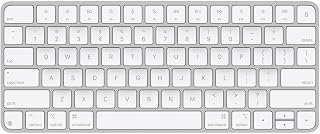
For anyone wanting the most native Mac experience possible, this makes sense given it comes straight from Apple with a model number tied directly to Mac hardware. At 14.4 ounces and just 0.73 inches thick, it's light and slim enough to slide next to a MacBook without cluttering a desk, and Bluetooth keeps the setup cable-free.
Pros
- About 30 days of battery life per charge
- Automatic pairing with Mac hardware
- Lightweight aluminum build at 14.4 ounces
- USB-C charging with included cable
Cons
- No numeric keypad
- Works only with Apple devices
If your priority is a keyboard that feels like it was made for your Mac, this is the safest pick on the list. Apple builds the Magic Keyboard to pair automatically with Mac hardware, and that plug-and-play simplicity is hard to beat when you just want to open the lid and start typing. Battery life stretches to about 30 days per charge, and USB-C means you're not hunting for a proprietary cable. The compact layout skips the numeric keypad, which suits anyone who wants their Mac setup to stay tidy and portable rather than sprawling across the desk. Build quality is where Apple's reputation shows: the aluminum body feels dense and premium at just 14.4 ounces, light enough to toss in a bag alongside a MacBook. For a Mac-first setup where you want zero configuration and a typing feel that matches the rest of your Apple gear, this keyboard is the least complicated route to a good daily driver.
Physical Specs: Dimensions 12.13 inches L x 6 inches W x 0.73 inches H. Weight: 14.4 ounces. Color: White. Keyboard layout: Compact without numeric pad.
Connectivity: Bluetooth wireless technology. USB-C port for charging. Includes woven USB-C Charge Cable for pairing and charging.
Power: Built-in Lithium Ion rechargeable battery. Battery life approximately 30+ days between charges. Charges via USB-C connection to any compatible Mac.
Compatibility: Works with 100+ Apple devices including all MacBook models (M1, M2, M3, M4, M5 series), iMac, Mac mini, Mac Studio, Mac Pro, iPad Pro, iPad Air, iPad mini, iPad, iPhone, Apple Vision Pro, and iPod touch.
Features: Hotkeys and media keys for quick access. Single color backlighting. Automatic pairing with Mac. Model number: MXCL3LL/A. First available: October 28, 2024.
Best for Mac owners who also use iPad or iPhone and want one keyboard that pairs automatically across all of them without extra software. Skip it if you need a numeric keypad for spreadsheet work, or if you split time between a Mac and a Windows or Android machine, since this one only works within the Apple ecosystem.

Someone who splits time between Mac and PC but wants the keyboard tuned for macOS will appreciate that this is built specifically for Mac while still listing PC compatibility. Low-profile mechanical switches give tactile feedback without the bulk of taller keys, and Bluetooth connectivity means one keyboard can pair across multiple machines without extra dongles.
Pros
- Perfect Stroke mechanical switches for precise feedback
- Adaptive backlighting based on hand proximity and ambient light
- Mac-optimized layout and Space Grey finish
- USB-C charging, 10-day battery life
Cons
- Premium price point
- Possible FileVault password prompt issues on older macOS
For Mac users who type all day and want the keyboard to disappear into the workflow, the MX Keys S for Mac is built around that exact goal. The spherically dished, low-profile keys are shaped to keep fingers naturally positioned, and the Perfect Stroke mechanical switches give a precise, satisfying response that many find rivals Apple's own keyboard. Backlighting turns on automatically as your hands approach and adjusts to the room, so you're not fumbling for a brightness setting mid-task. It runs on Mac OS 13 Ventura or later and iPadOS 16, and the Space Grey finish is designed to match modern Mac hardware rather than look bolted on. USB-C charging keeps it current, and a 10-day battery life keeps charging interruptions rare. If your Mac keyboard needs to hold up to hours of writing, coding, or messaging without fatigue, this is a stronger typing experience than most stock options.
Connectivity: Bluetooth Low Energy, compatible with up to 3 Apple devices simultaneously
Compatibility: macOS 13 Ventura and later, iPadOS 16 and later, iOS
Design: Low-profile full-size keyboard with 104 keys, spherically dished key design, 16.94in L x 5.18in W x 0.81in H
Power: Rechargeable Li-Po 1500 mAh battery with USB-C charging, approximately 10 days per charge
Build: Plastic construction with 26% post-consumer recycled content, Logitech Perfect Stroke mechanical switches
Features: Smart backlighting with automatic brightness adjustment, customizable Smart Actions via Logi Options+ app, device switching capability, 1-year limited hardware warranty
Good for Mac professionals and heavy typists who want mechanical-switch precision in a low-profile, Mac-tuned package. Less ideal if you're on an older macOS version, since FileVault users have reported password prompt issues, or if you're comparing keyboards on a tight budget, since this sits at a premium tier.

Logitech MX Keys S Wireless Keyboard: Low-Profile
A reader who mainly types on a laptop and wants a comfortable external option will benefit from the laptop-focused compatibility here. Single-color backlighting helps with visibility in dim rooms, and the low-profile layout mirrors laptop key travel so switching between the built-in keyboard and this one feels seamless, all over a stable Bluetooth connection.
Pros
- Pairs with up to three devices simultaneously
- Battery lasts 10 days with backlighting, 5 months without
- Low-profile linear switches with laptop-like feel
- Stable 810g weight without added bulk
Cons
- Full functionality requires the Logi Options+ app
- No water or spill resistance
This version of the MX Keys S is built for Mac users who move between a laptop and a desk setup and want the keyboard to feel consistent either way. The low-profile, linear switches echo a laptop typing feel while still offering full-size key travel, and the layout works over Bluetooth so it's easy to slot into any Mac workspace. It can pair with up to three devices at once, which matters if your Mac shares desk space with a tablet or a second machine. Backlighting activates automatically and adjusts to the room, and battery life covers 10 days with lighting on or 5 months with it off, so it holds up well for daily Mac use without constant recharging. At 810g it stays planted on the desk. For anyone assembling a Mac keyboard setup, this graphite model brings ergonomics and multi-device flexibility without the bulk of a mechanical board.
Suited to Mac users who also work across a second device and want quick Bluetooth switching plus a laptop-style typing feel. Skip it if you rely on other Logitech USB receivers, need spill resistance, or want to avoid installing Logi Options+ for full feature access, since some functions depend on that app.
Connectivity: Bluetooth Low Energy or Logi Bolt USB receiver, pairs up to 3 devices
Battery: Rechargeable Li-Po 1500 mAh, 10 days with backlighting or 5 months without
Compatibility: Windows, macOS, Linux, Chrome OS, iOS, iPadOS, Android
Layout: Full-size QWERTY, 104 keys, single-color backlighting
Dimensions: 430.2 x 131.63 x 20.5 mm, 810g weight
Features: Smart backlighting, customizable Smart Actions via Logi Options+, USB-C charging, 26% recycled plastic in Graphite finish
What's Included: MX Keys S keyboard, USB-C charging cable, Logi Bolt USB receiver
What to Look for in a Mac Keyboard
Wired vs. Wireless Connectivity
Wireless keyboards offer a clean, cable-free desk, but they require charging or batteries. Bluetooth options like the Apple Magic Keyboard – US English pair instantly with your Mac and stay powered for weeks on a single charge.
If you prefer zero latency and never want to worry about battery life, a wired option is worth considering. The Macally Wired Keyboard for Mac (USB C + A) covers both bases with its dual USB-A and USB-C plug, so it works with virtually any Mac port configuration.
macOS Layout and Shortcut Keys
Not every keyboard is built with macOS in mind. You want dedicated Mac modifier keys, function row shortcuts, and a layout that feels native from the moment you sit down. Keyboards that force you to remap keys break your flow.
The Logitech MX Keys S Mac Wireless Keyboard Fluid is a strong example here. It ships with a Mac-specific key layout and Apple-matching finishes, and it integrates with the Logi Options+ app for deep customization on macOS. Similarly, the Macally Wired Keyboard for Mac (USB C + A) includes 16 dedicated Mac shortcut keys that slot naturally into your workflow. For more compact layout options, check out our guide to the best 65 percent keyboards or the best 60 percent keyboard if desk space is a concern.
Backlighting and Visibility
If you work in dim environments or pull late-night sessions, backlighting is a genuine quality-of-life upgrade. The ProtoArc K100-A Backlit Wireless Bluetooth offers three adjustable brightness levels with a soft white LED that is easy on the eyes in low light.
The Logitech MX Keys S Wireless Keyboard Low Profile takes it a step further with proximity-sensing backlights that activate as your hands approach the keyboard and adapt to ambient lighting automatically. For users who need oversized, high-contrast key legends, the Macally Wired Keyboard for Mac (USB C + A) features print four times larger than standard keyboards, paired with clear LED backlighting.
Multi-Device Support
Power users often juggle a MacBook, an iPad, and maybe an iPhone at the same desk. A keyboard that can switch between three devices with a single button press is a real productivity boost.
The seenda SKM64-2 Bluetooth Keyboard and Mouse Combo supports three Bluetooth channels and pairs the keyboard with a matching mouse for a coordinated setup. The Macally Wireless Bluetooth Keyboard for Mac also connects to three devices simultaneously and throws in a numeric keypad, which accountants and spreadsheet-heavy users will appreciate. You can browse more input device options in our full Keyboards and Mice category.
Final Thoughts
There is a strong keyboard for every kind of Mac user in this lineup. If you want the most seamless Apple experience with zero setup friction, the Apple Magic Keyboard – US English is the natural choice. If you need a full-featured wireless option with smart backlighting and multi-device flexibility across macOS, the Logitech MX Keys S Mac Wireless Keyboard Fluid is hard to beat for everyday professional use.
Frequently Asked Questions
What is the best keyboard for Mac in 2026?
The right pick depends on your priorities. The Apple Magic Keyboard – US English is the go-to for seamless macOS integration and instant pairing. For more advanced features like proximity backlighting and multi-device switching, the Logitech MX Keys S Mac Wireless Keyboard Fluid is a top contender. Both have earned strong ratings from verified buyers.
Do third-party keyboards work well with Macs?
Yes, many third-party keyboards are designed specifically for macOS and include native Mac layouts with Command, Option, and dedicated function keys. Brands like Macally, Logitech, and ProtoArc all offer Mac-focused models that require no driver installation. The key is choosing one that explicitly lists macOS compatibility rather than a generic Windows-first board.
Is a wired or wireless keyboard better for a Mac setup?
Wireless keyboards are more popular for Mac setups because they complement the clean aesthetic and reduce cable clutter. Modern Bluetooth keyboards like the ProtoArc K100-A Backlit Wireless Bluetooth offer months of battery life between charges, so you rarely think about power. That said, a wired keyboard like the Macally Wired Keyboard for Mac (USB C + A) is a great option if you want consistent connectivity with no battery management at all.
Can I use a Mac keyboard with an iPad or iPhone?
Absolutely. Most Bluetooth keyboards covered here support iPadOS and iOS in addition to macOS. The seenda SKM64-2 Bluetooth Keyboard and Mouse Combo is designed specifically for the Apple ecosystem and works across macOS, iPadOS 13.0 and above, and iOS 13.0 and above. Multi-device models let you switch between your Mac and iPad instantly, which is ideal for users who move between devices throughout the day. For a complete desk upgrade, pairing a great keyboard with a quality mouse pad can make a noticeable difference in comfort.



Write Your Review
No reviews yet. Be the first to share your experience!