

If you spend hours every day typing reports, emails, and spreadsheets, your keyboard matters more than you might think. A poor fit can lead to wrist fatigue, slower output, and nagging discomfort that builds over months. Whether you are outfitting a home office or upgrading a shared workspace, finding the right board is worth the effort. This guide walks you through seven well-reviewed options to help you find the best keyboard for office typing that suits your workstyle. For more peripheral picks, browse the full Keyboards & Mice category.
Our selection covers a range of needs: ergonomic designs for long-session comfort, quiet keys for shared spaces, wireless flexibility for clean desks, and tactile mechanical options for typists who want satisfying feedback. Every product here has been evaluated for build quality, comfort, connectivity, and day-to-day reliability.
Quick answer
This guide compares 7 picks, with Logitech G413 SE Mechanical Gaming Keyboard - Full-Size ranked first. Logitech Ergo K860 Wireless Split Keyboard with Memory has the most customer reviews.
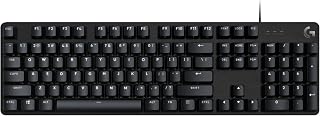
Tactile switches give a defined bump on every keystroke, which helps typists confirm registration without bottoming out hard, reducing finger fatigue across long shifts. The single-color backlighting keeps low-light desks readable. It's built for PC use over a stable USB 2.0 connection, so office workers get consistent input without wireless dropouts during heavy typing sessions.
Pros
- Tactile mechanical switches for clear feedback
- Durable PBT keycaps resist wear
- 6-key rollover prevents missed keystrokes
- Sturdy aluminum-magnesium top case
Cons
- Wired only, no wireless option
- No RGB or programmable macros
Office typing is mostly about consistent, comfortable keystrokes over long stretches, and that is exactly where this full-size mechanical keyboard holds up. The tactile switches give clear feedback on every press, so you are not second-guessing whether a key registered during a long typing session. PBT keycaps resist the shine and wear that come from constant daily use, which matters more for office work than for occasional gaming. The 6-key rollover means fast typists never lose a keystroke when their fingers overlap during quick bursts. The aluminum-magnesium top case adds a stable, no-flex typing surface, and the 12 function keys handle media and volume without pulling your hands away from the home row. The single-color white backlighting keeps things simple and professional rather than flashy, which suits an office desk better than RGB lighting would. If you type for hours and want mechanical durability without extra bells and whistles, this covers the basics well.
Key Specifications:
Switch Type: Tactile Mechanical
Keycaps: PBT (durable heat and wear-resistant)
Layout: Full-Size QWERTY with 108 keys
Connectivity: USB 2.0 Wired
Backlighting: Single Color White LED
Anti-Ghosting: 6-key rollover
Media Controls: 12 FN keys
Dimensions: 17.13 inches L x 1.97 inches W x 1.43 inches H
Weight: 780 grams
Enclosure: Brushed Aluminum-Magnesium Alloy
Compatibility: Windows and macOS
Warranty: 1 Year Limited Hardware
Model: G413 SE (Full-Size) or G413 TKL SE (Tenkeyless)
Good for office typists who want genuine mechanical switches, tactile feedback, and PBT keycaps that hold up over years of daily use, without needing RGB or programmable macros. Skip it if you need a wireless setup for a clean desk, work somewhere quiet keystrokes are required, or use a Mac as your primary machine alongside Windows, since the feature set leans toward Windows and PC-first workflows.

The split key layout and integrated wrist rest target office workers logging long hours of typing, encouraging a more natural hand angle that can ease strain over a full workday. A corded USB connection keeps setup simple on any PC or laptop, with no batteries to track or replace.
Pros
- Split layout encourages natural wrist and hand position
- Tactile membrane switches with responsive feedback
- Rated for 20 million keystrokes
- Includes keycap puller for easy maintenance
Cons
- Learning curve while adjusting to the split layout
- Wired connection limits desk flexibility
Office typing often means back-to-back hours at the keyboard, and that's exactly where wrist fatigue creeps in. The PERIBOARD-512B addresses this directly with its split-key layout that separates left and right hand zones into a more natural position. For anyone whose workday is dominated by emails, reports, and documents, that ergonomic head start can make a real difference over a full shift. The curved rows and contoured keycaps support natural finger movement, and the tactile membrane switches give responsive, audible feedback similar to brown mechanical switches, so typing still feels satisfying without full mechanical pricing. It's rated for 20 million keystrokes, which speaks to durability for daily office use, and the included keycap puller makes upkeep simple. The integrated wrist rest, while basic, does its job through long typing sessions. Since it's wired, there's no battery to manage or charge, which suits a stationary office desk setup well. The tradeoff is a short adjustment period as your hands adapt to the split layout, but for office typists prioritizing comfort and value over premium build, this is a practical, no-frills option.
Connectivity: Wired USB, compatible with Windows 10 and later.
Layout: Full 104-key QWERTY with 111 total keys. Ambidextrous design supports both left and right-handed users.
Switches: Tactile membrane switches with 4.2mm key travel and audible confirmation. Rated for up to 20 million keystrokes.
Design: One-piece split-key ergonomic layout with curved rows and ergonomic keycaps. Integrated wrist rest. Available in black, beige, and white. Dimensions: 19.09"L x 9.29"W x 1.73"H. Weight: 2.3 pounds.
Build: High-quality ABS plastic enclosure and keyboard plate. Includes keycap puller for maintenance. Backed by 12-month limited warranty.
Good for office workers who type for hours daily and want ergonomic relief without a big investment, especially those working from a fixed desk where a wired connection isn't a drawback. Not ideal for anyone wanting instant familiarity, since the split layout takes one to two weeks to adjust to, or for those who need wireless freedom to move between desks or devices.

A pronounced split and curved frame push hands into a more neutral position for people typing continuously across spreadsheets and documents, while the built-in wrist rest supports longer stretches at the desk. Cross-platform Bluetooth and USB support also suit offices running a mix of Windows, macOS, or Chrome OS machines.
Pros
- Split design reduces wrist bending and boosts wrist support
- Adjustable palm lift for seated or standing desks
- Dual Bluetooth and USB connectivity
- Waterproof with two-year battery life
Cons
- Split layout requires two to four weeks to adjust to
- Setup instructions could be clearer for ergonomic newcomers
For office roles where typing volume is high and the workday stretches on, cumulative wrist strain is a real concern, and this is the category where the Ergo K860 earns its place. Its curved split keyframe and pillowed memory foam wrist rest are built to reduce wrist bending by 25% and boost wrist support by 54% compared to standard keyboards, numbers that matter when you're logging hours at a desk five days a week. The adjustable palm lift with three tilt positions works whether your office setup is seated or a standing desk. Perfect Stroke keys shaped to fingertip contours keep typing smooth without feeling soft or unresponsive, and the quiet keys are considerate in open offices or shared spaces. Dual Bluetooth and USB connectivity means it adapts to whatever devices your office workflow requires, and a two-year battery life means it's rarely a maintenance item. Waterproofing is a practical bonus for a desk that sees coffee or tea. The recycled plastic build is a plus for offices with sustainability goals. The main tradeoff is a few weeks of adjustment as muscle memory catches up to the new layout.
Connectivity: Bluetooth and USB (includes USB receiver)
Compatibility: Windows 10+, macOS, Linux, Chrome OS, and select tablets
Layout: Full-size QWERTY with 105 keys, numeric keypad included
Power: 2 AAA batteries with 2-year battery life
Design: Curved split keyframe with ambidextrous layout, adjustable palm lift (0, -4, -7 degree angles)
Wrist Support: Pillowed memory foam wrist rest
Dimensions: 17.95 inches (L) x 9.17 inches (W) x 1.89 inches (H)
Weight: 2.6 pounds
Water Resistance: Waterproof rating
Additional Features: Customizable Fn keys via Logitech Options software, quiet keys, CAPS LOCK indicator
Warranty: Manufacturer warranty available through customer service
Well suited for office employees who type for hours daily and want a serious ergonomic upgrade, particularly those managing wrist discomfort or RSI concerns. Also a fit for sustainability minded offices given its recycled materials. Skip it if you want to start typing at full speed immediately, since the split layout needs two to four weeks of adjustment, or if a simpler setup process matters more than ergonomic depth.

Pros
- Exceptional typing experience with tactile switches that provide clear feedback and satisfying key reset
- Quiet operation compared to traditional mechanical keyboards, making it suitable for offices and shared environments
- Intelligent backlighting system that responds to hand proximity and ambient conditions, eliminating unnecessary battery drain
- Versatile multi-device pairing allows effortless workflow switching between PC, laptop, tablet, and smartphone
- Premium build quality with aluminum components and backlit key symbols that won't wear off over time
Cons
- Requires adjustment period due to slightly different key arrangement compared to standard keyboards
- FileVault compatibility issues on macOS may require using the Logi Bolt receiver instead of Bluetooth
- Learning curve for customization features through Logi Options+ software on Windows and macOS
The Logitech MX Mechanical is a premium wireless keyboard engineered for professionals, remote workers, and anyone who spends significant time typing. It combines low-profile mechanical switches with modern wireless connectivity and intelligent features designed to enhance productivity without compromising comfort or causing distractions in shared spaces.
The standout feature is the Tactile Quiet switch technology, which delivers a satisfying bump with each keystroke while keeping noise levels substantially lower than traditional mechanical keyboards. Users consistently praise the responsive, precise feedback that makes typing feel more engaging than standard membrane keyboards. Battery life is impressive, lasting up to 15 days on a single charge with backlighting enabled, or up to 10 months with the lights off, reducing the need for constant charging.
Design and build quality are exceptional. The full-size layout includes an aluminum and metal construction that feels premium without weighing down your desk. The backlighting system is genuinely smart, activating when your hands approach and automatically adjusting brightness to match ambient light conditions. This combination of functionality and durability means the keyboard will remain in excellent condition for years of daily use.
The multi-device capability is a game-changer for anyone juggling multiple computers or devices. Three dedicated buttons enable instant switching between paired devices, eliminating the tedious process of unplugging and replugging cables. Compatibility spans virtually all major operating systems, though FileVault users on macOS should note potential Bluetooth startup issues.
The MX Mechanical represents exceptional value for professionals seeking a quiet, reliable mechanical keyboard that works seamlessly across their entire device ecosystem. It's an investment in comfort and productivity that pays dividends with every keystroke.
This keyboard is ideal for remote workers, office professionals, writers, programmers, and anyone who values typing comfort over long work sessions. If you work in shared spaces or have colleagues nearby, the quiet mechanical switches make it significantly better than clicky gaming keyboards. The multi-device support particularly benefits those switching between work and personal computers throughout the day.
Consider this keyboard if you currently use membrane or cheap mechanical keyboards and want to experience a meaningful upgrade in feel and responsiveness. If you're new to mechanical keyboards, the Tactile Quiet option provides the perfect entry point, offering feedback without overwhelming noise. The premium price reflects the build quality and wireless technology, making it suitable for those who view a keyboard as a long-term investment.
Skip this model if you need an ultra-compact design for travel or gaming-focused features like programmable macros. For basic typing needs on a tight budget, less expensive options exist. However, for anyone spending 6+ hours daily at a keyboard, the ergonomic design and mechanical feedback justify the investment in reduced fatigue and improved typing satisfaction.
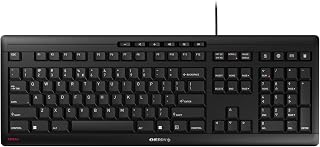
Cherry Stream Keyboard: Ultra-Quiet Wired Scissor
Silent Stroke technology directly addresses cubicle noise complaints, letting someone bang out reports or emails without every click carrying across the room. The ergonomic shape supports wrist comfort during extended sessions, and a simple wired USB-A connection means no pairing steps before the workday starts.
Pros
- Quiet CHERRY SX scissor switches
- Metal plate and reinforced feet prevent wobble
- Low-profile design eases typing fatigue
- Abrasion-resistant labels hold up long-term
Cons
- Windows-only, no native Mac support
- Not water resistant
This keyboard is built around the two things office typists care about most: quiet keys and reliable comfort through a full workday. The CHERRY SX scissor switches give a smooth, tactile press with noticeably less noise than a membrane or mechanical board, which makes it a strong pick for shared offices or open floor plans where sound matters. The metal internal plate and reinforced rubber feet keep the keyboard steady during fast typing, so there is no wobble or flex to slow you down. The low-profile design reduces finger travel, which many typists find less tiring across a long shift, and the 10 multimedia shortcuts plus a dedicated PC lock key add small conveniences that fit an office routine. Abrasion-resistant key labels mean the legends stay readable even after years of daily use, which matters more for typing-heavy jobs than for casual use. It is a wired, Windows-focused board, so it is best suited to a stationary office desk rather than a mixed-device setup.
Core Specs: 115-key QWERTY layout with numeric keypad. CHERRY SX scissor switch mechanism. USB-A wired connection. Dimensions 18.23L x 6.42W x 0.71H inches. Weight 2 pounds.
Construction: Metal plate with rubber and metal enclosure. 8 non-slip rubber feet. Integrated fold-out feet for angle adjustment. Abrasion-resistant key labeling.
Features: 10 multimedia keys (volume, calculator, email, browser, lock PC, play/pause, next track). 3 red status LEDs for Caps Lock, Num, and Scroll Lock. No backlighting.
Compatibility: Windows PC/Laptop only. Plug-and-play USB, no drivers required. Model JK-8500EU-2. 3-year manufacturer warranty. GS safety certification.

For workers who move between desks or share small workspaces, the lightweight, portable design paired with Bluetooth and USB flexibility means quick setup on a laptop or desktop without cable clutter. Quiet typing suits shared offices or open floor plans, letting someone type steadily through calls and meetings nearby.
Pros
- Quiet membrane keys suit shared offices
- Switches between three devices instantly
- Full-size layout with number pad
- Long battery life reduces charging interruptions
Cons
- No tactile mechanical feedback
- Logi Options+ shortcuts limited on non-Windows/macOS systems
For office typing, the biggest daily annoyance is often noise, and this keyboard is built specifically to solve that. The membrane switches produce a soft, quiet keystroke that suits open offices, shared desks, or any environment where a loud keyboard would stand out. It keeps the familiar laptop-style key feel, so the switch from a laptop to a full desktop setup feels natural rather than jarring. Being able to pair with up to three devices and switch instantly via Bluetooth or the Logi Bolt receiver is a real advantage for anyone splitting typing time between a laptop, tablet, and desktop through the workday. The full-size layout with number pad covers everything a typing-heavy office job needs, and at 685 grams it is light enough to move between desks or take along when working elsewhere. Logi Options+ lets you set up shortcuts that speed up repetitive typing tasks. The long battery life also means you are not stopping mid-task to recharge, which is exactly the kind of interruption office typists want to avoid.
Connectivity: Bluetooth, USB receiver (Logi Bolt included)
Keyboard Type: Membrane, full-size with number pad
Key Count: 108 keys
Layout: QWERTY, ambidextrous
Battery Life: Up to 36 months
Weight: 685g
Color: Graphite
Compatibility: Windows, macOS, Chrome OS, Linux, iPadOS, iOS, Android. Windows 11 minimum required.
Features: Multi-device switching (up to 3 devices), customizable shortcuts, quiet typing, 48% recycled plastic construction
Warranty: 1 year limited hardware warranty
Model: 920-012424
Best for office workers and multi-device users who want quiet, comfortable typing and the convenience of switching between laptop, tablet, and desktop without re-pairing. Skip it if you want the tactile snap of mechanical switches, since the membrane keys trade that feel for quietness, or if you rely on Logi Options+ shortcuts on Chrome OS or Linux, where support is limited.

Logitech MX Keys S Wireless Keyboard: Low-Profile
Low profile keys paired with Bluetooth connectivity make this a natural fit for anyone typing on a laptop most of the day, since the compact shape reduces wrist travel. Single-color backlighting helps in dim conference rooms, and battery power means one less cord tangled in with monitor and dock cables.
Pros
- Pairs with up to three devices for easy multitasking
- Quiet, precise typing suited to shared offices
- Adaptive backlighting for varied office lighting
- Long battery life reduces charging interruptions
Cons
- Full feature set requires the Logi Options+ app
- No water or spill resistance
Long stretches of office typing come down to two things: how a keyboard feels under your hands and how little it gets in your way. The MX Keys S handles both. Its low profile mirrors a laptop layout, so switching between your desktop setup and a laptop during the day feels seamless rather than jarring. For office use specifically, the ability to pair with up to three devices at once is a real time saver if you're jumping between a work laptop, a personal machine, and a tablet. The backlighting that senses your hands and adjusts to room light means you're not fumbling with settings during early mornings or late evenings at your desk. Typing itself is quiet and precise, which matters in shared offices or open floor plans where mechanical clatter can be distracting. The Smart Actions automation through Logi Options+ adds genuine value for anyone doing repetitive daily tasks. Battery life stretches for months on a single charge, so it rarely demands attention. For a keyboard meant to disappear into your workday rather than dominate it, this fits the brief well.
Best for office workers who juggle multiple devices, value quiet typing, and want a laptop-like feel with more stability. Also a strong pick for anyone wanting to automate repetitive tasks through software. Skip it if you need water resistance for a messy desk setup, rely on other Logitech USB receivers you'd want to keep using, or work in a strict macOS FileVault environment where Bluetooth pairing can be finicky.
Connectivity: Bluetooth Low Energy or Logi Bolt USB receiver, pairs up to 3 devices
Battery: Rechargeable Li-Po 1500 mAh, 10 days with backlighting or 5 months without
Compatibility: Windows, macOS, Linux, Chrome OS, iOS, iPadOS, Android
Layout: Full-size QWERTY, 104 keys, single-color backlighting
Dimensions: 430.2 x 131.63 x 20.5 mm, 810g weight
Features: Smart backlighting, customizable Smart Actions via Logi Options+, USB-C charging, 26% recycled plastic in Graphite finish
What's Included: MX Keys S keyboard, USB-C charging cable, Logi Bolt USB receiver
Office Keyboard Buying Guide
Switch Type and Typing Feel
The switch under each key is the single biggest factor in how a keyboard feels and sounds. Membrane and scissor-switch keyboards, like the Cherry Stream Keyboard | Wired Slim Whisper Quiet, are quiet and low-profile, making them a natural fit for open offices or shared spaces.
Mechanical switches deliver more tactile feedback and are preferred by fast, accurate typists. Low-profile mechanical options, like those on the Logitech MX Mechanical Wireless Illuminated, strike a middle ground: responsive feel without the height or noise of traditional mechanical boards.
Ergonomics and Posture Support
For anyone logging long hours at a desk, wrist comfort should be a top priority. Split-key keyboards physically separate the left and right key zones to reduce wrist bending and encourage a more natural arm position. The Logitech Ergo K860 Wireless Ergonomic Split pairs a curved split layout with a pillowed memory foam wrist rest, which is a combination that has been certified by ergonomics experts to reduce muscle strain.
A more budget-friendly ergonomic option is the Perixx PERIBOARD-512B Wired Ergonomic Keyboard, which uses a one-piece split layout and curved keycaps to support natural hand positioning. Most users adapt to the ergonomic shape within a couple of weeks and report noticeably less wrist pressure afterward. If you are also shopping for a complementary peripheral, our roundup of the best mouse under fifty dollars is worth a look.
Wired vs. Wireless Connectivity
Wireless keyboards keep your desk tidy and let you type from a comfortable distance. Multi-device options like the Logitech MX Keys S Wireless Keyboard Low Profile and the Logitech Signature Slim K950 Wireless Keyboard let you pair with up to three devices and switch between them with a single tap, which is ideal if you move between a laptop, desktop, and tablet throughout the day.
Wired keyboards, by contrast, never need charging and have zero latency. If your setup is stationary and you want one less thing to manage, a reliable wired option like the Cherry Stream Keyboard | Wired Slim Whisper Quiet or the Perixx PERIBOARD-512B Wired Ergonomic Keyboard keeps things simple and dependable.
Key Profile and Layout
Low-profile keyboards mimic the flat feel of a laptop and are easier on the wrists for people transitioning from a notebook. The Logitech MX Keys S Wireless Keyboard Low Profile uses spherically dished keys shaped to match your fingertip contour, which helps reduce misstrokes during fast typing sessions. A full-size layout with a numpad is worth prioritizing if you handle a lot of data entry.
If you prefer a more tactile, gaming-style board that also holds up in an office setting, the Logitech G413 SE Full-Size Mechanical brings PBT keycaps that resist wear and a brushed aluminum frame that stays rigid under heavy use. Its tactile mechanical switches give you precise feedback on every keystroke. For those who prefer a more compact layout at their desk, our guide to the best 65 percent keyboards covers a range of space-saving options.
Final Thoughts
There is no single keyboard that works for everyone, but two stand out as strong anchors for different kinds of office users. If comfort and posture are your main concern, the Logitech Ergo K860 Wireless Ergonomic Split is one of the most thoroughly designed ergonomic keyboards on the market, with a wrist rest, curved split layout, and ergonomist approval to back it up. For typists who want clean, quiet, multi-device flexibility without sacrificing build quality, the Logitech MX Keys S Wireless Keyboard Low Profile delivers a refined, low-profile experience that works equally well whether you are writing reports or jumping between devices.
Frequently Asked Questions
What type of keyboard is best for all-day office typing?
For all-day use, a low-profile keyboard with quiet switches and good wrist support tends to work best. Scissor-switch and low-profile mechanical keyboards strike a solid balance between comfort and responsiveness. Ergonomic split designs are especially worth considering if you notice wrist or forearm fatigue after long sessions.
Are mechanical keyboards good for office work in 2026?
Yes, modern mechanical keyboards are well-suited for office use, especially low-profile and tactile-quiet variants. In 2026, options like the Logitech MX Mechanical offer satisfying feedback without the loud clatter associated with traditional mechanical boards. They are durable, precise, and increasingly common in professional settings.
Is a wireless keyboard reliable enough for daily office work?
Modern wireless keyboards using Bluetooth Low Energy or dedicated USB receivers are highly reliable for office tasks. Latency is negligible for typing, and battery life on premium models can stretch for months. If you want the cleanest possible desk setup, wireless is a very practical choice in 2026. You might also want to pair yours with one of the top-rated mouse pads to complete your workspace.
How do I know if I need an ergonomic keyboard?
If you experience wrist stiffness, forearm tension, or discomfort after extended typing sessions, an ergonomic keyboard is worth trying. Split keyboards reduce wrist bending by encouraging a more natural arm angle, which can ease strain over time. Most users adjust to the new layout within one to two weeks and find the long-term comfort benefits well worth the brief learning curve.



Write Your Review
No reviews yet. Be the first to share your experience!