

You spend hours every day with your hands on a keyboard. Whether you’re deep in a coding sprint or jumping between terminals and docs, the keyboard you use directly affects your speed, comfort, and focus. Finding the best keyboard for programming means balancing key feel, layout, connectivity, and customization in a way that fits how you actually work.
This guide covers 10 carefully evaluated keyboards suited to programmers at every level, from minimalist compact boards to full-size workhorses. If you’re also comparing quieter options, check out our roundup of the best silent mechanical keyboards for noise-sensitive setups.
Quick answer
This guide compares 10 picks, with AULA F75 Pro 75% Hot Swappable Wireless Mechanical ranked first.

AULA F75 Pro 75% Hot Swappable Wireless Mechanical
The 75% layout saves desk space without sacrificing function keys that map IDE shortcuts, while hot-swappable sockets let you fine-tune switch feel as your typing preferences evolve. Pre-lubed linear switches reduce finger fatigue during long coding sessions, and tri-mode connectivity (2.4GHz, Bluetooth 5.0, USB-C) makes it simple to switch between your workstation, laptop, and tablet without cable swaps or pairing delays.
Pros
- Hot-swappable switches enable customization without soldering
- Triple connectivity handles workstation, laptop, and mobile setups
- Pre-lubed linear switches and five-layer dampening reduce typing noise
- 4000mAh battery lasts multiple workweeks between charges
Cons
- Driver software for macros varies across operating systems
- Water-repellent coating protects against spills but not submersion
Programming demands a keyboard that balances tactile feedback with extended comfort, and the AULA F75 Pro delivers both in a compact 75% layout that reclaims desk space without sacrificing essential keys. The pre-lubricated Reaper linear switches provide the smooth, consistent keystrokes programmers need during marathon coding sessions, while five-layer silencer padding keeps noise levels low in shared workspaces. Hot-swappable switch compatibility means you can refine your typing feel without voiding warranties or learning to solder. The side-printed PBT keycaps resist shine and sweat, maintaining crisp legends through thousands of hours at the terminal. Triple connectivity via 2.4GHz, Bluetooth 5.0, and USB-C lets you switch seamlessly between workstation, laptop, and testing devices. The 4000mAh battery handles full workweeks on a single charge, eliminating mid-sprint interruptions. The multi-function knob simplifies volume adjustments during video calls and screen sharing. Water-repellent coating protects against coffee spills. While advanced macro programming requires driver software that varies by platform, the core typing experience remains excellent across Windows, Android, and gaming console environments. For developers prioritizing typing comfort, wireless flexibility, and desk efficiency, this keyboard checks every box.
The hot-swappable design is a major strength for users wanting to personalize their typing experience. The keyboard supports both 3-pin and 5-pin switches, accommodating most mechanical switch types on the market. The included LEOBOG Reaper switches are pre-lubricated and tuned for a linear, creamy response that appeals to both typists and gamers. Two spare Reaper switches come in the box, letting you experiment or prepare for future replacements.
The programmable key functionality and macro support open creative possibilities for gamers and professionals alike. Through the driver software, you can remap keys, create key combinations, and set up context-specific macros. The N-key rollover ensures simultaneous key presses register accurately, critical for competitive gaming. Windows lock prevents accidental touches during intense gaming sessions, protecting your in-game focus.
Tri-mode connectivity is exceptionally practical in today's multi-device world. Pair the F75 Pro with your PC, laptop, tablet, and smartphone simultaneously, then switch between them using convenient shortcut keys or the side button. The 2.4GHz wireless mode delivers millisecond responsiveness suitable for gaming, while Bluetooth 5.0 handles everyday mobile needs with lower power consumption. USB-C wired connection provides a reliable fallback with zero latency.
The 4000mAh rechargeable battery balances capacity and charging speed for real-world use. Battery life depends on usage patterns and lighting settings, but the large capacity supports several days of typical use between charges. The included USB-C cable handles both charging and wired connectivity, eliminating cable clutter.

The 96% layout retains a dedicated number pad for data entry and terminal commands while keeping the footprint compact enough for dual-monitor setups. Hot-swappable ROG NX Snow linear switches let you experiment with tactile or clicky alternatives as your typing style changes, and tri-mode connectivity supports seamless switching between your desktop, Mac, and gaming console without driver conflicts or reconnection hassles.
Pros
- 96% layout preserves numpad while saving significant desk space
- 1,500-hour wireless battery life requires minimal recharging
- Pre-lubed linear switches with factory dampening reduce typing noise
- Metal housing and PBT keycaps deliver years of durability
Cons
- Armoury Crate software requires registration and has steep learning curve
- No water resistance against accidental spills
The ASUS ROG Strix Scope II 96 packs full-size functionality into a footprint that respects limited desk real estate, a critical advantage for programmers juggling multiple monitors and reference materials. The 96% layout preserves the numpad for financial calculations and data entry while trimming wasted space between key clusters. Pre-lubed ROG NX Snow linear switches deliver the smooth, quiet keystrokes programmers need during long debugging sessions, with factory sound dampening that eliminates the hollow ping common in lesser boards. Wireless performance through Bluetooth and 2.4GHz SpeedNova technology proves responsive enough for coding workflows, while 1,500-hour battery life means recharging just a few times yearly. The metal top housing and PBT keycaps withstand years of daily use without developing the greasy shine that plagues cheaper alternatives. Hot-swappable switches let you experiment with different typing feels as your preferences evolve. The detachable wrist rest supports proper ergonomics during marathon refactoring sessions. Tri-mode connectivity handles seamless switching between desktop workstation and laptop without re-pairing. While Armoury Crate software requires registration and presents complexity for macro setup, the hardware itself adapts intuitively within minutes. For programmers seeking wireless reliability, numpad access, and premium build quality without surrendering desk space, this keyboard delivers.
Layout: 96% (TKL size with full-size functionality and number pad)
Switches: Hot-swappable ROG NX Snow linear switches (pre-lubed), alternative ROG NX Storm clicky switches available
Connectivity: 2.4GHz wireless (SpeedNova technology), Bluetooth (up to 3 devices), USB wired
Battery Life: Up to 1,500 hours in 2.4GHz wireless mode
Lighting: Per-key RGB with customizable effects
Keycaps: PBT material
Dimensions: 14.84 inches L x 5.16 inches W x 1.57 inches H
Weight: 2.8 pounds
Compatibility: Windows PC and Mac
Included Accessories: Detachable wrist rest, ROG keycap and switch puller, wireless receiver, USB extender, specialty spacebar keycap, USB cable, ROG sticker
Warranty: 1 year
This keyboard targets programmers who need numpad functionality for data-heavy work but refuse to sacrifice desk space for traditional full-size layouts. The wireless modes and exceptional battery life suit developers who switch frequently between workstations and laptops. Hot-swappable switches appeal to those exploring mechanical preferences. Skip this if you need simplified software for macro programming, work exclusively in wired environments, or prefer tactile feedback over smooth linear switches. Budget-conscious developers may find better value elsewhere.

Pros
- Exceptionally satisfying mechanical typing feel with vibration-dampening gasket technology
- Practical compact layout saves desk space while maintaining full numpad access
- Exceptional battery life and fast USB-C charging enable extended use
- Programmable keys and multi-device Bluetooth connectivity boost productivity across devices
Cons
- White backlighting only, no RGB customization for users wanting ambient lighting effects
- Higher price point compared to standard mechanical keyboards without premium gasket mounting
The Logitech Alto Keys K98M is a premium wireless mechanical keyboard designed for professionals and enthusiasts who demand both tactile satisfaction and practical functionality. Its 98-key 1800-layout with numpad strikes an ideal balance between a compact footprint and full typing capability, making it perfect for users who want desk space efficiency without compromising on input options. Whether you spend your day writing, coding, or gaming, this keyboard positions itself as a workspace upgrade rather than a basic peripheral.
What truly sets the K98M apart is its UniCushion gasket mount system paired with hot-swappable Marble Switches. Unlike standard keyboards that transmit vibration directly to your desk, the gasket design absorbs impact and amplifies the acoustic feedback of each keystroke, creating a satisfying typing experience that feels genuinely premium. The concave keycaps add stability and precision, while hot-swap functionality means you can customize or replace switches without soldering. Real-world performance is responsive and comfortable for all-day use.
Build quality reflects Logitech's attention to detail. The transparent top case reveals the mechanical internals and looks visually distinct on any desk, while the recycled plastic materials feel durable without unnecessary weight. The white backlighting, though not RGB, provides clean functional illumination that suits both bright offices and dim evening sessions. Design choices prioritize substance over flashiness, appealing to users who want a keyboard that performs well and looks intentional.
The main consideration is that this keyboard targets a specific user who values satisfying mechanical feedback and practical layouts over cutting-edge RGB customization. The white backlighting may feel limiting if you prefer full-color ambient effects, and the premium price reflects the engineering that went into the gasket mount and build quality. Connectivity is solid with Bluetooth and Logi Bolt options, though driver setup through Logi Options+ is required to unlock programmable keys and AI features.
The Logitech Alto Keys K98M is a strong choice for remote workers, developers, and mechanical keyboard enthusiasts seeking a compact, satisfying, and reliable daily driver. The gasket technology genuinely improves the typing experience, the battery life is exceptional, and the customization options through software make it feel tailored to your workflow. If you prioritize tactile feedback and practical desk space over RGB lighting, this keyboard delivers genuine value.
Connectivity: Bluetooth Low Energy and Logi Bolt USB receiver for multi-device switching
Battery: Up to 12 months of wireless use with USB-C recharging
Layout: 98-key compact 1800-style with full numpad
Switches: Hot-swappable Marble Switches with concave keycaps
Backlighting: White only, single-color non-RGB
Mounting: UniCushion gasket system for vibration absorption
Dimensions: 7.1 inches L x 17 inches W x 1.9 inches H
Weight: 1100g
Materials: Recycled plastic enclosure and plate
Compatibility: Windows, macOS, and iOS with Bluetooth support
Warranty: 2-year limited hardware warranty
Best For: Remote workers and professionals seeking long battery life and satisfying tactile feedback. Developers and content creators who benefit from programmable keys and multi-device connectivity. Mechanical keyboard enthusiasts prioritizing gasket mounting and switch quality over RGB lighting and gaming aesthetics.
Consider Alternatives If: You need extensive RGB customization or prefer standard gaming keyboard aesthetics. You prioritize the lowest price point over premium build quality and gasket technology. You require a full 104-key layout and cannot work with a compact 98-key design.

HHKB Professional Classic Type-S Silent Mechanical
Pros
- Exceptionally quiet operation makes it perfect for open offices, libraries, or shared workspaces without disturbing others
- Refined tactile feedback from Topre switches provides satisfying typing experience with minimal noise
- Space-efficient 60-key layout saves desk real estate while maintaining full functionality through key remapping
- Durable PBT construction with dye-sublimated legends resists wear and keycap shine common in cheaper keyboards
- Cross-platform compatibility via DIP switches allows one keyboard to work seamlessly across multiple operating systems
Cons
- 60-key layout requires key remapping for users accustomed to function rows and number pads on standard keyboards
- Wired USB-C connection lacks wireless flexibility, though this design choice supports reliability and eliminates battery concerns
The HHKB Professional Classic Type-S is a premium mechanical keyboard engineered for professionals, programmers, and writers who prioritize silent operation and typing precision. This 60-key keyboard combines Japanese engineering with quiet technology, making it an ideal choice for anyone working in shared spaces, open offices, or environments where noise sensitivity matters.
The standout feature is the Topre Type-S silent electrostatic capacitive switch technology. These switches deliver smooth, tactile keystrokes while operating at whisper-quiet levels that eliminate the clacking sound associated with traditional mechanical keyboards. Users gain the satisfying feedback of premium switches without the noise pollution, allowing deep focus and concentration during long coding or writing sessions.
Built with high-quality PBT keycaps featuring dye-sublimated legends, this keyboard prioritizes durability and longevity. The materials resist shine and keycap wear, ensuring legends remain crisp and legible after years of intensive use. The compact 60-key layout minimizes finger travel distance, which reduces fatigue during extended typing sessions and improves overall productivity through efficiency of movement.
Customizable keymap settings and onboard DIP switches provide flexibility for Windows, macOS, and Linux users, allowing one keyboard to serve multiple devices without hassle. The ergonomic sculpted design supports natural hand positioning, making this keyboard suitable for both programming marathons and extended writing work. The USB-C connection ensures modern connectivity with stable, reliable performance.
The primary consideration is the premium price and learning curve for users unfamiliar with compact 60-key layouts. However, the exceptional build quality, whisper-quiet performance, and professional-grade engineering justify the investment for discerning users. With a 2-year warranty backing the purchase, the HHKB Professional Classic Type-S represents a refined tool that delivers both performance and longevity for serious keyboard enthusiasts and professionals.
Physical Design: Dimensions are 11.6 inches length by 4.3 inches width by 1.6 inches height, with a plastic enclosure and ambidextrous hand orientation. Weight is minimal for portability between workspaces.
Switching Technology: Features Topre Type-S silent electrostatic capacitive switches with 60 total keys in QWERTY layout. Each keystroke delivers tactile feedback while maintaining exceptionally quiet operation suitable for noise-sensitive environments.
Connectivity and Compatibility: USB-C wired connection for stable, modern device connectivity. Compatible with Windows, macOS, and Linux systems. Works with laptops, desktops, and hybrid devices. Onboard DIP switches enable seamless operating system switching without software installation.
Build Quality and Materials: Shine-resistant PBT keycaps with dye-sublimated legends provide durability and long-term legibility. Sculpted keycap design optimizes ergonomic positioning during extended typing sessions. 2-year advance exchange warranty covers defects and ensures professional-grade reliability.
Best For: Programmers and developers seeking distraction-free typing environments, writers working in shared spaces, professionals in noise-sensitive offices, and keyboard enthusiasts who value premium build quality and silent operation. Ideal for anyone willing to invest in a refined typing experience with lasting durability.
Consider Carefully If: You require a full-size keyboard with dedicated function row and number pad, prefer wireless connectivity, or are new to compact keyboard layouts. The learning curve for 60-key remapping and the premium pricing require commitment from the user.
Value Proposition: The HHKB Professional Classic Type-S justifies its premium price through exceptional engineering, whisper-quiet operation, durable PBT materials, and cross-platform flexibility. For professionals who spend hours typing daily, the ergonomic design and fatigue reduction deliver tangible productivity gains that amortize the investment over time.
Pros
- Exceptional typing experience with tactile feedback and satisfying, non-intrusive clicky sound
- Outstanding build quality with steel plate, screw-in stabilizers, and double-shot PBT keycaps resisting wear
- True multi-device switching and impressive battery longevity eliminate frequent recharging
- Extensive customization through VIA makes it adaptable for any workflow, gaming setup, or accessibility need
- Hot-swappable design future-proofs the keyboard and supports endless switch options
Cons
- Included USB-C cable is relatively short, requiring a longer aftermarket cable for comfortable desk layouts
- Programming remaps require wired connection initially, though custom keymaps persist in wireless mode
- Premium price point may exceed budget for casual users seeking basic mechanical keyboards
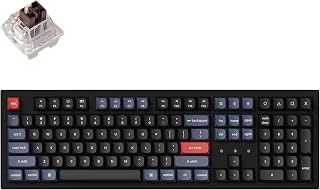
The Keychron K10 Pro is a premium full-size wireless mechanical keyboard engineered for professionals, creatives, and gamers who demand both performance and customization. Its 108-key layout preserves the numeric keypad while delivering a modern compact profile, making it versatile for office work, content creation, and competitive gaming alike.
The standout feature is its combination of hot-swappable MX switches, QMK/VIA programmability, and multi-device Bluetooth 5.1 connectivity. The pre-installed tactile brown switches offer responsive feedback with 50 million keystroke durability. Users can remap any key, create complex macros, and switch between three paired devices instantly, all while maintaining consistent performance whether wired or wireless at 1000 Hz polling rate.
Build quality justifies the investment. Sound-absorbing foam, thick silicone dampening pads, and a steel plate create a solid typing experience with controlled acoustics. The double-shot PBT keycaps resist shine and oil, while screw-in stabilizers on larger keys minimize wobble. The south-facing white backlight illuminates from the typist's perspective for optimal visibility without glare.
The 4000 mAh battery delivers up to 100 hours per charge at lowest brightness, addressing a critical pain point for wireless keyboards. The included keycap puller, switch puller, and cables support customization out of the box. One limitation is the bundled USB-C cable's short length, which some users find constraining for certain desk setups.
The Keychron K10 Pro represents a mature, well-thought-out mechanical keyboard that rewards customization enthusiasts and daily users alike. Its combination of wireless convenience, programmable depth, hot-swap flexibility, and reliable build quality makes it an investment piece worthy of keeping for years.
Physical Dimensions: 17.52 inches L x 5.43 inches W x 1.59 inches H
Key Specifications: 108 keys, full-size 100% layout, QWERTY, ambidextrous design
Switches: Pre-installed Keychron brown switches (tactile, hot-swappable with 3-pin and 5-pin MX alternatives)
Battery: 4000 mAh, up to 100 hours at lowest brightness setting
Connectivity: Broadcom Bluetooth 5.1 (up to 3 devices) and USB Type-C wired
Polling Rate: 1000 Hz (wired mode for competitive gaming)
Backlighting: South-facing white single-color LED
Keycaps: Double-shot PBT with concave profile
Stabilizers: PCB-mounted screw-in stabilizers on spacebar, shift, enter, delete
Programmability: QMK/VIA (remapping available in wired mode, keymaps work in both wireless and wired)
Compatibility: macOS, Windows, Linux
Included Accessories: Keycap puller, switch puller, Type-A to Type-C cable, screwdriver
Ideal For: This keyboard suits professionals working across multiple devices, competitive gamers prioritizing low latency, keyboard enthusiasts wanting unlimited customization, and anyone tired of replacing disposable keyboards. The multi-device switching appeals to mobile professionals and creatives managing Mac and Windows workflows simultaneously.
Professionals: The QMK/VIA programmability enables productivity shortcuts, application-specific key layouts, and accessibility customization. Wireless capability paired with Bluetooth switching reduces cable clutter on desks where multiple computers operate.
Gamers: The 1000 Hz polling rate, responsive tactile switches, and customizable macro support provide the precision and responsiveness competitive games demand. Hot-swappable compatibility lets gamers experiment with different switch characteristics without buying multiple keyboards.
Consider Alternatives If: You prefer quiet, low-profile keyboards or need extensive key customization without programming. Budget-conscious buyers may want the K8 Pro (numeric keypad omitted) or entry-level mechanical boards.

OmniPoint 3.0 magnetic switches offer adjustable actuation points, letting you set lighter presses for rapid autocomplete triggers or deeper travel for deliberate keystrokes during refactoring. The OLED screen displays system stats or custom macros without breaking focus, and PBT keycaps resist shine from oils during extended coding marathons. TKL layout frees up mouse space for precise debugging work while keeping arrow keys and function row intact for IDE navigation.
Pros
- Adjustable actuation from 0.1mm to 4.0mm prevents accidental keypresses
- Magnetic Hall Effect switches offer 20x faster actuation than traditional mechanical
- Aluminum construction and PBT keycaps ensure long-term durability
- Onboard memory saves configurations across multiple workstations
Cons
- Steep learning curve for mastering advanced customization options
- Gaming-focused presets provide limited value for coding workflows
Programming keyboards rarely need the aggressive features found in competitive gaming peripherals, but the SteelSeries Apex Pro TKL Gen 3 redefines what adjustable switches can offer developers. The OmniPoint 3.0 magnetic Hall Effect switches allow per-key actuation tuning from 0.1mm to 4.0mm, letting you set hair-trigger sensitivity for autocomplete acceptance while requiring deliberate presses for destructive commands like delete or deploy. This granular control reduces accidental keystrokes during rapid coding while maintaining responsiveness where it counts. The tenkeyless 84-key layout reclaims desk space for mouse movement and reference materials without sacrificing essential keys. Premium aluminum construction and double-shot PBT keycaps withstand years of heavy use, while triple-layer foam dampening and per-key lubrication produce satisfying acoustics in quiet offices. The integrated OLED display provides direct access to settings adjustments without leaving your IDE. All configurations save onboard, so customizations follow the keyboard between workstations. Per-key RGB with Prism Sync enables visual coding layer indicators. USB-C connectivity delivers modern reliability. While QuickSet gaming presets like Rapid Trigger offer limited value for development workflows, the underlying switch technology and build quality justify consideration. The steep learning curve for mastering customization options requires time investment, but the payoff in precision and comfort proves worthwhile for developers spending eight-plus hours daily at the keyboard.
Switch Technology: OmniPoint 3.0 analog magnetic Hall Effect switches with 40 adjustable actuation levels (0.1mm to 4.0mm) and 45g bottom-out force.
Performance Modes: Rapid Trigger for instant key reset, Rapid Tap for faster key prioritization, and Patent-pending Protection Mode to reduce accidental presses.
Display: Integrated OLED smart display for settings adjustment and media control without leaving gameplay.
Design: Compact tenkeyless (TKL) layout with 84 keys, aluminum top plate, double-shot PBT keycaps, triple-layer dampening foam, and per-key RGB illumination.
Connectivity: USB-C wired connection, Windows compatible, with onboard memory to save configurations.
Dimensions: 13.98 inches length and width by 1.7 inches height. Includes wrist support accessory.
This keyboard suits experienced programmers who want granular control over actuation points for different key functions and appreciate premium build quality. The adjustable magnetic switches appeal to developers curious about reducing accidental keystrokes during rapid typing. The tenkeyless layout works for coders prioritizing desk space over numpad access. Skip this if you need wireless connectivity, work with tight budgets, prefer plug-and-play simplicity over deep customization, or require the numpad for regular data entry. The learning curve may frustrate casual users.

SOLAKAKA KI99 Pro 96% Wireless Mechanical Keyboard
Pros
- Exceptional typing quality with smooth, creamy feel praised by reviewers across work and gaming use cases
- Reliable cross-device connectivity that pairs instantly via Bluetooth to Mac, PC, PS5, and smartphones
- Customizable RGB lighting with 16.8 million color options plus driver software for macro programming and key remapping
- Affordable entry point into quality mechanical keyboards with premium features typically found in higher-priced models
- Thoughtful design details like the adaptive media knob and compact 96% layout improve daily usability
Cons
- 96% layout omits certain keys like the End button, which may disrupt workflow for users accustomed to traditional full-size layouts
- Learning curve required to master knob mode switching and navigate compact key placement
- Battery-dependent wireless operation means occasional charging cycles, though 10,000mAh capacity minimizes frequency
The SOLAKAKA KI99 Pro is a compact 96% wireless mechanical keyboard designed for users who want full functionality in a space-conscious package. It's ideal for remote workers, competitive gamers, and anyone seeking a reliable mechanical keyboard that transitions easily between multiple devices without sacrificing performance or customization options.
The keyboard excels in typing quality, with reviewers consistently praising its smooth, creamy feel and satisfying keystroke response. The gasket structure combined with five layers of noise reduction creates a balanced acoustic profile that's pleasant without being distracting. Hot-swappable switches give you complete control over your tactile experience, while the responsive media knob intelligently switches between volume control in office mode and RGB adjustment in gaming mode, adapting to your workflow instantly.
Build quality impresses across the board. Dual-color PBT keycaps resist wear and fading after heavy use, maintaining crisp legends and vibrant colors. The plastic enclosure feels solid rather than cheap, and the metal knob adds a premium touch that justifies the mid-range price point. Battery life spans weeks between charges with typical use, and the 10,000mAh capacity ensures this keyboard stays powered through intense gaming marathons or full workdays.
The main tradeoff is the 96% layout, which eliminates certain dedicated keys like End that power users may rely on frequently. Some users may also find the compact arrangement requires an adjustment period. However, the ability to reprogram keys via driver software largely mitigates this limitation for those willing to customize.
The KI99 Pro delivers exceptional value for gamers and professionals seeking a wireless mechanical keyboard that combines customization, portability, and reliable performance. If you value smooth typing, multi-device flexibility, and customizable aesthetics at an accessible price, this keyboard belongs on your desk.
Connectivity: Bluetooth 5.0, 2.4GHz wireless, USB-C wired with 10-meter transmission range
Layout: 96% QWERTY with 99 keys, compact design optimized for desk space efficiency
Switches: Hot-swappable 3/5-pin, linear switches with pre-lubrication for smooth operation
Power: 10,000mAh rechargeable battery with extended usage time between charges
Lighting: Full-key RGB plus side light bars, 16.8 million color options, customizable via driver software or shortcut keys
Keycaps: PBT dual-color injection molded, wear-resistant with fade protection
Features: Media knob for volume and RGB control, gasket structure, five-layer noise reduction, metal accents
Compatibility: Windows 10+, macOS 10.12+, PlayStation 5, tablets, smartphones across gaming and productivity use
Dimensions: Compact 96% format with plastic enclosure
Best For: This keyboard suits remote workers juggling multiple devices, competitive gamers seeking customization, and anyone wanting premium mechanical keyboard quality without the full-size footprint or premium price tag.
Consider If You: Value smooth typing feel, need reliable cross-device connectivity, want customizable RGB lighting, and don't mind a compact layout in exchange for desk space savings. The hot-swappable switches appeal to enthusiasts who want to experiment with different tactile preferences.
Think Twice If You: Rely heavily on dedicated keys like End or Home that are consolidated into the 96% layout, prefer wired-only connectivity, or work extensively with legacy software requiring all traditional full-size keys. Heavy customization also requires patience learning the driver software.
Pro Tips: Reprogram the missing keys using the driver software to match your workflow. Toggle the media knob mode between gaming and office settings based on your current task. Turn off the keyboard when not in use to maximize battery life between charges.

Pros
- Exceptional typing feel with smooth, responsive keys that minimize fatigue during long work sessions
- Stable multi-device connectivity with zero lag or dropped connections across Mac, iPad, and iPhone
- Thoughtfully designed Mac-specific layout and Space Grey finish that complements Apple devices perfectly
- Customizable Smart Actions and Logi Options+ app provide powerful productivity shortcuts
- Solid build quality and weight prevent sliding, delivering a premium desktop experience
Cons
- Premium price point reflects the quality, making it a significant investment compared to standard wireless keyboards
- FileVault compatibility issues on macOS require optional USB receiver purchase for password entry at startup
- Backlighting on light-colored keys can create white-on-white visibility issues requiring manual adjustment
The Logitech MX Keys S for Mac is a premium wireless keyboard engineered specifically for Apple users who demand exceptional typing quality and seamless integration with their ecosystem. This keyboard is ideal for professionals, content creators, and power users who spend substantial time writing, coding, or managing communications across multiple Mac devices.
What sets this keyboard apart is its thoughtfully engineered typing experience. The spherically dished keys provide natural finger positioning and feedback, while the low-profile design maintains proper wrist alignment during extended use. Customer feedback consistently highlights the smooth, precise, and satisfying keystroke action, with many users noting it rivals or exceeds Apple's own Magic Keyboard. The intelligent backlighting system automatically illuminates as your hands approach and adjusts brightness based on ambient light, reducing eye strain without draining battery unnecessarily.
Build quality is immediately apparent from the moment you unbox this keyboard. The substantial weight and solid construction feel premium and business-grade, preventing the keyboard from shifting around your desk. The Space Grey finish and Mac-optimized key layout integrate seamlessly with modern Apple hardware. The inclusion of 26% recycled plastic demonstrates environmental responsibility without compromising durability or aesthetics. USB-C charging adds modern convenience, and the 10-day battery life means infrequent charging interruptions.
The primary drawbacks center on cost and compatibility edge cases. At this price point, it's a significant investment, though customers who have made the leap consistently report the expense justified by the quality and lifespan. FileVault users on older macOS versions may experience password entry issues at startup and need to purchase the optional Logi Bolt USB receiver. Additionally, the backlighting on the Space Grey model can occasionally make key legends difficult to read without software adjustments.
For Mac users seeking a keyboard that combines daily comfort with reliable performance and thoughtful feature integration, the MX Keys S delivers excellent value over its lifetime. The combination of premium typing feel, multi-device connectivity, and productivity-focused software makes this a standout choice in the wireless keyboard category.
Connectivity: Bluetooth Low Energy, compatible with up to 3 Apple devices simultaneously
Compatibility: macOS 13 Ventura and later, iPadOS 16 and later, iOS
Design: Low-profile full-size keyboard with 104 keys, spherically dished key design, 16.94in L x 5.18in W x 0.81in H
Power: Rechargeable Li-Po 1500 mAh battery with USB-C charging, approximately 10 days per charge
Build: Plastic construction with 26% post-consumer recycled content, Logitech Perfect Stroke mechanical switches
Features: Smart backlighting with automatic brightness adjustment, customizable Smart Actions via Logi Options+ app, device switching capability, 1-year limited hardware warranty
Best For: Mac Studio, MacBook Pro, MacBook Air, Mac Mini, and iPad users who prioritize typing comfort, multi-device connectivity, and productivity automation. Ideal for writers, developers, remote workers, and anyone spending 6+ hours daily typing.
Consider This Keyboard If: You want a premium alternative to Apple's Magic Keyboard with better typing feel, multi-device support, and customizable automation features. You value build quality and don't mind investing in a keyboard that will last years.
Look Elsewhere If: You need a budget wireless keyboard under $50, prefer compact or mechanical keyboard aesthetics, or require fingerprint unlock capability.
FileVault Users: If FileVault is enabled on your Mac, you may need the optional Logi Bolt USB Receiver to enter your password at startup or reboot when using Bluetooth connection.
Pairing with MX Master 3S: For ultimate productivity setup, pair this keyboard with the Logitech MX Master 3S for Mac mouse using Logi Options+ to enable seamless file and text transfer across three Apple devices.

Logitech MX Keys S Wireless Keyboard: Low-Profile
Pros
- Exceptional typing experience with spherically-dished keys that feel responsive yet quiet
- Multi-device pairing through Logi Options+ app enables seamless switching between computers
- Intelligent backlighting learns your usage patterns and adjusts brightness automatically
- Solid build quality with optimized angle for better wrist posture and comfort
- Fast USB-C charging with multi-month battery endurance between charges
Cons
- FileVault on macOS requires using the included Logi Bolt receiver instead of Bluetooth
- Smart Actions and advanced lighting features require Logi Options+ app installation
- Not water-resistant, so accidental spills pose a risk to the device
The Logitech MX Keys S is a premium wireless keyboard designed for professionals, remote workers, and anyone who values comfort during extended typing sessions. Its low-profile design mimics modern laptop keyboards while maintaining the stability and key travel of a full-sized keyboard, making it ideal for users transitioning between devices.
The standout features include intelligent backlighting that activates when your hands approach and adapts to ambient light conditions, plus the ability to pair with up to three devices simultaneously. Real-world performance is smooth and precise, with a quieter typing experience than traditional mechanical keyboards. The Smart Actions feature lets you automate repetitive workflows through the Logi Options+ app, which can significantly boost productivity for power users.
Build quality is solid throughout, with a thoughtful design that prioritizes ergonomics. The low-profile, angled approach is better for wrist posture than flat keyboards, and the 810g weight provides stability without bulk. The included USB-C cable charges fully in reasonable time, and battery endurance is genuinely impressive, lasting 10 days with lighting or 5 months without.
Main drawbacks include the dependency on Logi Options+ for full functionality, potential Bluetooth issues with macOS FileVault encryption, and zero water resistance. For those concerned about durability, the lack of spill protection is worth considering. The keyboard also cannot be used with other Logitech USB receivers, which limits flexibility if you have multiple Logitech devices.
Verdict: The MX Keys S is an excellent choice for multi-device users and professionals who want a comfortable, feature-rich keyboard without mechanical switch complexity. Its combination of design, battery life, and cross-platform support justifies the premium price for sustained daily use.
This keyboard is best suited for: Remote workers and office professionals juggling multiple computers, Mac and Windows users seeking cross-platform reliability, anyone spending 6+ hours daily typing, and professionals working in education, programming, or content creation. If you value silent typing, ergonomic design, and smart automation features, the MX Keys S is worth the investment.
It's less ideal for: Budget-conscious buyers, gaming-focused users seeking mechanical switches, or those needing water-resistant equipment. Casual users with single-device setups may also find its advanced features unnecessary.
Connectivity: Bluetooth Low Energy or Logi Bolt USB receiver, pairs up to 3 devices
Battery: Rechargeable Li-Po 1500 mAh, 10 days with backlighting or 5 months without
Compatibility: Windows, macOS, Linux, Chrome OS, iOS, iPadOS, Android
Layout: Full-size QWERTY, 104 keys, single-color backlighting
Dimensions: 430.2 x 131.63 x 20.5 mm, 810g weight
Features: Smart backlighting, customizable Smart Actions via Logi Options+, USB-C charging, 26% recycled plastic in Graphite finish
What's Included: MX Keys S keyboard, USB-C charging cable, Logi Bolt USB receiver

Pros
- Exceptional build quality with solid metal base and aluminum plate that minimizes flex and vibration
- MX2A Brown switches provide the perfect balance between tactile feedback and quiet operation
- Comfortable, responsive typing feel improves accuracy and speed compared to membrane keyboards
- Professional aesthetic with modern design that fits office and work-from-home environments
- Full-size layout with dedicated media controls and status LEDs for efficient workflow
Cons
- Not hot-swappable, so switch replacement requires soldering skills
- Limited color customization options beyond the bronze and black colorway
- Minimal tactile bump compared to some aftermarket switches, positioned mid-press rather than at top
The Cherry KC 200 MX is a full-size mechanical keyboard designed for professionals and typists who want genuine mechanical switches without the noise pollution of traditional clicky keyboards. This isn't a gaming-focused board packed with RGB lighting, but rather a refined, understated workhorse built for focused typing in office and professional settings.
What makes this keyboard stand out is the implementation of Cherry's improved MX2A Brown switches. These provide a noticeable tactile bump during keypresses, delivering satisfying feedback that rewards accurate typing while remaining significantly quieter than blue or green switches. Users consistently report that the switches feel smooth and responsive, with many noting an improvement in typing speed and accuracy after switching from membrane keyboards. The full N-key rollover and anti-ghosting ensure no missed inputs during rapid typing sessions.
Build quality is exceptional. The anodized metal plate and rigid aluminum base eliminate the flex and vibration common in budget keyboards. Keycaps are laser-etched and abrasion-resistant, meaning the legend markings won't fade or wear off after years of heavy daily use. The non-slip fold-out feet provide stable positioning on any desk surface. At 2 pounds, this keyboard feels substantial without being unwieldy.
The main limitation is inflexibility. Switches cannot be swapped without desoldering skills, and the software offers no key remapping or macro programming. Some users found the tactile bump less pronounced than expected, positioned mid-press rather than immediately upon key contact. The limited color options may not appeal to those seeking high customization.
This is an excellent choice for anyone upgrading from a membrane keyboard or seeking a mechanical alternative to loud gaming boards. Professional typists, programmers, and office workers will appreciate the balance of tactile feedback, durability, and quiet operation. At its price point, it offers solid value for a full-size keyboard from a respected mechanical keyboard manufacturer with proven reliability.
Switch Type: Cherry MX2A Brown tactile, rated for over 100 million actuations per key
Layout: Full-size QWERTY with 108 keys
Construction: Anodized metal plate with aluminum base, laser-etched abrasion-resistant keycaps
Connectivity: Wired USB-A connection
Dimensions: 16.93 inches length x 4.76 inches width x 1.54 inches height
Weight: 2 pounds
Features: Full N-key rollover, anti-ghosting, dedicated media controls, status LEDs for Caps Lock and Scroll Lock
Compatibility: Windows 10 and later, USB-A equipped devices
Warranty: 1 year manufacturer warranty
How to Choose the Right Programming Keyboard
Switch Type and Tactile Feedback
Switch choice is personal, but programmers tend to favor tactile or silent switches for all-day comfort. The HHKB – Happy Hacking Keyboard Professional Classic uses Topre Type-S electrostatic capacitive switches that deliver smooth tactile feedback with virtually no noise, making it a standout for open offices or late-night sessions.
If you prefer traditional MX-style switches, the Cherry KC 200 MX Wired Mechanical Office Keyboard ships with CHERRY MX2A Brown switches, rated for over 100 million actuations per key. Tactile without the click, they’re a reliable default for long coding days.
Layout and Desk Space
Layout affects how much you move your hands and how much desk space you free up for a mouse or notepad. The HHKB – Happy Hacking Keyboard Professional Classic uses a compact 60-key layout designed to minimize finger travel, keeping everything within a short reach. The AULA F75 Pro Wireless Mechanical Keyboard,75% Hot offers a 75% layout that retains arrow keys while staying compact.
For developers who rely on a numpad for data entry or number-heavy work, the Keychron K10 Pro Wireless Custom Mechanical delivers a full 100% layout with all function rows intact. The ASUS ROG Strix Scope II 96 Wireless Mechanical splits the difference at 96%, fitting a numpad into a frame only slightly wider than an 80% board. You can explore more compact options in our guide to the best low profile keyboards.
Wireless Connectivity and Battery Life
Programmers who work across multiple machines benefit enormously from multi-device wireless support. The Keychron K10 Pro Wireless Custom Mechanical connects to up to three devices via Bluetooth 5.1 and packs a 4000 mAh battery for up to 100 hours of use at low brightness. The SOLAKAKA KI99 Pro 96% Wireless Mechanical goes further with a 10,000 mAh battery, reducing how often you need to charge.
The Logitech MX Keys S Mac Wireless Keyboard Fluid and Logitech MX Keys S Wireless Keyboard Low Profile both support up to three devices via Bluetooth Low Energy, with the Mac variant optimized for Apple workflows through the Logi Options+ app. If you want to stay under a tighter budget while keeping wireless flexibility, our best keyboard under $100 has solid options worth comparing.
Programmability and Customization
Remapping keys and building macros is a major advantage for developers who want to optimize their workflow. The Keychron K10 Pro Wireless Custom Mechanical supports full QMK/VIA compatibility, letting you remap any key and create macro commands through a drag-and-drop interface without writing firmware code.
The SteelSeries Apex Pro TKL Gen 3 Gaming Keyboard takes customization further with OmniPoint 3.0 analog magnetic switches offering 40 adjustable actuation levels and an onboard OLED display for on-the-fly configuration. For those interested in the magnetic switch technology behind it, our best hall effect keyboard covers more options in that category.
Final Thoughts
The right programming keyboard depends on how and where you work. If silence and precision are your top priorities, the HHKB – Happy Hacking Keyboard Professional Classic is a premium choice that serious typists return to again and again. For developers who want flexible wireless connectivity, hot-swap freedom, and full key programmability across multiple operating systems, the Keychron K10 Pro Wireless Custom Mechanical delivers exceptional value in a well-built package.
Frequently Asked Questions
What type of keyboard switch is best for programming?
Tactile switches like the CHERRY MX2A Brown or Topre electrostatic capacitive variants are widely preferred for programming because they provide clear feedback without a loud click. That said, the best switch is the one that feels comfortable to you after hours of use. Linear switches work well for fast typists who want a smooth, uninterrupted keystroke.
Is a compact keyboard better for coding than a full-size layout?
Compact layouts like 60% or 75% reduce the distance your hand travels to reach the mouse, which can lower fatigue during long sessions. However, if your workflow involves frequent numpad use or you prefer having all function keys at a single keypress, a full-size or 96% layout like the Keychron K10 Pro or ASUS ROG Strix Scope II 96 may serve you better. It comes down to what your daily workflow actually demands.
Do I need a wireless keyboard for programming in 2026?
Wireless is a genuine quality-of-life upgrade if you work across multiple machines or want a cleaner desk setup. Modern keyboards like the AULA F75 Pro and SOLAKAKA KI99 Pro offer tri-mode connectivity with strong battery life, so latency and reliability are no longer concerns. That said, a wired keyboard like the Cherry KC 200 MX is perfectly capable and removes battery management from your routine entirely. For more wireless options at different price points, browse our Keyboards and Mice category.
What keyboard features matter most for long coding sessions?
Comfort, sound dampening, and key programmability are the three features that make the biggest difference over an eight-hour coding day. Sound-absorbing foam and gasket mounts, found on boards like the Logitech Alto Keys K98M and SOLAKAKA KI99 Pro, reduce vibration and noise fatigue. Ergonomic angles, PBT keycaps for a comfortable finger feel, and the ability to remap keys for your specific workflow round out what to look for in 2026.



Write Your Review
No reviews yet. Be the first to share your experience!