

Choosing the right keyboard feels overwhelming when every option looks similar on the surface. Logitech has built one of the most diverse lineups in the industry, covering everything from tournament-ready mechanical switches to cushioned ergonomic boards designed for eight-hour workdays. Whether you are upgrading your gaming rig, furnishing a home office, or trying to ease wrist strain, this guide walks you through the top Logitech keyboards available right now.
We evaluated each model based on switch type, build quality, connectivity, and the kind of user each one genuinely serves best. If you are also building out your desk setup, our roundup of the best vertical laptop stand options for a cleaner desk is worth a look alongside this guide.
Quick answer
This guide compares 10 picks, with Logitech MK270 Wireless Keyboard and Mouse Combo - Full ranked first.
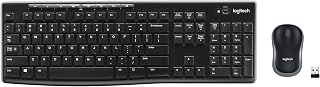
Logitech MK270 Wireless Keyboard and Mouse Combo
Households needing a reliable combo for everyday computing will find the full-size wireless layout familiar and comfortable, with linear switches offering smooth, consistent keystrokes for typing-heavy tasks. Since it works across laptops and PCs alike, it fits a shared family setup where multiple people use the same peripherals for browsing, schoolwork, or spreadsheets without any learning curve.
Pros
- 36-month keyboard battery life and 12-month mouse life
- Spill-resistant keyboard protects against common accidents
- Full-size layout with number pad for data entry
- Single USB receiver for both devices
Cons
- Plastic construction feels less premium
- Compact mouse may feel small for larger hands
Budget-conscious users building a dependable desk setup will find the MK270 combo delivers full-size functionality without compromise. The keyboard includes a complete number pad, F-keys, and arrow keys, making it a natural fit for spreadsheet work and data entry tasks where dedicated numeric input matters. Low-profile keys produce minimal noise, ideal for shared offices or home environments where others are nearby. Spill-resistant construction protects against common accidents like knocked-over coffee mugs. The single USB Nano Receiver eliminates dual-dongle hassle and maintains a reliable connection up to 33 feet, even in spaces with competing wireless signals. Battery performance is exceptional: 36 months for the keyboard on one AA battery and 12 months for the mouse on two AAA cells, with on/off switches to extend life further. The ambidextrous mouse works equally well for left and right-handed users. Tilt legs offer adjustable height for ergonomic positioning. Plastic construction feels functional rather than premium, and the compact mouse may feel small for users with larger hands.
This combo suits office workers, students, and home users prioritizing reliability and value over premium materials or advanced features. The full-size layout with number pad makes it particularly useful for finance, accounting, or data-heavy roles. Spill resistance adds peace of mind in busy environments. Skip it if you need metal construction, prefer larger mice, or work in environments with heavy wireless interference that might disrupt the 2.4 GHz connection.

Anyone outfitting a secondary or guest workstation will appreciate the optical movement detection on the paired mouse, giving accurate tracking for basic desktop use. Single-color backlighting adds visibility without complexity, and the wireless connection keeps cable clutter off a compact desk. This combo suits a straightforward personal computer setup where dependable, no-fuss performance matters more than extra features.
Pros
- Three-year keyboard battery life and 18-month mouse life
- Quiet operation ideal for calls and shared spaces
- Spill-resistant keyboard with integrated palm rest
- 10-meter wireless range with single USB receiver
Cons
- No keyboard backlighting for dim environments
- Right-handed-only mouse excludes left-handed users
Remote workers and students seeking wireless convenience with minimal maintenance will appreciate the MK345's industry-leading battery endurance. The keyboard runs up to three years on standard AA batteries, while the mouse lasts 18 months, drastically reducing the frequency of battery swaps compared to typical wireless peripherals. The 2.4 GHz connection provides a solid 10-meter range, giving you flexibility to position devices away from your PC tower or hub. Quiet operation makes this combo suitable for video calls, shared workspaces, or late-night sessions where noise discipline matters. The full-size keyboard includes an integrated palm rest and spill-resistant surface, practical for environments where beverages sit nearby. The right-handed mouse features contoured ergonomic shaping with optical tracking for reliable cursor movement. A single USB Nano Receiver handles both devices, freeing up ports. The keyboard lacks backlighting, so adequate ambient light is necessary. Optical mouse tracking may struggle on highly reflective or very dark surfaces without a mousepad. The right-handed-only mouse design limits accessibility for left-handed users.
Connectivity and Range: 2.4 GHz wireless with 10-meter operating range. Includes single USB-A Nano Receiver for plug-and-play compatibility.
Keyboard: Full-size 104-key QWERTY layout with palm rest, spill-resistant design, and integrated media keys. Battery life: up to 3 years on 2 AA batteries (included). Quiet key mechanism for distraction-free typing.
Mouse: Right-handed ergonomic design with optical tracking. Battery life: up to 18 months on 1 AA battery (included). Smooth scrolling and precise cursor control for navigation and productivity tasks.
Compatibility: Windows 10 and later, Chrome OS 134 and later, and macOS. Universal support across multiple operating systems ensures broad device compatibility.
Physical: Total weight 500g (41.6 ounces). Compact footprint suitable for various desk sizes and workspace configurations. Model: 920-006481. One-year limited hardware warranty included.
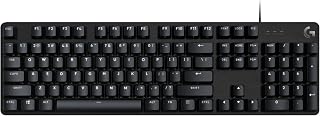
Budget-focused gamers building their first mechanical setup will appreciate the tactile switches here, giving crisp feedback for fast keypresses without the noise level of clicky variants. The single-color backlighting keeps the full-size layout visible in dim rooms during late-night sessions. USB 2.0 wired connectivity means zero input lag, a priority for anyone gaming competitively rather than typing casually.
Pros
- Tactile mechanical switches with durable PBT keycaps
- Aluminum-magnesium alloy top case resists flex
- 6-key rollover anti-ghosting for accurate input
- 12 function keys for media and lighting control
Cons
- Fixed white LED backlighting only
- No programmable macro support
For a Logitech setup that demands endurance and accuracy, the G413 SE strips away the gimmicks and focuses entirely on mechanical performance. Its tactile switches and PBT keycaps create a typing surface that holds up across marathon sessions, while 6-key rollover anti-ghosting handles simultaneous inputs without dropping commands. The aluminum-magnesium alloy top case resists flex under pressure, giving you a stable foundation whether you're gaming or typing long documents. White LED backlighting keeps things visible in dim conditions without the distraction of RGB cycling. The full-size layout includes 12 function keys for quick media and lighting control, and the wired USB 2.0 connection removes any concern about latency or battery life. This is a straightforward workhorse keyboard for anyone building a Logitech ecosystem around competitive gaming or productivity work. If your priority is reliable mechanical feedback and a clean aesthetic that matches most desktop setups, the G413 SE delivers exactly that without asking you to configure profiles or manage software for basic operation.
Key Specifications:
Switch Type: Tactile Mechanical
Keycaps: PBT (durable heat and wear-resistant)
Layout: Full-Size QWERTY with 108 keys
Connectivity: USB 2.0 Wired
Backlighting: Single Color White LED
Anti-Ghosting: 6-key rollover
Media Controls: 12 FN keys
Dimensions: 17.13 inches L x 1.97 inches W x 1.43 inches H
Weight: 780 grams
Enclosure: Brushed Aluminum-Magnesium Alloy
Compatibility: Windows and macOS
Warranty: 1 Year Limited Hardware
Model: G413 SE (Full-Size) or G413 TKL SE (Tenkeyless)
Buy this if you want a durable mechanical keyboard for long gaming sessions or heavy typing work and prefer simplicity over customization. It suits Logitech users building a no-nonsense setup focused on performance and consistent tactile feedback. Skip it if you need RGB lighting effects, programmable macros, or a compact form factor. The fixed white backlighting and lack of advanced remapping make it a poor fit for users who rely on custom key functions or want their peripherals to match complex lighting schemes.

Remote workers dealing with wrist or shoulder discomfort will benefit from the split ergonomic design and included wrist rest, which encourage a more natural hand angle during long typing sessions. Broad compatibility across Windows, macOS, Linux and Chrome OS makes it a fit for mixed-device home offices. Customizable display keys add shortcuts tailored to whatever workflow this setup demands.
Pros
- Curved split design reduces wrist bending by 25%
- Memory foam wrist rest integrated, no separate accessory needed
- Two-year battery life on included batteries
- Quiet keys suitable for shared workspaces
Cons
- 2 to 4 week adjustment period to rebuild typing muscle memory
- Wide footprint requires ample desk space
The K860 addresses the core challenge facing anyone building a health-focused workspace: maintaining comfort during extended typing sessions. Its curved split keyframe positions your hands at a natural angle, reducing wrist bending by 25% compared to flat keyboards. The integrated memory foam wrist rest provides constant cushioning without needing a separate accessory. Three adjustable tilt angles let you fine-tune the setup whether you're sitting or standing, making it adaptable across different desk configurations. Perfect Stroke keys deliver quiet, responsive feedback shaped to match natural fingertip contours. Dual connectivity through Bluetooth or the included USB receiver means you can pair it with multiple devices in your setup. Battery life extends to two years, eliminating frequent recharging interruptions. The substantial 2.6-pound build ensures stability during use. Construction incorporates 71% recycled plastic for those prioritizing sustainable gear choices. While the split layout demands an adjustment window of several weeks to rebuild muscle memory, users managing repetitive strain or carpal tunnel concerns report meaningful comfort gains that justify the learning curve.
Connectivity: Bluetooth and USB (includes USB receiver)
Compatibility: Windows 10+, macOS, Linux, Chrome OS, and select tablets
Layout: Full-size QWERTY with 105 keys, numeric keypad included
Power: 2 AAA batteries with 2-year battery life
Design: Curved split keyframe with ambidextrous layout, adjustable palm lift (0, -4, -7 degree angles)
Wrist Support: Pillowed memory foam wrist rest
Dimensions: 17.95 inches (L) x 9.17 inches (W) x 1.89 inches (H)
Weight: 2.6 pounds
Water Resistance: Waterproof rating
Additional Features: Customizable Fn keys via Logitech Options software, quiet keys, CAPS LOCK indicator
Warranty: Manufacturer warranty available through customer service
Buy this if you type for multiple hours daily and experience wrist discomfort, manage carpal tunnel or RSI issues, or want to prevent strain injuries before they develop. It suits professionals working across Windows, macOS, Linux, or Chrome OS who value long-term ergonomic investment. Skip it if you need immediate productivity without retraining time, require mechanical key feel, work in environments where the wide footprint won't fit your desk space, or prefer compact portable keyboards for frequent travel between locations.

Pros
- Full-size layout with dedicated numpad
- Quiet, deep-cushioned keys
- Bluetooth or Logi Bolt connectivity
- 24 programmable shortcut keys
Cons
- Integrated palm rest may feel minimal
- Not fully water resistant
For a desk that needs one dependable keyboard rather than a specialized gaming model, the Logitech Signature K650 covers the essentials of a full-size setup. Its QWERTY layout includes a dedicated numpad, while 24 programmable shortcut keys can streamline routine work. The design prioritizes long typing days: deep-cushioned keys, quiet operation, two adjustable tilt positions, and an integrated soft-touch palm rest all support a more comfortable workstation. Wireless flexibility is another reason it suits a broad range of PC setups. It connects through Bluetooth or the included Logi Bolt receiver, so it can fit into different device arrangements without a cable. The solid build and spill-resistant keycaps are practical for an everyday office or home desk. It is powered by two batteries, with battery life stated at up to 36 months for moderate use. This is a strong all-round Logitech option for writers, office workers, and general users who value quiet, comfortable productivity features over gaming-focused extras. The palm rest is integrated, though it may feel minimal to people wanting especially substantial support.
Connectivity: Bluetooth Low Energy wireless technology plus Logi Bolt USB receiver included
Compatibility: Windows, macOS, Chrome OS, Linux, iOS, iPadOS, Android
Layout: Full-size QWERTY with 104 keys, dedicated numpad, 24 programmable shortcut keys
Ergonomics: Integrated soft-touch wrist rest, adjustable feet with 2 tilt positions, deep-cushioned membrane keys
Power: 2 AA batteries (pre-installed), up to 36 months battery life
Durability: Spill-resistant design, easy-to-clean surface, includes 1-year limited hardware warranty
Dimensions: 18 inches L x 7.62 inches W x 0.96 inches H
Weight: 707.5 grams
Materials: Plastic enclosure with 28% post-consumer recycled content (Graphite model)
Choose the K650 if your setup is a PC workstation for documents, email, writing, or other daily tasks and you want a quiet full-size wireless keyboard with a numpad. It particularly suits people who prefer built-in comfort features, including a soft-touch palm rest and adjustable tilt, plus programmable shortcuts for repeated actions. Skip it if your priority is gaming-oriented features, if you need maximum wrist support for intensive sessions, or if you require a fully water-resistant keyboard. Heavy daily users should also account for shorter battery life than moderate use.

Pros
- Excellent build quality and durability with proven longevity reported across multiple customer experiences
- Responsive tactile keys provide satisfying feedback for both gaming and typing productivity
- Spill-resistant construction gives peace of mind for everyday use in various environments
- Wired USB connection eliminates battery concerns and ensures consistent, lag-free performance
- Affordable price delivers strong value for a full-featured gaming keyboard with RGB customization
Cons
- Non-standard key bottom design prevents replacement with aftermarket keycaps, limiting customization options
- Some users report occasional manufacturing quality inconsistencies across different production batches
- RGB backlighting does not illuminate during BIOS boot, which may matter to some enthusiasts
The Logitech G213 Prodigy is a full-sized wired gaming keyboard designed for players and productivity users who want responsive performance without premium pricing. Its spill-resistant construction and reliable build quality make it an excellent choice for everyday desk use, gaming sessions, and work environments where durability matters.
The standout feature is the responsive mech-dome key switch design, which delivers tactile feedback up to 4 times faster than standard keyboards. Combined with anti-ghosting technology that registers multiple simultaneous keypresses, the G213 handles competitive gaming demands well. The 5 customizable RGB lighting zones offer visual personalization, and the dedicated media controls provide convenient playback management without breaking immersion during gameplay.
Build quality is genuinely solid. The keyboard feels substantial without being bulky, the slim profile accommodates various desk setups, and the adjustable feet plus integrated palm rest support extended use. The spill-resistant materials handle accidental liquid exposure and everyday wear better than most keyboards in this price range, with many users reporting years of reliable service.
The main limitation is the proprietary key design, which prevents swapping in aftermarket keycaps if you want to customize the feel or sound. Some users also note occasional quality inconsistencies in certain production batches, though this appears less common than typical. The RGB does not illuminate during BIOS boot if that matters for your setup.
The G213 Prodigy represents strong value for gamers and professionals seeking a durable, responsive full-sized keyboard with modern RGB aesthetics. It delivers reliable gaming performance and comfortable typing without the premium cost of specialized mechanical switches.
Design and Layout: Full-sized 104-key QWERTY keyboard with ambidextrous design. Dimensions: 17.8 inches wide, 8.58 inches deep, 1.3 inches tall. Weight: 1000g. Slim profile optimized for gaming and productivity work.
Switches and Performance: Tactile mech-dome key switches with anti-ghosting gaming matrix. Key response up to 4 times faster than standard keyboards. Media controls for play, pause, mute, volume adjustment, and next track.
Lighting and Customization: 5 customizable RGB lighting zones with 16.8 million color options. LIGHTSYNC technology synchronizes effects with other compatible Logitech G devices. Customization via Logitech G HUB software includes lighting effects, game mode, and macro programming.
Build and Protection: Durable, spill-resistant materials resist liquids, crumbs, and dirt. Integrated palm rest with adjustable keyboard feet. Water-resistant construction for everyday use. Includes 2-year limited hardware warranty.
Connectivity: Wired USB connection. Compatible with Windows-based PCs. No batteries required. Model: G213, Part Number: 920-009284.

Pros
- Quiet, gentle keypresses create a pleasant typing experience without disturbing shared workspaces
- Memory foam wrist rest is soft enough to be comfortable without being too squishy or unstable
- Multi-device connectivity eliminates the need for multiple keyboards across work and personal setups
- Ergo-certified design tested by leading ergonomists provides credible health and comfort benefits
- Lightweight and compact form factor makes it portable and desk-space efficient
Cons
- Smaller and more compact layout compared to previous Logitech Wave models may require adjustment for users with muscle memory from larger keyboards
- Wave design is less aggressive than some premium ergonomic keyboards, making it a gentler adjustment rather than a dramatic posture correction
- Membrane switch technology lacks the tactile feedback and durability of mechanical alternatives
The Logitech Wave Keys is an ergonomic wireless keyboard designed for office professionals and remote workers who spend extended hours typing. Its ergonomic wave shape and memory foam palm rest make it particularly valuable for anyone experiencing wrist or arm strain, or those seeking preventative comfort measures for long-term desk work.
The keyboard excels at combining practical ergonomic benefits with real-world usability. The wavy key layout naturally positions your hands and wrists in a healthier typing posture without requiring a dramatic adjustment period. The cushioned palm rest provides meaningful support without feeling overly soft or unstable, and users consistently praise the quiet typing experience, which makes it ideal for shared office environments and quiet workspaces.
Build quality feels solid and well-engineered. The compact form factor saves valuable desk space compared to full-size keyboards while maintaining all essential keys and programmable shortcuts through the Logi Options+ app. The dual connectivity options, Bluetooth and Logi Bolt Receiver, give you flexibility, and Easy-Switch technology seamlessly connects three devices for effortless switching between work and personal equipment.
The main consideration is the learning curve if you are transitioning from a larger keyboard model. The compact layout places keys closer together, which may feel different initially though most users adapt within a few days. Additionally, this keyboard represents a moderate rather than aggressive ergonomic approach, meaning it provides helpful support without the steep learning curve of more specialized designs.
Overall, the Wave Keys offers excellent value for anyone seeking genuine ergonomic benefits without unnecessary complexity. With up to 3 years of battery life and sustainable materials construction, it represents a practical, durable solution for comfortable daily typing.
This keyboard is ideal for office workers, remote employees, and anyone who types for more than 4 hours daily. If you have experienced wrist pain, arm strain, or repetitive strain injury symptoms, this product offers preventative and therapeutic benefits without requiring professional ergonomic consultation.
The Easy-Switch multi-device connectivity makes it perfect for professionals who alternate between work and personal computers, eliminating the need for separate keyboards. The compact size benefits anyone with limited desk space or who values portability between home and office setups.
If you are accustomed to aggressive ergonomic designs or mechanical keyboards, consider that the Wave Keys offers a moderate approach with membrane switches rather than mechanical alternatives. It works best for people seeking comfort improvement within a familiar typing experience.

Competitive players who want tournament-grade responsiveness will want the clicky mechanical switches paired with a tenkeyless layout, freeing up desk space for wider mouse swings. RGB backlighting lets you customize zones for game cues or aesthetics. Wired connectivity eliminates any wireless latency concerns, making this the pick for anyone treating their keyboard as gaming gear first.
Pros
- Tenkeyless design maximizes mouse space and portability
- GX Blue clicky switches with audible and tactile feedback
- Detachable cable with secure three-pronged connector
- Onboard memory stores RGB profiles without software
Cons
- No numeric keypad for productivity work
- Windows-only compatibility
The G PRO Mechanical TKL represents Logitech's competitive gaming line at its most focused. Removing the numeric keypad opens up mouse space and reduces the keyboard's footprint for tournament travel or tight desk setups. GX Blue clicky switches provide audible and tactile confirmation for every press, giving you immediate feedback that your inputs registered during fast sequences. The detachable Micro USB cable with its three-pronged connector secures reliably for transport, while onboard memory stores your LIGHTSYNC RGB profiles so you can compete on any system without installing software. Aluminum and rubber construction balances portability with durability, and the 3-step angle adjustment lets you dial in your preferred typing position. Rubber feet keep the board planted during intense moments. At 2.2 pounds, this is a keyboard built to move between locations without compromising build quality. For Logitech users who compete, stream from multiple setups, or simply value desk space, the G PRO TKL prioritizes performance and portability over a full layout.
Physical Dimensions: 14.96 inches L x 6.3 inches W x 1.97 inches H, weighing 2.2 pounds
Switch Type: GX Blue Clicky mechanical switches with audible and tactile feedback
Layout: Tenkeyless (87 keys) QWERTY, ambidextrous hand orientation
Lighting: LIGHTSYNC RGB with 16.8 million color options, programmable with onboard memory storage
Connectivity: Wired via 1.8m detachable Micro USB cable with three-pronged connector
Compatibility: Windows 10 and later, PC only
Additional Features: 3-step angle adjustment, rubber feet for stability, F-key programmable macros (F1-F12), 2-year manufacturer warranty
Buy this if you compete in esports, travel to tournaments, or need maximum mouse space on a compact desk. It fits Logitech gamers who want pro-grade mechanical feedback in a portable package with tournament-ready features like onboard memory. Skip it if you rely on a numeric keypad for productivity tasks, need macOS compatibility, or share your space with others who find clicky switches too loud. This is a Windows-only keyboard designed for competitive play, not general office use.

Anyone splitting time between a laptop and desktop will value the dual Bluetooth and USB connectivity, letting one keyboard pair across multiple machines without extra dongles. Quiet typing switches suit shared offices or late-night work near sleeping family members. The lightweight, portable build fits a bag easily, making this the choice for a setup that travels between rooms or locations.
Pros
- Connects to three devices with instant switching
- Quiet membrane switches for shared environments
- 36-month battery life with minimal maintenance
- Built with 48% post-consumer recycled plastic
Cons
- No mechanical switch feedback
- Advanced shortcuts limited to Windows and macOS
When your Logitech setup spans a laptop, desktop, and tablet, the Signature Slim K950 handles the switching seamlessly. It pairs with up to three devices simultaneously via Bluetooth or the included Logi Bolt USB receiver, letting you jump between machines with a quick button press. The membrane switches produce remarkably quiet keystrokes, making this keyboard ideal for shared offices, libraries, or late-night work sessions where mechanical clatter would disturb others. Full-size layout with a number pad preserves traditional typing comfort, while customizable shortcuts through Logi Options+ automate repetitive tasks across Windows and macOS. At 685 grams, it remains light enough for frequent travel yet substantial enough to feel stable on your desk. Logitech built this with 48% certified post-consumer recycled plastic, addressing environmental concerns without sacrificing durability. The 36-month battery life removes charging anxiety entirely, a practical advantage for users tired of managing power cables. For Logitech ecosystems centered on quiet productivity across multiple devices, the K950 delivers wireless convenience and environmental responsibility in a slim, professional package.
Connectivity: Bluetooth, USB receiver (Logi Bolt included)
Keyboard Type: Membrane, full-size with number pad
Key Count: 108 keys
Layout: QWERTY, ambidextrous
Battery Life: Up to 36 months
Weight: 685g
Color: Graphite
Compatibility: Windows, macOS, Chrome OS, Linux, iPadOS, iOS, Android. Windows 11 minimum required.
Features: Multi-device switching (up to 3 devices), customizable shortcuts, quiet typing, 48% recycled plastic construction
Warranty: 1 year limited hardware warranty
Model: 920-012424
Buy this if you work across multiple devices daily and need silent typing in shared spaces or quiet environments. It suits Logitech users building a wireless productivity setup with long battery life and minimal desk clutter. Skip it if you prefer the tactile feedback of mechanical switches or need advanced customization on Chrome OS or Linux. The membrane switches and limited shortcut support outside Windows and macOS make it less versatile for mechanical keyboard enthusiasts or non-standard operating systems.

Logitech MX Keys S Wireless Keyboard: Low-Profile
Professionals typing for hours on a laptop will feel the difference in the low profile keys, which reduce finger travel and wrist strain across long documents or emails. Bluetooth connectivity keeps the desk cable free, and single-color backlighting helps in dim home offices. This suits a setup built around comfort and precision rather than gaming speed.
Pros
- Pairs with three devices and switches instantly
- Intelligent backlighting adapts to hands and ambient light
- Low-profile keys balance laptop feel with full-size stability
- Smart Actions automate repetitive tasks via Logi Options+
Cons
- No water resistance or spill protection
- Requires Logi Options+ for full functionality
For professionals juggling laptop and desktop workflows, the MX Keys S delivers seamless multi-device switching paired with the tactile precision Logitech's premium line is known for. The low-profile keys strike a rare balance between laptop-style travel and full-size stability, while intelligent backlighting adjusts to room conditions and activates as your hands approach. Pairing with up to three devices simultaneously means you can type on your work laptop, toggle to a personal desktop, then switch to a tablet without re-pairing. Smart Actions through Logi Options+ automate repetitive tasks, a productivity win for power users managing complex workflows. Battery endurance reaches 10 days with backlighting active or five months without, and the 810g weight keeps the board stable during fast typing. The angled low-profile design promotes better wrist posture than flat alternatives. Wireless connectivity is Bluetooth-only, so those preferring USB receivers will need to look elsewhere. Logi Options+ is required to unlock full functionality, and macOS users with FileVault encryption may encounter occasional Bluetooth hiccups.
Buy this if you frequently switch between a laptop, desktop, and tablet throughout the day and want a single premium keyboard that handles all three without fumbling through Bluetooth menus. The Smart Actions feature particularly benefits users automating repetitive workflows. Skip it if you need water resistance for environments prone to spills, prefer dedicated USB receiver connectivity over Bluetooth, or want mechanical switches. Left-handed users and those who dislike software dependencies for full functionality should also consider alternatives.
Connectivity: Bluetooth Low Energy or Logi Bolt USB receiver, pairs up to 3 devices
Battery: Rechargeable Li-Po 1500 mAh, 10 days with backlighting or 5 months without
Compatibility: Windows, macOS, Linux, Chrome OS, iOS, iPadOS, Android
Layout: Full-size QWERTY, 104 keys, single-color backlighting
Dimensions: 430.2 x 131.63 x 20.5 mm, 810g weight
Features: Smart backlighting, customizable Smart Actions via Logi Options+, USB-C charging, 26% recycled plastic in Graphite finish
What's Included: MX Keys S keyboard, USB-C charging cable, Logi Bolt USB receiver
Logitech Keyboard Buying Guide
Wired vs. Wireless Connectivity
If you prioritize zero-latency input, a wired board like the Logitech G213 Prodigy Wired RGB Gaming Keyboard keeps you fully in control with no signal interruptions. The detachable cable on the Logitech G PRO Mechanical TKL Tenkeyless adds portability without sacrificing that direct connection feel.
For desk setups where cable management is a headache, wireless options like the Logitech MX Keys S Wireless Keyboard Low Profile support both Bluetooth and Logi Bolt, giving you flexible connectivity across multiple devices. The Logitech MK270 Full Size Wireless Keyboard covers basic wireless needs with a reliable 2.4 GHz receiver at a very approachable entry point.
Switch Type and Typing Feel
Mechanical switches deliver a tactile or clicky response that typists and gamers tend to prefer for accuracy. The Logitech G PRO Mechanical TKL Tenkeyless uses GX Blue clicky switches with an audible bump on each keypress, which suits competitive players who want definitive feedback. The Logitech G413 SE Full-Size Mechanical goes with tactile switches instead, giving you the responsiveness without the louder click.
If you share a workspace or prefer quieter keys, membrane and low-profile boards like the Logitech Signature Slim K950 Wireless Keyboard and the Logitech MX Keys S Wireless Keyboard Low Profile offer a laptop-style feel that is noticeably quieter. These are well-suited for offices, libraries, or any shared environment where noise matters. For those building out a complete workstation, pairing a quiet keyboard with a solid monitor upgrade like one of the best 240Hz 1080p monitors can sharpen both comfort and performance.
Ergonomics and Long-Session Comfort
Anyone who types for hours at a stretch should take ergonomics seriously. The Logitech Ergo K860 Wireless Ergonomic Split uses a curved, split keyframe that reduces wrist bending and comes with a memory foam wrist rest built in. It has been certified by United States Ergonomics, which adds real credibility to its comfort claims.
For a gentler ergonomic step-up, the Logitech Wave Keys Ergonomic Wireless Keyboard uses a wave-shaped layout and a cushioned palm rest to ease wrist pressure without the steep learning curve of a fully split design. The Logitech Signature K650 Comfort Full-Size also includes an integrated soft-touch palm rest and deep-cushioned keys, making it a solid everyday option at a lower commitment level.
Form Factor: Full-Size vs. Tenkeyless
Full-size boards include a number pad and are ideal for data entry, spreadsheet work, or anyone who prefers a familiar traditional layout. The Logitech MK345 Full Size Wireless Keyboard and Logitech G413 SE Full-Size Mechanical both deliver complete layouts with everything you would expect in a standard setup.
Tenkeyless boards drop the number pad to reclaim desk space, which is especially valuable for gamers who need room to move their mouse. The Logitech G PRO Mechanical TKL Tenkeyless is purpose-built for this, compact enough to pack for LAN events while still delivering pro-level switch performance. If your desk setup also includes high-demand gaming peripherals, check out the best WiFi extender for gaming to keep your connection as sharp as your hardware.
Final Thoughts
Logitech covers an impressive range of needs, and the right choice depends on how and where you type. For competitive gaming with maximum desk space, Logitech G PRO Mechanical TKL Tenkeyless is the standout pick. For all-day office work with serious comfort built in, Logitech Ergo K860 Wireless Ergonomic Split delivers a genuinely ergonomist-approved experience that holds up over long sessions.
Frequently Asked Questions
What is the best Logitech keyboard for gaming in 2026?
The Logitech G PRO Mechanical TKL Tenkeyless is consistently rated among the top gaming keyboards Logitech offers, favored for its GX Blue clicky switches, compact TKL layout, and detachable cable that makes it easy to transport. The Logitech G413 SE Full-Size Mechanical is another strong contender if you prefer a full-size board with tactile switches and a brushed aluminum build. Both have been widely validated by competitive players and everyday gamers alike.
Are Logitech wireless keyboards reliable for everyday use?
Yes, Logitech’s 2.4 GHz and Logi Bolt wireless technology provides a stable connection with minimal input lag for standard productivity tasks. Models like the Logitech MX Keys S Wireless Keyboard Low Profile and the Logitech Signature Slim K950 Wireless Keyboard also support Bluetooth multi-device pairing, so you can switch between your computer, tablet, and phone with a single tap. Battery life across the lineup is generous, with several models rated for months of use on a single charge.
Which Logitech keyboard is best for wrist pain or ergonomic needs?
The Logitech Ergo K860 Wireless Ergonomic Split is the most fully featured ergonomic option, with a curved split layout and memory foam wrist rest that reduces wrist bending by a meaningful margin. If a split layout feels too unfamiliar, the Logitech Wave Keys Ergonomic Wireless Keyboard offers a gentler wave-shaped design that still promotes a natural hand position. Both models carry ergonomics certification, which gives them more credibility than boards that simply market themselves as comfortable. You might also find it helpful to pair an ergonomic keyboard with a vertical laptop stand to align your full workstation posture.
Do Logitech keyboards work with Mac and ChromeOS?
Most modern Logitech keyboards are designed to work across Windows, macOS, ChromeOS, Linux, iPadOS, iOS, and Android. The Logitech Signature K650 Comfort Full-Size and Logitech MK345 Full Size Wireless Keyboard both list broad platform compatibility in their specs. Gaming-focused boards like the G PRO TKL and G413 SE are primarily designed for Windows but function on macOS with some key remapping required through Logitech G HUB software.



Write Your Review
No reviews yet. Be the first to share your experience!