

Your laptop boots slowly, apps stall at launch, and large file transfers feel like they take forever. If that sounds familiar, your storage drive is almost certainly the bottleneck. Swapping in a modern M.2 NVMe SSD is one of the highest-impact upgrades you can make, and this guide covers the best M.2 SSD for laptop across every performance tier and use case in 2026. Whether you are a casual user, a creative professional, or a hardcore gamer, there is a drive on this list built for you. If you are also planning a broader system refresh, our roundup of the best GPU under $250 pairs well with a storage upgrade for a balanced performance boost.
We evaluated each drive on sequential read and write throughput, real-world responsiveness, thermal behavior, endurance ratings, and compatibility with mainstream laptop platforms. Every product below uses the standard M.2 2280 form factor, so fitment across most laptops is straightforward.
Quick answer
This guide compares 10 picks, with SanDisk Optimus 5100 500GB NVMe SSD PCIe 4.0 M.2 2280 ranked first. Samsung 990 EVO Plus 2TB NVMe SSD: 7,250 MB/s PCIe 4.0 holds the highest customer rating among them. Samsung 990 PRO 2TB PCIe 4.0 NVMe SSD, 7450 MB/s Read has the most customer reviews.

The 500GB capacity hits the sweet spot for mainstream laptop users who need room for Windows, core applications, and active project files without overspending on unused space. PCIe 4.0 x4 interface delivers transfer speeds that outpace older SATA drives by a wide margin, cutting boot times and load screens noticeably. The M.2 2280 form factor fits virtually every modern laptop with an available slot, and the power-efficient architecture helps preserve battery life during mobile use.
Pros
- PCIe 4.0 speeds up to 6,600MB/s deliver a dramatic improvement over SATA-based laptop drives
- Power-efficient architecture keeps thermals low and supports longer laptop battery life
- Ultra-slim M.2 2280 form factor fits standard laptop slots with no extra hardware needed
- 5-year warranty backed by proven BiCS QLC architecture for long-term reliability
Cons
- 500GB fills quickly for users who store 4K footage or large game libraries on the drive
- Write speeds trail read speeds more noticeably compared to premium NVMe alternatives
Laptop upgrades rarely demand the absolute fastest storage, and the SanDisk Optimus 5100 hits a sweet spot that makes a lot of sense in that context. Its M.2 2280 form factor slides into virtually any modern laptop slot, and at just 5.7 grams it adds no meaningful weight to the system. The PCIe 4.0 interface pushes sequential reads to 6,600MB/s on the 500GB model, which is a dramatic leap over the SATA SSDs and spinning hard drives still found in many budget and mid-range laptops. Day-to-day benefits are tangible: faster boot times, near-instant application launches, and smooth multitasking during everyday workloads. The power-efficient architecture is a genuine advantage here, keeping heat low enough that a heatsink is unnecessary in most laptop chassis and helping to preserve battery runtime. nCache 4.0 technology keeps performance steady through sustained workloads rather than spiking only during benchmarks. The 5-year warranty adds confidence for a drive intended to stay inside a laptop for years. The 500GB ceiling is the main consideration for laptop users who store large media libraries locally.
Speed Performance: PCIe 4.0 interface, up to 7,100MB/s read (1TB/2TB models), 6,600MB/s read (500GB model), up to 6,700MB/s write across most capacities.
Capacity and Storage: Available in 500GB, 1TB, 2TB, and 4TB options. The 500GB model provides 460GB of usable space after OS allocation.
Endurance and Reliability: Up to 1,200 TBW on the 4TB model. 5-year limited warranty covers defects and failures. BiCS QLC 3D NAND technology ensures proven long-term stability.
Power and Thermals: Power-efficient architecture reduces heat generation. Stays cool under load without active cooling in most systems, extending laptop battery life during mobile work.
A good fit for laptop owners upgrading from SATA SSDs or mechanical drives who want a meaningful speed jump without overspending. Works well for students, remote workers, and casual gamers whose storage needs stay under 500GB. Skip it if you regularly carry large video projects or game libraries locally, as the capacity will feel limiting quickly, and heavier creative workloads may benefit from a higher-capacity drive.

The next-gen TLC 3D NAND paired with 7250 MB/s reads and 6900 MB/s writes provides balanced performance for laptops handling frequent read-write workloads like video editing or database tasks. Explicit compatibility with handheld gaming devices confirms the drive works reliably in compact, thermally constrained laptop-style enclosures beyond traditional clamshell designs.
Pros
- Up to 7,250MB/s read and 6,900MB/s write speeds deliver fast boot times and quick game loading on laptops
- Runs 100% more efficiently than its predecessor, preserving battery life in ultraportable systems
- TLC 3D NAND offers superior long-term durability compared to QLC alternatives
- M.2 2280 form factor fits standard laptop slots with no additional hardware required
Cons
- Under extreme sustained workloads temperatures can reach 59C and speeds may drop to around 4,500MB/s
- Not the top choice for users who regularly perform heavy, prolonged sequential file transfers from their laptop
The WD_BLACK SN7100 was designed with laptops and handheld gaming devices explicitly in mind, and that focus shows throughout its feature set. Sequential read speeds reach 7,250MB/s and writes hit 6,900MB/s over PCIe Gen4, which translates directly to Windows 11 boot times in the five-to-six-second range and sharp reductions in game load screens compared to older SATA drives. The TLC 3D NAND architecture gives it a durability edge over QLC-based alternatives at similar price points, which matters for a drive expected to handle years of daily laptop use. Where it stands apart from many fast drives is power consumption: the SN7100 operates 100% more efficiently than its predecessor, running cool in the compact, thermally constrained environment inside a laptop chassis without requiring airflow assistance. Random 4K IOPS performance is strong, keeping file-heavy tasks like software development and content creation responsive. The standard M.2 2280 form factor slots into any compatible laptop without adapters. Under extreme sustained sequential workloads temperatures can climb to around 59C and throughput may settle near 4,500MB/s, though typical laptop gaming and productivity workloads stay well within comfortable limits.
Storage Capacity: 1TB
Interface: PCIe Gen4 NVMe
Form Factor: M.2 2280
Read Speed: Up to 7,250 MB/s
Write Speed: Up to 6,900 MB/s
Memory Type: TLC 3D NAND
Dimensions: 3.14in L x 0.86in W x 0.04in Th
Weight: 4.54g
Warranty: 3-Year Limited
Compatible Devices: Laptops, Gaming Handhelds, Desktops (Windows/x86 systems)
A strong match for laptop gamers, ultraportable users, and anyone replacing a slow OEM drive who wants Gen4 performance without sacrificing battery life or running hot in a tight chassis. Also suits developers and creators handling moderate file workloads. Skip it if your primary use involves prolonged large sequential transfers, such as continuous 4K rendering, where sustained thermal limits may become a recurring constraint.

The single-sided design makes this drive ideal for laptops with tight internal clearances, where double-sided modules might not fit or could interfere with cooling. Sequential reads up to 7400 MB/s ensure fast boot times and application launches, while the 2TB capacity provides ample room for a professional workflow or game library without constant storage management.
Pros
- Single-sided build fits tight laptop compartments easily
- Low power draw extends battery life during portable use
- 7400MB/s reads eliminate Gen 3 bottlenecks
- Five-year warranty and solid endurance rating
Cons
- Write speeds drop after SLC cache fills on sustained transfers
- No onboard DRAM limits performance in write-heavy professional scenarios
Laptop owners shopping for a Gen 4 upgrade will find the Lexar NM790 2TB checks every practical box. Its single-sided M.2 2280 design slips into space-constrained notebook chassis without clearance drama, while the 7400MB/s read and 6500MB/s write speeds deliver meaningful gains over aging Gen 3 hardware. Host Memory Buffer 3.0 keeps power draw low and thermals manageable, critical advantages in laptops where cooling headroom is tight. That efficiency matters during unplugged work sessions, and the lack of onboard DRAM means one less heat source competing with your CPU. Game installs complete faster, creative apps load project files without delay, and everyday multitasking feels noticeably snappier. The 1500 TBW endurance rating and five-year warranty suggest this drive will outlast most upgrade cycles. Sustained heavy writes will eventually slow once the SLC cache saturates, but typical laptop workloads rarely push that boundary. For students editing video projects, remote workers juggling large datasets, or gamers tired of waiting through load screens, the NM790 delivers flagship-class speed without the power penalty or expense of DRAM-equipped competitors.
Perfect for laptop users upgrading from Gen 3 SSDs who need modern performance without excessive heat or power consumption. Content creators working with 4K footage, gamers prioritizing fast loading, and productivity users managing large file libraries will all benefit from the speed boost and efficient design. Skip it if you regularly perform sustained heavy writes like large database operations or 24/7 server workloads, where drives with dedicated DRAM and higher endurance ratings prove more reliable over time.
Capacity: 2TB
Interface: NVMe M.2 2280
Protocol: PCIe Gen 4x4
Read Speed: Up to 7400 MB/s
Write Speed: Up to 6500 MB/s
Endurance: 1500 TBW
NAND: TLC Flash
Form Factor: M.2 2280 (single-sided)
Compatibility: Desktop, Laptop, PlayStation 5
Warranty: 5-year limited

Sequential reads up to 7250 MB/s deliver fast performance for laptops running demanding applications, from video editing to large game libraries. Backward compatibility ensures the drive works in older Gen3 systems while still providing Gen4 speeds when the laptop supports it, making it a versatile upgrade for various portable machines.
Pros
- Exceptional real-world performance: users report Windows boot times dropping from 25 seconds to under 8 seconds
- Superior thermal management with minimal power draw ideal for laptops and compact systems
- Reliable and durable with a proven track record of Samsung SSD longevity
- Comprehensive software suite keeps your drive optimized with automatic updates and encryption features
- Excellent value with 2TB capacity at competitive pricing and strong 4.8 out of 5 star rating from thousands of verified users
Cons
- Requires PCIe 4.0 or 5.0 compatible system to achieve advertised speeds, older systems limited to slower performance
- Heat sink not included in package, high-heat installations may benefit from aftermarket thermal solutions
- Premium pricing compared to entry-level NVMe drives, though justified by performance and reliability
The Samsung 990 EVO Plus 2TB is a high-performance NVMe SSD designed for gamers, content creators, and professionals who demand speed without compromise. This drive combines cutting-edge NAND technology with intelligent power management to deliver up to 7,250 MB/s read speeds while maintaining cool operating temperatures. It's the ideal choice for anyone upgrading a dated SATA drive or building a high-end system that won't bottleneck their processor or GPU.
Real-world performance is where this drive truly shines. Users report dramatic improvements in everyday computing, with Windows boot times cutting from 25 seconds to under 8 seconds after installation. Game load times improve dramatically thanks to the sustained performance delivered by Intelligent TurboWrite 2.0, which prevents the speed degradation common with cheaper SSDs during large file transfers. The drive supports both PCIe 4.0x4 and PCIe 5.0x2 interfaces, making it compatible with virtually any modern system and future-proof for upcoming platforms.
Build quality and thermal management are exceptional standouts. The nickel-coated controller delivers a 73 percent improvement in power efficiency compared to standard designs, meaning the drive consumes less electricity while running cooler than competitors. Users consistently report operating temperatures between 30 and 50 degrees Celsius even under sustained workloads, eliminating thermal throttling that plagues lesser drives. The drive's durability is backed by a comprehensive 5-year warranty, reflecting Samsung's confidence in longevity.
The main considerations are system compatibility and thermal solutions. You'll need a PCIe 4.0 or 5.0 capable motherboard and BIOS support to unlock the full 7,250 MB/s speeds. While the drive runs cool by default, systems with limited ventilation or multiple high-heat components nearby may benefit from an aftermarket heatsink, which is not included. The premium pricing is higher than entry-level NVMe options, but the performance gains and reliability justify the investment.
The Samsung 990 EVO Plus 2TB is a top-tier storage solution that delivers on its performance promises with exceptional real-world results. With its combination of speed, efficiency, reliability, and comprehensive software support, it's the right choice for users who refuse to compromise on storage performance.
Storage and Interface: 2TB capacity, NVMe M.2 2280 form factor, PCIe Gen 4x4 and Gen 5x2 compatible
Performance: Sequential read speeds up to 7,250 MB/s, sequential write speeds up to 6,300 MB/s, random access optimized
Power and Thermal: Nickel-coated controller with 73% improved power efficiency, typical operating temperature 30-50 degrees Celsius
Compatibility: Desktop and laptop systems, backward compatible with legacy systems, forward compatible with PCIe 5.0 slots, PlayStation 5 compatible
Reliability: 1,200 TBW write endurance rating, 5-year manufacturer warranty, Samsung Magician software suite included
Gamers: Experience dramatically faster game loading and OS boot times. The sustained performance prevents stuttering during intense sessions with high-speed asset streaming.
Content Creators: Handle 4K video projects, large photo libraries, and real-time rendering with the fast sequential and random access this drive provides.
Professionals: Perfect for software developers, data analysts, and engineers working with large datasets who need reliable, fast storage with industry-leading warranty coverage.
System Builders: Ideal primary storage for new high-end systems where backward and forward compatibility ensure investment protection through multiple hardware generations.

Sequential reads up to 7100 MB/s provide strong Gen4 performance for laptops handling content creation or gaming workloads. The included Acronis data recovery software adds a safety net for users who rely on their laptop as a primary machine, offering peace of mind against accidental file loss without additional software purchases.
Pros
- Exceptional read and write speeds of 7,100MB/s and 6,000MB/s deliver snappy performance for gaming and productivity
- Excellent compatibility across desktops, laptops, and popular gaming handhelds makes it universally useful
- Affordable pricing for Gen4 performance, offering strong value compared to competing drives
- Includes valuable Acronis software bundle for data migration and backup without extra cost
- Reliable Crucial brand backing with 5-year warranty coverage and proven track record
Cons
- 1TB capacity may require careful management for users with large game libraries or professional video projects
- No heatspreader included, which could impact thermal performance in sustained high-speed workloads on some systems
The Crucial P310 is a PCIe Gen4 NVMe SSD designed for gamers, content creators, and everyday PC users who want faster storage without paying flagship prices. Its 1TB capacity provides ample room for modern AAA titles, creative applications, and personal media while delivering significant performance gains over older storage technology.
Performance is the P310's strongest point, with sequential read speeds hitting 7,100MB/s and write speeds reaching 6,000MB/s. In real-world use, this means faster game load times, quicker application launches in Photoshop or Excel, and snappier system responsiveness overall. Compared to PCIe Gen3 drives, you're looking at roughly double the speed for demanding workloads, which makes a noticeable difference when transferring large files or booting your system.
The drive's broad compatibility is a major advantage. Beyond standard desktop and laptop installations, it officially supports gaming handhelds including the ROG Ally X, Lenovo Legion Go, AYANEO Kun, and Steam Deck. It's also backward compatible with PCIe Gen3 motherboards, so you're not locked into the latest hardware. The compact 2280 M.2 form factor fits virtually any modern system, and installation takes just a few minutes.
Build quality is solid thanks to Crucial's G8 NAND technology and thermal design that balances speed with power efficiency and heat management. The included Acronis True Image software adds genuine value, letting you clone your existing drive or back up your system without purchasing additional tools. Crucial backs it all with a 5-year limited warranty, reinforcing their confidence in the product.
The main consideration is that 1TB may feel tight if you have a massive game library or work with large video files regularly. Additionally, there's no included heatspreader, so thermal performance depends on your system's airflow and whether your motherboard includes a built-in thermal pad. For most users, these aren't dealbreakers, and the P310 represents smart value for anyone upgrading to Gen4 performance.
Capacity: 1TB
Form Factor: M.2 2280
Interface: PCIe Gen4 x4 NVMe
Read Speed: Up to 7,100MB/s
Write Speed: Up to 6,000MB/s
NAND Type: G8
Weight: 10g
Dimensions: 3.15 inch length, 0.86 inch width, 0.09 inch thickness
Compatibility: PCIe Gen4 and Gen3 systems (backward compatible), ROG Ally X, Lenovo Legion Go, AYANEO Kun, Steam Deck, desktops, and laptops
Warranty: 5-year limited warranty
Included Software: Acronis True Image, 1 month Adobe Creative Cloud All-Apps trial, Crucial Storage Executive
Best For: Gamers upgrading from older drives, content creators needing reliable fast storage, laptop users seeking responsiveness, and handheld console owners wanting more game space.
Consider If: You have a system with PCIe Gen4 support or need backward compatibility with older PCIe Gen3 systems, you want Crucial's trusted brand and warranty coverage, or you value the included Acronis backup software.
Skip If: You need a drive with built-in heatspreader for extreme overclocking scenarios, require capacities larger than 1TB for massive libraries, or are exclusively looking for budget-tier storage without performance prioritized.
Installation Tip: Power down your system, locate your M.2 slot, insert the drive at a 30-degree angle, and secure it with the provided screw. Installation takes under five minutes and requires no technical expertise.

The PCIe 5.0x4 interface and 14,700 MB/s read speed make this the fastest option for laptops with Gen5 support, future-proofing the system for next-generation workloads. Hardware encryption protects sensitive data without performance penalties, a critical feature for professionals who carry confidential files on portable systems requiring both speed and security.
Pros
- PCIe 5.0 interface delivers up to 14,700MB/s reads, roughly twice the speed of Gen4 drives
- 5nm controller achieves 49% better power efficiency than its predecessor, beneficial in laptop environments
- In-house DRAM, NAND, and controller manufacturing supports consistent, reliable long-term performance
- Hardware encryption and advanced thermal control suit professional and security-conscious laptop users
Cons
- Requires a PCIe 5.0-compatible laptop slot; older machines cannot access the drive's full speed potential
- Speed advantage over Gen4 drives is minimal during everyday tasks like browsing or document editing
Most laptops shipping today run PCIe 4.0 storage, which makes the Samsung 9100 PRO a forward-looking choice aimed squarely at users with PCIe 5.0-capable machines. For those laptops, the numbers are remarkable: sequential reads reach 14,700MB/s and writes hit 13,300MB/s, roughly double what a Gen4 drive can deliver. That gap becomes tangible when moving large project files, loading AI workloads, or editing high-resolution video directly from the drive. The 5nm controller brings a 49% improvement in power efficiency over its predecessor, which matters in a laptop where thermal headroom is limited. The built-in heatspreader and advanced thermal control help sustain those peak speeds under load without relying on a bulky external heatsink. Random access performance, at 1,850K read IOPS and 2,600K write IOPS, keeps multitasking fluid even under demanding conditions. Hardware encryption support adds a layer of security relevant to professional users. Samsung manufactures the DRAM, NAND, and controller in-house, which contributes to the consistency and reliability the brand is known for. The standard M.2 2280 form factor ensures physical compatibility is straightforward.
Interface: PCIe 5.0 x4 NVMe
Form Factor: M.2 2280
Capacity: 1TB (also available in 2TB, 4TB, 8TB)
Sequential Read Speed: Up to 14,700MB/s
Sequential Write Speed: Up to 13,300MB/s
Random Read IOPS: Up to 1,850K
Random Write IOPS: Up to 2,600K
Controller: 5nm Samsung proprietary controller
Security: Hardware encryption
Compatible Devices: Desktop PCs, Laptops (with PCIe 5.0 support)
Color: Black
Software: Samsung Magician with automatic firmware updates and drive health monitoring
Ideal for laptop power users running PCIe 5.0-compatible hardware who work with large files daily, including video editors, software developers, and AI practitioners. Samsung Magician software adds useful management capabilities for long-term ownership. Skip it if your laptop only supports PCIe 4.0 or earlier, as the speed advantage disappears entirely, and the premium positions it firmly outside the value-focused buyer's range.

With sequential reads reaching 7450 MB/s, this drive delivers some of the fastest Gen 4 performance available for laptops that demand rapid file access and minimal load times. The 9.8 ft drop resistance and dust protection add durability for portable systems that face more physical stress than desktops, making it a reliable choice for mobile professionals.
Pros
- 7450MB/s reads maximize PCIe 4.0 laptop performance
- 55% random performance boost accelerates real-world tasks
- Smart thermal control prevents throttling in tight laptop spaces
- Military-grade durability suits mobile professional use
Cons
- Premium pricing demands careful budget consideration
- Requires PCIe 4.0 slot to achieve rated speeds
Laptop power users demanding absolute peak performance will find the Samsung 990 PRO 2TB delivers on every front. This PCIe 4.0 drive hits 7450MB/s sequential reads, extracting every available drop of bandwidth from modern notebook platforms. The 55% random performance improvement over the previous generation means file operations, application launches, and multitasking scenarios all feel instantaneously responsive. Intelligent Turbo Write maintains consistent speed during extended transfers, addressing the common complaint where competing drives slow to a crawl once their cache fills. Samsung's smart thermal control manages heat without throttling, essential in laptops where airflow is limited and sustained workloads can quickly overwhelm passive cooling. The military-grade durability features, including drop resistance and environmental sealing, add peace of mind for mobile professionals. At 9 grams and using the standard 2280 form factor, installation is straightforward in any compatible notebook. The five-year warranty reflects Samsung's confidence in longevity under demanding use. You need a PCIe 4.0 slot to unlock full potential, so older laptops will bottleneck performance significantly, but for compatible systems this represents the fastest consumer option available.
Speed: Sequential Read 7,450 MB/s, Sequential Write 6,900 MB/s, significant random performance improvements over 980 PRO
Interface: PCIe 4.0 NVMe, M.2 2280 form factor, requires PCIe 4.0 slot on motherboard
Efficiency: 1,380 MB/Read per watt and 1,319 MB/Write per watt, representing 50% improvement in power efficiency over previous generation
Durability: 9.8-foot drop resistance, water and dust resistant, 5-year manufacturer warranty
Compatibility: Windows and MacOS systems, verified compatibility with PlayStation 5, works in any PCIe 4.0 compatible desktop or laptop
Ideal for professionals running demanding creative workflows on mobile workstations, competitive gamers who travel with high-end gaming laptops, and data scientists processing large datasets on the go. Anyone with a PCIe 4.0 laptop who needs maximum speed and refuses to compromise on reliability should consider this drive. Skip it if your laptop only supports PCIe 3.0, where you'll pay a premium for speed you cannot access, or if budget constraints make more affordable Gen 4 alternatives more practical for everyday tasks.
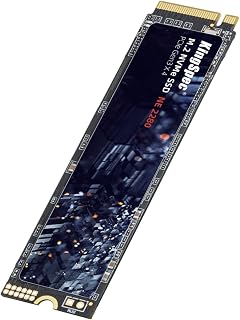
Pros
- Excellent read speed of 2400MB/s significantly improves boot times and file transfer performance
- 3D NAND technology provides better reliability and longevity compared to standard NAND
- Broad OS compatibility makes it versatile for Windows, Linux, and enterprise environments
- Strong warranty coverage with 3-year protection and lifetime technical support
- Advanced data protection features including ECC and wear leveling extend drive lifespan
Cons
- No customer reviews available yet, making real-world performance validation difficult
- Write speed of 2200MB/s is noticeably slower than the 2400MB/s read speed
- Limited information about long-term reliability and failure rates compared to established brands
The KingSpec 512GB M.2 NVMe SSD is an internal storage solution designed for users upgrading their desktop or laptop systems. It targets PC builders, gamers, content creators, and business users who need dependable storage without premium pricing. The 2280 form factor fits standard M.2 slots found in most modern computers from the past five years.
Performance is this drive's main strength. The NVMe Gen3x4 interface delivers 2400MB/s read speeds, making application launches and file operations noticeably faster than SATA SSDs. The 3D NAND TLC/QLC Flash technology works with a quality main controller to maintain consistent speeds during sustained workloads. Integrated features like garbage collection and wear leveling keep performance stable over extended use.
Build quality appears solid with enterprise-grade data protection features including S.M.A.R.T monitoring, TRIM, LDPC ECC, and end-to-end error checking. These technologies work together to prevent data loss and extend the drive's operational lifespan. The drive has undergone testing to ensure reliability in both business and consumer environments.
One consideration is the lack of customer reviews, which means real-world long-term performance data is unavailable. Additionally, write speeds of 2200MB/s lag behind read speeds, which may impact tasks involving large file creation. For users primarily reading and accessing data, this is less of a concern.
The KingSpec 512GB NVMe SSD is a practical choice for PC upgrades, gaming rigs, and workstations needing faster storage. The 3-year warranty and lifetime support provide confidence, making it a solid value for budget-conscious upgrades.
Storage Capacity: 512GB
Form Factor: M.2 2280
Interface: NVMe Gen3x4 (PCIe 3.0)
Read Speed: Up to 2400MB/s
Write Speed: Up to 2200MB/s
Memory Technology: 3D NAND Flash (TLC/QLC)
Supported OS: Windows 7, Windows 8, Windows 10, RHEL, CentOS, Linux, Ubuntu
Features: S.M.A.R.T, TRIM, Wear Leveling, Garbage Collection, Native Command Queuing, LDPC ECC, E2E Data Protection
Compatibility: Desktop and Laptop computers with M.2 NVMe slots
Warranty: 3 Years (with Lifetime Technical Support)

The included heatsink helps dissipate heat in laptops with limited airflow, preventing thermal throttling during sustained workloads like game installations or large file transfers. Sequential reads up to 7350 MB/s ensure fast access times, while Gen4x4 PCIe support maximizes bandwidth on modern laptops without requiring the latest Gen5 hardware.
Pros
- 7350MB/s reads compete with premium drives
- Included heatsink prevents thermal throttling in laptops
- Backward compatible with wide range of systems
- 1TB capacity handles operating system plus games or projects
Cons
- Limited capacity may require external storage for large libraries
- Endurance specifications and warranty details not prominently detailed
Budget-conscious laptop owners seeking Gen 4 speeds will find the SIX NVME 1TB delivers surprisingly capable performance at an accessible entry point. The 7350MB/s read speed puts it firmly in flagship territory, providing a substantial upgrade path from older SATA or Gen 3 hardware without stretching budgets. That included heatsink matters in laptops, where thermal throttling can cripple performance during sustained workloads. The 2280 form factor and backward compatibility ensure straightforward installation across a wide range of notebook models, from ultraportables to gaming rigs. Gen4x4 PCIe interface means modern laptops can fully exploit the available bandwidth, making game launches, file transfers, and application loading noticeably faster. The 1TB capacity strikes a practical balance for users who need room for their operating system, core applications, and a modest game library or creative project archive. PS5 compatibility adds versatility for users who want one drive for their laptop upgrade and another for console expansion later. While the specifications lack detailed endurance ratings or warranty terms commonly published by established brands, the core performance metrics suggest this drive handles typical laptop workloads without issue.
Storage and Interface: 1TB capacity, M.2 2280 form factor, PCIe Gen4x4 interface with up to 7350MB/s read speeds.
Compatibility: Desktop, laptop, and PS5 gaming console support. Backward compatible with PCIe Gen3 systems. Dimensions: 3.15 inches length, 0.87 inches width, 0.08 inches thickness. Weight: 0.02kg.
Included Accessories and Warranty: Heatsink, screwdriver kit, mounting screws, and quick-start guide included. Protected by 5-year limited warranty from SIX.
Best suited for students, casual gamers, and home users upgrading older laptops who want Gen 4 performance without premium pricing. Anyone building or refreshing a budget gaming notebook will appreciate the included heatsink and strong read speeds. Skip it if you need maximum capacity, require detailed endurance specifications for professional workloads, or prefer drives backed by extensive warranty coverage from established manufacturers with proven long-term reliability track records.

Sequential reads up to 7400 MB/s deliver strong Gen4 performance for laptops that need fast load times in gaming or creative applications. TRIM support ensures the drive maintains consistent performance over time by managing deleted data efficiently, important for users who frequently install and remove large files on portable systems.
Pros
- 7400 MB/s read speeds near the top of Gen 4 performance
- Active thermal management prevents throttling in laptop enclosures
- HMB and SLC cache maintain consistency under load
- Biwin Intelligence software simplifies cloning and diagnostics
Cons
- Premium positioning in a competitive market
- Older systems may require BIOS updates for full compatibility
Laptop users chasing maximum NVMe performance will find the Acer Predator GM7 delivers exactly that. This PCIe Gen 4 drive hits 7400 MB/s read and 6500 MB/s write speeds, placing it among the fastest consumer SSDs available for mobile systems. The 1TB capacity strikes a practical balance for most laptop workflows, from gaming libraries to creative projects. Modern thermal management keeps temperatures in check during sustained workloads, a critical feature in the confined spaces of laptop chassis where heat dissipation is always a concern. HMB and SLC cache technologies maintain consistent performance across varied tasks, whether you're launching applications, loading large game assets, or moving project files. The M.2 2280 form factor fits standard laptop slots, and the included Biwin Intelligence software simplifies drive cloning when upgrading from an older SSD. TRIM support ensures long-term performance stability. This drive works equally well in desktops and PS5 consoles, but its combination of speed, thermal efficiency, and capacity makes it particularly suited to the demands of high-performance laptops where internal space and thermal headroom are at a premium.
Buy the Predator GM7 if you're upgrading a gaming laptop or mobile workstation and need top-tier Gen 4 speeds without thermal throttling concerns. It's ideal for users running demanding applications, large game libraries, or creative workflows that benefit from fast storage. Skip it if your laptop only supports PCIe Gen 3, as you won't realize the full performance advantage and cheaper alternatives make more sense. Budget-focused buyers may also find capable mid-range drives sufficient for typical laptop tasks at significantly lower cost.
Laptop M.2 SSD Buying Guide
PCIe Generation: Gen 3 vs. Gen 4 vs. Gen 5
The PCIe generation your laptop supports determines the ceiling of what any SSD can deliver. PCIe Gen 4 drives like the Lexar 2TB NM790 Internal NVMe SSD, 7400/6500 MB/s and Samsung SSD 990 EVO Plus 2TB, PCIe Gen 4×4 reach sequential reads above 7,000 MB/s, which is roughly twice the ceiling of Gen 3. That translates to noticeably faster large-file transfers and shorter load times in demanding applications.
If your laptop only supports PCIe Gen 3, a Gen 4 drive will still work but will be capped at Gen 3 speeds. In that scenario, the KingSpec SSD 512GB, M.2 NVMe Gen3x4 SSD 2280 is a sensible, efficient choice that avoids overpaying for headroom your system cannot use. For future-proofed desktop or high-end laptop builds, the Samsung SSD 9100 PRO 1TB, PCIe 5.0×4 M.2 2280 pushes the boundary to an extraordinary 14,700 MB/s read, though PCIe 5.0 laptop support remains limited in 2026.
Capacity: Matching Storage to Your Workload
A 500 GB drive like the Sandisk Optimus 5100 500GB NVMe SSD, PCIe 4.0 covers everyday computing, light creative work, and a modest game library. Once you factor in the operating system, productivity software, and a few AAA titles, 1 TB becomes the practical sweet spot for most users. Drives like the Crucial P310 1TB SSD, PCIe Gen4 NVMe M.2 2280 and WD_Black SN7100 1TB NVMe SSD – Gen4 PCIe hit that mark with strong Gen 4 performance.
Content creators and heavy multitaskers should look at 2 TB options. The Samsung SSD 990 PRO 2TB, PCIe 4.0 M.2 2280 delivers exceptional endurance alongside its speed, making it a reliable long-term investment for video editing or data-intensive workflows. Pairing a fast SSD with quality RAM also matters; see our guide on the best DDR5 7200 RAM for a complete performance picture.
Thermal Management and Power Efficiency
Laptops have tighter thermal constraints than desktops, so an SSD that runs hot will throttle its own performance under sustained load. The Samsung SSD 990 EVO Plus addresses this with a nickel-coated controller designed to reduce heat output while sustaining high throughput. Similarly, the Acer Predator GM7 1TB SSD incorporates thermal throttling and active power management to keep temperatures in check during extended sessions.
The SIX NVME M.2 SSD PCIe 4.0-1TB m.2 2280 ssd takes a more complete approach, including a heatsink in the package. That is a useful bonus for laptops with limited airflow around the M.2 slot. Power efficiency also directly affects battery life, so drives that achieve high performance per watt, such as the WD_Black SN7100 with its claimed 100% power efficiency improvement over its predecessor, are especially valuable in portable machines.
Cache Architecture and Real-World Consistency
Advertised peak speeds are measured under ideal burst conditions. What matters day-to-day is sustained performance, which is governed by cache design. Drives using Host Memory Buffer technology, like the Lexar NM790 with HMB 3.0 and the Acer Predator GM7, borrow a slice of your system RAM to act as a DRAM cache. This keeps performance smooth without the added heat and cost of a dedicated DRAM chip.
SLC caching, used by the Samsung 990 PRO via Intelligent TurboWrite 2.0, buffers incoming writes into faster single-level cell blocks before redistributing them. This dramatically improves large-file write consistency. If you regularly move big project files or game installs, prioritize drives with robust cache implementations over those that only advertise raw peak speeds. For a broader look at building a balanced system, the best budget motherboard guide and the best Z890 motherboard roundup are worth reading alongside this one.
Final Thoughts
For most laptop users seeking a well-rounded Gen 4 upgrade, the Crucial P310 1TB SSD delivers reliable everyday speed, broad compatibility, and trusted Micron build quality at an accessible tier. If you need elite sustained performance for creative or gaming workloads and your laptop supports Gen 4 fully, the Samsung SSD 990 PRO 2TB stands out for its endurance, thermal efficiency, and consistent real-world throughput that holds up long after the initial benchmark window closes.
Frequently Asked Questions
What is the best M.2 SSD form factor for most laptops?
The M.2 2280 form factor (80 mm long) is the most widely supported size in modern laptops. Every drive on this list uses that standard, so compatibility is rarely an issue. Always confirm your laptop’s M.2 slot length and supported PCIe generation before purchasing, since a small number of ultrabooks use the shorter 2242 form factor instead.
Is PCIe Gen 4 worth it for a laptop upgrade in 2026?
Yes, if your laptop supports it. Gen 4 drives deliver roughly double the sequential throughput of Gen 3, which makes a tangible difference when loading large game levels, exporting video, or transferring big files. If your machine only has a Gen 3 slot, a Gen 4 drive will still function but will be capped at Gen 3 speeds, so it is worth verifying your specs first. For users building or upgrading a full system, pairing a Gen 4 SSD with a capable GPU is a smart move; our best GPU under $200 guide covers strong options at an accessible tier.
How much SSD storage do I actually need in a laptop?
For general productivity and light use, 500 GB is functional but can feel tight once you install an OS, applications, and a few larger files. Most users in 2026 find 1 TB to be the practical minimum for a comfortable experience. Gamers and content creators working with 4K footage or large project files should consider 2 TB to avoid constant storage management.
Do M.2 NVMe SSDs run hot in laptops?
NVMe SSDs generate more heat than SATA drives, and laptops with limited airflow can see thermal throttling under sustained workloads. Drives with efficient controllers, like the Samsung 990 EVO Plus with its nickel-coated design or the Acer Predator GM7 with built-in thermal throttling, are engineered to stay within safe temperature ranges. Installing a drive that includes a heatsink, such as the SIX NVME M.2 SSD, can also help in chassis with poor slot ventilation.





Write Your Review
No reviews yet. Be the first to share your experience!