

An unused M.2 SSD can become an exceptionally quick pocket drive, but only if its enclosure recognizes the drive and provides enough USB bandwidth. A mismatched adapter can leave the SSD invisible to your computer, restrict transfer speed, or create needless heat during a large copy, backup, recovery, or cloning job.
This guide compares five 10Gbps M.2 enclosures for anyone repurposing an SSD, moving large files, or building portable storage for work and play. We evaluated protocol coverage, cable flexibility, thermal design, and installation convenience, and you can pair your choice with our guide to external SSD options for gaming if you need storage for a PC or console library.
Quick answer
This guide compares 5 picks, with SSK M.2 NVMe SATA SSD Enclosure USB 3.2 Gen2 10Gbps ranked first.

SSK M.2 NVMe SATA SSD Enclosure USB 3.2 Gen2
The dual NVMe and SATA compatibility gives this adapter unusual flexibility for users with mixed SSD types. Its USB 3.2 Gen 2 interface provides 10Gbps bandwidth to prevent bottlenecks with modern drives. Broad device support including smartphones and tablets extends its utility beyond traditional computer backup scenarios.
Pros
- Supports both NVMe and SATA M.2 drives
- Aluminum construction with effective thermal pads
- Broad platform support including mobile devices
- Includes both USB-C and USB-A cables
Cons
- Requires USB 3.2 Gen2 for full 10Gbps speed
- Does not support mSATA or 2.5-inch drives
The SSK SHE-C325 PRO stands out for its dual-protocol compatibility, handling both M.2 NVMe and SATA SSDs across standard lengths including 2242, 2260, and 2280. That versatility covers most upgrade scenarios and lets you repurpose older SATA drives alongside newer NVMe models. The RTL9210B controller chip drives consistent 10Gbps USB 3.2 Gen2 performance while supporting UASP and TRIM to keep your SSD running efficiently over time. Slim aluminum alloy construction provides serious heat dissipation through included thermal pads, and the 0.1kg weight makes this genuinely pocket-friendly. The reversible USB-C connector simplifies daily connection, and backward compatibility with USB 3.1 and 3.0 ensures the adapter works with older systems at reduced speeds. Cross-platform support spans Windows, Mac OS, Linux, Android, and iOS without driver installations. The package includes both USB-C and USB-A cables plus a screwdriver and thermal pads for immediate use. Maximum throughput requires a host device with USB 3.2 Gen2 or Thunderbolt 3 connectivity.
Interface: USB 3.2 Gen2 (10Gbps) with USB-C connector, backward compatible with USB 3.1 Gen1 and USB 3.0.
Compatibility: NVMe PCIe and SATA M.2 SSDs with M-Key or B+M connectors in 2242, 2260, and 2280 sizes. Supports up to 4TB capacity. Works with Windows 7/8/8.1/10, macOS, Linux, Android, and iOS.
Controller: RTL9210B chip with UASP and TRIM support for optimized performance and SSD longevity.
Physical: Aluminum alloy construction, space gray color, 4.52 inches long by 1.55 inches wide by 0.43 inches tall, weighs 0.1kg.
Package Contents: M.2 enclosure, USB 3.2 Type-C cable, USB 3.0 Type-A cable, 2x thermal pads, screwdriver, and user documentation. Includes 1-year warranty.
This adapter fits users managing mixed drive inventories who need one enclosure for both NVMe and SATA M.2 SSDs. It's practical for professionals with older SATA drives to repurpose and those who value broad device compatibility including mobile platforms. Skip this if you only work with NVMe drives and want simpler tool-free installation, or if your systems lack USB 3.2 Gen2 ports for full speed access.

Tool-free installation matters when you're swapping drives frequently for portable SSD access, and this enclosure skips the screwdriver entirely. With a 10000 MB/s data transfer rate over USB 3.2 Type-C, it handles both NVMe and SATA M.2 SSDs, so you're not locked into one drive format. Mac compatibility and single-laptop support round out a setup built for quick, on-the-go access without fumbling through disassembly each time.
Pros
- Tool-free installation for fast drive swaps
- USB 3.2 Type-C speeds up to 1000MB/s
- Compact aluminum and ABS build with thermal pad
- Supports 2242, 2260, and 2280 M.2 lengths
Cons
- No room for drives with pre-installed heatsinks
- M.2 only, not compatible with 2.5-inch SATA drives
Turning a spare M.2 NVMe or SATA drive into fast portable SSD storage starts with getting it in and out of the enclosure without a toolkit, and that's exactly where the SABRENT EC-SNVE earns its place on this list. The tool-free latch design means you can swap a bare drive in seconds, which matters if you're building a go-bag drive on short notice or moving a drive between builds. USB 3.2 Type-C delivers real-world transfer rates up to 1000MB/s, fast enough to make an old NVMe drive feel genuinely useful again for offloading large files or backups on the go. The aluminum and ABS shell keeps things light for laptop bags while a built-in thermal pad helps the drive stay cool during longer transfer sessions. At 4.59 by 1.24 by 0.5 inches, it stays pocketable without feeling flimsy. It supports 2242, 2260, and 2280 M.2 lengths, covering nearly any modern drive you'd want to repurpose for fast, tool-free portable access.
Compatibility: M.2 NVMe PCIe (2242, 2260, 2280) and M.2 SATA (2242, 2260, 2280) drives. Bare drives only, no pre-installed heatsinks.
Connection: USB 3.2 Type-C, up to 10Gbps theoretical, up to 1000MB/s real transfers. Backward compatible with USB 3.1 and USB 3.0 at reduced speeds. Bus-powered, no external power required.
Physical: Aluminum with ABS frame. Dimensions 4.59in L x 1.24in W x 0.5in H. Includes thermal pad for heat management.
Package Contents: Enclosure, 8-inch Type-C to Type-C cable, user manual. Warranty registration available on manufacturer website.
System Requirements: Windows 7 or later, macOS 10.5 or later, Linux. No drivers required.
Good fit for anyone who wants to convert a spare bare M.2 NVMe or SATA drive into quick-access portable storage without screws or tools. Best for laptop and Mac users who value a slim, durable metal build and USB-C speed. Skip it if your drive has a pre-installed heatsink, since the slim profile won't accommodate it, or if you're working with a 2.5-inch SATA drive instead of M.2.

Designed specifically for Mac mini integration, this enclosure fits naturally into Apple-centric workflows. The 8TB capacity support accommodates professional storage needs like Time Machine backups or media production work. Its 2280 form factor compatibility covers the most common NVMe SSD sizes found in modern systems.
Pros
- Genuine 10Gbps transfer speeds via RTL9210 chipset
- Tool-free installation with secure buckle mechanism
- Aluminum housing plus thermal pad for stable temperatures
- Includes both USB-C to USB-C and USB-C to USB-A cables
Cons
- Only supports NVMe drives with M or B+M keys, not SATA
- Alignment marks for drive seating could be better documented
When you're turning a bare M.2 NVMe drive into a fast portable SSD, the connection between drive and enclosure matters as much as the cable you plug in. This UGREEN enclosure uses tool-free installation with diamond alignment marks to seat the drive correctly, then relies on the RTL9210 chipset to push genuine 10Gbps speeds over USB 3.2 Gen 2, backward compatible with 3.1 and 3.0 for older ports. The aluminum housing paired with an included thermal pad keeps things cool during sustained transfers, which matters if you're cloning drives or moving large media files. Two cables come in the box, USB-C to USB-C and USB-C to USB-A, so you're covered whether you're plugging into a Mac mini, a Windows laptop, or a tablet. A silicone case adds transport protection. The one thing to know going in: this only takes NVMe drives with M or B+M keys, so an old SATA M.2 SSD won't work here. For anyone building a fast, portable SSD setup from a spare NVMe stick, this hits the mark.
Interface and Performance: USB 3.2 Gen 2 with 10Gbps data transfer rate, backward compatible with USB 3.1 and USB 3.0
Compatibility: NVMe M.2 SSDs with M key or B+M key, sizes 2230, 2242, 2260, and 2280 up to 8TB capacity. Compatible with Windows, Mac OS, Linux, Android, and iOS. Does not support SATA NGFF or mSATA drives.
Physical Design: Aluminum enclosure measuring 4.92 inches L x 1.61 inches W x 0.55 inches H, weighing 139 grams. Includes silicone protective case.
Protection and Features: RTL9210 chipset with short-circuit and over-current protection, supports UASP and Trim functionality. Thermal management pad included.
Included Accessories: USB-C to USB-C cable, USB-C to USB-A adapter cable, silicone thermal pad, protective silicone case, and user manual.
Warranty: 2-year manufacturer warranty
Buy this if you have a spare NVMe M.2 drive and want a fast, well-built way to carry it between a Mac mini, PC, or other USB-C devices, especially if you need reliable 10Gbps speeds for backups or media work. Skip it if your drive is SATA-based rather than NVMe, since the enclosure won't recognize it, or if you don't need speeds above USB 3.0 levels for your workflow.

FIDECO M.2 NVMe SSD Enclosure USB 3.2 Gen 2 10Gbps
The tool-free sandwich design makes this adapter ideal for users who need quick access to multiple NVMe drives without carrying screwdrivers. Its USB 3.2 Gen 2 interface delivers the full 10Gbps transfer rate needed to handle large file transfers efficiently. Support for both M and M+B key SSDs adds versatility for mixed drive collections.
Pros
- Genuine 10Gbps speeds with UASP support
- Tool-free sandwich installation in seconds
- Functional thermal management with aluminum contact
- Pocket-sized and lightweight for travel
Cons
- Some thin SSDs need extra thermal padding
- Only supports NVMe drives, not SATA M.2
The FIDECO M210 brings M.2 NVMe drives into a truly portable form factor with full 10Gbps USB 3.2 Gen 2 connectivity. The sandwich-style construction makes installation remarkably fast and completely tool-free, letting you swap drives in seconds without hunting for screwdrivers or clips. Thermal management is handled through direct aluminum contact with the drive, keeping temperatures stable during extended file operations. The compact 4.5 by 1.4 by 0.5 inch footprint slips into any bag or pocket, while the included USB-C to USB-A adapter cable ensures compatibility across different host systems. UASP and TRIM support maintain both speed and drive health over time. Cross-platform functionality covers Windows, Mac OS, and Linux without driver complications. Real-world transfer speeds reflect the theoretical 10Gbps maximum, making this a legitimate high-speed solution for moving large files or running applications directly from the external drive. The ABS and aluminum construction feels solid enough for daily transport while remaining lightweight for travel.
Interface and Performance: USB 3.2 Gen 2 Type-C connector, supports UASP protocol, maximum 10Gbps data transfer rate.
Compatibility: M.2 NVMe SSD form factors (2230/2242/2260/2280), M and M+B key drives only. Supports Windows, Mac OS, and Linux operating systems.
Physical Design: Sandwich-style construction with aluminum and ABS materials. Dimensions 4.5"L x 1.4"W x 0.5"H. Includes thermal pad and USB-C to USB-A adapter cable in the box.
Warranty and Support: One-year manufacturer warranty included. Technical support available via email at [email protected]. Model M210 by FIDECO.
This adapter works well for content creators shuttling video files between workstations, professionals needing fast backup solutions, and anyone converting an unused NVMe drive into portable storage. It suits users who value quick installation and thermal performance. Skip this if your M.2 drive uses SATA protocol rather than NVMe, or if you need enclosures for multiple drives simultaneously. Some thinner SSD models may require an additional thermal pad for optimal contact.
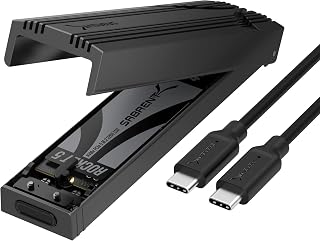
This enclosure supports up to 8TB capacity, making it suitable for professionals working with extensive media libraries or backup archives. The 1250MB/s transfer rate ensures fast sequential reads and writes when moving large video files or disk images. Its compatibility with both Mac and PC simplifies cross-platform workflows.
Pros
- Aluminum thermal pad system for stable performance
- Premium aluminum and ABS construction
- Tool-free flip-open mechanism
- Lightweight at 2.62 ounces
Cons
- Tight cover requires firm pull to open
- NVMe only, no SATA M.2 support
The SABRENT EC-PNVO delivers portable NVMe storage with a focus on thermal stability and build precision. The flip-open tool-free mechanism removes installation friction, though the tight-fitting cover requires a firm pull from the end opposite the USB-C port to open. That snug tolerance keeps your drive secure during transport and prevents accidental disconnection. Aluminum thermal pad contact directly against the SSD maintains stable performance during sustained 10Gbps transfers, whether you're cloning entire drives or moving hours of 4K footage. The reinforced ABS frame paired with machined aluminum alloy construction creates a premium feel without adding bulk. At 2.62 ounces and 4.59 by 1.24 by 0.6 inches, it fits comfortably in a laptop bag or pocket. The included USB-C to USB-C cable delivers full bandwidth immediately, and compatibility extends to USB-A connections with adapter use, though speeds drop accordingly. The enclosure works exclusively with NVMe drives and requires a USB-C host port to reach maximum throughput.
Connectivity: USB 3.2 Gen 2 (10Gbps), USB-C port
Compatibility: M.2 NVMe PCIe SSDs in 2230, 2242, 2260, and 2280 sizes, up to 8TB capacity
Performance: 1,250 MB/s data transfer rate with thermal stability management
Physical: 4.59 inches long, 1.24 inches wide, 0.6 inches tall, weighs 2.62 ounces
Materials: Aluminum alloy top with ABS reinforced frame and thermal pads
Included: USB-C to USB-C cable, spare thermal pad, user manual
Warranty: 1 year limited, 3 years with manufacturer registration
Compatibility: Windows PC and Mac systems, also works with gaming handhelds and any USB-C device
This adapter suits professionals and content creators who prioritize thermal performance and build quality for frequent high-volume transfers. It's ideal if you already have USB-C equipped systems and want a portable drive that maintains speed consistency under load. Skip this if you're working with SATA M.2 drives instead of NVMe, or if you primarily connect through older USB-A ports. The tight cover may frustrate users who swap drives constantly.
How to Choose an M.2 to USB Adapter
Confirm the Drive Protocol and Physical Size
The M.2 label identifies the physical card format, not the drive’s communication protocol. NVMe uses PCIe, while M.2 SATA uses SATA signaling, and an enclosure must explicitly support the protocol inside your drive. A connector with two notches can look reassuringly universal while still needing a SATA-compatible enclosure, so check the SSD label or specification page first.
The SSK M.2 to USB NVMe SATA SSD Enclosure USB 3.2 and SABRENT Tool-Free NVMe & SATA M.2 SSD Enclosure accommodate both NVMe and SATA drives in 2242, 2260, and 2280 lengths. The FIDECO M.2 NVMe SSD Enclosure, SABRENT USB-C NVMe Enclosure & Reader, and UGREEN USB-C M.2 NVMe SSD Enclosure for Mac are NVMe-only, though the SABRENT USB-C model also accepts smaller 2230 drives. For more help matching components, browse our storage hardware guides.
Match 10Gbps Performance to Your USB Port and Cable
USB 3.2 Gen 2 provides a theoretical 10Gbps connection, which is a strong fit for current portable NVMe storage and large media folders. Your computer port, cable, source drive, file mix, and thermal condition all influence the speed you actually see. Connecting a 10Gbps enclosure to a 5Gbps USB port still works, but the slower connection becomes the limit.
The SABRENT Tool-Free NVMe & SATA M.2 SSD Enclosure lists transfers up to 1000MB/s, while the SSK includes both Type-C and Type-A cables for broader device access. FIDECO includes a USB-C cable with an attached USB-A adapter, whereas UGREEN needs a matching 10Gbps data cable to reach its full potential. USB-C describes the connector shape rather than guaranteed bandwidth, so use compatible gear from our USB cable and adapter recommendations when performance matters.
Look for Useful Thermal Design
Long copies, cloning sessions, and video project transfers keep an SSD working continuously, which makes heat management more than a cosmetic detail. An aluminum shell and properly positioned thermal pad help move heat away from the drive and support steadier operation. The SABRENT USB-C NVMe Enclosure & Reader uses a flip-open cover that presses its thermal pad directly against the SSD.
FIDECO’s sandwich-style construction is designed to improve thermal-pad contact, while SSK uses an aluminum alloy case to help disperse heat. UGREEN combines an aluminum enclosure with an extra silicone case for portable protection. If you routinely run several drives or move archives for hours, the added capacity of one of these RAID enclosure options may suit your workflow better than a single-drive adapter.
Choose an Installation Style That Fits Your Routine
Frequent drive swapping favors a tool-free enclosure. The SABRENT Tool-Free NVMe & SATA M.2 SSD Enclosure and UGREEN USB-C M.2 NVMe SSD Enclosure for Mac use simple tool-free retention, while the SABRENT USB-C NVMe Enclosure & Reader uses a quick flip-open design. FIDECO also keeps installation tool-free with its sandwich layout, making it useful for drive upgrades and troubleshooting.
The SSK M.2 to USB NVMe SATA SSD Enclosure USB 3.2 uses a screw-based approach and includes a screwdriver, which can be preferable if you plan to leave one SSD installed. All five enclosures draw power through USB and work without an external power brick. Initialize and format a brand-new SSD before expecting it to appear in your operating system, and note that the SABRENT Tool-Free NVMe & SATA M.2 SSD Enclosure does not have room for a pre-installed SSD heatsink.
Final Thoughts
For a flexible enclosure that can serve both common M.2 formats, the SSK M.2 to USB NVMe SATA SSD Enclosure USB 3.2 is a clear choice, while the UGREEN USB-C M.2 NVMe SSD Enclosure for Mac suits a slim NVMe-only setup with a protective silicone case. Match your existing SSD protocol and USB port before you order, and either route can turn unused storage into a dependable portable drive.
Frequently Asked Questions
Can an M.2 to USB adapter work with both NVMe and SATA SSDs?
Only enclosures specifically built for both protocols can do that. M.2 describes the drive shape rather than its protocol, so a SATA SSD will not operate in NVMe-only models such as the FIDECO and UGREEN options. Before installation, compare the drive’s protocol, keying, and length with the enclosure specifications.
Is a 10Gbps M.2 to USB adapter fast enough for an external SSD?
Yes, a 10Gbps adapter is fast enough for sizable game libraries, high-resolution media, backups, and everyday portable storage. In 2026, it remains a practical balance of speed, compatibility, and portability for most users. It will not match the peak speed of an internally connected PCIe drive, but it can make file transfers and drive access feel substantially more responsive than older USB storage.
Do M.2 SSD enclosures need external power?
These five enclosures are bus powered, so they receive power through the USB connection and do not need a separate power adapter. Connect directly to a computer port if the drive disconnects during demanding transfers, since an underpowered hub can cause instability. A new SSD also needs initialization and formatting before your computer can use it for storage.
What else can I do with an M.2 to USB adapter?
An enclosure is useful for file recovery, cloning, carrying project folders, and creating a fast photo workspace after a shoot with one of the best SD cards for cameras. It also makes a convenient removable library for games, creative apps, and local backups. For smaller storage needs on portable gaming devices, compare microSD cards for handheld gaming alongside an M.2 enclosure.





Write Your Review
No reviews yet. Be the first to share your experience!