

Your keyboard is the primary interface between you and every game you play. Whether you’re executing precise movements in competitive shooters or managing complex keybinds in MMOs, a quality mechanical keyboard transforms how you interact with your games.
This guide breaks down seven mechanical gaming keyboards that deliver on performance, build quality, and features. We’ve included options for wireless connectivity, hot-swappable switches, and different form factors to match various gaming styles and desk setups.
Quick answer
This guide compares 7 picks, with AULA F75 Pro 75% Hot Swappable Wireless Mechanical ranked first.

AULA F75 Pro 75% Hot Swappable Wireless Mechanical
Gamers who switch between a PC, console, and mobile setup will appreciate the tri-mode connectivity here, covering 2.4GHz wireless, BT5.0, and USB-C in one board. The 75% layout keeps desk space open without sacrificing too much functionality, and the hot-swappable linear switches let you tune the feel without soldering. The built-in volume roller is a practical bonus for quick audio adjustments mid-session.
Pros
- Tri-mode connectivity works seamlessly across PC, console, and mobile
- Pre-lubed linear switches deliver smooth, fast gaming inputs
- Hot-swappable sockets allow switch customization without soldering
- 4000mAh battery supports extended wireless gaming sessions
Cons
- Advanced macro programming requires OS-specific driver software
- Water-repellent coating protects against spills but not full submersion
Gaming demands responsiveness, and the AULA F75 Pro answers with tri-mode connectivity that adapts to any setup. The 2.4GHz wireless, Bluetooth 5.0, and USB-C wired options let you switch between PC, console, tablet, or phone without cable management headaches. Pre-lubricated Reaper linear switches provide the smooth, fast actuation gamers need for rapid inputs, while five-layer silencer padding keeps acoustic noise low during intense sessions. Hot-swappable sockets mean you can swap in different switches to match your play style without tools or technical knowledge. The 75% layout keeps arrow keys and a function row within reach while freeing up mouse space for low-sensitivity FPS play. The multi-function knob adjusts RGB brightness in gaming mode, letting you dial in visibility without interrupting gameplay. Double-shot PBT keycaps resist wear and shine from heavy use, and the 4000mAh battery supports marathon sessions on a single charge. Water-repellent coating adds peace of mind during late-night gaming. The compact form factor travels easily to LAN events or tournaments, and multi-device compatibility works with Windows, Android, and major gaming consoles right out of the box.
The hot-swappable design is a major strength for users wanting to personalize their typing experience. The keyboard supports both 3-pin and 5-pin switches, accommodating most mechanical switch types on the market. The included LEOBOG Reaper switches are pre-lubricated and tuned for a linear, creamy response that appeals to both typists and gamers. Two spare Reaper switches come in the box, letting you experiment or prepare for future replacements.
The programmable key functionality and macro support open creative possibilities for gamers and professionals alike. Through the driver software, you can remap keys, create key combinations, and set up context-specific macros. The N-key rollover ensures simultaneous key presses register accurately, critical for competitive gaming. Windows lock prevents accidental touches during intense gaming sessions, protecting your in-game focus.
Tri-mode connectivity is exceptionally practical in today's multi-device world. Pair the F75 Pro with your PC, laptop, tablet, and smartphone simultaneously, then switch between them using convenient shortcut keys or the side button. The 2.4GHz wireless mode delivers millisecond responsiveness suitable for gaming, while Bluetooth 5.0 handles everyday mobile needs with lower power consumption. USB-C wired connection provides a reliable fallback with zero latency.
The 4000mAh rechargeable battery balances capacity and charging speed for real-world use. Battery life depends on usage patterns and lighting settings, but the large capacity supports several days of typical use between charges. The included USB-C cable handles both charging and wired connectivity, eliminating cable clutter.

This full-size board is built with hot-swappable sockets, so gamers can swap out the pre-lubed NX Snow V2 linear switches for something that suits their playstyle without soldering. The included wrist rest supports long gaming sessions, the USB-C to USB-A cable keeps the connection solid and wired, and per-key RGB lighting lets you color-code keys for specific in-game actions or macros.
Pros
- Hot-swappable design lets you change switch types without soldering
- Pre-lubed linear switches and sound dampening create smooth, quiet keystrokes
- PBT doubleshot keycaps resist wear and shine during heavy use
- Programmable macros and multi-function wheel support streaming workflows
Cons
- Wired-only connectivity limits placement flexibility
- Full-size layout demands significant desk space
When gaming demands extend beyond quick matches into marathon sessions and content creation, the ASUS ROG Strix Scope II X adapts to your workflow. Hot-swappable sockets let you swap in different switch types without soldering, so you can tune actuation feel as your preferences evolve or different games demand different response. The pre-lubed ROG NX Snow V2 linear switches arrive smooth out of the box, eliminating the scratch and resistance that plague stock switches on competing boards. Dust-proof wall-stem construction protects against debris that can ruin expensive switches over time. Sound-dampening foam throughout the case and pads under each switch absorb the metallic ping and hollow echo common in aluminum-framed keyboards, keeping your mic clear during voice comms. PBT doubleshot keycaps maintain their texture through thousands of hours, resisting the shine that develops on ABS alternatives. The multi-function wheel adjusts volume and lighting without hunting through software menus mid-match. Every key accepts macro programming, essential for streamers who need instant access to scene switches and recording controls. Three adjustable tilt angles and a detachable wrist rest accommodate different desk heights and postures during extended play.
Physical Dimensions: 17.2 inches length, 5.1 inches width, 1.5 inches height. Weight: 2.1 pounds.
Key Features: 104-key full-size layout, QWERTY configuration, hot-swappable mechanical switches, three adjustable tilt angles, detachable wrist rest, RGB backlit with per-key customization, USB 2.0 TypeC-to-TypeA connection.
Switch Specifications: ROG NX Snow V2 linear switches (pre-lubed), dust-proof wall-stem design, integrated LED lens, smooth keystrokes with reduced wobble. Optional ROG NX Storm clicky switches for tactile feedback.
Keycaps: PBT doubleshot material, resistant to shine and wear, includes specialty ROG-themed spacebar keycap.
Compatibility: Windows 10 and above, PC and laptop. Includes detachable wrist rest, 2-in-1 ROG keycap and switch puller, USB cable, and ROG sticker.

At 96% size, this board keeps the numpad while trimming the outer bezels, giving gamers a compact footprint without losing functionality. Tri-mode connectivity means you can run wired for zero-latency competitive play or go wireless for a cleaner desk. The hot-swappable pre-lubed ROG NX Snow linear switches ship smooth out of the box, so there is no need to mod before your first session.
Pros
- SpeedNova wireless delivers zero-lag performance for competitive gaming
- 1,500-hour battery life eliminates constant recharging interruptions
- Pre-lubed linear switches provide smooth, quiet keystrokes out of box
- 96% layout balances numpad functionality with compact mouse space
Cons
- Armoury Crate software requires registration and has steep learning curve
- Not water resistant, vulnerable to liquid damage
Wireless gaming keyboards often compromise on latency, but the ROG Strix Scope II 96 eliminates that concern with SpeedNova 2.4GHz technology that delivers zero perceptible lag during competitive play. The pre-lubed ROG NX Snow linear switches combine fast actuation with factory sound dampening that removes the hollow ping common in gaming boards, giving you quiet, smooth keypresses that won't annoy teammates on voice chat. The 96% layout keeps the numpad for MMO hotkeys and productivity while shrinking overall footprint, freeing up mouse room for sweeping FPS movements. What truly separates this keyboard is the 1,500-hour wireless battery life, meaning you can game for months between charges rather than constantly hunting for cables mid-session. Tri-mode connectivity switches effortlessly between Bluetooth for casual play, 2.4GHz for competitive gaming, and USB-C wired for zero battery anxiety during tournaments. Metal top housing and premium PBT keycaps withstand years of heavy gaming without developing shine or wobble. The detachable wrist rest and two-position tilt adjustment let you dial in ergonomics for marathon sessions, while onboard RGB and hot-swappable switches add customization depth.
Layout: 96% (TKL size with full-size functionality and number pad)
Switches: Hot-swappable ROG NX Snow linear switches (pre-lubed), alternative ROG NX Storm clicky switches available
Connectivity: 2.4GHz wireless (SpeedNova technology), Bluetooth (up to 3 devices), USB wired
Battery Life: Up to 1,500 hours in 2.4GHz wireless mode
Lighting: Per-key RGB with customizable effects
Keycaps: PBT material
Dimensions: 14.84 inches L x 5.16 inches W x 1.57 inches H
Weight: 2.8 pounds
Compatibility: Windows PC and Mac
Included Accessories: Detachable wrist rest, ROG keycap and switch puller, wireless receiver, USB extender, specialty spacebar keycap, USB cable, ROG sticker
Warranty: 1 year
Ideal for competitive gamers who demand wireless performance without latency penalties, especially those playing FPS, battle royale, or MOBA titles where milliseconds matter. The 96% layout suits players who need numpad macros for MMOs but want better mouse clearance than full-size boards. Perfect for multi-device users who switch between gaming PC and work laptop. Skip this if you want instant plug-and-play macro setup, as Armoury Crate has a learning curve. Also not the choice for pure 60% or TKL minimalists.
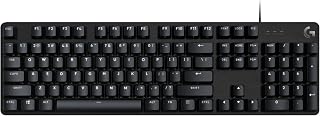
Gamers who want a no-fuss full-size layout will appreciate this board's tactile switches, which deliver a satisfying bump on each keypress that helps with the rapid, deliberate inputs gaming demands. The single-color backlit design keeps things clean without the distraction of RGB, and the USB 2.0 wired connection ensures a stable, low-latency link to your PC during competitive sessions.
Pros
- Tactile switches and PBT keycaps provide durable, consistent feedback
- 6-key rollover anti-ghosting prevents missed inputs during intense moments
- Aluminum-magnesium alloy construction eliminates flex under heavy use
- Wired USB connection ensures zero latency for competitive play
Cons
- Fixed white LED backlighting with no RGB customization
- No programmable macro support or advanced key remapping
For gamers who need a reliable workhorse without the distraction of RGB light shows, the Logitech G413 SE delivers where it counts. The tactile mechanical switches provide clear feedback for every keypress, crucial when split-second timing decides whether you clutch or choke. PBT keycaps resist the wear and shine that develop on cheaper boards after months of intense use, maintaining their texture through marathon sessions. The 6-key rollover anti-ghosting ensures your inputs register accurately even when you're mashing multiple abilities simultaneously in the heat of combat. Build quality centers on an aluminum-magnesium alloy top case that eliminates flex and provides a stable platform for rapid keystrokes. The full-size layout keeps the numpad intact for games that use it for hotkeys, while 12 function keys handle media controls and lighting toggles. White LED backlighting illuminates keys in dim rooms without the performance cost of addressable RGB. The wired USB connection guarantees zero input lag, a non-negotiable for competitive play. This keyboard strips away customization bells and whistles to focus entirely on durable construction and consistent performance.
Key Specifications:
Switch Type: Tactile Mechanical
Keycaps: PBT (durable heat and wear-resistant)
Layout: Full-Size QWERTY with 108 keys
Connectivity: USB 2.0 Wired
Backlighting: Single Color White LED
Anti-Ghosting: 6-key rollover
Media Controls: 12 FN keys
Dimensions: 17.13 inches L x 1.97 inches W x 1.43 inches H
Weight: 780 grams
Enclosure: Brushed Aluminum-Magnesium Alloy
Compatibility: Windows and macOS
Warranty: 1 Year Limited Hardware
Model: G413 SE (Full-Size) or G413 TKL SE (Tenkeyless)
Competitive players who value consistency and durability over customization will appreciate this keyboard's no-nonsense approach. If you play fast-paced shooters, MOBAs, or fighting games where reliable input matters more than aesthetics, this delivers. Skip it if you need programmable macros for MMOs, want per-key RGB lighting to match your setup, or prefer compact layouts. Players who frequently remap keys or run complex macro chains will find the lack of software customization limiting for their workflow.

Built-in sound dampening and stabilizers make a noticeable difference for gamers who want a quieter, more controlled typing feel without switching to a silent switch type. The yellow linear switches are tuned for fast actuation, which suits rapid keypresses in action and FPS games. Doubleshot ABS keycaps hold up under heavy use, and the dedicated media roller keeps volume control off your keyboard shortcuts.
Pros
- 1.2mm actuation and 45g force for instant competitive response
- Yellow switches stay quiet with built-in dampeners and foam layer
- Six dedicated macro keys for complex command sequences
- Doubleshot ABS keycaps resist legend wear through heavy use
Cons
- No water resistance makes spills potentially catastrophic
- Wired-only connection limits desk flexibility
Gaming keyboards live or die by their switches, and the Razer BlackWidow V4 X delivers where it counts. Yellow linear switches actuate at just 1.2mm with 45g of force, giving you the hair-trigger response competitive gaming demands without the noise that wakes roommates or bleeds into voice chat. Built-in sound dampeners and foam layering under the PCB keep the acoustic profile low while maintaining that crisp mechanical feel. Six programmable macro keys sit ready for complex ability rotations or build orders, and the multi-function roller gives you instant volume control mid-match. Doubleshot ABS keycaps resist wear through marathon sessions, and lubricated stabilizers prevent the rattle that plagues cheaper boards. Per-key RGB lighting syncs with hundreds of Chroma-enabled games, adding visual feedback that can genuinely help with ability cooldowns or in-game events. The 104-key layout and 2.5-pound weight keep it firmly planted during intense moments. Wired USB connection eliminates latency and battery anxiety. For players chasing every advantage in fast-paced titles, this keyboard removes the barriers between intent and execution.
Switch Type: Razer Yellow Mechanical Linear, 1.2mm actuation distance, 45g actuation force, silent with sound dampeners
Backlighting: Per-key RGB, 16.8 million colors, Chroma integration
Keys and Controls: 104-key QWERTY layout, 6 dedicated macro keys, multi-function roller, secondary media keys
Keycaps: Doubleshot ABS with extra-thick walls, doubleshot molding for durability
Connectivity: Wired USB (Corded Electric)
Compatibility: Windows 11, macOS 14 Sonoma, Linux, Android
Dimensions: 20.5 inches L x 8 inches W x 2 inches H
Weight: 2.5 pounds
Materials: ABS plastic enclosure, lubricated stabilizers, foam sound dampening layer
Warranty: 2-year manufacturer warranty
Model: RZ03-04701900-R3U1

The tenkeyless form factor is a strong choice for gaming because it pulls the mouse closer to the keyboard, reducing arm strain during long sessions. Clicky switches give tactile and auditory confirmation on every keypress, which many gamers find helps with rhythm and precision in fast-paced titles. RGB backlighting supports visibility in low-light setups, and the wired connection keeps input latency as low as possible.
Pros
- Tenkeyless layout maximizes mouse space for low-sensitivity FPS play
- GX Blue clicky switches confirm every input with tactile feedback
- Onboard memory stores profiles for plug-and-play tournament use
- Detachable cable and 2.2-pound weight make travel and transport easy
Cons
- No numpad limits functionality for MMOs and productivity tasks
- Windows-only compatibility excludes Mac and console gamers
Esports tournaments demand reliability, and the Logitech G PRO TKL delivers competition-ready performance in a portable form factor. The tenkeyless design strips away the numpad to maximize mouse clearance for low-sensitivity aim, critical for FPS and battle royale titles where wide swipes define accuracy. GX Blue clicky switches provide distinct tactile and audible feedback that confirms every input registered, giving you confidence during clutch moments when split-second timing matters. The detachable three-pronged Micro USB cable survives repeated packing and transport to LAN events without loosening or failing. Onboard memory stores your LIGHTSYNC RGB profiles and macros directly on the keyboard, letting you plug into tournament PCs and play with your exact settings without installing software or requesting admin access. At 2.2 pounds, the aluminum and rubber construction balances durability with genuine portability. Rubber feet anchor the board during aggressive key mashing, while three-step angle adjustment lets you optimize wrist position for extended play. The compact footprint fits easily into tournament bags alongside your mouse and headset, making this the travel-ready choice for competitive players.
Physical Dimensions: 14.96 inches L x 6.3 inches W x 1.97 inches H, weighing 2.2 pounds
Switch Type: GX Blue Clicky mechanical switches with audible and tactile feedback
Layout: Tenkeyless (87 keys) QWERTY, ambidextrous hand orientation
Lighting: LIGHTSYNC RGB with 16.8 million color options, programmable with onboard memory storage
Connectivity: Wired via 1.8m detachable Micro USB cable with three-pronged connector
Compatibility: Windows 10 and later, PC only
Additional Features: 3-step angle adjustment, rubber feet for stability, F-key programmable macros (F1-F12), 2-year manufacturer warranty
Built for competitive esports players, tournament participants, and serious ranked grinders who need maximum mouse space and portability. The clicky switches suit players who want tactile confirmation of inputs during fast-paced combat. Onboard memory makes this perfect for LAN events and shared tournament systems. Skip this if you play MMOs or strategy games that rely heavily on numpad macros, need wireless connectivity, or game on Mac. Also avoid if you share space with others who find clicky switches too loud.

Pros
- Exceptional build quality with aluminum frame and textured PBT keycaps that resist shine and wear
- 8000Hz polling rate and Rapid Trigger technology deliver measurable speed advantages in competitive play
- Adjustable magnetic actuation point (0.1-4.0mm) lets you fine-tune response to match your playstyle
- Snap Tap and Dynamic Keystroke features provide movement control options unavailable on standard keyboards
- Tenkeyless layout balances functionality with mouse space, ideal for low-sensitivity FPS gaming
Cons
- Windows 11 minimum OS requirement may exclude some older systems from full feature support
- Advanced features like Snap Tap and Dynamic Keystroke require learning curve and game-specific configuration
The Razer Huntsman V3 HE is a professional-grade tenkeyless keyboard engineered for competitive FPS gaming and esports competition. It targets serious players who demand every millisecond of advantage, from pro teams at major tournaments to ranked grinders in Valorant and Counter-Strike 2.
The Hall Effect magnetic switches with adjustable actuation (0.1-4.0mm) and Rapid Trigger technology form the keyboard's core. Paired with true 8000Hz HyperPolling, this delivers response times measured in fractions of a millisecond. Razer Snap Tap prioritizes your newest directional input for cleaner movement, while Dynamic Keystroke binds up to four actions per key based on how deep you press, enabling complex keybinds that adapt to your playstyle.
Build quality reflects the premium positioning: a 5052 aluminum alloy top case, textured doubleshot PBT keycaps that resist wear and shine, N-key rollover with anti-ghosting, and hybrid onboard storage for six profiles. The detachable USB-C cable and web-based Synapse customization add flexibility without requiring software bloat. At 14.2 inches, the TKL form factor provides essential space savings for mouse movement in low-sensitivity FPS setups.
The main drawback is price and complexity. At $139.99, it sits in premium territory, and features like Snap Tap and Dynamic Keystroke demand game-specific configuration to unlock their value. The Windows 11 minimum requirement may also limit compatibility for older systems.
Verdict: This is a purpose-built keyboard for competitive players willing to invest in measurable performance gains. If you play ranked FPS titles or compete in esports, the speed, customization, and durability justify the cost. For casual gaming or general typing, a mid-range alternative offers better value.
Connectivity: Detachable USB-C cable with USB-A to USB-C adapter, 1x USB 2.0 port passthrough.
Switches: Razer Hall Effect Magnetic Switches, linear actuation, adjustable 0.1-4.0mm, 100 million keystroke lifespan, Rapid Trigger support.
Polling Rate: True 8000Hz HyperPolling for near-zero latency response.
Layout: Tenkeyless (TKL) QWERTY, 87 keys total.
Build: 5052 aluminum alloy top case, textured doubleshot PBT keycaps, N-key rollover with anti-ghosting.
Features: Razer Snap Tap, Razer Snap Flex, Dynamic Keystroke, customizable Razer Chroma RGB lighting, hybrid onboard storage for 6 profiles, Synapse for Web support.
Dimensions: 14.2 inches length, 5.5 inches width, 1.6 inches height. Weight: 1.9 pounds.
Compatibility: Windows and MacOS, Windows 11 minimum OS version for full feature support.
Warranty: 2-year manufacturer warranty.
Best For: Competitive FPS gamers, esports athletes, players in Valorant, Counter-Strike 2, Apex Legends, and similar titles where millisecond advantages matter. Also suitable for programmers and professionals who benefit from customizable multi-key binding and premium build quality.
Consider Alternatives If: You play casually and don't need advanced actuation features. You're on a tight budget and $139.99 exceeds your keyboard spend. You prefer full-size layouts with numpad. You use Linux or older Windows versions and need full feature compatibility.
Long-Term Value: The 100 million keystroke lifespan, PBT keycaps, and aluminum chassis are built to outlast most gaming keyboards. Adjustable actuation and web-based customization future-proof the keyboard against playstyle changes. If competitive gaming is your focus, the speed and durability deliver ROI through tournament viability and reduced need for replacements.
What to Consider When Choosing a Gaming Keyboard
Switch Type and Actuation
Mechanical switches determine how your keyboard feels and sounds during gameplay. Linear switches like the ROG NX Snow or Razer Yellow offer smooth, uninterrupted keystrokes ideal for rapid-fire inputs and competitive gaming. They require minimal force and provide no tactile bump, allowing for faster double-taps and reduced finger fatigue during extended sessions.
Clicky switches such as the GX Blue deliver audible and tactile feedback with each press, giving you confirmation that your input registered. This can improve accuracy in games requiring deliberate key presses but may be too loud for shared spaces or late-night gaming sessions.
Form Factor and Layout
Keyboard size directly impacts your available mouse space and desk ergonomics. Tenkeyless designs remove the number pad, freeing up room for low-sensitivity mouse movements common in FPS games. The 75% layout strikes a middle ground by condensing the keyboard while retaining arrow keys and function rows in a compact footprint.
Full-size keyboards maintain all keys including the number pad, which benefits players who frequently switch between gaming and productivity tasks. The right monitor setup paired with your keyboard layout creates a balanced workstation that accommodates both competitive gaming and daily computing needs.
Connectivity Options
Wireless keyboards with 2.4GHz connections now match wired latency while eliminating cable drag across your mousepad. Tri-mode keyboards support Bluetooth for connecting multiple devices, 2.4GHz for gaming performance, and USB-C wired mode for charging or tournament use where wireless may be restricted.
Battery life varies significantly between models. Look for keyboards offering 1000+ hours in wireless mode if you prefer minimal charging interruptions. Wired-only keyboards eliminate battery concerns entirely and often come at lower price points while maintaining premium features.
Customization and Software
Hot-swappable sockets let you replace switches without soldering, allowing you to experiment with different switch types or replace worn switches years down the line. Pre-lubricated switches and stabilizers reduce rattle and create a more refined typing experience straight out of the box.
Programmable macro keys expand your command arsenal by binding complex actions to single keypresses. Software suites like Logitech G HUB or Razer Synapse enable per-key RGB customization, profile switching, and remapping any key to match your preferred control scheme. For those building a complete gaming setup, consider how your keyboard pairs with peripherals like gaming monitors that complement your hardware investment.
Final Thoughts
Each keyboard in this guide serves different gaming priorities. If you want wireless flexibility with extensive customization options, the AULA F75 Pro Wireless Mechanical Keyboard,75% Hot delivers tri-mode connectivity and hot-swappable switches at an accessible entry point. For competitive players who demand tournament-grade precision and magnetic switch technology, the Razer Huntsman V3 HE Magnetic TKL 8KHz Wired provides cutting-edge performance features like Rapid Trigger and 8000Hz polling. Your choice ultimately depends on whether you prioritize portability, switch customization, wireless convenience, or competitive response times in your gaming experience.
Frequently Asked Questions
What switch type is best for competitive gaming in 2026?
Linear switches are preferred by most competitive gamers because they offer smooth, consistent actuation without tactile bumps that can slow down rapid keypresses. Red and yellow switches typically require 45-50g of force, while black switches need 60g for players who want to avoid accidental inputs. Magnetic hall effect switches take this further by allowing you to adjust actuation points down to 0.1mm for even faster response times.
Is wireless latency still an issue for gaming keyboards?
Modern 2.4GHz wireless gaming keyboards have eliminated perceptible latency for the vast majority of players. Technologies like ROG SpeedNova and Razer HyperSpeed deliver sub-1ms response times that match or exceed standard wired connections. Bluetooth connections add slightly more latency and are better suited for casual gaming or office use rather than competitive play.
Do I need hot-swappable switches?
Hot-swappable sockets provide long-term value if you want to experiment with different switch types or replace individual switches as they wear out. You can switch from linear to tactile switches without buying a new keyboard, and replacement switches cost significantly less than a complete keyboard. If you’re certain about your preferred switch type and don’t plan to modify your keyboard, a non-hot-swappable model offers the same gaming performance at a lower cost.
What keyboard size works best for FPS games?
Tenkeyless and 75% keyboards are ideal for FPS players who use low mouse sensitivity settings. Removing the number pad creates 4-5 inches of additional mousepad space, allowing for wider arm movements without bumping into your keyboard. The retained arrow keys and function row on these compact layouts ensure you keep essential gaming controls. If you frequently need the number pad for other games or work tasks, consider a full-size keyboard or separate USB number pad. Pairing your keyboard with properly sized monitors creates an efficient gaming station that maximizes your available desk real estate.



Write Your Review
No reviews yet. Be the first to share your experience!