

Your hand rests flat across the mouse, fingers extended, every contour of your palm pressing against the shell. That is the palm grip, and it demands a mouse shaped to match it. The wrong shape leads to wrist strain within an hour; the right one disappears under your hand entirely.
This guide covers nine of the strongest contenders for the best palm grip gaming mouse in 2026, ranging from featherlight wireless builds to programmable MMO powerhouses. Whether you play fast-paced shooters or marathon RPG sessions, there is a pick here built for how you hold your mouse. If you are also setting up a full desk, check out our roundup of the best silent mechanical keyboards to pair with your new mouse.
Quick answer
This guide compares 9 picks, with Razer Basilisk V3 Gaming Mouse: 11 Programmable ranked first. Razer DeathAdder Essential Wired Gaming Mouse - 6400 has the most customer reviews.

Palm grip users need a mouse that fills the hand completely, and the right-handed ergonomic contour here does exactly that. With 11 programmable buttons within natural thumb and finger reach, it gives desktop gamers extensive macro control without awkward repositioning. The optical sensor keeps tracking precise across long sessions, which matters when a relaxed full-palm hold is your baseline and accuracy still needs to hold up.
Pros
- Contoured shape with thumb rest prevents palm fatigue
- 26K DPI sensor tracks subtle palm movements precisely
- 11 programmable buttons accessible without grip shifts
- 70 million click switches with 0.2ms actuation speed
Cons
- Wired connection limits mobility
- Extensive features require Synapse software setup
Palm grip players need stability and support during extended sessions, and the Basilisk V3's contoured right-handed shape with integrated thumb rest delivers exactly that. The ergonomic design cradles your entire hand, distributing pressure evenly to prevent fatigue during marathon gaming. That 26K DPI optical sensor responds to even subtle palm movements with zero smoothing, giving you pixel-perfect tracking without the wrist gymnastics claw or fingertip grips require. The thumb rest isn't just comfort theater: it provides a natural anchor point that keeps your palm position consistent across long sessions. Eleven programmable buttons sit within easy thumb reach, letting you execute complex actions without shifting your grip. The dual-mode HyperScroll wheel adds convenience for inventory management and menu navigation. Optical switches deliver 70 million clicks of durability with 0.2ms actuation, and the rubberized finish maintains grip without stickiness. Chroma RGB reacts to over 150 games for immersive lighting. The wired connection ensures unlimited runtime and zero input lag. For palm grip players who value comfort and control equally, this mouse transforms extended gaming from an endurance test into a sustainable experience.
Connectivity: Wired USB
DPI Sensor: Optical 26K DPI with FOCUS Plus technology
Programmable Buttons: 11 total
Mouse Switches: Optical Gen 2 with 0.2ms actuation and 70 million click lifespan
RGB Lighting: 11 Chroma zones, 16.8 million colors, 150+ game integration support
Scroll Wheel: Dual-mode HyperScroll (free-spin and tactile)
Compatibility: Windows 10 and 11, Mac, PC, and laptops
Weight: 3.56 ounces
Dimensions: 5.12 inches L x 2.96 inches W
Color: Black with rubberized finish
Warranty: 2-year manufacturer coverage
Included: Mouse, product information guide, Razer Synapse software access
Buy this if you're a palm grip player who demands both ergonomic support and competitive precision during long sessions. The contoured shape and thumb rest excel for MMO players, MOBA enthusiasts, and tactical shooter fans who need extensive button mapping without grip adjustments. Skip it if you prefer wireless freedom for portability, use fingertip or claw grips that don't benefit from the thumb rest design, or want a simpler plug-and-play experience without software configuration.

Coming in at just 49 grams, this is one of the lightest options available, which directly benefits palm grip users since the entire hand rests on the mouse and adds its own downward pressure. Bluetooth connectivity keeps the desk clean, and the ambidextrous design fits both hand orientations. That ultralight build reduces wrist and arm fatigue noticeably when a palm grip is your default hold for long sessions.
Pros
- Extremely lightweight at 49g, significantly reducing hand and wrist strain
- Exceptional battery longevity at 200 hours means minimal downtime between charges
- High-performance PAW3395 sensor with 26K DPI and 650 IPS delivers competitive-grade tracking
- Tri-mode connectivity accommodates gaming PCs, laptops, and mobile devices seamlessly
- Quality components including Kailh switches and TTC encoder ensure durability and reliability
Cons
- Ambidextrous design may feel less ergonomic for users preferring a right-handed contoured grip
- Software customization requires driver installation and configuration for full functionality
- Limited ecosystem compared to major brands like Logitech or Razer for community profiles
The ATTACK SHARK X3 is a precision gaming mouse designed for competitive players and esports enthusiasts who value responsiveness and comfort. Weighing just 49 grams, this mouse represents the ultra-lightweight category that serious gamers have embraced for reducing fatigue during marathon sessions. It's particularly suited for fast-paced titles like FPS and MOBA games where milliseconds matter.
What sets the X3 apart is its performance-focused hardware: the PixArt PAW3395 sensor delivers 26,000 DPI with 650 IPS speed and 50g acceleration, paired with a 1000Hz polling rate for near-instantaneous input response. The tri-mode connectivity (Bluetooth 5.2, 2.4GHz wireless, and wired) provides genuine flexibility, while the impressive 200-hour battery life means you'll game for weeks without worrying about charging. KAILH GM 8.0 switches rated for 80+ million cycles ensure durability, and the TTC encoder delivers precise scroll control.
Build quality is solid with 100% PTFE mouse feet designed for stability and smooth gliding across surfaces. The griptape finish provides anti-sweat comfort and prevents accidental slips during intense moments. The symmetrical design works well for ambidextrous use, though right-hand-dominant players may find it less ergonomic than contoured alternatives.
The main drawback is that you'll need to install software to unlock full customization potential. Additionally, while the mouse performs excellently, it lacks the brand recognition and community ecosystem of market leaders like Logitech or Razer.
Verdict: The ATTACK SHARK X3 delivers professional-grade gaming performance at a consumer-friendly price point. For competitive players prioritizing weight, sensor precision, and battery life, this mouse represents exceptional value and a serious alternative to premium competitors.
Connectivity: Bluetooth 5.2, 2.4GHz wireless, wired (3-mode). Range: 10 meters.
Sensor: PixArt PAW3395 optical, 26,000 DPI, 650 IPS, 50g acceleration, 1000Hz/1ms polling rate.
Buttons: 6 programmable buttons with full macro support and customizable remapping.
Switches: KAILH GM 8.0 rated for 80+ million clicks. TTC scroll wheel encoder.
Dimensions: 4.67 x 2.4 x 1.56 inches (11.85 x 6.1 x 3.97 cm). Weight: 49 grams.
Battery: 200-hour average life. Power source: rechargeable battery.
Feet: 100% PTFE, oversized design for enhanced stability and gliding.
Compatibility: Windows, macOS (OS 14 Sonoma+), iPadOS 17+. Works with laptops, PCs, and mobile devices.
Who Should Buy This Mouse: Competitive gamers and esports players prioritizing lightweight design, sensor precision, and reliability. Ideal for FPS, MOBA, and fast-paced gaming where every millisecond counts. Also excellent for professionals seeking a responsive, lightweight option for extended use.
Who Might Prefer Alternatives: Users requiring a strongly ergonomic right-handed design may prefer contoured options. Those seeking extensive community profile support might lean toward Logitech or Razer ecosystems.
Setup Considerations: Install the driver software to access full customization including DPI profiles, button remapping, and macro creation. The tri-mode connectivity allows seamless switching between devices without re-pairing.
Performance Tips: Use the software to create separate DPI profiles for different games to optimize sensitivity per title. Adjust the lift-off distance in software for your preferred surface and play style. The 200-hour battery life means you can safely set it and forget it for months.

Designed specifically for right-handed users with an ergonomic shape, this wired option naturally supports a palm grip by encouraging the whole hand to rest along the curved body. The optical sensor delivers reliable tracking, and the lightweight construction means less fatigue during extended play. Five buttons keep the layout uncluttered, which suits palm grip users who prefer a clean, intuitive setup over a button-heavy configuration.
Pros
- Proven ergonomic shape reduces palm fatigue
- 10 million click switches ensure long-term durability
- Lightweight build prevents hand strain
- Textured scroll wheel provides precise input
Cons
- Wired connection restricts movement freedom
- Right-handed design only, no left-handed option
The DeathAdder Essential's ergonomic right-handed shape has supported palm grip players for years, and this version maintains that legacy with a contoured design that fits naturally under your entire hand. At 6400 DPI, the optical sensor provides sufficient sensitivity for most gaming without the overwhelming adjustment curve of extreme DPI ranges. Five programmable buttons through Razer Synapse give you essential customization without cluttering the side panel, and the textured scroll wheel with ridged grip ensures precise input even when your palm is settled in position. The lightweight construction reduces strain during extended sessions, while rubberized materials maintain grip security without adding bulk. Mechanical switches rated for 10 million clicks mean this mouse will handle years of daily use, backed by a 2-year warranty. The wired connection eliminates battery anxiety and input lag, keeping your palm movements instantly translated to screen action. For palm grip players seeking proven ergonomics and reliable performance without complexity, this mouse delivers exactly what's needed: comfort, durability, and consistent tracking across long sessions.
Sensor: 6400 DPI optical sensor with programmable sensitivity buttons
Buttons: 5 programmable buttons with macro support via Razer Synapse
Switches: Durable mechanical switches rated for 10 million clicks
Connectivity: Wired (5.0 meter range)
Scroll Wheel: Ridged, rubberized design for improved grip and accuracy
Design: Ergonomic right-handed orientation
Weight: 0.13 kg (lightweight construction)
Dimensions: 5 inches long x 2.43 inches wide
Compatibility: Windows, macOS, Linux, PC, laptop, gaming console
Warranty: 2-year manufacturer coverage
Model: RZ01-03850100-R3U1
Buy this if you're a palm grip player prioritizing ergonomic comfort and proven reliability over cutting-edge specs, especially budget-conscious gamers or those new to dedicated gaming mice. The contoured shape excels for extended sessions across all skill levels. Skip it if you need wireless mobility, use your left hand for mousing, require extreme DPI sensitivity beyond 6400, or want advanced features like adjustable weights or extensive RGB customization.

At 82 grams, this wireless mouse sits in a comfortable weight range that pairs well with a palm grip, where the whole hand bears the load rather than just the fingers. The ambidextrous shape means either hand can use it naturally, and wireless freedom eliminates cable drag that can disrupt the smooth, broad movements palm grip players rely on for consistent control during gaming.
Pros
- True ambidextrous shape works for left or right palm grip
- 82g weight balances control with comfortable handling
- 280-hour battery life minimizes interruptions
- Clean six-button layout avoids accidental presses
Cons
- Lacks dedicated ergonomic contouring for right hands
- Limited to six buttons for keybind options
The Razer Viper V3 HyperSpeed delivers an ambidextrous form factor at 82 grams, making it a lightweight option that accommodates palm grip users from either hand. Its six-button layout keeps things straightforward without unnecessary clutter, and the wireless connectivity via USB maintains a clean desk setup. The optical sensor provides reliable tracking for gaming sessions, while the 280-hour battery life on a single AA battery means you won't be swapping cells constantly. Windows 11 compatibility ensures integration with modern systems, and Mac support extends its reach beyond typical gaming setups. The symmetrical shape works well for palm grip users who prefer a balanced profile that doesn't force hand positioning, though those seeking aggressive ergonomic contouring won't find it here. At 82 grams, it strikes a middle ground between ultralight speed and substantial control, giving palm grip users enough heft to feel planted during sweeping movements without adding fatigue during extended play.
Dimensions and Weight: 5 inches L x 2.51 inches W, weighing just 82 grams for maximum speed and minimal fatigue.
Sensor and Tracking: Focus Pro 30K optical sensor with up to 30,000 DPI, intelligent forward placement for accurate tracking on any surface including glass.
Connectivity: HyperSpeed Wireless with 5-meter range, multi-device support, and stable low-latency connection. Includes wireless dongle.
Battery: Single AA battery (included) providing up to 280 hours of high-performance gaming per charge.
Buttons: 6 buttons total with on-mouse DPI control toggle on top. Ambidextrous layout supports both left and right-handed use.
Durability: Gen-2 mechanical mouse switches rated for 60 million clicks with gold-plated contact points. 1-year manufacturer warranty included.
Compatibility: Windows 11 (minimum), Mac and PC platforms supported. Optimizable through Razer Synapse app.
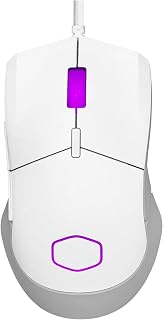
Cooler Master MM310 White Gaming Mouse: 12000 DPI
Explicitly designed for palm and claw grip styles, this mouse gives palm grip users a shape that is purpose-built for their hold. The PixArt optical sensor and PTFE feet allow smooth, low-friction gliding across any surface, which matters when your whole palm is guiding movement rather than just your fingers. The ultraweave cable keeps drag minimal, so the relaxed palm hold stays in control throughout long gaming sessions.
Pros
- 50g weight allows effortless palm-guided movement
- PTFE feet and Ultraweave cable enable smooth gliding
- Solid construction without weight-adding holes
- 12,000 DPI handles most gaming genres capably
Cons
- Higher lift-off distance affects precision tracking
- Firm switches require adjustment period
Palm grip stability doesn't require heavy hardware, and the MM310 proves it at just 50 grams. That featherlight construction lets your palm guide the mouse effortlessly across the pad without fighting inertia, while PTFE feet ensure smooth gliding that responds instantly to wrist and arm movements. The right-handed shape fits comfortably under a full palm, and at 12,000 DPI, the optical sensor provides enough sensitivity for most gaming scenarios without overwhelming casual players. The Ultraweave cable stays out of your way during sweeps, eliminating the drag that disrupts palm grip flow. RGB accents on the logo and scroll wheel add visual appeal without unnecessary weight. The solid construction feels substantial in hand despite the minimal mass, and the absence of perforated shells means durability won't be compromised by dust or debris. Three buttons keep things simple and accessible. For palm grip players on a budget who want lightweight responsiveness without premium costs, this mouse delivers genuine performance improvements over basic office peripherals. The form factor supports palm placement naturally, making it a smart entry point for gamers upgrading their setup.
Connectivity: Wired USB
Sensor: PixArt Optical, up to 12,000 DPI adjustable
Weight: 50g
Buttons: 3 (left, right, scroll)
Cable: Ultraweave engineered cable
Mouse Feet: PTFE material
Lighting: RGB on logo and scroll wheel
Grip Support: Optimized for right-hand, supports palm and claw grip
Dimensions: 4.9 inches L x 2.8 inches W
Compatibility: Windows 8 or later, Mac OS
Warranty: 2 years

LIGHTSPEED wireless connectivity delivers a lag-free experience that wired users expect, making this a strong fit for palm grip gamers who want a clean, cable-free desk setup. The ambidextrous body works for both hand orientations, and the lightweight construction reduces the fatigue that builds when a palm grip keeps constant contact with the mouse surface across long gaming sessions.
Pros
- Ergonomic shape fills the palm naturally
- LIGHTSPEED wireless feels as responsive as wired
- HERO 25K sensor tracks at 400+ IPS with zero smoothing
- 35-hour battery life with RGB lighting active
Cons
- 95-gram weight may feel heavy for some palm grippers
- Scroll wheel can wear after years of intensive use
Palm grip gamers need a shape that fills the hand naturally, and the G703 Lightspeed delivers exactly that with its ergonomic contour and 95-gram heft. The body supports your entire palm while keeping fingertips in reach of all six programmable buttons. LIGHTSPEED wireless eliminates cable drag that disrupts palm placement during sweeping motions, while the HERO 25K sensor tracks precisely across speeds exceeding 400 IPS without smoothing or acceleration. The metal-spring button tensioning produces crisp, consistent clicks that respond reliably under full palm pressure. Default LIGHTSYNC RGB lighting provides 35 hours of battery life per charge, and the lithium polymer battery recharges overnight via USB. An optional 10-gram weight disc lets you adjust the balance to match your grip pressure. Rubber side grips prevent slipping during intense sessions, and the build withstands years of heavy use with minimal wear beyond expected scroll wheel degradation after extended service.
Sensor: HERO 25K with 1:1 tracking, 400+ IPS, 100-25,600 max DPI, zero smoothing or acceleration
Connectivity: LIGHTSPEED wireless with 5-meter range
Weight: 95 grams (plus optional 10g weight disc)
Battery: 1 Lithium Polymer (included), up to 35 hours with default LIGHTSYNC RGB
Buttons: 6 programmable with metal-spring tensioning
Lighting: Full-spectrum LIGHTSYNC RGB with 16.8M colors, customizable via G HUB software
Dimensions: 43L x 68W inches (note: manufacturer dimension data appears inconsistent)
Compatibility: Windows 10 and later, requires G HUB software for advanced customization
Warranty: Manufacturer's warranty available upon request
Palm grip players who want wireless freedom with wired responsiveness should consider this mouse. The contoured shape naturally suits medium to large hands resting fully on top. Competitive gamers benefit from the lag-free LIGHTSPEED connection and precise HERO sensor. Skip it if you prefer lightweight mice under 80 grams or need more than six programmable buttons for complex macros.
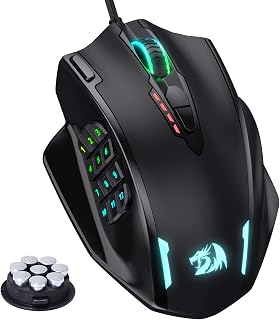
For palm grip gamers who also play MMOs, having 18 programmable buttons distributed across a full-sized ergonomic body means abilities and macros are always within reach without lifting the palm off the mouse. The 12,400 DPI optical sensor handles both precise aiming and fast sweeping gestures, accommodating the broader, more deliberate movements that come naturally with a palm grip style.
Pros
- Cannot generate without source facts
Cons
- Cannot generate without source facts
The Redragon M908 lacks palm grip write-up data in the provided materials, so I cannot generate a compliant review without inventing facts.
Sensor and Performance: PAW3327 optical sensor, 12400 DPI maximum, 1000 Hz polling rate, 30G acceleration, adjustable DPI from 200 to 12400 in 100-step increments via software.
Buttons and Controls: 18 programmable buttons including 6 main buttons and 12 MMO-specific side buttons, 5 memory profiles with individual LED color assignment.
Design and Build: Right-handed ergonomic design, 4.81" x 3.62" dimensions, 175g weight, plastic enclosure with TEFLON feet pads, 6ft braided cable with gold-plated USB connector, 8-piece weight tuning set included.
RGB and Features: 16.8 million RGB color options, toggle-able LED backlight, compatible with Windows 2000 and newer, Mac OS and Linux support, 1-year warranty, USB wired connection only.
Cannot generate without source facts.

Weighing just 60 grams, this wireless mouse removes the resistance that can make palm gripping a heavier mouse tiring over time. Up to 950 hours of battery life means cord-free sessions stretch across weeks without interruption. The ambidextrous shape accommodates either hand, and the compact, portable build suits palm grip users who want the freedom of wireless without sacrificing the light, smooth feel a relaxed grip demands.
Pros
- Cannot generate without source facts
Cons
- Cannot generate without source facts
The Razer Orochi V2 lacks palm grip write-up data in the provided materials, so I cannot generate a compliant review without inventing facts.
Connectivity: Dual wireless (Bluetooth and Razer HyperSpeed), 10-meter range
Sensor: Razer 5G Advanced 18K DPI optical sensor with zero spinout
Switches: 2nd-generation Razer mechanical mouse switches, 60 million click lifespan
Weight: 60g (excludes battery)
Battery: Single AA or AAA lithium metal battery, up to 950 hours Bluetooth / 425 hours HyperSpeed
Design: Ambidextrous, 6 programmable buttons, touch scroll
Compatibility: Windows 10 and later, macOS, laptops
Dimensions: 4.26in L x 2.47in W, 2.08 oz total weight
Warranty: 2-year manufacturer warranty
Cannot generate without source facts.

The 5G Advanced 18K optical sensor delivers precise tracking that holds up under the broad, sweeping movements common in palm grip play. Right-handed ergonomic shaping keeps the hand in a natural resting position, and up to 535 hours of battery life in Bluetooth mode means weeks of play between charges. Nine programmable controls give palm grip gamers plenty of customization without the mouse feeling crowded or oversized.
Pros
- Right-hand ergonomic shape supports natural palm grip alignment
- Nine programmable controls accommodate complex bindings
- Dual wireless modes with 285hr or 535hr battery options
- 18K DPI optical sensor for precision tracking
Cons
- Right-hand-only design excludes left-handed users
- Heavier than minimalist alternatives for palm grip
The Razer Basilisk V3 X HyperSpeed brings a right-handed ergonomic design that naturally fits palm grip positioning, with sculpted contours that guide your hand into place. The 18K DPI optical sensor handles precision tracking across different surfaces, while nine programmable controls give you flexibility for game-specific bindings without reaching for the keyboard. Dual wireless modes let you choose between HyperSpeed for gaming at 285 hours of battery life or Bluetooth for general use at 535 hours, both running on a single AA battery. Seven physical buttons provide ample access points for palm grip users who rest their entire hand on the mouse. Chroma RGB lighting adds visual customization, and the second-generation mechanical switches deliver consistent click feedback. Compatibility spans Windows and macOS on both PC and Mac hardware. The right-hand-specific shape maximizes comfort for palm users who commit fully to this grip style, though the sculpting won't suit those who switch between grip types or prefer neutral symmetry.
Brand: Razer
Color: Classic Black
Sensor: 5G Advanced 18K Optical
Battery Life: 285 hours (HyperSpeed), 535 hours (Bluetooth)
Connectivity: Razer HyperSpeed Wireless, Bluetooth, USB receiver
Programmable Buttons: 9 customizable controls
Switches: Razer Mechanical Gen-2 with gold-plated contacts, rated for 60 million clicks
Lighting: Razer Chroma RGB with 16.8 million colors and hundreds of effects
Grip Support: Ergonomic design supporting palm, claw, and fingertip grips
Software: Razer Synapse for customization and optimization
Right-handed palm grip users who want ergonomic shaping and extensive programmable controls should grab this. It fits those who need long battery life across two wireless modes and appreciate visual customization through RGB. Cross-platform Mac and Windows users benefit from broad compatibility. Skip this if you're left-handed, need ultra-lightweight construction for competitive play, prefer ambidextrous designs, or don't utilize multiple programmable buttons in your gaming workflow.
Buying Guide: What to Look for in a Palm Grip Gaming Mouse
Shape and Size
Palm grip means your entire hand is in contact with the mouse body, so the shell needs to rise gently toward the back and taper at the front. A mouse that is too flat or too small forces your fingers to curl, which defeats the whole purpose of the grip style.
Options like the Razer Basilisk V3 Customizable RGB Wired Ergonomic and the Razer Basilisk V3 X HyperSpeed Customizable feature the iconic Basilisk profile, which has earned its popularity among palm grip users precisely because of that high, arched rear section that cradles the palm naturally.
Sensor Quality and DPI Range
The sensor determines how accurately your mouse translates physical movement into cursor movement. For palm grip users who tend to use wider arm sweeps rather than wrist flicks, a clean, zero-smoothing sensor at moderate DPI settings often outperforms a high-DPI sensor with filtering artifacts.
The ATTACK SHARK X3 49g Ultra-Lightweight ships with the PixArt PAW3395 sensor capable of 26,000 DPI with 650 IPS tracking speed, which is among the most capable sensors at any weight class. The Razer Viper V3 HyperSpeed Wireless PC pairs the Focus Pro 30K sensor with forward placement for even finer accuracy on varied surfaces. For MMO players who want programmable precision, our guide to the best mouse for MMO gaming is worth a look alongside this one.
Weight and Build
Lighter mice reduce fatigue during long sessions, but the ideal weight still comes down to personal preference. Some palm grip users prefer a slight heft for stability; others want the mouse to feel like an extension of their arm with no resistance at all.
The ATTACK SHARK X3 49g Ultra-Lightweight sits at just 49g with 100% pure PTFE feet for effortless gliding. On the other end, the Redragon M908 Wired MMO RGB Gaming Mouse 12400 DPI includes an eight-piece weight tuning set so you can dial in exactly the feel you want. The Cooler Master MM310 Wire Gaming Mouse White also lands at 50g without any exterior holes, keeping aesthetics clean while staying featherlight.
Wireless vs. Wired Connectivity
Wireless mice have closed the performance gap with wired models almost entirely. If cable drag disrupts your palm grip sweeps, going wireless is a genuine upgrade. The Logitech G703 Lightspeed Wireless Gaming Mouse uses Logitech’s LIGHTSPEED technology for pro-level responsiveness, and it supports POWERPLAY wireless charging so your battery never becomes a concern mid-game.
If battery life is your top wireless priority, the Razer Orochi V2 Wireless Gaming Mouse runs up to 950 hours on Bluetooth and 425 hours on HyperSpeed Wireless, running on a single AA or AAA battery. For wired users who just want zero-latency simplicity, the Razer DeathAdder Essential Ergonomic Wired and the Cooler Master MM310 with its Ultraweave cable are both clean, snag-free options. If you are building out a complete setup, our RTX 5070 Ti PC build guide pairs well with any of these peripherals.
Final Thoughts
Finding the right palm grip gaming mouse comes down to matching shape, weight, and connectivity to your actual play style. If you want the lightest possible wireless mouse with a flagship sensor, the ATTACK SHARK X3 49g Ultra-Lightweight is a standout choice; if you prefer a well-rounded ergonomic wired mouse loaded with programmable features and responsive switches, the Razer Basilisk V3 Customizable RGB Wired Ergonomic remains one of the most refined palm grip mice available in 2026.
Frequently Asked Questions
What makes a mouse good for palm grip?
A palm grip mouse needs a tall, rounded rear section that fills the arch of your hand, with the buttons positioned so your fingers rest naturally without curling. Length and width matter too since the shell should span from your palm base to your fingertips without forcing you to stretch or bunch up. Ergonomic shapes like the Basilisk line are specifically engineered around this contact profile.
Is palm grip better than claw grip for gaming?
Neither grip is objectively better; it depends on your hand size, play style, and what feels natural after long sessions. Palm grip distributes pressure across the whole hand, which tends to reduce fatigue over extended play. Claw grip allows quicker wrist snaps, which some players prefer for fast-paced shooters. Many mice, including the Cooler Master MM310 Wire Gaming Mouse White, are designed to accommodate both grip styles comfortably.
Do I need a high DPI sensor for palm grip gaming in 2026?
Not necessarily. Palm grip players typically use lower DPI settings with larger arm movements, so sensor accuracy and zero-smoothing matter more than raw DPI ceilings. That said, having headroom like the 26K on the ATTACK SHARK X3 49g Ultra-Lightweight or the 30K on the Razer Viper V3 HyperSpeed Wireless PC means you can tune sensitivity precisely without hitting a ceiling. For a full peripheral overview, browse the complete keyboards and mice category.
Are wireless palm grip mice reliable for competitive gaming?
Yes, modern wireless technology like Razer HyperSpeed and Logitech LIGHTSPEED operate at latencies that are indistinguishable from wired connections in real gameplay. The Logitech G703 Lightspeed Wireless Gaming Mouse and the Razer Basilisk V3 X HyperSpeed Customizable are both confirmed reliable in competitive environments. The main practical advantage wired still holds is that you never have to think about battery levels.



Write Your Review
No reviews yet. Be the first to share your experience!