

Building a high-performance gaming PC demands a graphics card that can handle demanding titles at high resolutions without compromise. AMD’s new RX 9070 series brings RDNA 4 architecture to the table, offering ray tracing acceleration, AI-enhanced features, and 16GB of GDDR6 memory across the lineup.
This guide evaluates three standout RX 9070 models from ASUS, ASRock, and XFX. Whether you prioritize advanced cooling, compact builds, or maximum clock speeds, you’ll find the right card for your gaming setup. For broader GPU comparisons, check out our budget GPU guide.
Quick Comparison
| Model | Link | Rating | Graphics Ram Size | Graphics Ram Type | GPU Clock Speed |
|---|---|---|---|---|---|
| 1 ASUS Prime Radeon RX 9070 EVO 16GB GDDR6 Gaming Graphics... | Check price | 4.9 of 549 ratings | 16 GB | GDDR6 | 2610 megahertz |
| 2 ASRock Radeon RX 9070 Challenger 16GB Graphics Card, RDNA... | Check price | 4.8 of 580 ratings | 16 GB | GDDR6 | 2070 megahertz |
| 3 XFX Swift AMD Radeon RX 9070 16GB GDDR6 Gaming Graphics... | Check price | 4.7 of 547 ratings | 16 GB | GDDR6 | 2700 megahertz |
Ratings reflect the most recent data pull. Check each listing for current price and availability.

With 16GB GDDR6 memory and a robust 2610 MHz boost clock, this ASUS card excels at high-resolution gaming and content creation tasks that demand extra VRAM. The inclusion of three native DisplayPort 2.1a outputs makes it particularly well-suited for multi-monitor setups, while the OC Edition tuning delivers strong out-of-box performance.
Pros
- Exceptional thermal performance and low noise levels, especially in Quiet mode
- Significant performance leap from previous-generation cards with smooth 4K gaming capability
- Reliable driver support on Linux and Windows with minimal compatibility issues
- Premium build quality with dual-ball bearings rated to last twice as long as standard designs
- Excellent value for serious gamers upgrading from older mid-range graphics cards
Cons
- Premium pricing reflects the performance gains, making it a substantial investment
- Requires robust power supply and adequate case airflow for optimal thermal performance
- May be overkill for 1440p gaming or lighter workloads where lower-tier cards suffice
The ASUS Prime Radeon RX 9070 EVO is a flagship graphics card designed for serious gamers and content creators who demand maximum performance without compromise. This 16GB GDDR6 powerhouse targets those upgrading from previous-generation cards like the RTX 3060 or 3070, offering dramatic improvements in frame rates and visual fidelity.
Performance and cooling are the standout qualities here. The card reaches up to 2610 MHz boost clock and delivers smooth 4K gaming at ultra settings with advanced upscaling. The phase-change GPU thermal pad works in concert with the triple axial-tech fan array to keep temperatures low, while innovative dual-ball fan bearings ensure longevity. The dual BIOS switch gives you flexibility between performance and whisper-quiet modes.
Design is thoughtfully engineered within a compact 2.5-slot footprint that maximizes compatibility without sacrificing cooling. The card features PCIe 5.0 support with dual HDMI 2.1b and triple DisplayPort 2.1a outputs, future-proofing your investment. ASUS GPU Tweak III software provides granular control over clocks, voltages, and thermal thresholds for enthusiasts.
The main drawback is the premium price point, which may stretch budgets for casual gamers. Additionally, getting the full benefit requires a robust power supply and proper case ventilation. Driver maturity on Linux has historically been a concern with AMD, though recent updates have substantially improved compatibility and stability.
Verdict: The ASUS Prime RX 9070 EVO is a compelling choice for 4K gaming and professional workloads. If you're coming from older hardware, the performance gain is transformative. For those playing at 1440p or lower, consider whether the investment aligns with your needs.
GPU: AMD Radeon RX 9070, Architecture: RDNA 4
Memory: 16GB GDDR6, 2610 MHz memory clock
Boost Clock: 2610 MHz (OC mode), 2590 MHz (Default mode)
Game Clock: 2140 MHz (OC mode), 2120 MHz (Default mode)
Connectivity: PCIe 5.0 x16, 2x HDMI 2.1b, 3x DisplayPort 2.1a
Dimensions: 12 inches long, 5 inches wide, 2.5-slot design
Fans: 3x Axial-tech with dual-ball bearings
Max Resolution: 7680x4320 pixels
Weight: 2.4 pounds
Features: 0dB technology, Dual BIOS (Quiet/Performance), Phase-change thermal pad, Auto-Extreme manufacturing, GPU Tweak III software
Warranty: 3 years
Model Number: PRIME-RX9070-O16G-EVO
Ideal For: Serious gamers targeting 4K ultra gaming, content creators using GPU acceleration for video editing and rendering, machine learning practitioners, and Linux enthusiasts seeking robust open-source driver support.
Consider This Card If: You're upgrading from a card older than 2021, you game at 4K resolution, you value quiet operation and thermal efficiency, or you want PCIe 5.0 and modern display connectivity for future-proofing.
Look Elsewhere If: Your gaming is primarily at 1440p or 1080p, your budget is tight, your case airflow is limited, or you exclusively use NVIDIA-specific features like DLSS on certain titles.

The ASRock Challenger offers 16GB GDDR6 memory at 2520 MHz boost clock, providing ample headroom for demanding AAA titles at 1440p and light 4K gaming. Its 0dB silent mode keeps the triple-fan system whisper-quiet during desktop tasks, while the LED indicator provides convenient status monitoring for system builders.
Pros
- Exceptional thermal management: Stays cool even during intensive 4K gaming sessions
- Massive 16GB VRAM enables smooth multitasking and local AI model execution
- Noticeably quieter operation than competing cards, with minimal fan noise during gameplay
- Strong performance gains over previous-generation GPUs like RTX 3070 Ti
- Excellent price-to-performance ratio for 1440p and 4K gaming
Cons
- Requires 700W PSU minimum and two 8-pin power connectors, limiting compatibility with older systems
- 2.5-slot form factor may not fit all chassis without careful planning or modification
- Driver support and Linux optimization still developing compared to established Nvidia ecosystem
The ASRock Radeon RX 9070 Challenger is a mid-range powerhouse designed for gamers seeking smooth 1440p gameplay and playable 4K performance without breaking the bank. With 16GB of GDDR6 memory on a 256-bit bus, this card handles modern AAA titles, ray tracing, and emerging AI workloads with confidence. It's built for gamers upgrading from aging hardware, streamers, content creators, and PC enthusiasts who value both performance and efficiency.
The standout feature is the thermal performance. Users consistently report temperatures staying below 70C under full load, with some systems barely reaching 50C during intensive 4K gameplay. The triple-fan design runs remarkably quiet, with users praising the 0dB silent mode. The factory overclock to 2520 MHz delivers competitive frame rates immediately, without requiring manual tweaking. The RDNA 4 architecture with 56 CUs and dual accelerators for ray tracing and AI ensures future-ready performance for emerging gaming features and local AI applications.
Build quality reflects ASRock's reputation for solid mid-range cooling solutions. The card measures 15.75 inches long and occupies 2.5 slots, requiring verification of chassis clearance before purchase. Power requirements are reasonable, demanding a 700W PSU with two 8-pin connectors. The design balances aesthetics with function, featuring LED indicators without excessive RGB bloat that could distract from gaming.
The primary consideration is AMD's evolving driver landscape. Coming from Nvidia requires a BIOS change in some cases, and AMD's Linux support, while strong, continues to mature. These are technical hurdles rather than performance issues, but worth noting for system integrators.
The RX 9070 Challenger represents genuine value in the mid-range GPU market. It outperforms older flagships like the RTX 3070 Ti while running cooler and quieter, and it undercuts equivalent Nvidia offerings by $300 or more. For 1440p gaming at high settings with consistent frame rates, or 4K at medium to high settings, this card delivers without compromise. Recommended for budget-conscious gamers who refuse to sacrifice performance or thermals.
GPU: AMD Radeon RX 9070 with RDNA 4 architecture, 56 CUs, 3584 stream processors
Memory: 16GB GDDR6 on 256-bit bus, 20 Gbps speed, up to 576 GB/s bandwidth
Clock Speeds: Game clock 2070 MHz, boost clock 2520 MHz
Cooling: Triple axial fans, 0dB silent mode, efficient thermal design
Connectivity: PCIe 5.0 x16, DisplayPort and HDMI outputs, support for 8192x4320 resolution
Physical: 15.75 inches long, 8.66 inches wide, 2.5-slot design, 1.34 kg
Power: Dual 8-pin connectors, 700W PSU recommended
Warranty: 2-year manufacturer warranty
Who Should Buy: Gamers targeting 1440p at 100+ FPS with high settings, streamers requiring 16GB VRAM for multitasking, creators running local AI models, and anyone upgrading from GTX 1080 Ti, RTX 2080 Ti, or RTX 3070 Ti era hardware.
Power Requirements: This card demands a quality 700W PSU minimum. Budget another $80-120 if your system needs an upgrade. Verify your PSU has two available 8-pin connectors before purchase.
Chassis Compatibility: At 15.75 inches long and 2.5 slots wide, measure your case GPU bay carefully. Vertical mounting brackets may conflict with this card. Contact ASRock support through Amazon if uncertain about your specific case.
Driver Setup: Windows 10/11 users may experience BIOS changes during installation, particularly if coming from Nvidia. Backup your boot configuration before installation. Linux users benefit from strong Vulkan support but may find DXVK compatibility still improving.
When to Wait: If your current GPU handles your games above 60 FPS comfortably, upgrading offers diminishing returns. If 1440p high-refresh gaming or 4K gaming matters to your workflow, this card represents excellent value now.
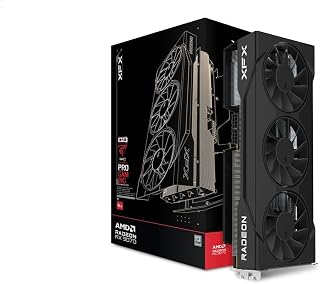
This XFX Swift variant stands out with its aggressive 2700 MHz boost clock, the highest among these options, delivering exceptional raw performance for competitive gaming and high-refresh-rate displays. The triple 90mm fan design ensures sustained cooling under load, while 16GB GDDR6 memory handles modern texture-heavy games with ease.
Pros
- Delivers high FPS at 1440p and capable 4K performance across demanding games
- Runs remarkably cool with temperatures staying below 60C even under load
- 2-slot design saves valuable case space compared to larger alternative GPUs
- Incredible value for the performance tier, best price-to-performance available
- Significant performance leap over previous-generation cards like the RX 6800 XT
Cons
- May run slightly warm in cases with poor airflow or limited ventilation
- 16GB VRAM, while adequate, is lower than some competing high-end models
- Requires adequate power supply and modern CPU to fully realize gaming potential
The XFX Swift AMD Radeon RX 9070 is a premium mid-range graphics card designed for gamers who want solid 1440p performance and playable 4K gaming without paying flagship prices. It targets PC enthusiasts upgrading from older generation cards who need meaningful performance gains for modern AAA titles.
The standout feature is its exceptional thermal performance, with the triple-fan XFX SWFT cooling solution keeping temperatures under 60C during intensive gaming sessions. Paired with the 2700 MHz boost clock and 16GB GDDR6 memory, real-world gaming delivers high framerates across demanding titles while maintaining impressive power efficiency that benefits both your electricity bill and system stability.
Build quality is solid throughout, with a sleek black finish and a compact 2-slot form factor that makes this card more flexible for system builds than larger alternatives. The DisplayPort and HDMI outputs provide connectivity options for modern displays, and the PCI-Express x16 interface ensures compatibility with virtually all current desktop systems.
The main consideration is that extremely tight case builds or systems with poor airflow may see slightly elevated temperatures, though users report this is often case-dependent rather than a card limitation. Some competitive options offer higher VRAM counts, though 16GB proves sufficient for current gaming demands.
This GPU represents the best price-to-performance option currently available for gamers ready to upgrade. Whether jumping from a 6800 XT or older card, the performance gains justify the investment, and the 3-year warranty provides confidence in your purchase.
Core Specifications
Graphics Processor: AMD Radeon RX 9070
Memory: 16GB GDDR6
Memory Clock: 20 GHz
Boost Clock: Up to 2700 MHz
Display Resolution: Up to 3840x2160 (4K)
Video Outputs: HDMI, 3x DisplayPort
Physical Design
Form Factor: 2-slot design
Cooling Solution: XFX SWFT Triple 90mm Fan System
Weight: 1.74 kg
Interface: PCI-Express x16
Warranty: 3 years manufacturer coverage
Who Should Buy This Card
This GPU is ideal for 1440p gaming enthusiasts and 4K gamers who prioritize smooth performance over absolute maximum settings. It's perfect for upgrading from mid-range cards from 2-3 generations ago and pairs excellently with high-end CPUs like the Ryzen 7 7800X3D or Intel equivalents for balanced, high-performance gaming builds.
System Requirements
Ensure your PC has adequate power supply (check your system's wattage), sufficient case airflow for the triple-fan cooling system, and at least a modern mid-range CPU to avoid bottlenecking. The card itself is compact enough to fit most standard ATX and larger cases due to its 2-slot design.
Buying Guide
Clock Speeds and Performance Targets
Factory overclocked cards deliver higher frame rates out of the box without manual tuning. The ASUS Prime Radeon RX 9070 EVO 16GB GDDR6 OC reaches up to 2610 MHz in OC mode, while the XFX Swift AMD Radeon RX 9070 OC Triple 90mm Fan pushes boost clocks to 2700 MHz. Higher clocks translate to smoother gameplay in titles that demand raw GPU horsepower.
Game clock ratings matter just as much for sustained performance during extended sessions. Cards with aggressive boost profiles may throttle under load if cooling cannot keep pace. Verify that your chosen model balances peak speeds with thermal headroom for consistent frame delivery.
Cooling Design and Thermal Management
Triple-fan configurations dominate the RX 9070 lineup, but implementation details separate adequate cooling from exceptional thermal performance. The ASUS Prime model incorporates a phase-change GPU thermal pad alongside axial-tech fans with extended blades and a barrier ring for increased air pressure. This approach maintains lower temperatures under sustained loads, preserving boost clocks and component longevity.
Zero-decibel fan modes allow passive cooling during light workloads, eliminating noise when you’re browsing or watching content. Dual-ball bearings extend fan lifespan compared to sleeve designs, reducing maintenance concerns over years of use. If you’re building a quiet system, check out our affordable GPU options for additional choices.
Form Factor and Build Compatibility
Card dimensions determine whether your chosen GPU fits your case and leaves room for proper airflow. The ASRock Radeon RX 9070 Challenger 16GB OC Graphics occupies 2.5 slots and measures 290x123x51mm, making it suitable for mid-tower builds with moderate clearance. The ASUS Prime’s compact 2.5-slot design offers similar flexibility while maintaining robust cooling performance.
Power requirements matter equally for system planning. All three cards use dual 8-pin connectors and recommend 700W or higher power supplies. Ensure your PSU delivers adequate wattage on the 12V rails, especially if you’re pairing your GPU with a high-core-count processor. Our Z890 motherboard guide covers platform choices for Intel builds.
Memory Configuration and Bandwidth
Every RX 9070 model ships with 16GB of GDDR6 memory on a 256-bit bus, providing ample capacity for 4K textures and ray-traced effects. The ASRock Challenger runs memory at 20 Gbps, delivering high bandwidth for data-intensive workloads. This configuration eliminates VRAM bottlenecks in modern titles that stream large asset pools during gameplay.
The generous memory buffer also benefits content creators running GPU-accelerated rendering or AI upscaling tools. If you work with 3D applications or video editing software, the extra VRAM prevents workflow interruptions. Pair your card with fast system memory from our DDR5 RAM recommendations for balanced performance.
Final Thoughts
The RX 9070 lineup offers strong 1440p and 4K gaming performance with modern features baked into RDNA 4 architecture. Choose the ASUS Prime Radeon RX 9070 EVO if you value advanced thermal engineering and dual BIOS profiles for different use cases. The ASRock Radeon RX 9070 Challenger delivers excellent value with factory overclocking and robust build quality for mainstream gaming setups. Browse more GPU options in our graphics cards category.
Frequently Asked Questions
What power supply do I need for an RX 9070 graphics card?
All RX 9070 models recommend a 700W power supply with dual 8-pin PCIe connectors. Ensure your PSU delivers adequate amperage on the 12V rails to support both the GPU and your processor under full load. Quality units from reputable manufacturers provide stable voltage regulation that prevents crashes during gaming sessions.
Can the RX 9070 handle 4K gaming in 2026?
Yes, the RX 9070’s 16GB GDDR6 memory and RDNA 4 architecture support 4K gaming with high settings in most current titles. Ray tracing performance benefits from third-generation RT accelerators, though you may need to adjust quality presets in the most demanding scenes. The cards excel at 1440p where they deliver consistently high frame rates with maxed-out visual settings.
How does factory overclocking affect warranty coverage?
Factory overclocked models ship with manufacturer-validated clock speeds that remain fully covered under warranty. These pre-configured profiles undergo extensive validation to ensure stability and reliability. You can safely use the advertised boost clocks without voiding coverage, unlike manual overclocking which may affect warranty terms depending on the manufacturer’s policy.
What case clearance do I need for a triple-fan RX 9070?
Most RX 9070 cards measure between 290mm and 320mm in length and occupy 2.5 expansion slots. Verify your case specifications support the card’s physical dimensions, leaving at least 30mm of clearance beyond the card length for cable management. Mid-tower cases designed for ATX motherboards typically accommodate these cards without modification.





Write Your Review
No reviews yet. Be the first to share your experience!