

Your PC’s built-in audio rarely does justice to your games, music, or video calls. Whether you’re gaming late at night, streaming movies, or sitting through back-to-back meetings, a decent soundbar transforms the experience without cluttering your desk. If you’re also shopping for accessories to complete your setup, check out our guide to the best gifts for tech lovers for more ideas.
This guide covers ten of the most popular soundbars for PC users in 2026, ranging from compact wired bars to Bluetooth-enabled models with full RGB lighting. Whatever your setup or listening style, there’s a solid option here for you.
Quick answer
This guide compares 10 picks, with LENRUE A39PRO USB Computer Speakers 10W Stereo Soundbar ranked first. Bluedee Computer Soundbar Speaker with Bluetooth, USB holds the highest customer rating among them. Sony HTS100F 2.0ch Compact Soundbar with HDMI ARC has the most customer reviews.

Pros
- True plug-and-play operation requires zero drivers or technical knowledge
- Top-positioned volume control is more intuitive and accessible than inline knobs
- RGB lighting adds visual appeal without being intrusive or garish
- Wide device compatibility thanks to standard 3.5mm AUX input
- Compact tabletop design fits any desk space without clutter
Cons
- Sound quality is entry-level, better for casual use than audiophiles
- Non-waterproof design limits use in kitchens or humid environments
- Fixed 1.2-meter cable may be too short for some desk setups
The LENRUE A39PRO is a no-frills desktop soundbar designed for anyone tired of tinny built-in monitor speakers. Perfect for professionals working from home, casual gamers, and students, this speaker prioritizes simplicity and compatibility over premium audio quality.
The standout feature is its genuine plug-and-play operation: no drivers, no apps, no configuration. Simply plug USB for power and 3.5mm for audio, then adjust volume via the intuitive top-mounted knob. The 10W dual-driver stereo system delivers clear, balanced sound suitable for videos, music, and gaming without noticeable distortion at normal volumes.
Design-wise, the A39PRO strikes a practical balance between compact and functional. The RGB breathing light adds a touch of personality to your desk, and it toggles on and off via a rear switch if you prefer minimal aesthetics. Build quality is solid plastic, weighing just over a pound, making it lightweight and stable on any desk surface.
The main limitation is audio fidelity, it won't satisfy audiophiles or music producers seeking studio-grade sound. Additionally, the fixed 1.2-meter cable may require an extension for some desk layouts, and the non-waterproof design keeps it strictly indoors.
Verdict: The LENRUE A39PRO is an excellent value-oriented soundbar for everyday desktop use. Its hassle-free setup, reliable performance, and affordable price make it a smart upgrade from monitor speakers for home office, entertainment, and light gaming. Recommended for buyers prioritizing convenience over premium audio.
Audio Performance: 10W total output, 2x5W stereo drivers, 80dB signal-to-noise ratio, 20Hz frequency response, 4-ohm impedance
Connectivity: USB power input (5V), 3.5mm AUX audio jack, 1.2-meter cable length
Design: 12.5 inches wide, 2.56 inches wide, 2.17 inches tall, 530g weight, tabletop mount, black plastic enclosure
Features: Top-mounted knob control, RGB breathing light with toggle switch, universal device compatibility
Warranty: 2-year limited warranty from LENRUE
Best For: Home office workers, online students, casual gamers, anyone with a desktop setup lacking decent audio
Ideal Use Cases: Video conferencing, YouTube and streaming, light gaming, music background audio, desktop entertainment
Not Recommended For: Music production, professional audio work, audiophile listening, waterproof or outdoor environments

Pros
- Audio-visual experience stands out: RGB lighting genuinely syncs to music, creating an engaging lightshow effect
- Easy setup and broad device compatibility make it work with virtually any audio source
- Compact footprint and lightweight design work well for cramped desk setups
- Touch controls and volume knob provide intuitive, responsive operation
Cons
- Limited to 4 watts output means it won't fill large rooms, best suited for personal workstations
- 2.0 stereo configuration lacks a subwoofer, so bass impact is modest compared to larger systems
- Not waterproof, so it requires protection from spills and moisture
The Redragon GS560 RGB Soundbar is a compact 2.0 channel speaker system designed for gamers, streamers, and desk workers who want quality audio without sacrificing space. At just 16 inches wide, it's built to nestle under monitors or laptops while delivering stereo sound and dynamic RGB lighting that syncs to your music.
The standout feature is the audio-visual experience. The RGB lighting modes, Wave, Disco, Rain, and static glow, actually respond to your music rather than just cycling through colors. For gaming sessions or music streaming, this creates a genuinely engaging lightshow. The upgraded dynamic drivers deliver clear, articulate sound with respectable bass for the compact form factor, though don't expect room-filling volume from the 4-watt output.
Build quality is solid despite the budget price point. The metal and plastic construction feels durable, and the touch controls respond reliably. The dedicated volume knob is a nice touch for quick adjustments without reaching for your device. USB power keeps the cable count minimal, and the 3.5mm input works with PCs, Macs, TVs, gaming consoles, and smartphones.
The main limitation is audio power. This is a personal-space speaker, not a party system. At 4 watts and without a subwoofer, it suits desktop or gaming setup use better than filling a living room. The 65 dB signal-to-noise ratio is acceptable for the category, though demanding audio professionals might notice some background hiss at high volumes.
Overall, the GS560 delivers excellent value for the price. The RGB lighting justifies the cost alone for gamers, while the solid stereo audio and universal compatibility make it a genuinely useful desk accessory rather than a gimmick. Recommended for anyone seeking affordable, compact speakers with visual personality.
Audio Performance: 2.0 channel stereo, 4 watts output, 20 kHz frequency response, 65 dB signal-to-noise ratio, dynamic drivers
Connectivity: USB power (5V), 3.5mm audio jack, 10-meter wireless range capability
Design: 15.8 inches wide, 2.7 inches deep, 2.8 inches tall, 885 grams, tabletop mounting, metal and plastic enclosure
Features: Touch controls, volume knob with power switch, four RGB lighting modes (music-sync capable), compatible with PC, Mac, TV, laptop, smartphone
Warranty: 1 year limited warranty, includes user manual
Who should buy: Gamers wanting ambient RGB lighting, streamers seeking compact desktop audio, office workers needing clear communication audio, or anyone with space constraints who values visual appeal alongside sound quality.
Who should skip: Those needing high-volume output for large rooms, audiophiles seeking professional-grade sound, or users who require waterproof equipment for kitchen or outdoor use.
Best use cases: Gaming setups, streaming stations, desk workstations, laptop companions, small bedroom entertainment, or office audio enhancement. The RGB lighting particularly shines during gaming, music streaming, or video content creation where the visual sync adds entertainment value.
Setup tips: Mount directly under your monitor or TV for optimal lighting effect. Use the volume knob for quick adjustments during gaming. Experiment with different RGB modes to find your preferred visual style. Position at ear level when seated for best stereo separation.

Pros
- Eye-catching RGB lighting with audio sync is engaging and adds aesthetic appeal to your setup
- Easy setup with universal USB/3.5mm connectivity works across multiple devices without drivers
- Compact 16-inch size fits perfectly under monitors without taking up desk real estate
- Clear sound quality and bass response at an affordable price point for casual gaming and work
- Touch control is intuitive and responsive for quick volume adjustments
Cons
- 4-watt output is modest and best for personal desktop use rather than filling larger rooms
- Limited bass depth compared to dedicated subwoofer systems, though adequate for gaming audio
- USB-only power source means it must stay tethered to a computer or powered USB hub
The Redragon GS560 is a gaming-focused RGB soundbar designed for desktop users who want immersive audio with visual flair. It combines a stereo speaker system with dynamic RGB backlighting that syncs to your music or game audio. This product is ideal for gamers, content creators, and anyone working at a desk who values both sound quality and aesthetic appeal.
The standout feature is the audio-reactive lighting system, which offers four different modes including Wave, Disco, and Rain effects that dance along with your audio. The upgraded dynamic driver delivers surprisingly clear sound with decent bass response for its compact size. Real-world performance shows solid mid-range clarity perfect for gaming dialogue and music playback, though volume dynamics are constrained by the 4-watt output limit.
Build quality is solid with an aluminum and ABS construction that feels sturdy despite the lightweight design. The 15.8-inch tabletop form factor sits neatly under most monitors without obstruction. The touch-controlled volume knob is responsive and intuitive, while the single cable management setup keeps your desk clean and clutter-free.
The main limitation is power output and bass extension. At 4 watts, this soundbar is personal-use only and won't project effectively across a room or fill a living space. Deep bass enthusiasts will find it adequate rather than impressive. Additionally, USB-only power means it requires a nearby USB port or powered hub to operate.
Verdict: The Redragon GS560 delivers excellent value for desktop gamers and streamers who want music-reactive lighting without sacrificing audio quality. If you need impressive bass or room-filling volume, look elsewhere. For a compact, stylish desk speaker that boosts your gaming or work setup with visual flair, this is a smart choice.
Audio Specifications: 2-channel stereo, 4-watt maximum output, 20 KHz frequency response, dynamic driver technology.
Connectivity: USB power (5V), 3.5mm audio input, 3.5mm microphone input. Compatible with PC, laptop, tablet, TV, and smartphone.
Physical Specs: 15.8 inches deep, 2.7 inches wide, 2.8 inches tall. Weight: 921 grams. 16-inch compact form factor designed for tabletop mounting.
RGB Features: 4 backlit modes with dynamic and static illumination, audio-sync technology, touch control. Colors include classic RGB spectrum.
Warranty: 1-year limited warranty from manufacturer. Model: Redragon GS560 (Adiemus series).
Best For: Desktop gamers, streamers, content creators, and office workers who want a compact speaker with visual enhancement. Ideal for personal desk setups, not large rooms or outdoor use.
Consider This If: You want RGB lighting that reacts to music without spending premium money. You have limited desk space and need a compact footprint. You value aesthetic appeal alongside audio quality for your gaming or creative setup.
Skip If: You need high-volume output for larger spaces. You want deep bass performance (consider a dedicated subwoofer instead). You prefer wireless connectivity (this is wired USB-powered only).
Setup Tip: Place the soundbar directly under your monitor for optimal RGB visibility and audio coverage. Ensure your USB port has sufficient power output to operate the unit continuously. Use the 3.5mm audio input for devices without USB access.

Pros
- Excellent sound quality for the price with anti-magnetic technology reducing static interference
- Wireless connectivity with 10-meter Bluetooth range offers flexibility for multiple devices
- Slim, sleek design integrates seamlessly into modern desk setups
- No external power adapter needed, just plug into any USB port
- Strong customer ratings reflect reliable performance and build quality
Cons
- Not waterproof or water-resistant, so keep away from liquids and moisture
- LED lights cannot be disabled, which may be distracting in dark environments
- No dedicated subwoofer, so bass performance is limited compared to multi-speaker systems
The Bluedee SK010 is a desktop soundbar speaker engineered for professionals, gamers, and everyday PC users who want better audio without the bulk of traditional multi-speaker setups. Its compact 16.4-inch form factor fits neatly into tight desk spaces, making it perfect for apartment dwellers and anyone with limited surface area. The device promises a cohesive audio experience that goes beyond typical built-in monitor or laptop speakers.
Sound quality stands out as the product's primary strength. Featuring dual drivers and dual diaphragms, the SK010 delivers a balanced blend of crisp highs and deeper lows, with anti-magnetic shielding that minimizes static interference. For video calls, music streaming, and casual gaming, the audio reproduction is noticeably cleaner than standard integrated speakers. The inclusion of touch controls provides intuitive volume and power management without cluttering your workspace with extra cables.
Connectivity is a major advantage. Bluetooth 5.0 pairs wirelessly with phones, tablets, and laptops within 10 meters, while the 3.5mm aux jack ensures compatibility with older devices or situations where Bluetooth isn't available. The tidy nylon-braided Y-cable bundles power and audio into a single connection, reducing cable clutter. USB power delivery means no wall outlet is needed, whether you're powering from your PC, laptop, or portable charger, making this a genuinely portable solution.
The ambient LED light strips add subtle visual flair that appeals to streamers and content creators looking to enhance their setup's aesthetics. However, these lights are permanent fixtures without a disable option, which may prove distracting for users who prefer minimal visual elements during focused work sessions. The speaker's 85% eco-friendly ABS construction and sustainable packaging demonstrate environmental responsibility without compromising durability.
The primary limitation is the absence of a dedicated subwoofer and waterproofing. Bass performance, while respectable for a soundbar, cannot match larger speaker systems, and the device's vulnerability to moisture means careful placement away from drinks or humid environments. Despite these trade-offs, the SK010 represents solid value for desktop audio, combining practical design, strong connectivity options, and reliable performance backed by an 18-month warranty and lifetime support.
Audio: Stereo output with dual drivers and dual diaphragms, 10-meter Bluetooth range, 3.5mm audio jack, anti-magnetic technology for interference reduction.
Connectivity: Bluetooth 5.0, 3.5mm aux jack, USB power input, 1 microphone, touch control with mechanical knob.
Design: Compact soundbar form factor measuring 16.42 inches wide x 2.67 inches deep x 2.67 inches high, weighing 2 pounds. Available in black with LED ambient light strips.
Materials and Build: 85% eco-friendly ABS plastic, 5% metal components, nylon-braided Y-cable for combined power and audio delivery. Not waterproof or water-resistant.
Warranty and Support: 18-month manufacturer warranty from purchase date, lifetime after-sales customer service via Amazon messaging and manual contact information.
Best For: PC gamers seeking improved audio without large speaker footprints, remote workers needing quality video call audio, content creators wanting aesthetic desktop upgrades, and anyone upgrading from built-in monitor or laptop speakers.
Consider if: You prioritize compact design, wireless flexibility, and plug-and-play setup with no software overhead. The dual connectivity ensures compatibility whether you're streaming from your phone or desktop.
Skip if: You require dedicated subwoofer-level bass response, need waterproof equipment, or prefer audio systems with customizable lighting that can be turned off completely.
Placement Tips: Position the soundbar directly beneath your monitor or on the desk surface for optimal sound projection. Keep away from liquids and humidity sources. The 10-meter Bluetooth range allows wireless connection from anywhere in your room during non-intensive use.

Pros
- Impressive stereo separation and bass response for a soundbar at this price point
- Quick Bluetooth pairing with 33-foot range offers wireless freedom without losing audio quality
- Compact 16-inch width fits seamlessly on most desks without taking up much real estate
- Built-in microphone allows hands-free calls during work or gaming sessions
- USB-powered design with automatic on-off eliminates cord management and power switches
Cons
- No built-in battery means you cannot use it unplugged or away from a power source
- Maximum 5-watt output may not satisfy users seeking room-filling volume for large spaces
- Touch knob control offers limited customization compared to dedicated app or physical buttons
The Nylavee SK100 is a desktop soundbar designed for professionals, gamers, and casual users who want quality audio without the complexity of multi-speaker setups. It combines compact form factor with solid stereo performance, making it an excellent choice for desk environments where space is limited but audio quality matters.
The standout feature is its hybrid driver configuration. With 4 speaker units and 2 independent bass diaphragms, the SK100 delivers noticeably clear dialogue and music separation while maintaining punchy bass. The double-layer neodymium magnets and mica fiber diaphragms contribute to audio clarity without harshness. Real-world performance is best suited for desktop distances, where the 33-foot Bluetooth range and stereo imaging shine. The 40-millisecond audio latency keeps video and audio reasonably synced for gaming and video calls.
Build quality reflects its mid-range price. The ABS and metal enclosure feels solid without being premium. At 16 inches wide and 2 pounds, it fits naturally on most desk setups. The side knob control is intuitive for volume and source switching. USB power delivery with automatic on-off is convenient, though the cord tether eliminates true portability.
The main limitation is power output. At 5 watts maximum, the SK100 excels in quiet office or bedroom settings but lacks the volume for open living rooms or parties. The lack of battery also means it must stay plugged in. For gaming, the 40ms latency is acceptable but noticeable compared to dedicated gaming headsets.
The Nylavee SK100 delivers solid value for desktop audio. If you need clear stereo sound with easy Bluetooth connectivity in a space-saving package, it's a smart upgrade from built-in laptop or monitor speakers. Best suited for work, study, and casual gaming rather than high-volume entertainment.
Audio Performance: 6 dynamic drivers, 5W max output, 20 kHz frequency response, 40ms Bluetooth latency, 33-foot wireless range
Connectivity: Bluetooth 5.0, 3.5mm AUX input, USB-powered (5V)
Build: ABS and metal construction, 16 inches wide x 2.36 inches deep x 2.76 inches tall, 2 pounds. Black color only. Tabletop mount with no water resistance.
Controls: Single knob control, built-in microphone, automatic on-off with USB power
Compatibility: Desktop, laptop, smartphone, tablet, Xbox, PS5, and most Bluetooth audio sources
Package: 1 soundbar, 1 USB power cable, 1 x 3.5mm audio cable, user manual. 18-month warranty included.
Best For: Home office workers, students, gamers seeking affordable desktop audio, and anyone upgrading from monitor or laptop speakers in confined spaces.
Not Ideal For: Users needing high-volume output for large rooms, portable or battery-powered audio, or those requiring advanced equalizer controls and app customization.
Setup Tips: Place the soundbar centered at ear level when seated for optimal stereo imaging. For wired connection, use the included 3.5mm cable to minimize latency in gaming. Ensure your power source is within cable reach since the USB connection is permanent.
Competing Alternatives: Compare against other compact desktop soundbars in the $50-70 range. Look for models with similar driver counts but check Bluetooth stability reviews and frequency response specs. The SK100's value proposition is its combination of dual connectivity, solid build, and warranty coverage rather than raw power output.

Pros
- Exceptional audio quality relative to price and size
- Directional sound clarity ideal for competitive gaming with precise enemy location detection
- Quick setup and intuitive controls
- Durable construction with professional aesthetic
- Flexible connectivity supports wired and wireless devices seamlessly
Cons
- Status light remains permanently on and can be distracting in low-light environments
- No software-based EQ customization or RGB address control
- Bluetooth connection exhibits latency issues that limit gaming use over wireless
The Creative Sound Blaster GS3 is a compact gaming soundbar designed for PC gamers, content creators, and professionals who need quality audio in tight spaces. At just 16 inches wide and weighing 2.3 pounds, it fits effortlessly under monitors and ultrawide displays where traditional speakers cannot fit.
The standout feature is its acoustic performance, delivering 24W of peak power with full-range racetrack drivers and a built-in port tube. The Superwide technology creates a genuinely immersive soundstage with pronounced bass that defies the compact design. Reviewers consistently praise the clarity across gaming, movies, and music, with particular strength in directional audio that helps gamers pinpoint enemy positions with precision.
Design and build quality are solid across the board. The all-black chassis looks refined and professional, matching any desk setup without drawing unwanted attention. Controls are intuitive, and the physical construction feels durable. The RGB lighting system offers six presets to match your gaming aesthetic, though it cannot be individually addressed or customized beyond the built-in modes.
Two notable drawbacks warrant mention: the status indicator light never turns off and creates noticeable glare in dim environments, and Bluetooth connectivity has reported latency issues that make it unreliable for gaming over wireless. Wired connections via USB-C and aux work smoothly. There is also no software suite for EQ adjustments, though users report the onboard audio performs well without customization.
Verdict: The Sound Blaster GS3 delivers exceptional value for gamers and professionals constrained by desk space. It outperforms monitor speakers and traditional compact solutions, making it a smart choice if you want powerful, directional audio in a refined package. The wireless quirks and fixed RGB controls are minor tradeoffs for the overall package.
Dimensions: 3.64 x 16.14 x 2.9 inches
Weight: 2.33 pounds
Peak Power: 24W with full-range racetrack drivers
Connectivity: USB-C, 3.5mm aux input, Bluetooth 5.4, headphone output
RGB Modes: Chasers, Aurora, Peak Meter, Glowing, Wave, Cycle
Model: MF8465
Manufacturer: Creative Labs
Color: Black

Pros
- Eliminates desk clutter with secure monitor mounting and zero footprint on work surface
- Works instantly across multiple operating systems and devices with included USB-C adapter
- Clean, minimalist design fits professional home offices and work-from-home setups
- Loud enough for video calls, training videos, and multimedia at reasonable volumes
- Highly rated by users in their 70s and tech beginners for ease of setup
Cons
- Audio quality described as thin and tinny by audiophiles, not suitable for music enthusiasts
- Clamp mechanism works best on thin, flat monitor edges and may not fit thicker monitor designs
- 10-watt output and compact 40mm drivers limit bass depth compared to larger desktop speakers
The XKX115A is a compact USB speaker designed for desktop PC users who value desk space and convenience over high-fidelity audio. It's perfect for remote workers, video conferencing enthusiasts, and anyone running Teams, Zoom, or streaming content who needs reliable desktop audio without the bulk of traditional speakers.
The standout feature is the adaptive channel-switching technology that automatically adjusts left and right audio channels based on speaker orientation. Paired with dual ultra-magnetic drivers and passive radiators, this delivers surprisingly loud, full-range stereo sound with noticeable bass for a speaker this size. Users consistently praise its clear output during video calls and training videos, and the touch control buttons make volume adjustment effortless.
Build quality is solid plastic construction with a secure clip-on mount that holds firmly to monitor edges. The design is deliberately minimal and modern, blending into professional office setups without visual clutter. Installation is instant: plug into USB, and sound works immediately across Windows, macOS, ChromeOS, Linux, and Android with no drivers or setup required.
The main limitation is audio fidelity. This speaker prioritizes clarity and volume over rich bass response and sonic depth. Audiophiles or music listeners may find the sound thin and tinny compared to larger bookshelf or desktop speaker systems. Additionally, the clip mechanism works best on monitors with thin, flat bezels and may not accommodate thicker monitor frames.
Verdict: The XKX115A is an excellent choice for professionals and casual users seeking hassle-free, space-efficient PC audio. Its universal compatibility, instant setup, and strong performance for speech and video make it one of the best compact monitor speakers for work-from-home environments.
Audio Performance: 10 watts output, 20 KHz frequency response, stereo 2-channel configuration with dual 40mm dynamic drivers and dual passive radiators.
Connectivity: USB and USB-C (includes USB-C to USB adapter), no wireless capability, 5-foot maximum range when mounted.
Design: 9.17 inches wide by 2.83 inches high by 1.65 inches deep. Compact plastic enclosure with touch button controls. Clip-on mount for monitors or desk placement.
Compatibility: Windows, macOS, ChromeOS, Linux, and Android. Works with PCs, laptops, MacBooks, Mac minis, iMacs, iPads, and Android tablets. Not compatible with monitors, TVs, or projectors.
Warranty: 24-month worry-free manufacturer warranty. USB-powered with no external power adapter required.

Pros
- Excellent sound quality for the price, especially for TV dialogue and secondary room use
- Easy setup with HDMI ARC, optical cable, and Bluetooth options
- Sleek, lightweight design that doesn't dominate the room or exceed smaller TV widths
- Strong build quality comparable to pricier competitors
- Long-lasting performance with users reporting satisfaction years after purchase
Cons
- Best suited for smaller rooms; may not provide enough bass for large living spaces without a separate subwoofer
- HDMI eARC setup can be tricky and may require troubleshooting with certain TV models
- Limited to 2 audio channels, so surround sound experience is simulated rather than true surround
The Sony HTS100F is a compact 2.0-channel soundbar designed for smaller rooms, secondary TVs, and budget-conscious buyers looking to escape tinny built-in TV speakers. It works best in apartments, bedrooms, or spaces where a full home theater system isn't practical. The slim 38-inch profile fits under most TVs without overwhelming the setup.
The standout feature is its voice enhancement technology, which noticeably sharpens dialogue on shows and movies, a real win for streaming content and older broadcasts where dialogue can feel muffled. S-Force Pro Front Surround creates a wider soundstage than you'd expect from a 2-channel bar. At 120 watts with a bass reflex speaker, it delivers satisfying room-filling sound for compact spaces, though it won't shake your walls or replace a subwoofer in larger rooms.
Connectivity is flexible: HDMI ARC with eARC support lets your TV remote control volume, USB and Bluetooth enable easy music playback from phones or tablets, and optical input provides a backup option. Setup is straightforward except for HDMI eARC, which some users report requires patience and TV menu navigation.
Build quality exceeds expectations at this price point. The plastic enclosure feels solid, not cheap, and the included remote is responsive. Real users report durability over years of daily use, suggesting this soundbar holds up well long-term.
The main limitation is its 2-channel design in smaller rooms. Bass is present but not punchy, so action movie enthusiasts may want to add a subwoofer later. For TV dialogue, streaming, and casual listening in compact spaces, the HTS100F is a smart, honest upgrade that delivers real improvements without breaking the bank.
Audio Output: 2-channel surround with S-Force Pro Front Surround technology
Power Output: 120 watts total
Dimensions: 38 inches W x 6 inches D x 6 inches H
Connectivity: HDMI eARC, optical digital, USB, Bluetooth (10-meter range)
Speaker Type: Bass reflex driver with built-in tweeter
Frequency Response: 64.4 Hz and above
Mounting: Wall-mountable or tabletop placement
Warranty: 1 year manufacturer limited warranty
Included: Remote Commander with batteries, optical cable, AC cord, wall mount template, quick start guide
Ideal For: Anyone with a smaller TV in a bedroom, apartment, dorm, or secondary room who wants better dialogue clarity and richer sound than built-in speakers. Streaming enthusiasts who prioritize TV shows and conversations over movie bass. Budget shoppers upgrading from disappointing TV audio for under $100. People with space constraints who need a slim, non-intrusive solution.
Not Ideal For: Large living rooms or open-concept spaces requiring deep bass and cinematic impact. Home theater purists wanting true surround sound without a subwoofer. Users expecting movie-theater bass response from a compact bar without additional components.

Built specifically for desktop setups, this soundbar uses passive radiators to deliver fuller low-end punch than most compact PC speakers manage, which matters if you're gaming or watching movies at your desk. The bar mount keeps it tucked under a monitor without eating desk space, while Bluetooth and USB-C give flexible hookup options for mixed PC and mobile use. Chroma RGB syncs with existing gaming setups for a cohesive look.
Pros
- Single USB-C setup
- Dual full-range drivers and passive radiators
- 14-zone Chroma RGB with game synchronization
- Bluetooth 5.0 and Razer Audio App controls
Cons
- No subwoofer connectivity
- Not waterproof
Desktop audio often has to share limited space with a monitor, keyboard, and mouse, which is exactly where the Razer Leviathan V2 X makes its case. This stereo PC soundbar is built around dual full-range drivers and passive radiators, with a compact monitor-mount-oriented form factor that keeps the listening hardware at the front of the setup rather than beside it. A single USB-C connection simplifies installation and helps reduce cable clutter, while Bluetooth 5.0 provides another way to connect compatible devices. For a PC gaming station, its most distinctive contribution is not just sound. The 14-zone Razer Chroma RGB lighting can synchronize dynamically with games, and the Razer Audio App offers control over audio and lighting profiles. That makes it particularly well suited to a desktop already centered on customizable peripherals. It can deliver up to 90 dB, but there is no subwoofer connectivity, so its bass is generated by the soundbar's own drivers and passive radiators. Choose it for a tidy, RGB-led desk setup where stereo audio and direct controls matter more than deep, separate-subwoofer bass.
Audio Performance: Stereo output, 90dB maximum volume, Dolby Digital 2.0 encoding, 20kHz frequency response, dual full-range drivers with passive radiators
Connectivity: USB Type-C (power and audio), Bluetooth 5.0, 10-meter wireless range, dual connectivity protocols for seamless device switching
Design: Compact bar-mount form factor, black color, 1-inch speaker size, passive radiator enclosure material, fits under standard monitors
Customization: 14-zone Razer Chroma RGB with dynamic in-game effects, Razer Audio App and Razer Synapse software control, app-based audio device toggling
Warranty and Support: 1-year manufacturer limited warranty, includes USB Type-C cable and product documentation
Buy the Leviathan V2 X if your PC setup has little spare desk room and you want a soundbar intended to sit beneath a monitor, with USB-C setup, Bluetooth, and heavily customizable Chroma RGB. It suits PC gamers and desktop users who value a coordinated Razer-style visual setup as much as straightforward stereo sound. Skip it if your priority is powerful low-end for bass-heavy games or music, since it has no subwoofer connection. It is also the wrong fit for locations exposed to water, as it is not waterproof.
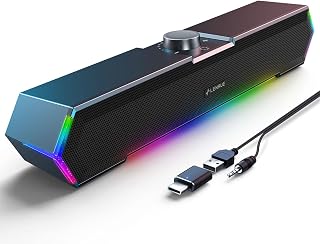
Anyone tight on desk space will appreciate the compact stereo design here, powered through USB-C or AUX so it fits laptops and desktops alike without a bulky power brick. The plastic enclosure keeps it light enough to reposition easily, and a physical volume knob offers quick control without digging through OS settings. Touch lights add a visual accent for users who want their desk setup to feel more personalized.
Pros
- Compact under-monitor design
- USB and AUX driver-free setup
- Included USB-C adapter
- Volume knob and touch RGB lighting
Cons
- No Bluetooth or wireless capability
- Touch-light reliability concerns
For a PC that needs better-than-built-in audio without surrendering desktop space, the LENRUE G11 takes a straightforward wired approach. Its 14.57-inch soundbar-style body is designed to sit below most monitors, avoiding the footprint of separate desktop speakers. USB power and AUX audio cables provide a direct, driver-free connection for computers and laptops; the included USB-C adapter extends that compatibility to newer devices. Glued connectors are intended to make cable management more orderly. Sound comes in stereo from four amplifier IC horns. For routine PC listening, the emphasis is on clear vocals and punchy mids across videos, music, and games, not the low-frequency depth associated with a dedicated subwoofer. The volume knob puts adjustment within reach, while touch-controlled RGB lighting brings a visual accent to a gaming or streaming setup. Its enclosure is plastic, and the soundbar is not waterproof. The G11 belongs on a shortlist of PC soundbars for users who want simple cabled installation, a small under-monitor footprint, and a more polished desk layout, but do not need Bluetooth or bass-led audio.
Audio Output: Stereo, 5 watts maximum power, dynamic driver type
Connectivity: USB powered (5V input), 3.5mm AUX cable input, USB C adapter included
Compatibility: Windows Vista/7/8/10, Mac OS, Chrome OS, computers, desktops, laptops. Not compatible with TVs or headphones.
Design: Plastic enclosure, 14.57 inches wide x 2.56 inches tall x 2.36 inches deep, weighs 0.65 kg
Controls: Touch-activated RGB lighting, top-mounted volume knob
Additional Features: Noiseless operation, surge protection, 1-year warranty, no Bluetooth or microphone
Buy the G11 if you want a compact, wired PC soundbar for a desktop or laptop and value an easy USB-and-AUX connection, an included USB-C adapter, a volume knob, and touch lighting. It is best for everyday video, music, and casual games when clear vocals and mids are more important than deep bass. Skip it if you need Bluetooth or wireless listening, a dedicated subwoofer-style low end, or absolute reliability from the touch-light feature. It is not waterproof.
What to Look for in a PC Soundbar
Connection Type
How a soundbar connects to your PC matters more than most buyers realize. Wired options using a 3.5mm AUX cable and USB power, like the LENRUE Computer Speakers,PC Speakers, are plug-and-play with zero latency. If you prefer a cleaner desk without visible cables, Bluetooth models like the Bluedee Computer Speakers for Desktop PC give you wireless flexibility with Bluetooth 5.0.
Some soundbars, like the Creative Sound Blaster GS3 Compact RGB, offer three connection methods including USB-C, AUX, and Bluetooth, which is ideal if you switch between devices often. Think about your daily workflow before committing to one connection style.
Audio Output and Driver Quality
Wattage gives you a rough sense of volume potential, but driver quality determines how the sound actually feels. Full-range drivers paired with passive radiators, as found in the Razer Leviathan V2 X, PC Soundbar with Full-Range, deliver a fuller frequency range with punchy low-end. Dual drivers with independent bass diaphragms, like those in the Nylavee Computer Speakers for Desktop PC, are worth seeking out if bass depth matters to you.
For casual use like YouTube or video calls, a 10W stereo bar is more than adequate. For gaming or music listening sessions, aim for a model with larger drivers and some form of bass reinforcement.
Desk Footprint and Mounting Options
Most PC soundbars are designed to sit flat beneath your monitor, keeping the footprint minimal. The slim profile of the LENRUE G11 Computer Speakers for Desktop is a good example of a bar built specifically to slide under any standard monitor without eating into your workspace. If desk real estate is tight, the Computer Speakers for Desktop PC Monitor goes a step further with a clip-on mount that attaches directly to your monitor, freeing up your entire desk surface.
If you’re putting together a full gaming station, pairing a great soundbar with the right peripherals makes a real difference. Our roundup of top picks for esports fans has more gear worth considering.
RGB Lighting and Aesthetics
Lighting is no longer just a gimmick. Soundbars like the Redragon GS560 RGB Desktop Soundbar feature audio-sync LED modes that pulse with your music, adding atmosphere without requiring any additional accessories. The Razer Leviathan V2 X, PC Soundbar with Full-Range takes it further with 14 Chroma RGB lighting zones fully customizable through Razer Synapse.
If you want lighting without software overhead, models like the LENRUE Computer Speakers,PC Speakers include a simple breathable light strip with a physical on/off switch. That said, if your setup has no RGB theme at all, a clean all-black bar like the Sony S100F 2.0ch Compact and Slim Soundbar for TV keeps things understated and professional. If you’re building a budget-conscious gaming setup, our list of gifts for gamers under a certain budget is worth a look too.
Final Thoughts
There’s a strong PC soundbar for every kind of user in this lineup. If you want a feature-rich, software-integrated option for gaming, the Razer Leviathan V2 X, PC Soundbar with Full-Range is hard to beat with its full-range drivers, Chroma RGB, and Bluetooth 5.0. For a dependable everyday bar that keeps things simple and delivers clean stereo sound without any fuss, the LENRUE Computer Speakers,PC Speakers remains one of the most well-rounded choices you can make in 2026.
Frequently Asked Questions
What is the best soundbar for PC gaming in 2026?
For gaming specifically, you want a soundbar with low-latency connectivity, good bass response, and ideally some form of RGB to match your setup. The Razer Leviathan V2 X and the Redragon GS560 RGB Desktop Soundbar are both strong contenders, offering audio-sync lighting and full-range drivers suited for immersive gameplay. Bluetooth 5.0 on both models also means you can pair a phone or tablet without swapping cables.
Can I use a TV soundbar like the Sony S100F with a PC?
Yes, the Sony S100F 2.0ch Compact and Slim Soundbar for TV works with a PC as long as you connect via Bluetooth or optical out. It’s a great option if you want a more living-room-quality sound experience at your desk. Keep in mind it’s slightly larger than a typical desktop soundbar, so make sure you have the monitor clearance for it. Its S-Force Pro Front Surround processing also adds a noticeably wider soundstage compared to most compact PC bars.
Do I need drivers to use a USB-powered PC soundbar?
Most USB-powered soundbars in this list are plug-and-play and require no additional drivers or software. The LENRUE G11 Computer Speakers for Desktop and the Redragon GS560 RGB Desktop Soundbar both confirm this in their specifications. The exception is premium models like the Razer Leviathan V2 X, which has optional Razer Synapse software for customizing RGB and audio settings. You don’t need the software to use it, but it unlocks more control if you want it.
What’s a good soundbar for a small desk or minimalist setup?
If desk space is your primary concern, the Computer Speakers for Desktop PC Monitor is uniquely versatile because it clips directly onto your monitor instead of sitting on your desk. The LENRUE G11 Computer Speakers for Desktop and the Bluedee Computer Speakers for Desktop PC also have slim profiles designed to tuck neatly under a monitor. For anyone building a tidy workspace from the ground up, our guide to practical picks for laptop owners covers more space-saving accessories worth pairing with your new soundbar.






Write Your Review
No reviews yet. Be the first to share your experience!