

Whether you are upgrading a laptop, cloning a drive, or just need portable storage on the go, a quality SSD enclosure turns any bare drive into a plug-and-play solution. The problem is that not every enclosure delivers consistent speeds, reliable heat management, or broad compatibility. If you have ever plugged in an external drive only to watch it throttle mid-transfer, you already know how much the enclosure itself matters.
This guide breaks down ten of the best SSD enclosures available right now, covering both 2.5-inch SATA and M.2 NVMe formats. If you are also looking for drives to pair with these cases, our roundup of the best portable SSDs for gaming is a solid starting point. Whether you prioritize raw speed, compact design, or budget-friendly convenience, there is an option here for you.
Quick answer
This guide compares 10 picks, with ASUS ROG Strix Arion M.2 NVMe SSD Enclosure, USB 3.2 ranked first.

Pros
- Exceptional heat dissipation thanks to aluminum construction and integrated thermal pads
- 10Gbps transfer speeds enable fast backups, large file transfers, and portable work storage
- Dual included cables support both modern USB-C and legacy USB-A connections out of the box
- Supports all standard M.2 NVMe form factors with tool-free, hassle-free installation
- Premium design and build quality justify the price compared to basic generic alternatives
Cons
- Higher price point than basic plastic enclosures, though justified by superior build quality
- RGB lighting requires ASUS Aura Sync compatibility to unlock full customization potential
- Gamer-oriented aesthetic may not appeal to users preferring minimalist or professional designs
The ASUS ROG Strix Arion is a premium M.2 NVMe SSD enclosure designed for gamers, content creators, and professionals who demand both performance and durability. It transforms any spare NVMe drive into a fast, portable storage solution with exceptional build quality that stands apart from generic competitors.
Performance is where this enclosure truly excels. The USB 3.2 Gen 2 connection delivers sustained 10Gbps transfer speeds, making it ideal for backing up large game libraries, editing video files, or transferring project data. The aluminum alloy chassis features integrated thermal pads that actively cool your drive during intensive operations, ensuring consistent performance without throttling even under sustained load.
Build quality and design set this apart in the enclosure market. The screwdriver-free installation is genuinely convenient, and the robust aluminum construction feels substantially more premium than plastic alternatives. The angular, gamer-inspired aesthetic includes an RGB-lit ROG logo that synchronizes with ASUS Aura Sync compatible peripherals, adding visual appeal for users with coordinated gaming setups. At 98 grams, the weight provides reassuring solidity without being cumbersome for portable use.
The practical accessories included make a real difference in everyday use. Two cables ship in the box: USB-C to USB-C and USB-C to USB-A, eliminating the need for separate purchases regardless of your device ecosystem. Universal M.2 form factor support handles all standard sizes, and the included pin ejector and protective holder make installation and storage straightforward.
The main consideration is price, which runs higher than basic plastic enclosures. However, this investment is justified by superior thermal management, durable construction, and thoughtful design details that deliver better long-term value. If you value reliability, aesthetics, and performance for serious storage needs, the ASUS ROG Strix Arion delivers on all fronts.
Connectivity and Speed: USB 3.2 Gen 2 Type-C interface with 10Gbps data transfer rates. Includes USB-C to USB-C and USB-C to USB-A cables for universal device compatibility.
Compatibility: Supports M.2 NVMe SSDs in 2230, 2242, 2260, and 2280 form factors with M-Key or B+M Key notches. Works with laptops, desktops, and any device with USB-C connectivity. SSD not included.
Design and Materials: Premium aluminum alloy enclosure with integrated thermal pads for heat dissipation. Dimensions: 7 inches length, 4 inches width, 2 inches height. Weight: 98 grams. Features ASUS Aura Sync RGB lighting with customizable color effects.
Installation: Tool-free screwdriver-free design with pin ejector and protective holder included. Includes R Hook accessory and protective carrying holder for portability and storage.
Warranty: 1-year manufacturer warranty from ASUS covering defects and hardware failure.
Who Should Buy This? Gamers with multiple gaming SSDs who want fast external storage for game libraries and backups. Content creators editing video or photography files who benefit from 10Gbps transfer speeds. Professionals requiring reliable portable storage for large project files. Anyone upgrading their PC SSD who wants to repurpose their old drive as external backup storage.
Key Questions to Consider: Do you have a spare M.2 NVMe drive to use with this enclosure? Do you need USB-C compatibility on your devices? Will you benefit from RGB lighting synchronized with your setup? Are you willing to invest in a premium enclosure for superior build quality and thermal performance?
Alternatives: Basic plastic enclosures offer lower prices but lack thermal management and build quality. Generic aluminum enclosures save money but miss the premium design and RGB features. This enclosure justifies its premium price through superior construction, effective cooling, and included accessories that deliver real-world value.
Real-World Use Cases: Cloning existing SSDs during upgrades. Creating backups of critical data with fast transfer speeds. Building portable storage for traveling professionals or content creators. Extending storage for gaming consoles and laptops without opening devices. Repurposing upgraded SSD drives as portable backup solutions.

Pros
- Extremely affordable at under $10 with an 18-month warranty backing
- No software installation needed, works immediately on any compatible system
- Fast UASP protocol significantly speeds up file transfers compared to standard USB
- Compact, lightweight design perfect for portable storage and travel
- Wide brand compatibility including Western Digital, Seagate, Samsung, and Kingston
Cons
- Limited to 2.5-inch drives only, cannot accommodate 3.5-inch desktop drives
- 6Gbps speed ceiling means it won't max out newer USB 3.1 or Thunderbolt connections
- Material quality and durability details not extensively covered in product specifications
The BENFEI 2.5-inch SATA to USB enclosure is a straightforward storage solution designed for users who need to repurpose old 2.5-inch hard drives or SSDs as external storage. Whether you're migrating data between computers, backing up files, or recovering data from an old laptop drive, this enclosure makes the process simple and affordable.
Performance is solid thanks to the JMS580 chipset and UASP protocol support. The 6Gbps transfer rate represents a meaningful upgrade over standard USB 3.0, delivering approximately 70% faster speeds for large file operations. Real-world transfers should feel noticeably quicker than older enclosures, making this a practical choice for regular file moving and backup tasks.
Setup is genuinely effortless. The tool-free design requires no screwdrivers or technical knowledge, and the inclusion of both USB Type-C and Type-A cables covers modern and older devices alike. Once connected, the drive mounts immediately without needing drivers, which works across Windows, macOS, and Linux systems. The hot-swappable design adds convenience for power users who frequently swap drives.
The main limitation is the 2.5-inch drive size restriction, which excludes larger 3.5-inch desktop drives. Additionally, while the enclosure supports up to 6TB capacity, don't expect to leverage faster USB 3.1 or Thunderbolt speeds since it maxes out at 6Gbps. The 18-month warranty provides reasonable peace of mind for a budget product.
This enclosure delivers excellent value for budget-conscious users and those with older 2.5-inch drives needing a second life. It's reliable, simple, and fast enough for everyday use without unnecessary premium pricing.
Compatibility: 2.5-inch SATA I/II/III drives, supports 7-9.5mm thickness, up to 6TB capacity.
Connectivity: USB 3.0 with UASP protocol support, includes USB Type-C and Type-A cable (10Gbps rated). Backward compatible with USB 2.0 and 1.1 ports.
Transfer Speed: Up to 6Gbps (Megabytes per second), approximately 750MB/s theoretical maximum.
Supported Brands: Western Digital, Seagate, Toshiba, Samsung, Kingston, Crucial, Hitachi, and most 2.5-inch SATA drives.
Operating Systems: Windows, macOS 8.0 and above, Linux.
Physical: Black color, 0.1kg weight, tool-free installation, hot-swappable, no drivers required.
Warranty: 18-month unconditional warranty with dedicated customer support.

Pros
- Extremely easy installation with zero technical knowledge required
- Fast USB 3.0 speeds cut file transfer times significantly compared to USB 2.0
- Lightweight and portable design perfect for backup storage on the go
- Works with both legacy USB 2.0 and modern USB 3.0 for versatile compatibility
- Exceptional customer ratings reflect proven reliability and real-world satisfaction
Cons
- Plastic construction may feel less durable than metal enclosures for heavy users
- Limited to 2.5-inch drives only, cannot accommodate 3.5-inch desktop drives
- Transfer speeds capped by USB connection, not ideal for intensive raid setups
The SABRENT EC-UASP is a straightforward external enclosure designed for 2.5-inch SATA drives and SSDs. It's built for users who need portable storage, emergency backups, or a way to repurpose old laptop drives without spending a fortune or wrestling with complicated hardware.
The standout feature is its tool-free design combined with USB 3.0 performance. Installation takes seconds: slide your drive in, connect the USB cable, and you're done. The UASP support optimizes SSD speeds to a full 5 Gbps when connected to a USB 3.0 port, making this enclosure genuinely useful for modern storage rather than just functional.
Build quality is straightforward plastic construction with compact dimensions that easily fit in a laptop bag or backpack. The lightweight design (just 2 ounces) makes it genuinely portable, and hot-swappable functionality means you can swap drives without shutting down your computer. Backward compatibility with USB 2.0 ensures this works with virtually any computer you own.
The main limitation is the plastic housing, which won't match the durability of metal alternatives for intensive daily use. Also, this enclosure only supports 2.5-inch drives, so 3.5-inch desktop drives won't fit. For high-speed professional workflows requiring sustained throughput, you may want a beefier solution.
Overall, this is an excellent choice for anyone needing affordable, hassle-free portable storage. The combination of ease of use, solid performance, and budget pricing makes it one of the most practical external enclosure options available.
Physical Specifications: Dimensions are 5.31 inches L x 2.91 inches W x 0.59 inches H. Weight is just 2 ounces, making it one of the lightest enclosures available. Color is black with a plastic construction.
Compatibility and Performance: Supports 2.5-inch SATA, SATA II, and SATA III drives with UASP optimization. USB 3.0 transfer rates reach 5 Gbps, while USB 2.0 backward compatibility offers 480 Mbps. Supports up to 16 TB capacity. Works with Windows 7 and higher, Mac OS X and higher.
Connectivity and Ease: Includes USB 3.0 cable in the box. Hot-swappable design with no drivers needed. Plug-and-play operation on any supported system. Model EC-UASP comes with a 1-year manufacturer warranty.

Pros
- Plug and play installation with zero driver requirements saves setup time
- Fast USB 3.0 interface delivers 5 Gbps transfer speeds for efficient data backup and file transfers
- Tool-free assembly and hot-swappable functionality make it easy to swap drives
- Transparent enclosure design provides visual appeal and lets you monitor drive status
- Affordable price point makes it accessible for casual users and professionals alike
Cons
- Clear plastic case may scratch or cloud over time with regular handling and use
- Limited to 2.5-inch drives only, not compatible with 3.5-inch or larger hard drives
- No active cooling means sustained high-speed transfers may generate some heat
The SABRENT EC-OCUB is a compact, budget-friendly external enclosure designed for 2.5-inch SATA hard drives and SSDs. It's perfect for users who need a simple solution to repurpose old laptop drives, create portable backup storage, or quickly transfer large files between computers without technical complexity.
The standout feature is its USB 3.0 interface, which delivers impressive 5 Gbps transfer speeds when connected to a USB 3.0 port. In real-world use, this means backing up a 100GB drive takes roughly 20 minutes. The tool-free, hot-swappable design means you can connect and disconnect drives instantly without powering down, and the included Acronis True Image software streamlines cloning and backup tasks. Backward compatibility with USB 2.0 ensures it works with older computers too.
Build quality is straightforward and practical. The transparent plastic enclosure is lightweight at just 40 grams and slim enough to fit easily into a laptop bag. The neutral clear design appeals to most users, though the plastic construction feels less premium than metal alternatives. Installation takes seconds: insert your drive, plug in the USB cable, and it's ready to use on Windows, Mac, or Linux systems without driver installation.
The main limitations are its 2.5-inch drive capacity and lack of active cooling. The enclosure is limited to thin laptop-sized drives, excluding larger 3.5-inch desktop hard drives. Prolonged high-speed transfers may cause minor heat buildup, though this rarely causes practical problems. The clear plastic case can also scratch or become cloudy with heavy use.
The SABRENT EC-OCUB delivers excellent value for anyone needing quick, simple external storage. It's an ideal choice for backup routines, drive testing, or extending the life of old laptop drives. For the price, it's hard to beat for casual users and professionals alike.
Interface: USB 3.0 (USB 2.0 and 1.1 backward compatible)
Supported Drives: 2.5-inch SATA and SATA II hard drives, SATA III SSDs
Drive Thickness: 7mm and 9.5mm compatible
Transfer Rates: Up to 5 Gbps (USB 3.0), up to 480 Mbps (USB 2.0)
Dimensions: 4.9 inches L x 3.1 inches W x 0.5 inches H
Weight: 40 grams
Material: Clear plastic
Included: USB cable, Acronis True Image software download
Warranty: 1 year limited
Operating Systems: Windows XP, Vista, 7, 8, 8.1, 10, Mac OS X
Who Should Buy This: The SABRENT EC-OCUB is ideal for anyone with a 2.5-inch hard drive or SSD they want to use as external storage. It's perfect for backup enthusiasts, IT professionals managing multiple drives, students transferring large files between computers, or anyone looking to repurpose an old laptop drive into external storage.
When to Consider Alternatives: If you need to house a 3.5-inch desktop hard drive, look for enclosures with larger form factors. If you prioritize durability and heat management for continuous heavy use, metal enclosures with active cooling may be better suited. If you need RAID functionality or multiple drive support, consider multi-bay enclosures instead.
Best Uses: Portable backup storage, OS cloning, emergency recovery drives, external workspace for video editing or content creation, testing drives before installation, and keeping old drives accessible for archival purposes.

Pros
- Excellent data transfer speeds make file backups and transfers significantly faster than older enclosures
- Truly plug-and-play functionality eliminates setup headaches and driver installations
- Affordable price point delivers professional-grade performance without premium costs
- Works reliably with a wide range of hard drives and solid-state drives from all major manufacturers
- Lightweight and compact design makes it perfect for desk organization and travel
Cons
- Only includes USB-C to USB-A cable, separate USB-C to USB-C cable needed for some modern devices
- Limited to 2.5-inch drives, so 3.5-inch external hard drives are not compatible
- Plastic construction may feel less premium compared to metal alternatives
The UGREEN 2.5-inch Hard Drive Enclosure is a straightforward external storage solution designed for anyone needing quick access to 2.5-inch SATA drives. Whether you're recovering data from an old laptop, creating portable backups, or expanding storage for gaming systems and media servers, this enclosure bridges the gap between internal drives and external accessibility.
Performance is where this enclosure truly shines. The USB 3.1 Gen 2 interface paired with UASP protocol delivers the advertised 6Gbps transfer speeds, which translates to noticeably faster file operations compared to older USB 3.0 enclosures. Real-world users report seamless integration with Plex media servers, NAS backup workflows, and simple data migration tasks, with the USB-C connection providing faster throughput than USB-A alternatives on compatible devices.
The build quality prioritizes practicality over aesthetics. The compact plastic housing measures just over an inch tall and fits easily on any desk or in a bag. Internal EVA foam padding protects drives from vibration and impact during transport or everyday use. The included 20-inch USB-C to USB-A cable offers reasonable flexibility, though users wanting pure USB-C connectivity will need to source that separately.
One minor limitation is the USB-C to USB-A cable configuration. While this bundle works with most computers, newer devices with USB-C ports exclusively will require an additional cable purchase. Additionally, support is limited to 2.5-inch form factors, excluding larger 3.5-inch drives from compatibility.
For the price point, this UGREEN enclosure delivers reliable, fast external storage without unnecessary complexity. The 2-year warranty and broad drive compatibility make it a sensible choice for data recovery, backups, and portable storage across Windows, macOS, and Linux systems.
Interface and Performance: USB 3.2 Gen 2, 6Gbps data transfer rate, UASP protocol support.
Compatibility: 2.5-inch SATA III hard drives and SSDs up to 6TB capacity, 7mm and 9.5mm heights. Compatible with WD, Seagate, Toshiba, Samsung, Kingston, Crucial, and Hitachi drives.
Supported Platforms: Windows, macOS 8.0 and later, Linux, Android via adapter.
Physical Dimensions: 3.23 inches wide, 1.12 inches long, 0.55 inches tall. Weight is 88 grams.
Package Contents: 1 enclosure unit, 1 USB-A to USB-C cable (20 inches), 1 product manual. Warranty is 2 years from manufacturer.

Pros
- Exceptional cooling performance keeps temperatures low during sustained transfers, preventing throttling
- Rock-solid reliability praised by creative professionals who depend on stable file access
- Premium build quality with solid aluminum enclosure that feels durable and professional
- Excellent compatibility across Mac, Windows, and gaming consoles without driver headaches
- Tremendous value for the performance tier compared to competitors
Cons
- Premium pricing compared to budget USB 3.1 enclosures may not suit all budgets
- SSD replacement requires removing multiple screws, making it less convenient than tool-free designs
- Requires NVMe drives without heatspreaders, limiting some compatible high-performance options
The OWC Express 1M2 is a Thunderbolt 4 NVMe SSD enclosure engineered for creative professionals, video editors, photographers, and anyone needing fast external storage. It supports DIY NVMe installation and works across Mac, Windows, and PlayStation 5, making it incredibly versatile for modern workflows.
Performance is where this enclosure truly shines. Real-world sustained speeds reach 3GB/s on Apple Silicon Macs, with consistent 3836MB/s transfer rates. This is over twice as fast as older Thunderbolt enclosures and eliminates the frustrating disconnection issues common with cheaper competitors. Video editors transferring 4TB projects experience rock-solid stability throughout the process.
The standout design feature is the patented passive heat-dissipating aluminum chassis. Unlike fan-based competitors, this enclosure runs silently while actively pulling heat from your SSD. Users report the drive stays warm but never hot, even during intensive sustained transfers. The metal construction feels premium and durable, with thoughtful details like included USB-C cable and screwdriver.
The main drawback is that replacing the SSD requires removing the enclosure and unscrewing the drive assembly, which is less convenient than tool-free designs. Also, your NVMe drive must not have a heatspreader attached, which eliminates some high-performance options like the WD Black SN850X with factory heatsink.
For creative professionals and power users, the OWC Express 1M2 delivers exceptional reliability, speed, and design quality. The premium price is justified by consistent performance and the peace of mind that comes with professional-grade engineering and OWC's multi-year warranty.
Interface and Speed: PCIe 4x NVMe, Thunderbolt 4 / USB4 / USB-C connectivity with up to 3836MB/s real-world performance and 3151MB/s rated speeds.
Compatibility: Works with Mac (Apple Silicon and Intel), Windows PCs, and PlayStation 5. Supports NVMe M.2 2280, 2242, and 2230 form factors (bare drives only, no heatspreaders).
Physical Design: Aluminum metal enclosure, 5.1 inches long by 0.9 inches wide by 2.7 inches thick, weighing 280g. Bus-powered with no external power required. Includes 40Gb/s USB-C cable and screwdriver.
Warranty and Support: 2-year limited warranty on enclosure, 3-year warranty on the complete solution. Backed by OWC's professional support team.
Best For: Video and photo editors working on Mac or Windows, content creators needing fast portable storage, gamers using PlayStation 5, and professionals who cannot afford storage downtime.
Consider This Product If: You need speeds that far exceed USB 3.1, work with large video or media files, want passive cooling without fan noise, prefer premium aluminum construction, and value reliability from an established brand.
Look Elsewhere If: You're on a tight budget and can accept slower USB 3.1 speeds, prefer tool-free SSD swapping, or need support for NVMe drives with factory heatspreaders.
Pro Tips: Pair this enclosure with bare NVMe drives like the Samsung 990 Evo Plus or Western Digital Black SN850X (non-heatspreader version) for optimal compatibility. On Mac, format using Disk Utility for seamless integration. For maximum thermal performance on sustained 4TB transfers, consider placing on a passive aluminum stand.

Pros
- Dual USB connector design eliminates the need for separate cables or adapters for different devices
- Fast 5 Gbps data transfer rates with UASP protocol significantly speed up large file operations
- Truly plug-and-play with zero setup, no drivers, and intuitive tool-free assembly
- Affordable price point makes upgrading to external storage accessible for any budget
- Wide device and OS compatibility ensures this works with your existing hardware ecosystem
Cons
- Limited to 2.5-inch drives only, so 3.5-inch desktop drives cannot be used
- No reviews available yet, so real-world user feedback is not yet established
- Integrated cable design means you cannot replace a damaged cable separately
The BENFEI 2.5-inch SATA to USB enclosure is a straightforward solution for anyone who needs to access existing 2.5-inch hard drives or SSDs externally. Whether you're migrating data between computers, backing up a laptop drive, or repurposing old storage, this enclosure provides an affordable gateway without special tools or technical knowledge.
Performance is solid for the price. The 5 Gbps transfer rate with UASP protocol delivers noticeably faster speeds than older USB 3.0 devices, cutting file transfer times significantly. The dual USB connector design is particularly smart, offering both Type-C and Type-A options so you can connect to virtually any modern device from laptops and desktops to tablets and phones without hunting for adapters.
Build and usability are straightforward. The tool-free design means pushing out the cover, inserting your drive, and closing it back up takes under a minute. Hot-swappable functionality lets you swap drives on the fly without disconnecting from your computer, adding convenience for users managing multiple drives. The compact form factor and integrated cable keep everything tidy in a bag or drawer.
The main limitation is the 2.5-inch restriction, so desktop-sized 3.5-inch drives cannot be accommodated. Additionally, the integrated cable means a damaged connector cannot be swapped out independently, though the 18-month warranty provides protection against manufacturing defects.
For the price and feature set, this enclosure is a dependable choice for expanding storage, creating backups, or reviving old drives. It delivers reliable performance with no fuss, backed by a solid warranty and responsive customer service.
This enclosure works with any 2.5-inch SATA I, II, or III drive up to 6TB capacity. Compatible with all major brands including Western Digital, Seagate, Toshiba, Samsung, Kingston, Crucial, and Hitachi. Supports Windows, macOS 8.0 and above, and Linux systems without requiring drivers.
USB connectivity covers Type-C and Type-A ports, ensuring compatibility with modern laptops, tablets, phones, and desktop computers. Backward compatible with USB 2.0 and 1.1 ports if you need to connect to older devices. Works with PS4 for game library expansion or backup storage.
Best for users upgrading laptops and wanting to keep old drives as portable backup storage, IT professionals managing multiple drives across devices, content creators needing fast external storage for large files, and budget-conscious buyers wanting expandable storage without breaking the bank.
Not ideal if you work exclusively with 3.5-inch desktop drives or need extreme portability since the integrated cable adds bulk compared to modular designs.

FIDECO M.2 NVMe SSD Enclosure USB 3.2 Gen 2 10Gbps
Pros
- Exceptional transfer speeds leverage full 10Gbps USB 3.2 Gen 2 bandwidth
- Intelligent sandwich design ensures optimal thermal contact and heat dissipation
- Universal drive compatibility eliminates need for multiple enclosures
- Plug-and-play setup requires no drivers or complex configuration
- Compact design with premium aluminum and ABS construction feels solid and professional
Cons
- May require additional thermal padding for thinner SSDs to ensure optimal contact
- Only supports NVMe drives with M or M+B keys, not compatible with SATA M.2 SSDs
- New SSDs require initialization before computer recognition on first use
The FIDECO M210 NVMe enclosure transforms any M.2 NVMe SSD into a portable external drive with genuine 10Gbps speeds. Whether you're a content creator managing large video files, a data backup enthusiast, or someone upgrading their storage, this compact adapter delivers professional-grade performance at a consumer-friendly price point.
Performance is the standout feature here. By fully supporting USB 3.2 Gen 2 and UASP protocol, this enclosure reaches theoretical maximum speeds of 10Gbps, enabling file transfers in minutes rather than hours. Real-world testing confirms fast, reliable performance across Windows, Mac OS, and Linux systems. Users report consistently quick data transfers, and the included thermal management actually works, keeping drives cool even during extended copying sessions.
The build quality impresses immediately. The sandwich-style design isn't just clever marketing, it's genuinely functional. Installing an SSD takes seconds without tools, and the design naturally optimizes thermal pad contact with the drive. The premium aluminum and ABS construction feels durable, while the pocket-sized dimensions (4.5" x 1.4" x 0.5") fit easily into any travel bag. The included USB-C to USB-A adapter cable adds flexibility for different devices.
One consideration: some users report needing additional thermal padding for certain thinner SSD models to achieve optimal contact. Most buyers solve this with a standard 0.5mm adhesive pad, but it's worth knowing upfront. Additionally, this enclosure only supports NVMe drives with M or M+B key types, not SATA M.2 drives, so verify your SSD compatibility before purchasing.
The verdict is clear: the FIDECO M210 represents exceptional value for anyone needing portable, high-speed NVMe storage. The tool-free installation, superior thermal design, and reliable performance justify the investment. Backed by a one-year warranty and responsive customer support, this is a dependable solution for external SSD needs.
Interface and Performance: USB 3.2 Gen 2 Type-C connector, supports UASP protocol, maximum 10Gbps data transfer rate.
Compatibility: M.2 NVMe SSD form factors (2230/2242/2260/2280), M and M+B key drives only. Supports Windows, Mac OS, and Linux operating systems.
Physical Design: Sandwich-style construction with aluminum and ABS materials. Dimensions 4.5"L x 1.4"W x 0.5"H. Includes thermal pad and USB-C to USB-A adapter cable in the box.
Warranty and Support: One-year manufacturer warranty included. Technical support available via email at [email protected]. Model M210 by FIDECO.
Who Should Buy: Content creators with large media files, system administrators managing backups, travelers needing portable storage, anyone upgrading their computer with an external SSD, or professionals requiring quick data transfers between machines.
Compatibility Check: Before purchasing, confirm your M.2 SSD uses NVMe protocol with M or M+B key notch (not SATA). Check your drive specifications or physical inspection to verify the key type. The enclosure supports four common SSD sizes, so size compatibility is rarely an issue.
Setup Tips: Allow time for Windows/Mac to detect and initialize new SSDs on first connection. Keep the thermal pad properly positioned for optimal heat dissipation. If thermal contact feels loose, additional 0.5mm adhesive padding is inexpensive and commonly available online.
Performance Expectations: Achieve maximum 10Gbps speeds only when connected to USB 3.2 Gen 2 ports on your host device. Older USB ports will negotiate to lower speeds. Real-world transfer rates depend on your SSD's native speed and USB port implementation.
Pros
- Exceptionally fast and reliable 10Gbps transfer speeds with active thermal cooling
- Intuitive tool-free design saves time during SSD upgrades, cloning, and troubleshooting
- Durable aluminum housing provides excellent heat dissipation and long-term durability
- Universal USB-C compatibility works seamlessly with Windows, Mac, and mobile devices
- Compact and lightweight form factor makes it truly portable for on-the-go professionals
Cons
- Tool-free cover design is tight and may require learning the correct pulling technique
- USB-C to USB-A adapter needed for older devices, which slightly reduces speeds
- Only supports NVMe SSDs, not compatible with M.2 SATA drives
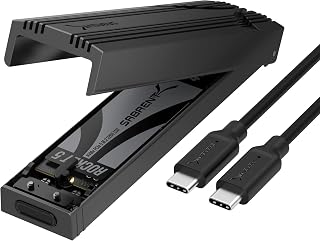
The SABRENT EC-PNVO is a premium USB-C NVMe enclosure designed for professionals, content creators, and gamers who need fast, reliable portable storage. It combines an innovative tool-free design with serious thermal engineering to deliver consistent 10Gbps performance without the complications of traditional enclosures.
What sets this enclosure apart is its aluminum thermal pad system that directly contacts your M.2 NVMe SSD, effectively cooling the drive during sustained transfers. This design philosophy means you get stable 10Gbps speeds whether you're cloning a drive for hours or transferring large video files. The flip-open mechanism requires no screws or tools, though users report the cover fits snugly and needs a deliberate pull from the end farthest from the USB-C port. This tight tolerance is actually a feature, as it ensures your drive stays secure and protected.
Build quality is exceptional throughout. The enclosure combines a reinforced ABS frame with a precision-machined aluminum alloy top that looks and feels premium. At just 2.62 ounces and compact dimensions of 4.59 by 1.24 by 0.6 inches, it's genuinely portable without feeling fragile. The included USB-C to USB-C cable enables full 10Gbps performance immediately out of the box, though the enclosure also works with USB-A adapters on older systems, with slightly reduced speeds.
The main limitation is the tight learning curve on opening the cover and the fact that this enclosure only works with NVMe SSDs, not legacy M.2 SATA drives. Additionally, achieving maximum speeds requires a USB-C port on your host device; USB-A connections work but provide somewhat slower performance.
Overall, the SABRENT EC-PNVO is an excellent choice if you value build quality, thermal performance, and ease of use over absolute price minimization. The 1-year warranty extends to 3 years with registration, giving you peace of mind on a tool that professionals will use frequently.
Connectivity: USB 3.2 Gen 2 (10Gbps), USB-C port
Compatibility: M.2 NVMe PCIe SSDs in 2230, 2242, 2260, and 2280 sizes, up to 8TB capacity
Performance: 1,250 MB/s data transfer rate with thermal stability management
Physical: 4.59 inches long, 1.24 inches wide, 0.6 inches tall, weighs 2.62 ounces
Materials: Aluminum alloy top with ABS reinforced frame and thermal pads
Included: USB-C to USB-C cable, spare thermal pad, user manual
Warranty: 1 year limited, 3 years with manufacturer registration
Compatibility: Windows PC and Mac systems, also works with gaming handhelds and any USB-C device
Who Should Buy: Content creators working with large video files, IT professionals needing SSD diagnostics tools, gamers upgrading or managing storage, and anyone who values tool-free convenience and thermal performance.
Who Might Want Alternatives: Budget-conscious buyers seeking the absolute lowest price, users with only USB-A ports and no adapter, those working with M.2 SATA SSDs, or anyone requiring slower speeds for light file access.
Key Considerations: Verify your host device has a USB-C port for full 10Gbps speeds. Confirm you have NVMe SSDs, not SATA SSDs. Plan to use the included cable for best performance. Take a moment to learn the proper technique for opening the tight cover to avoid frustration on first use.
Value Assessment: At its price point, this enclosure delivers exceptional value for professionals. The build quality, thermal performance, and zero-tool design justify the investment compared to cheaper slide-in alternatives that typically run cooler and deliver less stable speeds under sustained workloads.
Pros
- Exceptional build quality with aluminum chassis and premium ASM235CM chipset for reliable performance
- Fast real-world speeds make file transfers and backups noticeably quicker than older enclosures
- Genuinely universal compatibility covers most 2.5" SATA drives on the market
- No driver installation or power supply needed, making it ideal for travel and multi-device use
- Excellent value proposition at under $25 for a well-engineered storage solution
Cons
- Limited to 2.5" drives, so 3.5" desktop drives cannot be used without a different enclosure
- Requires USB-C to USB-A adapter for older computers and devices without native USB-C ports
- Transfer speeds capped at 6Gbps by SATA drives themselves, not the enclosure's full 10Gbps USB 3.1 potential
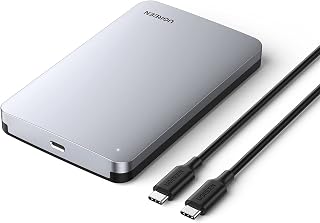
The UGREEN USB-C SSD enclosure is a compact, portable storage solution designed for anyone who needs to expand drive capacity, create backups, or recover data from existing 2.5" SATA drives. It's ideal for laptop users, content creators, IT professionals, and anyone juggling files between multiple systems.
Performance is where this enclosure shines. The 6Gbps transfer speed with UASP acceleration delivers genuine speedup compared to older USB 3.0 models. The ASM235CM chipset handles high-speed transfers smoothly, and the aluminum construction provides passive heat dissipation so drives stay cool without adding bulk or noise.
Setup is refreshingly simple. There's no driver installation, no external power needed, and no tool-free assembly means you can be transferring files within seconds of unboxing. Compatibility is excellent, covering Windows, macOS, Linux, and even game consoles and Smart TVs, making this enclosure genuinely universal.
The main limitation is that this enclosure only works with 2.5" SATA drives. If you have older 3.5" desktop drives, you'll need a different solution. Additionally, older computers without USB-C ports will require a separate USB-A adapter.
Overall, the UGREEN enclosure represents outstanding value for portable storage. It combines practical design, solid performance, and broad compatibility into an affordable package that handles everyday backup and file transfer tasks with ease.
Connection: USB 3.1 Type-C with 10Gbps bandwidth
Transfer Speed: 6Gbps max with UASP protocol
Chipset: ASM235CM
Compatibility: 2.5" SATA III/II/I drives up to 6TB
Supported Drives: SSD and HDD from WD, Seagate, Samsung, Kingston, Crucial, Toshiba, and others
Materials: Premium aluminum alloy
Dimensions: 5.24" L x 3.23" W x 0.59" H
OS Support: Windows, macOS, Linux, PS4, PS3, Xbox One, Smart TV
Power Supply: None required (bus-powered)
Included: USB-C to USB-C cable
Best For: Anyone with a 2.5" SATA SSD or HDD who needs fast external storage for backups, data transfers, or portable file access. Great for students, travelers, and professionals who work across multiple systems.
Consider This Enclosure If: You need reliable, plug-and-play storage expansion without setup hassle. You want proven compatibility with popular drive brands. You value compact, durable design with fast speeds.
Skip This If: You have 3.5" desktop drives that need housing. Your primary devices use only older USB-A ports and you don't want to purchase adapters. You need NVMe drive support.
Shopping Tip: Make sure your 2.5" drive is SATA-based, not NVMe. This enclosure doesn't support newer NVMe SSDs. Also verify your computer has USB-C connectivity or plan to budget for a USB-C to USB-A adapter.
What to Look for in an SSD Enclosure
Drive Type Compatibility
The first thing to confirm is whether your drive is M.2 NVMe or 2.5-inch SATA, because these two formats require completely different enclosures. An NVMe drive will not work in a SATA case, and vice versa. Some NVMe enclosures, like the FIDECO M.2 NVMe SSD Enclosure, support multiple key types (M and M+B) along with multiple form factors including 2230, 2242, 2260, and 2280.
If you are working with a 2.5-inch drive, confirm the enclosure supports your drive’s thickness. Most quality options, like the UGREEN 2.5″ Hard Drive Enclosure USB 3.0 to SATA, accommodate both 7mm and 9.5mm drives, which covers the vast majority of consumer SSDs and HDDs.
Transfer Speed and Interface
For SATA-based enclosures, USB 3.0 with UASP support is the sweet spot, delivering up to 6 Gbps with significantly lower CPU overhead than standard USB bulk transfer. Look for enclosures that explicitly mention UASP SATA III support, as the speed difference versus older implementations is noticeable in real-world use.
NVMe enclosures raise the ceiling considerably. A USB 3.2 Gen 2 enclosure like the ASUS ROG Strix Arion Aluminum Alloy M.2 NVMe SSD pushes up to 10 Gbps, while the OWC Express 1M2 40Gb/s Portable NVMe SSD leverages USB4 and Thunderbolt for real-world throughput exceeding 3800 MB/s. Match the interface to what your computer actually supports for the best results. For context on fast internal drives that pair well with these enclosures, check out our best PCIe 5.0 SSD guide.
Thermal Management
Heat is the silent killer of sustained transfer performance. Cheaper plastic shells trap heat and cause drives to throttle during long file copies. Aluminum enclosures dissipate heat passively, which keeps speeds consistent without adding any noise or moving parts.
The SABRENT USB-C NVMe Enclosure & Reader uses a direct-contact thermal pad inside an aluminum shell to pull heat away from the SSD actively during transfers. For heavy workloads like video editing or large backups, this kind of thermal design is worth prioritizing over a bare plastic shell, regardless of the stated speed spec.
Installation and Portability
Tool-free designs have become the standard for good reason. Enclosures like the BENFEI 2.5 Inch SATA to USB Tool Free External let you slide a drive in, close the shell, and go. No screwdrivers, no loose hardware, no fumbling. This matters especially if you swap drives frequently or use the enclosure for cloning and recovery work.
For NVMe users who move between machines often, a compact sandwich-style design like the FIDECO M.2 NVMe SSD Enclosure fits easily in a pocket. Combine that with a bus-powered design and you have a genuinely portable setup with no wall adapter needed. If you are building out a broader portable rig, our picks for the best portable SSD for gaming cover pre-built options too.
Final Thoughts
There is a solid SSD enclosure for every situation in this lineup. For budget-friendly 2.5-inch SATA use, the SABRENT 2.5in SATA to USB 3.0 Tool-Free SSD/HDD is a dependable, widely-validated choice with an enormous track record. If you need top-tier NVMe performance and your system supports USB4 or Thunderbolt, the OWC Express 1M2 40Gb/s Portable NVMe SSD delivers the kind of real-world throughput that makes other enclosures look slow by comparison.
Frequently Asked Questions
What is the difference between an NVMe enclosure and a SATA enclosure?
NVMe enclosures are designed for M.2 PCIe drives and use interfaces like USB 3.2 Gen 2, USB4, or Thunderbolt to reach much higher speeds than SATA. SATA enclosures work with 2.5-inch drives and top out around 6 Gbps with UASP enabled. You cannot mix and match: always confirm which type your drive is before buying an enclosure.
Do I need a driver to use an SSD enclosure?
In most cases, no. The enclosures reviewed here are all plug-and-play on Windows, macOS, and Linux. Your operating system recognizes the drive through the enclosure’s bridge chip automatically. The only exception is a brand-new, unformatted SSD, which needs to be initialized and formatted before it shows up as usable storage.
Can I use an SSD enclosure to clone my old drive to a new one?
Absolutely, and this is one of the most common use cases. You connect your new SSD via an enclosure, use cloning software to copy the old drive over, then swap the drives. Some enclosures, like the SABRENT 2.5in SATA to USB 3.0 Clear SSD/HDD, even bundle Acronis True Image to make the cloning process straightforward. If you are upgrading to a faster internal drive, our best PCIe 4.0 SSD guide covers strong candidates for the new drive.
Are SSD enclosures worth using in 2026?
More than ever. With USB 3.2 Gen 2 and USB4 becoming common on laptops and desktops, an NVMe enclosure in 2026 can genuinely rival internal drive speeds for most everyday tasks. Even a budget SATA enclosure makes a retired laptop drive useful again as external backup storage. The cost-to-utility ratio on these accessories is hard to beat.
Common questions
What is the best NVMe enclosure to buy right now?
The SABRENT USB-C NVMe Enclosure & Reader (EC-PNVO) is the best NVMe enclosure for most buyers. It supports M.2 PCIe SSDs up to 8 TB with a 10Gbps USB interface rated for 1250 megabytes per second, and works with both Mac and PC. The ASUS ROG Strix Arion is a strong alternative if you want an aluminum alloy build with dual USB-C and USB-A cables for wider compatibility. Check the current listing for live pricing on either option.





Write Your Review
No reviews yet. Be the first to share your experience!