

Your laptop boots slowly, applications stall, and load times feel like they belong to a different decade. The good news is that swapping out your old hard drive for a solid state drive is one of the most impactful upgrades you can make, often transforming a sluggish machine into something that feels brand new. Whether you need a simple SATA drop-in replacement or a high-speed PCIe Gen4 NVMe drive, there is an option on this list built for your situation.
This guide covers ten of the best SSDs for a laptop upgrade in 2026, spanning a range of interfaces, capacities, and performance tiers. If you are also shopping for accessories to go along with your upgrade, check out our roundup of the best gifts for tech lovers for more ideas. Read on to find the drive that fits your laptop and your workflow.
Quick answer
This guide compares 10 picks, with Samsung 870 EVO 1TB SSD: 560MB/s SATA III 2.5" Internal ranked first.

Samsung 870 EVO 1TB SSD: 560MB/s SATA III 2.5"
SATA III capped at 560MB/s won't match newer NVMe options, but for laptops that only support SATA connections, this is still a major leap over a spinning hard drive. MLC V-NAND technology adds endurance, making it a solid pick for anyone upgrading an older laptop that can't physically accept an M.2 NVMe drive.
Pros
- Read speeds up to 560MB/s, max for SATA III
- 5-year warranty with up to 600 TBW endurance
- In-house Samsung NAND, DRAM, and firmware
- Standard 2.5-inch fit for most laptop bays
Cons
- SATA interface caps performance well below NVMe drives
- No speed gains possible even on newer hardware
Not every laptop upgrade is about chasing the newest interface, and that's exactly where the Samsung 870 EVO 1TB earns its spot on this list. Many laptops, especially older or budget models, only support SATA, and this drive pushes that interface to its limit with 560MB/s read and 530MB/s write speeds. For a laptop upgrade, that means dramatically faster boots and app launches compared to whatever aging drive is currently installed, without needing to check for NVMe compatibility first. Samsung's MLC V-NAND and in-house manufacturing of NAND, DRAM, and firmware back this up with real reliability, and the 5-year warranty with up to 600 TBW endurance is reassuring for a drive meant to last through years of daily laptop use. The 2.5-inch form factor is the standard fit for laptop bays, so compatibility is rarely a concern. If your laptop's motherboard tops out at SATA III, this is about as much performance as you can extract from an upgrade, making it a dependable, low-risk choice.
Storage Capacity: 1TB
Form Factor: 2.5-inch
Interface: SATA III 6Gb/s
Read Speed: Up to 560 MB/s
Write Speed: Up to 530 MB/s
Cache Memory: 1GB
NAND Technology: MLC V-NAND
Endurance: 600 TBW
Warranty: 5-year limited (3-year standard coverage)
Encryption: AES 256-bit, TCG/Opal support
Compatibility: PC, Mac, Laptop
Weight: 3.04 ounces
Dimensions: 3.94" L x 2.76" W x 0.27" Th
Model Number: MZ-77E1T0B/AM
Buy this if your laptop is limited to a SATA III interface and you want the fastest, most reliable option within that constraint. Great for laptop upgraders prioritizing longevity and warranty backing. Skip it if your laptop supports NVMe, since M.2 drives offer significantly higher sequential speeds for a comparable capacity.
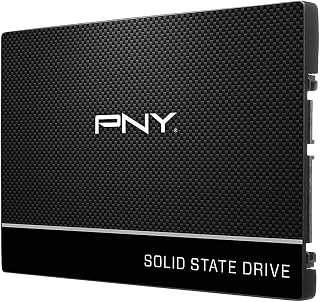
At 250GB, this is aimed at budget laptop upgrades where the goal is simply replacing a failing or slow hard drive with something reliable, not maximizing capacity. Hardware encryption is a useful bonus for anyone storing sensitive files on a personal or work laptop without paying for a larger drive than they need.
Pros
- Noticeable speed gain over mechanical hard drives
- Compact, lightweight 2.5-inch form factor
- Hardware encryption for data security
- Ultra-low power draw helps laptop battery life
Cons
- 250GB capacity is limiting for larger needs
- SATA speeds trail behind NVMe alternatives
For laptop owners upgrading on a tight budget, the PNY CS900 250GB addresses the most common scenario: an old laptop still running a mechanical hard drive that needs a straightforward, affordable SSD swap. At 535MB/s read and 500MB/s write speeds, it delivers a dramatic improvement in boot times and application responsiveness over any spinning hard drive, which is the biggest jump most people notice in a laptop upgrade. The 2.5-inch form factor is compact at 0.3 inches thick and weighs just 45 grams, so it drops into standard laptop drive bays without clearance issues. Built-in hardware encryption adds a layer of data protection, useful for a laptop that travels. Ultra-low power consumption is another laptop-specific advantage, helping preserve battery life after the upgrade. The tradeoff is capacity: 250GB covers an OS and core applications but leaves little room for large media libraries. For anyone whose main goal is reviving an aging laptop with minimal spend, this covers the essentials well.
Capacity: 250GB
Form Factor: 2.5-inch
Interface: SATA 6.0 Gb/s (backwards compatible with SATA II 3GB/sec)
Read Speed: 535MB/s sequential
Write Speed: 500MB/s sequential
Cache Memory: 250MB
Security: Hardware Encryption
Power Consumption: Ultra-low
Warranty: 3 years
Compatibility: Mac and PC (laptops and desktops)
Model: SSD7CS900-250-RB
Weight: 45g
Dimensions: 7.1L x 5.9W x 0.3 inches (thickness)
Buy this if you're upgrading an older laptop from a mechanical hard drive and mainly need a low-cost boost for the OS and everyday apps. Suits students, office workers, and casual gamers with modest storage needs. Skip it if you store large game libraries or media collections, since 250GB fills up quickly and you'd be better served by a higher-capacity drive.

For a straightforward laptop refresh, PCIe 4.0 speeds up to 6000 MB/s deliver a real jump over SATA without demanding a premium budget. Backward compatibility also means it'll still install and run in laptops with older M.2 slots, so you're not stuck checking motherboard generation before buying.
Pros
- PCIe 4.0 speeds up to 6000 MB/s read
- Single-sided M.2 2280 fits tight laptop slots
- Includes Acronis cloning software for easy migration
- Low power draw helps with laptop thermals and battery
Cons
- Write speed caps at 4000 MB/s
- No heatspreader included
If your laptop upgrade calls for a real speed leap rather than a marginal bump, the Kingston NV3 1TB is the pick worth centering on. It runs PCIe 4.0 Gen 4x4, hitting read speeds up to 6000 MB/s, which puts it in a different league from any SATA drive you might be replacing. The single-sided M.2 2280 form factor is key for laptop upgrades specifically, since it fits the tight internal clearances most notebooks require without needing a heatspreader that could interfere with a slim chassis. Write speeds settle at 4000 MB/s, still comfortably fast for everyday laptop use like boot-up, app switching, and file handling. Kingston backs the drive with a solid reputation and includes Acronis cloning software, which matters a lot for a laptop swap since it simplifies moving your existing OS and files over. For anyone upgrading a laptop's internal storage and wanting genuine next-gen performance without overpaying, this is an easy one to shortlist.
Performance: Read Speed up to 6000 MB/s, Write Speed up to 4000 MB/s, PCIe 4.0 Gen 4x4 interface
Capacity: 1TB, also available in 500GB, 2TB, and 4TB options
Form Factor: M.2 2280 (22mm x 80mm x 0.89mm thickness), single-sided design
Compatibility: Desktop and laptop computers, backward compatible with PCIe 3.0 slots
Cache Memory: 1GB DRAM cache
Warranty: 5-year limited warranty from Kingston
Weight: 4.54 grams
Included Software: Acronis cloning software for data migration
Buy this if your laptop has an open PCIe 4.0 M.2 slot and you want a noticeable jump in boot and load times over a SATA drive. Good for gamers, students, and everyday users doing a straightforward internal storage swap. Skip it if your laptop only supports SATA or older PCIe standards, since you won't see these speeds, or if you regularly move huge files where the 4000 MB/s write ceiling would be limiting.

If your laptop still runs an older NVMe generation, backward compatibility here means you're not locked out of the upgrade, and the drive will still perform well once installed. The bundled data recovery software is a nice safety net for anyone nervous about migrating a system drive, making this a low-risk pick for a first NVMe swap.
Pros
- Backward compatible with PCIe Gen3 laptops
- Includes Acronis cloning and recovery software
- Strong 7100MB/s read speed for everyday tasks
- Compact 2280 form factor fits most laptops
Cons
- 1TB may be limiting for large libraries
- No heatsink included
For a laptop upgrade, the Crucial P310 stands out because it's built to fit without compromise. It uses a standard 2280 M.2 form factor and is backward compatible with older PCIe Gen3 laptops, so it works whether your machine is brand new or a few years old. Sequential reads up to 7100MB/s give a real boost to boot times, app launches, and game load screens, which matters most when you're replacing a slow stock drive. The included Acronis Data Recovery software is especially useful for a laptop swap, letting you clone your existing drive instead of doing a fresh install and reconfiguring everything. Crucial's reputation for reliable NAND and thermal-aware design also matters in a laptop, where cooling is tighter than in a desktop. The 1TB capacity suits general use, business tasks, and moderate gaming libraries well, though heavy gamers or video editors upgrading a laptop might find themselves running low on space sooner than expected.
Capacity: 1TB
Form Factor: M.2 2280
Interface: PCIe Gen4 x4 NVMe
Read Speed: Up to 7,100MB/s
Write Speed: Up to 6,000MB/s
NAND Type: G8
Weight: 10g
Dimensions: 3.15 inch length, 0.86 inch width, 0.09 inch thickness
Compatibility: PCIe Gen4 and Gen3 systems (backward compatible), ROG Ally X, Lenovo Legion Go, AYANEO Kun, Steam Deck, desktops, and laptops
Warranty: 5-year limited warranty
Included Software: Acronis True Image, 1 month Adobe Creative Cloud All-Apps trial, Crucial Storage Executive
Best for laptop owners doing a straightforward storage upgrade who want easy cloning, solid speed gains, and broad compatibility with older and newer systems. Skip it if you need maximum capacity for a large game library or 4K video projects, since 1TB may fill up faster than expected for those workloads.

3D NAND construction helps this SATA drive hold up over years of daily laptop use, and the included data recovery service adds peace of mind during the transition from an old drive. It's a practical choice for anyone upgrading an aging laptop who wants dependable everyday performance without moving to NVMe.
Pros
- Fits the widely used 2.5 inch 7mm SATA laptop bay
- Big responsiveness gain over mechanical hard drives
- 3D NAND for consistent long-term reliability
- 3-year warranty plus data recovery service
Cons
- SATA interface caps speed well below NVMe drives
- Not ideal for 4K editing or heavy sequential workloads
Upgrading a laptop usually means replacing whatever spinning drive it shipped with, and the Crucial BX500 1TB is built for exactly that swap. It uses a standard 2.5 inch 7mm SATA enclosure, which is the form factor most laptops from the last decade were designed around, so compatibility is rarely a concern. That makes it a low-risk starting point if you are not sure your laptop even supports NVMe. Sequential read speeds up to 540MB/s will not compete with M.2 drives, but compared to a mechanical hard drive, the jump in boot times and app loading is immediate and noticeable. Micron's 3D NAND keeps performance steady over time rather than degrading quickly. Crucial backs it with a 3-year limited warranty and a data recovery service, which adds peace of mind for a drive meant to carry your laptop's daily workload. For a laptop upgrade focused on responsiveness rather than raw throughput, this is a straightforward, low-friction option.
Storage Capacity: 1TB
Interface: SATA 2.5-inch
Form Factor: 2.5-inch 7mm
Sequential Read Speed: Up to 540MB/s
NAND Technology: Micron 3D NAND
Warranty: 3-year limited
Special Features: Data Recovery Service included
Compatibility: Desktops and laptops with 2.5-inch SATA bays
Color: Black
Good for anyone upgrading an older laptop still running on a mechanical hard drive, especially if that laptop only has a SATA bay and no M.2 slot. Also suits budget-focused upgraders who just want faster boots and app loads without paying for NVMe speeds they won't fully use. Skip it if your laptop supports NVMe and you want maximum throughput for video editing or heavy multitasking, since the SATA interface caps performance well below what M.2 drives offer.

Gamers upgrading a laptop will appreciate that this drive is built for PS5 as well as PC, signaling it's tuned for sustained read-heavy workloads like game loading. TRIM support keeps performance consistent over time rather than degrading as the drive fills up, which matters most for anyone reinstalling a large game library after the swap.
Pros
- Up to 7400 MB/s read speed on compatible systems
- TRIM support helps sustain performance over time
- Works across laptops, desktops, and gaming consoles
- 1TB capacity suits games and active project files
Cons
- Full speed requires a PCIe Gen 4 capable laptop
- Older laptops may need a BIOS update first
If your laptop has a free M.2 PCIe Gen 4 slot, the Acer Predator GM7 1TB is a way to turn that upgrade into a real performance leap rather than just a capacity bump. Rated at up to 7400 MB/s read and 6500 MB/s write, it sits near the top of what consumer NVMe drives currently offer, which matters most on laptops used for gaming or content work where load times and file transfers add up. TRIM support helps maintain performance as the drive fills up over time, and it is listed as compatible with laptops, desktops, and gaming consoles, so the same drive can move with you across systems. The 1TB capacity is a practical middle ground for a laptop upgrade, enough room for a game library or active project files without paying for space you won't use. The tradeoff worth knowing before buying is that older laptops may need a BIOS update to fully recognize a Gen 4 drive, and systems limited to PCIe Gen 3 won't unlock its full speed.
Best for laptop owners with a PCIe Gen 4 M.2 slot who want a noticeable jump in load times for gaming or creative work, and who are comfortable checking BIOS compatibility before installing. Not the right pick if your laptop only supports PCIe Gen 3 or SATA M.2, since you would be paying for speed the system cannot deliver, or if 1TB is more capacity than your usage actually needs.

For a laptop that supports PCIe 4.0, this drive's 7,450 MB/s ceiling gives you enough headroom for large creative files, game libraries, or heavy multitasking without the drive becoming the bottleneck. Add 9.8 ft drop resistance and dust and water protection, and it's a sensible upgrade for anyone who travels with their machine and wants durability alongside raw throughput.
Pros
- 2TB capacity for long-term laptop storage needs
- Read speeds up to 7450 MB/s on PCIe 4.0 systems
- 9.8 foot drop resistance and water and dust resistance
- Standard M.2 2280 form factor for broad compatibility
Cons
- Requires a PCIe 4.0 slot to reach full speed
- More capacity and speed than casual users may need
For a laptop upgrade meant to last, the Samsung 990 PRO 2TB gives you both headroom and speed in one drive. At 2TB, it removes the capacity anxiety that comes with smaller upgrades, while read speeds up to 7450 MB/s and write speeds up to 6900 MB/s put it among the fastest PCIe 4.0 drives available for laptops and desktops. It is built to hold up to daily carrying and use, with 9.8 foot drop resistance and water and dust resistance, which matters more in a laptop than in a stationary desktop. The M.2 2280 form factor is the standard most modern laptops with PCIe 4.0 slots use, so fitment is straightforward if your system supports it. The main thing to confirm before buying is that your laptop actually has a PCIe 4.0 M.2 slot, since the drive's top speeds depend on it. For gaming laptops or workstations doing heavier file work, this is a durable, high-capacity way to upgrade once and not need to revisit storage for years.
Speed: Sequential Read 7,450 MB/s, Sequential Write 6,900 MB/s, significant random performance improvements over 980 PRO
Interface: PCIe 4.0 NVMe, M.2 2280 form factor, requires PCIe 4.0 slot on motherboard
Efficiency: 1,380 MB/Read per watt and 1,319 MB/Write per watt, representing 50% improvement in power efficiency over previous generation
Durability: 9.8-foot drop resistance, water and dust resistant, 5-year manufacturer warranty
Compatibility: Windows and MacOS systems, verified compatibility with PlayStation 5, works in any PCIe 4.0 compatible desktop or laptop
Suited to laptop owners who want a large capacity upgrade paired with top-tier speed, particularly for gaming or file-heavy work, and who have confirmed their laptop supports PCIe 4.0 M.2 drives. The drop and water resistance also make it a sensible pick for a drive that travels with a laptop. Skip it if your laptop only has PCIe 3.0 or SATA support, or if 2TB is more capacity than your use case calls for.

This is built for the simplest kind of laptop upgrade: swapping out a dying hard drive for something faster and more reliable at a small 256GB footprint. Its portable, compact 2.5 inch form factor also makes it easy to repurpose as an external drive later if your storage needs change.
Pros
- Excellent value for price with strong 4.6-star customer ratings from over 6,000 reviews
- Rapid sequential performance speeds up boot times and application loading significantly
- Robust data protection features including SmartECC technology prevent data corruption
- Compatible with both desktop and laptop systems, offering versatile upgrade options
- Proven reliability with thermal management ensures consistent performance under load
Cons
- 256GB capacity may feel limiting for users with large media libraries or demanding workloads
- SATA interface, while proven and compatible, is slower than newer NVMe drives
- Best suited for everyday computing rather than extreme gaming or professional video editing
The Patriot P210 is a 256GB SATA SSD designed for users looking to breathe new life into aging computers or build an affordable storage upgrade. It's ideal for everyday computing, business applications, multimedia work, and anyone seeking a straightforward performance boost without breaking the bank.
Performance is solid across the board. With sequential read speeds reaching 500MB/s and writes up to 400MB/s, the P210 handles system boots, application launches, and file transfers with noticeably faster response times compared to traditional hard drives. The 30K random write IOPs ensures smooth multitasking and reliable file operations even under moderate workloads.
Built-in protection features distinguish this drive from cheaper alternatives. SmartECC technology and end-to-end data path protection work together to safeguard your files from corruption, while thermal throttling technology maintains stable performance during extended use sessions. At just 46 grams, the drive is remarkably portable and fits comfortably in any 2.5-inch bay, including external enclosures.
The main limitation is capacity. At 256GB, you'll need external storage or careful file management for large media collections. Additionally, the SATA interface represents an older standard compared to cutting-edge NVMe drives, though this also makes it universally compatible with virtually any desktop or laptop manufactured in the last decade.
The Patriot P210 delivers excellent reliability and performance for its price point. If you need a trustworthy, fast upgrade for everyday computing without premium costs, this is a smart choice backed by thousands of satisfied users.
Capacity: 256GB
Interface: SATA 6 Gb/s
Form Factor: 2.5-inch
Read Speed: Up to 500 MB/s
Write Speed: Up to 400 MB/s
Random Write: Up to 30K IOPs
Weight: 46 grams
Dimensions: 3.94 inch L x 2.74 inch W x 0.28 inch Th
Model: P210S256G25
Compatibility: Desktop and laptop computers with 2.5-inch SATA bays
Features: SmartECC, thermal throttling, end-to-end data path protection
Who Should Buy: Budget-conscious users upgrading from mechanical hard drives, students, small business users, or anyone building an affordable entry-level system. Perfect for booting a secondary computer or creating portable backup storage with an external enclosure.
Who Should Look Elsewhere: Creative professionals handling 4K video or large datasets may need higher capacity or faster NVMe drives. Extreme gamers seeking maximum performance should consider newer M.2 NVMe alternatives, though this drive handles gaming well at its price point.
Compatibility Check: Verify your computer has a 2.5-inch SATA bay and SATA power connector before purchasing. Most laptops and desktops built after 2010 support this drive. Older systems or compact ultrabooks may require external USB enclosures instead.
Value Proposition: At this price point, the P210 offers the best combination of performance, reliability features, and proven customer satisfaction among affordable SATA SSDs in the 256GB category.

The included heatsink is the detail that matters here, since thin laptops can struggle to dissipate heat from a fast NVMe drive and throttle under sustained transfers. Paired with PCIe Gen4x4 speeds up to 7350MB/s, this suits anyone upgrading a laptop for heavy file transfers or game installs who wants to avoid thermal slowdown.
Pros
- Very high 7350MB/s read speed
- PCIe Gen4x4 with Gen3 backward compatibility
- Works across laptop, desktop, and PS5
- Includes a heatsink for thermal management
Cons
- Heatsink may not fit slim laptop M.2 bays
- 1TB capacity limits large game libraries
If your laptop upgrade is really about squeezing out every bit of speed, this SIX NVMe drive earns its spot through raw throughput. Rated at 7350MB/s read, it edges past most competitors on this list, making it a strong pick for anyone whose laptop upgrade is driven by gaming performance or creative workflow bottlenecks. The 1TB capacity in the compact M.2 2280 form factor slots into thin-and-light laptops without any fit issues, and PCIe Gen4x4 support means you get the full bandwidth on laptops built for it. It's also backward compatible, so older laptops with Gen3 slots still gain a meaningful upgrade over a SATA drive. Since this drive is also built for PS5 and desktop use, it's a flexible buy if you're upgrading storage across multiple devices, not just one laptop. The included heatsink is a nice touch for sustained workloads, though laptop owners should confirm their chassis has room for it before ordering.
Storage and Interface: 1TB capacity, M.2 2280 form factor, PCIe Gen4x4 interface with up to 7350MB/s read speeds.
Compatibility: Desktop, laptop, and PS5 gaming console support. Backward compatible with PCIe Gen3 systems. Dimensions: 3.15 inches length, 0.87 inches width, 0.08 inches thickness. Weight: 0.02kg.
Included Accessories and Warranty: Heatsink, screwdriver kit, mounting screws, and quick-start guide included. Protected by 5-year limited warranty from SIX.
Good for laptop owners chasing top-tier sequential speeds for gaming or creative work, and for anyone who wants one drive that also works across desktop and PS5 setups. Skip it if your laptop's M.2 slot is too shallow for a heatsink-equipped drive, or if you just need reliable everyday storage without maxing out bandwidth specs.

SLC caching helps this SATA drive maintain steadier write speeds during larger file transfers, which is useful for laptop upgraders moving photos, documents, or software installs off an old mechanical drive. Shock resistance is a practical plus for a laptop that travels, protecting data if the machine gets bumped or dropped.
Pros
- Excellent value for the price with proven performance ratings from thousands of verified buyers
- Quick and straightforward installation, no drivers or special setup required
- Reliable thermal stability and durability for everyday gaming and productivity
- Compatible with PS5 and Xbox Series X/S for console storage expansion
- Low power consumption extends battery life in laptop upgrades
Cons
- SATA interface maxes out at 550MB/s, significantly slower than newer NVMe drives hitting 3,500+ MB/s
- No hardware encryption or advanced security features for sensitive data protection
- 2.5-inch form factor becoming less common in newer laptops, limiting upgrade options for recent models
The TEAMGROUP Vulcan Z 1TB is a traditional 2.5-inch SATA SSD designed for users ready to escape the mechanical hard drive era. It targets budget-conscious gamers, office workers, and anyone upgrading an older PC or laptop who values stability and affordability over cutting-edge speed. With a strong 4.6-star rating from thousands of real users, this drive has earned trust in the mainstream market.
Performance centers on the drive's SLC cache technology, which maintains 550MB/s read speeds and 500MB/s write speeds during sustained operations. Real-world benefits include noticeably faster game loading, quicker Windows boot times, and snappier file operations compared to mechanical drives. For 4K video editing and large file transfers, the cached performance proves reliable, though users pushing terabytes of daily data may eventually see performance dips once the cache fills.
Build quality reflects TEAMGROUP's manufacturing reputation. The 7mm slim profile fits most laptops, while the shock-resistant construction and passive cooling design mean no noise and minimal vibration. At just 45 grams, it's lightweight enough for portable machines. The 3-year warranty shows manufacturer confidence, though the coverage details vary by region.
The primary limitation is the SATA interface itself. At 6 Gbps theoretical maximum, this drive caps out well below what modern NVMe M.2 drives deliver. For someone building a high-end gaming PC or content creation workstation today, this drive feels dated. However, for straightforward PC refreshes and console storage expansion on PS5 or Xbox Series X/S, it remains practical.
Verdict: The Vulcan Z 1TB is a solid performer for practical upgrades and gaming refresh scenarios. It delivers genuine speed improvements over mechanical drives at an accessible price point. Buy it if you're upgrading an older system or need affordable extra storage for consoles. Skip it if your workflow demands modern NVMe speeds or you're building a new high-performance workstation.
Storage Capacity: 1TB (1024GB)
Interface: SATA III 6.0 Gb/s
Form Factor: 2.5-inch, 7mm profile
Read Speed: 550 MB/s
Write Speed: 500 MB/s
Cache: SLC Cache with 3D NAND TLC
Weight: 45 grams
Dimensions: 5.25L x 1.66W x 0.31 inches
Warranty: 3-year limited
Compatibility: PC, laptop, PS5, Xbox Series X/S
Ideal buyers: Users upgrading from mechanical hard drives, budget-conscious gamers looking for boot and load time improvements, anyone needing laptop or desktop storage expansion, console owners adding PS5 or Xbox Series X/S storage, small businesses replacing aging infrastructure on a tight budget.
Not recommended for: Content creators needing sustained high-speed writes, enthusiasts building new high-end systems, users requiring encryption or advanced security, anyone with only M.2 slots and no 2.5-inch bays.
What to Look for When Buying an SSD for Your Laptop
Interface: SATA vs. NVMe
The single most important factor is whether your laptop supports a SATA or an NVMe M.2 slot. SATA drives like the Samsung SSD 870 EVO SATA III 2.5″ 1TB and the Crucial BX500 1TB 3D NAND SATA 2.5-Inch Internal top out around 560 MB/s, which is still dramatically faster than any spinning hard drive.
NVMe drives use the PCIe bus and deliver far higher throughput. PCIe Gen4 options like the Kingston NV3 1TB M.2 2280 NVMe SSD reach up to 6,000 MB/s read, while the Samsung SSD 990 PRO 2TB, PCIe 4.0 M.2 2280 pushes the envelope at 7,450 MB/s. Check your laptop’s specifications before purchasing.
Capacity: How Much Storage Do You Actually Need?
For everyday productivity, 256GB drives like the PNY CS900 250GB 2.5″ SATA III Internal SSD or the Patriot P210 256GB SATA 3 2.5 Inch SSD are a solid entry point if your main goal is replacing a failing HDD on a budget. They keep the operating system and essential apps running smoothly without spending more than necessary.
If you store games, large media files, or creative projects locally, a 1TB or 2TB drive gives you room to grow. The Crucial P310 1TB SSD, PCIe Gen4 NVMe M.2 2280 and the Samsung 990 PRO 2TB both hit that sweet spot between capacity and performance. Going with at least 1TB is wise if you plan to keep the laptop for several years.
Form Factor and Physical Fit
Most modern laptops use the M.2 2280 form factor, which is a small stick-style drive. The Acer Predator GM7 1TB SSD, Kingston NV3, Crucial P310, Samsung 990 PRO, and the SIX NVME M.2 SSD PCIe 4.0-1TB m.2 2280 ssd all use this standard size. Older or budget laptops may instead have a 2.5-inch drive bay, which accepts the SATA options on this list.
Before ordering, open your laptop’s spec sheet or pop the back panel to confirm which slot you have. Some ultrabooks are soldered and cannot be upgraded at all, so it is worth verifying ahead of time. If you are considering a gaming-focused upgrade, our guide to the best gifts for gamers covers complementary accessories worth pairing with a new drive.
Reliability, Warranty, and Endurance Ratings
Endurance is measured in terabytes written (TBW), and it tells you how much data can be written to the drive over its lifetime. The Samsung SSD 870 EVO SATA III 2.5″ 1TB carries up to 600 TBW under a five-year warranty, which is generous for a mainstream SATA drive. The TEAMGROUP T-Force Vulcan Z 1TB SLC Cache 3D NAND covers you with a three-year warranty, while the Kingston NV3 and SIX NVME both offer five-year coverage.
Beyond the warranty, look for drives that include management or monitoring software. Samsung Magician, Kingston’s bundled Acronis cloning tool, and Biwin Intelligence for the Acer Predator GM7 all make migration and ongoing health monitoring easier. A drive with good software support means fewer headaches down the road.
Final Thoughts
Choosing the right SSD for your laptop upgrade comes down to your interface, your capacity needs, and how much performance you actually want to unlock. For most users doing everyday work on a SATA-based machine, the Samsung SSD 870 EVO SATA III 2.5″ 1TB is a proven, reliable pick with outstanding long-term endurance ratings. If your laptop supports PCIe Gen4 and you want serious throughput for gaming or content creation, the Samsung SSD 990 PRO 2TB, PCIe 4.0 M.2 2280 delivers near-maximum PCIe 4.0 performance with power efficiency to match.
Frequently Asked Questions
Is upgrading a laptop SSD worth it in 2026?
Absolutely. Replacing a hard drive or an older SATA SSD with a modern NVMe drive is one of the highest-impact upgrades available for a laptop. Boot times, application launches, and file transfers all improve noticeably. It extends the useful life of older hardware without requiring a full system replacement.
What is the difference between SATA and NVMe SSDs for laptops?
SATA SSDs connect through the older SATA interface and are capped at around 550-560 MB/s sequential read speeds. NVMe SSDs use the PCIe bus and can reach 6,000 MB/s or more on Gen4 drives. SATA drives are typically used as 2.5-inch replacements for traditional hard drives, while NVMe drives slot into an M.2 connector on the motherboard.
How do I know which SSD fits my laptop?
Check your laptop’s user manual or the manufacturer’s spec page for the supported storage interface and form factor. Most laptops released in the last four years support M.2 2280 NVMe, while older models may only have a 2.5-inch SATA bay. If you are unsure, tools like Crucial’s online compatibility scanner can identify compatible drives based on your laptop model. For more tech upgrade ideas, see our list of top external hard drive deals as a complement to your internal upgrade.
Do I need to reinstall Windows after installing a new SSD?
Not necessarily. Many drives on this list, including the Kingston NV3 and the Acer Predator GM7, include cloning software that migrates your existing OS, apps, and data to the new drive without a fresh installation. Samsung Magician also handles migration for Samsung drives. Cloning is generally the fastest and least disruptive path, though a clean install is always an option if you want a fresh start.





Write Your Review
No reviews yet. Be the first to share your experience!