

You’re upgrading your PC gaming setup and need a controller that delivers console-quality performance without compatibility headaches. Whether you’re diving into competitive shooters, exploring open-world RPGs, or streaming games from the cloud, the right Xbox controller transforms your experience with precision input, comfortable ergonomics, and seamless Windows integration.
This guide breaks down six controllers across different price tiers and feature sets. We’ve evaluated wired and wireless options, premium models with advanced customization, and budget-friendly picks that don’t sacrifice quality. If you’re also building out your keyboard and mouse setup, the principles of responsive input and ergonomic design apply across all your peripherals.
Quick answer
This guide compares 6 picks, with Xbox Wireless Controller Carbon Black + USB-C Cable ranked first. GameSir G7 Pro Wireless Xbox Controller with TMR holds the highest customer rating among them. Xbox Elite Wireless Controller Series 2 | Pro Gaming has the most customer reviews.

The official controller delivers native Xbox compatibility plus Bluetooth and USB-C connectivity, making it the most reliable choice for PC gaming across Steam, Game Pass, and legacy titles. Its textured grip ensures comfort during marathon sessions, while the 19-button layout and standard Xbox button mapping eliminate configuration hassles. The included USB-C cable offers wired flexibility when battery life runs low.
Pros
- Native Windows and Xbox compatibility without adapters
- Textured grip improves handling during long sessions
- Bluetooth and USB-C connectivity options included
- Headphone jack for direct audio connection
Cons
- No built-in rechargeable battery
- Lacks customizable back buttons or paddles
Microsoft's official wireless controller brings native Xbox compatibility to PC gaming without requiring adapters or workarounds. The textured grip surfaces improve control during extended sessions, while the 19-button layout includes a dedicated share button for capturing gameplay moments. Bluetooth and USB-C connectivity options let you connect wirelessly or wired depending on your setup preferences. The included USB-C cable supports both charging and wired play. The controller works across multiple platforms including Windows PCs, making it a versatile choice for gamers who switch between console and PC. Its ergonomic design follows the proven Xbox controller shape that many PC gamers already know. The wireless connection maintains a stable signal for couch gaming or desk setups. Battery power keeps the controller cordless, though you'll need to manage battery replacement or recharging. The headphone jack enables direct audio connection for private listening during PC gaming sessions.
PC gamers who already own an Xbox or prefer the familiar Xbox button layout will appreciate the seamless compatibility. It suits players who value official hardware support and want a controller that works reliably across Windows without configuration hassles. Skip this if you need customizable back buttons, adjustable trigger tension, or prefer rechargeable batteries built into the controller. Competitive players seeking advanced features like hair triggers or remappable paddles should look elsewhere.

TMR Hall effect sticks eliminate drift over time, a critical advantage for competitive PC gamers who demand long-term precision in shooters and MOBAs. Trigger stops provide faster shot registration in FPS titles, while native Xbox and Windows support ensures plug-and-play compatibility. The 16-button wireless design keeps desk clutter minimal without sacrificing essential inputs for modern PC gaming.
Pros
- TMR Hall effect sticks prevent drift issues
- Trigger stops speed up input response times
- Wireless connectivity across Xbox and Windows platforms
- Ergonomic design for extended gaming comfort
Cons
- No advanced remapping or paddle buttons
- Requires battery management for wireless use
The GameSir G7 Pro addresses PC gaming demands with TMR Hall effect analog sticks that eliminate stick drift issues common in traditional potentiometer-based designs. Trigger stops reduce the distance required to register a full press, giving faster response times in shooters and racing games on PC. The wireless connection works across Xbox consoles and Windows PCs, offering flexibility for multi-platform setups. Its 16-button configuration covers standard inputs while maintaining an ergonomic grip shape suited to extended gaming marathons. The controller's compatibility extends across Xbox One, Series S, Series X, and Windows machines, making it functional whether you're gaming at a desk or from your couch. Battery power keeps the controller wireless without tethering you to a cable during gameplay. The design prioritizes performance features over novelty additions, focusing on what competitive PC gamers actually use during matches.
Connectivity: 2.4GHz wireless and wired USB connection
Compatibility: Xbox Series X, Xbox Series S, Xbox One, Windows PC
Polling Rate: 1000Hz on PC (wired and 2.4G), standard on consoles
Joysticks: TMR with Hall Effect sensors, multiple stick lengths included
Triggers: Dual mode with Hall Effect and Micro switches, user-switchable
Buttons: 16 total including 4 remappable buttons (R5/L5 mini bumpers, R4/L4 back buttons)
D-pad: Optical Micro switch with 3 interchangeable D-pad types
Battery: 1200mAh built-in, charging dock included
Weight: 1.93 kg package weight
Warranty: 1 year manufacturer warranty
Color: Black with Zenless Zone Zero Edition design collaboration
Competitive PC gamers who play shooters or fighting games will benefit from the trigger stops and drift-resistant TMR sticks. It suits players who want performance upgrades over standard controllers without moving to expensive pro-tier options. Skip this if you need extensive button remapping, vibration feedback customization, or an integrated rechargeable battery. Casual players who don't utilize trigger stops may find better value in simpler options.
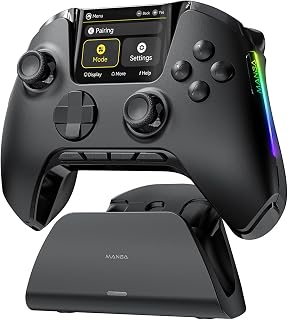
While primarily a Switch controller, the interactive screen and motion sensing give PC gamers a unique secondary display for custom macros or system stats. Bluetooth and wired USB options provide flexible PC connectivity, and the 16-button ergonomic layout handles most PC titles comfortably. The screen feature sets it apart for users wanting dashboard visibility without alt-tabbing mid-game.
Pros
- Built-in interactive screen for real-time information
- Motion sensing enables gyro aiming in supported games
- Bluetooth and wired USB connectivity options
- Ergonomic design with 16-button layout
Cons
- Limited Xbox game compatibility compared to alternatives
- Screen feature increases battery consumption
The ManbaOne breaks from traditional controller design with an integrated interactive screen embedded directly into the device. This display provides real-time information without requiring you to glance at your monitor, useful for tracking stats or settings during PC gaming sessions. While primarily designed for Switch, the controller's PC compatibility through Bluetooth and wired USB connections makes it functional for Windows gaming. Motion sensing capabilities add gyro aiming options for supported PC games that recognize motion input. The 16-button layout covers standard gaming functions across its ergonomic frame. Wireless operation via Bluetooth keeps your desk setup clean, while the wired USB mode serves as a backup connection method. The screen element sets it apart from conventional gamepads, though its utility depends on game support and personal preference. Battery power drives both the controller functions and the display, requiring periodic recharging to maintain wireless operation.
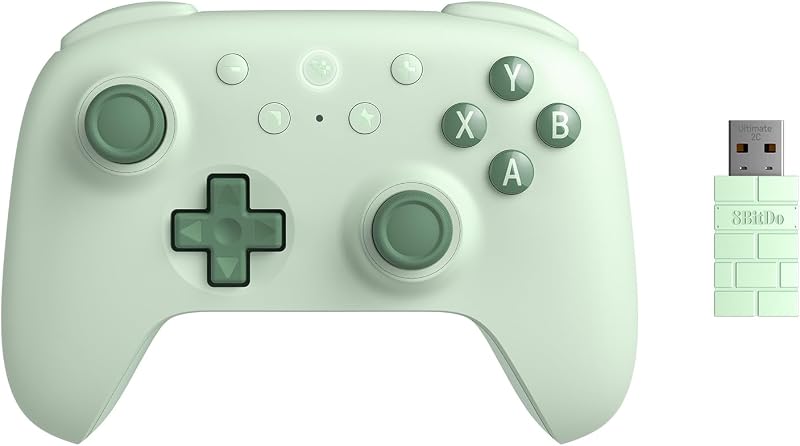
This controller supports Nintendo Switch, Switch 2, Windows PC, iOS, and Android via Bluetooth, wired USB, or the included wireless dongle. Note that it does not support Xbox, PlayStation, GeForce Now, or wake-up functionality on Switch.
For the best experience, use the wireless dongle on PC instead of Bluetooth mode. Mobile connectivity works over Bluetooth, though performance may vary by device. Consult customer service if you intend to use the controller on a platform not explicitly listed.
PC gamers who value novelty features and want on-controller information displays will find the screen interesting. It suits players who use gyro aiming in supported titles or frequently switch between PC and Switch gaming. Skip this if you prioritize Xbox game compatibility, need trigger stops for competitive play, or prefer controllers without additional screen elements that drain battery faster. Traditional gamepad enthusiasts won't need the screen functionality.
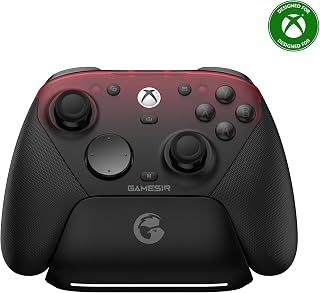
Hall effect TMR sticks and analog triggers resist wear for competitive PC shooters where input longevity matters. The 1000Hz polling rate delivers one-millisecond response time, cutting input lag below standard controllers. Wired and wireless dual-mode operation with Android compatibility adds versatility, while the 3.5mm jack supports direct headset audio routing without additional PC configuration.
Pros
- TMR sticks and Hall Effect triggers resist drift
- 1000Hz polling rate for responsive PC input
- Works with Xbox consoles, PC, and Android
- 3.5mm audio jack for direct headset connection
Cons
- Wired connection required for Xbox consoles
- Heavier than some competing controllers at 272g
The GameSir G7 Pro bridges Xbox and PC gaming with a hybrid connection setup that gives you flexibility across platforms. Its TMR sticks and Hall Effect analog triggers resist drift and wear, addressing a common controller failure point that matters when you're investing in PC peripherals. The 1000Hz polling rate delivers responsive input for competitive PC titles, while native Xbox compatibility means you can use it across your gaming setup without juggling multiple controllers. At 272g, it sits in the comfortable middle ground for extended sessions. The wired connection to Xbox consoles and wireless capability for PC and Android means you get low-latency performance where it counts most. The 3.5mm audio jack lets you plug in your headset directly, useful when your PC setup doesn't have convenient audio routing. With 16 buttons, you get full standard controls without venturing into pro-tier button overload. It's a practical cross-platform option that prioritizes longevity through its magnetic sensor technology.
Connectivity: Wired for Xbox, 2.4G wireless for PC, Bluetooth for Android
Input Technology: Hall Effect analog triggers, TMR Mag-Res sticks, 16 buttons total
Performance: 1000Hz polling rate (PC), built-in gyroscope (PC), 4 customizable back buttons
Battery: 1200mAh with smart auto start-stop charging station included
Compatibility: Xbox Series X|S, Xbox One, PC, Android
Build: 272g weight, 3.9 x 7.01 x 7.13 inches, black color, 1-year manufacturer warranty
PC gamers who also own an Xbox console and want one controller for both will appreciate the cross-platform design. Players concerned about thumbstick drift or trigger wear should consider the Hall Effect sensors. If you need wireless PC connectivity with Xbox console compatibility in one package, this fits. Skip it if you exclusively game on PC and want a dedicated wireless-to-PC solution, or if you prefer Xbox's official controller layout over third-party alternatives.
Pros
- Exceptional build quality with interchangeable components designed for durability and long gaming sessions
- Industry-leading battery life at 40 hours reduces charging frequency and keeps you in the game
- Extensive customization options through the Xbox Accessories app give you complete control over button mapping and dead zones
- Universal compatibility across multiple platforms including PC, Xbox consoles, and cloud gaming services
- Professional-grade precision features like adjustable thumbsticks and hair trigger locks enhance competitive performance
Cons
- Learning curve required to fully utilize all customization options and profile features in the Xbox Accessories app
- Carrying case and multiple replacement components add bulk if you plan to travel frequently with the controller
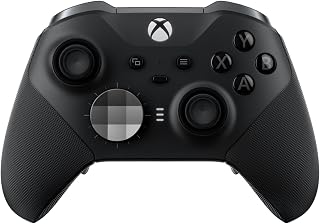
The Xbox Elite Wireless Controller Series 2 is a premium gaming peripheral engineered for serious and competitive gamers who demand precision, customization, and durability. Developed in collaboration with professional esports players, this controller brings professional-grade features to gamers across Xbox Series X/S, Xbox One, Windows PC, and cloud gaming platforms. It is ideal for players who want to optimize their performance in multiplayer shooters, fighting games, and other competitive titles.
The standout features that set this controller apart include adjustable-tension thumbsticks that let you fine-tune resistance for improved aim and consistency, combined with shorter hair trigger locks that reduce pull distance for faster reactive gameplay. The customization ecosystem is unparalleled, with 6 interchangeable thumbstick toppers, 4 paddles, and 2 D-pads included in the package. You can save up to 3 custom profiles directly on the controller and switch between them instantly using the dedicated Profile button, allowing you to adapt your setup for different games without reconfiguration.
Build quality is exceptional with a wrap-around rubberized grip designed for comfort during extended gaming sessions. The 40-hour rechargeable battery provides substantial playtime between charges, while the refined internal components are built to withstand intense competitive use. Connectivity options include Xbox Wireless, Bluetooth, or a USB-C cable, with a 3.5mm audio jack for headset compatibility. The Xbox Accessories app on consoles and Windows PCs unlocks additional customization including button remapping, dead zone adjustment, and keyboard key remapping for supported games.
The primary consideration is the $198 price tag, which positions this as a premium investment compared to standard controllers. The full customization potential requires time spent in the Xbox Accessories app to realize maximum benefits. Additionally, the included carrying case and collection of replacement components add physical bulk if portability is a priority.
The Xbox Elite Wireless Controller Series 2 delivers professional-grade performance, exceptional customization, and durable construction that justify the premium price for competitive gamers and enthusiasts who want to maximize their in-game precision and control. If you play competitive titles seriously or demand extensive personalization options, this controller is a worthwhile investment.
Connectivity: Xbox Wireless, Bluetooth, USB-C cable (included)
Compatibility: Xbox Series X/S, Xbox One, Windows PC, Xbox Cloud Gaming
Battery Life: Up to 40 hours rechargeable
Buttons: 18-button configuration
Included Accessories: 6 thumbstick toppers, 4 paddles, 2 D-pads, carrying case, charging dock, USB-C cable
Audio: 3.5mm headset jack
Customization: 3 programmable profiles, button remapping via Xbox Accessories app, adjustable dead zones, adjustable thumbstick tension
Weight: 16 ounces
Dimensions: 8 inches D x 8 inches W x 4 inches H
Color: Black
Warranty: Limited Warranty
Who Should Buy This Controller? The Xbox Elite Wireless Controller Series 2 is designed for competitive multiplayer gamers, esports enthusiasts, and players who want maximum customization. If you play demanding titles like shooters, fighting games, or fast-paced online games where reaction time matters, this controller delivers measurable performance advantages. It is also ideal for PC gamers who use Xbox controllers and want professional-grade precision.
What Makes It Different? Unlike standard Xbox controllers, the Elite Series 2 offers adjustable thumbstick tension and hair trigger locks that are not found on regular controllers. The ability to save three custom profiles and switch between them instantly gives you game-specific optimization without manual reconfiguration. The included accessories and carrying case make it feel like a complete professional gaming package.
Is It Worth the Price? At $198, this controller costs roughly 4 times more than a standard Xbox controller. The premium is justified if you play competitive games regularly, value extended battery life, need customization for multiple games, or want durability built for intensive use. For casual players who use a controller occasionally, a standard controller is more practical. For serious gamers, the performance and customization features deliver measurable value.
Customization Setup Time: Plan to spend 15-30 minutes in the Xbox Accessories app to fully optimize your controller settings. Adjust thumbstick dead zones, map buttons to your preference, and set trigger sensitivity. Once configured, your profiles save to the controller itself, so setup is one-time effort per game type.
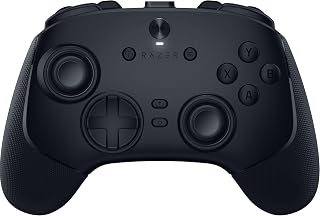
The 8000Hz polling rate provides 0.125-millisecond response time, the fastest input speed available for PC gaming and essential for esports-level precision. Six remappable buttons and swappable TMR thumbstick caps let competitive players customize for specific genres like FPS or fighting games. The 2.4GHz wireless connection maintains tournament-grade latency while the ergonomic design supports extended PC gaming sessions.
Pros
- 8000Hz polling rate for ultra-responsive input
- Six remappable buttons for custom layouts
- TMR thumbsticks resist drift with swappable caps
- 2.4GHz wireless avoids Bluetooth latency
Cons
- PC-only compatibility, no console support
- Heavier than standard controllers at 580g
Razer built the Wolverine V3 Pro specifically for PC gaming, and the 8000Hz polling rate puts it at the top of the responsiveness spectrum for competitive play. The 2.4GHz wireless connection avoids Bluetooth latency while keeping your desk cable-free. TMR thumbsticks with swappable caps let you customize feel and resistance, and the drift-resistant technology extends the controller's working life. Six remappable buttons expand your control options without requiring you to lift your thumbs from the sticks, valuable in games where quick access to multiple functions matters. Fast triggers reduce travel distance for faster shooting in FPS titles. The ergonomic design comes from Razer's focus on extended gaming sessions. At 580g, it has noticeable heft. This is a PC-first controller that doesn't compromise performance for console compatibility. The dedicated wireless dongle ensures stable connection, and the button layout accommodates customization through Razer's software. It's engineered for players who want tournament-grade response times and configurable controls in a wireless package.
Competitive PC gamers who need maximum polling rate and remappable controls should look here. Players who want drift-resistant sticks and trigger customization in a wireless PC controller will benefit from the feature set. If you value configurability and are already in Razer's ecosystem, this integrates well. Skip it if you need Xbox console compatibility, prefer a lighter controller, or don't want to use proprietary software for button mapping.
Connectivity: 2.4 GHz wireless via USB-A dongle or wired USB-C connection. Both modes support 8000 Hz polling rate.
Input Features: 6 remappable buttons, 4 back buttons, 2 claw grip bumpers, 8-way floating D-pad, and Pro HyperTriggers with switchable actuation modes.
Thumbsticks: TMR magnetic thumbsticks with anti-drift technology and 2 swappable caps included. Evolved beyond standard Hall Effect designs.
Build: Doubleshot PBT action buttons with hybrid microswitches, rubberized ergonomic handles, lightweight construction. Weight: 0.58 kg.
Customization: Razer Synapse 4 software support with 4 onboard profiles, per-game macros, and complete button remapping.
Compatibility: Windows 11 PC exclusive with USB-A support. Not compatible with Xbox, PlayStation, macOS, or mobile devices.
Included Accessories: Custom carrying case, 2 replaceable thumbstick caps, 2-meter braided USB-C cable.
Dimensions: 6.16 inches W x 2.55 inches H x 4.16 inches D.
Buying Guide: Choosing Your PC Gaming Controller
Connectivity Options That Match Your Setup
Wired controllers eliminate input lag and never need charging, making them ideal for competitive gaming where every millisecond counts. The XBOX Wireless Gaming Controller + USB-C Cable gives you both worlds with included cable and wireless capability.
Wireless controllers offer freedom of movement for couch gaming and multi-device switching. Look for 2.4GHz dongles over Bluetooth when gaming on PC, as they provide lower latency and more stable connections. The GameSir G7 Pro Wireless XBOX Controller,TMR achieves 1000Hz polling rate wirelessly on PC, matching wired performance.
Stick Drift Prevention and Sensor Technology
Traditional potentiometer-based thumbsticks wear down over time, causing drift that ruins precision aiming. Hall Effect sensors use magnetic fields instead of physical contact, virtually eliminating drift even after millions of movements.
TMR (Tunnel Magnetoresistance) technology takes this further by combining Hall Effect durability with the smooth feel of traditional sticks. Both GameSir models in this roundup feature TMR sticks, while the Razer Wolverine V3 Pro 8K PC Wireless uses evolved TMR designs fine-tuned for competitive esports. If you value long-term reliability and consistent performance, prioritize controllers with magnetic sensing technology.
Customization and Programmable Inputs
Back buttons and remappable controls let you execute complex actions without lifting your thumbs from the sticks. The Xbox Wireless Gaming Controller | Elite Series 2 offers four swappable paddles and adjustable thumbstick tension, while the ManbaOne Interactive Screen Wireless features a built-in display for on-controller configuration without software.
Consider how much customization you’ll actually use. Casual gamers might find two back buttons sufficient, while competitive players benefit from full button remapping, adjustable dead zones, and saved profiles for different games. The Xbox Accessories app provides deep customization for official controllers, while third-party options like GameSir Nexus and Razer’s software offer advanced features like gyro aiming and stick curve adjustments.
Polling Rate and Response Time
Polling rate determines how often your controller sends input data to your PC. Standard controllers operate at 125Hz, updating every 8 milliseconds. Gaming-focused models reach 1000Hz (1ms updates), while the Razer Wolverine V3 Pro pushes to 8000Hz for professional esports.
Higher polling rates reduce input lag but require more USB bandwidth. For most gaming scenarios, 1000Hz provides responsive performance without drawbacks. The GameSir G7 Pro Wired Controller for Xbox Series delivers 1000Hz over both wired and 2.4GHz connections, matching the performance gamers expect from high-end gaming mice and mechanical keyboards.
Final Thoughts
Your ideal controller balances features with your gaming priorities and budget. For players who want official Xbox compatibility with instant PC plug-and-play, the XBOX Wireless Gaming Controller + USB-C Cable delivers reliable performance right out of the box. Competitive gamers chasing every advantage should consider the Razer Wolverine V3 Pro 8K PC Wireless with its 8000Hz polling rate and mouse-click buttons. Whichever option you choose, investing in quality controls elevates your entire gaming experience.
Frequently Asked Questions
Do Xbox controllers work on Steam games?
Yes, Xbox controllers work natively with Steam through both wired and wireless connections. Steam automatically detects Xbox controllers and maps them correctly for compatible games. You can also customize button layouts and sensitivity through Steam’s controller configuration menu, which works alongside the Xbox Accessories app for deeper customization.
What’s the difference between Hall Effect and TMR thumbsticks?
Hall Effect sensors use magnetic fields to detect stick position without physical contact, preventing wear-based drift. TMR (Tunnel Magnetoresistance) technology refines this approach by combining magnetic sensing with smoother analog response that mimics traditional potentiometer sticks. Both eliminate drift, but TMR offers more natural feel while maintaining durability. The practical difference is minimal for most gamers in 2026, as both technologies vastly outperform traditional sticks.
Can I use an Xbox controller wirelessly on PC without a dongle?
Yes, if your PC has Bluetooth. Official Xbox controllers support Bluetooth pairing, though 2.4GHz wireless adapters provide lower latency and more stable connections for gaming. Some third-party controllers like the ManbaOne include dedicated USB dongles for wireless PC connectivity. For competitive gaming where response time matters, wired or 2.4GHz connections outperform Bluetooth every time.
How important is polling rate for controller gaming?
Polling rate affects how quickly your PC registers controller inputs. Standard 125Hz controllers update every 8ms, while 1000Hz models update every 1ms. Competitive players notice the difference in fast-paced shooters and fighting games, where split-second reactions determine outcomes. Casual gamers may not perceive the improvement, making it a nice-to-have rather than essential feature unless you’re pursuing ranked play or esports performance in 2026.




Write Your Review
No reviews yet. Be the first to share your experience!