

Whether you are jumping into a job interview, hosting a live stream, or grinding through back-to-back video calls, a blurry or laggy webcam makes everything harder. Cyber Monday webcam deals give you a real window to grab a solid upgrade at a fraction of the usual cost. If you are building or refreshing a PC setup, pairing a new camera with great PC speakers for gaming can completely transform your workspace.
This guide rounds up ten of the best webcam options available this Cyber Monday, covering everything from budget-friendly picks under twenty dollars to a sharp 4K option for content creators. Whatever your use case, there is something here for you.
Quick answer
This guide compares 10 picks, with TRAUSI 1080P Webcam with Noise-Canceling Mic, Auto ranked first. Logitech C920x HD Pro Webcam 1080p/30fps with Dual Mics holds the highest customer rating among them.
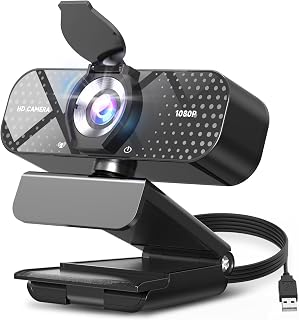
Anyone juggling back to back Zoom and Teams calls will appreciate the built-in noise-canceling microphone paired with automatic light correction, since it keeps voices clear and faces visible without fiddling with settings between meetings. The wide-angle lens also helps when sharing a frame with a whiteboard or second person, and the physical privacy shield adds peace of mind on a shared desk.
Pros
- Automatic light correction adapts to home office lighting
- Noise-canceling mic keeps calls clear
- Sliding privacy cover included
- Simple plug and play setup
Cons
- Fixed focus with no manual adjustment
- 30fps cap limits fast-motion use
Cyber Monday roundups exist for shoppers who want solid value without overthinking the purchase, and the TRAUSI TW05 fits that mission well. It's an easy add-to-cart pick for anyone upgrading from a laptop's built-in camera during a sale. The 1080P sensor and wide-angle lens produce clean, professional-looking video for calls and lectures, while automatic light correction removes the guesswork of adjusting for a dim home office or a sunlit room. The noise-canceling mic handles typical household or office chatter without needing a separate headset. A sliding privacy cover is a nice touch for anyone concerned about always-on cameras, and setup is plug and play with no software required. This is the kind of deal that makes sense as a stocking-stuffer style tech gift or a low-risk first webcam. It won't satisfy streamers chasing high frame rates or sharp close-up focus, since it's fixed focus and capped at 30fps, but for everyday video calls and teaching, it covers the basics well.
Video Quality: 1080P Full HD (1920x1080) at 30fps, 16:9 aspect ratio, AVI format capture
Lens: Wide-angle lens with 2.8-4mm focal length range and fixed focus design for consistent sharpness
Audio: Built-in noise-canceling microphone with AAC audio format support
Connectivity: USB 2.0, 3.0, 3.1, and OTG compatible, plug-and-play with no driver installation needed
Compatibility: Windows PC, Mac, laptops, desktops, plus Zoom, Skype, Teams, and streaming platforms
Physical: Compact minimalist design, privacy cover included, 5ft USB power cable, 90-day manufacturer warranty
Good for remote workers, students, and teachers who just need a dependable step up from a built-in laptop camera, and for gift shoppers looking for an easy, low-commitment webcam. Skip it if you're a streamer or gamer who needs higher frame rates, manual focus, or fast-motion clarity, since the fixed focus and 30fps cap will feel limiting for that kind of use.
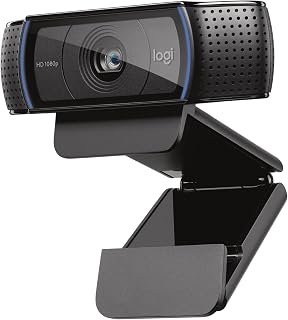
Logitech C920x HD Pro Webcam 1080p/30fps with Dual
This is the one for buyers who want a proven workhorse rather than a gamble on a new brand, since the 1080p/30fps output and 1/2.9 inch sensor have long been a benchmark for consistent video quality on PC. XSplit VCam compatibility also makes it a solid pick for anyone dabbling in background effects or light streaming setups alongside daily video calls.
Pros
- True autofocus with automatic light correction
- Dual stereo mics for natural audio
- Wide 78-degree field of view fits groups
- Includes 3-month XSplit VCam license
Cons
- No physical privacy shutter
- 30fps cap may limit fast-action streaming
If this Cyber Monday list is meant to help readers avoid buyer's remorse, the Logitech C920x earns its spot as the safer, more capable option for people who rely on video daily. Unlike the budget picks here, it uses real autofocus paired with automatic light correction, so it keeps adjusting as you move or as room lighting shifts, rather than locking onto one fixed distance. The five-element glass lens and 78-degree field of view produce sharper detail and room for multiple people in frame, which matters for demo videos or shared calls. Dual stereo microphones flanking the lens give noticeably more natural audio than single-mic budget webcams. A bundled 3-month XSplit VCam license adds background removal without a green screen, a helpful extra during a sale when every included feature adds value. The tradeoffs are a 30fps ceiling and no physical privacy shutter, but for anyone treating this purchase as a long-term upgrade rather than a quick fix, the C920x is the pick built to actually last.
Video Performance: Full HD 1080p at 30fps, 720p at 30fps, 78-degree viewing angle, autofocus with light correction
Audio: Dual stereo microphones for natural sound capture
Lens: Five-element glass lens, 1.8 f-stop maximum aperture, auto focus
Sensor: CMOS 1/2.9 inch, FHD maximum display resolution
Connectivity: USB, plug-and-play compatibility with Windows 11 and multiple operating systems
Physical: 3.7 inches wide, 2.7 inches tall, 1.7 inches deep, weighs 5.7 ounces
Included: C920x Webcam, USB cable, user documentation, 3-month XSplit VCam license
Warranty: 1 Year Limited Hardware Warranty
Best for remote professionals, content creators, and streamers who want dependable, proven video and audio quality and are willing to spend a bit more during the sale for it. Also good for anyone who films demos or group shots thanks to the wider field of view. Skip it if you specifically need a physical privacy shutter or frame rates above 30fps for fast-paced gaming content.

Students attending online classes or workers hopping between video conferences will find the straightforward HD 1080p output and plug-and-play USB setup easy to trust, with no drivers or configuration to slow down a class start time. The compact form factor also keeps it unobtrusive clipped to a laptop or monitor, and the built-in microphone covers casual gaming streams too.
Pros
- Simple USB plug-and-play setup
- Built-in microphone included
- 1080p resolution covers most video call needs
- Compact form factor fits any desktop or laptop
Cons
- No low-light or brightness correction features mentioned
- Fixed 3.5mm focal length with no zoom flexibility
Cyber Monday shopping lists always include a handful of budget entries, and this webcam earns its spot as the low-cost fallback for anyone who just needs 1080p on a tight allowance. It's a straightforward USB plug-and-play camera with a CMOS sensor and a built-in microphone, so you skip separate audio hardware and driver installs alike. The compact form factor means it clips onto a laptop or desktop monitor without adding bulk to your desk. It covers the basics that most shoppers on this list are after: online classes, video conferences, live streaming, and casual gaming sessions. There's nothing flashy here, no low-light enhancement or premium optics, but the fixed 3.5mm focal length keeps things simple rather than fiddly. If your goal this Cyber Monday is grabbing a no-frills webcam upgrade without overthinking specs, this fits that exact need. It's the kind of pick that rounds out a deals list for people comparing entry points before spending more on higher-tier options elsewhere on this page.
Video Performance: 1080P resolution, 30fps frame rate, 16:9 aspect ratio, CMOS sensor, 3.5mm focal length
Connectivity: USB 2.0/3.0, 5-foot braided cable included
Compatibility: Windows XP through Windows 11, Mac, and all major video platforms (Zoom, Teams, FaceTime, Google Meet, YouTube)
Design: Compact form factor, adjustable clip, portable and lightweight
Features: Automatic low-light adjustment, stable transmission chip, plug-and-play setup with no drivers required
Model: Xweiryn K1, ASIN B0GG3JNQGF
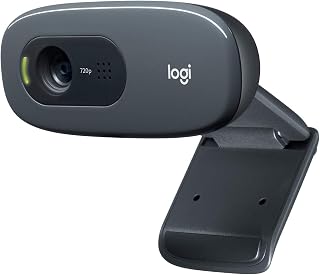
Shoppers on a tight budget who mainly need reliable video calling over flashy specs will do fine with the 720p resolution here, since it's built around Logitech's long-standing wide screen video calling design rather than newer 1080p sensors. The plug-and-play setup keeps things simple for anyone who just wants a dependable camera for everyday chats.
Pros
- Trusted Logitech brand reliability
- Simple USB-A plug-and-play connectivity
- Wide screen video calling support
- Straightforward MJPEG and PCM format compatibility
Cons
- 720p resolution falls short of Full HD competitors
- No low-light or image enhancement features
Among this year's Cyber Monday webcam picks, the Logitech C270 stands out as the value anchor: a recognizable brand at the lower end of the resolution spectrum. Its 720p CCD sensor and wide-screen video calling support make it a sensible pick for shoppers who mainly want dependable video calls rather than high-resolution streaming or content creation. The USB-A connection keeps compatibility simple across older and newer PCs alike, and MJPEG video capture paired with PCM audio support covers the basics without complication. This isn't the webcam for anyone chasing crisp detail or low-light performance, but for a deal-focused list, it earns its place as the safe, no-surprises option that trusted brand shoppers gravitate toward when comparing prices. If you're building out a home office or replacing an aging built-in laptop camera and don't need Full HD, the C270 fits the bill without asking you to learn new software or troubleshoot compatibility issues. It's a practical, unglamorous choice for practical needs.
Video
Resolution: 720p (1280 x 720)
Frame Rate: 30 fps
Field of View: 55 degrees diagonal
Photo Sensor: CCD
Capture Format: MJPEG
Focal Length: 0.01 mm
Aperture: f/1.8
Audio
Microphone: Built-in noise-reducing
Pickup Range: 1.5 meters
Audio Format: PCM
Connectivity & Compatibility
Connection: USB 2.0 Type-A
Compatible With: Skype, Zoom, Windows, Mac, Linux
Setup: Plug-and-play, no driver installation required
Physical
Mounting: Adjustable universal clip
Screen Size Reference: 2.7 inches
Memory: Internal flash memory
Fits shoppers who want a trusted brand name and straightforward video calling without paying for features they won't use, like remote workers on basic Zoom calls or students needing something simple. Skip it if you want Full HD resolution, low-light correction, or streaming-quality video, since 720p and a standard CCD sensor won't deliver that.
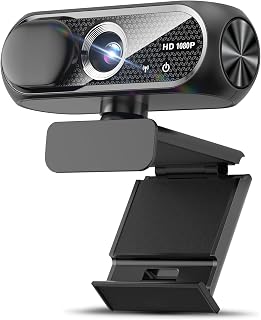
For dim home offices or evening calls, the Low Light special feature paired with a CMOS sensor and auto light correction means faces stay visible without needing extra desk lamps. Combined with a wide-angle lens and built-in noise cancellation, it covers the basics for casual Zoom or Skype use, while the privacy cover suits anyone who wants the camera closed by default between calls.
Pros
- Automatic light correction for varied lighting
- Wide-angle lens with natural 16:9 view
- Noise-canceling mic for clear voice
- Includes privacy cover
Cons
- Fixed focus, no depth adjustment
- Can be hard to mount on curved screens
For a Cyber Monday buyer comparing entry-level webcams, the Shcngqio TWC29 stands out for covering the essentials without asking anyone to pay for extras they don't need. It's built around a straightforward promise: clear 1080p video, a wide field of view, and automatic light correction that adjusts for dim rooms or bright windows without manual tweaking. The CMOS sensor and 16:9 aspect ratio give video calls a natural, familiar look, and the built-in noise-canceling mic holds up fine in typical home or office noise. A privacy cover and compact form factor round out a design that clearly prioritizes practicality over flash. It sits comfortably on flat monitors, though some buyers have noted it can be trickier to mount securely on curved laptop screens. As a discount-season pick, it works best as a no-fuss replacement for a built-in laptop camera rather than a tool for demanding creative work, since the fixed focus and 30fps ceiling mean it won't keep pace with fast-action streaming or competitive gaming.
Video Capture: 1080p Full HD at 30fps, 1920x1080 resolution, 16:9 aspect ratio, AVI format
Lens and Focus: Wide-angle lens with fixed focus, 1-2 meter focal length range
Sensor: CMOS photo sensor for reliable low-light performance
Audio: Built-in noise-canceling microphone, supports AAC and MP3 formats
Connectivity: USB 2.0, 3.0, and 3.1 compatible, plus OTG support. Includes 5-foot USB power cable. No additional drivers required.
Compatibility: Windows PC, Mac, Linux, tablets, and smartphones. Works with Zoom, Skype, and all major video conferencing platforms
Design: Compact form factor, black color, includes privacy cover slide
Warranty: 90-day manufacturer warranty
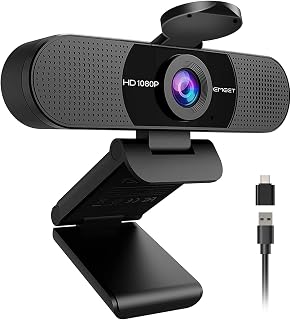
Small conference rooms or desks shared by two people benefit from the 90 degree field of view here, which captures more of the frame than standard webcams. The dual omnidirectional microphones pick up voices from multiple directions, making this a strong pick for anyone running informal team huddles where several voices need to come through clearly.
Pros
- Dual omnidirectional mics for clear call audio
- Wide 90-degree field of view fits group calls
- Auto light correction adapts to home office lighting
- Compact clip design with a removable privacy cover
Cons
- Fixed focus range, not ideal outside typical desk distance
- No built-in speakers or Windows Hello support
If you're shopping Cyber Monday deals looking for a webcam upgrade that won't stress your budget, the EMEET C960 is worth a look. It covers the fundamentals well: 1080p video through a 5-layer anti-glare lens, dual omnidirectional mics for clear audio, and a 90-degree field of view that works whether you're on a solo call or squeezing a few people into frame. Auto light correction handles the inconsistent lighting most home offices deal with, so you're not stuck adjusting settings before every meeting. The ultra-compact, clip-mount design means it sits neatly on a monitor without eating desk space, and the removable privacy cover is a nice touch for anyone who wants a physical guarantee they're not being watched between calls. USB Type-A and USB-C compatibility via the included adapter means it'll work across most laptops and desktops without hunting for extra cables. It's a fixed-focus camera, so it's built for typical desk distances rather than creative framing, but for straight video conferencing upgrades this Cyber Monday, it checks the right boxes without asking you to pay for features you won't use.
Video and Image: 1080P (1920x1080) resolution, 16:9 aspect ratio, CMOS sensor, fixed focus (11.8 to 118.1 inches), 90-degree wide-angle lens, 5-layer anti-glare lens
Audio: Dual omnidirectional microphones, supports AAC, MP3, and PCM formats, no built-in speakers
Connectivity: USB Type-A and USB-C adapter, compatible with Windows 10/11, macOS 10.14+, and Android TV 7.0+
Design: Ultra-compact form factor, 2.65 inches wide x 2.04 inches high x 4.88 inches deep, 0.16 kg weight, includes removable privacy cover and clip base
Compatibility: Works with Zoom, Teams, FaceTime, Google Meet, YouTube and more. Not compatible with Windows Hello, game consoles, or tablets. Includes 2-year warranty and USB cable with user manual
Good for remote workers, students, and anyone still relying on a laptop's built-in camera who wants a noticeable upgrade without spending a lot. Skip it if you need Windows Hello facial recognition, built-in speakers, or autofocus for moving around during calls. Also worth noting for USB hub users: direct port connections are recommended for best performance.
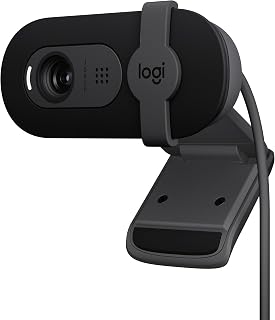
Streamers and remote workers who move between bright and dim rooms benefit from the Low Light special feature, which keeps footage usable without extra lighting gear. Built on Logitech's fluid crystal sensor and full 1080p capture, it suits anyone who wants a trusted brand behind their meeting or streaming camera without chasing image stabilization features they don't need.
Pros
- RightLight technology improves visibility in dim rooms
- Built-in privacy shutter for camera security
- Lightweight and portable at 4.96 ounces
- Plug-and-play compatibility with major video call apps
Cons
- Fixed focus with only a 60-degree viewing angle
- Digital zoom only, no optical zoom available
For a Cyber Monday webcam roundup, the Logitech Brio 101 sits in a sweet spot: a trusted brand name with genuine Full HD quality and a couple of thoughtful extras that matter for everyday use. Its RightLight technology automatically brightens footage in dim rooms, which solves one of the most common webcam complaints without asking you to buy separate lighting gear. The integrated privacy shutter is a small but meaningful touch for anyone conscious about camera security when the webcam isn't in use. At 4.96 ounces, it's light enough to move between a home office and a dorm room, and the plug-and-play setup with Zoom, Teams, and Google Meet means it works right out of the box. It doesn't try to be everything: the fixed focus and 60-degree field of view mean it's built for single-person calls rather than group framing, and there's no optical zoom. For shoppers comparing options on this list who want dependable brand quality without paying for excess, this is one of the stronger practical entries.
Video: 1080p Full HD resolution, H.264 video capture, 60-degree viewing angle, fixed focus with 4mm maximum focal length
Audio: Built-in microphone with mono audio support for clear communication during calls
Connectivity: USB-A connection with integrated cable, works with Windows 7+, macOS 10.10+, and Chrome OS
Physical: Compact rectangular design measuring 2.87in W x 2.62in H x 1.26in D, weighs 4.96 ounces, available in black
Features: RightLight auto-brightness, integrated privacy shutter, customizable settings via Logi Options+ app, 1-year limited hardware warranty
A strong fit for remote workers, students, and casual streamers who want reliable Full HD video with better low-light handling than typical budget webcams. Skip it if you regularly need to frame multiple people, want adjustable focus, or expect real optical zoom, since the fixed 60-degree view and digital-only zoom won't cover those cases.

Pros
- Excellent value for 1080p quality at this price point
- Dual microphones with noise reduction deliver noticeably clearer audio than single-mic competitors
- Privacy cover is a practical security feature often missing from budget webcams
- Automatic low-light correction handles poor lighting without manual adjustment
- Includes USB Type-A to Type-C adapter for broader device compatibility
Cons
- No built-in speakers, requiring separate audio output for calls
- Requires manual configuration as default microphone in Zoom and Teams for optimal performance
- Limited specifications provided make it difficult to compare focal length and aperture performance against competitors
The Acer A610 is a 1080p webcam designed for remote workers, online educators, and content creators who need reliable video communication without breaking the bank. It fills a practical niche for professionals working from home or managing virtual meetings, offering solid performance at an accessible price point.
The standout features here are the dual noise-reduction microphones and automatic low-light correction. In real-world use, these features mean fewer background distractions during calls and more flattering video when your home office lacks ideal lighting. The 1080p CMOS sensor delivers sharp, clear video suitable for professional settings and online classes. The 360-degree rotation and 83-degree field of view give you flexibility in positioning, so you stay properly framed whether you're presenting slides or conducting a one-on-one meeting.
Build and design are straightforward. The included privacy cover is a practical touch that many budget webcams overlook, and the included USB Type-A to Type-C adapter increases compatibility. Setup is genuinely plug-and-play, with no driver installation required on Windows or Mac, which is a significant convenience factor.
The main drawback is that you'll need to manually configure the A610 as your default microphone in both your operating system and individual applications like Zoom or Teams. This isn't a major issue, but it requires initial setup steps. Additionally, there are no built-in speakers, so you'll need external audio output for calls.
Overall, the Acer A610 is a dependable choice for anyone seeking a capable 1080p webcam with good microphone performance and practical security features. It won't compete with premium models on advanced features, but it delivers solid value for remote work, online teaching, and streaming at this price.
Remote workers and hybrid employees who participate in regular video calls and want reliable audio capture without expensive equipment.
Online educators and instructors who need professional-quality video and clear microphone performance for virtual classrooms.
Content creators and streamers just starting out, who need a capable webcam for Twitch, YouTube, or other streaming platforms without premium pricing.
Anyone concerned about privacy who values having a physical cover for their camera when not actively using it.
Setup is simple: connect the webcam to your computer via the included USB adapter. No driver installation is required on Windows 7, 8, 10, 11, or macOS.
The camera works with all major video calling platforms including Zoom, Skype, Google Meet, and Microsoft Teams. After initial connection, configure the A610 as your default microphone in your computer's sound settings and in your specific applications for optimal microphone performance.
The included USB Type-A to Type-C adapter provides compatibility with modern laptops and devices. Audio formats supported include AAC and MP3.

Pros
- Excellent 4K resolution and color accuracy deliver professional-quality video
- Flexible mounting with full 360-degree rotation and 180-degree tilt adjustment
- Integrated noise-canceling microphone reduces the need for separate audio equipment
- Physical privacy cover offers genuine security unlike software solutions
- Affordable price point makes 4K quality accessible to budget-conscious buyers
- Plug-and-play convenience means immediate use without driver installation
Cons
- Auto-focus system may struggle in very low-light conditions despite brightness correction
- Digital zoom can reduce image quality compared to physical lens zoom
- Fixed focal length limits close-up detail capture for presentations or product demos
The AOC AC310 is a budget-friendly 4K webcam designed for remote workers, content creators, and video conferencing enthusiasts. It combines solid video performance with practical privacy features, making it an excellent choice for anyone looking to upgrade from a basic 1080p camera without premium pricing.
The standout feature is the 4K resolution paired with an 80-degree wide-angle lens and full 360-degree rotation capability. The built-in noise-canceling microphone performs admirably for conference calls, while the automatic light correction intelligently adjusts video brightness in varying lighting conditions. These features work together to ensure you present yourself professionally whether you're in a bright office or dimly lit home.
Build quality feels solid for the price range, with a compact design that fits easily on monitors or desks. The included physical sliding lens cover is a genuine privacy asset that goes beyond typical software muting options. The USB-C connectivity with USB-A adapter provides modern flexibility without sacrificing backward compatibility with older devices.
The main limitations are the fixed focal length, which may not suit close-up work, and digital-only zoom that can degrade image sharpness. Performance in very low-light environments, while improved by auto-correction, cannot fully compensate for insufficient ambient light.
For remote workers, streamers, and video conferencing professionals operating on a budget, the AOC AC310 delivers excellent value. The combination of 4K quality, practical design features, and reliable performance makes this an easy recommendation for most users seeking a dependable upgrade from basic webcams.
Video Performance: 4K Ultra HD (UHD) resolution, 8MP still image capture, 16:9 aspect ratio, MP4 format, auto-focus system
Optics: 80-degree field of view, 28-30mm focal length, wide-angle lens, digital zoom
Connectivity: USB-C with included USB-A adapter, compatible with Zoom, Microsoft Teams, Skype, and major video platforms
Audio: Built-in noise-canceling microphone, supports AAC and MP3 formats
Design: 2.5 inches D x 2.5 inches W x 3.5 inches H, weighs 0.16 kg, minimalist black design, 180-degree tilt, 360-degree rotation, physical sliding lens cover
Warranty: 3-year manufacturer warranty
Best For: Remote workers, freelancers, content creators, online educators, and anyone needing reliable 4K video conferencing on a budget. Also suitable for streamers and gamers looking for quality without premium pricing.
Consider This If: You currently use a 1080p or lower resolution camera and want a significant quality upgrade. You work from multiple locations and need a portable, easy-to-use solution. You prioritize privacy and want a genuine physical camera cover.
Skip This If: You need professional-grade optics with optical zoom capabilities. You work exclusively in low-light environments and require exceptional low-light performance. You're building a high-end streaming setup where lens quality is paramount.
Setup Tip: Position the camera at eye level and test lighting from multiple angles before important calls. The auto-correction handles most situations well, but natural side lighting produces the most flattering results.

Pros
- Exceptional value for the price with genuine 1080P video quality that rivals cameras costing twice as much
- Auto light correction performs remarkably well in low-light and backlit situations without graininess
- Dual noise-canceling mics deliver clear, professional-quality audio without picking up background noise
- Physical privacy cover offers tangible security that software-only solutions cannot match
- Truly plug-and-play experience with zero driver installation needed on all major operating systems
Cons
- Fixed focus design may not be ideal for users needing manual focus adjustments at varying distances
- 30fps frame rate is standard for video calls but may feel less smooth than higher-end 60fps webcams for fast-motion content
- Compact form factor means it may not mount as rigidly as larger professional webcams on certain monitor configurations
The NIVEOLI 1080P webcam is a budget-friendly solution designed for professionals, students, and content creators who need reliable video and audio quality without breaking the bank. It's an excellent fit for anyone doing frequent video calls, streaming, or online classes who wants to upgrade from their laptop's built-in camera.
Performance wise, the 1080P video at 30fps delivers noticeably sharper images than lower-resolution alternatives, and the automatic light correction is genuinely impressive. Users consistently praise how well it handles dim rooms and backlit situations, maintaining clarity without the graininess common in budget webcams. The dual noise-canceling microphone is another standout feature, actively suppressing background noise while preserving voice clarity even in moderately busy environments.
Build quality feels solid for the price point, with a lightweight but sturdy design and an adjustable clip that works on most monitors. The 360-degree rotating head provides flexibility, and the included privacy shutter is a thoughtful touch that actually sets this webcam apart from more expensive competitors who force you to buy accessories separately.
The main limitation is the fixed focus system and 30fps frame rate, which are perfectly adequate for stationary video calls but may disappoint users shooting fast-motion content like gaming or dynamic streaming. The compact size also means mounting options are somewhat limited on thicker monitor bezels.
Verdict: This webcam delivers excellent value for its price. It's genuinely reliable for professional video calls, streaming, and online classes, with no driver hassles and zero learning curve. If you need a straightforward 1080P webcam with solid audio and don't require manual focus or 60fps performance, this is a smart purchase.
Video Quality: 1080P Full HD (1920x1080) at 30fps, 16:9 aspect ratio, MP4 format
Sensor: CMOS sensor with fixed focus, focal length 35-100mm
Audio: Dual noise-canceling digital microphones with advanced audio processing, MP3 and AAC support
Connectivity: USB 2.0, plug-and-play (no drivers needed)
Compatibility: Windows, Mac, Linux, Android. Works with Zoom, Skype, Teams, Twitch, YouTube, and similar platforms
Special Features: Automatic light correction with high dynamic range (HDR), privacy shutter, 360-degree rotating head, adjustable clip mount
Build: Compact form factor, weighs 0.19 kg, includes tripod
Warranty: 2-year manufacturer warranty
Best For: Remote workers, online students, content creators on a budget, small business owners, and anyone upgrading from a laptop webcam who wants reliable 1080P video with minimal setup hassle.
Professional Use: Ideal for frequent Zoom meetings, Teams calls, and online presentations where audio and video clarity matter but you don't need broadcast-quality equipment.
Streaming and Content Creation: Works well for beginner streamers on Twitch or YouTube, online tutors, and podcasters who need a secondary camera source.
Not Ideal For: Users requiring manual focus control, 60fps video for fast-motion gaming, or professional studio-level equipment. This is a practical workhorse, not a premium option.
Webcam Buying Guide: What to Look for This Cyber Monday
Resolution and Frame Rate
For most people, 1080p at 30fps is the sweet spot. It looks clean on video calls and holds up well in recordings without putting extra strain on your system. Every webcam in this roundup hits that standard, so you are already in good shape no matter which one you choose.
If you are a creator or you present frequently to large audiences, stepping up to 4K is worth considering. The AOC 4K Webcam for PC, Streaming Computer Camera delivers ultra-sharp detail that makes a visible difference on larger displays and recorded content.
Built-in Microphone Quality
A webcam with a weak microphone forces you to buy a separate mic, which adds cost and desk clutter. Look for noise-canceling or noise-reduction technology that filters out keyboard clicks, fans, and room echo. The EMEET C960 1080P Webcam with Microphone, 2 Mics uses dual omnidirectional microphones, which do a solid job picking up your voice from multiple angles without capturing everything else in the room.
The Acer A610 1080p Webcam for PC with Microphones also features dual noise-reduction mics, making it a strong contender if clear audio is a priority for your remote meetings or online classes.
Low-Light Performance and Auto Correction
Most home offices and bedrooms are not perfectly lit, so automatic light correction is one of the most practical features a webcam can have. It dynamically adjusts brightness and exposure so you do not look washed out or shadowy depending on the time of day. The Logitech C920x HD Pro PC Webcam Full 1080p/30fps uses Logitech’s HD lighting adjustment to produce consistently bright, sharp images even in dim conditions.
Budget options like the TRAUSI 1080P FHD Webcam with Noise-Canceling Mic also include auto light correction, which is impressive at that price point. If you are building a full PC setup, you might also want to explore PC cases with glass panels to complement your workspace aesthetics.
Privacy Cover and Ease of Setup
A physical privacy cover is a small feature that matters a lot. It lets you block the lens instantly without unplugging anything, giving you real peace of mind between calls. Several options here include one, such as the 1080P HD Webcam with Microphone from Shcngqio and the Webcam 1080P with Microphone & Privacy Cover from NIVEOLI.
All ten webcams in this guide are plug-and-play, meaning no driver installation is required. You just connect via USB and your system recognizes it instantly, which is exactly what you want when you are in a hurry before a call. If you are also thinking about storage upgrades this Cyber Monday, check out the best portable SSDs for gaming for more deals worth watching.
Final Thoughts
Cyber Monday webcam deals offer real value across every budget, and this year’s lineup does not disappoint. If you want a trusted name with proven performance and broad platform compatibility, the Logitech C920x HD Pro PC Webcam Full 1080p/30fps remains one of the best all-around picks you can grab on sale. For those who want a no-fuss budget option that still delivers clear 1080p video and a privacy cover, the Webcam 1080P with Microphone & Privacy Cover from NIVEOLI punches well above its weight.
Frequently Asked Questions
Are Cyber Monday webcam deals worth it in 2026?
Yes, Cyber Monday consistently delivers genuine discounts on webcams from both major brands and reliable budget manufacturers. In 2026, you can find capable 1080p options at very accessible prices alongside discounted premium models. The key is knowing what features matter for your specific use case before the sale starts.
What is the difference between a 1080p and a 4K webcam?
A 1080p webcam captures video at 1920×1080 resolution, which is sharp and more than sufficient for video calls, remote work, and casual streaming. A 4K webcam like the AOC 4K Webcam for PC, Streaming Computer Camera captures four times the detail, which becomes noticeable in recorded content, large-screen presentations, and professional productions. For everyday calls, 1080p is the practical choice for most users.
Do I need a webcam with a built-in microphone?
It depends on your setup. If you already own a standalone USB or XLR microphone, you may not need one. However, for most remote workers and students, a webcam with a noise-canceling built-in mic is convenient and saves desk space. Options like the EMEET C960 1080P Webcam with Microphone, 2 Mics make a strong case for the all-in-one approach. You can also explore top-rated PC speakers if you want to round out your audio setup at the same time.
Are budget webcams reliable for professional video calls?
Many budget webcams in 2026 deliver genuinely solid performance for professional calls, especially with auto light correction and noise-canceling mics built in. The Webcam for PC, HD 1080P USB Plug-and-Play Computer from Xweiryn, for example, uses a stable transmission chip for lag-free video and handles low-light environments well. As long as you match the webcam’s specs to your use case, a budget pick can absolutely hold its own in a professional setting.




Write Your Review
No reviews yet. Be the first to share your experience!