

You’re building or upgrading a gaming PC and need a GPU that handles modern titles at high refresh rates without breaking the bank. The RTX 5060 Ti 16GB sits in the sweet spot for 1080p and 1440p gaming, plus it brings enough VRAM and AI compute power for content creation, local LLM inference, and machine learning workflows. This guide walks you through 8 RTX 5060 Ti models, highlighting what sets each apart so you can match the right card to your build.
Whether you’re chasing the highest factory overclock, the quietest cooling solution, or the most compact form factor for a small chassis, the differences between these cards matter. We’ve evaluated cooling performance, build quality, noise levels, and feature sets to give you a clear picture of what each model delivers.
Quick Comparison
| Model | Link | Rating | Graphics Ram Size | Graphics Ram Type | GPU Clock Speed |
|---|---|---|---|---|---|
| 1 RTX 5060 Ti 16GB GDDR7 GPU for AI Content Creation & LLM... | Check price | 5.0 of 53 ratings | 16 GB | GDDR7 | 2407 megahertz |
| 2 ASUS Prime RTX 5060 Ti 16GB GDDR7 Gaming GPU with PCIe... | Check price | 4.6 of 5173 ratings | 16 GB | GDDR7 | 2602 megahertz |
| 3 ASUS Dual RTX 5060 Ti 16GB GDDR7 OC Gaming Graphics Card...Highest ratedMost reviewed | Check price | 4.7 of 5412 ratings | 16 GB | GDDR7 | 2632 megahertz |
| 4 ZOTAC RTX 5060 Ti 16GB White Gaming GPU - Compact DLSS 4,... | Check price | 4.7 of 5144 ratings | 16 GB | GDDR7 | 2602 megahertz |
| 5 ASUS Dual RTX 5060 Ti 16GB GDDR7 OC Gaming Graphics Card... | Check price | 4.7 of 5354 ratings | 16 GB | GDDR7 | 2602 megahertz |
| 6 ASUS Prime RTX 5060 Ti 16GB GDDR7 OC Gaming Graphics... | Check price | 4.6 of 5222 ratings | 16 GB | GDDR7 | 2647 megahertz |
| 7 Gigabyte RTX 5060 Ti AERO OC 16GB GDDR7 Graphics Card -... | Check price | 4.3 of 564 ratings | 16 GB | GDDR7 | n/a |
| 8 MSI RTX 5060 Ti 16GB VENTUS 3X OC - DLSS 4 Gaming GPU,...Unavailable | Check price | 4.5 of 593 ratings | 16 GB | GDDR7 | 2602 megahertz |
Ratings reflect the most recent data pull. Check each listing for current price and availability.
Quick answer
This guide compares 8 picks, with RTX 5060 Ti 16GB GDDR7 GPU for AI Content Creation & ranked first. ASUS Dual RTX 5060 Ti 16GB GDDR7 OC Gaming Graphics holds the highest customer rating among them.
Pros
- Excellent value for AI acceleration and local LLM deployment without extreme cost
- 16GB VRAM handles larger language models and longer context windows for professional workflows
- Low power footprint (180W) makes it viable for mid-range PSU builds and reduces energy bills
- Dual fan cooling and compact form factor suit both gaming rigs and creative workstations
Cons
- Limited gaming performance compared to higher-tier 50 series cards for demanding AAA titles
- Only 3 reviews available, limiting real-world validation of long-term durability and performance under heavy AI loads
The RTX 5060 Ti is a mid-range graphics card designed for creators, developers, and AI enthusiasts who need GPU acceleration without breaking their budget or PC case space. It fills a practical niche between entry-level cards and expensive flagship models, offering legitimate performance gains for AI workloads, content creation, and local machine learning inference.
The standout feature is its 16GB of GDDR7 memory paired with 759 AI TOPS from 5th Gen Tensor Cores. This combination makes it genuinely capable for running local large language models, image upscaling, video processing, and RAG-style AI workflows. Creators can use it to speed up repetitive tasks like denoise, background removal, and generative fills, while developers can run open-source LLMs locally for privacy and offline capability. The 448 GB/sec memory bandwidth ensures smooth multitasking across multiple AI applications without constant resource swapping.
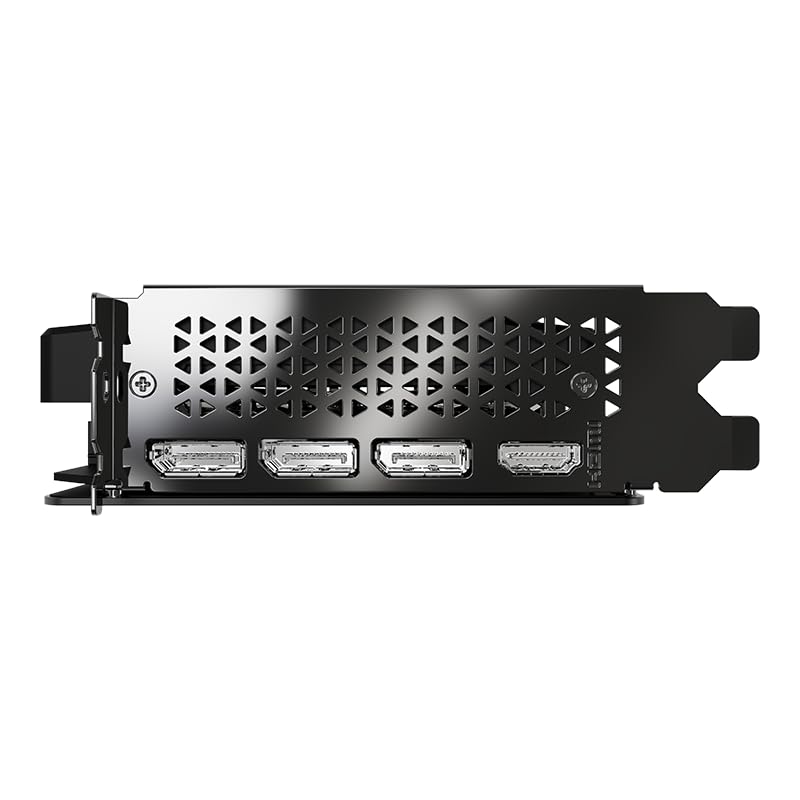
Build quality is solid and practical. The dual-fan cooler operates quietly under typical loads, the compact 2-slot form factor fits nearly any case, and the included GPU holder is a thoughtful touch that prevents sag in smaller or older builds. The 180W TDP and single 8-pin connector mean you don't need an oversized power supply, making this card accessible to budget PC builds. Multi-display connectivity via 3x DisplayPort 2.1b and 1x HDMI 2.1b supports creator desk setups with multiple monitors for timeline editing or dashboard monitoring.
The primary drawback is gaming performance, which is adequate for 1080p and 1440p at medium settings but not competitive for demanding AAA titles at high refresh rates. Additionally, only three customer reviews are currently available, so long-term durability data under sustained heavy AI workloads is limited. Prospective buyers should verify compatibility with their specific AI frameworks and model sizes before purchase.
Verdict: The RTX 5060 Ti is a smart choice for creators and developers prioritizing AI acceleration, local LLM deployment, and content creation speed over bleeding-edge gaming performance. Its blend of practical performance, low power draw, and included accessories makes it a solid value for semi-professional and hobbyist workflows.
GPU Specs: NVIDIA GeForce RTX 5060 Ti, NVIDIA Blackwell architecture, 5th Gen Tensor Cores, 759 AI TOPS, 2407 MHz boost clock
Memory: 16GB GDDR7 at 28 Gbps, 448 GB/sec bandwidth, 128-bit interface
Display Outputs: 3x DisplayPort 2.1b, 1x HDMI 2.1b, supports up to 4 displays at 3840x2160 resolution
Power: 180W TDP, single 8-pin PCIe connector
Design: Dual-fan cooler, 2-slot form factor (9.65 x 4.72 x 1.57 inches)
Interface: PCIe x8
Warranty: 3-year limited warranty
Included Accessories: RGB GPU Holder
Best For: AI researchers and developers running local LLMs, content creators using GPU-accelerated editing and generation tools, machine learning hobbyists, and builders prioritizing power efficiency and compact form factor.
Gamers: Suitable for 1080p and 1440p gaming at medium to high settings. Not recommended for competitive high-refresh gaming or 4K gaming at demanding visual quality.
Not Ideal For: Professional data center deployments requiring maximum VRAM capacity, budget gamers seeking maximum frame rates, or users with extremely tight case constraints requiring single-slot designs.
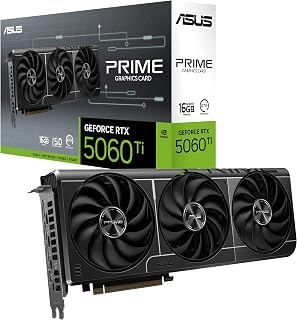
The Prime variant delivers solid baseline performance with its 2602 MHz boost clock and 16GB of GDDR7 memory, providing the capacity AI workloads demand for larger model inference while maintaining smooth frame rates in modern games. The combination of DisplayPort and HDMI outputs ensures compatibility with multi-monitor setups common in content creation and AI development environments.
Pros
- Triple Axial-tech fans with 0dB idle run quietly
- 16GB GDDR7 handles AI workloads and modern games
- Dual BIOS toggles performance profiles instantly
- Reinforced backplate prevents GPU sag
Cons
- Native 4K rasterization trails flagship cards
- Positioned above some competing options
For 1440p gaming and AI workloads, the ASUS Prime RTX 5060 Ti delivers balanced performance through NVIDIA's Blackwell architecture. The 16GB GDDR7 memory handles modern games and AI inference tasks simultaneously, making it practical for users who alternate between gaming sessions and creative projects. DLSS 4 upscaling maintains frame rates in demanding titles, while 758 AI TOPS provides headroom for local model inference. The triple Axial-tech fan configuration uses dual-ball bearings and 0dB idle mode, producing minimal noise during light loads and staying audible but controlled under sustained gaming. The dual BIOS switch offers instant profile changes between quiet and performance modes without software restarts. PCIe 5.0 connectivity and a reinforced backplate add durability. The 2.5-slot footprint fits standard ATX and most micro-ATX cases. Ray tracing performance suits 1440p resolution better than native 4K rendering, though DLSS compensates in supported games. This card targets upgraders from GTX 1070/RTX 2060 era hardware seeking current-generation features without flagship pricing.
GPU Specs: NVIDIA GeForce RTX 5060 Ti with Blackwell architecture, 2602 MHz boost clock, 2572 MHz default clock
Memory: 16GB GDDR7 at 2602 MHz memory clock speed
Design: 2.5-slot form factor with triple Axial-tech fans, dual BIOS switch, reinforced metal backplate
Connectivity: PCIe 5.0 x16 interface, dual DisplayPort 2.1, HDMI 2.1
Performance: 758 AI TOPS, supports DLSS 4 with OC mode up to 2602 MHz
Cooling: Dual-ball fan bearings, 0dB idle technology, GPU Tweak III thermal control software
Dimensions: 12 inches length, 4.7 inches width, 800g weight
Display Support: Up to 7680 x 4320 pixel resolution output
Warranty: 3-year coverage with ASUS registration
Best for gamers upgrading two-generation-old cards who game at 1440p and occasionally run AI tools or content software. The 16GB memory and dual BIOS flexibility suit users who value thermal control and longevity. Skip this if you primarily play esports titles at 1080p where cheaper 8GB variants offer identical frame rates, or if you need maximum 4K native rasterization without upscaling assistance. Also not ideal for users with strict budget constraints who can accept fewer features.
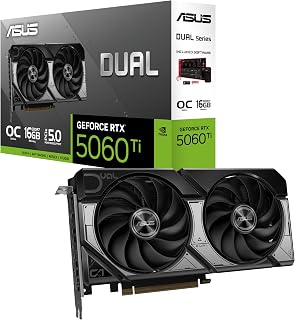
This Dual OC Edition pushes performance further with a 2632 MHz factory overclock, offering a measurable advantage in both gaming frame rates and AI inference speed. The triple DisplayPort 2.1b outputs support high-refresh 4K gaming while the 16GB GDDR7 buffer handles demanding neural network workloads without memory bottlenecks.
Pros
- Factory overclocked to 2632 MHz boost
- Axial-tech fans with 0dB idle stay quiet
- 2.5-slot compact design fits SFF cases
- Dual ball bearings extend fan lifespan
Cons
- Compact form limits extreme overclocking
- Higher tier than budget entry options
The ASUS Dual RTX 5060 Ti OC Edition prioritizes compact efficiency for gaming and AI tasks. Running at 2632 MHz boost in performance mode, it delivers 767 AI TOPS and handles 1440p ultra settings smoothly. The Blackwell architecture brings DLSS 4 frame generation, extending playable frame rates in supported titles. The 16GB GDDR7 buffer accommodates texture-heavy games and simultaneous background inference tasks. Axial-tech fans feature smaller hubs with longer blades, pushing more air through the heatsink while maintaining lower noise. The barrier ring directs airflow downward for focused cooling. During light gaming or productivity work, 0dB mode stops the fans entirely. Dual ball bearings extend lifespan compared to sleeve designs. At 2.5 slots thick, the card fits small form factor cases and leaves room for adjacent expansion cards. The dual BIOS lets users switch between quiet and performance profiles based on workload demands. PCIe 5.0 interface readies the system for future bandwidth-intensive applications. Compact sizing trades extreme overclocking potential for compatibility, but the factory overclock already pushes clocks higher than reference.
GPU and Memory: NVIDIA GeForce RTX 5060 Ti, 16GB GDDR7, 2632 MHz (OC Mode), 2602 MHz (Default Mode). Supports DLSS 4 and Blackwell architecture for AI-accelerated performance.
Connectivity and Cooling: 3x DisplayPort 2.1b, HDMI 2.1b, PCIe 5.0 x16 interface. Dual Axial-tech fans with dual ball bearings, 2.5-slot compact form factor, 0dB technology for silent idle operation.
Physical and System Requirements: Dimensions 9 inches long by 4.7 inches wide, weighs 0.66 kg. Supports maximum resolution of 7680x4320 pixels. Includes 3-year warranty and SpeedSetup manual. Compatible with standard desktop builds requiring adequate power supply and proper case ventilation.
Ideal for small form factor builders who game at 1440p and need AI acceleration for creative tools or local inference. The compact 2.5-slot design suits cramped chassis without compromising thermal performance. Dual BIOS appeals to users who value profile flexibility. Skip this if you're building in a spacious full tower where larger triple-fan models offer better overclocking headroom, or if you exclusively play older esports titles that don't benefit from 16GB memory or DLSS 4.

The Twin Edge White Edition combines a compact SFF-ready form factor with full 16GB GDDR7 capacity, making it ideal for builders who need AI capability in smaller cases. Its IceStorm 2.0 cooling handles sustained AI training sessions while the 2602 MHz clock delivers consistent gaming performance across demanding titles.
Pros
- 8.7-inch length fits small form factor cases
- DLSS 4 achieves 165+ FPS at 1440p
- IceStorm 2.0 cooling stays quiet under load
- White aesthetic complements themed builds
Cons
- 8-pin power limits aggressive overclocking
- Occasional driver conflicts require manual fixes
ZOTAC's Twin Edge OC White Edition combines NVIDIA Blackwell architecture with a compact aesthetic for 1440p gaming and AI tasks. The 16GB GDDR7 memory running at 28 Gbps handles texture streaming in modern titles and supports local AI inference workflows. DLSS 4 frame generation pushes frame rates above 165 FPS in competitive shooters like Battlefield 6 and Black Ops 7 at 1440p. Real-world testing confirms stability even with memory overclocks applied through MSI Afterburner. The IceStorm 2.0 cooling system uses dual 90mm BladeLink fans and composite heatpipes to manage thermals in an 8.7-inch, 2-slot form factor. FREEZE Fan Stop halts the fans during idle and light loads, reducing noise. Pass-thru airflow design exhausts heat efficiently in tight builds. The white shroud and metal backplate add rigidity and visual cohesion for themed systems. PCIe 5.0 interface and DisplayPort 2.1b outputs support high-refresh 4K displays. The 8-pin power connector limits aggressive voltage tuning compared to cards with dual 8-pin or 12VHPWR, though the factory overclock to 2602 MHz already extracts solid performance.
GPU Architecture: NVIDIA Blackwell (RTX 5060 Ti)
Memory: 16GB GDDR7, 128-bit interface, 28 Gbps
Clock Speed: 2602 MHz base
Power Input: 8-pin PCIe connector
Bus: PCIe 5.0 x16
Display Outputs: 3x DisplayPort 2.1b (8K at 165Hz with DSC), 1x HDMI 2.1b (8K at 120Hz with DSC)
Max Resolution: 7680x4320 (8K)
Simultaneous Displays: 4 displays
Physical Dimensions: 8.7 inches length, 1.6 inches width, 650g weight
Form Factor: SFF-ready, 2-slot design
Cooling: IceStorm 2.0 with dual 90mm BladeLink fans, composite heatpipes, FREEZE Fan Stop, pass-thru airflow
Features: DLSS 4, VR Ready, HDCP 2.3, 8K Ready
Warranty: 3 years
Model Number: ZT-B50620Q-10M
Best for 1440p gamers building small form factor or themed white systems who value aesthetics and compact dimensions. The 16GB memory suits users who run modern AAA titles or occasional AI inference. Twin Edge cooling handles thermals without excessive noise. Skip this if you plan aggressive overclocking beyond memory tweaks, as the 8-pin power connector restricts voltage headroom. Also not ideal if you frequently encounter driver conflicts and lack patience for manual troubleshooting between Nvidia updates.
With compatibility across both desktop and laptop docking solutions, this Dual OC Edition offers flexibility for hybrid workstations. The 16GB GDDR7 memory handles large language model inference and high-resolution gaming textures equally well, while the 2602 MHz boost clock maintains strong performance in both domains.
Pros
- 16GB GDDR7 handles AI workloads and demanding game textures
- Compact 2.5-slot design fits smaller builds easily
- DLSS 4 frame generation boosts perceived performance significantly
- 767 AI TOPS suitable for local model inference
Cons
- Ray tracing performance adequate but not exceptional
- 4K gaming requires settings compromises
The ASUS Dual RTX 5060 Ti delivers capable 1440p gaming alongside 767 AI TOPS that make it a practical choice for users splitting time between gaming and AI workloads. The 16GB GDDR7 memory handles demanding textures and multitasking comfortably, while DLSS 4 provides intelligent upscaling and frame generation that stretches performance further than raw specs suggest. The 2632 MHz OC boost clock pushes frame rates into high-refresh territory at 1440p in most current titles. The compact 2.5-slot design fits into smaller builds where space is limited, and the dual Axial fan configuration uses extended blades for better airflow efficiency. At 0.66 kg, installation is straightforward even in cramped cases. Ray tracing performance is adequate but not class-leading, and 4K gaming requires settings compromises. The card handles AI inference tasks well thanks to the Blackwell architecture and generous VRAM buffer, making it suitable for local model experimentation. Thermal management is solid with the dual-fan setup, though you'll want decent case airflow to maintain optimal temperatures under sustained load.
GPU Specifications: NVIDIA GeForce RTX 5060 Ti, Blackwell architecture, 767 AI TOPS performance
Memory: 16GB GDDR7, 2602 MHz memory clock
Clock Speeds: 2602 MHz base, 2632 MHz OC mode
Connectivity: PCIe 5.0, 3x DisplayPort 2.1b, 1x HDMI 2.1b
Display Output: Maximum resolution 7680 x 4320
Cooling: Dual Axial fans, 2.5-slot design
Dimensions: 9.02 inches length x 4.72 inches width
Weight: 0.66 kg
Compatible with: Desktop and Laptop systems
Buy this if you're building a compact gaming PC for 1440p or running local AI models that benefit from 16GB VRAM. Content creators doing moderate GPU work and gamers targeting high refresh rates at 2K resolution will appreciate the balance of performance and size. Skip it if you need strong 4K gaming performance or exceptional ray tracing. Pure gaming enthusiasts without AI workloads might find better value in cards optimized solely for frame rates, and those with full-size cases gain no advantage from the compact form factor.

The Prime OC Edition reaches 2647 MHz, the highest factory clock in this comparison, translating to faster frame rendering and quicker AI model iteration times. This overclock advantage becomes meaningful during extended gaming sessions or when running multiple AI inference tasks simultaneously on the 16GB GDDR7 buffer.
Pros
- 16GB GDDR7 excellent for AI workloads and VRAM-intensive games
- Triple-fan cooling delivers near-silent operation
- DLSS 4 enables smooth 1440p and playable 4K gaming
- Dual BIOS and accessible tuning software
Cons
- Gaming gains over previous gen cards are incremental
- SFF-ready designation requires case compatibility verification
The ASUS Prime RTX 5060 Ti combines 16GB GDDR7 with Blackwell architecture to serve both gaming and AI workloads effectively. The triple Axial-tech fan design keeps temperatures controlled while maintaining near-silent operation, with 0dB technology shutting fans off during light tasks. DLSS 4 support delivers smooth frame rates at 1440p and handles 4K gaming in modern titles when paired with upscaling. The 2647 MHz boost clock provides solid performance headroom, and the dual BIOS switch offers easy toggling between performance profiles. The 2.5-slot, 12-inch form factor fits most cases, though the SFF-ready claim requires case verification. The metal backplate adds structural support, and GPU Tweak III software makes tuning accessible for all skill levels. The 16GB memory buffer is the defining advantage, enabling comfortable AI model inference and future-proofing against VRAM-hungry games. Gaming performance improvements over previous generation cards are measurable but incremental, so the value proposition centers on the memory capacity and cooling solution rather than frame rate leaps. The card runs efficiently and quietly under typical gaming loads, making it a strong candidate for systems where acoustics matter.
GPU: NVIDIA GeForce RTX 5060 Ti (Blackwell Architecture)
Memory: 16GB GDDR7
GPU Clock: 2647 MHz (OC), 2617 MHz (Default)
Memory Clock: 2647 MHz
Cooling: Triple Axial-tech Fans, Dual-ball Bearings, Dual BIOS (Quiet/Performance)
Power: PCIe 5.0 x16 Interface
Outputs: DisplayPort 2.1, HDMI 2.1
Max Resolution: 7680x4320
Physical: 2.5-slot, 12 inches long, 4.7 inches wide, 3.2 pounds
AI Performance: 772 AI TOPS
Warranty: 3 Years
Buy this if you're running local AI models that need substantial VRAM or gaming at 1440p with plans for occasional 4K sessions. Content creators juggling GPU tasks and gamers upgrading from hardware two or more generations old will benefit from the memory and architecture improvements. Skip it if you're purely chasing gaming frame rates without AI workloads, as higher-tier options may deliver better pure gaming value. Upgraders from immediately previous generation cards won't see revolutionary performance gains unless the 16GB VRAM specifically addresses a bottleneck.

Pros
- Excellent thermal management with triple-fan WINDFORCE design
- Dual BIOS switching offers flexibility between raw power and quiet gaming
- 16GB GDDR7 handles demanding AAA titles and content creation workloads
- Blackwell architecture and DLSS 4 deliver strong frame rates at high settings
- Reinforced structure adds durability for long-term reliability
Cons
- Mid-range positioning means it won't compete with flagship RTX 5080 or 5090 models
- Requires robust power supply and adequate case airflow for optimal performance
- Premium pricing compared to entry-level alternatives in the RTX 50 series
The Gigabyte RTX 5060 Ti AERO OC is a mid-range graphics card targeting gamers and content creators who want solid 1440p and 4K performance without flagship pricing. Powered by NVIDIA's Blackwell architecture and equipped with 16GB of GDDR7 memory, this card strikes a balance between capability and value. It's designed for players who want next-gen gaming features like DLSS 4 without the cost of higher-tier options.
Performance stands out through the combination of 16GB GDDR7 memory and Blackwell-based processing. The card handles demanding AAA titles smoothly at high settings, and DLSS 4 support helps maximize frame rates. The 128-bit memory interface and 28GHz memory clock speed deliver the bandwidth needed for modern gaming workloads, making it competent for content creation tasks as well.
Design quality is solid with Gigabyte's WINDFORCE cooling system featuring three fans. The triple-fan setup keeps thermals well-managed under load, and the dual BIOS design lets you toggle between a high-performance mode and a quieter, efficiency-focused mode depending on your needs. The reinforced structure suggests durability for years of use.
The main limitation is that as a mid-range card, it occupies a specific performance tier. Users wanting maximum performance should consider flagship models, while those with tighter budgets might look at entry-level alternatives. Additionally, you'll need a solid power supply and adequate case ventilation to get the best results.
This is a capable card for serious 1440p gaming and 4K work at reasonable frame rates. If you want Blackwell architecture and DLSS 4 without paying flagship prices, the RTX 5060 Ti AERO OC deserves consideration.
GPU: NVIDIA GeForce RTX 5060 Ti with Blackwell architecture
Memory: 16GB GDDR7 with 128-bit interface, 28GHz memory speed
Cooling: WINDFORCE triple-fan system
Output: 3x DisplayPort + 1x HDMI, supports up to 7680x4320 resolution
Interface: PCI-Express 5.0 x16
Core Clock: 2647MHz (boost)
Dual BIOS: Performance and Silent modes
Dimensions: 11.06 inches (L) x 4.61 inches (W)
Weight: 820g
Model: GV-N506TAERO OC-16GD

MSI's VENTUS 3X cooling with triple TORX 5.0 fans excels during prolonged AI training runs that generate sustained thermal loads. The 16GB GDDR7 memory running at 28 Gbps provides the bandwidth required for both real-time ray tracing in games and efficient data throughput during machine learning operations.
Pros
- Factory overclock to 2617 MHz delivers immediate performance
- DLSS 4 multi-frame generation pushes 1440p frame rates high
- 180W power draw comfortable for standard PSUs
- ZERO FROZR silent operation during light workloads
Cons
- 4K gaming at ultra settings requires compromises
- 2.5-slot design demands adequate case space
The MSI RTX 5060 Ti VENTUS 3X OC arrives factory-overclocked to 2617 MHz, delivering immediate performance gains for 1440p gaming and AI inference tasks. The 16GB GDDR7 memory paired with Blackwell's 4th-gen RT cores and 5th-gen Tensor cores handles ray tracing and AI-driven rendering effectively. DLSS 4 with multi-frame generation pushes frame rates well into triple digits at 1440p on demanding titles, while NVIDIA Reflex 2 with Frame Warp reduces latency for competitive gaming. The triple TORX Fan 5.0 setup uses claw-shaped blades that optimize airflow, and ZERO FROZR mode keeps the card silent during light workloads by stopping fans entirely. The nickel-plated copper base plate and precision heat pipes transfer heat efficiently, and the metal backplate provides structural rigidity. At 180W, the card runs comfortably on a standard 600W PSU. The dual BIOS modes let you toggle between gaming performance and quiet operation depending on your priority. The 2.5-slot design requires adequate case space, and while 1440p is the performance sweet spot, demanding 4K gaming will need reduced settings. The PCIe 5.0 x8 implementation has minimal real-world impact on gaming performance.
GPU Memory: 16GB GDDR7 at 28 Gbps delivers 448 GB/s bandwidth, sufficient for high-resolution textures and complex AI workloads. GPU Clock: Factory-overclocked to 2617 MHz boost (2602 MHz in both gaming and silent modes), providing immediate performance without additional tweaking. Architecture: NVIDIA Blackwell with 4608 CUDA cores, 144 Tensor cores, and 36 RT cores for ray-tracing and neural rendering.
DLSS 4 Support: Multi-frame generation, layer rebuilding, and super-resolution combine to boost frame rates and reduce latency while maintaining image quality. Real-world testing shows 3-digit frame rates at 1440p on demanding AAA titles. NVIDIA Reflex 2 with Frame Warp provides competitive gamers with ultra-low latency performance. Power Efficiency: 180W TDP keeps the card cool and compatible with standard PSUs.
Display Outputs: 3x DisplayPort 2.1b and 1x HDMI 2.1b support up to 7680x4320 resolution and enable high-refresh 1440p gaming. Card Dimensions: 304mm long, 2.5 slot design, 860g weight. PCIe Interface: PCIe 5.0 x8 (note: x8 rather than full x16 has negligible real-world performance impact).
Buy this if you're gaming at 1440p with a high refresh monitor or experimenting with AI models that benefit from 16GB VRAM. Competitive gamers valuing low latency and users wanting a balanced card for gaming plus creative work will appreciate the factory overclock and efficient cooling. Skip it if you're targeting demanding 4K gaming at ultra settings or working in compact cases where a 2.5-slot card won't fit. Users with minimal AI workloads and strict budgets might find better pure gaming value elsewhere.
Buying Guide: What to Look for in an RTX 5060 Ti 16GB
Cooling Design and Noise Levels
The RTX 5060 Ti runs a 180W TDP, which means cooling matters but you’re not dealing with furnace-level heat output. Dual-fan models like the ZOTAC Twin Edge and CyberGeek cards keep the design compact and run quiet under typical gaming loads. Triple-fan options from ASUS Prime and MSI VENTUS push more air and maintain lower temperatures during sustained workloads, which helps if you’re rendering video or running AI inference tasks for extended periods.
Look for 0dB or FREEZE fan stop technology if you value silence during light use. Most ASUS and ZOTAC models include this feature, spinning fans down completely when the GPU isn’t under load. If you’re planning a quiet productivity build or a living room gaming PC, this feature keeps your system nearly silent during web browsing, streaming, or light esports titles. For builders prioritizing cooling efficiency alongside overall system performance, check out our guide to the best budget GPU for gaming to see how other cards in this price range stack up.
Form Factor and Case Compatibility
All these RTX 5060 Ti cards carry the SFF-Ready Enthusiast designation, meaning they fit in compact cases while maintaining solid cooling. Most models measure 2.5 slots thick and around 9 to 12 inches long. The ZOTAC Twin Edge comes in at the shorter end, making it ideal for mini-ITX builds or small form factor cases where every millimeter counts.
The ASUS Prime and Dual models, along with the MSI VENTUS, push closer to 12 inches but stay within the 2.5-slot envelope. If you’re building in a standard ATX or micro-ATX case, length and thickness won’t constrain you. But if you’re working with a compact chassis or a vertical GPU mount, verify clearance before ordering. Most models include a metal backplate for structural support, which helps prevent GPU sag in horizontal installations.
AI Performance and VRAM for Creative Workflows
The 16GB GDDR7 memory is the standout feature here. For gaming alone, 16GB is generous and future-proofs you against VRAM-heavy titles at 1440p. But if you’re also running local LLMs, training models, or working in AI-accelerated creative apps like DaVinci Resolve or Adobe Premiere with AI noise reduction and upscaling, that 16GB becomes essential. You can handle larger language models with longer context windows without relying on cloud inference.
All RTX 5060 Ti cards deliver around 758 to 772 AI TOPS thanks to NVIDIA’s 5th Gen Tensor Cores and Blackwell architecture. The minor variance between models comes from factory overclocks. For AI-heavy workflows, the extra TOPS from an overclocked model like the ASUS Prime OC or Dual OC won’t dramatically change your experience, but they add a small edge in batch processing and real-time previews. If you’re also considering system memory for heavy multitasking and content creation, take a look at our breakdown of the best DDR5 7200 RAM for high-performance Intel platforms.
Factory Overclocks and Dual BIOS Features
Several models, including the ASUS Dual OC, Prime OC, and Gigabyte AERO OC, ship with factory overclocks that push boost clocks from the reference 2602 MHz up to around 2632 to 2647 MHz. That’s a modest bump, translating to a few extra frames per second in GPU-bound scenarios. If you’re chasing every last frame, the overclocked models deliver, but the difference is incremental rather than transformative.
Dual BIOS switches on ASUS and Gigabyte cards let you toggle between Performance and Quiet modes. Performance mode runs the fan curve more aggressively for lower temperatures, while Quiet mode prioritizes acoustics. This flexibility is useful if you switch between gaming sessions and quiet productivity work. Some users prefer the peace of mind of having a backup BIOS in case a firmware update goes wrong, though that’s a rare scenario.
Final Thoughts
The RTX 5060 Ti 16GB is a strong choice for gamers targeting high refresh rate 1080p and smooth 1440p, and the 16GB VRAM makes it versatile for creators running AI workflows or local LLMs. If you want a compact, quiet card with solid cooling and a GPU holder included, the CyberGeek GeForce RTX 5060 Ti Graphics Card delivers great value. For builders prioritizing a balance of cooling efficiency, RGB lighting, and a reinforced structure, the Gigabyte GeForce RTX 5060 Ti AERO OC 16G Graphics is worth a close look.
Frequently Asked Questions
Is the RTX 5060 Ti 16GB enough for 1440p gaming in 2026?
Yes, the RTX 5060 Ti 16GB handles 1440p gaming well in most modern titles, especially with DLSS 4 enabled. You’ll get smooth frame rates in demanding games at high settings, and the 16GB VRAM ensures you won’t run into memory limitations even in texture-heavy titles. For competitive esports or lighter games, you can easily push high refresh rate monitors at 1440p.
What power supply do I need for an RTX 5060 Ti 16GB?
A 600W power supply is the recommended minimum for an RTX 5060 Ti build, though most users will be fine with a quality 550W unit if the rest of the system is efficient. The card uses a single 8-pin PCIe power connector and draws 180W under load. Make sure your PSU has the necessary PCIe connector and enough headroom for the CPU and other components. If you’re planning a high-end build with overclocking or additional drives, consider a 650W or higher unit. For more guidance on PSU selection, see our roundup of the best power supplies for various build types.
Can the RTX 5060 Ti 16GB run local LLMs effectively?
Yes, the 16GB GDDR7 memory makes the RTX 5060 Ti capable of running local LLMs with longer context windows and larger models compared to 8GB cards. You can run coding assistants, chat models, and other AI workloads locally without relying on cloud services. The 758+ AI TOPS from the 5th Gen Tensor Cores accelerate inference, making it practical for real-time use in productivity workflows.
How does the RTX 5060 Ti 16GB compare to previous generation cards?
The RTX 5060 Ti 16GB brings NVIDIA’s Blackwell architecture, faster GDDR7 memory, and significantly higher AI compute compared to the RTX 4060 Ti. Gaming performance is a solid step up, especially in ray-traced titles, and DLSS 4 offers better frame generation and image quality than DLSS 3. The doubled VRAM over the 8GB RTX 4060 Ti makes this card far more versatile for content creation and AI workloads. If you’re deciding between GPU upgrades and other components, our guide to the best budget motherboard for Intel builds can help you allocate your budget effectively.
Common questions
Is the RTX 5060 Ti 16GB worth it?
Yes, the RTX 5060 Ti 16GB is worth it if you need the extra memory for high-texture games at 1440p or local AI workloads. The 16GB variant launched at $429 MSRP, and while current prices vary by retailer, the additional 8GB over the base 8GB model makes it more future-proof for demanding titles and AI applications. If you're only gaming at 1080p or don't run AI models locally, the 8GB version or AMD's RX 9060 XT 16GB may offer better value.
How does the RTX 5060 Ti 16GB perform at 1440p?
The RTX 5060 Ti 16GB handles 1440p gaming well in most current titles, with the 16GB of GDDR7 memory preventing texture bottlenecks in high-detail scenarios. Frame rates stay smooth in modern AAA games at high settings, though the most demanding ray-traced titles may require some compromise. The card's 2602 to 2647 MHz clock speeds across different models deliver consistent performance, making it a capable 1440p option without stepping up to the pricier RTX 5070.





Write Your Review
No reviews yet. Be the first to share your experience!