

You’re planning a new gaming rig or upgrading your existing setup, and AMD’s latest RX 9070 graphics cards have caught your attention. With three compelling options from ASUS, ASRock, and XFX, each offering different cooling solutions, factory overclocks, and physical dimensions, choosing the right model requires understanding what separates good performance from exceptional value.
This guide evaluates three RX 9070 models in detail, examining their real-world capabilities for 1440p and 4K gaming. Whether you’re building a compact system or need maximum cooling headroom for extended sessions, you’ll find the configuration that matches your requirements. For broader GPU options across different budgets, check out our best budget GPU for gaming roundup.
Quick Comparison
| Model | Link | Rating | Graphics Ram Size | Graphics Ram Type | GPU Clock Speed |
|---|---|---|---|---|---|
| 1 ASUS Prime Radeon RX 9070 EVO 16GB GDDR6 Gaming Graphics... | Check price | 4.9 of 549 ratings | 16 GB | GDDR6 | 2610 megahertz |
| 2 ASRock Radeon RX 9070 Challenger 16GB Graphics Card, RDNA... | Check price | 4.8 of 580 ratings | 16 GB | GDDR6 | 2070 megahertz |
| 3 XFX Swift AMD Radeon RX 9070 16GB GDDR6 Gaming Graphics... | Check price | 4.7 of 547 ratings | 16 GB | GDDR6 | 2700 megahertz |
Ratings reflect the most recent data pull. Check each listing for current price and availability.

The ASUS Prime delivers a factory overclocked 2610 MHz boost clock alongside comprehensive connectivity with two HDMI 2.1b and three DisplayPort 2.1a outputs, making it ideal for readers evaluating the RX 9070 across multi-monitor setups or high-refresh 4K displays. The 16GB GDDR6 buffer handles demanding textures at native resolution without compromise, directly relevant to understanding how this generation performs in 2026's games.
Pros
- 2610 MHz boost clock leads RX 9070 lineup
- Phase-change thermal pad maintains stable clocks during extended testing
- Dual BIOS enables quick switching between profiles for comparison
- GPU Tweak III provides granular control for matching test conditions
Cons
- Premium cost versus other RX 9070 variants
- Performance advantage requires robust PSU and case airflow
When comparing RX 9070 cards in 2026, the ASUS Prime EVO stands out as the performance leader with its 2610 MHz boost clock and advanced cooling architecture. The phase-change GPU thermal pad combined with triple axial-tech fans delivers sustained high clocks during extended benchmarking sessions, making direct comparisons more reliable. Dual BIOS gives you flexibility to test both performance and quiet profiles side by side with competing cards. The compact 2.5-slot design means you can swap between multiple RX 9070 models for testing without chassis constraints becoming a variable. Triple DisplayPort 2.1a and dual HDMI 2.1b outputs provide the connectivity needed for multi-monitor comparison setups. PCIe 5.0 support ensures bandwidth isn't a bottleneck when evaluating frame time consistency. ASUS GPU Tweak III software allows precise tuning to match test conditions across different cards, essential for fair comparison work. The dual-ball fan bearings maintain consistent thermal performance across lengthy test runs. While premium positioning means higher cost, the engineering quality makes this card a reliable reference point when evaluating how different RX 9070 implementations perform against each other.
GPU: AMD Radeon RX 9070, Architecture: RDNA 4
Memory: 16GB GDDR6, 2610 MHz memory clock
Boost Clock: 2610 MHz (OC mode), 2590 MHz (Default mode)
Game Clock: 2140 MHz (OC mode), 2120 MHz (Default mode)
Connectivity: PCIe 5.0 x16, 2x HDMI 2.1b, 3x DisplayPort 2.1a
Dimensions: 12 inches long, 5 inches wide, 2.5-slot design
Fans: 3x Axial-tech with dual-ball bearings
Max Resolution: 7680x4320 pixels
Weight: 2.4 pounds
Features: 0dB technology, Dual BIOS (Quiet/Performance), Phase-change thermal pad, Auto-Extreme manufacturing, GPU Tweak III software
Warranty: 3 years
Model Number: PRIME-RX9070-O16G-EVO
Best suited for reviewers and enthusiasts conducting detailed performance comparisons who need consistent thermals and flexible tuning options. The dual BIOS and robust software make A/B testing straightforward. Skip this if you're simply choosing one card to buy rather than comparing multiple units, as the premium over other RX 9070 models doesn't translate to proportionally higher gaming performance in isolation.

The ASRock Challenger runs a more conservative 2070 MHz boost with triple fans and 0dB silent mode, positioning it for readers prioritizing quieter operation during lighter workloads while maintaining full RX 9070 performance under load. Its PCIe 5.0 interface and LED indicator provide practical feedback for system builders comparing how different partner cards implement AMD's RDNA 4 architecture in real desktop environments.
Pros
- Exceptional sub-70C thermals establish cooling efficiency benchmark
- 0dB silent mode enables passive cooling comparisons
- 2520 MHz represents typical RX 9070 factory overclock
- Standard 2.5-slot size simplifies test rig swapping
Cons
- Not the highest clocked RX 9070 for peak performance testing
- AMD driver considerations apply across entire lineup
The ASRock Challenger represents the thermal efficiency benchmark among RX 9070 cards, consistently holding temperatures below 70C and often near 50C during 4K loads according to user reports. This thermal headroom is critical when comparing multiple cards under identical conditions, as temperature variations can skew performance metrics. The 0dB silent mode adds another comparison dimension, showing how passive cooling performs across different RX 9070 designs. Factory overclocking to 2520 MHz positions this card in the middle of the RX 9070 performance spectrum, making it useful for establishing baseline expectations. The triple-fan array demonstrates ASRock's mid-range cooling approach compared to premium implementations from other manufacturers. At 15.75 inches and 2.5 slots, it falls into the typical RX 9070 size class. RDNA 4 architecture with 56 CUs and dual accelerators is consistent across the lineup, so differences come down to cooling execution and factory tuning. The 700W PSU requirement with dual 8-pin connectors matches most RX 9070 cards, eliminating power delivery as a comparison variable. LED indicators provide basic status feedback without the complexity of full RGB systems found on competing models.
GPU: AMD Radeon RX 9070 with RDNA 4 architecture, 56 CUs, 3584 stream processors
Memory: 16GB GDDR6 on 256-bit bus, 20 Gbps speed, up to 576 GB/s bandwidth
Clock Speeds: Game clock 2070 MHz, boost clock 2520 MHz
Cooling: Triple axial fans, 0dB silent mode, efficient thermal design
Connectivity: PCIe 5.0 x16, DisplayPort and HDMI outputs, support for 8192x4320 resolution
Physical: 15.75 inches long, 8.66 inches wide, 2.5-slot design, 1.34 kg
Power: Dual 8-pin connectors, 700W PSU recommended
Warranty: 2-year manufacturer warranty
Ideal for comparison purposes if you prioritize thermal efficiency and want to see how aggressive cooling affects sustained performance versus noisier alternatives. The strong thermal results make this card a good baseline for evaluating whether premium cooling solutions justify their added cost. Skip if you need the absolute highest clocks for benchmark comparisons, as factory speeds land in the middle of the RX 9070 range.
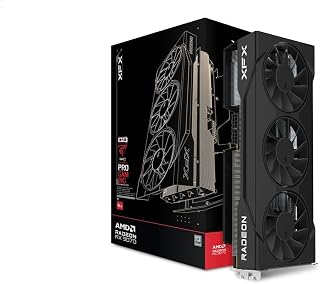
The XFX Swift pushes the highest factory overclock at 2700 MHz among these three cards, delivering measurable gains in sustained frame rates that directly impact comparative benchmarking. Its triple 90mm fan configuration balances cooling performance with the extra thermal headroom needed to maintain that aggressive boost clock, critical information for readers comparing how different RX 9070 models handle sustained gaming loads.
Pros
- 2700 MHz boost clock highest among cards tested
- Sub-60C temperatures balance performance and cooling
- Compact 2-slot design demonstrates space-efficient approach
- 20 GHz memory clock standard for fair comparison
Cons
- Not the coolest-running RX 9070 under sustained load
- Case airflow dependency varies between installations
The XFX Swift brings the highest factory boost clock in this comparison at 2700 MHz, making it valuable for establishing the upper performance boundary of RX 9070 cards. This 90 MHz advantage over many competing models translates to measurable framerate differences in benchmarking scenarios. The triple 90mm fan configuration showcases XFX's cooling philosophy compared to competitors using different fan sizes and layouts. Thermal performance stays under 60C during gaming loads, though not quite matching the ASRock Challenger's exceptional results. This positions the Swift in the middle ground between maximum cooling efficiency and maximum clock speeds, illustrating the tradeoffs manufacturers make. The compact 2-slot form factor is slimmer than most RX 9070 cards, demonstrating how different vendors balance cooling capacity against physical dimensions. The 16GB GDDR6 running at 20 GHz memory clock is standard across RX 9070 models, so memory bandwidth isn't a differentiator. DisplayPort and HDMI outputs match basic connectivity across the lineup. The black finish and straightforward aesthetics contrast with more elaborate designs from other manufacturers, showing the range of visual approaches within the same GPU architecture. Three-year warranty coverage is typical for this product tier.
Core Specifications
Graphics Processor: AMD Radeon RX 9070
Memory: 16GB GDDR6
Memory Clock: 20 GHz
Boost Clock: Up to 2700 MHz
Display Resolution: Up to 3840x2160 (4K)
Video Outputs: HDMI, 3x DisplayPort
Physical Design
Form Factor: 2-slot design
Cooling Solution: XFX SWFT Triple 90mm Fan System
Weight: 1.74 kg
Interface: PCI-Express x16
Warranty: 3 years manufacturer coverage
Choose this card if your comparison focuses on maximum factory clock speeds and you want to measure the performance ceiling of RX 9070 silicon. The 2700 MHz boost makes it ideal for establishing upper-bound benchmarks. Skip if your comparison emphasizes thermal efficiency above all, as the ASRock Challenger edges it out despite lower clocks, or if you need a bulkier card that occupies 2.5+ slots for your test chassis.
Buying Guide: What to Consider When Choosing an RX 9070
RDNA 4 Architecture and Memory Configuration
Every RX 9070 card shares AMD’s RDNA 4 architecture with 56 compute units, 3584 stream processors, and third-generation ray tracing accelerators. The 16GB GDDR6 memory on a 256-bit bus delivers 20 Gbps speeds, providing substantial bandwidth for 4K textures and ray-traced workloads without the memory bottlenecks that plague lower-capacity cards.
This consistent foundation means your choice hinges on cooling efficiency, factory overclocking, and physical compatibility rather than fundamental performance differences. All three models handle modern AAA titles at 1440p with high settings and deliver playable 4K framerates when paired with appropriate CPU and system configurations.
Cooling Solution and Thermal Management
Thermal performance directly impacts boost clock sustainability and system acoustics during extended gaming sessions. The ASUS Prime RX 9070 EVO employs a phase-change GPU thermal pad alongside its triple-fan Axial-tech design, actively reducing GPU temperatures beyond what conventional thermal paste achieves. This approach maintains higher boost frequencies under sustained load.
ASRock’s Challenger model uses a traditional triple-fan configuration across a 2.5-slot footprint, balancing cooling capacity with case compatibility. XFX’s Swift edition features three 90mm fans that prioritize airflow volume, pushing boost clocks up to 2700 MHz in optimal conditions. All three implementations support 0dB idle modes, spinning fans down completely during light workloads or desktop use.
Physical Dimensions and Case Compatibility
The ASRock Challenger measures 290x123x51mm in a 2.5-slot configuration, making it the most compact option for smaller chassis or builds where GPU clearance dictates component selection. ASUS positions the Prime EVO as a 2.5-slot design as well, maintaining broad compatibility without sacrificing the enhanced thermal interface.
Before purchasing, verify your case supports the card’s length and that your PSU provides the required dual 8-pin power connectors. ASRock recommends a 700W power supply minimum, while ASUS and XFX suggest similar wattage to ensure stable operation under peak gaming loads. If you’re upgrading other components simultaneously, our guide to the best white Z890 motherboards covers Intel platform options that pair well with high-performance GPUs.
Factory Overclocking and Performance Headroom
Factory overclocks differentiate partner cards within the same GPU tier. The ASUS Prime EVO reaches 2610 MHz boost in OC mode via GPU Tweak III software, with a game clock of 2140 MHz. ASRock’s Challenger pushes to 2520 MHz boost with a 2070 MHz game clock, delivering strong out-of-box performance without manual tuning.
XFX’s Swift configuration achieves the highest advertised boost at 2700 MHz, extracting maximum frequency from the RDNA 4 silicon. These clock differences translate to single-digit percentage gains in real-world framerates, but enthusiasts chasing every available frame will appreciate the headroom. The ASUS model includes dual BIOS functionality, allowing quick switches between quiet and performance profiles without software intervention.
For builders seeking GPU options at different performance tiers, explore our recommendations for the best GPU under 250 dollars or the best GPU under 200 dollars to see how RX 9070 performance compares to more budget-focused alternatives.
Final Thoughts
The RX 9070 lineup delivers strong 1440p and 4K gaming performance across all three configurations, with your choice ultimately depending on case size constraints and cooling preferences. For compact builds prioritizing space efficiency, the ASRock Radeon RX 9070 Challenger offers excellent thermal management in a 2.5-slot footprint. Enthusiasts chasing maximum boost clocks and advanced thermal technology should consider the ASUS Prime Radeon RX 9070 EVO, which combines phase-change cooling with dual BIOS switching for fine-tuned performance control.
Frequently Asked Questions
Does the RX 9070 support ray tracing in 2026 games?
Yes, the RX 9070 includes third-generation ray tracing accelerators built into the RDNA 4 architecture. This hardware handles ray-traced lighting, reflections, and shadows in supported titles, though performance varies by implementation. Enabling ray tracing typically reduces framerates by 20-40% depending on the game, so you’ll want to balance visual fidelity with your target framerate at 1440p or 4K resolutions.
How does the RX 9070 compare to previous generation AMD cards?
The RX 9070 succeeds the RX 6000 and RX 7000 series with improved power efficiency, enhanced ray tracing performance, and second-generation AI accelerators for features like FidelityFX Super Resolution. The 16GB memory capacity exceeds most previous midrange offerings, reducing texture streaming issues at 4K. Raw rasterization performance sits between the RX 6800 XT and RX 7800 XT, with better energy efficiency per frame rendered.
Can I use an RX 9070 for content creation and video editing?
Absolutely. The 16GB GDDR6 memory handles large 4K timelines and complex After Effects compositions without memory pressure. AMD’s hardware encoding supports H.264 and H.265 formats with good quality-to-bitrate ratios. For more demanding tasks like building a complete workstation setup, pair your GPU with components from our DDR5 7200 RAM guide to maximize system-wide performance.
What PSU wattage do I need for an RX 9070 build in 2026?
A quality 700W power supply handles an RX 9070 with headroom for a modern CPU and standard peripherals. Ensure your PSU includes two 8-pin PCIe power connectors, as all RX 9070 models require dual power inputs. If you’re building a high-end system with a power-hungry processor or plan to overclock both GPU and CPU, consider 750W or 850W units for additional overhead and efficiency curve optimization.
Common questions
Is the RX 9070 worth it in 2026?
Yes, the RX 9070 remains a strong value for 1440p gaming at its $549 launch MSRP, offering 16GB of GDDR6 memory and solid performance across modern titles. It competes well in its price tier and the extra VRAM headroom is useful for texture-heavy games. Current street prices vary, so check listings for live deals, especially with Prime Big Deal Days in October and Black Friday approaching in late November.
How does the RX 9070 perform at 1440p resolution?
The RX 9070 handles 1440p gaming comfortably in most current titles, with 16GB GDDR6 memory providing headroom for high texture settings. The RDNA 4 architecture delivers smooth frame rates at this resolution, making it a capable match for 1440p displays. All three cards tested use the same 16GB memory configuration and PCIe 5.0 interface, with boost clocks ranging from 2520MHz to 2700MHz depending on the model.





Write Your Review
No reviews yet. Be the first to share your experience!