

When a demanding CPU makes your fans surge during games, rendering, or long work sessions, a larger liquid cooler can seem like the obvious answer. The 240mm vs 360mm aio decision is more nuanced, because radiator room, processor power, airflow, and acoustics all shape the result.
This guide is for builders deciding between a compact two-fan radiator and a longer three-fan model. We compare the practical tradeoffs, then match them to the coolers below, whether you are replacing an air cooler or choosing between cooling approaches for a new system. For broader context, see our air cooler versus AIO guidance for gaming PCs.
Quick answer
This guide compares 10 picks, with Thermalright Aqua Elite 240 V3 AIO Water Cooler, Dual ranked first. CORSAIR Nautilus 360 RS ARGB Liquid CPU Cooler - 360mm holds the highest customer rating among them.

Not every build needs a full 360mm loop, and this 240mm cooler makes the case for staying compact with a 25 db noise rating, among the quietest in this comparison. Its dual PWM ARGB fans with S-FDB bearings suit a reader prioritizing quiet operation in a smaller case where 360mm radiators simply won't fit.
Pros
- Fits cases too small for a 360mm radiator
- 66.17 CFM airflow at a quiet 25 dB
- Works across AMD AM4/AM5 and Intel LGA1150-1851
- Synchronized ARGB fans and pump head
Cons
- ARGB only syncs with compatible motherboard headers
- Some early units show minor startup pump noise
Choosing between 240mm and 360mm comes down to case space and how far you want to push cooling, and the Aqua Elite 240 V3 makes the case for going smaller without giving up much. Its fourth-gen octagonal pump head and dual 120mm ARGB fans push 66.17 CFM at a controlled 25 dB, enough headroom for mainstream gaming and productivity builds that don't need the extra radiator footprint a 360mm demands. If your case has limited top or front mounting space, or you simply don't need to chase the last few degrees that a bigger radiator buys you, this 240mm unit covers AMD AM4/AM5 and Intel LGA1150 through LGA1851 with all mounting hardware included. The aluminum fin radiator and protective mesh tubing add durability, and the synchronized ARGB on fans and pump gives you modern looks without needing a 360mm cooler's bulk. For builders weighing the two sizes, this is the pick when fit and value matter more than maximum thermal ceiling.
Cooling System: 240mm all-in-one liquid cooler with aluminum fin radiator and protective mesh water tubing
Pump: Fourth-generation design with octagonal shape, 2800 RPM maximum speed (±10%), 40,000-hour rated lifespan
Fans: Dual 120mm TL-C12B-S V2 with S-FDB bearings, 1500 RPM maximum speed (±10%), 66.17 CFM maximum airflow, 25.6dB noise level
Connectors: 4-pin PWM fan headers, 5V 3-pin ARGB headers for both fans and pump
Power Consumption: 2.64 watts total system power
Dimensions: 4.72 inches long by 0.98 inches wide by 4.72 inches high
Weight: 100 grams
CPU Compatibility: AMD AM4, AM5; Intel LGA1150, LGA1151, LGA1155, LGA1156, LGA1200, LGA1700, LGA1851
Materials: Aluminum, metal, and plastic components
Included: One complete AIO water cooler unit with mounting accessories for all supported platforms
Buy this if your case only clears a 240mm radiator, or you're running a mainstream CPU where a 360mm would be overkill. Budget-focused builders who still want ARGB and quiet operation fit well too. Skip it if you're deciding in favor of a 360mm because you have a high-TDP CPU, overclock heavily, or your case has room for the larger radiator and you want the extra thermal headroom.

CORSAIR Nautilus 360 RS ARGB Liquid CPU Cooler
If you've settled on 360mm for the extra radiator surface area, this one backs that choice with three RS120 ARGB fans and direct motherboard connection for simpler daisy-chained wiring. Running at 36 db, it stays reasonably quiet given the larger footprint, and broad socket support across AM5, AM4, and current Intel platforms makes it a safe long-term fit for a 360mm build.
Pros
- 360mm radiator offers more cooling surface than 240mm options
- Quiet 20dBA pump keeps noise manageable despite larger size
- Pre-applied thermal paste simplifies installation
- Direct motherboard connection avoids extra controllers
Cons
- Requires case clearance for a 15.59-inch radiator
- No pump display screen, unlike some LCD-equipped AIOs
Choosing between 240mm and 360mm often comes down to how much radiator space your case has and how quiet you want the result, and the Nautilus 360 RS answers both with a 360mm radiator and a 20dBA pump. That extra radiator length over a 240mm option gives more surface area for heat dissipation, which matters if you're running demanding CPUs or want more thermal headroom for the future. The three RS120 ARGB fans use AirGuide technology and Magnetic Dome bearings, spinning up to 2100 RPM while the overall noise level sits at 36dB, a reasonable tradeoff for the added cooling capacity a 360mm unit provides over a 240mm one. A convex cold plate with pre-applied thermal paste and direct motherboard connection make installation simple, which helps offset the extra planning a larger radiator requires for case clearance. The dimensions run 15.59 inches long, so confirm your case supports a 360mm radiator before committing. For builders who've decided the bigger radiator is worth the space, this is a straightforward, well-built option.
Installation is remarkably straightforward and takes approximately 15-30 minutes depending on experience level. The pre-applied thermal paste eliminates the guesswork, and the convex cold plate design ensures proper contact with Intel and AMD CPU integrated heat spreaders without requiring additional paste application.
Compatibility spans a wide range of modern platforms: Intel LGA 1851, LGA 1700, and AMD AM5, AM4 sockets. Connection is simplified through a single 4-pin PWM fan header and one 5V ARGB header on your motherboard, with daisy-chaining capability for the three included RS120 fans. Cable lengths are well-designed to accommodate most modern case layouts without excessive excess or tension.
The Nautilus 360 RS excels in thermal performance, consistently keeping high-end CPUs cool even during extended gaming sessions or heavy workloads. The high-flow pump circulates coolant efficiently while maintaining its exceptionally quiet 20 dBA operation. Users report CPU temperatures remaining stable and low even with demanding processors like the i7-12700KF under sustained load.
Acoustic performance is exceptional by AIO standards. The pump runs at whisper-quiet levels, and the RS120 fans generate minimal noise despite providing strong static pressure and airflow. This combination makes the cooler ideal for noise-sensitive builds, streaming setups, and professional environments where acoustic performance is a priority.

Readers set on 360mm cooling but wanting a lighter aesthetic will find this white version pairs the same three-fan ARGB setup with 16 watts of fan power and a 36 db noise level. It's suited to builds where matching case color matters as much as the thermal benefits of the larger radiator.
Pros
- Strong cooling performance during gaming and heavy workloads
- Quiet pump and fan operation according to user feedback
- Straightforward installation with pre-applied thermal paste
- Clean ARGB lighting and reduced cable clutter
- Broad compatibility with current Intel and AMD desktop sockets
Cons
- A 360mm radiator may be difficult to fit in smaller or compact PC cases
- Advanced CORSAIR iCUE control requires an optional controller sold separately
- Requires a compatible motherboard with a 4-pin PWM connection and 5V ARGB header
The CORSAIR Nautilus 360 RS ARGB is a 360mm all-in-one liquid CPU cooler designed for gaming PCs, streaming systems, and performance-focused desktops. Its support for Intel LGA 1851 and LGA 1700, along with AMD AM5 and AM4, makes it suitable for a wide range of modern processors.
Cooling performance is the main strength, with a high-flow pump, three RS120 ARGB fans, and a copper cold plate designed for effective heat transfer. User feedback highlights low temperatures and quiet operation during gaming and demanding workloads, while the pre-applied thermal paste makes installation faster.
The cooler also offers a clean, practical installation experience. Fans can be daisy-chained to reduce wiring, and direct connection to the motherboard means no separate controller is required for standard ARGB and PWM control. The pump head and fans provide coordinated lighting for a polished build appearance.
There are a few planning considerations before purchase. A 360mm radiator requires a case with sufficient mounting space, and advanced CORSAIR iCUE control needs an optional controller. Builders should also verify that their motherboard has the required 4-pin PWM and 5V ARGB headers.
Overall, the Nautilus 360 RS ARGB is a capable and well-rounded AIO cooler for users who want strong thermal performance, low operating noise, easy cable management, and white ARGB styling. It is especially appealing for modern Intel and AMD gaming systems with enough room for a 360mm radiator.

For readers weighing a 240mm radiator against a bulkier 360mm setup, this cooler's 20 db noise level makes a strong argument for staying smaller, especially in a quiet build where fan noise matters more than squeezing out extra thermal headroom. Direct motherboard connection also keeps cabling simple in tighter 240mm-compatible cases.
Pros
- Rated 20 dB pump, quieter than many 240mm options
- Fits Intel LGA1851/1700 and AMD AM5/AM4
- Daisy-chain cabling reduces header clutter
- BIOS-controlled PWM, no extra software needed
Cons
- Noise increases noticeably under heavy gaming loads
- 240mm radiator may still not fit smaller cases
When the 240mm vs 360mm decision hinges on noise rather than raw size, the Nautilus 240 RS makes a strong case for staying at 240mm. Its pump runs at a rated 20 dB, among the quietest specs in this comparison, and the RS120 fans are tuned for low-noise operation rather than maximum airflow. That makes it a fit for builders who want a 240mm footprint specifically because they're prioritizing quiet, steady operation over the extra cooling ceiling a 360mm provides. It covers Intel LGA1851/LGA1700 and AMD AM5/AM4, and the daisy-chain cabling cuts down on motherboard headers used, which matters more in smaller cases where a 360mm wouldn't fit anyway. The convex cold plate with pre-applied thermal paste simplifies installation, and BIOS-level PWM control avoids extra software. If you're set on 240mm because your case won't take a 360mm, or because you want the simpler, quieter build, this is a sound choice without RGB distractions.
Cooling Solution: Liquid (AIO), 240mm radiator
Pump Noise Level: 20 dBA
Power Connector: 4-pin PWM
Voltage: 12V DC
Power Consumption: 1.5W
Fans Included: 2x RS120 fans
Material: Metal, Plastic
Weight: 2.7 lbs
Warranty: 5-year manufacturer warranty
Model: CW-9060088-WW
Socket Compatibility: Intel LGA1851, LGA1700, AMD AM5, AM4
Cold Plate: Slightly convex with pre-applied thermal paste
Fan Bearing: Magnetic Dome
Radiator Technology: AirGuide airflow optimization

For readers leaning toward 360mm for its cooling headroom, the 31.9 db noise rating stands out as one of the quieter options at that radiator size. Combined with 12.12 watts of fan draw, it suggests a build geared toward sustained airflow without the usual acoustic tradeoff that often comes with larger triple-fan loops.
Pros
- 360mm radiator and 75.05 cfm airflow outperform 240mm capacity
- Quiet 31.9dB operation despite higher 3100 RPM pump speed
- Single-frame fan design simplifies installation
- Direct motherboard connection avoids extra hardware
Cons
- Requires case clearance for a 15.62-inch radiator
- Full RGB customization needs NZXT CAM software
For anyone comparing 240mm and 360mm radiators as an upgrade from air cooling, the Kraken Core 360 RGB makes the case for going bigger. The 360mm radiator and 3100 RPM pump deliver more airflow capacity at 75.05 cfm than a 240mm setup can match, while noise stays controlled at 31.9dB thanks to the single-frame fan design. That consolidated fan assembly also reduces mounting screws and cable runs, which helps when a 360mm radiator already means more planning for case fit and clearance at 15.62 inches long. Direct motherboard connectivity keeps installation simple without needing a separate controller, a plus for first-time builders stepping up from air cooling into their first 360mm AIO. The RGB Core fans tie into NZXT's CAM software for synchronized lighting, though that does mean fuller customization requires the CAM ecosystem rather than standalone control. If your case supports the larger radiator, the extra surface area over a 240mm option gives more thermal headroom for sustained gaming and multitasking loads without pushing noise levels up.
Cooling Method: All-in-one liquid cooling
Radiator Size: 360mm
Pump Speed: 3,100 RPM maximum
Noise Level: 31.9 dB
Air Flow: 75.05 CFM
Power Connector: 4-Pin PWM
Voltage: 12V DC
Power Consumption: 12.12 watts
Dimensions: 15.62 inches L x 4.72 inches W x 5.7 inches H
Weight: 1.78 kg
Warranty: 5 years manufacturer
Included: 360mm AIO cooler with pre-installed fans

This 360mm cooler targets the reader who wants more than raw cooling capacity from their radiator choice, pairing a 3.95-inch 480x480 IPS display with three wireless splicing fans. It's suited to a build where the 360mm form factor is justified by both performance and the visual payoff of a built-in screen.
Pros
- 68.9 CFM airflow with three fans across a 360mm radiator
- 3.95-inch IPS LCD display at 480x480 resolution
- Magnetic, tool-free pump head installation
- Compatible with AMD AM4/AM5 and Intel LGA1150-1851
Cons
- AMD installation requires a separately sourced backplane
- LCD display needs compatible headers and TRCC software setup
If the 360mm side of this comparison is what you're leaning toward, the Peerless Vision 360 shows what the extra radiator size can buy you beyond just cooling headroom. Its three TL-M12Q fans spin up to 2000 RPM for 68.9 CFM while staying at 28.2 dB, and the three-fan, 360mm layout gives it more surface area to dissipate heat than a 240mm setup, which matters if you're running a higher-end or overclocked CPU. The size difference also shows up in the standout 3.95-inch IPS LCD display at 480x480 resolution, something that fits more naturally on a larger radiator and pump assembly. Compatibility spans AMD AM4/AM5 and Intel LGA1150 through LGA1851, with a magnetic, tool-free pump head for easier installation. At 15.63 inches long, it needs the case space a 360mm demands, which is the real tradeoff against the 240mm options in this comparison. For builders who have the room and want the larger radiator's extra thermal ceiling plus display customization, this is the 360mm pick to consider.
Cooling System: 360mm Liquid CPU Cooler with 3 120mm Fans
Compatibility: AMD AM4/AM5, Intel LGA1150/1151/1155/1156/1200/2011/2066/1700/1851
Display: 3.95-inch IPS LCD with 480x480 resolution, 60Hz refresh rate
Fans: TL-M12Q PWM fans, Maximum 2000 RPM, 68.9 CFM airflow, S-FDB bearings
Noise Level: 28.2 dB
Power Consumption: 45 watts
Radiator Dimensions: 15.63"L x 4.72"W x 1.06"H
Fan Connectors: 4-Pin PWM, 5V 3-Pin ARGB lighting interface
Material: Aluminum construction
Features: Magnetic pump head, DIY screen themes, automatic temperature control
What to Expect During Setup: Installation typically takes 20-30 minutes with the included mounting hardware. The magnetic pump head design speeds up placement and removal compared to traditional coolers. Follow the installation video provided by Thermalright for your specific platform to ensure proper seating.
Important Platform Notes: Intel platform users receive all necessary mounting fasteners. AMD users on AM4/AM5 platforms must use their original motherboard's backplane, which this cooler does not include. ARGB lighting configuration requires connecting the 5V 3-Pin header to your motherboard's ARGB connector and using TRCC software to customize effects and display themes.
Display Customization: After installation, download TRCC software to unlock the LCD display's full potential. You can display system parameters, upload custom images, create dynamic animations, and design personalized text overlays that reflect your build aesthetic.

Despite its 240 SE naming, this model ships as a 360mm AIO, giving readers comparing radiator sizes a quieter option at 29.8 db alongside a 2000 rpm fan ceiling. That combination suits someone who wants the thermal headroom of a 360mm loop without pushing fan speed and noise to the extreme.
Pros
- Fits cases too small for 360mm radiators
- Quiet 29.8dB operation at 2000 RPM
- 2-inch IPS LCD for temps or custom art
- Broad socket support across Intel and AMD
Cons
- 240mm size limits cooling headroom versus 360mm options
- No community track record yet for pump and LCD longevity
If you're torn between a 240mm and a 360mm radiator, the FW 240 SE ARGB is worth considering as the compact option, especially when case space is tight. Its 240mm aluminum radiator paired with dual TL-P12W-S fans at 2000 RPM keeps noise to just 29.8dB, so it suits builds where quiet operation matters more than squeezing out every last degree. What sets it apart in a 240 vs 360 comparison is the 2-inch IPS LCD on the pump head, letting you display temps or custom visuals, a feature not every 360mm competitor offers. Socket support spans Intel LGA1150 through LGA1851 and AMD AM4/AM5, so compatibility isn't a limiting factor when choosing radiator size. The tradeoff is clear: a 240mm radiator has less surface area than a 360mm unit, so it caps out sooner under high-wattage CPUs or heavy overclocking. For mainstream processors in mid-range gaming or content creation rigs, though, the smaller footprint and lower noise can outweigh the thermal ceiling a 360mm model would clear.
Cooling System: 240mm All-in-One Liquid Cooler with dual PWM fans and ARGB lighting
Radiator Dimensions: 277 x 120 x 52mm, Overall Product: 10.91 x 4.72 x 2.05 inches
Pump Head: 67 x 68 x 59mm with magnetic 2-inch IPS LCD display module
Fan Specifications: TL-P12W-S fans, 2000 RPM nominal speed (±10%), 70.84 CFM airflow, 29.8dB noise level maximum
Electrical: 12V DC, 4-pin connector with PWM temperature control
Display: 2-inch IPS LCD screen with 320x240 resolution, supports JPG, PNG, GIF formats, freely customizable content
Socket Compatibility: AMD AM4, AM5; Intel LGA1150, 1151, 1155, 1156, 1200, 2011, 2066, 1700, 1851
Material: Aluminum construction with all-metal mounting brackets
Buy this if your case only fits a 240mm radiator, or if you want quiet operation and a customizable LCD display more than maximum headroom. Skip it if you're running a high-wattage CPU or plan aggressive overclocking, where a 360mm radiator's larger surface area will matter. Also skip if long-term pump and LCD reliability data matters to you, since community reviews are limited.

For a 360mm build focused on sustained performance, the 3-phase pump motor and ceramic bearing design aim to support better heat transfer across the larger radiator surface. At 30 db with three PWM ARGB fans, it fits a reader who wants the bigger cooling loop without excessive pump or fan noise.
Pros
- Incredibly quiet operation, eliminating jet engine noise while maintaining excellent cooling performance
- Straightforward installation with clear instructions, all necessary brackets, and daisy-chain fan design for minimal cable management
- Outstanding cooling efficiency with verified temperature drops of 25+ degrees Celsius compared to traditional air cooling
- Vibrant and durable RGB lighting that syncs smoothly with case fans for a cohesive aesthetic
- Exceptional price-to-performance ratio compared to competing 360mm AIO coolers
Cons
- RGB lighting compatibility issues on some motherboards, particularly ASUS ROG Strix boards expecting 4-pin connectors instead of 3-pin
- Installation instructions could be clearer for users unfamiliar with cable routing and pump connection procedures
- Case compatibility should be verified before purchase due to radiator and fan size requirements
The Minorsonic 360mm AIO CPU cooler is a budget-friendly liquid cooling solution designed for gamers, content creators, and PC enthusiasts who demand reliable thermal performance without premium pricing. This all-in-one cooler combines a high-speed ceramic bearing pump, PWM-controlled ARGB fans, and an optimized radiator to keep modern high-performance CPUs running cool and stable.
The standout feature is the ceramic bearing pump operating at 3000 RPM, which delivers superior heat transfer efficiency while maintaining exceptional durability. The advanced 3-phase motor technology minimizes vibration and keeps noise levels impressively low, even under sustained heavy workloads. Real-world testing from verified customers shows temperature reductions of 25 degrees Celsius or more compared to traditional air coolers, with idle temperatures around 35C and under-stress temperatures staying in the 50-53C range on high-end processors.
Build quality feels solid across the board, with premium materials including copper, aluminum, and ceramic components. The 12-channel radiator design maximizes surface contact for efficient heat dissipation, while the daisy-chained fan configuration dramatically simplifies installation by requiring only a single PWM connection per fan set. All necessary mounting brackets are included, ensuring compatibility across Intel LGA1700/1851 and AMD AM5/AM4 platforms.
The main drawback involves RGB lighting compatibility on certain motherboards, particularly ASUS ROG Strix models that use 4-pin RGB headers while these fans employ 3-pin connectors. Installation instructions, while functional, could be more detailed for first-time AIO users unfamiliar with pump connections and radiator placement. Additionally, case compatibility should be verified due to the radiator and fan dimensions.
For the price, the Minorsonic 360mm AIO represents exceptional value in the liquid cooling category. It delivers professional-grade cooling performance, near-silent operation, and attractive aesthetics while maintaining affordability. This cooler is highly recommended for anyone seeking significant thermal improvements over air cooling without investing in premium-tier AIO systems.
Cooling System: 360mm AIO liquid cooler with ceramic bearing pump
Pump Specifications: High-speed ceramic bearing pump, 3000 RPM, 3-phase 4-pole motor
Radiator: 12-channel design with optimized fin density
Fans: Three 120mm PWM ARGB fans, daisy-chain configuration, maximum 1600 RPM
Noise Level: 30 dB at full speed
Power Consumption: 5 watts, 12 volts, 4-pin connector
Socket Compatibility: Intel LGA1700, LGA1851, AMD AM5, AMD AM4
Materials: Ceramic, metal, plastic, rubber, copper, aluminum, glass
Included: Pump block, 360mm radiator, three 120mm fans, all mounting brackets, installation manual
Pre-Installation: Verify your CPU socket compatibility and available case space for a 360mm radiator. The cooler supports Intel LGA1700/1851 and AMD AM5/AM4 platforms. All necessary mounting brackets are included in the box.
Key Steps: Mount the radiator and fans to your case first, ensuring proper airflow direction. Connect the pump power to a 4-pin PWM header on your motherboard, then connect the daisy-chained fans to a single PWM header. Finally, install the pump block onto your CPU using the provided brackets. The daisy-chain design means all three fans connect through one cable, significantly reducing the cable clutter compared to traditional setups.
RGB Setup: Connect the 5V ARGB header to your motherboard's RGB/ARGB header. Note that compatibility depends on your motherboard manufacturer. ASUS ROG Strix boards use 4-pin RGB headers, while these fans employ 3-pin connectors, which may cause lighting issues. Consult your motherboard manual for adapter options if needed.
Pros
- Exceptional thermal performance from full copper mirror-finish water block base
- Synchronized ARGB lighting across all components creates cohesive case aesthetics
- Quiet operation with S-FDB bearing fans keeps noise minimal during load
- Universal compatibility with dual-platform metal mounting system fits most modern CPUs
- Durable construction using copper, aluminum, and woven protective tubing resists wear
Cons
- Minimum 250mm case width requirement limits compatibility with compact or ITX builds
- ARGB lighting depends on motherboard RGB headers, may not work on older boards without 5V 3-pin support
- Three-year lifespan typical for AIO units before potential pump degradation or coolant evaporation
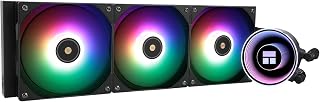
The Thermalright Frozen Notte 360 V2 is a 360mm all-in-one liquid CPU cooler designed for gamers, content creators, and PC enthusiasts who want reliable thermal management without breaking the bank. It bridges the gap between air cooling and high-end liquid solutions, offering excellent performance at a competitive price point that makes it accessible to budget-conscious builders.
The standout feature is the full copper mirror-finish water block paired with a 360mm aluminum fin cold plate. This combination delivers impressive heat dissipation efficiency, keeping modern CPUs like the i7-13700K and Ryzen 7 7700X running cool under load. The three included TL-E12B-S V2 fans spin up to 2000RPM with S-FDB bearings, eliminating vibration and chatter while maintaining noise levels under 27.7dB. The synchronized ARGB system adds 1600W of customizable color lighting, giving your build a premium visual presence when everything syncs properly through the motherboard's RGB headers.
Build quality is solid throughout. The high-polymer woven tubing resists degradation and provides long-term durability compared to basic rubber tubing on cheaper models. The dual-platform metal mounting bracket installs tool-free and covers both Intel and AMD sockets from AM2 through LGA2066, making compatibility nearly universal. The 450mm tubing length offers flexible radiator placement, though you'll need at least 250mm of case width to accommodate the 360mm radiator safely.
The main limitation is that this is still an all-in-one cooler with a sealed lifespan, typically around three years before coolant evaporation becomes noticeable. It also requires a motherboard with dedicated 5V 3-pin ARGB headers to use the lighting features, which older boards may lack. Some users might find the noise floor slightly higher under extreme loads compared to high-end models, though it remains respectable for the price tier.
This cooler represents excellent value for anyone upgrading from stock coolers or older air solutions. It delivers liquid cooling performance and visual appeal at a price point that won't drain your budget, making it a smart choice for mid-range builds focused on both performance and aesthetics.
Water Block: 397 x 120 x 27mm with full copper mirror-plane base and 360mm black aluminum fin cold plate. Tubing length: 450mm. Water pump speed: 5300RPM (+/- 10%).
Fans: Three 120mm TL-E12B-S V2 PWM fans. Speed range: up to 2000RPM (+/- 10%). Noise level: ≤27.7dB. Wind pressure: 2.87mmH2O (max). Air volume: 72.37CFM (max). Bearings: S-FDB for vibration elimination.
Socket Compatibility: Intel LGA1150, LGA1151, LGA1155, LGA1156, LGA1200, LGA1700, LGA1851, LGA2011, LGA2066. AMD AM4, AM5, AM2, AM2+, AM3, AM3+, FM1, FM2, FM2+.
Power Connectors: CPU fans (4-pin PWM), water pump (12V 3-pin), ARGB lighting (5V 3-pin dual connectors). ARGB power: 1600W total color capability.
Materials: Copper, aluminum, aluminum alloy, acrylic. Tubing: high-polymer woven protective design.
Who Should Buy: PC builders with mid-range to high-end CPUs seeking liquid cooling aesthetics and performance. Gamers wanting RGB-synchronized builds. Content creators running workloads requiring sustained cool temperatures. Budget-conscious enthusiasts upgrading from stock or basic air coolers.
System Requirements: Verify your motherboard has 5V 3-pin ARGB headers and 12V 3-pin pump power headers for full functionality. Ensure your case provides at least 250mm width to accommodate the 360mm radiator without clearance issues. Check CPU cooler mounting clearance relative to RAM and other components.
Installation Tips: Use the included metal mounting bracket matched to your socket type. The tool-free design simplifies installation, but follow the manual precisely to ensure proper mounting pressure. Connect pump power to the CPU fan header or dedicated pump header, not standard fan headers. Sync ARGB lighting through motherboard RGB settings or included software if available.
Maintenance: Monitor coolant levels visually through the pump window if available. Check radiator fans for dust accumulation quarterly and clean with compressed air to maintain airflow. Expect optimal performance for approximately three years before considering replacement.

Choosing between 240mm and 360mm often comes down to how much thermal margin you want, and this 360mm option's high-efficiency fans aim to deliver that extra capacity while keeping draw to just 2 watts. At 35.2 db, it's a reasonable middle ground for someone who wants the bigger radiator without a dramatic jump in fan noise.
Pros
- Excellent thermal performance at 350W TDP handles demanding CPUs and overclocking workloads
- Comprehensive socket support covers both Intel and AMD latest generation platforms
- Quiet operation at 35.2dB minimizes fan noise during gameplay and everyday use
- Premium build quality with metal and plastic construction ensures durability and longevity
- Simplified installation with included mounting hardware and daisy chain connectors
Cons
- Standard 120mm fans may require case with adequate airflow planning for optimal performance
- No RGB lighting for users prioritizing aesthetic customization in high-end builds
The ID-COOLING FX360 PRO is a 360mm all-in-one liquid cooler designed for gaming PCs and high-performance workstations. It targets builders seeking reliable thermal performance without the premium cost of boutique brands, offering broad compatibility with current Intel and AMD platforms.
The cooler's standout feature is its 350W TDP capacity, powered by a robust 2900RPM pump that efficiently dissipates heat from modern CPUs. The three 120mm cooling fans deliver 82.5CFM airflow with minimal noise at 35.2dB, making it suitable for both competitive gaming and quiet office environments. This balance of cooling power and acoustics is rare at this price point.
Build quality is solid throughout, combining metal and plastic components with a premium all-black finish and distinctive CD-pattern pump cover. The daisy chain fan connectors simplify cable management considerably, reducing internal clutter and making the installation process straightforward for builders of all skill levels.
The main consideration is radiator sizing and case compatibility. The 360mm radiator requires adequate space and airflow planning, particularly in smaller or restrictive cases. Additionally, the absence of RGB lighting may disappoint builders focused on aesthetic customization, though the minimalist black design pairs well with modern builds.
The FX360 PRO represents excellent value for performance-focused builders on a moderate budget. It delivers proven cooling capacity, long-term reliability, and universal platform support that appeals to both Intel and AMD enthusiasts upgrading mid-range and high-end systems.
Cooling Performance: 350W TDP, 2900RPM pump, 82.5CFM airflow, 2.55mmH2O air pressure, 35.2dB noise level
Compatibility: Intel LGA1851, LGA1700, LGA1200, LGA1151, LGA1150, LGA1155, LGA1156 and AMD AM4, AM5
Physical Specs: 360mm radiator with three 120mm fans, all-black design with CD-pattern pump cover, daisy chain connectors
Power: 4-pin connector, 12V DC, 2W power draw
Package Contents: Radiator, three cooling fans, mounting hardware for Intel and AMD platforms
Buying Guide: How to Choose Between 240mm and 360mm AIOs
Confirm Case Clearance Before Choosing Capacity
A 360mm radiator needs three 120mm fan positions in a row, plus clearance for the radiator, fans, tubing, motherboard heatsinks, and RAM. Measure the usable top and front mounting space in your case manual, not only the advertised case size. Front mounting can also reduce available graphics card room, while top mounting can conflict with tall memory or a crowded VRM area.
A 240mm unit is usually easier to place in compact and mainstream cases. The Thermalright Aqua Elite 240 V3 Water Cooling CPU and CORSAIR Nautilus 240 RS Liquid CPU Cooler suit builds where a two-fan mount is the realistic option, while the Thermalright Frozen Notte 360 Black ARGB V2 Water uses a 397 mm-long radiator before fan depth is added. The supplied dimensions for the FW 240 SE also identify a 240-size radiator, so always prioritize the listed measurements and your case documentation over a product title alone.
Match Radiator Area to CPU Workload
A comparable 360mm design has roughly 50 percent more nominal radiator area than a 240mm design and adds a third fan. That added capacity is useful for processors that sustain high all-core power during compiling, video work, or intensive creation, and it can give you more room for calmer fan curves. It does not automatically transform every gaming build, since CPU limits, room temperature, case airflow, and installation quality remain important.
For long multicore workloads, 360mm options such as the NZXT Kraken Core 360 RGB – 360mm AIO CPU Cooler, ID-COOLING FX360 PRO 360mm AIO CPU Cooler, and CORSAIR Nautilus 360 RS ARGB Liquid CPU Cooler are logical starting points. The CORSAIR model is available in black and white, while the ID-COOLING model lists a 350W thermal design target and high-airflow fans. If you are selecting cooling for a gaming-focused AMD system, compare your needs with our AIO recommendations for Ryzen 7 9800X3D builds; Core Ultra builders can also use our Core Ultra 9 285K AIO cooler guide for platform-specific context.
Consider Noise, Fan Curves, and Cable Layout
A larger radiator can remove the same amount of heat with less aggressive fan speed, but it also introduces a third fan. Judge noise claims carefully because brands may use different measurement methods and conditions. CORSAIR lists a 20 dBA pump for its Nautilus line, while the Thermalright Aqua Elite 240 V3 lists fan noise up to 25.6 dBA, useful reference points but not a direct like-for-like ranking.
Connection design matters just as much as sound. The CORSAIR Nautilus RS coolers use daisy-chained fans, the Minorsonic AIO CPU Cooler combines its pre-installed fans through shared PWM and ARGB connections, and the ID-COOLING FX360 PRO also uses chained fan connectors. NZXT’s single-frame fan design further reduces separate screws and cables. Check your motherboard header count and current limits, or plan around one of the top fan hubs for cleaner PC builds.
Choose Features You Will Actually Use
RGB can be simple or elaborate. The CORSAIR Nautilus 360 RS ARGB Liquid CPU Cooler connects its lighting directly to a compatible motherboard, avoiding a separate controller, while the Thermalright Frozen Notte 360 Black ARGB V2 Water includes synchronized ARGB lighting across its pump and fans. Confirm that your board has the required 5V three-pin ARGB header, and never connect that plug to a 12V four-pin RGB header.
For a more customized look, the Thermalright Peerless Vision 360 ARGB Black CPU has a magnetic 3.95-inch IPS display for system information, images, and animations. The Thermalright FW 240 SE ARGB Black-360mm AIO CPU offers a smaller 2-inch IPS screen in a more compact radiator format. Also confirm socket support before ordering: AM4, AM5, LGA 1700, and LGA 1851 coverage is common here, but included brackets for older sockets can vary. Explore the broader PC cooling collection if your build also needs airflow upgrades.
Final Thoughts
A spacious case and sustained high CPU workloads make the CORSAIR Nautilus 360 RS ARGB Liquid CPU Cooler a well-rounded three-fan choice, while a compact build or moderate processor can be served capably by the Thermalright Aqua Elite 240 V3 Water Cooling CPU. Measure first, then let your workload and desired acoustics make the final call.
Frequently Asked Questions
Is a 360mm AIO always cooler than a 240mm AIO?
Usually, a comparable 360mm AIO has more heat-exchange area and can provide more cooling headroom under sustained load. That advantage may be modest in short gaming bursts or on processors with restrained power limits. Case airflow, mounting position, ambient temperature, pump behavior, and fan curves still determine the final outcome.
Is a 240mm AIO enough for gaming in 2026?
Yes, a quality 240mm AIO is enough for many gaming systems, especially when the processor is not held at a heavy all-core load for long periods. Its shorter radiator is also far easier to fit in many cases. Choose a 360mm version when your CPU runs hot in demanding applications, you want extra thermal capacity, or your case comfortably supports it.
Should an AIO radiator go at the top or front of the case?
Top mounting typically exhausts heat upward and keeps the front intake path available for the graphics card. Front mounting can feed the radiator cooler outside air, though it may warm the air entering the rest of the case. Either layout can work well when tube routing is natural, fans have a clear path, and the pump is not positioned as the highest point in the loop.
Do I need thermal pads when installing an AIO CPU cooler?
Desktop AIO coolers use thermal paste between the cold plate and the CPU heat spreader, and several models in this comparison include paste pre-applied. Do not substitute a thermal pad unless the platform manufacturer specifically instructs you to use one. Thermal pads are more commonly used for components such as graphics cards, SSDs, and laptops, as covered in our guide to thermal pads for GPUs, SSDs, and laptop cooling.





Write Your Review
No reviews yet. Be the first to share your experience!