

Your GPU is running hot, your M.2 SSD is throttling under sustained reads, or you just cracked open a PS5 for a thermal refresh. In each of those situations, the fix often comes down to one small, easy-to-overlook component: the thermal pad. Unlike thermal paste, pads bridge larger air gaps and uneven surfaces between a chip and its heatsink, making them the go-to solution for VRAM modules, SSD controllers, and console heat spreaders. If you are also looking to improve overall system airflow, our roundup of quiet CPU coolers that stay silent under load pairs well with this guide.
We evaluated ten thermal pads across conductivity ratings, size versatility, ease of installation, and real-world suitability for common upgrade scenarios. Whether you are a first-time builder or a seasoned modder, this list covers every budget and use case.
Quick answer
This guide compares 10 picks, with Aairhut 4-Pack Thermal Pads 13W/mK, 100x100mm, 4 ranked first.

Pros
- Effective thermal performance with users reporting 5-15 degree temperature reductions on GPUs and laptops
- Versatile kit eliminates guesswork with four pre-cut thickness options for different components
- Clean, mess-free installation compared to traditional thermal paste
- Excellent value for the quantity and quality, competitive with premium brands
- Works reliably across diverse applications from gaming PCs to console repairs
Cons
- Self-adhesive coating is not extremely sticky, requiring careful placement and immediate pressure
- May need reapplication if heatsinks are removed for maintenance or upgrades
- Blue protective film can cause confusion about actual pad color during unboxing
The Aairhut 4-Pack Thermal Pads are premium cooling solutions designed for gamers, PC enthusiasts, and hardware modders who need reliable thermal management. This kit targets anyone upgrading GPU memory cooling, SSD heatsinks, or gaming console components without the hassle of traditional thermal paste.
Performance is the standout feature here. With 13W/mK thermal conductivity, these pads efficiently transfer heat from high-demand components. Real-world users report consistent temperature improvements, with many seeing 5-15 degree Celsius drops on GPUs and laptops after installation. The four thickness options (0.5mm through 2mm) eliminate guesswork, allowing precise contact for different component profiles and mounting scenarios.
Build quality reflects the premium positioning. The pads feature a malleable, paste-like consistency that compresses 30-40% under pressure, conforming to uneven surfaces for superior thermal contact. They are non-conductive, flame-retardant, and RoHS certified, making them safe for sensitive electronics. The dual self-adhesive film system enables clean installation without messy grease or cleanup.
The main limitation is moderate adhesiveness. Users need to apply and press firmly immediately after placement, otherwise repositioning becomes difficult. Additionally, if components require heatsink removal later, the pads may need replacement rather than reuse. These minor drawbacks are typical for self-adhesive thermal solutions and don't detract from the overall value proposition.
The Aairhut thermal pads deliver professional-grade cooling performance at an accessible price point. They excel for anyone performing GPU repasting, SSD thermal upgrades, or console maintenance. Backed by a 36-month warranty and strong user reviews, this is a reliable choice for serious thermal management needs.
Thermal Performance
Thermal Conductivity: 13W/m.K
Compression Rate: 30-40%
Operating Temperature Range: -40C to 200C
Physical Specifications
Size per Pad: 100mm x 100mm
Thicknesses Included: 0.5mm, 1mm, 1.5mm, 2mm
Total Package Dimensions: 3.94" L x 3.94" W x 0.2" H
Weight: 170g
Material & Safety
Type: Non-conductive silicone thermal pad
Flame-Retardant: Yes
RoHS Certified: Yes
Adhesive: Dual self-adhesive films (peelable protective layer)
Warranty & Support
Warranty Period: 36 months from date of purchase
Customer Support: 24/7 with 24-hour resolution guarantee
GPU and Video Card Cooling
Ideal for applying to GPU memory (VRAM) and other hot-spot components. Users report excellent results on RTX 4080, RTX 5090, and AMD RX 6750 XT models after removing factory heatsinks.
SSD Thermal Management
Perfect for M.2 NVMe drives requiring thermal pads under aftermarket heatsinks. The multiple thicknesses accommodate various SSD and heatsink combinations without thermal paste mess.
Gaming Consoles
Suitable for PS4 and PS5 thermal upgrades, helping reduce fan noise and extend hardware lifespan during extended gaming sessions.
Laptop Cooling Upgrades
Users report transforming laptop thermal performance, with idle temperatures dropping from 45-55C to 30-40C after applying these pads to problem components.
Mining and High-Performance Computing
The wide temperature range and high thermal conductivity support demanding 24/7 workloads with sustained heat output.
Pros
- Delivers measurable thermal performance with users reporting significant temperature drops on GPUs and SSDs
- Stays flexible and workable over time, avoiding hardening that compromises long-term effectiveness
- Non-conductive formulation provides peace of mind when applied to circuit boards and sensitive hardware
- Works effectively as both a replacement for stock thermal pads and an additional cooling layer
- High-quality manufacturing from a trusted thermal solution brand
Cons
- Premium pricing reflects quality but represents a significant investment compared to basic thermal pads
- Thin profile requires careful handling during installation to avoid tearing or misalignment
- Two-piece quantity may require purchasing multiple packs for large-scale thermal upgrade projects
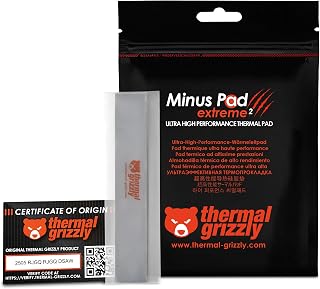
The Thermal Grizzly Minus Pad Extreme 2 is a high-performance thermal interface material engineered for demanding computing applications. This product targets enthusiasts, overclockers, and professionals who need reliable cooling solutions for graphics cards, NVMe SSDs, RAM modules, and gaming consoles. The 120x20x1.0mm form factor with two pieces per package makes it suitable for multi-component thermal upgrades.
Real-world performance data from users consistently demonstrates the product's effectiveness. GPU thermal improvements include reductions from 85C to 64C on VRAM and VRM temperature drops of approximately 8 degrees Celsius. SSD cooling shows comparable success, with users reporting stable 50C temperatures under sustained 4K gaming loads, representing 10-degree temperature improvements over stock thermal pads. The non-hardening formula maintains its thermal transfer properties long-term while remaining flexible for installation adjustments.
The material composition balances workability with durability. Unlike traditional thermal pads that harden over time and lose effectiveness, the Minus Pad Extreme 2 retains a soft, putty-like consistency. This design philosophy improves installation ease and accommodates component tolerances without compromising thermal contact. The electrically non-conductive properties add an important safety layer when working with sensitive electronics on motherboards and graphics card VRM sections.
Considerations include the product's thin profile, which requires careful handling to prevent tearing during application. Users should plan cuts or applications methodically to avoid waste. Additionally, the premium price point reflects the superior materials and manufacturing quality but may require budget prioritization compared to standard thermal interface products.
The Thermal Grizzly Minus Pad Extreme 2 represents a worthwhile investment for anyone serious about thermal management in high-performance computing setups. The documented temperature improvements, non-hardening formula, and proven reliability across multiple component types make this a top-tier choice for enthusiasts unwilling to compromise on cooling performance.
Dimensions: 120mm x 20mm x 1.0mm (4.72 x 0.79 x 0.04 inches)
Weight: 0.704 ounces per package
Quantity: 2 pieces per package
Model Number: TG-MP-E2-120-20-10-2
Key Properties: Non-hardening, electrically non-conductive, superior thermal conductivity, soft and adaptable consistency
Best For: Graphics cards, NVMe SSDs, RAM modules, gaming console cooling, VRM thermal management

Pros
- Superior thermal conductivity in bridging uneven surfaces where rigid pads fail
- Safe handling with no metal particles, electrically insulating for worry-free installation
- Moldable and cuttable to fit unique component geometries and tight spaces
- Excellent compression properties maintain consistent contact over time
- Works reliably across diverse applications from high-end gaming PCs to laptop repairs
Cons
- Extremely soft material requires careful installation technique to avoid misalignment or tearing
- Lower hardness compared to rigid thermal pads means higher skill level needed for optimal placement
- Performance depends heavily on proper pressure application during installation
The ARCTIC TP-3 is a premium thermal pad designed for PC enthusiasts and repair professionals who need reliable heat dissipation in challenging component layouts. This 120x20mm pad excels where traditional rigid thermal interface materials fall short, particularly when dealing with height variations across nearby chips and components that demand flexible thermal solutions.
What sets the TP-3 apart is its exceptional compression properties combined with advanced silicone formulation. The pad bridges height differences between closely-spaced components more effectively than rigid alternatives, delivering superior thermal performance while remaining moldable and cuttable to fit unique geometries. Its soft composition allows precise adaptation to irregular surfaces without gaps or voids that compromise heat transfer.
Installation quality is paramount with this product. The extremely low hardness that enables its thermal advantages also demands careful, deliberate placement. Users must follow the included manual closely and apply consistent pressure during mounting to achieve optimal thermal contact. This is not a product for rushed installations, but rather for those who prioritize thermal performance over quick application.
From a safety perspective, the TP-3 delivers complete peace of mind. It contains no conductive particles, maintains electrical insulation properties, and poses zero risk to sensitive PC components even with direct contact. This makes it ideal for high-value components where installation mistakes could prove costly.
The ARCTIC TP-3 represents an excellent choice for users building custom PC cooling solutions, repairing laptops with thermal issues, or modifying graphics cards where standard thermal pads underperform. With proper installation technique, it reliably bridges the gap between component performance and effective heat management.
Proper installation is critical for maximum performance. Begin by cleaning both component surfaces thoroughly with isopropyl alcohol to remove dust and residue. Allow surfaces to dry completely before proceeding to ensure optimal contact.
Cut the TP-3 pad to match your target component size, leaving minimal overhang. Apply steady, even pressure when placing the pad, using a flat tool like a plastic card to smooth out air bubbles. Avoid folding or creasing the pad during handling. Reference ARCTIC's included user manual for specific application guidance on your component type.
The ARCTIC TP-3 thermal pad works with RAM modules, chipsets, graphics card memory chips, laptop components, gaming console parts, and integrated circuits across PCs and laptops. Its electrically insulating properties make it safe for use around all electronic components. The pad can be cut to any custom size needed for your specific application.

Pros
- Delivers measurable temperature reductions on graphics cards and storage drives
- Highly compressible material ensures excellent contact even on uneven surfaces
- Cost-effective alternative to premium thermal pad options
- Safe handling with no metal particles or electrical conductivity risks
- Generous 100x100mm sheet size provides ample material for multiple applications
Cons
- Extremely soft material requires careful installation and precise handling
- May require stacking or custom cutting to achieve desired thickness for some applications
- Not suitable for high-vibration environments where durability is critical
The ARCTIC TP-3 is a premium thermal pad designed for PC enthusiasts, console gamers, and system builders seeking superior heat management. This 1.5mm thick pad measures 100x100mm and targets anyone upgrading cooling on graphics cards, SSDs, RAM modules, or gaming consoles where thermal performance matters.
What sets the TP-3 apart is its exceptional softness and compressibility, which allows it to conform perfectly to uneven surfaces and tight gaps. Real-world testing shows it outperforms pricier competitors, delivering temperature reductions of 10-15 degrees Celsius on GPU memory chips and M.2 SSDs. Users report memory temperatures dropping from 94-97C down to 83-84C on graphics cards, while SSD thermal management sees similar gains with proper application.
The material is electrically insulating and contains no metal particles, making it inherently safe for all electronic components. Its moldable nature means you can cut it with a sharp blade to fit custom shapes and sizes, and the large 100x100mm sheet provides plenty of material for experimentation or multiple projects without waste.
Installation demands care due to the material's softness, which can shift if not handled properly during application. Some applications may require stacking multiple pieces or careful layering to achieve the exact thickness needed for optimal contact. Despite these installation nuances, the performance gains justify the effort for serious users.
The ARCTIC TP-3 represents exceptional value for thermal pad upgrades, delivering professional-grade cooling performance at consumer-friendly pricing. It is the ideal choice for anyone looking to maximize component longevity and gaming performance without breaking the budget.
Graphics Card Memory Chips: Replace worn factory pads on VRAM around the GPU die to reduce memory throttling and improve stability during gaming or intensive compute tasks.
M.2 SSD Thermal Management: Upgrade stock thermal interface material on NVMe drives to lower operating temperatures and maintain peak read/write speeds during sustained workloads.
Gaming Consoles: Improve heat dissipation on PS2, PS4, Xbox One X, and other consoles experiencing thermal issues or fan noise from inadequate original cooling pads.
Laptop Chipsets: Replace degraded thermal pads on chipsets, VRM components, and memory modules in laptops to reduce thermal throttling and extend component lifespan.
Measurement and Sizing: Use digital calipers to measure exact gaps and height differences on your target components. Precision prevents gaps that compromise thermal transfer or misalignment that reduces contact pressure.
Cutting Technique: Use a sharp hobby knife or scalpel blade for clean cuts with minimal fraying. Mark cutting lines lightly first, then make deliberate strokes rather than rough sawing motions.
Stacking Strategy: For thicker requirements, stack multiple strips rather than folding, as this maintains consistent compression properties across the entire surface.
Surface Preparation: Clean component surfaces and existing pad residue with isopropyl alcohol and allow complete drying before application to maximize adhesion and thermal contact.
Pros
- Exceptional versatility across CPU, GPU, SSD, and other thermal management applications
- Flexible padding compensates for manufacturing tolerances and surface irregularities
- High thermal conductivity rating ensures effective heat transfer in demanding scenarios
- Electrically non-conductive material provides added safety margin for sensitive components
- Two-pack provides excellent value for system builders managing multiple thermal interfaces
Cons
- Lower thermal conductivity (8W/(m·K)) compared to premium thermal pastes, better suited for moderate performance gains
- Requires careful alignment during installation to avoid misplacement or reuse complications
- No warranty coverage limits recourse for defective products or unsatisfactory performance
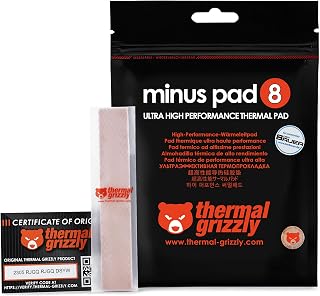
The Thermal Grizzly Minus Pad 8 addresses a specific thermal management gap for system builders and enthusiasts working with uneven component surfaces or substantial air gaps. This two-pack thermal interface solution targets users building custom cooling systems where traditional thermal paste proves ineffective, particularly on graphics cards, M.2 storage modules, and chipset coolers.
The standout feature is its flexible, compressible structure combined with 8W/(m·K) thermal conductivity. The ceramic-silicone and nano-aluminum oxide composition fills microscopic surface irregularities while maintaining consistent contact pressure across the entire interface area. This makes it particularly valuable for GPU memory modules and SSD controllers where paste application is impractical or risky.
Build quality reflects Thermal Grizzly's reputation in thermal solutions. The 120x20mm pad dimensions suit most standard applications, and the electrically non-conductive formulation eliminates short-circuit concerns. The two-pack structure provides flexibility for multiple component upgrades in a single build or system maintenance cycle.
The primary limitation is thermal conductivity rating. At 8W/(m·K), this pad performs below premium thermal pastes but exceeds air gap performance significantly. Users pursuing maximum performance gains on high-end GPUs or CPUs may see better results with liquid metal compounds, though those carry additional application complexity and component compatibility concerns.
For system builders seeking reliable, hassle-free thermal interface solutions on irregular surfaces, the Thermal Grizzly Minus Pad 8 delivers consistent performance at practical pricing. The high user satisfaction rating and broad compatibility make it a dependable choice for GPU memory cooling, SSD thermal management, and chipset heatsink applications.
Thermal Performance
Thermal Conductivity: 8W/(m·K)
Composition: Ceramic Silicone with Nano-Aluminum Oxide
Electrical Properties: Non-conductive
Physical Specifications
Dimensions: 120mm x 20mm x 1.0mm
Item Weight: 1g per pad
Quantity per Package: 2 pads
Part Number: TG-MP8-120-20-10-2R
Compatibility
CPU Sockets: Intel LGA 1200, AMD AM4
Applications: CPUs, GPUs, SSDs, Heatsinks
Mounting Type: Panel Mount
Cooler Material: Aluminum compatible
Warranty
Coverage: No warranty included
Manufacturer: Thermal Grizzly
When to Choose This Product
Select the Thermal Grizzly Minus Pad 8 if you need thermal interface material for uneven surfaces, large air gaps, or applications where thermal paste risks component damage. Ideal for GPU memory modules, M.2 SSD controllers, VRM coolers, and chipset heatsinks requiring flexible thermal contact.
Installation Considerations
Ensure proper alignment during installation as repositioning may affect adhesive properties. Clean component surfaces thoroughly before application to maximize thermal transfer efficiency. Allow adequate pressure for optimal contact between pad and component surfaces.
Performance Expectations
This thermal pad provides moderate thermal performance improvements over air gaps but typically underperforms premium thermal pastes. Temperature reductions depend on surface irregularities, component power dissipation, and overall cooling system design. Most users report 5-15 degree Celsius improvements compared to no thermal interface material.
Value Assessment
The two-pack format provides cost efficiency for users managing multiple thermal interfaces. Budget-conscious builders benefit from the straightforward application process and safety margins offered by electrically non-conductive material. Compare performance expectations against liquid metal alternatives if maximum thermal performance remains the priority.

Pros
- Dramatically outperforms generic thermal pads in heat transfer efficiency
- Soft material compresses uniformly for superior contact on uneven surfaces
- Easy to cut and reposition, allowing customization for various component sizes
- Reliable thermal performance maintained over extended use without hardening
- Excellent value for premium thermal management on high-performance systems
Cons
- Material is more fragile than standard thermal pads and can tear during handling, requiring careful installation
- Thickness selection is critical for optimal contact and performance, requiring prior heatsink measurement
- Premium pricing compared to basic thermal paste solutions
The Gelid Solutions GP-Extreme thermal pad is a professional-grade heat transfer solution designed for overclockers, system builders, and anyone replacing worn thermal interfaces on high-performance components. With a thermal conductivity rating of 12W/mK, this product sits in the premium segment and targets users whose systems need more than basic thermal management, particularly graphics card memory modules and chipsets prone to overheating.
What truly sets the GP-Extreme apart is its exceptional real-world performance. Multiple verified users report temperature drops of 15-20C on graphics card memory, with one owner reducing chipset temperatures from 74C to 55C on an AMD ITX board. The pad's remarkable softness and compressibility are key to this success, allowing it to conform perfectly to irregular surfaces and fill microscopic gaps that paste alone cannot address. Installation is straightforward: cut to size with scissors, peel one adhesive side, apply, then peel the second side and install your heatsink.
The construction quality is evident in the material's non-toxic, non-corrosive formulation and its non-electrical conductivity, making it safe for direct application on sensitive PCB traces and memory chips. The electrically non-conductive property eliminates a common concern when working with thermal interfaces around live circuitry. The pad maintains consistent performance across different thicknesses (0.5mm to 3.0mm), allowing precise matching to your specific gap requirements.
One legitimate drawback is material fragility. The same softness that enables superior thermal contact means the pad can tear or break during handling if not positioned carefully on the first attempt. Users should cut deliberately and avoid repositioning once partially placed. Additionally, getting the thickness selection right matters significantly, as incorrect dimensions can reduce contact pressure and compromise thermal transfer.
For system builders and enthusiasts willing to invest in quality thermal solutions, the Gelid GP-Extreme delivers measurable performance improvements backed by extensive user verification. It excels when stock thermal solutions prove inadequate, making it a smart choice for high-end GPU repads, laptop maintenance, and chipset cooling upgrades.
Graphics card memory repadding: Most common use case with documented 10-20C temperature improvements on VRAM and cache chips during heavy gaming or compute workloads.
Laptop thermal maintenance: Ideal for replacing dried-out factory pads on gaming laptops and workstations where memory or chipset temperatures throttle performance.
Custom PC builds: Essential for high-end components where precision gap filling prevents thermal throttling and extends system longevity.
Chipset cooling: Particularly effective on AMD ITX and mATX boards where chipset thermals are problematic with stock solutions.
Thermal Performance: 12W/mK thermal conductivity rating, delivering professional-grade heat transfer efficiency.
Physical Dimensions: 80 x 40 x 1.5mm (this specific variant). Available in 0.5mm, 1.0mm, 1.5mm, 2.0mm, 2.5mm, and 3.0mm thickness options to match any gap requirement.
Material Properties: Non-electrically conductive, non-corrosive, non-hardening, and non-toxic composition ensures safe long-term use on sensitive electronics without degradation.
Application: Pre-adhesive backing on both sides allows tool-free installation. Cuttable with standard scissors for size customization. Compatible with PCBs, graphics cards, laptops, game consoles, microcontrollers, and SMD components.
Compatibility: Universal fit with broad cooler and heatsink compatibility across most cooling solutions.

OwlTree 4 Pack Thermal Pads 100x100mm 0.5-2mm 6.0
Pros
- Excellent thermal conductivity at 6.0 W/mK rivals leading premium brands
- Versatile 4-pack with multiple thickness options eliminates the need for separate purchases
- Proven durability and high temperature tolerance across demanding applications
- Non-conductive design ensures complete safety around circuit boards and electrical components
- Customizable sizing allows precise fitting in laptops, gaming PCs, and industrial equipment
Cons
- Requires careful application for optimal contact between surfaces, as improper installation reduces effectiveness
- Single 100x100mm pad may not be sufficient for very large heatsink configurations
- Silicone-based material can attract dust if not covered during storage
OwlTree's 4-pack thermal pads are engineered for anyone managing heat in electronics, from PC enthusiasts upgrading GPU coolers to professionals servicing laptops and industrial equipment. The 6.0 W/mK thermal conductivity places these pads squarely in the professional tier, delivering performance that rivals brands costing two to three times more.
The standout feature is the four-thickness variety in one package. Whether you need 0.5mm for delicate SSD interfaces, 1.5mm for standard GPU mounting, or 2mm for creative gap-filling solutions, having all options eliminates guesswork and return hassles. Real-world users report noticeably lower component temperatures after installation, with stable performance even during sustained heavy loads.
Build quality is solid throughout. The silicone compound resists compression during thermal cycling, maintaining contact year after year. The material is genuinely non-conductive and anti-static, so there's zero risk of accidental shorts or component damage, a critical safety feature often overlooked by budget competitors.
One limitation worth noting is that a single 100x100mm pad may not cover exceptionally large heatsinks without joining pieces. Additionally, optimal results require clean surfaces and firm, even pressure during application, so installation precision matters. Users new to thermal pad application may need to reference guides to avoid common mistakes.
The verdict: OwlTree delivers professional-grade thermal performance at consumer pricing. Recommended for PC builders, laptop repair technicians, and anyone serious about component cooling who won't compromise on reliability.
Choose OwlTree thermal pads if you need reliable heat management for CPU, GPU, SSD, or memory cooling. These pads work across consumer electronics, automotive systems, industrial controls, and any application requiring efficient thermal interface material between 0.5mm and 2mm thickness.
Installation tips: Clean both surfaces thoroughly with isopropyl alcohol, apply the appropriate thickness for your gap size, and use firm, even pressure for 30 seconds. For best results, slightly compress the pad as you apply the component. Allow 24 hours of thermal cycling before pushing components to maximum load.
This product excels for DIY cooling upgrades, laptop thermal pad replacement, GPU bracket mounting, and industrial thermal interface needs. It's less suitable if you require conductive thermal pads for specific electrical applications, though these pads work perfectly for standard insulating applications.
Thermal Conductivity: 6.0 W/mK (professional-grade)
Size: 100 x 100mm per pad
Thickness Options: 0.5mm, 1mm, 1.5mm, 2mm (one of each included)
Temperature Range: -40°C to 200°C
Properties: Non-conductive, non-toxic, odorless, fire-retardant, anti-static, anti-corrosion, compression-resistant
Electrical Safety: Safe for use on circuit boards and electronic components
Package Contents: 4 pads total (one each of 0.5mm, 1mm, 1.5mm, 2mm)
Dimensions: 6.18 x 5.51 x 0.31 inches
Weight: 4.6 ounces

Pros
- Exceptional thermal performance, especially for components with height variations or spacing gaps
- Safe electrical insulation means worry-free installation near sensitive electronics
- Two-pack bundle offers great value and redundancy for multiple repair or upgrade projects
- Non-capacitive design prevents electrical interference or component damage
- Highly moldable and customizable for any component shape or size requirement
Cons
- Extremely soft material requires careful installation with sharp tools to avoid tearing or crumbling
- Demands precision during application using tweezers and proper technique to prevent deformation
- May require stacking multiple pads to achieve desired thickness for some high-performance applications
The ARCTIC TP-3 is a premium thermal pad designed for PC enthusiasts, laptop modders, and gamers seeking reliable heat dissipation without the mess of thermal paste. This 1.0mm thickness pad comes in a two-pack with generous dimensions (200 x 100mm), making it suitable for RAM, chipsets, graphics cards, and various IC components across desktops, laptops, and gaming consoles.
What sets the TP-3 apart is its intelligent softness. The low-hardness silicone-based construction minimizes thermal resistance and excels when bridging small gaps between closely-spaced components. Users report significant thermal improvements on MacBook Air M2 models, RTX 3070 graphics cards, and laptop cooling systems, with one user noting measurable improvements in throttling behavior under heavy workloads. The moldable design means you can cut it to exact specifications, offering precise thermal control without waste.
Build quality is excellent for the price. The pads contain no metal particles, making them completely electrically insulating and safe to apply near active circuits. They're vibration-damping as well, adding component protection beyond thermal management. The two-pack ensures you have extra material for mistakes or future projects, a thoughtful inclusion that reflects ARCTIC's 20-year reputation for user-focused design.
Installation demands respect for the material's properties. The extreme softness means tearing or crumbling can occur with dull tools or excessive pressure. Users consistently recommend using sharp craft knives or X-Acto blades, applying backing film removal with tweezers, and avoiding hard pressing during assembly. This isn't a drawback for careful builders but represents a learning curve for beginners.
The ARCTIC TP-3 represents genuine value for anyone upgrading component cooling. Whether you're reviving an aging MacBook, refreshing a graphics card, or optimizing a gaming laptop, this thermal pad delivers measurable thermal benefits when installed properly. It's a smart choice for DIY cooling enthusiasts who prioritize both performance and component safety.
Success with ARCTIC TP-3 requires understanding its unique properties. The pad's softness is a feature, not a flaw, but demands careful technique. Always use a sharp, clean cutting tool like a fine X-Acto knife or craft blade. Dull scissors or box cutters will compress and tear the material rather than cutting cleanly. Plan your cuts in advance and avoid emergency trimming during installation.
When removing backing film, use tweezers or fine-point tools rather than your fingers. The pad can stick to skin and deform under friction. Remove one side completely, apply the pad to its destination component, then carefully peel the remaining film. Work slowly and deliberately. Never squeeze, press hard, or reposition the pad aggressively once placed. The material will conform slightly under gentle pressure, but rough handling causes permanent deformation.
Stack pads if needed for height, but understand the thermal trade-offs. Thicker pads increase thermal resistance, so use the minimum stack height required for your component fit. Reassemble components with attention to screw tightening sequence (following original manufacturer patterns when possible). Patient installation takes 15-20 minutes but prevents the common mistakes that lead to poor reviews.
GPU and Graphics Card Cooling: The TP-3 excels replacing degraded thermal pads on graphics cards, especially high-end models like the RTX 3070. Users report stable performance and improved longevity when replacing powdery, cracked, or missing factory pads. The moldable design handles varying component heights on modern GPU boards.
Laptop Thermal Upgrades: MacBook Air and gaming laptop owners use these pads to improve CPU and chipset cooling, reducing throttling under sustained loads. The 1.0mm thickness pairs well with most laptop chassis designs. Notable results include better short-burst performance and reduced fan noise.
RAM and Chipset Cooling: The electrically insulating properties make these ideal for direct contact with sensitive memory and controller chips. The vibration damping provides bonus protection during transport and operation.
Console and Portable Device Cooling: The versatility extends to Nintendo Switch, PlayStation, and other compact gaming devices where thermal management impacts performance and longevity.

Thermalright 12.8 W/mK Thermal Pad 85x45mm for PC
Pros
- Exceptional cooling results verified by users on RTX 3090s, NVMe drives, and MacBook logic boards
- Reusable and cuttable for flexible application on various component sizes and shapes
- Non-conductive material eliminates risk of short circuits on sensitive electronics
- Reliable performance across extreme temperature ranges with no degradation
- No mess cleanup compared to thermal paste, making repeated applications hassle-free
Cons
- Thickness consistency can vary between batches, requiring careful inspection upon arrival
- Requires disassembly of components like graphics cards for proper application
- May require cutting to fit smaller components, adding installation time for custom setups
The Thermalright thermal pad is a high-performance heat transfer solution designed for users who demand better cooling without the mess of thermal paste. This 85x45mm pad excels across diverse applications, from gaming PCs and graphics cards to laptop logic boards and NVMe SSDs, making it a versatile choice for enthusiasts and professionals alike.
The standout feature is its 12.8 W/mK thermal conductivity, which delivers measurable cooling improvements. Real-world reviews show RTX 3090 temperatures dropping below factory specs and NVMe drives cooling from 90°C to 60°C. The non-conductive silicone formula adds an extra safety layer, preventing electrical shorts on sensitive components that thermal paste could potentially damage.
Build quality is solid with a density of 3.1 g/cc and hardness rating of 30-55 Shore. The pad withstands temperatures from -40°C to 200°C without melting or degrading, backed by fire-retardant and anti-static properties. The cuttable design means one pad can serve multiple applications, reducing waste and cost per use.
The main consideration is thickness consistency. Some users reported inconsistent pad thickness between units, which affects cooling performance. Installation also requires component disassembly, making it unsuitable for warranty-sensitive builds. For users willing to do the work, this thermal pad represents excellent value and performance improvement.
This product earns strong recommendations for PC builders, console modders, and laptop enthusiasts seeking reliable, reusable thermal management. It's particularly valuable for high-end components prone to thermal throttling where every degree of cooling matters.
Thermal Performance: Conductivity 12.8 W/mK, Density 3.1 +/- 0.2 g/cc, Hardness 30-55 Shore, Breakdown Voltage 9.8 KV
Physical Dimensions: 85mm x 45mm x 1.5mm (3.35 inch x 1.77 inch x 0.06 inch). Weight 0.03 kg (cuttable to custom sizes)
Operating Temperature Range: -40°C to 200°C. Material composition features non-conductive silicone with fire-retardant and anti-static properties
Compatibility: Universal mounting, compatible with CPU, GPU, SSD, RAM, LED, and console cooling applications. Works with standard heatsinks and all major socket types
Best For: This thermal pad suits users upgrading cooling on high-end graphics cards, NVMe SSDs experiencing thermal throttling, MacBook logic boards, PS4/PS5 consoles, and any component where thermal paste application is impractical or risky
Installation Tips: Clean component surfaces thoroughly before application. The 1.5mm thickness accommodates most gaps between components and heatsinks. For smaller components, carefully cut the pad to size using a sharp blade. Allow 24 hours for optimal thermal contact before full load testing
Alternatives to Consider: Liquid thermal interface compounds offer slightly higher conductivity but require reapplication. Thermal paste provides lower cost but creates mess on repeated applications. Graphite pads offer lower conductivity but don't require cutting
Maintenance: The reusable design means you can peel and reposition the pad without replacement, making it cost-effective for system upgrades and component swaps over time

Pros
- Superior thermal conductivity with soft silicone construction ensures efficient heat transfer
- Highly compressible material adapts to uneven chip surfaces and component tolerances
- Versatile compatibility spans GPUs, RAM, SSDs, laptops, and gaming consoles
- Non-adhesive and electrically insulating design eliminates installation risks
- Exceptional value for performance-conscious PC enthusiasts and system builders
Cons
- Requires careful application to avoid air bubbles that could reduce thermal efficiency
- Single 100x100mm size may require cutting or multiple pads for larger components
- Thermal performance depends on proper compression and contact pressure during installation
The ARCTIC TP-4 is a premium thermal pad designed for PC builders, console enthusiasts, and anyone seeking reliable heat transfer between processors, GPUs, RAM, and cooling solutions. Its 100x100mm size and 1.0mm thickness make it suitable for most modern components requiring thermal interface material.
What sets this pad apart is its ultra-soft silicone composition paired with exceptional compressibility. The material compresses from 0.5mm to 0.3mm, accommodating surface irregularities and height differences up to 40%, ensuring consistent contact and minimizing thermal resistance. This gap-filling performance is critical for maintaining efficient heat dissipation across imperfect component surfaces.
Build quality reflects ARCTIC's engineering expertise. The pad remains electrically insulating and non-adhesive, eliminating installation hazards and messy residue concerns. Its vibration-dampening properties add stability to sensitive components, contributing to long-term system reliability and performance consistency.
The main consideration is application technique. Proper installation requires even pressure distribution and air bubble elimination to achieve optimal thermal conductivity. Additionally, the single 100x100mm pad may require cutting for larger components or using multiple pads for extensive coverage.
Verdict: The ARCTIC TP-4 delivers professional-grade thermal management for PC enthusiasts and system builders seeking reliable performance and value. Its combination of superior heat transfer, compressibility, and component compatibility makes it an excellent choice for GPU upgrades, RAM cooling, SSD thermal management, and console modifications.
Product Dimensions: 100 x 100 x 1.0 mm (3.94 x 3.94 x 0.04 inches)
Item Weight: 0.352 ounces
Material: Ultra-soft silicone-based composition
Compressibility: Compresses from 0.5mm to 0.3mm
Key Properties: Electrically insulating, non-adhesive, vibration-dampening
Manufacturer: ARCTIC
Model Number: ACTPD00063A
ASIN: B0FZV9K6WR
Who Should Buy This: PC builders upgrading GPUs or RAM, console modders seeking improved thermal management, anyone installing M.2 SSDs with heatsinks, and system builders prioritizing reliable heat transfer and component protection.
Installation Tips: Clean component surfaces thoroughly before application. Apply even pressure during installation to ensure consistent contact and eliminate air bubbles. Use a thermal pad applicator or precision tool for best results. Allow adequate settling time before powering on components.
Size Considerations: The 100x100mm pad suits most modern GPUs, RAM modules, and console components. For larger areas, consider cutting the pad or using multiple pads edge-to-edge with slight overlap.
Performance Expectations: Optimal thermal performance depends on proper installation, adequate contact pressure, and compatible cooling solutions. Results vary based on component design, surface flatness, and system configuration.
Buying Guide: What to Look for in a Thermal Pad
Thermal Conductivity Rating
Thermal conductivity is measured in W/mK, and it is the single most important spec on the box. Higher numbers mean heat moves away from the chip faster. The Thermal Grizzly Minus Pad Extreme 2 sits at the top of the performance spectrum, while the OwlTree 4 Pack Thermal Pad,100x100mm 0.5mm 1mm offers a more modest 6.0 W/mK suited to lighter-duty applications.
For demanding hardware like high-end GPU VRAM or a fast PCIe 5.0 SSD, aim for 12 W/mK or higher. Speaking of fast drives, if you are shopping for a new storage upgrade, check out our picks for the best PCIe 5.0 SSD to pair with a quality thermal solution.
Thickness and Gap-Filling Versatility
Not every component sits the same distance from its heatsink. A pad that is too thin leaves an air gap; one that is too thick creates excessive pressure. This is where multi-thickness kits shine. The Aairhut 4 Pack 13 W/m.K Thermal Pads includes four sheets at 0.5 mm, 1 mm, 1.5 mm, and 2 mm, giving you flexibility across GPU VRAM, M.2 SSD controllers, and console repairs in a single purchase.
Single-thickness options like the Thermalright Thermal Pad 1.5mm 12.8 W/mK make sense when you already know the exact gap you are filling. If you are unsure, a kit is the safer starting point.
Pad Size and Cuttability
Large sheets give you more material to work with, and all good thermal pads can be trimmed with scissors or a razor. The ARCTIC TP-3: Premium Performance Thermal Pad in the 200×100 mm format offers a generous surface area that covers even full-length GPU heatsink contact zones without needing multiple pieces.
For SSD cooling specifically, narrower pre-cut strips like those from ARCTIC TP-3: Premium Performance Thermal Pad in 120×20 mm format are already sized for standard M.2 modules, reducing waste and simplifying installation. If you are building around a PCIe 4.0 drive, our best PCIe 4.0 SSD guide can help you pick a drive that benefits from this kind of targeted thermal management.
Electrical Safety and Material Properties
Every pad on this list is electrically non-conductive, which matters a great deal when you are placing material near exposed traces or memory chips. The Gelid Solutions GP-Extreme Thermal Pad 80 x 40 x is explicitly non-corrosive and non-hardening, meaning it will not dry out, crack, or cause chemical damage over years of use.
Non-hardening is also a practical benefit at reinstallation. The Thermal Grizzly Minus Pad 8 120x20x1.0mm 2Pack uses a ceramic silicone and nano-aluminum oxide blend that stays pliable over time, so removing the heatsink for a future upgrade will not turn into a scraping exercise. If you are pairing new memory with your build, our best RAM for 4K gaming roundup is worth a look.
Final Thoughts
Most builders will be well served by the ARCTIC TP-3 Premium Performance Thermal Pad, which delivers strong performance at an approachable entry point and comes in formats sized for both SSD and GPU work. If you need maximum conductivity for a high-end graphics card or a demanding console mod, the Thermal Grizzly Minus Pad Extreme 2 is worth the premium, offering the best heat transfer performance in this roundup without hardening over time.
Frequently Asked Questions
What is the difference between a thermal pad and thermal paste?
Thermal paste is a semi-liquid compound ideal for direct CPU-to-heatsink contact where surfaces are flat and close together. Thermal pads are solid, pre-cut sheets designed to fill larger or uneven gaps, such as those found between GPU VRAM chips and a heatsink plate or between an M.2 SSD and its aluminum shield. Pads are easier to apply cleanly and are the correct choice any time you need to bridge a visible air gap.
How thick should a thermal pad be?
The right thickness matches the physical gap between the component and the heatsink surface. Most GPU VRAM chips work well with 1.0 mm to 1.5 mm pads, while M.2 SSD controllers often need 0.5 mm to 1.0 mm. When in doubt, a multi-thickness kit like the Aairhut 4 Pack 13 W/m.K Thermal Pads lets you layer or swap until you find the exact fit. A pad that compresses 20 to 30 percent under the heatsink is generally ideal.
Can thermal pads damage my components if applied incorrectly?
All pads reviewed here are electrically non-conductive, so contact with PCB traces or solder joints will not short anything out. The main risk is using a pad that is far too thick, which can put mechanical stress on the heatsink mounting hardware or prevent the cooler from seating properly. As long as you match the thickness to the gap and use a non-adhesive or lightly adhesive pad, reinstallation and removal remain straightforward. For more context on keeping your whole system cool, the best portable SSDs for gaming guide also touches on thermal considerations for compact storage.
How often should thermal pads be replaced?
Quality silicone-based pads from brands like Thermal Grizzly, ARCTIC, and GELID are rated to remain stable for several years under normal operating conditions. If you notice rising component temperatures after a long period of use, or if you are doing a full thermal overhaul in 2026, it is worth replacing the pads alongside any paste. Non-hardening formulas are especially easy to swap out since they do not bond permanently to the surfaces. Pairing fresh pads with quality memory can also make a measurable difference, as outlined in our guide to the best RAM for Core Ultra processors.





Write Your Review
No reviews yet. Be the first to share your experience!