

Choosing a GPU for 1080p gaming feels straightforward until you realize how wide the performance spectrum has become. You don’t need a flagship card to hit high frame rates at this resolution, but you also don’t want to bottleneck your monitor or compromise on visual settings. This guide walks through nine graphics cards that deliver strong 1080p performance across different budgets and use cases, from affordable entry points to cards that handle ray tracing and high-refresh competitive gaming without breaking a sweat.
Whether you’re building your first PC or upgrading from an older card, understanding what matters at 1080p helps you avoid overspending on features you won’t use while ensuring you don’t compromise on the fundamentals.
Quick Comparison
Ratings reflect the most recent data pull. Check each listing for current price and availability.
Quick answer
This guide compares 9 picks, with ASUS Dual GeForce RTX 3050 6GB OC Edition - Compact ranked first. GIGABYTE Radeon RX 9070 XT Gaming OC 16GB GDDR6 PCIe leads this list on VRAM.

The 6GB GDDR6 configuration strikes a balance for budget-conscious 1080p gamers who primarily play esports titles and older AAA games. The 1500 MHz boost clock handles competitive shooters and MOBAs smoothly at high settings, where frame rates matter more than ultra textures. This entry-level option covers the essentials without excess capacity you won't utilize at this resolution.
Pros
- Compact size fits restrictive cases
- DLSS 3 boosts performance in supported games
- Quiet cooling with IP5X dust protection
- Low power requirements ease PSU demands
Cons
- 6GB VRAM limits texture settings in newer AAA games
- Ray tracing performance remains marginal
For straightforward 1080p gaming without bells and whistles, the ASUS Dual RTX 3050 6GB delivers exactly what budget builders need. Its compact 20cm, 2-slot footprint makes it ideal for small form factor cases and pre-built upgrades where space and power connectors are constrained. Ampere architecture brings efficiency and DLSS 3 support, letting you squeeze extra frames from supported titles while keeping temperatures controlled. The dual Axial-tech fans with barrier ring design push air downward effectively, maintaining quiet operation even when games demand sustained GPU load. Esports titles run beautifully, hitting high refresh rates with room to spare, while lighter AAA games achieve smooth medium-to-high settings at native resolution. The IP5X dust resistance and stainless steel bracket suggest durability beyond typical entry-level construction. For gamers upgrading from integrated graphics or aging cards like the GTX 1050, this represents a meaningful performance leap. The 6GB VRAM suffices for current 1080p gaming when texture settings are managed sensibly, and concurrent ray tracing with shading works in less demanding scenarios. Setup is straightforward, fitting systems with limited PSU headroom and tight internal layouts.
Budget gamers satisfied with 1080p who prioritize system compatibility and quiet operation over maximum settings. Excellent for compact builds, pre-built upgrades, and esports players who value high refresh rates in competitive titles. Avoid if you demand ultra settings in the latest AAA releases or plan to explore ray tracing extensively, as the 6GB VRAM becomes a constraint quickly.
GPU Architecture: NVIDIA GeForce RTX 3050 with Ampere SM, 2nd Gen RT Cores, and 3rd Gen Tensor Cores for DLSS 3 support.
Memory: 6GB GDDR6 with 1500 MHz memory clock speed, delivering adequate bandwidth for 1080p and light 1440p workloads.
Clock Speeds: OC Mode: 1500 MHz boost clock, Default Mode: 1470 MHz boost clock for flexible performance tuning.
Thermal Design: Dual Axial-tech fans, 2-slot form factor (20cm length, 7.9in x 4.7in), IP5X dust resistance, and stainless steel bracket.
Power: No external power connector required. PCIe x16 slot power delivery only, making it ideal for systems with limited PSU capacity.
Connectivity: HDMI 2.1, DisplayPort 1.4a, and DVI-D for multi-monitor setups and modern display standards.

The 10GB GDDR6 memory provides comfortable overhead for 1080p gaming with high settings, while the 2600 MHz GPU clock delivers strong performance across modern titles. Intel's Arc B570 brings competitive rasterization capabilities at this resolution, and the combination of HDMI 2.1a and DisplayPort 2.1 ensures compatibility with both high refresh rate monitors and newer display technologies.
Pros
- 10GB VRAM prevents texture bottlenecks
- 0dB silent cooling at idle and low loads
- XeSS 2 upscaling boosts performance effectively
- DisplayPort 2.1 and HDMI 2.1a connectivity
Cons
- Intel Arc drivers still maturing compared to competitors
- PCIe x8 interface limits future platform flexibility
Intel's Arc B570 Challenger arrives as a genuine 1080p workhorse, leveraging 10GB of GDDR6 memory and a 2600MHz GPU clock to punch above its weight class. The Xe2-HPG architecture with XeSS 2 upscaling delivers smooth frame rates in demanding modern titles when settings are dialed to high, and AI-enhanced image reconstruction maintains visual clarity while boosting performance meaningfully. That generous 10GB buffer ensures textures load without hitching, even in asset-heavy open-world games that choke cards with less VRAM. ASRock's dual striped axial fans employ 0dB silent cooling, spinning down completely during desktop work and remaining whisper-quiet when gaming loads spike. The metal backplate prevents sag and adds structural integrity that entry-level cards often skip. Connectivity covers all bases with three DisplayPort 2.1 and one HDMI 2.1a output, supporting multiple high-refresh displays simultaneously. A single 8-pin power connector simplifies installation without adapter hassles. The 160-bit memory bus feeds the GPU efficiently at 1080p resolutions, where bandwidth demands remain reasonable. For builders seeking value without sacrificing features, this card delivers premium touches like silent cooling and robust construction typically reserved for higher price tiers.
The Arc B570 excels at 1440p gaming, maintaining high frame rates with maxed or near-maxed settings in modern AAA titles like Assassin's Creed Resync, Subnautica 2, and God of War. The 10GB VRAM buffer ensures smooth performance without stuttering even in VRAM-intensive scenarios with multiple monitors or intensive applications running simultaneously.
XeSS 2 technology provides meaningful performance boosts through AI-powered upscaling without sacrificing perceived image quality. Users report stable gameplay and low thermal temps, with the card operating at just 45-56 degrees Celsius at zero RPM and averaging around 68 degrees under sustained gaming loads. Idle power consumption is remarkably low at 18-21 watts during light tasks like streaming and multi-monitor work.
The card handles both 1080p ultra settings and 1440p high settings comfortably. While not positioned as a 4K solution, users seeking budget-friendly 1440p gaming will find this card highly capable and reliable across current and near-future game libraries.
GPU: Intel Arc B570 (Xe2-HPG Architecture)
Memory: 10GB GDDR6, 160-bit bus
Clock Speeds: 2600 MHz GPU, 19 Gbps Memory
Power: Single 8-pin connector
Interface: PCIe 4.0 x8
Display Outputs: 3x DisplayPort 2.1, 1x HDMI 2.1a
Max Resolution: 7680 x 4320
Cooling: Dual striped axial fans with 0dB Silent Cooling
Backplate: Metal with structural reinforcement
Weight: 0.99 kg
Warranty: 2 Years Manufacturer
Media Engine: Advanced with AV1 encoding support
DirectX Support: 12 Ultimate

The 2640 MHz boost clock delivers exceptional frame rates at 1080p, easily pushing high refresh rate displays beyond 144Hz in most titles. GDDR7 memory brings faster bandwidth for handling complex scenes, while the RTX 5070 GPU provides plenty of overhead for maximum settings without compromising performance. This card ensures you won't need an upgrade for years of 1080p gaming.
Pros
- Massive performance overhead ensures years of 1080p dominance
- DLSS 4 and ray tracing deliver cutting-edge visual fidelity
- Exceptional cooling keeps noise and temperatures minimal
- Military-grade components with three-year warranty backing
Cons
- 13-inch length requires careful case compatibility verification
- Overkill for basic 1080p gaming without ray tracing
For 1080p gaming, the ASUS TUF RTX 5070 OC delivers extraordinary headroom that transforms the experience into something effortless. Built on NVIDIA's Blackwell architecture with 12GB GDDR7 memory and a 2640MHz boost clock, this card annihilates 1080p workloads while leaving thermal and performance reserves untapped. DLSS 4 support pushes frame rates into triple digits even with ray tracing maximized, ensuring buttery smoothness in the most demanding titles. The three Axial-tech fans maintain whisper-quiet operation at 65C under load, making extended gaming sessions comfortable. Military-grade components and protective PCB coating guarantee longevity, while the 3.125-slot cooling design prevents throttling entirely. The included anti-sag bracket addresses physical concerns for heavy cards. At 13 inches long, case compatibility requires verification, but the compact form relative to performance output is impressive. This card future-proofs your 1080p setup for years, handling upcoming titles with ray tracing and maximum settings without compromise. The 12GB VRAM buffer eliminates texture streaming issues completely at this resolution.
GPU and Memory: NVIDIA GeForce RTX 5070, 12GB GDDR7, 2640MHz boost clock, PCIe 5.0 interface
Cooling and Design: 3.125-slot form factor, three Axial-tech fans, phase-change thermal pad, protective PCB coating, military-grade components, GPU Guard bracket
Connectivity: 3x DisplayPort 2.1a, 2x HDMI 2.1b, 7680x4320 maximum resolution support
Physical: 13 inches long, 5.5 inches wide, 3.4 pounds, includes cooling bracket and stand
Warranty and Support: 3-year manufacturer warranty, GPU Tweak III software for performance monitoring and thermal control
Buy this if you want absolute maximum settings at 1080p with ray tracing, high refresh rate monitors above 240Hz, or plan to keep your system for five-plus years without compromise. The three-year warranty and military-grade build justify the investment for users prioritizing reliability. Skip this if your budget is tight or your display caps at 144Hz without ray tracing support, since cheaper cards handle standard 1080p workloads competently. Also avoid if your case cannot accommodate 13-inch cards or lacks adequate cooling airflow.

This entry-level option suits casual 1080p gamers with its 6GB GDDR6 memory, adequate for medium to high settings in most current titles. The 1492 MHz boost clock handles esports games and less demanding AAA releases smoothly, while Ampere architecture provides access to basic ray tracing and DLSS features for occasional visual upgrades without requiring premium-tier hardware.
Pros
- 70-watt power consumption requires no external power connectors
- Dual-fan Ventus cooler stays quiet while maintaining good temperatures
- Compact 7.4-inch length fits most standard cases easily
- Ray tracing and DLSS support at 1080p resolution
Cons
- 6GB VRAM may limit texture quality in demanding titles
- Entry-level positioning shows age compared to current generation cards
For 1080p gaming in 2026, the MSI RTX 3050 Ventus 2X 6GB delivers exactly what budget-conscious players need: stable performance with modern features like ray tracing and DLSS at the resolution where it matters most. Built on Ampere architecture, this dual-fan card handles 1080p titles smoothly while maintaining reasonable temperatures and quiet operation. The standout trait is its 70-watt power draw, pulling all necessary electricity directly from the PCIe slot without external connectors. That makes upgrades trivial in OEM systems from Dell or HP where PSU replacement isn't feasible. The compact 7.4-inch length fits standard mid-tower cases easily, and MSI's build quality ensures durability backed by a 3-year warranty. While 6GB VRAM and entry-level positioning mean this isn't built for 4K or maximum settings, it excels at its intended purpose. For gamers focused purely on 1080p with ray-traced effects and upscaling technology, this card strikes an effective balance between capability and practical constraints like power consumption and physical footprint.
GPU Specifications: NVIDIA GeForce RTX 3050 with Ampere architecture, 96-bit memory interface, 1492 MHz boost clock. Memory: 6GB GDDR6 running at 14 Gbps. Power consumption: 70W. Video outputs: 1x DisplayPort 1.4a, 2x HDMI 2.1a. Maximum supported resolution: 7680x4320.
Physical Design: Dimensions 7.4 inches (L) x 4.3 inches (W). Weight 0.58 kg. Dual-fan cooling design. PCIe x16 slot required. No external power connectors needed. Compatible with desktop systems. Includes quick setup guide and 3-year warranty.
Perfect for gamers upgrading pre-built systems with limited PSU capacity, those building compact 1080p rigs, or anyone entering ray tracing on a tight budget. Also suits users who value low power draw and quiet cooling over cutting-edge performance. Skip this if you plan to move beyond 1080p soon, play the most demanding AAA titles at maximum settings, or need a card for content creation and professional workloads where 6GB VRAM becomes a bottleneck.

The 12GB GDDR6 memory provides ample headroom for modern titles at 1080p with high texture settings, while the 2584 MHz boost clock delivers smooth frame rates in demanding scenarios. The RDNA 3 architecture brings efficient power consumption and strong rasterization performance at this resolution, making it a solid match for gamers who want high refresh rate gameplay without stepping up to 1440p hardware.
Pros
- Delivers smooth 70+ FPS at maximum 1080p settings
- Exceptionally quiet dual-fan cooling with 0dB idle mode
- 12GB VRAM handles texture-heavy games without bottlenecks
- Metal backplate adds rigidity and improves heat dissipation
Cons
- White LED lighting cannot be customized or disabled
- One-year warranty shorter than some competitor offerings
The ASRock RX 7700 XT Challenger hits the sweet spot for serious 1080p gaming without overspending on unused capability. AMD's RDNA 3 architecture with 54 compute units and 12GB GDDR6 memory provides exactly what 1080p demands: smooth frame rates at maximum settings with room to spare. The 2584MHz memory clock paired with 48MB Infinity Cache keeps data flowing efficiently, eliminating stuttering even in texture-heavy environments. Real-world performance delivers 70+ FPS in demanding AAA titles with everything cranked up, making high refresh rate monitors sing. The dual-fan cooling with striped ring fans remains exceptionally quiet, with 0dB idle mode silencing operation during desktop work and light gaming. This matters tremendously for builds in living rooms or shared spaces. Three DisplayPort 2.1 and one HDMI 2.1 output handle modern high-refresh displays without compromise. The metal backplate adds structural rigidity while assisting heat dissipation. Clean black aesthetics fit any build theme. For users upgrading from GTX 1070 or RTX 3060 cards, the performance jump is immediately noticeable while staying within reasonable budgets.
Core Specifications: AMD Radeon RX 7700 XT GPU with RDNA 3 architecture, 54 Compute Units, RT and AI accelerators. 12GB GDDR6 memory on 192-bit bus with 48MB Infinity Cache. Game Clock 2226 MHz, Boost Clock up to 2584 MHz, Memory Clock 18,000 MHz.
Connectivity: 3x DisplayPort 2.1, 1x HDMI 2.1. PCIe 4.0 x16 interface. Dual 8-pin auxiliary power connectors. Maximum display resolution up to 7680x4320 pixels.
Physical: Dimensions 10.5 x 5.1 x 2.0 inches. Weight 2.2 pounds. Dual-fan cooling design. Metal backplate. 2-year spare part availability. 1-year warranty.
Ideal for gamers committed to 1080p who want maximum settings on 144Hz monitors without wasting money on 1440p-focused hardware. Perfect if you're upgrading from GTX 1070 or RTX 3060 class cards and want meaningful gains. Also excellent for quiet operation enthusiasts who value the 0dB idle mode. Skip this if you need extensive RGB customization, since the white LED is fixed. Avoid if your case or power supply lacks dual 8-pin connectors or adequate clearance for installation.

The 16GB GDDR6 memory capacity exceeds typical 1080p requirements, ensuring future-proofing as games become more VRAM-intensive over the next few years. The impressive 3060 MHz boost clock delivers exceptional frame rates at this resolution, easily maintaining smooth gameplay even with maximum quality settings. For gamers planning to stick with 1080p long-term, this extra memory headroom prevents performance degradation in upcoming releases.
Pros
- Ridiculous 1080p frame rates exceed 200 FPS in demanding titles
- 16GB VRAM eliminates every memory bottleneck at this resolution
- Quiet cooling system barely spins up under 1080p workloads
- 11.34-inch length fits most standard gaming cases
Cons
- Requires 750W power supply minimum for stable operation
- Performance vastly exceeds what most 1080p displays can show
The GIGABYTE Radeon RX 9070 XT utterly destroys 1080p gaming with ridiculous performance margins. Built on AMD's latest architecture with 16GB GDDR6 and a 3060MHz clock, this card turns 1080p into a playground where every setting maxed still yields 200+ FPS in AAA titles. The massive 16GB memory buffer removes every constraint, letting you run ultra textures and maximum draw distances without hesitation. PCIe 5.0 compatibility ensures bandwidth never becomes a limiting factor. The WINDFORCE cooling with Hawk fans and server-grade thermal gel maintains quiet operation even when the GPU is barely breaking a sweat at 1080p loads. At 11.34 inches, the card fits standard ATX cases comfortably. The silver and black design integrates cleanly into modern builds. Real-world reports confirm long-term stability after driver installation, with the generous VRAM preventing the stuttering and texture pop-in that plague cards with smaller buffers. For 1080p gamers wanting absolute certainty their rig handles anything thrown at it, this represents massive capability at reasonable investment.
Core Specifications
GPU: AMD Radeon RX 9070 XT
Memory: 16GB GDDR6
Memory Clock: 2600 GHz
GPU Clock: 3060 MHz
Interface: PCIe 5.0 x16
Max Resolution: 7680 x 4320 (8K)
Physical and Connectivity
Dimensions: 11.34 inches (L) x 5.2 inches (W)
Weight: 1.78 kg
Output: DisplayPort
Power Connectors: Dual 8-pin (750W+ PSU recommended)
Cooling: WINDFORCE system with Hawk fans and thermal gel
Warranty and Support
Manufacturer: GIGABYTE
Warranty: 3 years
Model: GV-R9070XTGAMING OC-16GD
Gaming Performance at Common Resolutions
1440p Gaming: 160-220fps on most modern AAA titles at high settings. Excellent for competitive gaming and high-refresh monitors.
4K Gaming: Playable at high settings on most titles, medium settings on demanding new releases. Solid for content creators monitoring in 4K.
Esports Titles: 300+ fps possible on optimized competitive games for ultra-high refresh gameplay.
Real-World Use Cases
Best suited for 1440p gaming at 144+ fps, 4K content creation workflows, professional 3D rendering, and VR gaming. Handles flight simulators like DCS at high settings with 4K head tracking. Eliminates VRAM constraints for media professionals working with large files.
Driver Recommendations
Run DDU (Display Driver Uninstaller) before installation if upgrading from another card. Install latest AMD drivers for maximum stability and performance. Update BIOS if required by your system for PCIe 5.0 compatibility.
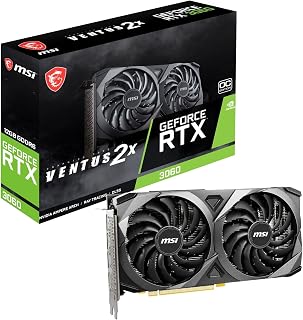
With 12GB of GDDR6 memory, this card handles texture-heavy games at 1080p without running into VRAM limitations that plague smaller capacity options. The 1807 MHz boost clock delivers consistent performance across popular esports and AAA titles at this resolution, while Ampere architecture provides access to DLSS for additional frame rate headroom when needed in newer releases.
Pros
- 12GB VRAM handles texture-heavy games effortlessly
- Ray tracing and DLSS enhance visual quality
- Efficient cooling for sustained performance
- Future-proof memory capacity for 1080p
Cons
- Overkill for basic esports titles
- Limited headroom for resolution upgrades
The RTX 3060 Ventus 2X brings serious horsepower to 1080p gaming, equipped with 12GB of GDDR6 memory that eliminates texture stuttering and frame pacing issues even in the most demanding titles. Nvidia's Ampere architecture ensures this card tears through modern games with ease, while the 1807MHz boost clock keeps frames high and smooth. Ray tracing and DLSS support let you enable cutting-edge visual effects without sacrificing playability, turning atmospheric games into visual showcases. MSI's Torx Twin Fan cooling handles heat efficiently across extended sessions, and the compact Ventus design slots into most builds without clearance headaches. The 192-bit memory interface feeds data quickly enough that 1080p never bottlenecks, whether you're playing competitive shooters at maximum refresh rates or exploring open-world epics with settings maxed. That 12GB buffer provides future-proofing as games grow more texture-hungry, making this card a smart investment for longevity. PCIe 4.0 support ensures compatibility with current and upcoming platforms, while the straightforward installation process gets you gaming quickly.
GPU Chip: NVIDIA GeForce RTX 3060 (Ampere architecture)
Memory: 12GB GDDR6
Memory Interface: 192-bit
Boost Clock: 1807 MHz
Memory Clock: 1807 MHz
Max Resolution: 7680 x 4320 pixels
Video Outputs: 3x DisplayPort 1.4a, 1x HDMI 2.1
Interface: PCIe x16 4.0
Model: MSI Ventus 2X 12G OC V1
Included Accessories: Graphics card, quick setup guide
Perfect for gamers committed to 1080p who want maximum visual fidelity and consistent high refresh rate performance without compromise. Ideal if you're running a 144Hz or 240Hz monitor and want to actually use that capability in AAA titles. Skip this if you're planning a near-term monitor upgrade to 1440p or 4K, where the performance headroom diminishes significantly despite the generous VRAM allocation.

Pros
- Stays cool in mid-to-upper 70s at 60 percent fan speed with near-silent idle
- Compact 9.49-inch length and 900g weight fit smaller cases
- 130W power draw enables smaller PSUs and lower electricity costs
- 8GB GDDR6 handles 1080p high-texture settings comfortably
Cons
- Not suited for 4K gaming or pushing AAA titles to absolute limits
- Initial driver updates necessary to avoid thermal throttling and crashes
The XFX Speedster SWFT210 RX 7600 brings AMD's RDNA 3 architecture to 1080p gaming with a focus on efficiency and thermal management rather than brute force. At this resolution, the card consistently delivers smooth gameplay across modern titles while staying impressively cool and quiet. The dual-fan SWFT cooler keeps temperatures in the mid-to-upper 70s at just 60 percent fan speed, and during lighter loads the fans shut off entirely for silent operation. With 8GB of GDDR6 memory and support for resolutions up to 7680x4320, there's headroom for high-texture settings at 1080p without compromise. The 130W power draw keeps electricity costs down and allows pairing with smaller PSUs, making system builds more flexible. Physical dimensions of 9.49 inches and 900 grams mean this GPU slots into compact cases where larger alternatives wouldn't fit. VR gaming receives full support with strong performance in demanding titles. Compatibility extends seamlessly across Windows and Linux after driver updates. The card excels at 1080p workloads where its efficiency and cooling characteristics shine brightest, though it won't push 4K or absolute maximum settings in the heaviest AAA releases.
GPU Architecture: AMD RDNA 3
Memory: 8GB GDDR6 at 17.5 GHz
Boost Clock: Up to 2655 MHz
Power Consumption: 130W typical gaming load
Cooling: XFX SWFT Dual Fan solution
Dimensions: 9.49" L x 5.16" W
Weight: 900g
Outputs: HDMI + 3x DisplayPort
Max Resolution: 7680x4320
Interface: PCI Express
Warranty: 3-year manufacturer coverage
Ideal For: 1080p and 1440p gaming at 60fps, indie and retro games, esports titles, emulation, VR gaming at moderate settings, small-form-factor PC builds, office and CAD workstations that need basic GPU support, Linux gaming environments, and upgrades from GTX 1600-series cards.
Not Recommended For: High-end 4K gaming, rendering and 3D modeling workloads, machine learning projects, extreme overclocking, or competitive settings where 144+ fps is critical.

PNY NVIDIA GeForce RTX 5050 8GB Blackwell Graphics
The 8GB GDDR6 memory handles 1080p gaming comfortably across a wide range of titles with settings turned up. The 2317 MHz boost clock provides solid frame rates for both competitive and single-player experiences at this resolution, while the compact 2-slot design fits easily into smaller builds. This newer architecture brings efficiency improvements that benefit gamers building compact 1080p systems.
Pros
- Current RTX 50 Series architecture ensures longer relevance
- 8GB GDDR6 provides solid headroom for 1080p texture quality
- 2317 MHz boost clock delivers strong performance for the class
- DisplayPort and HDMI outputs support flexible monitor configurations
Cons
- Newer release means less extensive real-world reliability data
- PCI-Express x8 interface instead of x16 standard
The PNY NVIDIA GeForce RTX 5050 represents the latest generation entry point for 1080p gaming in 2026, bringing current-gen architecture to users who want modern features without premium pricing. With 8GB of GDDR6 memory and a boost clock of 2317 MHz, this dual-fan card provides sufficient headroom for high-quality textures and settings at 1080p resolution. The RTX 50 Series designation means access to the newest iteration of ray tracing cores and tensor cores for AI-enhanced features like the latest DLSS upscaling technology. Unlike older generation alternatives, this card benefits from architectural improvements that deliver better performance per watt and future driver optimizations. The PCI-Express x8 interface and 2-slot design maintain compatibility with a wide range of systems, while dual-fan cooling handles thermal loads without excessive noise. For gamers building or upgrading in 2026, choosing current-generation silicon ensures longer relevance as game developers optimize for newer architectures. The combination of 8GB VRAM, high clock speeds, and DisplayPort plus HDMI outputs covers all practical connectivity needs for single or dual-monitor 1080p setups focused on gaming performance.
GPU: NVIDIA GeForce RTX 5050 with Blackwell Architecture
Memory: 8GB GDDR6, 128-bit bus
Clock Speed: 2317 MHz (GPU), 2317 MHz (Memory)
Interface: PCIe 5.0 x8
Output Ports: DisplayPort 2.1, HDMI 2.1
Max Resolution: 7680x4320
Form Factor: 2-Slot, SFF-Ready
Power: Efficient design suitable for compact builds
Warranty: 3 Years
Best for gamers building new systems in 2026 who want current-generation architecture for better longevity, users seeking the latest DLSS and ray tracing implementations, and anyone prioritizing future driver support over older hardware. Also suits builders wanting 8GB VRAM at entry-level pricing with dual-monitor connectivity. Skip this if you already own a capable 1080p card from the previous generation, need proven long-term reliability data, or plan to game primarily at 1440p or 4K where more powerful options make sense.
Buying Guide
VRAM Capacity and Bus Width
At 1080p, 6GB of VRAM is the floor for modern gaming, but 8GB provides meaningful headroom for texture-heavy titles and longer-term viability. The ASUS Dual GeForce RTX 3050 6GB GDDR6 OC Edition and msi Gaming RTX 3050 Ventus 2X 6G OC Graphics Card run a 96-bit bus, which limits bandwidth compared to the 160-bit interface on the ASRock Intel Arc B570 Challenger 10GB OC GDDR6. Cards like the ASRock Radeon RX 7700 XT Challenger 12GB OC push to 12GB on a 192-bit bus, offering substantial overhead for high settings and future-proofing.
Bus width directly impacts how quickly the GPU can pull textures and assets from memory. A narrower bus paired with modest VRAM works fine for competitive shooters and esports titles, but open-world games with dense environments benefit from wider memory interfaces. The GIGABYTE Radeon RX 9070 XT Gaming OC 16G Graphics represents the upper end here with 16GB, which is overkill for pure 1080p but valuable if you plan to scale up to 1440p later.
Architecture and Ray Tracing Performance
NVIDIA’s Ampere architecture in the RTX 3050 and RTX 3060 cards brings second-generation RT cores, while the newer Blackwell architecture in the ASUS TUF Gaming GeForce RTX 5070 12GB GDDR7 OC and PNY NVIDIA GeForce RTX™ 5050 Dual-Fan Graphics introduces fourth-generation RT cores and DLSS 4. AMD’s RDNA 3 architecture in the RX 7600 and RX 7700 XT delivers competitive rasterization performance but trails in ray tracing efficiency compared to NVIDIA’s current offerings.
If you’re primarily interested in high frame rates in traditional rasterized games, AMD’s cards often deliver better value per frame. If ray tracing and AI upscaling matter to your library, NVIDIA’s RTX lineup holds a clear advantage, particularly with DLSS Frame Generation in newer titles. The Graphics Cards category on our site breaks down more architecture comparisons if you’re weighing generational differences.
Cooling Design and Form Factor
Most 1080p-focused GPUs use dual-fan cooling solutions that fit standard ATX and micro-ATX cases without crowding adjacent slots. The ASUS Dual GeForce RTX 3050 6GB GDDR6 OC Edition measures 20 cm and occupies two slots, making it compatible with compact builds. The ASUS TUF Gaming GeForce RTX 5070 12GB GDDR7 OC stretches to 3.125 slots with a larger fin array optimized for sustained loads, which suits users running longer gaming sessions or content creation workloads alongside gaming.
Look for cards with 0dB or semi-passive fan modes if noise matters to you. The ASRock Intel Arc B570 Challenger 10GB OC GDDR6 and ASRock Radeon RX 7700 XT Challenger 12GB OC both feature silent cooling at idle, spinning fans only under load. Metal backplates add rigidity and help dissipate heat across the PCB, a worthwhile feature if you’re transporting your build or mounting the card vertically.
Power Delivery and Connector Requirements
Entry-level cards like the RTX 3050 models typically require a single 8-pin PCIe power connector, making them compatible with most budget power supplies rated at 450W or above. Mid-range options such as the ASRock Radeon RX 7700 XT Challenger 12GB OC step up to dual 8-pin connectors, pushing recommended PSU wattage to 650W or higher. Premium cards like the ASUS TUF Gaming GeForce RTX 5070 12GB GDDR7 OC demand robust power delivery to support higher boost clocks and sustained performance under load.
Check your PSU’s available PCIe connectors before committing to a card. Some older or budget power supplies lack the necessary cables, and using adapters introduces potential points of failure. If you’re upgrading other components alongside your GPU, consider that power requirements scale quickly. For context on managing power in related electronics, our guide on LiPo vs NiMH for RC cars covers similar trade-offs between capacity and delivery in a different domain.
Final Thoughts
For budget-conscious builders who want solid frame rates in competitive and esports titles, the ASRock Intel Arc B570 Challenger 10GB OC GDDR6 delivers excellent value with modern architecture and ample VRAM. If you’re prioritizing ray tracing and AI-enhanced visuals alongside strong 1080p performance, the ASUS TUF Gaming GeForce RTX 5070 12GB GDDR7 OC offers flagship-tier features without the overkill of a 4K-focused card. Both represent smart picks for different priorities, and either will serve you well through multiple upgrade cycles.
Frequently Asked Questions
Is 6GB VRAM enough for 1080p gaming in 2026?
Six gigabytes works for most current titles at high settings, but you’ll encounter limitations in texture-heavy AAA games or when enabling ray tracing. Cards with 8GB or more provide better headroom for future releases and let you maintain higher settings without compromising performance. If you’re planning to keep the card for several years, investing in additional VRAM pays off as game requirements continue climbing.
Do I need ray tracing for 1080p gaming?
Ray tracing enhances visual fidelity with realistic lighting and reflections, but it’s not essential for enjoying games at 1080p. If your library includes titles that support ray tracing and you value the visual upgrade, NVIDIA’s RTX cards with DLSS provide the best experience by maintaining frame rates while enabling RT features. For competitive or esports-focused gaming, prioritize raw rasterization performance over ray tracing capabilities.
How much power supply wattage do I need for these GPUs?
Entry-level cards like the RTX 3050 run comfortably on a 450W PSU, while mid-range options such as the RX 7700 XT require 650W to account for peak power draw and system overhead. High-end cards demand 750W or more, especially if you’re pairing them with a power-hungry CPU. Always check the manufacturer’s recommended wattage and ensure your PSU has the necessary PCIe power connectors before purchasing a new GPU.
Can these cards handle 1440p gaming if I upgrade my monitor later?
Cards with 12GB or more VRAM, like the RX 7700 XT and RTX 5070, handle 1440p well in most titles, though you may need to adjust settings in the most demanding games. Entry-level 6GB models struggle at higher resolutions due to memory constraints. If you’re planning a monitor upgrade within the next year or two, choosing a card with extra VRAM and higher memory bandwidth now saves you from needing another GPU upgrade sooner than expected. For more insights on matching components to your actual use case, our article on when to retire a LiPo battery discusses similar forward-planning trade-offs in the context of RC electronics.





Write Your Review
No reviews yet. Be the first to share your experience!