

In CS2, a clean counter-strafe can be the difference between a controlled shot and a frustrating miss. When your movement keys feel slow to reset, the problem is not always your aim, it may be the keyboard’s switch behavior, layout, or configuration.
This guide compares ten strong options for players who want compact desk space, adjustable inputs, and dependable gaming features. We focus on the traits that matter for peeking, stopping, strafing, and long sessions, while a stable connection also benefits from the advice in our gaming Ethernet cable guide.
Quick answer
This guide compares 10 picks, with MCHOSE Ace 68 Turbo Hall Effect Gaming Keyboard, 65% ranked first. GravaStar Mercury V60 HE Gaming Keyboard, UFO Hall has the most customer reviews.

Pros
- Highly adjustable Hall Effect actuation and Rapid Trigger controls
- Fast advertised response with up to 16K Windows polling
- Sturdy CNC aluminum construction with an aluminum plate
- Compact layout preserves arrow keys and essential controls
- Extensive software, onboard profile, and RGB customization
Cons
- USB-C wired connectivity limits cable-free setup options
- The 68-key layout may not suit users who need a function row or number pad
- Mac supports up to 8K polling rather than the Windows maximum of 16K
The MCHOSE Ace 68 Turbo is a compact Hall Effect gaming keyboard built for players who prioritize fast, adjustable input. Its 68-key ANSI layout is especially well suited to competitive FPS gaming, where extra mouse space and precise movement control can matter.
Its standout feature is the magnetic switch system, which supports adjustable actuation from 0.1 to 3.4mm and Rapid Trigger adjustment from 0.001 to 3.4mm. The advertised 16K Windows polling, 256K scan rate, and latency as low as 0.06ms target fast, consistent inputs, while the dedicated RT button makes profile changes convenient.
Build quality is a clear strength, with a full CNC-machined aluminum body, aluminum plate, five-layer sound damping, and a stable 2.8-pound construction. South-facing RGB, a dynamic light bar, onboard memory, and hot-swappable magnetic switch support give the keyboard a premium look and useful personalization options.
There are some practical limitations to consider. The keyboard uses wired USB-C connectivity, the compact layout may not provide enough keys for productivity-focused users, and Mac systems support up to 8K polling instead of the Windows maximum.
Overall, the Ace 68 Turbo is a strong choice for competitive gamers who want precise movement tuning, Rapid Trigger customization, and a solid aluminum chassis. It is less suitable for shoppers seeking wireless convenience or a full-size layout, but its feature set is well aligned with high-speed gaming.

Pros
- Highly adjustable Hall Effect actuation and Rapid Trigger controls
- Fast polling and scan-rate specifications suited to competitive gaming
- Premium CNC aluminum body with a compact, mouse-friendly layout
- Feature-rich software, onboard profiles, and dedicated profile switching
- Positive user feedback on response, sound, lighting, and build quality
Cons
- Wired USB-C connectivity may not suit buyers who want wireless flexibility
- The 16K polling mode is specified for Windows, while Mac support is listed up to 8K
- The compact 68-key layout sacrifices some dedicated keys found on larger keyboards
The MCHOSE Ace 68 Turbo is a compact Hall Effect gaming keyboard designed for competitive players who want precise control over actuation and rapid input behavior. Its 68-key layout keeps arrow keys and essential controls while leaving more room for mouse movement.
Its main advantage is adjustment flexibility. Magnetic switches support 0.1 to 3.4mm actuation and 0.001 to 3.4mm Rapid Trigger settings, while up to 16K polling on Windows, a 256K scan rate, and claimed latency as low as 0.06ms target fast-paced games such as Valorant, CS2, Apex, and osu!.
The full CNC aluminum body and aluminum plate give the keyboard a substantial, stable feel, while the five-layer sound-damping design is intended to improve the overall typing sound. South-facing RGB, a dynamic rear light bar, hot-swappable magnetic switches, and wired USB-C connectivity complete the premium gaming setup.
There are a few limitations to consider. It is a wired-only keyboard, the maximum polling specification depends on the operating system, and the compact layout omits some dedicated keys found on larger boards. Its 2.8-pound aluminum construction also favors stability over portability.
Overall, the Ace 68 Turbo is a well-equipped option for gamers who prioritize adjustable magnetic input, Rapid Trigger customization, and a premium compact design. It is especially appealing to competitive FPS players, while its extensive software and RGB controls also suit enthusiasts who enjoy fine-tuning their setup.

Pros
- Responsive Hall Effect magnetic switches with customizable actuation
- Space-saving 75% layout with 84 keys
- Gasket structure delivers a softer, more comfortable typing feel
- Hot-swappable design supports switch and keycap customization
- Solid metal and plastic construction with included keycap puller and USB cable
Cons
- Wired USB-C connectivity limits portability compared with wireless keyboards
- Some users have reported brief disconnects and needed to replace the included cable
- Customer support may be limited, so troubleshooting could require extra effort
The IROK Mars75 is a wired 75% magnetic switch keyboard designed for PC gaming, fast-paced input, and everyday productivity. Its compact 84-key layout preserves important navigation keys while taking up less desk space than a full-size keyboard.
Its Hall Effect switches are the main performance highlight, offering adjustable actuation and fast magnetic sensing. The advertised 8K polling rate, 0.125ms latency, and 256KHz single-key scan rate target responsive gameplay, while the hot-swappable design allows users to customize magnetic switches and keycaps without soldering.
The gasket-mounted construction adds cushioning beneath the PCB for a softer, more consistent typing feel and reduced vibration. A metal and plastic enclosure, customizable 500Hz ARGB lighting, and included keycap puller give the keyboard a practical feature set for gaming setups and general use.
There are a few important limitations to consider. The Mars75 is corded only, and one customer reported intermittent disconnects that improved after switching the USB cable, suggesting that troubleshooting may occasionally be necessary. Support availability may also be a concern for buyers who expect extensive after-sales assistance.
Overall, the IROK Mars75 offers an impressive combination of magnetic switch performance, compact design, adjustable input, and customization. It is best suited to users who value rapid response and enthusiast features at an accessible level, provided they are comfortable with a wired setup and occasional troubleshooting.
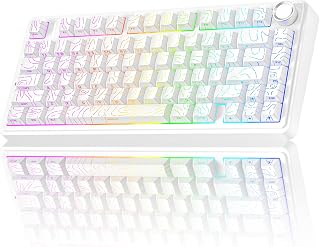
The Line White version suits a clean CS2 desk setup with its compact 75% layout, RGB backlighting, and side-printed PBT keycaps, which keep essential movement and utility keys close while reducing visual clutter. Its linear switches and 2.4 GHz wireless or USB-C connections support a gaming-focused feel, but the listed specifications do not confirm Rapid Trigger functionality.
Pros
- Compact 75% layout retains function and arrow keys
- Three connection methods and up to five paired devices
- Hot-swappable switches with PBT keycaps
- Water-repellent rating and multifunction knob
Cons
- No confirmed rapid-trigger support
- No dedicated number pad
The Line White F75 Pro is best treated as a compact, customizable mechanical option rather than a verified rapid-trigger choice. Neither its listed specifications nor its supplied description states rapid-trigger functionality. For a CS2 article built around that capability, prospective buyers should not infer it from the keyboard’s linear switches, programmable keys, or gaming designation. What is documented is a 75% layout that retains function and arrow keys while conserving desk space. Pre-lubed LEOBOG Star Vector linear switches, a gasket structure, and five layers of silicone dampening target a smooth, creamy-sounding and reduced-noise typing experience. Hot-swappable sockets enable switch changes without soldering, while side-printed PBT keycaps are described as resistant to fading and sweat. Connection options include Bluetooth 5.0, 2.4GHz wireless, and USB-C wired use, plus switching for up to five paired devices. RGB lighting, a water-repellent rating, and a knob that controls lighting in gaming mode or volume and media in office mode add flexibility. The plastic construction is the principal material compromise. This version belongs in a compact mechanical comparison, but its rapid-trigger status is unverified.
Key Technical Specs: The F75 Pro features a compact 75% QWERTY layout with 80 keys, supporting both 3-pin and 5-pin hot-swappable mechanical switches. Connectivity options include Bluetooth 5.0, 2.4GHz wireless with USB receiver, and direct USB-C wired connection, accommodating simultaneous pairing with up to five devices including PCs, Macs, tablets, smartphones, and gaming consoles.
Power and Performance: The rechargeable 4000mAh battery provides extended wireless operation between charges, while N-key rollover ensures every keypress registers in fast-paced gaming scenarios. Programmable macro keys can be customized through the F75 driver to assign complex functions or key combinations, and WIN key lock prevents accidental presses during intense sessions.
Design Specifications: The keyboard features RGB backlighting with multiple customizable effect patterns controlled via the multi-function knob. Switch type is linear with pre-lubrication, and side-printed PBT keycaps use double injection molding for durability. The advanced gasket structure with extended silicone pads and PCB single-key slotting optimizes feel and sound. Includes USB cable and keycap puller, backed by one-year manufacturer warranty.
Best For: Gamers seeking a compact, customizable mechanical keyboard with multi-device support. Streamers and content creators who value the satisfying sound for on-camera appeal. Professionals and students who want mechanical typing comfort with flexibility to connect across multiple devices. Keyboard enthusiasts interested in hot-swappable customization without soldering.
Consider Alternatives If: You prefer clicky or heavily tactile switches over linear feedback. You need a full-size keyboard layout. You prioritize aluminum construction and premium materials above functionality. Your workflow requires only a single-device connection.
Value Assessment: At this price point, the F75 Pro excels in versatility and customization. The tri-mode connectivity alone justifies consideration for multi-device users, while the hot-swappable design appeals to anyone curious about exploring different switch types. The pre-lubed switches and gasket structure deliver sound quality typically found in more expensive keyboards, making this a strong value proposition for both newcomers and experienced mechanical keyboard users.

The Line Black model fits a streamlined CS2 battle station through its 75% format, linear switches, and programmable keys, allowing a compact layout while retaining remapping flexibility for in-game commands. It also offers 2.4 GHz wireless, Bluetooth 3.0/5.0, and USB-C connectivity plus a volume roller. Still, its specifications do not list Rapid Trigger.
Pros
- Compact 75% layout with function and arrow keys
- Bluetooth, 2.4GHz wireless, and USB-C connectivity
- Hot-swappable switches and programmable keys
- RGB controls plus multifunction volume roller
Cons
- No confirmed rapid-trigger support
- Linear switches do not provide clicky or tactile feedback
Rapid trigger is not identified in the available specifications, so the AULA F75 Pro cannot be presented as a confirmed rapid-trigger keyboard for a CS2-focused shortlist. Its case instead rests on documented features for a compact gaming setup: the 75% QWERTY layout retains function and arrow keys while conserving desk space, and pre-lubed LEOBOG Star Vector linear switches provide a smooth, creamy-sounding typing experience. Customization is the stronger verified point. Hot-swappable switches let owners change switch types without soldering, while programmable keys add configuration flexibility. RGB backlighting and a multifunction knob provide further control; the knob adjusts RGB brightness and effects in gaming mode, then volume and playback in office mode. Bluetooth 5.0, 2.4GHz wireless, and USB-C wired connectivity support up to five paired devices with dedicated switching keys. The five-layer silencing system and extended silicone pad structure reduce noise. Choose this Line Black version for its compact, customizable feature set, but not on an assumption of rapid-trigger behavior.
Layout and Keys: 75% compact layout with 80 keys, QWERTY configuration, N-key rollover with WIN key lock for gaming precision.
Switches: Hot-swappable base supporting 3-pin and 5-pin switches. Includes pre-lubricated LEOBOG Star Vector linear switches with 2 extra switches included.
Connectivity: Bluetooth 5.0, 2.4GHz wireless, and USB-C wired. Connects up to 5 devices simultaneously with easy switching via shortcut keys.
Backlighting: 16.8 million RGB colors, 16 preset lighting effects, 10 music-reactive rhythm effects, adjustable brightness and speed via knob or FN key combinations.
Battery: 4000mAh rechargeable capacity with extended wireless runtime. Charges via USB-C.
Keycaps: Side-printed PBT with double injection molding and heat sublimation process. Sweat-proof and resistant to fading.
Dimensions: 12.7L x 12.7W x 16.97H inches. Includes dust cover, keycap/switch puller, USB-C cable, and user manual.
Compatibility: Windows 11, Mac OS 14 Sonoma, Ubuntu 24.04. Works with PC, laptops, tablets, smartphones, PS, and Xbox.
Warranty: 6 months manufacturer warranty.
Buy it if your CS2 keyboard search also prioritizes a smaller 75% board, linear pre-lubed switches, RGB control, and the option to alter switches later without soldering. It also makes sense for someone moving among a PC, laptop, console, tablet, or smartphone and wanting Bluetooth, 2.4GHz wireless, or USB-C. Skip it if rapid trigger is a non-negotiable requirement, because the supplied details do not verify it. Also look elsewhere for a full-size layout or clicky and tactile switch feedback.

Pros
- Highly adjustable actuation gives gamers detailed control over key sensitivity.
- Rapid and responsive performance is well suited to competitive FPS games.
- Compact layout offers a useful balance between desk space and functionality.
- Solid typing feel, restrained stabilizer rattle, and factory-lubed components add to the overall experience.
- Strong performance-to-cost value compared with many premium magnetic gaming keyboards.
Cons
- The hard plastic enclosure and non-shine-through keycaps feel less premium than higher-end alternatives.
- Some users have reported occasional A/D input delay during counter-strafing.
- The software interface may be less accessible for some users, and the keyboard is designed primarily for Windows PCs.
The Hyekit MCHOSE ACE 68 is a wired 68-key magnetic mechanical gaming keyboard designed for players who want customizable, highly responsive input. Its compact layout suits FPS gamers, competitive players, and desktop users who want more room for a mouse.
Its main advantage is adjustable actuation from 0.02mm to 3.4mm, allowing each key to be tuned for speed or control. Rapid Trigger supports quick movement changes, while the 8K polling rate, 32K scan rate, and claimed 0.125ms latency target fast competitive performance.
The dual-point actuation feature can assign two actions to one keypress, which is useful for layered controls and quick combinations. RGB lighting, USB-C connectivity, hot-swappable magnetic switches, and the compact 68-key design add flexibility for gaming and everyday use.
Build quality is generally well received despite the plastic enclosure, with reviewers noting a stable feel, reasonable sound, and limited stabilizer rattle. The keycaps are not shine-through, and some users may find the software interface less accessible.
The ACE 68 offers an impressive feature set for gamers seeking magnetic switch customization without moving to a premium keyboard. It is especially compelling for FPS play, although occasional reports of A/D delay mean highly competitive buyers should test the configuration carefully.

Pros
- Very responsive Hall Effect switches with adjustable actuation and rapid trigger
- Compact layout retains dedicated arrow keys and useful gaming functions
- Premium-feeling aluminum construction with a satisfying, well-dampened sound
- Strong RGB customization and extensive web-based programming options
- Positive user feedback on typing feel, appearance, responsiveness, and overall quality
Cons
- Wired USB-C connectivity may not suit users who want a wireless setup
- The listed QWERTZ layout may require adjustment for buyers accustomed to QWERTY
- Long-term durability is not yet well established, and advanced settings may require time to configure
The ATTACK SHARK R82HE is a compact 75% mechanical gaming keyboard designed for players who prioritize fast input and flexible customization. Its 80-key layout keeps the arrow keys while reducing desk clutter, making it a practical choice for competitive gamers, streamers, programmers, and everyday users.
Its Hall Effect magnetic switches are the main attraction, with adjustable actuation, rapid trigger, and advertised 0.005mm RT precision. The 8KHz polling rate and 0.08ms advertised latency are aimed at fast-paced games such as CS2, Valorant, rhythm titles, and other situations where quick stops and repeated inputs matter.
Build quality is supported by an aluminum enclosure and plate, while the five-layer dampening system uses multiple foam and silicone layers to produce a deeper, cleaner sound. Customer feedback also highlights the creamy typing feel, appealing RGB lighting, solid weight, and sturdy impression.
There are a few details to check before buying. The keyboard is wired only, the listed QWERTZ layout may not match every regional preference, and the web-based driver offers many advanced settings that can take time to learn. Long-term durability is also not fully established.
Overall, the R82HE is a strong choice for gamers seeking Hall Effect performance, rapid trigger controls, and a compact RGB design without moving to a full-size keyboard. Its responsive switches, tunable actuation, and sound-focused construction make it especially appealing for competitive and rhythm gaming.
Pros
- Highly responsive Hall Effect switches with precise adjustable actuation
- Rapid Trigger and Snap Tap features benefit fast-paced competitive games
- Smooth, low-wobble switches and appealing acoustics according to customer feedback
- Distinctive transparent RGB design with useful included accessories and spare switches
Cons
- Wired USB-C connectivity limits flexibility compared with wireless gaming keyboards
- Advanced actuation and Rapid Trigger settings may require time to configure for each game or typing style
- The transparent plastic chassis may show dust, fingerprints, and cable clutter more readily than an opaque design
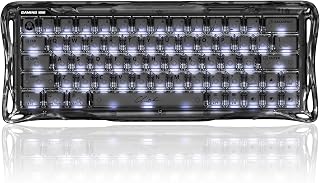
The GravaStar Mercury V60 HE is a compact wired gaming keyboard built for players who prioritize fast inputs and customizable key behavior. Its Hall Effect design, adjustable actuation, and competitive controls make it especially appealing for FPS and other movement-focused games.
Its UFO Magnetic Switches support actuation adjustment from 0.005mm to 3.5mm, while Rapid Trigger responds when keys are released instead of relying only on a fixed reset point. The 8000Hz polling rate, Snap Tap control, and responsive linear feel give competitive players useful tools for quicker strafing and directional changes.
Customer feedback highlights the smooth switch feel, low wobble, pleasant sound, and satisfying typing experience. Hot-swappable switches and included extras add flexibility, while the multi-layer acoustic structure helps control vibration for a more refined out-of-the-box sound.
The full-transparent Onyx Crystal chassis and RGB lighting provide a bold sci-fi appearance that stands out on a desk. However, the keyboard is wired only, and its clear plastic enclosure may require more frequent cleaning because dust and fingerprints are easier to notice.
Overall, the Mercury V60 HE is a strong choice for competitive gamers who want precise Hall Effect control, rapid input resets, and a visually distinctive keyboard. It is less suitable for buyers seeking wireless convenience or a simple plug-and-play experience without advanced customization.

Pros
- Highly adjustable Rapid Trigger and actuation settings are well suited to fast FPS movement and counter-strafing.
- Solid aluminum and forged carbon construction helps keep the keyboard planted during intense play.
- Compact 64-key layout leaves additional room for wide mouse movements.
- Extensive software controls, onboard profiles, RGB customization, and programmable functions support different playstyles.
- Includes a 3-year warranty and useful accessories such as a dust brush, keycap and switch puller, USB cable, and manual.
Cons
- The compact layout includes a smaller right Shift key and may require an adjustment period for users accustomed to full-size keyboards.
- It uses a wired USB-C connection, so it does not provide wireless flexibility.
- The keyboard is not water resistant, so it requires care around drinks and spills.
The IQUNIX EV63 is a compact 64-key Hall Effect gaming keyboard built primarily for competitive FPS players. Its small footprint gives low-sensitivity mouse users more room for wide aiming movements, while programmable controls also make it suitable for everyday typing.
Its main advantage is adjustable input control, with 0.01mm Rapid Trigger, adjustable actuation, zero dead zone control, and 8000Hz wired polling. M.A.T. 2.0 Magnetic Auto-Tune is designed to keep sensing consistent, helping reduce missed inputs, unintended triggers, and sticky key behavior during rapid movement.
The Magnetic X Ultra linear switches combine a light 36±10gf initial force with 3.5±0.2mm travel and factory lubrication. A CNC aluminum case, real forged carbon front plate, and approximately 1200g weight give the keyboard a stable, premium feel that should resist unwanted desk movement.
There are a few practical compromises to consider, including the wired-only connection and compact layout with a smaller right Shift key. The EV63 is also not water resistant, and its extensive configuration options may take time to learn for buyers who prefer a plug-and-play keyboard.
Overall, the IQUNIX EV63 is a strong choice for FPS players who value rapid input tuning, stable construction, and deep software customization. Buyers seeking a compact keyboard with fast magnetic switches and a premium chassis should find it especially compelling.

GravaStar Mercury K1 Lite 75% Wireless Mechanical
The Mercury K1 Lite can suit players building a tidy, adaptable CS2 setup: its 75% design saves desk space, while hot-swappable switches and programmable keys allow later customization of key feel and bindings. RGB lighting, ergonomic features, and Bluetooth, Wi-Fi, or USB-C connectivity add versatility. However, the provided specifications do not verify Rapid Trigger support.
Pros
- 79-key 75% QWERTY layout
- 40gf custom linear switches
- Hot-swappable switch design
- Five-layer gasket mount and RGB-diffusing keycaps
Cons
- No confirmed rapid-trigger support
- No number pad and open frame needs regular dusting
On a rapid-trigger list, the Mercury K1 Lite needs a qualification before its other strengths: the supplied materials do not identify rapid-trigger support. Its GravaStar x BSUN custom linear switches have a stated 40gf actuation force, but that alone does not confirm the feature named in this CS2 article. It belongs only as a compact mechanical alternative, not a verified rapid-trigger pick. The board gives 79 keys in a 75% QWERTY layout, retaining a compact footprint while omitting a dedicated number pad. A five-layer gasket mount and tuned acoustic structure are described as absorbing impact, reducing harshness, and delivering a thocky sound. Switches are hot-swappable, so owners can customize the board without making the included linear switches permanent. The PC chassis, polycarbonate plate, skeletal frame, and translucent keycaps place RGB diffusion at the center of the design. For connection flexibility, it supports Bluetooth, Wi-Fi, and USB-C, and it runs on battery power. Listed features also include programmable keys, ergonomic design, and foldability. Select it for its 75% format, lighting-focused presentation, and customizable mechanical design, while treating the absence of stated rapid trigger as the deciding limitation for this particular guide.
Physical Specs: Dimensions 13.5L x 6.14W x 1.81H inches, weight designed for portability, compact 75% layout with 79 total keys, QWERTY language support, ambidextrous hand orientation.
Switches and Feel: GravaStar x BSUN custom linear switches with 40gf actuation force, 2mm pre-travel, 3.6mm total travel distance. Five-layer gasket mount system with PORON foam. Hot-swappable for customization. Includes four bonus switch samples for experimenting with different feels.
Connectivity and Battery: Triple connectivity: 2.4GHz wireless at 1kHz polling rate, Bluetooth 5.0, USB-C wired. Pair with up to three devices simultaneously. Built-in 4000mAh battery supports weeks of continuous use per charge. USB-C charging allows typing while powered.
RGB and Aesthetics: Full RGB backlighting with translucent keycaps that diffuse light beautifully. Crystal Aurora colorway features lavender purple, icy mint green, and crystal-clear accents. Open skeletal white frame design. Compatible with Windows 10 and above, Mac OS 10.12 Sierra and above.
In the Box: GravaStar Mercury K1 Lite keyboard, Type-A 2.4GHz wireless receiver, USB-A to USB-C cable, one-year warranty, cleaning brush, keycap and switch puller tool, four bonus switch samples.
Buy the Mercury K1 Lite if a 75% keyboard with 79 keys, hot-swappable linear switches, RGB, and Bluetooth, Wi-Fi, or USB-C connectivity matches your broader gaming setup. It is especially relevant to buyers who prefer a compact board and want translucent keycaps with prominent RGB diffusion. Skip it if the CS2 keyboard must have verified rapid trigger, because the provided information does not establish that. Also pass if a dedicated number pad is essential or you do not want to regularly dust an open-frame design.
How to Choose a Keyboard for CS2
The right choice depends less on flashy lighting and more on how naturally the board supports your movement habits. Hall Effect keyboards lead this group for precise actuation control, but layout, wired reliability, and software quality should shape your final decision too.
Choose Hall Effect switches for movement-focused play
Magnetic Hall Effect switches sense key travel rather than relying on a fixed physical contact point. That lets you set a shallow actuation point for quick movement inputs, then use Rapid Trigger to reset a key shortly after you release it, which can make repeated A and D taps feel more immediate.
The MCHOSE Ace 68 Turbo offers unusually fine actuation and Rapid Trigger adjustment, while the GravaStar Mercury V60 HE adds 0.005mm control and an 8000Hz wired polling rate. The IQUNIX EV63 also targets FPS movement with its magnetic auto-tuning approach, zero-dead-zone control, and compact 64-key form factor.
Match the layout to your aim space
Low-sensitivity CS2 players often benefit from a 60% or 65% keyboard because it leaves more room for wide mouse sweeps. A board such as the MCHOSE ACE 68 or GravaStar Mercury V60 HE keeps the footprint tight, although you may need time to adapt to compressed navigation keys.
A 75% layout is a comfortable middle ground if you want dedicated arrow keys and a more familiar arrangement. The ATTACK SHARK R82HE RT, IROK Mars75, and AULA F75 Pro retain those practical keys without taking over your desk, especially alongside a properly positioned laptop stand for desk use.
Prioritize a stable wired signal and sensible polling
For serious CS2 play, a wired USB-C connection removes battery management and keeps the signal path simple. The MCHOSE Ace 68 Turbo lists up to 16K polling on Windows, while the ATTACK SHARK R82HE RT, IROK Mars75, MCHOSE ACE 68, GravaStar Mercury V60 HE, and IQUNIX EV63 list high-speed wired modes built for competitive input.
Higher polling can reduce input delay, but it will not replace sound fundamentals such as crosshair placement and disciplined movement. If you also use a laptop at your setup, a capable USB-C charger for a laptop and an organized Thunderbolt 5 dock setup can help keep cables and peripherals manageable.
Use software control carefully and learn the key feel
Adjustable actuation is useful only when the setting matches your hands. Start with a moderate trigger point, play several matches, and gradually lower it if you need quicker movement. An extremely shallow setting can cause accidental inputs until you build the muscle memory for it.
Several magnetic options offer advanced functions such as SOCD, dual-key actions, Mod Tap, Toggle, and custom profiles. The MCHOSE Ace 68 Turbo, ATTACK SHARK R82HE RT, and IQUNIX EV63 provide extensive tuning, but always confirm the rules for the server, league, or event where you play before enabling movement-assist features.
Consider conventional mechanical boards for versatile setups
A traditional mechanical keyboard remains a sensible choice when CS2 shares time with school, work, or multiple devices. The AULA F75 Pro offers Bluetooth, 2.4GHz wireless, and wired connectivity, plus hot-swappable switches, sound dampening, a volume knob, and a spacious 75% arrangement.
The GravaStar Mercury K1 Lite takes a similarly flexible route with tri-mode connection, a gasket-mounted structure, hot-swappable switches, and an open-frame look. Neither board offers the deep movement tuning of a Hall Effect model, yet both can suit players who value a softer typing feel and broader everyday convenience.
Final Thoughts
For a compact, movement-first competitive setup, the MCHOSE Ace 68 Turbo Hall Effect Gaming Keyboard brings exceptionally detailed magnetic-switch control and a substantial aluminum build. If your desk also serves work and multiple devices, the AULA F75 Pro Wireless Mechanical Keyboard offers more connection flexibility, familiar 75% practicality, and an enjoyable customized feel.
Frequently Asked Questions
Is a Hall Effect keyboard better for CS2?
For players focused on counter-strafing and rapid direction changes, a Hall Effect board can be a strong upgrade because it allows adjustable actuation and dynamic key reset. It is not automatically better for every person, though. Your movement technique, preferred key feel, and comfort with software tuning matter just as much.
Do I need 8000Hz polling for CS2 in 2026?
No, 8000Hz is not required to play CS2 well, but it is a useful feature for players seeking a highly responsive wired setup. A stable computer, reliable USB connection, and consistent frame delivery have a greater overall effect than chasing a single specification. Choose high polling when it fits your system and preferences rather than expecting it to transform your rank.
Should I use SOCD or Snap Tap features in CS2?
These features can alter how opposite directional inputs are resolved, so their acceptability can vary by server, event, and organizer. Check the applicable rules before using them in organized competition. For a more dependable overall match connection, review our guide to choosing a router for a large house if your gaming setup is far from the network equipment.
Is a 60% or 75% keyboard better for CS2?
A 60% or 65% model gives you maximum mouse room, making it especially appealing for low-sensitivity aiming. A 75% board keeps arrow keys, function-row access, and often a control knob, which can be easier for daily productivity. If you game away from a dedicated desk, our lap desk picks can help you create a more stable surface for either layout.



Write Your Review
No reviews yet. Be the first to share your experience!