

When you are deep into a draft, a keyboard that feels cramped, loud, or tiring can pull attention away from every sentence. The right model should make long writing sessions feel natural, whether you are outlining a novel, editing client work, or managing research across several devices.
Our best keyboard for writers guide compares eight options with different strengths, including quiet low-profile boards, ergonomic split designs, and satisfying mechanical choices. For more ways to refine your workspace, explore our Keyboards & Mice buying guides.
Quick answer
This guide compares 8 picks, with Kisnt KN85 75% Wireless Mechanical Keyboard, Tri-Mode ranked first. Logitech K780 Multi-Device Wireless Keyboard holds the highest customer rating among them. Logitech Ergo K860 Wireless Split Keyboard with Memory has the most customer reviews.
Pros
- Excellent ergonomic value: compact footprint frees mouse room while keeping all essential keys
- Ultra-low latency across all three connection modes ensures responsive gaming and real-time typing
- Creamy, buttery typing feel with pre-lubed linear switches delivers satisfying, non-fatiguing keypress feedback
- Hot-swappable architecture empowers users to experiment with different switch types and fine-tune their sound signature
- Solid 2-year warranty and responsive 24/7 customer support reflect genuine commitment to user satisfaction
Cons
- Windows-only software limits customization and macro programming for Mac users in wired/2.4G modes
- No dedicated number pad, requiring function-key combinations for frequent numpad users
- Animated RGB effects noticeably drain battery life, necessitating static lighting for optimal wireless runtime
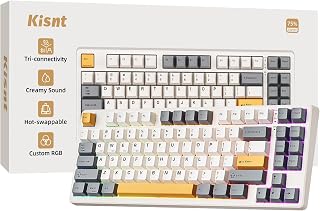
The Kisnt KN85 is a 75% wireless mechanical keyboard engineered for professionals, gamers, and creators who refuse to compromise on typing experience or desk real estate. With 85 keys compressed into a 13.68-inch footprint, it preserves function keys and arrows while freeing 25% of desk space. This keyboard excels for laptop users, hybrid workers, programmers, and minimalist setup enthusiasts seeking performance without bulk.
The standout feature is undoubtedly the typing experience. Pre-lubed Bsun linear switches (45-50gf actuation) deliver a buttery, cushioned keypress that feels premium compared to budget mechanical boards. The gasket-mount construction absorbs vibrations and produces a smooth, mellow thock rather than harsh clacking, making it surprisingly pleasant for late-night work or shared office spaces. Hot-swappable compatibility means you can experiment with other switch types to personalize your sound signature without technical expertise.
Connectivity flexibility sets this keyboard apart from standard gaming boards. Tri-mode support (USB-C wired, 2.4GHz wireless, Bluetooth 5.0 with three channels) enables seamless switching between Windows PC, Mac, tablet, and smartphone with minimal latency (2ms USB, 5ms 2.4G, 11ms Bluetooth). The 4000mAh battery sustains multi-week operation on static RGB settings, and you can continue working via USB while charging runs low.
Build quality feels solid despite the plastic construction, and the retro beige colorway with ambient RGB backlighting creates an inviting, modern-minimalist aesthetic. However, the Windows-only software limits Mac customization to basic functions, animated RGB effects measurably reduce battery life, and users requiring frequent numpad input will find function-key combinations cumbersome compared to full-size alternatives.
Verdict: The KN85 strikes an impressive balance between portability and performance. At its price point, the combination of hot-swappable switches, multi-device connectivity, satisfying typing feel, and two-year warranty makes it an excellent choice for anyone tired of cramped laptop keyboards or cluttered desk setups. Recommended for hybrid workers, programmers, and gamers with limited desk space who prioritize typing quality and flexibility.
Physical Specs: 13.68 inches (L) x 5.51 inches (W) x 1.77 inches (H), 0.9kg weight, 85-key layout, retro beige plastic enclosure
Connectivity: USB-C wired, 2.4GHz wireless with dedicated receiver, Bluetooth 5.0 (3 channels), 4000mAh rechargeable battery (7-8 hour charge time)
Switches and Customization: Pre-lubed Bsun linear switches (45-50gf), hot-swappable (3-pin and 5-pin compatible), RGB backlighting with programmable keys and macro support via Windows software
Compatibility: Windows 8+, macOS, Linux, Android, iOS, gaming consoles. Ambidextrous layout suitable for all hand types
Warranty and Support: 2-year manufacturer warranty, 30-day returns, 24/7 specialist support
Best For: Hybrid workers and remote employees seeking compact, multi-device keyboards. Programmers and students valuing desk space and typing comfort. Gamers who prefer smaller footprints without sacrificing performance. Content creators needing programmable macros and wireless flexibility. ASMR enthusiasts appreciating smooth, satisfying keypress feedback.
Consider Alternatives If: You require a dedicated numpad for frequent number entry. You use Mac as primary machine and need full software customization. You prioritize wireless-only use in environments where USB charging is impractical. You prefer mechanical keyboards with louder, clackier acoustics.
Setup Tips: Fully charge before first use. Use 5V 1A chargers or computer USB ports only (fast chargers may damage the keyboard). For optimal battery life, keep RGB static rather than animated. Consider a wrist rest during extended typing sessions. Enable Bluetooth pairing by toggling to BT mode, then holding Fn+W (or E/R) for 3-5 seconds until the key flashes rapidly.
Pros
- Exceptional build quality with gasket mounting and multi-layer dampening for premium typing feedback
- Seamless device switching across PC, laptop, and tablet without re-pairing or lag
- Hot-swap socket design lets you upgrade switches without soldering or permanent commitment
- Durable PBT keycaps resist shine and degradation better than standard ABS alternatives
- Comprehensive customization through dedicated software and four extra hotkeys
Cons
- No customer reviews currently available to validate real-world performance and long-term durability
- Plastic enclosure may feel less premium compared to aluminum construction found on higher-end models
- Learning curve required to fully utilize the software's macro programming and custom lighting features
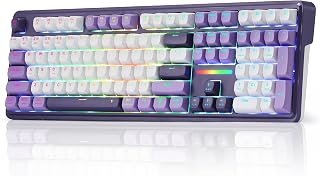
The Redragon K745 PRO is a full-size 108-key wireless gaming keyboard designed for players and professionals who demand flexibility, sound quality, and customization. With its tri-mode connectivity and hot-swap socket design, it caters to users who work across multiple devices and want to experiment with different mechanical switches without purchasing new keyboards.
The standout feature is the gasket-mounted construction combined with 5-layer noise dampening, which creates a notably soft and bouncy typing feel with that coveted thocky sound. The keyboard includes four extra hotkeys for common shortcuts like mute and calculator, plus full programmable macro support through the included software. Anti-ghosting across all 104 standard keys ensures accurate registration even during rapid multi-key combinations, critical for both competitive gaming and fast-paced work.
Build quality is solid for the price point, with translucent PBT keycaps that let RGB lighting shine through while resisting the greasy wear that cheaper ABS plastics develop over time. The keyboard supports three wireless modes (2.4GHz, Bluetooth, and USB-C wired), allowing seamless switching between your gaming PC, work laptop, and tablet without re-pairing or noticeable lag. The included keycap and switch puller plus spare switches show attention to enthusiast needs.
The main limitation is the plastic enclosure, which may feel less premium than aluminum alternatives if you're comparing at higher price points. Additionally, with no customer reviews currently available, real-world durability and the actual quietness of the typing experience remain unverified by users in the field. The software customization is powerful but may require time to explore and master.
The K745 PRO delivers excellent value for gamers and remote workers seeking a versatile, feature-rich wireless keyboard with premium typing feedback and upgrade flexibility. It strikes a strong balance between functionality, sound quality, and customization without unnecessary complexity.
Core Specs: 108 keys, full-size QWERTY layout, gasket-mounted with 5-layer noise dampening. Custom linear switch design with hot-swap 3-pin and 5-pin compatibility.
Connectivity: Tri-mode: 2.4GHz wireless, Bluetooth, and USB-C wired. Switch devices without re-pairing. Zero-lag wireless performance across all modes.
Features: RGB backlighting, translucent PBT keycaps, four programmable hotkeys, anti-ghosting, water-resistant construction. Includes keycap puller, switch puller, spare switches, and USB cable.
Compatibility: PC, laptop, and tablet. Ambidextrous hand orientation. Professional software for customization, macro programming, and lighting effects.
Physical: Weight 0.88 kg, plastic enclosure, charming purple color. One-year manufacturer warranty included.
Best For: Competitive gamers seeking responsive, customizable input. Content creators and programmers who benefit from programmable hotkeys and macro support. Remote workers who switch between multiple devices and want a premium wireless solution.
Consider This If: You value typing feel and sound quality, want the flexibility to swap switches, or need seamless connectivity across PC, laptop, and tablet without hassle. You're willing to invest time in software customization to unlock the keyboard's full potential.
Skip If: You prefer minimalist designs or lighter, compact keyboards. You want extensive community reviews and proven long-term durability data before purchasing. You need an aluminum frame or industrial-grade build quality at this price range.

The S108's round keycaps and retro typewriter aesthetic create a tactile, nostalgic writing experience that many authors find inspiring. Its clicky blue switches provide satisfying auditory feedback with each keystroke, helping you stay engaged during long writing sessions. The detachable wrist rest supports comfort when you're working through multiple chapters, while USB connectivity ensures reliable performance without battery concerns.
Pros
- Distinctive retro steampunk aesthetic that stands out on any desk or streaming setup
- Blue mechanical switches deliver satisfying clicky feedback ideal for both gaming and typing
- Extensive RGB customization including brightness, speed, and color adjustment via function keys
- Solid build quality with aluminum construction and detachable wrist rest for comfort
- No drivers required and works across multiple operating systems for plug-and-play setup
Cons
- Round keycaps take adjustment if you're accustomed to standard concave keycap profiles
- Learning curve for RGB customization keyboard shortcuts, though instructions are included
- Wired-only connection limits desk flexibility compared to wireless gaming keyboards
The RK Royal Kludge S108 is a full-size mechanical gaming keyboard that merges retro typewriter aesthetics with contemporary gaming performance. This keyboard appeals to enthusiasts who appreciate vintage design, competitive gamers seeking responsive input, and content creators looking for an eye-catching peripherals setup that combines form and function.
The standout feature is its blue mechanical switches paired with 168 customizable RGB backlit modes. Typing and gaming feel responsive and satisfying thanks to the medium-resistance switches and audible click, while the extensive lighting effects, including dynamic color changes and customizable sidelight, create an immersive gaming atmosphere. The per-key illumination and brightness controls via function keys offer granular personalization without requiring software installation.
Build quality impresses with its premium aluminum alloy frame and matte-finish texture, delivering a sturdy, professional look that resists scratches. The ergonomic detachable wrist rest provides solid support during extended sessions, while the full 108-key anti-ghosting layout ensures every keystroke registers reliably during intense gameplay. The universal keycap compatibility allows you to mix vintage typewriter caps with standard keycaps for a unique aesthetic.
The main trade-off is the round keycap profile, which requires adjustment if you prefer traditional concave caps. Additionally, the RGB customization system uses function key combinations that take some learning, though the keyboard includes detailed instructions. Being wired-only means less desk flexibility than wireless alternatives, though this ensures zero latency for competitive gaming.
The RK S108 delivers excellent value for gamers and retro enthusiasts who prioritize distinctive style and responsive mechanical input over wireless convenience. Its combination of nostalgic design, reliable performance, and customization depth makes it a compelling choice for anyone seeking a conversation-starting keyboard that actually performs.
Design and Build: 108-key full-size layout with steampunk aesthetic, round keycaps, aluminum alloy frame, metal panel construction, matte-finish texture.
Switches and Input: Clicky blue mechanical switches with medium resistance and tactile feedback, 108-key anti-ghosting, QWERTY layout, ambidextrous design, keycap puller included.
Lighting: Per-key RGB illumination with 168 backlit modes, customizable sidelight, adjustable brightness and speed, dynamic color-changing effects, color customization via function keys.
Comfort and Ergonomics: Detachable ABS wrist rest, dimensions 17.4L x 7.2W x 1.6H inches, weight 1 kg, designed for gaming and everyday use.
Connectivity and Compatibility: USB wired connection, plug-and-play (no drivers required), compatible with Windows 7/8/10/XP/Vista, Linux, macOS, gaming consoles, laptops, and desktops.
Who Should Buy This: Retro gaming enthusiasts, mechanical keyboard collectors, content creators seeking distinctive peripherals, competitive gamers valuing responsive input, and anyone wanting a nostalgic steampunk aesthetic without sacrificing modern performance.
Consider Before Buying: If you prefer wireless keyboards or prefer traditional concave keycaps, this may not be the best fit. The RGB customization requires learning function key combinations. Ensure your desk has space for a full-size keyboard and can accommodate a wired USB connection.
Alternatives and Comparisons: If you want wireless convenience, consider wireless mechanical alternatives, though you'll sacrifice the distinctive retro design. If you prefer standard keycaps with similar specs, look for other full-size mechanical keyboards without the steampunk theme.
Warranty and Support: Comes with 1-year manufacturer warranty. RK Royal Kludge provides detailed keyboard shortcuts for RGB customization in documentation and online resources. No driver installation needed, making troubleshooting straightforward.

Pros
- Seamless three-device switching with one-touch buttons eliminates pairing hassle and keyboard swapping
- Full-size keyboard with number pad rare in wireless multi-device options, ideal for data entry and accounting work
- Built-in cradle elegantly solves the problem of balancing phones and tablets while typing
- Solid build quality with excellent key feel and responsive typing, backed by strong user satisfaction ratings
- Works across all major operating systems and devices, making it a true universal keyboard
Cons
- Membrane switches lack the tactile feedback and durability of mechanical keyboards for heavy typists
- Not water resistant, so spills or moisture near the keyboard pose damage risks
- Requires line of sight for Bluetooth switching and occasional reconnection issues reported in some use cases
The Logitech K780 is a full-size wireless keyboard engineered for the modern multi-device lifestyle. It's designed for professionals, remote workers, content creators, and anyone who regularly switches between a computer, tablet, and phone. If keyboard clutter and constant device pairing frustration have been your reality, this keyboard offers a practical solution.
The standout feature is undeniably the three-device switching capability with dedicated buttons. Instead of unpairing and reconnecting, users simply press a button to jump between their MacBook, iPad, and iPhone (or any compatible combination). Combined with the integrated cradle that holds devices at an ergonomic angle, this becomes a genuine productivity multiplier. Real-world reviews confirm the keyboard feels premium with solid, quiet keys that deliver satisfying tactile feedback despite being membrane switches rather than mechanical.
Build quality reflects Logitech's reputation for attention to detail. The white plastic construction feels sturdy, the weight (1.9 pounds) provides stability even with a tablet in the cradle, and the minimalist aesthetic appeals to modern desk setups. At 14.9 inches wide, it takes up less space than a traditional keyboard while retaining full-size functionality including a number pad, which is rare in wireless multi-device keyboards.
The main limitations are the lack of water resistance and membrane switch construction. Heavy typists accustomed to mechanical keyboards may find these keys less rewarding, and any accidental liquid spill could spell disaster. Some users report occasional Bluetooth connectivity quirks, though most experiences are problem-free when properly paired.
Overall, the K780 delivers excellent value for anyone tired of juggling multiple keyboards or constantly reconnecting devices. Its combination of full-size comfort, elegant multi-device support, and thoughtful design makes it one of the best wireless keyboards available for cross-platform users.
The K780 is ideal for remote workers, hybrid workers, and professionals who use multiple devices throughout the day. If you work from a desk with a computer and frequently reference information on a tablet or phone, this keyboard pays for itself in time saved switching inputs and reducing desk clutter.
Content creators, accountants, data entry professionals, and anyone who regularly uses a number pad will appreciate the full-size layout. Mac users working between personal and work laptops benefit from the seamless switching, as do Android users with multiple tablets and phones.
This keyboard is less suited for casual users with only one primary device, mechanical keyboard enthusiasts who prioritize switch feel above all else, or anyone working near liquids or in dusty environments where water resistance matters.
Connectivity: Bluetooth Smart and 2.4 GHz Logitech Unifying USB receiver for maximum compatibility.
Compatibility: Windows 10/11 and later, macOS 10.15 and later, Chrome OS, iOS 11 and later, iPadOS 13.4 and later, Android 7 and later.
Design: Full-size keyboard with 96 keys, dedicated quick-switch buttons for three devices, integrated phone and tablet cradle, dimensions 14.9 x 6.2 x 0.9 inches, weight 1.9 pounds.
Input Method: 78 buttons with membrane switches, QWERTY layout, ambidextrous design, single-color backlighting.
Power: Two AAA batteries (included, pre-installed), with extended battery life rated for months of use.
Build: Plastic construction with stable base, not water resistant. Model 920-008025 in white colorway.

The Ergo K860's split keyboard design and integrated wrist rest reduce strain during marathon writing sessions. Its ergonomic layout positions your hands at a natural angle, helping prevent fatigue when you're working on lengthy manuscripts. Dual connectivity via Bluetooth and USB gives you flexibility to pair with multiple devices, so you can switch between drafting and research without cable swapping.
Pros
- Reduces wrist bending and adds significant wrist support versus standard keyboards
- Three-position palm lift suits both seated and standing writing sessions
- Quiet keys won't disturb others during late-night writing
- Two-year battery life plus Bluetooth and USB flexibility
Cons
- Split layout takes 2-4 weeks to build muscle memory for
- Setup guidance is thin for first-time ergonomic keyboard users
Writers logging long hours face a specific hazard: cumulative wrist strain from thousands of daily keystrokes. The Ergo K860 addresses this directly with a curved split keyframe that cuts wrist bending by 25% and adds 54% more wrist support than a flat keyboard, backed by a memory foam wrist rest that stays comfortable through marathon sessions. The three-position palm lift lets you switch between seated drafting and standing breaks without losing proper alignment, which matters when a work-in-progress keeps you at the keys well past a normal workday. Perfect Stroke keys are contoured to fingertips, so long-form typing feels controlled rather than mushy, and the quiet key action means late-night writing sessions won't wake a household. With two years of battery life and both Bluetooth and USB connectivity, it moves easily between a desktop and a laptop without becoming another gadget to manage. For a writer, the real payoff isn't features, it's sustainability: a keyboard built to keep your hands functional across years of manuscripts, not just weeks.
Connectivity: Bluetooth and USB (includes USB receiver)
Compatibility: Windows 10+, macOS, Linux, Chrome OS, and select tablets
Layout: Full-size QWERTY with 105 keys, numeric keypad included
Power: 2 AAA batteries with 2-year battery life
Design: Curved split keyframe with ambidextrous layout, adjustable palm lift (0, -4, -7 degree angles)
Wrist Support: Pillowed memory foam wrist rest
Dimensions: 17.95 inches (L) x 9.17 inches (W) x 1.89 inches (H)
Weight: 2.6 pounds
Water Resistance: Waterproof rating
Additional Features: Customizable Fn keys via Logitech Options software, quiet keys, CAPS LOCK indicator
Warranty: Manufacturer warranty available through customer service
Best for writers with long daily word counts, or anyone already feeling wrist or hand fatigue who wants to get ahead of it before it becomes a chronic problem. Also good for those who switch between sitting and standing setups. Skip it if you write in short bursts, need a compact travel keyboard, or don't want to spend a few weeks relearning a split key layout.

The Signature K650 includes a built-in wrist rest that supports your hands during extended writing sessions. Its full-size layout provides dedicated number pad access for footnotes and citations, while Bluetooth connectivity keeps your desk uncluttered. Battery power means you won't need to stay tethered to an outlet when inspiration strikes in different rooms or workspaces.
Pros
- Exceptional comfort for all-day use thanks to cushioned keys and contoured wrist rest
- Whisper-quiet operation makes it ideal for shared workspaces and conference calls
- Versatile connectivity options and broad OS compatibility work with virtually any device
- Outstanding value at this price point with premium features typically found in higher-end models
- Lightweight, compact full-size design doesn't sacrifice functionality or take up excessive desk space
Cons
- Wrist rest padding is thinner than some competing models, which may not satisfy users seeking maximum lumbar support
- Battery life claims assume light usage patterns and may vary significantly with heavy typing
- Not water resistant, so spills require quick cleanup to prevent damage despite spill-resistant keycaps
The Logitech Signature K650 is a full-size wireless keyboard designed for professionals and everyday users who prioritize comfort and reliability over gaming-oriented features. It's an excellent choice for office workers, writers, and anyone spending hours typing each day who wants to upgrade from a basic keyboard without investing in an expensive mechanical setup.
What sets the K650 apart is its thoughtful ergonomic design. The integrated soft-touch palm rest combined with deep-cushioned keys creates a genuinely comfortable typing experience. Users consistently report that the quiet operation is a major benefit in shared spaces, and the responsive keys deliver satisfying feedback without the harsh clacking of mechanical switches. The 24 programmable shortcut keys add practical efficiency gains for common tasks.
Build quality feels solid for the price range. The full-size layout maintains all essential keys including a dedicated numpad, and the adjustable feet provide two tilt positions for personalized positioning. The spill-resistant keycaps offer peace of mind in real-world environments. Dual connectivity options, Bluetooth and the included Logi Bolt receiver, provide flexibility across multiple devices and platforms without fuss.
The main limitation is that the wrist rest is less substantial than some competitors offer, so users seeking maximum support during intensive sessions might feel it's a bit minimal. Battery longevity claims of 36 months are realistic for moderate use but will shorten with heavy daily typing. The keyboard is also not fully water resistant, though its spill-resistant design provides reasonable everyday protection.
Overall, the K650 represents excellent value for comfort-conscious typists seeking a reliable, quiet, multi-platform wireless keyboard without gaming aesthetics or mechanical switches. It delivers on its core promise of all-day comfort and dependable connectivity at a price point that makes upgrading from budget keyboards a no-brainer.
Connectivity: Bluetooth Low Energy wireless technology plus Logi Bolt USB receiver included
Compatibility: Windows, macOS, Chrome OS, Linux, iOS, iPadOS, Android
Layout: Full-size QWERTY with 104 keys, dedicated numpad, 24 programmable shortcut keys
Ergonomics: Integrated soft-touch wrist rest, adjustable feet with 2 tilt positions, deep-cushioned membrane keys
Power: 2 AA batteries (pre-installed), up to 36 months battery life
Durability: Spill-resistant design, easy-to-clean surface, includes 1-year limited hardware warranty
Dimensions: 18 inches L x 7.62 inches W x 0.96 inches H
Weight: 707.5 grams
Materials: Plastic enclosure with 28% post-consumer recycled content (Graphite model)
Best For: Office professionals, writers, programmers, and remote workers who type extensively and value comfort over gaming features. Ideal for anyone upgrading from low-end keyboards or looking for a quiet, reliable wireless option that works across multiple devices.
Consider Alternatives If: You need premium ergonomic support comparable to split or curved keyboards, require fully water-resistant construction for high-splash environments, prefer mechanical switch tactile feel, or need backlighting for low-light setups.
Bundle Recommendation: Pair with the Logitech Signature M650 mouse and download Logi Options+ software on Windows or macOS to customize both devices and unlock additional productivity features.

The Signature Slim K950 delivers quiet typing that won't disturb others during long writing sessions. Its lightweight, portable design makes it easy to move between workspaces, while Bluetooth and USB connectivity let you switch between devices without fumbling with cables. The QWERTY layout ensures you won't need to relearn finger placement when drafting your next manuscript.
Pros
- Nearly silent membrane switches for distraction-free writing
- 36-month battery life eliminates frequent charging
- Supports three devices with instant switching
- Lightweight and portable at 685 grams
Cons
- No tactile feedback for those who prefer mechanical switches
- Advanced customization limited to Windows and macOS
Writers working long hours need a keyboard that won't disturb others or fatigue their hands, and the Logitech Signature Slim K950 delivers on both fronts. The membrane switches produce nearly silent keystrokes, making it ideal for coffee shops, shared offices, or late-night writing sessions when others are asleep. The full-size layout includes a number pad and familiar laptop-style key travel, so there's no learning curve for those transitioning from a notebook. Multi-device support for up to three simultaneous connections means you can switch instantly between a research laptop, a drafting tablet, and a desktop machine without re-pairing. The 36-month battery life removes the interruption of frequent charging, letting you focus on the work instead of the tool. Customizable shortcuts through Logi Options+ let you automate common tasks like formatting, saving, or inserting frequently used phrases, though this feature is limited to Windows and macOS. At 685 grams, it's light enough to toss in a bag for working anywhere. The build uses 48% recycled plastic, balancing durability with environmental responsibility.
Connectivity: Bluetooth, USB receiver (Logi Bolt included)
Keyboard Type: Membrane, full-size with number pad
Key Count: 108 keys
Layout: QWERTY, ambidextrous
Battery Life: Up to 36 months
Weight: 685g
Color: Graphite
Compatibility: Windows, macOS, Chrome OS, Linux, iPadOS, iOS, Android. Windows 11 minimum required.
Features: Multi-device switching (up to 3 devices), customizable shortcuts, quiet typing, 48% recycled plastic construction
Warranty: 1 year limited hardware warranty
Model: 920-012424
Buy this if you write in shared spaces, need multi-device flexibility, or value a quiet typing experience over tactile feedback. It's well-suited to journalists, novelists, students, and remote workers who move between devices throughout the day. The long battery life and portability make it a strong choice for frequent travelers or digital nomads. Skip it if you prefer the distinct tactile response of mechanical switches or rely on advanced customization in Chrome OS or Linux environments, where shortcut features won't function fully.

Logitech MX Keys S Wireless Keyboard: Low-Profile
The MX Keys S features a low-profile design that reduces wrist strain during extended typing sessions. Its fluid, precise keystrokes help maintain writing flow, while single-color backlighting lets you work comfortably in dim environments. Bluetooth connectivity allows seamless pairing with your laptop, keeping your workspace clean and cable-free when you're deep in a draft.
Pros
- Curved split design reduces wrist bending by 25%
- Memory foam wrist rest increases support by 54%
- Three adjustable tilt positions for seated or standing work
- Two-year battery life minimizes charging interruptions
Cons
- Split layout requires 2-4 weeks to retrain muscle memory
- Setup instructions lack clarity for ergonomic keyboard beginners
Long writing sessions demand a keyboard that supports natural hand posture, and the Logitech Ergo K860's split design addresses this head-on. The curved keyframe and memory foam wrist rest reduce wrist bending by 25% and increase support by 54% compared to standard keyboards, which can prevent strain injuries over time. Writers managing carpal tunnel or RSI concerns report noticeable comfort improvements within the first month, making this a practical tool for those prioritizing long-term hand health. The Perfect Stroke keys are shaped to match fingertip contours, delivering a smooth and responsive feel without mushiness. The adjustable palm lift offers three tilt positions to match seated or standing work, and the quiet keys won't disturb others in shared spaces. Dual connectivity via Bluetooth and USB receiver provides flexibility for switching between devices, while the two-year battery life removes charging interruptions. Built with 71% recycled plastic, the keyboard weighs 2.6 pounds and feels durable without being unwieldy. However, the split layout requires an adjustment period of 2-4 weeks as you retrain muscle memory for key positions. Setup instructions could be clearer for first-time ergonomic keyboard users.
Buy this if you write for hours daily and experience wrist discomfort, carpal tunnel, or RSI symptoms with standard keyboards. It's ideal for authors, journalists, and remote workers who prioritize hand health and are willing to invest time learning the split layout. The adjustable tilt suits both seated and standing desks. Skip it if you need immediate productivity without a learning curve, travel frequently and need portability, or prefer a compact keyboard without a dedicated wrist rest.
Connectivity: Bluetooth Low Energy or Logi Bolt USB receiver, pairs up to 3 devices
Battery: Rechargeable Li-Po 1500 mAh, 10 days with backlighting or 5 months without
Compatibility: Windows, macOS, Linux, Chrome OS, iOS, iPadOS, Android
Layout: Full-size QWERTY, 104 keys, single-color backlighting
Dimensions: 430.2 x 131.63 x 20.5 mm, 810g weight
Features: Smart backlighting, customizable Smart Actions via Logi Options+, USB-C charging, 26% recycled plastic in Graphite finish
What's Included: MX Keys S keyboard, USB-C charging cable, Logi Bolt USB receiver
Choosing the Right Keyboard for Writers
Prioritize a Key Feel You Can Live With
Key feel affects both your comfort and your concentration. The Logitech MX Keys S Wireless Keyboard Low Profile uses fingertip-shaped, low-profile keys for a fluid and notably quiet experience, while the Logitech Signature Slim K950 Wireless Keyboard favors a familiar laptop-style feel for distraction-light writing in shared rooms.
If you prefer a deeper mechanical press, the Kisnt KN85 Wireless Mechanical Keyboard combines pre-lubed linear switches with a gasket mount for a cushioned, mellow response. The Redragon K745 PRO Wireless 108-Key Gasket RGB also uses a gasket-mounted build and multiple damping layers, and our gasket mount keyboard guide explains why this construction appeals to many frequent typists. The clicky blue switches in the RK ROYAL KLUDGE S108 Typewriter Keyboard deliver much more audible feedback, which suits writers who enjoy a classic typewriter-like sound but may not suit quiet spaces.
Match the Layout to Your Actual Work
A full-size layout is practical when your writing workflow includes invoices, tables, citations, or frequent number entry. The Logitech K780 Multi-Device Wireless Keyboard, Logitech Signature K650 Comfort Full-Size, Redragon K745 PRO Wireless 108-Key Gasket RGB, and RK ROYAL KLUDGE S108 Typewriter Keyboard all retain a dedicated number pad.
Writers with limited desk space may prefer the 75% Kisnt KN85 Wireless Mechanical Keyboard. It keeps arrow keys, function-row access, and useful shortcuts while omitting the number pad, so you gain room without giving up core navigation. If you mainly draft at a desk and want a conventional work layout, compare these options with our recommendations for the best keyboards for office typing.
Put Long-Session Comfort First
If wrist position is your first concern, the Logitech Ergo K860 Wireless Ergonomic Split stands apart with its curved split frame, sloped profile, and pillowed memory-foam wrist rest. Its adjustable palm lift options can help you set a more natural hand angle whether you work seated or standing.
The Logitech Signature K650 Comfort Full-Size is a simpler comfort-focused alternative, pairing deep-cushioned keys with an integrated soft-touch palm rest and adjustable feet. Writers who prefer a flatter, more compact profile may instead appreciate the solid build and low typing angle of the Logitech MX Keys S Wireless Keyboard Low Profile.
Consider Device Switching, Shortcuts, and Upkeep
Multi-device capability matters if you collect notes on a tablet, draft on a laptop, and edit at a desktop. The Logitech K780 Multi-Device Wireless Keyboard lets you switch among three devices and includes a built-in cradle, while the Logitech MX Keys S Wireless Keyboard Low Profile and Logitech Signature Slim K950 Wireless Keyboard also pair with up to three compatible devices. The Kisnt KN85 Wireless Mechanical Keyboard and Redragon K745 PRO Wireless 108-Key Gasket RGB add wired, Bluetooth, and 2.4GHz connection options for flexible desk setups.
Automation can also remove small interruptions from your day: MX Keys S supports Smart Actions, the K745 offers four reassignable hotkeys, and the KN85 supports remapping and macros in its compatible software modes. If gaming is part of your downtime, our guide to the best magnetic switch keyboards covers a different switch technology built around rapid key response. For lasting legibility and a cleaner workspace, favor durable keycap materials where possible and use the advice in our keyboard cleaning kit guide to maintain the board you choose.
Final Thoughts
For writers who want posture support to be the priority, the Logitech Ergo K860 Wireless Ergonomic Split is the most purpose-built choice here. If you want a compact mechanical board with flexible connections and a softer, more customizable typing character, the Kisnt KN85 Wireless Mechanical Keyboard is a compelling fit for a focused writing desk.
Frequently Asked Questions
What type of keyboard is best for writing in 2026?
The best type depends on the way you write and where you work. A quiet low-profile model can be excellent for shared offices, a split ergonomic keyboard can better suit writers focused on posture, and a mechanical model can provide more tactile feedback. The most useful choice is one whose layout, key feel, and connection options support your daily routine without becoming a distraction.
Are mechanical keyboards good for writers?
Mechanical keyboards can be very good for writers because they offer a distinct feel and often allow more personalization than slim office keyboards. The Kisnt KN85 Wireless Mechanical Keyboard and Redragon K745 PRO Wireless 108-Key Gasket RGB use cushioning-oriented construction to soften the impact and sound of each press. Choose carefully if you share your workspace, since the RK ROYAL KLUDGE S108 Typewriter Keyboard’s clicky switches are designed to be clearly heard.
Should writers choose a full-size or compact keyboard?
Choose a full-size model if you regularly enter figures, use spreadsheet commands, or simply prefer a number pad within reach. The Logitech K780 Multi-Device Wireless Keyboard and Logitech Signature K650 Comfort Full-Size offer that familiar arrangement. A compact 75% layout such as the Kisnt KN85 Wireless Mechanical Keyboard is better when you want more free desk space and rarely use a numpad.
How can I reduce hand fatigue while writing?
Start by setting your chair, desk, and keyboard so your shoulders can stay relaxed and your wrists are not sharply bent. A palm rest, sensible keyboard angle, quiet keys, and regular changes in position can all make extended sessions more manageable. Our office typing keyboard recommendations offer additional options for building a comfortable everyday workstation.



Write Your Review
No reviews yet. Be the first to share your experience!