

Your NVMe SSD might be the fastest component in your build on paper, but heat is the variable that changes everything. Under sustained load, a drive without cooling can throttle hard, turning a flagship Gen4 or Gen5 SSD into something that feels mid-range. If you are doing large file transfers, 4K video exports, or long gaming sessions, you have probably already felt the slowdown.
This guide breaks down the best M.2 heatsink options available right now, covering everything from ultra-budget single-sided coolers to premium dual-panel designs for both desktop PC and PS5 builds. Whether you are cooling one drive or outfitting a workstation with several, there is a solid pick on this list for you. If you are still choosing your drive, check out our guide to the best SSD with heatsink for a bundled solution.
Quick answer
This guide compares 10 picks, with M.2 2280 SSD Heatsink for PS5 & PC - Dual-Sided ranked first. GLOTRENDS M.2 NVMe SSD Heatsink 22x70x3mm - Passive has the most customer reviews.

Pros
- Exceptional value at under $7 with premium aluminum construction and professional finish
- Proven 10-30°C cooling performance reduces thermal throttling and extends SSD lifespan
- Tool-free installation takes under 5 minutes with included screwdriver and clear instructions
- Dual-sided cooling works perfectly with double-sided NVMe drives like WD Red SN700
- Slim profile fits snugly in constrained spaces like PS5 and NAS enclosures
Cons
- Relies on screw tension for thermal contact rather than spring pressure, requiring occasional temperature monitoring
- Limited color options, currently available in black only
- Some users report variable cooling performance depending on ambient temperature and SSD model
The MHQJRH M.2 2280 SSD heatsink is a budget-friendly thermal solution designed for anyone looking to protect their NVMe drives from overheating. Whether you're upgrading a PlayStation 5, building a high-performance PC, or managing SSDs in a NAS setup, this heatsink delivers professional-grade cooling at an exceptional price point.
What sets this heatsink apart is its dual-sided aluminum design with strategically placed grooves that dramatically increase surface area for heat dissipation. Real-world users report temperature reductions of 10-30°C, with one reviewer seeing their SSD cool from 160°F to 135°F after installation. The included Nano Silicon thermal pads are the secret weapon here, offering excellent conductivity while being soft enough to conform to uneven component surfaces without damaging drive labels or voiding warranties.
Build quality punches well above its price class. The aluminum body features silver plating to combat static electricity, anodic oxidation for durability, and precise machining throughout. Installation takes just minutes with the included adjustable height screws, thermal pads, and screwdriver. The slim 3 x 0.95 x 0.4 inch profile fits in tight spaces like PS5 slots and NAS enclosures without interfering with surrounding components.
The main limitation is that cooling effectiveness relies on screw tension rather than spring pressure to maintain contact between the drive and heatsink. This means occasional temperature monitoring is wise to ensure screws remain properly tightened over time. Additionally, cooling performance varies based on ambient temperature and specific SSD models, so results won't be identical across all setups.
For the price, this MHQJRH heatsink is a no-brainer purchase. It combines solid engineering, reliable performance, and exceptional value in a package that works across PCs, PS5 consoles, and NAS systems. Highly recommended for anyone serious about SSD longevity and performance.
Dimensions: 3 inches L x 0.95 inches W x 0.4 inches H
Weight: 1 ounce
Material: Aluminum alloy with anodic oxidation and silver plating
Compatibility: M.2 2280 format, PCIe NVMe and SATA SSD
Installation Height Requirement: Minimum 12mm clearance
Included Accessories: Nano Silicon thermal pads, 6 adjustable height screws, screwdriver
Cooler Type: Passive heatsink with dual-sided cooling
Part Number: SRP-002
PlayStation 5 Owners: Installing an NVMe SSD in PS5? This heatsink is the perfect finishing touch, providing both thermal protection and a polished appearance in your custom storage expansion.
PC Builders: Whether you're using your M.2 drive as a boot drive or secondary storage, this heatsink prevents thermal throttling during sustained workloads like video rendering, gaming, or large file transfers.
NAS Users: The slim design and dual-sided cooling make it ideal for RAID setups in tight NAS enclosures like QNAP systems, where temperature management directly impacts drive reliability.
Budget-Conscious Builders: You don't need to spend $20+ on a heatsink. This MHQJRH option delivers professional results at a fraction of the cost without sacrificing build quality or performance.

Pros
- Exceptional cooling performance with measurable temperature drops under load and idle conditions
- Works perfectly with both single and double-sided NVMe drives without modification
- Extremely easy installation process suitable for beginners and experienced builders alike
- Minimal footprint leaves clearance in compact builds and console setups
- Outstanding build quality and attention to detail throughout design and materials
Cons
- Tight fit on some double-sided SSDs may require careful alignment during installation
- Limited to M.2 2280 form factor, not compatible with 2242 or other drive sizes
- Incremental cooling gains diminish when case airflow is already excellent
The be quiet! MC1 is a premium passive heatsink designed to cool M.2 2280 NVMe SSDs in high-performance computing environments. It serves PC gamers, system builders upgrading storage, and PlayStation 5 users expanding console storage capacity who want to protect their investment through thermal management.
Real-world testing shows the MC1 delivers impressive cooling results, lowering SSD temperatures by 10-25 degrees depending on workload and initial drive conditions. Users report dropping from dangerous 75 degree operating temperatures down to stable 50-degree ranges, effectively eliminating thermal throttling that would otherwise cripple performance during sustained read-write operations. This makes it particularly valuable for PCIe 4.0 and 5.0 SSDs, which generate significant heat under load.
The build quality is exceptional. Machined from high-grade aluminum with a professional all-black finish, the MC1 integrates seamlessly into modern PC builds and PlayStation 5 consoles. Installation is genuinely straightforward, requiring just minutes to secure the drive with included screws and mounting hardware. The compact footprint (2.91 x 0.94 inches) means it rarely conflicts with GPUs or case side panels, even in tight builds.
The main consideration is compatibility with double-sided SSDs, where tight clearance occasionally requires careful positioning during assembly. Some users report millimeter-level tolerances when installed next to graphics cards. Additionally, the cooler is limited to M.2 2280 drives and will not fit other form factors. For those with compatible SSDs in warm environments, however, these limitations are minor trade-offs.
The be quiet! MC1 represents an excellent value proposition for extending SSD lifespan and maintaining peak performance under demanding workloads. The 3-year warranty, proven cooling effectiveness, and exceptional build quality make it a smart investment for any serious PC or PlayStation 5 user seeking reliable thermal solutions. Highly recommended for anyone running modern high-speed NVMe storage.
Brand: be quiet!
Model: MC1 (Part Number BZ002)
Compatibility: M.2 2280 NVMe SSDs, single and double-sided modules
Material: Aluminum
Mounting: Chassis Mount with included screws
Dimensions: 2.91 inches L x 0.94 inches W x 0.39 inches H
Weight: 1 gram
Color: Black
Warranty: 3 years manufacturer coverage
Included Accessories: Mounting screws and screwdriver
Who Should Buy This? The MC1 is ideal for PC builders using modern PCIe 4.0 or 5.0 NVMe SSDs in warm environments, PlayStation 5 owners expanding console storage, and users experiencing thermal throttling or high SSD temperatures above 60 degrees. It is also perfect for compact builds and server environments where reliable cooling directly impacts performance and lifespan.
Installation Tips: Before installation, power down your system completely and ground yourself to prevent static discharge. Identify whether your SSD is single or double-sided (most are single-sided). For double-sided drives, ensure adequate clearance above the drive before mounting. Apply even pressure when securing mounting screws to avoid drive warping.
Performance Expectations: Temperature reductions typically range from 10-20 degrees under normal workloads, with even greater improvements during sustained heavy use. Actual cooling performance depends on case airflow, ambient temperature, and initial SSD power consumption. The cooler works best in systems with positive case ventilation.
Maintenance: No ongoing maintenance is required. Dust occasionally accumulates on the aluminum fins, so check every 6-12 months and gently remove dust with compressed air if needed to maintain optimal heat dissipation.

Pros
- Effective cooling performance with measurable temperature drops verified by users
- Exceptional compatibility across Samsung, Intel, Kingston, WD, and other leading brands
- Slim design won't interfere with GPU or other components in tight builds
- Durable aluminum build feels premium and provides excellent heat dissipation
- Straightforward installation process suitable for beginners and experienced builders
Cons
- Cooling effectiveness varies by case airflow and ambient temperature conditions
- Thermal pads cannot be reused after removal if you swap SSDs
- Limited documentation beyond video tutorials for some less common SSD models
This M.2 NVMe heatsink is a slim, aluminum cooler designed for PS5 owners and PC builders who want to maximize SSD performance and longevity. It solves the common problem of thermal throttling in high-speed NVMe drives by dissipating heat away from the controller and NAND chips, making it ideal for anyone running demanding workloads or concerned about sustained temperatures in compact builds.
The standout feature is its proven 10-20°C cooling effect paired with universal compatibility across 50+ SSD models, including Samsung 970 EVO, 980 Pro, and newer 990 EVO drives. Users report noticeable temperature improvements after installation, with the heatsink proving particularly valuable for PS5 expansion slots where thermal headroom matters. The double-sided clip design automatically adjusts to different module heights, eliminating guesswork during setup.
Build quality impresses at this price point. The anodized aluminum body feels solid and resists static electricity, while the pre-applied thermal pads are engineered for efficient heat transfer without damaging premium SSDs. The ultra-thin 0.4-inch profile ensures it won't collide with graphics cards or RAM in crowded motherboards, and the sleek black finish looks clean inside clear-sided cases.
The main limitation is that cooling performance depends heavily on case ventilation and ambient conditions, so results vary between systems. Additionally, thermal pads are single-use, so replacing the SSD later requires new pads. Documentation could be more comprehensive for niche SSD models, though video guides are available online.
Bottom line: This heatsink delivers measurable thermal benefits at an unbeatable price for PS5 upgraders and PC enthusiasts. It's a smart, no-fuss upgrade that prevents throttling, extends SSD lifespan, and works with virtually any modern NVMe drive. Highly recommended for anyone installing new high-speed storage.
Dimensions: 3 inches L x 0.95 inches W x 0.4 inches H
Weight: 0.04 kg
Material: Aluminum alloy with anodic oxidation surface treatment and silver plating
Mounting Type: Double-sided clip design
Thermal Cooling Effect: 10-20°C reduction (varies by environment)
Compatibility: M.2 2280 NVMe NGFF SSDs, single and double-sided modules. Compatible with Samsung 860/960/970/980 series, Intel 760P/660P, Kingston A400, WD Blue, XPG Gammix, Crucial, and 50+ additional models
Included Components: Heatsink with pre-applied thermal pads
Best For: PS5 expansion drives, desktop PC M.2 slots, high-performance gaming and workstation builds
Who Should Buy This? PS5 owners upgrading storage capacity, PC builders installing NVMe SSDs, and gamers concerned about thermal throttling in compact builds or high-load scenarios.
Is It Worth the Investment? At this price, the ROI is immediate. Preventing even one throttled SSD or extending drive lifespan by preventing heat-related failure justifies the cost many times over.
Installation Difficulty: Extremely beginner-friendly. The clip mount requires no tools, screws, or special knowledge. Most users complete installation in under 5 minutes.
Performance Expectations: Expect 10-20°C improvements, though results depend on case airflow, component density, and ambient room temperature. Even in worst-case scenarios, the heatsink provides meaningful thermal headroom.
Important Notes: Ensure your M.2 slot has adequate clearance above it before purchasing. Check compatibility with your specific SSD model using the extensive compatibility list. If you plan to frequently swap drives, budget for additional thermal pads since the included ones are single-use.

Pros
- Measurable thermal performance with temperature drops of 7-30°C depending on workload and environment
- Straightforward design without unnecessary RGB or heatpipes keeps price low and reliability high
- Quick installation with dual-clip system and included thermal pads that also act as mild adhesive
- Excellent build quality with impeccable materials and anodized finish that matches most motherboards
- Wide compatibility across Samsung, Crucial, and other major M.2 2280 SSD brands
Cons
- Low-profile design may have tight tolerances with certain ITX cases and rear-mounted SSDs
- Passive cooling only, no active fans or heatpipes for extreme overclocking scenarios
- Minimal aesthetic appeal with plain aluminum finish compared to RGB-equipped alternatives
The Thermalright TR-M.2 2280 is a straightforward aluminum heatsink designed for users who want real thermal performance without premium pricing or unnecessary features. It's ideal for PC builders, gamers upgrading to fast NVMe drives, and anyone concerned about M.2 SSD temperatures without wanting to spend $15 or more on branded alternatives.
The standout feature is its dual-sided thermal pad design combined with anodized aluminum construction. Real-world testing shows temperature reductions of 7-30°C depending on case airflow and workload. The extruded aluminum body with sandblasted finish provides a large heat dissipation area, while the stamped steel lower half sandwiches the SSD securely. Installation takes minutes with included screws and thermal pads that double as mild adhesive.
Build quality is genuinely impressive for the price point. Materials feel premium, the anodized finish is durable, and the design is minimalist without being cheap. The low-profile dimensions (70x24x13mm) keep it compact, and compatibility spans Samsung 990 Pro, 980 PRO, Crucial P5, and most other M.2 2280 drives. Thermalright's 20-year reputation backs the product quality.
The main limitation is design simplicity, which can create tolerance issues in tight ITX cases, especially with rear-mounted SSDs where GPU coolers might press against the heatsink. There's also no active cooling or heatpipes, so extreme overclocking users may want something beefier. The plain black aluminum won't appeal to anyone prioritizing RGB aesthetics.
Verdict: The TR-M.2 2280 delivers excellent thermal performance and build quality at an unbeatable price. It's a smart buy for anyone running modern SSDs who wants passive cooling without compromise or hype. Just verify case tolerances before installing in tight spaces.
Installation is straightforward and requires no special tools. The heatsink comes with thermal pads pre-applied to both the aluminum top and steel bottom pieces. Simply align the assembly over your M.2 SSD, insert the included screws, and tighten. The thermal pads act as mild adhesive, holding the heatsink in place even during removal. Video tutorials are included for visual learners.
Compatibility is broad across all M.2 2280 SSDs. The design is confirmed to work with Samsung 990 Pro, 980 PRO, 850 EVO, 860 EVO, 960 EVO, 970 EVO, 950 PRO, 960 PRO, and 970 PRO series drives. It also fits most other M.2 2280 form factor SSDs from Crucial, Western Digital, Kingston, and other brands. The compact profile (2.76L x 0.94W x 0.47H inches) won't interfere with PCI-E slot devices or RAM.
Important note: Users with Fractal Terra Mini ITX cases or other space-constrained builds should verify clearances before purchasing, as rear-mounted SSDs with this heatsink may create tight fits with GPU coolers. For standard ATX and most ITX builds, installation is problem-free.
Model: Thermalright TR-M.2 2280 TYPE A B. Dimensions: 70x24x13mm (2.76L x 0.94W x 0.47H inches). Weight: 41 grams. Material: Anodized aluminum alloy top with stamped steel bottom. Mounting: M.2 2280 socket with dual-clip design and included screws. Thermal interface: High-conductivity thermal pads on both sides. Compatibility: M.2 2280 SSDs for desktop PCs with M.2 interface sockets. Mounting type: Chassis mount via M.2 slot.

Pros
- Effective thermal management keeps M.2 drives from throttling during sustained workloads
- Affordable solution compared to OEM or premium third-party alternatives
- All tools and materials included, no additional purchases needed for installation
- Proven reliability backed by thousands of verified customer ratings
- Extended warranty available through simple manufacturer registration
Cons
- Copper base may require occasional cleaning to maintain optimal thermal contact over time
- Design is passive-only, offering no active cooling for extreme overclocking scenarios
- Limited to M.2 2280 form factor, not compatible with 2260, 2242, or 22110 drives
The SABRENT Rocket SB-HTSK heatsink is a practical thermal solution designed for desktop PC builders and system integrators who want to extend their M.2 NVMe SSD lifespan and maintain peak performance. This product targets anyone building or upgrading a gaming PC, workstation, or content creation machine where sustained drive temperatures matter.
The standout feature is the intelligent copper-aluminum material combination, which balances thermal conductivity with weight and cost. Copper excels at heat transfer while aluminum provides structural stability and helps distribute heat across a wider surface area. In real-world use, this means your SSD stays cooler during large file transfers, intensive gaming sessions, or video rendering, preventing the thermal throttling that can slow down even high-end NVMe drives.
Build quality is solid for the price point. The compact form factor is thoughtfully designed to avoid conflicts with RAM modules, cables, or case components. Installation takes just a few minutes thanks to the included thermal tape, mounting hardware, and screwdriver. The mounting mechanism is straightforward and doesn't require any technical expertise or additional tools.
The main limitation is that this is a passive heatsink. If you're pushing extreme performance through overclocking, you won't see the same thermal benefits as active cooling solutions. Additionally, this model is specifically designed for M.2 2280 drives, so it won't fit other form factors. The thermal interface material will need occasional inspection to ensure it remains effective over several years of use.
Overall, the SABRENT Rocket SB-HTSK delivers genuine value. It's an easy upgrade that meaningfully improves drive thermal management, comes with everything you need, costs less than most competitors, and benefits from strong customer satisfaction. Recommended for anyone building or upgrading a desktop system with an M.2 2280 NVMe drive.
Product Model: SB-HTSK
Dimensions: 3.1 inches (L) x 1 inch (W) x 0.9 inches (H)
Weight: 0.14 kg
Material: Copper base with aluminum construction
Drive Compatibility: M.2 2280 SSDs, both single and double-sided layouts
Mounting Type: Desktop
Warranty: 1 Year Limited (extendable to 2 years with manufacturer registration)
Included Accessories: Rocket NVMe Heatsink, thermal tape, mounting screws, screwdriver, installation guide
Best Sellers Rank: Number 3 in Heatsinks category
Is This Right For You? Choose this heatsink if you have an M.2 2280 NVMe SSD in a desktop PC and want passive thermal management at an affordable price. It's ideal for gaming builds, workstations, and content creation machines where drive temperatures affect performance.
Compatibility Check: Verify your SSD is M.2 2280 form factor before purchasing. This heatsink is not compatible with 2260, 2242, or 22110 drives. Check that your PC case has clearance near the M.2 slot for the heatsink's compact dimensions.
Installation Tips: Turn off your PC and ground yourself before installation. Apply the thermal tape to the copper base, then mount the heatsink using the provided screws. Ensure the heatsink sits flush against your drive for optimal contact. The entire process typically takes 5-10 minutes.
Maintenance: After six months of use, inspect the thermal interface to ensure it hasn't degraded. If thermal performance diminishes over time, consider reapplying thermal paste between the heatsink and drive for sustained effectiveness.

Pros
- Measurable temperature drops reported across multiple user builds with different SSDs and systems
- Ultra-slim design solves clearance problems that plague thicker heatsinks under large GPUs
- Included thermal pad and mounting options give flexibility for various installation scenarios
- Passive cooling eliminates fan noise, vibration, and reliability concerns of active solutions
- Affordable protection for expensive NVMe drives during intensive workflows
Cons
- Metal clasps can scratch the SSD's PCB coating if not installed carefully, requiring attention to detail
- Some users report the mounting pressure feels inconsistent between rubber bands and metal clips, though heatsink remains secure
- Not designed for laptop use despite low profile; best suited for desktop PCs and gaming consoles
The GLOTRENDS M.2 NVMe heatsink is a passive aluminum cooler designed for desktop PCs, PlayStation 5 systems, and high-performance builds where SSD temperatures matter. If you're upgrading a PS5, building a gaming PC with multiple drives, or working in video production and 3D rendering, this $5 accessory addresses a real problem: M.2 SSDs throttle when hot, killing transfer speeds and gutting your investment in fast storage.
Performance is where this heatsink earns its reputation. Users consistently report 5-20°C temperature reductions under sustained workloads like game installs, 4K video exports, and large file transfers. The passive aluminum fin design pulls heat directly from the SSD controller with zero noise, zero power draw, and zero moving parts to fail. The included thermal pad conducts heat while blocking electrical current, and you choose between metal clasps or rubber bands to secure the cooler, both included in the box.
Build quality is straightforward. The heatsink is thin enough to fit under full-size graphics cards without clearance headaches, and installation genuinely takes under a minute. The thermal pad peels and sticks, the heatsink slides on, and you secure it with whatever method fits your case and GPU layout. Nearly 7,000 reviews averaging 4.5 stars speak to reliability across different drive types, mainboards, and systems.
The main tradeoff is user care during installation. Metal clasps can scratch SSD coating if you're careless, and some users report the mounting pressure feels looser than optimal, though the cooler stays firmly attached during operation. This isn't a con for careful builders, but it's worth knowing. Also note this is designed for desktops and consoles, not laptops.
For anyone running a 2280 M.2 drive in a gaming console, gaming PC, or workstation, this heatsink is a no-brainer. It costs less than a single game, installs in seconds, runs silent, and measurably extends your drive's performance and lifespan during the workloads that matter most.
Physical Specs
Dimensions: 22 x 70 x 3 mm (2.76 x 0.87 x 0.12 inches). Weight: 0.02 kg. Material: Aluminum body with thermal interface pad. Color: Black.
Compatibility
Fits all 2280 M.2 form factor drives including NVMe Gen3, Gen4, Gen5, and SATA models. Works with PlayStation 5, PS5 Slim, desktop motherboards, and M.2 riser cards. Not designed for laptops.
What's Included
1 aluminum heatsink, 1 low-viscosity thermal pad, 2 metal clasps, 2 rubber bands, and user manual. Warranty: Limited manufacturer warranty from GLOTRENDS.
Step-by-Step Installation
1. Power down your system and ground yourself to prevent static discharge. Locate your M.2 SSD slot on the motherboard or riser card.
2. If the drive already has a heatsink or thermal pad, carefully remove it. Clean any old thermal material from the SSD controller.
3. Peel the backing from the included thermal pad and press it firmly onto the SSD controller. Use gentle, even pressure for full contact.
4. Place the aluminum heatsink over the thermal pad, aligning it with the SSD controller.
5. Secure the heatsink using either the metal clasps or rubber bands (or both). Metal clasps slide over the edges and apply downward pressure. Rubber bands wrap around and hold from the sides. Choose whichever method fits your case and GPU clearance best.
6. Verify the heatsink is flush against the thermal pad with no gaps. Power on and monitor temperatures to confirm the cooler is working. Most systems drop 5-20°C within the first heavy workload.
Tips for Success
Apply steady, even pressure when attaching the thermal pad to avoid air pockets. If using metal clasps, be gentle to avoid scratching the SSD's PCB coating. Rubber bands work well in tight spaces where metal clasps won't fit. Remove and reapply if you're not satisfied with the fit on first try, no permanent damage done.

Pros
- Simple click-mount design eliminates installation frustration and mounting mistakes
- Effective thermal performance keeps SSDs in safe operating range during heavy workloads
- Affordable price point with zero-compromise quality and professional finish
- Included thermal pads ensure optimal contact across different SSD designs
- PS5 approved specification makes it the safe choice for console storage upgrades
Cons
- May be partially obscured by large CPU coolers in tightly packed PC builds
- No RGB lighting or customization options for users seeking visual customization
- Click mechanism may require careful handling during installation on double-sided SSDs
The ARCTIC M2 Pro is a purpose-built heatsink designed for M.2 2280 NVMe SSDs in both PC and PlayStation 5 systems. It targets users who need reliable thermal management without overcomplicating their build with unnecessary features or complex installation procedures.
The standout feature is its ability to lower SSD temperatures by approximately 12 degrees Celsius during intensive read and write operations. This thermal performance translates directly to preventing throttling during sustained gaming sessions or content creation, keeping your drive running at peak speed when it matters most.
Build quality is solid throughout. The lightweight aluminum construction feels premium despite the affordable price, and the silver finish integrates seamlessly into most builds. The included TP-3 thermal pads are precisely engineered to accommodate height variations across different SSD components, ensuring consistent contact without manual adjustment.
The tool-free click mechanism represents a genuine advantage over screw-based alternatives. Installation is intuitive enough that even first-time builders complete it without issues, and the dual adhesive strips hold the heatsink securely once mounted. In tight builds, the heatsink may sit beneath large CPU coolers, but this doesn't impact thermal performance.
For PS5 users and PC builders alike, the ARCTIC M2 Pro delivers proven thermal management backed by a 6-year warranty. It's the definition of a product that solves one problem exceptionally well without unnecessary complexity or cost.
Compatibility: M.2 2280 NVMe SSDs, PS5, PS5 Slim
Material: Aluminum
Mounting: Click mechanism with adhesive thermal pads
Dimensions: 2.9 inches L x 0.9 inches W x 0.4 inches H
Weight: 40.5 grams
Included Components: ARCTIC M2 Pro heatsink, two TP-3 thermal pads
Warranty: 6 years
Model: ACOTH00002A
Step 1: Prepare Your SSD Power off your system and locate your M.2 2280 slot. Remove any existing heatsink if present. Ensure the SSD is free of dust and debris.
Step 2: Apply Thermal Pads Peel the backing from one TP-3 thermal pad and apply it to one side of the ARCTIC M2 Pro heatsink, pressing firmly for 3 seconds. Repeat on the other side of the heatsink.
Step 3: Align and Click Position the heatsink over your M.2 drive and gently press down until you hear a satisfying click. The click mechanism confirms secure mounting without tools or excessive force.
Step 4: Verify Installation Ensure the heatsink sits flush against the drive with no gaps. Power on your system and verify SSD recognition in BIOS or system settings. Monitor temperatures using your preferred software to confirm thermal improvement.

Pros
- Proven 5-20C real-world cooling gain under sustained workloads
- Works with PS5, PS5 Slim, and any 2280 M.2 SSD without compatibility issues
- Passive design is silent, reliable, and requires no maintenance
- Includes everything needed for installation of two drives with no tools required
- Low cost protection for high-value storage devices
Cons
- Not designed for laptops where space and thermal design differ significantly
- Passive cooling has limits in extreme overclocking scenarios or very high ambient temperatures
- Thermal pads are consumable and may need replacement after multiple installations
The GLOTRENDS M.2 NVMe heatsink is a straightforward passive cooling solution for anyone installing fast SSDs in desktops, gaming PCs, or PlayStation 5 consoles. This 2-pack targets builders and gamers who want to protect their storage investment while maintaining peak write speeds during intensive tasks like game installations, 4K video exports, or large file transfers.
Real-world performance is the standout here. The aluminum fin design pulls heat away from the SSD controller and delivers measurable 5-20C temperature reductions under sustained load. That matters because modern NVMe drives throttle when they get too hot, which slows down your workflow exactly when you need speed. No fan means no noise, no power draw, and no additional failure points. Just fit it and your drive runs cooler all day.
Installation is genuinely quick. Peel the thermal pad, apply it to the SSD, then secure the heatsink with the included metal clasps, rubber bands, or both. The whole process takes under a minute and leaves no adhesive residue, so you can swap or remove it without voiding your drive warranty. The kit includes everything you need for two drives right out of the box.
The main limitation is it is not built for laptops, where tight thermal design and different mounting requirements demand different solutions. In extreme overclocking or very hot environments, passive cooling has its ceiling too. The thermal pads are also consumable and may need replacement after several installations.
For the price, this is essential protection. A few dollars here keeps a drive worth hundreds running in its comfort zone and extends its lifespan. It is a no-brainer buy if you are installing an M.2 SSD in a desktop or PS5.
Dimensions: 22 x 70 x 3mm per heatsink, 2.76 inches L x 0.87 inches W x 0.12 inches H
Compatibility: All 2280 M.2 SSDs including NVMe Gen3, Gen4, Gen5 and SATA drives. Fits PS5, PS5 Slim, desktop PCs, and M.2 riser cards. Not for laptops.
Cooling Method: Passive aluminum fin design with low-viscosity thermal pads
Included Components: 2 aluminum heatsinks, 2 thermal pads, 4 metal clasps, 4 rubber bands, user manual
Weight: 0.03 kg total
Installation: Tool-less, no adhesive, no warranty impact
Who Should Buy This: Desktop builders, PS5 owners upgrading storage, gamers doing large file transfers, content creators exporting 4K video, and anyone wanting to extend M.2 SSD lifespan.
Who Should Not: Laptop users (thermal design is different), users with extreme overclocking setups (passive cooling has limits), or those needing active cooling for sustained 24/7 server workloads.
Installation Tips: Clean the SSD controller chip before applying the thermal pad for best contact. Use metal clasps if your mounting area allows, or rubber bands if space is tight. Both methods work equally well.
When to Replace Thermal Pads: If you plan to remove and reinstall the heatsinks multiple times, budget for replacement thermal pads after 3-5 installation cycles.
Pros
- Exceptional value: Five heatsinks with thermal pads for under $6 total
- Easy installation: Tool-free design with silicone bands takes minutes without technical skills
- Real performance gains: Users report consistent 8-20°C temperature reductions under load
- Broad compatibility: Works with single-sided and double-sided M.2 2280 NVMe SSDs
- Complete package: Includes spare thermal pads, bands, and mounting hardware
Cons
- Fin design is basic compared to premium heatsinks, though it performs adequately for the price
- Silicone bands may need periodic adjustment if removed and reinstalled multiple times
- Not compatible with M.2 form factors other than 2280 (such as 2260 or 2242 drives)
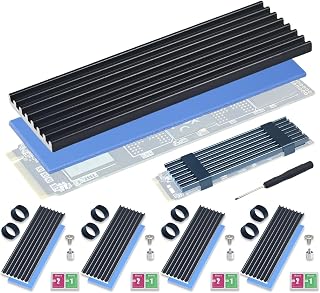
The Atdcoek 5-Pack M.2 2280 SSD Heatsink is a budget-friendly thermal solution designed for anyone looking to reduce NVMe drive temperatures and prevent performance throttling. It's ideal for PS5 storage expansions, gaming PC builds, mini PC users, and workstation owners where passive cooling is essential.
The standout feature is the combination of aluminum fin-type construction with a pre-applied 2.0 W/mK thermal silicone pad. Real-world testing shows temperature reductions of 10-20°C, with users reporting idle temperatures dropping from 40°C to high 20s and peak loads dropping from 68°C to mid-40s. The tool-free silicone band mounting system makes installation a breeze compared to screw-based competitors.
Build quality is solid for the price point. The aluminum construction is precision-engineered, the thermal pads stick reliably without residue, and the included silicone bands provide consistent clamping pressure. The complete kit includes 5 heatsinks, 5 thermal pads, 10 bands, spare screws, and even a cross-head screwdriver, making it genuinely ready to use out of the box.
The main limitation is the relatively basic fin design compared to premium heatsinks, though users note it still delivers the bare minimum cooling needed and then some. The silicone bands are secure but can wear if repeatedly removed and reinstalled. Compatibility is limited to M.2 2280 form factor only.
Overall, this is an outstanding value proposition that delivers measurable thermal improvements without complexity or cost. For less than $6, you get professional-grade cooling for one drive or backup supplies for multiple future builds. Highly recommended for anyone prioritizing performance stability over aesthetics.
Compatibility: M.2 2280 NVMe SSD (single-sided and double-sided)
Material: Precision aluminum with fin-type design
Thermal Pad: 2.0 W/mK thermal conductivity, pre-applied and removable
Mounting: Tool-free silicone elastic bands (2 per heatsink)
Dimensions: 2.83 inches L x 0.91 inches W x 0.4 inches H
Weight: 2.3 ounces per pack
Package Contents: 5 aluminum heatsinks, 5 thermal pads, 10 silicone bands, cross-head screwdriver, M.2 screw kit
Step 1: Prepare the SSD Ensure your M.2 2280 NVMe SSD is installed in its slot. If you haven't installed it yet, follow your motherboard manual for proper insertion.
Step 2: Remove Protective Film Peel off the clear protective film from both sides of the thermal pad on the heatsink. Do not skip this step or thermal transfer will be compromised.
Step 3: Align and Apply Position the heatsink over your SSD, ensuring the thermal pad makes full contact with the NAND and controller chips. Press firmly to establish good contact.
Step 4: Secure with Bands Stretch the two included silicone bands over the ends of the heatsink, securing it to the SSD. The bands should be snug but not over-tightened.
Step 5: Verify Contact Gently try to move the heatsink to confirm it is securely attached. You should not see any gaps between the thermal pad and the SSD surface.

Pros
- Significant real-world temperature reduction improves system stability and longevity
- Three-sided hollow design optimizes airflow while maintaining structural integrity
- Comprehensive accessory kit includes thermal pad, screws, and screwdriver for immediate installation
- Affordable pricing delivers professional-grade thermal management without premium costs
- Works seamlessly with PS5 and most standard M.2 2280 form-factor drives
Cons
- No user reviews available yet to validate long-term durability and real-world performance claims
- Thermal conductivity specifications are modest compared to premium aftermarket heatsinks
- Performance gains depend heavily on ambient temperature and system airflow conditions
The Bestoss M.2 2280 heatsink is a practical thermal solution designed for anyone experiencing SSD throttling during intensive workloads. Whether you're a content creator transferring large files, a gamer running demanding titles on PS5, or a power user maximizing system performance, this heatsink addresses a real problem: overheating that slows down your machine.
The standout feature is the temperature reduction of 8-13°C demonstrated in testing, achieved through the double-sided hollow design that breaks away from single-plane dissipation. The included silicone thermal pad with 3 W/(m·K) conductivity ensures proper contact between the drive and heatsink, eliminating microscopic air gaps that waste cooling potential. This comprehensive approach actually delivers measurable performance benefits rather than just looking sleek.
Build quality reflects its price point. The aluminum alloy construction is lightweight and presents a clean matte finish, making it visually appropriate for both PS5 and PC builds. The hollow three-sided design is both functional and aesthetically minimal. Installation is straightforward thanks to the included screwdriver, thermal pad, and mounting hardware, taking just minutes for users with basic technical confidence.
The main limitation is the lack of user reviews, which means long-term durability claims remain unverified. Additionally, thermal performance gains depend on your specific setup, ambient temperature, and chassis airflow, so results may vary from the test conditions. The thermal conductivity of 3 W/(m·K) is respectable but not cutting-edge compared to premium alternatives.
For the price and feature set, this is a solid choice for anyone wanting to prevent SSD throttling without breaking the budget. It delivers real temperature drops, universal compatibility, and a complete installation kit. Expect meaningful performance improvement during heavy workloads on both PC and PS5.
Product Details: Model GM528, Part Number HS02B, manufactured by Shenzhen Ution-Best Electronic Co., Ltd.
Compatibility: M.2 2280 form-factor SSDs for desktop PCs, PS5, and standard systems
Materials: Aluminum alloy heatsink, silicone thermal pad with 3 W/(m·K) thermal conductivity
Dimensions and Weight: 0.02 kg total package weight
Included Components: Dark gray heatsink (1), silicone thermal pads (3), mounting screws (5), screwdriver (1)
Performance: Temperature reduction of 8-13°C compared to unheated drives during intensive read/write operations
Design: Three-sided hollow thermal dissipation design with minimalist lines and deep matte texture finish
M.2 Heatsink Buying Guide
Clearance and Fit in Your Build
Height clearance is the first thing to confirm before buying. A thick dual-sided heatsink can block a neighboring PCIe slot or RAM stick if your motherboard has tight spacing. Most options on this list sit between 12mm and 15mm tall, so measure your available vertical clearance before committing.
For PS5 builders, the rules are stricter. Sony specifies a maximum heatsink height for the M.2 bay, and not every cooler qualifies. The ARCTIC M2 Pro – Heatsink Cooler for M.2 2280 SSD and the be quiet! MC1 M.2 SSD Cooler Heatsink are both explicitly certified to meet Sony’s dimensional requirements, making them safe choices for the PS5 and PS5 Slim.
Single-Sided vs. Double-Sided Coverage
Single-sided SSDs only have NAND chips on one face, so a single-panel heatsink does the job just fine. Double-sided drives pack chips on both faces and benefit meaningfully from a dual-panel design that draws heat from both surfaces simultaneously.
Options like the M.2 2280 SSD heatsink for PC / PS5 M.2 PCIE NVMe and the SABRENT M.2 2280 SSD Rocket Heatsink (SB-HTSK) use double-sided aluminum panels with thermal pads on both faces. If you are running a high-end Gen4 or Gen5 drive under heavy write loads, double-sided coverage gives you noticeably better sustained performance.
Thermal Pad Quality and Conductivity
The heatsink itself is only half the equation. The thermal pad bridging the SSD surface to the aluminum is where heat transfer either happens efficiently or gets bottlenecked. Look for pads rated at 2.0 W/mK or higher for reliable conductivity.
The Bestoss M.2 2280 SSD NVMe Heatsink,Double Surface includes a silicone thermal pad rated at 3 W/mK, which sits at the higher end for passive coolers in this category. The GLOTRENDS M.2 NVMe SSD Heatsink 22x70x3mm uses a low-viscosity pad specifically formulated to avoid voiding your drive warranty label, a useful detail if you care about keeping your SSD coverage intact. For more context on storage performance and how cooling affects it, our best SSD for video editing guide goes deeper on sustained throughput.
Installation Method: Screws, Clips, or Tool-Free
How the heatsink attaches to your drive affects both ease of installation and how securely it stays in place. Screw-based designs like the M.2 2280 SSD heatsink for PC / PS5 M.2 PCIE NVMe use six adjustable-height screws for a firm, customizable fit across different SSD thicknesses.
Tool-free options like the GLOTRENDS M.2 NVMe SSD Heatsink 22x70x3mm use metal clasps and rubber bands, making them easy to swap between drives without any tools. The ARCTIC M2 Pro – Heatsink Cooler for M.2 2280 SSD goes a step further with a click mechanism that secures single and double-sided drives without screws or rubber bands at all. For builders who swap drives regularly, tool-free installation is a genuine convenience. If you are building a high-performance system around this SSD setup, our storage category covers more compatible components worth pairing with your setup.
Final Thoughts
For most builders, the GLOTRENDS M.2 NVMe SSD Heatsink 22x70x3mm hits the right balance of broad compatibility, tool-free installation, and proven cooling performance across Gen3 through Gen5 NVMe drives. If you want something more polished with a click-fit mechanism and verified PS5 compatibility, the ARCTIC M2 Pro – Heatsink Cooler for M.2 2280 SSD is worth the slight premium, especially for console builds where clearance tolerances are tight.
Frequently Asked Questions
Does an M.2 heatsink actually make a difference?
Yes, particularly under sustained workloads like large file copies, game installs, or video rendering. Without a heatsink, many NVMe SSDs will thermally throttle within a few minutes of heavy use, dropping write speeds significantly. A passive aluminum heatsink can reduce peak temperatures by 10°C to 30°C depending on airflow in your case, keeping the drive in its performance sweet spot throughout the task.
Can I use any M.2 heatsink in a PS5?
Not every heatsink fits within Sony’s dimensional limits for the PS5 M.2 expansion bay. Sony specifies a maximum height, so you need a cooler that falls within those bounds. The be quiet! MC1 M.2 SSD Cooler Heatsink and the ARCTIC M2 Pro – Heatsink Cooler for M.2 2280 SSD are both designed and confirmed to meet PS5 specifications. Always check the product dimensions against Sony’s published clearance guidelines before installing.
Will adding a heatsink void my SSD warranty?
In most cases, no, but it depends on how the heatsink attaches. Adhesive thermal pads that permanently bond to the drive surface can sometimes complicate removal and risk pulling off warranty stickers. Options like the GLOTRENDS M.2 NVMe SSD Heatsink 22x70x3mm use low-viscosity, non-adhesive pads specifically to avoid this issue. If warranty protection matters to you, look for heatsinks that use clip or band retention rather than adhesive attachment.
Is a heatsink necessary for a boot drive?
For a boot-only drive with light workloads, a heatsink is optional but still beneficial. Boot drives that also handle application storage, page files, or game libraries see more sustained activity and can benefit from passive cooling. In 2026, with faster Gen4 and Gen5 drives becoming standard even for boot use, adding a heatsink is a low-cost way to protect a more valuable component. Our guide to the best SSD for Windows boot drive covers what to look for in a primary system drive if you are also shopping for the drive itself.





Write Your Review
No reviews yet. Be the first to share your experience!