

Building a logo at high zoom or cleaning the edge of a complex mask can expose every weakness in a basic office mouse. You need steady cursor control, useful scrolling, and a shape that keeps a long illustration session from becoming an endurance event.
This guide to the best mouse for graphic design compares ten wireless options for illustrators, photo editors, UI designers, and multi-monitor creatives. If your workspace also needs to support displays, drives, and peripherals, pair your choice with a creative workstation Thunderbolt 5 dock guide to make the most of your desk setup.
Quick answer
This guide compares 10 picks, with INFINMIND L910 Pro+ Ergonomic Wireless Mouse, 3-Device ranked first. TECKNET Wireless Mouse 2.4G Ergonomic Optical 2600 DPI has the most customer reviews.

Pros
- True multi-device connectivity with instant switching saves time for professionals managing multiple computers
- Programmable buttons let you automate repetitive tasks and customize the mouse to your exact workflow
- Long 90-day battery life and USB-C charging eliminate frequent dead batteries and cable clutter
- Silent mechanism keeps workspaces peaceful while maintaining responsive tactile feedback
- Precision metal scroll wheels feel premium and perform smoothly compared to plastic alternatives
Cons
- Button programming software is limited to Mac and Windows, leaving Linux users without customization options
- Six primary buttons may feel cramped for users accustomed to mice with more side buttons
- No mention of adjustable weight or replaceable parts, which some power users prefer for long-term durability
The INFINMIND L910 Pro+ is a multi-device wireless mouse designed for professionals, remote workers, and students who regularly switch between computers. It combines practical ergonomics with modern connectivity features to handle the demands of a hybrid, multi-screen workflow without the clutter of managing separate mice.
The standout feature is its three-device connectivity: one USB receiver and two Bluetooth connections let you toggle between machines with a single button press. The 6 programmable buttons are a solid productivity win, letting you automate shortcuts specific to your most-used apps. The 5-level DPI adjustment (1000 to 4800) covers both detail-oriented tasks like photo editing and fast-paced browsing. In practice, the silent clicking keeps shared workspaces quiet without feeling mushy or unresponsive.
Build quality is solid. The metal scroll wheels on the front and side feel more durable and premium than plastic alternatives, and the contoured ergonomic shape sits comfortably in your palm during long work sessions. The USB-C rechargeable battery is a modern convenience, and a 90-day charge cycle means you'll rarely hunt for power. The mouse works across Windows, macOS, Chrome, and Linux, though only Windows and Mac get full button customization.
The main limitation is that Linux users cannot reprogram buttons, which may disappoint those ecosystems. The button layout, while functional, is relatively compact and might feel crowded if you're used to gaming-style mice with eight or more side buttons. Also, there's no mention of user-replaceable parts or adjustable weight, which some professionals prefer for long-term durability and customization.
Overall, the L910 Pro+ is a smart buy for anyone managing multiple devices and values both comfort and efficiency. It's not a gaming mouse, and it's not designed for power users who need extreme customization, but it strikes an excellent balance between features, build quality, and everyday usability for the office, home office, or nomadic worker.
Connectivity: 1x USB-A (2.4GHz) + 2x Bluetooth connections (supports up to 3 devices)
Buttons: 8 total (6 programmable on Mac/Windows)
DPI Levels: 5 adjustable settings (1000, 1600, 2400, 3200, 4800)
Scroll Wheels: Front scroll wheel + side scroll wheel, both precision metal construction
Battery: Rechargeable via USB-C, lasts up to 90 days per charge
Movement Detection: Optical sensor
Compatibility: Windows, macOS, Chrome, Linux
Design: Ergonomic contoured shape, silent click mechanism
Brand: INFINMIND
Best For: Remote workers, students, and professionals who frequently switch between laptop, desktop, and tablet. If you use a Mac and Windows machine simultaneously, or if you manage multiple workspaces, this mouse eliminates the frustration of disconnecting and reconnecting.
Consider This If: You spend 6+ hours daily at a computer and want to reduce wrist strain. The ergonomic design and long battery life make it a solid investment for full-time desk workers. The programmable buttons also appeal to anyone running repetitive tasks in software like Excel, video editing, or design tools.
Skip It If: You need advanced gaming features, extreme customization (gaming mice with 10+ buttons), or you work exclusively on Linux and rely on button programming. If battery life is not a concern and you prefer wired mice, or if you only use one device, a simpler mouse may be more cost-effective.
Value Check: At this price point, the three-device connectivity and 90-day battery are competitive advantages. You're paying for convenience and multi-device support rather than gaming performance or extreme button count, which makes it a practical choice for productivity-focused users.

Pros
- Exceptional build quality and ergonomics make it comfortable for all-day use
- Multi-device Bluetooth connectivity eliminates the need for USB receivers or dongles
- Silent operation combined with precision tracking sets it apart from standard mice
- Highly responsive scroll wheel and customizable controls streamline complex workflows
- Reliable performance across Windows, macOS, Linux, and Chrome OS
Cons
- Larger size may not suit users with smaller hands or those preferring compact mice
- Steep learning curve for button customization requires time to optimize profiles
- Battery life and connectivity may vary depending on operating environment
The Logitech MX Master 3S Bluetooth Edition is a premium productivity mouse designed for professionals who spend their days switching between devices and applications. This Bluetooth-only model targets power users in design, development, and knowledge work who demand precision, comfort, and reliability without the clutter of USB receivers.
The standout features here are genuine innovations rather than marketing speak. The 8K DPI Darkfield sensor tracks reliably on any surface including glass, the Quiet Clicks reduce noise by 90% compared to the previous generation, and the MagSpeed scroll wheel is noticeably faster and more precise than traditional mice. Multi-device connectivity via FLOW allows you to work across three devices seamlessly, while customizable buttons and app-specific profiles adapt to your exact workflow through the Logi Options+ software.
Ergonomically, the MX Master 3S strikes an excellent balance. It's heavier than typical mice but not bulky, with a design that encourages natural wrist posture and thumb placement. The weight distribution feels intentional and contributes to precise control. Battery life of up to 70 days between charges is solid for a wireless mouse, and USB-C charging is convenient for modern workflows.
One consideration is the larger form factor, which some users find awkward if they prefer compact mice or have smaller hands. The reach to certain buttons can be challenging depending on grip style, as noted in real user feedback. Additionally, while Bluetooth connectivity is a major advantage for eliminating receivers, it does require initial device pairing and occasional driver updates for optimal stability.
The MX Master 3S Bluetooth Edition delivers exceptional value for professionals who value ergonomics, multi-device productivity, and silent operation. It's not the cheapest mouse on the market, but the build quality, feature set, and real-world performance justify the investment for anyone working across multiple devices or applications throughout the day.
The MX Master 3S is purpose-built for professionals and power users who operate in multi-device environments. This includes product designers, software developers, video editors, writers, and anyone whose workflow spans multiple computers or laptops throughout the day.
If you're currently using a basic mouse or trackpad and spend hours daily doing precision work, the upgrade will be immediately noticeable. The mouse also excels for anyone frustrated with inadequate ergonomics or uncomfortable hand positions during extended sessions. Those who value quiet operation in shared workspaces or home offices will appreciate the nearly silent clicks and scroll wheel.
Skip this mouse if you prefer ultra-compact travel mice, work exclusively on a single device, or need a budget option. The Bluetooth-only design also means you cannot use legacy USB receivers if needed for specific setups.
Connectivity and Compatibility: Bluetooth wireless with 33 ft operating range. Compatible with Windows, macOS, Linux, Chrome OS, iPadOS, and Android. Supports up to 3 simultaneous device connections.
Performance: 8K DPI Darkfield optical sensor, 7 programmable buttons including app-switch and gesture controls, MagSpeed scroll wheel, dual thumbwheel for horizontal scrolling and mode-shifting.
Design and Durability: Weight 4.97 oz (141g), dimensions 2 x 3.3 x 4.9 inches, ergonomic right-hand design with 27% post-consumer recycled plastic (Graphite model). Two-year limited hardware warranty included.
Power: Rechargeable 500mAh Li-Po battery, up to 70 days battery life per charge, USB-C charging. No charging cable included in box.

Pros
- Exceptional precision and responsiveness across all operating systems
- Significantly quieter operation compared to MX Master 3, reducing workplace distraction
- Outstanding 18-month battery life reduces frequent charging needs
- Reliable 33-foot wireless range with Bolt receiver provides stable connectivity
- Premium build quality with professional graphite finish
Cons
- Premium pricing places it above budget-friendly wireless mouse options
- Steep learning curve for maximizing all seven buttons and gesture controls without Logi Options+ software
- Not compatible with Logitech Unifying technology, requiring dedicated Bolt receiver
The Logitech MX Master 3S is a flagship wireless mouse designed for professionals who spend hours daily on precise digital work. Whether you're a graphic designer, video editor, software developer, or content creator, this mouse delivers the performance and comfort needed for demanding creative tasks across multiple platforms.
The standout feature is the 8K DPI Darkfield sensor, which provides unprecedented tracking accuracy on virtually any surface, including glass and reflective materials where standard sensors fail. The 90% noise reduction in clicking compared to the previous MX Master 3 makes this an exceptionally quiet option, ideal for shared offices and open workspaces. Seven programmable buttons and customizable gestures allow you to automate repetitive tasks, while the precision scroll wheel and thumb wheel provide intuitive navigation in complex applications.
Build quality is excellent with a contoured ergonomic design that fits naturally in your hand during extended work sessions. The graphite finish feels premium and resists fingerprints. At 141 grams, the mouse is substantial without feeling heavy, and the ambidextrous design works for both left and right-handed users, though the button layout favors right-handed operation.
The 18-month battery life is genuinely impressive, meaning most users will charge just 1-2 times per year. Wireless range extends to 33 feet with the included Bolt receiver, providing reliable connection stability. The main limitation is the need for Logi Options+ software on Windows and macOS to unlock full customization potential, though basic functionality works without it on all supported operating systems.
For professionals who invest in their workspace and demand precision, comfort, and reliability, the MX Master 3S justifies its premium price. It's not a mouse for casual users or gamers, but for creative and technical professionals, it's a genuine productivity upgrade that pays for itself through efficiency gains.
Connectivity: Wireless (Bolt receiver, 33 ft range)
Sensor: Darkfield optical, 8000 DPI maximum
Buttons: 7 programmable buttons plus scroll wheel and thumb wheel
Battery: 500 mAh Li-Po, 18-month average life
Weight: 141 g (4.97 oz)
Dimensions: 4.9 x 3.3 x 2 inches
Compatibility: Windows, macOS, Linux, Chrome OS, iPadOS, Android
Hand Orientation: Ambidextrous
Color: Graphite
Ideal For: Graphic designers, video editors, software developers, CAD operators, photographers, content creators, and anyone performing precision work across multiple devices. Best suited for professionals working in offices or creative studios.
Consider Alternatives If: You're a casual user seeking a basic wireless mouse, a gamer needing high-frequency polling rates, or operating on a tight budget. Also consider alternatives if you rely exclusively on Logitech Unifying receivers rather than Bolt technology.
Budget Option: Logitech's standard wireless mice offer solid performance at lower price points but sacrifice the advanced features, ergonomics, and precision tracking of the MX Master 3S.

Pros
- Exceptional value for money at under $10
- Long battery life reduces frequent replacement needs
- Comfortable ergonomic grip suitable for extended use
- Compact, lightweight design ideal for travel and portability
- Wide operating system compatibility
Cons
- AAA batteries not included with purchase
- Side button not compatible with Mac OS
- Will not work on glass surfaces without a mousepad
The TECKNET 2.4G Wireless Mouse is a budget-friendly peripheral designed for everyday computing across Windows, Mac, and Linux systems. It targets users seeking reliable performance without premium pricing, particularly office workers, students, and remote professionals who value portability.
The mouse excels in ergonomic design with its contoured shape and rubber side-grips that accommodate small to medium-sized hands. The 5-level adjustable DPI system (800 to 2600) delivers flexible cursor control for different tasks, while optical tracking provides precision on most standard surfaces. Battery longevity is a standout strength, delivering up to 24 months of operation on two AAA batteries with an on-off switch to extend life further.
Build quality reflects its price point, using ABS plastic construction that feels solid but not premium. The compact 4.09 x 2.68 x 1.49-inch footprint makes it genuinely travel-friendly, and the included USB nano receiver maintains reliable 2.4GHz connectivity up to 49 feet away. Plug-and-play setup requires no driver installation.
Limitations include poor performance on glass surfaces, incompatibility of side buttons with Mac, and the omission of batteries from the box. The wireless range of 49 feet, while adequate for most users, trails some competitors. These trade-offs are reasonable given the aggressive pricing.
The TECKNET 2.4G Wireless Mouse represents excellent value for budget-conscious buyers and travelers. Strong customer ratings confirm its reliability, making it a practical choice for anyone needing a no-frills, dependable wireless mouse for daily work.
Connectivity: 2.4GHz wireless with USB nano receiver, 49-foot range
DPI Levels: 5-level adjustable (800, 1200, 1600, 2000, 2600)
Tracking: Optical precision movement detection
Buttons: 6 buttons (note: side button not Mac compatible)
Battery: 2 x AAA batteries, approximately 24 months life
Dimensions: 4.09 x 2.68 x 1.49 inches
Weight: 85g
Compatibility: Windows XP and later, Mac OS, Chrome OS, Linux
Hand Orientation: Right-handed
Warranty: 12 months
Pros
- Rechargeable battery saves money and reduces electronic waste compared to disposable battery mice
- Ergonomic right-handed design with 6 buttons provides comfort and productivity for daily computing
- Reliable 2.4GHz wireless connection with minimal interference ensures stable performance
- Visual battery level indicator lets you know charging status at a glance
- Excellent value for money with comprehensive warranty coverage
Cons
- No left-handed option available, limiting usability for left-handed users
- Modest DPI ceiling of 2400 may feel limiting for competitive gamers or precision design work
- Limited reviews and brand recognition may concern buyers unfamiliar with Uineer
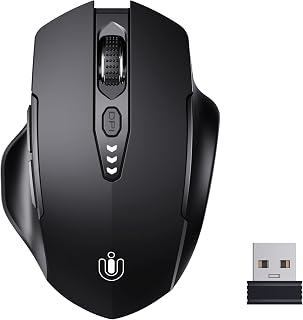
The Uineer U6P wireless mouse is an everyday computing companion designed for budget-conscious users who want reliable performance without unnecessary complexity. This mouse appeals to office workers, casual gamers, and general computer users seeking a comfortable, wireless alternative to wired mice or aging battery-powered models.
The standout feature is undoubtedly the rechargeable battery with visual display, which eliminates the frustration of unexpected battery failures and ongoing costs. The ergonomic right-handed design contours naturally to your palm, while six buttons and adjustable DPI settings (800, 1200, 1600, 2400) accommodate various computing styles. The 2.4GHz wireless connection provides stable, interference-free performance with a 10-meter range, and setup is genuinely plug-and-play with no driver downloads required.
Build quality is straightforward and practical. The matte black plastic construction feels adequately durable for daily use, though it does not project premium materials or luxury aesthetics. At 95 grams, the mouse has a lightweight feel that some users prefer, though it may feel insubstantial compared to heavier mice. The included Type-C charging cable and nano receiver (housed in the battery compartment) are practical touches that reduce clutter.
The primary limitation is the DPI ceiling of 2400, which is functional for standard office work but may feel restrictive for competitive gaming or high-precision design tasks. Additionally, the right-handed design offers no accommodation for left-handed users, narrowing the potential audience. The lack of substantial user reviews means you are taking a calculated risk on a less-established brand.
Verdict: The Uineer U6P delivers solid fundamentals at an attractive price. If you need a dependable wireless mouse with the convenience of rechargeable batteries and comfortable ergonomics, this is a smart choice. It is best suited for general computing and work rather than demanding gaming or professional design. The generous warranty provides additional peace of mind for a budget purchase.
Connectivity: 2.4GHz wireless via USB nano receiver
Movement Technology: Optical sensor
DPI Levels: 800, 1200, 1600, 2400 (adjustable)
Buttons: 6
Orientation: Right-handed
Battery: Rechargeable lithium metal, included with Type-C charging cable
Wireless Range: 10 meters
Weight: 95 grams
Dimensions: 4.65 inches L x 3.23 inches W
Compatible Operating Systems: Windows 7, Windows 8, Windows 10, Mac, Linux
Warranty: 1-year replacement service, 45-day refund policy
Included Accessories: 50cm Type-C charging cable, nano receiver, user manual

Pros
- Flow technology enables fluid multi-computer workflow, saving time and reducing context switching
- Extended 70-day battery life per charge cycle minimizes disruptions
- Precise 4000 DPI laser sensor handles both precision work and fast navigation
- Intuitive 7-button layout with customizable functions caters to power users
- Works with Windows 7 and newer, compatible with both PC and Mac ecosystems
Cons
- Requires 2 AAA batteries, which means ongoing replacement costs and environmental impact
- Right-hand only design excludes left-handed users from this premium option
- Learning curve for Flow and button customization features requires software setup time
The Logitech MX Master 2S is a premium wireless mouse engineered for professionals and power users who demand precision and efficiency. It's built for anyone managing multiple computers or complex workflows, from designers and programmers to content creators and business professionals seeking a productivity edge.
What sets the MX Master 2S apart is its Flow cross-computer technology, allowing you to control multiple computers with a single mouse and share files between them seamlessly. The 7-button design with customizable functions, combined with 4000 DPI laser tracking, delivers both versatility and precision for detailed work, photo editing, or coding tasks where accuracy matters.
The build quality reflects its premium positioning, with a comfortable ergonomic design that reduces hand fatigue during long work sessions. The 70-day battery life per charge is genuinely impressive, while the Unifying receiver and micro-USB cable provide flexible connectivity options across different setups.
The main drawbacks are the right-hand-only design, which excludes left-handed users, and the reliance on AAA batteries rather than built-in rechargeable power. Additionally, getting the most from Flow and button customization requires some initial software configuration time.
For professionals working across multiple machines or anyone seeking a high-performance wireless mouse with cross-platform control, the MX Master 2S delivers outstanding value and capability. It's an investment in productivity that pays dividends through better workflow efficiency and reduced device switching friction.
Connectivity: Bluetooth and wireless with Unifying receiver (10-meter range). Tracking: Laser movement detection at 4000 DPI maximum sensitivity. Design: Right-hand oriented, 145g weight, plastic enclosure in graphite color.
Controls: 7 programmable buttons with customizable functions. Power: 2 AAA batteries, 70-day battery life. Compatibility: Windows 7 and later, Mac, works with PC and laptop hardware platforms.
Package Contents: Mouse, Unifying receiver, micro-USB charging cable, user documentation. Model Number: 910-007221, ASIN B072RCDN7T.
Ideal for: Professionals managing multiple computers simultaneously, creative professionals requiring precision input, productivity-focused power users, Mac and PC dual-platform users, and anyone seeking to streamline multi-device workflows.
Consider alternatives if: You're left-handed, prefer built-in rechargeable batteries, need a budget-friendly basic mouse, or work exclusively on a single device without cross-computer needs.

Pros
- True multi-device switching eliminates the friction of pairing and re-pairing
- Long battery life and quick 1.5-2 hour recharge reduce daily hassles
- Metal scroll wheel balances durability with premium tactile feedback
- Works across all major operating systems and devices without driver installation
- 3-year warranty shows manufacturer confidence in product longevity
Cons
- Side-scroll wheel not supported on macOS, limiting functionality for Apple users
- Non-programmable buttons restrict customization for power users with specific workflow needs
- Older Microsoft Office versions (2016 and earlier) don't support horizontal scrolling
The TECKNET TK-MS029 is a Bluetooth wireless mouse built for professionals and multitaskers who need to switch between laptops, tablets, and desktops without friction. With support for up to 3 devices simultaneously, Bluetooth connectivity, and a compact rechargeable design, it targets anyone tired of managing multiple mice or constantly pairing devices.
The standout features deliver real productivity gains. The one-button 3-device switcher works smoothly in practice, and the horizontal side-scroll wheel genuinely saves time navigating spreadsheets and web layouts. The 6-level DPI control (800 to 4800) handles both detail work and rapid navigation, while silent clicks keep shared workspaces and libraries undisturbed. Bluetooth 5.3 connectivity is stable across devices, and the 2.4GHz fallback option removes dependency on Bluetooth hardware.
Build quality justifies the price. The precision-crafted metal scroll wheel feels premium compared to plastic alternatives, delivering smooth resistance and durability. The matte finish resists fingerprints, and the overall weight (173g) sits comfortably between lightweight and substantial. The included USB-C charging cable charges fully in 1.5 to 2 hours, and the 3-month battery life between charges means you won't be constantly hunting for power.
Real limitations exist. The side-scroll wheel doesn't work on macOS, eliminating a key differentiator for Apple users. Buttons cannot be remapped, so power users needing custom shortcuts are out of luck. Older Office versions also don't support side-scrolling. These constraints narrow the audience slightly but don't diminish value for mainstream users.
The TECKNET TK-MS029 delivers solid performance at an accessible price. It excels for desk-based multitasking, silent work environments, and anyone wanting a reliable rechargeable alternative to disposable batteries. The 3-year warranty backs durability, and compatibility spans Windows, Mac, Chrome, and Linux. If you juggle devices and value convenience over customization, this is a confident pick.
Remote workers and hybrid professionals who switch between company laptop, personal tablet, and desktop throughout the day. The one-button device switcher saves mental overhead and time re-pairing.
Spreadsheet power users and designers who benefit from horizontal scrolling to navigate wide documents and design canvases without constant view adjustments or horizontal swiping.
Anyone in shared spaces like offices, libraries, or coffee shops who appreciates silent clicks that don't distract colleagues or disrupt focus.
Budget-conscious buyers seeking premium features (rechargeable, metal construction, multi-device support) without premium pricing.

Pros
- Exceptional ergonomic build reduces hand fatigue during long work sessions
- Fast charging and multi-month battery life minimize interruptions
- Dual-host Bluetooth pairing streamlines productivity across laptops, tablets, and phones
- Customizable buttons and DPI settings adapt to individual preferences
- Silent buttons keep your workspace quiet without sacrificing responsiveness
Cons
- Right-handed design excludes left-handed users from full comfort benefits
- Teal color option limits aesthetic flexibility for some workspace setups
The Lenovo Yoga Pro is a premium ergonomic wireless mouse designed for professionals, remote workers, and anyone spending extended hours at a desk. Its thoughtful engineering balances comfort with performance, making it a solid choice for those willing to invest in peripherals that reduce strain.
The standout feature is the ergonomic design, with its full-sized symmetrical body, soft-grip sides, and thumb rest that naturally supports your hand during extended sessions. Combined with silent clicking, programmable buttons, and a configurable scroll wheel, the Yoga Pro adapts to your workflow rather than forcing you to adapt to it. The optical sensor with DPI adjustment up to 4000 delivers precision tracking on virtually any surface.
Build quality feels solid with the metal scroll wheel adding durability and tactile feedback. The rechargeable battery is practical, offering 2-3 months of use between charges and achieving a full charge in under 2 hours. Dual-device Bluetooth 5.1 connectivity with quick pairing makes switching between devices seamless, a major convenience for multi-device users.
The main limitation is that it's designed exclusively for right-handed users, which excludes lefties entirely. The Tidal Teal finish is striking but may not match all workspace aesthetics. At nearly $40, it's a premium choice, though the durability, comfort, and features justify the price for serious computer users.
Verdict: The Lenovo Yoga Pro is a well-crafted ergonomic mouse that delivers comfort, customization, and reliable performance. It's worth the investment if you spend significant time at a computer and prioritize reducing hand and wrist strain.
Connectivity: Bluetooth 5.1 Low Energy with dual-host pairing and Swift Pair
Tracking Technology: Blue optical sensor with multi-surface capability
DPI Settings: 4000 DPI maximum, three on-the-fly stages plus software adjustment
Buttons: Left, right, scroll wheel, plus two programmable side buttons and one top button
Scroll Wheel: 2-way metal construction with configurable sensitivity
Battery: Rechargeable, 2-3 months runtime, under 2-hour full charge via USB-C
Design: Full-sized ergonomic, right-handed, soft-grip sides with thumb rest
Color: Tidal Teal
Warranty: One year

Pros
- Excellent ergonomic design specifically contoured for right-handed users with natural wrist support
- Genuinely silent switches that don't compromise on click feedback or responsiveness
- Innovative dual scroll wheels significantly speed up work in spreadsheet-heavy roles
- Seamless device switching without dongles thanks to Bluetooth and dual-connector receiver
- Outstanding battery efficiency, lasting weeks on a single charge with quick emergency charging
Cons
- Right-handed design only, leaving left-handed users without an optimal option
- Requires proprietary software to customize macros, adding an extra setup step
- Premium price point may feel steep compared to basic wireless mice without ergonomic features
The Philips SPK7858 is a premium ergonomic wireless mouse built for professionals spending 8+ hours daily at their desk. This is the mouse for remote workers, analysts, designers, and anyone who refuses to sacrifice comfort or productivity for connectivity. If you've felt wrist strain or fatigue from standard mice, this product addresses that directly.
The standout feature is the dual scroll wheel system, which genuinely transforms how you work with spreadsheets and multi-column documents. The main wheel handles vertical scrolling while the thumb-side horizontal wheel lets you slice through Excel columns without dragging your cursor across screens. Combined with the 5-level adjustable DPI and customizable macro buttons, this mouse adapts to your workflow rather than forcing you to adapt to it. The laser sensor delivers precise tracking on any surface, even bare coffee shop tables.
Build quality feels solid and premium. The specially contoured right-handed shell paired with the anti-slip thumb rest demonstrates thoughtful design for comfort. The silent click switches are genuinely quiet without sacrificing tactile feedback, making this mouse perfect for open-floor offices or late-night work sessions. The rechargeable 500mAh battery lasts 25 days under typical use, and the emergency 5-minute top-up feature is a clever solution to the dead-battery-mid-meeting nightmare.
The main limitation is that this is a right-handed design only, which excludes left-handed users entirely. Setting up custom macros requires installing Philips software, adding an extra setup step compared to plug-and-play alternatives. At this price point, the investment is meaningful, though the build quality and thoughtful features justify it for professionals who value their time.
Verdict: The Philips SPK7858 is an excellent choice for professionals who spend extended hours at a desk and prioritize ergonomic comfort and workflow efficiency. The dual scroll wheels and multi-device connectivity set it apart from standard ergonomic mice. Highly recommended for anyone experiencing wrist fatigue or working across multiple devices regularly.
Connectivity: Bluetooth with dual USB-A/C receiver (42-foot range)
Buttons: 5-button design with customizable macros
Scroll Wheels: Main vertical wheel plus thumb-side horizontal scroll wheel
DPI Levels: 5-level adjustable (800, 1200, 1600, 2400, 4000 DPI)
Sensor: Laser optical sensor
Battery: 500mAh rechargeable, 25-day battery life (8 hours daily use)
Charging: 1m charging cable, 5-minute emergency charge provides 1 hour of use
Weight: 97 grams
Compatibility: Mac, PC, iPad, Windows 11+, macOS 14 Sonoma+, iOS, Android
Hand Orientation: Right-handed
Warranty: 2-year manufacturer warranty
Who Should Buy This Mouse: Right-handed professionals who work 8+ hours daily at a desk, especially those in data-heavy roles like finance, analytics, design, or content creation. Ideal for remote workers and anyone experiencing wrist fatigue with standard mice. Perfect if you regularly switch between laptop, desktop, and tablet.
Who Should Skip It: Left-handed users will not find this mouse suitable due to its right-handed design. Budget-conscious buyers seeking basic wireless functionality should consider standard ergonomic options. Those who prefer minimal software setup may find the macro customization step unnecessary.
Setup Tips: Install the Philips software before using to unlock full macro customization potential. The dual 2.4G receiver's USB-A/C connector makes it compatible with nearly any modern device without a hub. Pair via Bluetooth for seamless device switching once connected to the receiver.
Best Use Cases: Excel-heavy spreadsheet work benefits most from the dual scroll wheels. Multi-device professionals gain significant time savings from instant switching between three devices. Open-floor offices and shared spaces benefit from the genuinely silent click technology. Video production, photo editing, and CAD work leverage the 5-level DPI adjustment for precision tasks.

Pros
- Superior ergonomic design specifically engineered for small to medium hands with noticeable wrist relief
- Exceptional battery life of up to 24 months reduces frequent charging hassles
- Multi-device connectivity with Easy-Switch button makes laptop and desktop switching seamless
- Quiet clicks and smooth SmartWheel scrolling enhance focus and reduce noise in shared workspaces
- Wide platform compatibility ensures smooth operation across major operating systems
Cons
- Right-hand only configuration limits options for left-handed users
- Designed specifically for small to medium hands, making it potentially uncomfortable for users with larger hands
- Requires Logi Options+ software for full customization features, adding a setup step for new users
The Logitech Lift is a purpose-built vertical ergonomic mouse designed for office professionals and remote workers who spend hours at their desk. This right-handed mouse is engineered specifically for users with small to medium hands, offering a refreshing alternative to traditional flat mouse designs that can contribute to wrist fatigue and poor posture.
The standout feature is the innovative 57-degree vertical angle that lifts your hand into a more natural position, significantly reducing strain on your wrist and forearm. Combined with a softly textured grip and supportive thumb rest, the Lift delivers measurable comfort improvements that users consistently praise. The SmartWheel scrolling technology feels responsive and precise, while the whisper-quiet clicks minimize distractions in shared work environments.
Build quality reflects Logitech's attention to detail, with a lightweight 125-gram design that feels substantial without being fatiguing. The mouse incorporates up to 70% post-consumer recycled plastic depending on color choice, demonstrating environmental responsibility. Connectivity options include both Bluetooth and Logi Bolt USB, giving you flexibility based on your setup preferences.
The main limitation is the right-hand-only design, which excludes left-handed users. Additionally, while the ergonomic benefits are substantial, users with larger hands may find the mouse too small for optimal comfort. Battery life of up to 24 months from a single AA battery is excellent, though actual duration depends on your usage patterns.
The Logitech Lift earns strong user ratings for good reason. If you have small to medium hands and spend extended hours at a desk, this mouse delivers genuine ergonomic benefits backed by rigorous certification standards and real-world user feedback. It represents a worthwhile investment in long-term comfort and workplace productivity.
The Logitech Lift is ideal for professionals who experience wrist discomfort, work remotely, or want to prevent repetitive strain injuries. It works best for desk-based jobs involving extended mouse usage, such as coding, design work, data entry, and general office tasks across Windows, Mac, Linux, and Chrome OS platforms.
Consider this mouse if you have small to medium hands and value long battery life and multi-device connectivity. However, if you use your mouse left-handed, require ambidextrous design, or have larger hands, you may want to explore alternative ergonomic mice. The Lift requires Logi Options+ software for button customization and advanced features, so basic OS compatibility should be verified for your specific system.
For maximum benefits, pair the Lift with proper desk ergonomics, including monitor height adjustment and arm support. When combined with good posture habits, this mouse becomes a powerful tool for reducing workplace strain and improving daily comfort during extended computing sessions.
Buying Guide: What Matters for Graphic Design
The right design mouse is not always the one with the largest sensor number or the most buttons. Match its shape, scrolling behavior, control software, and connection options to the programs and devices you use throughout the day.
Sensor Control and Scrolling Precision
Design work shifts constantly between broad canvas navigation and delicate pointer placement. Adjustable DPI lets you slow the cursor for retouching, vector points, and layer work, then raise it when moving across a large display or several screens.
The Logitech MX Master 3S Bluetooth Edition lists an 8000 DPI sensor and MagSpeed scrolling, making it appealing for fast timeline or document movement. The TECKNET Wireless Mouse, Side Scroll Bluetooth adds six DPI stages and a thumb wheel, while the PHILIPS Ergonomic Wireless Mouse provides five sensitivity levels for more measured control.
Hand Comfort for Long Creative Sessions
Comfort is a productivity feature when you spend hours refining images, layouts, or presentation graphics. Look at your hand size, grip style, and whether your current mouse encourages a cramped wrist position before choosing a compact, full-size, or vertical body.
The Logitech Lift Vertical Ergonomic Wireless Mouse uses a 57-degree vertical angle and is intended for small to medium right hands. For a more traditional full-size feel, the Lenovo Yoga Pro Mouse has soft side material and a thumb rest, while the PHILIPS model combines a contoured right-handed shell with a non-slip thumb support.
Custom Shortcuts That Fit Your Software
Extra controls are worthwhile when they replace repeated keyboard reaches without getting in your way. Prioritize buttons you can reach naturally for actions such as undo, redo, brush-size changes, panning, zooming, or switching between frequently used tools.
The INFINMIND Ergonomic Wireless Bluetooth Mouse supports custom assignments across six buttons on Mac and Windows, and the Lenovo Yoga Pro Mouse offers programmable side and top controls. The PHILIPS model supports macros for selected buttons, but the TECKNET three-device model has non-programmable buttons, so confirm software support before building your workflow around shortcuts. Designers who also create game interfaces may find our mobile gaming controller recommendations useful for their broader input-device setup.
Device Switching, Ports, and Power
A mouse that follows you from a desktop to a laptop and tablet can make hybrid work much smoother. Bluetooth preserves USB ports, while a 2.4GHz receiver can offer immediate plug-and-play convenience for a dedicated desktop machine.
The INFINMIND model can switch among two Bluetooth connections and one 2.4GHz connection, while the Logitech MX Master 3S Bluetooth Edition is Bluetooth-only and does not include a receiver. The Logitech MX Master 3S Performance Wireless Mouse includes a Bolt receiver, and the MX Master 2S adds Flow cross-computer control for compatible systems. The UINEER Wireless Mouse and compact TECKNET Wireless Mouse, 2.4G Ergonomic Computer suit straightforward USB-A use. If you transfer large creative files over a home network, a dependable router for a large house and these reliable Ethernet cable choices can help keep the rest of your workflow responsive.
Final Thoughts
Your ideal design mouse should feel natural in your hand while reducing friction in the actions you repeat hundreds of times a day. Choose the Logitech MX Master 3S Performance Wireless Mouse for a feature-rich, multi-device productivity setup, or select the Logitech Lift Vertical Ergonomic Wireless Mouse when forearm posture and small-to-medium hand comfort are your main priorities.
Frequently Asked Questions
What is the best mouse for graphic design in 2026?
The strongest choice depends on your hand size, preferred software, and how many devices share your desk. A comfortable ergonomic shape, adjustable DPI, and a dependable scroll wheel matter more than an extreme sensor specification alone. Programmable buttons are especially useful when you regularly use Photoshop, Illustrator, Lightroom, Figma, or similar applications. Multi-device pairing becomes valuable if you move between a work computer, personal laptop, and tablet.
Is a vertical mouse good for graphic design?
A vertical mouse can be an excellent option if a conventional grip leaves your wrist or forearm feeling strained. Its handshake-style orientation may support a more neutral forearm position during extended desk work. It is not automatically the right answer for every designer, since some people prefer the faster familiar movements of a traditional mouse. Allow yourself time to adjust to the different hand angle before deciding whether it fits your creative routine.
Do graphic designers need a side scroll wheel?
A side scroll wheel is helpful, though not essential, for wide timelines, spreadsheets, large artboards, and horizontal web pages. It can reduce repeated Shift-scroll gestures and limit how often you drag the bottom scrollbar. This feature is most valuable for UI, web, presentation, and layout work involving wide canvases. Illustrators who mainly use a pen display may place more value on vertical scrolling and shortcut buttons instead.
Can one mouse work with Mac, Windows, and a tablet?
Many current Bluetooth productivity mice work across macOS, Windows, ChromeOS, Linux, and tablets, but button customization can vary by operating system. Check whether the model supports separate Bluetooth channels, a receiver connection, or both before relying on it for several devices. Also confirm whether side buttons and programming software work on your preferred platform. If your portable creative setup also handles game-content files, our guide to the best ssd for rog ally can help you plan extra project storage.



Write Your Review
No reviews yet. Be the first to share your experience!