

You’ve got a spare M.2 NVMe SSD sitting in a drawer, or maybe you just upgraded your laptop and want to repurpose the old drive. The problem is picking the right enclosure, because the market spans everything from bare-bones USB adapters to full Thunderbolt 4 enclosures with active cooling. If you’re shopping for accessories to pair with a new machine, our roundup of the best gifts for laptop owners is also worth a look.
This guide covers ten of the best NVMe enclosure options available in 2026, evaluated across speed tiers, build quality, compatibility, and real-world usability. Whether you need a slim pocket-sized adapter or a high-performance enclosure for professional video work, there’s a solid pick here for you.
Quick answer
This guide compares 10 picks, with Yottamaster M.2 NVMe SSD Enclosure 40Gbps Thunderbolt 4 ranked first. SSK M.2 NVMe SATA SSD Enclosure USB 3.2 Gen2 10Gbps has the most customer reviews.

Pros
- Exceptional build quality with professional-grade ASM2464PD controller for reliable sustained performance
- Transparent casing adds visual appeal while allowing monitoring of cooling fan and power status
- Extremely fast setup process and tool-free design make it accessible for all users
- Excellent compatibility across multiple device ecosystems and operating systems
- Handles demanding workflows like 4K video editing and large file transfers without throttling
Cons
- Actual transfer speeds depend heavily on SSD specification and host system, not just the enclosure
- Requires a 40Gbps-rated cable for peak performance, which may require separate purchase
- Performance benefits only fully realized when connected to Thunderbolt 3/4 or USB4 hosts, not with standard USB-C
The Yottamaster M.2 NVMe SSD Enclosure is a premium external storage solution designed for professionals and power users who demand speed and reliability. It transforms standard M.2 NVMe SSDs into portable, Thunderbolt 4 and USB4-connected drives, making it perfect for creative workflows, video editors, data professionals, and anyone managing large files across multiple devices.
Performance is the standout feature here. With 40Gbps architecture and real-world sustained speeds of 2800-3200 MB/s, this enclosure excels at 4K video editing, large file transfers, and professional workflows. The ASM2464PD controller chip manages thermal and power stability even under heavy loads, eliminating the performance throttling you often see with budget alternatives. For optimal results, pair it with a 40Gbps-rated Thunderbolt 4 cable on compatible devices.
Design and build quality impress immediately. The transparent aluminum and crystal case reveals the active cooling fan and LED indicators, offering both aesthetic appeal and functional transparency. Tool-free installation takes under 30 seconds, and the enclosure supports M.2 sizes from 2230 to 2280, accommodating capacities up to 8TB. Universal compatibility spans Windows PCs, USB-C laptops, tablets, and any device with Thunderbolt 4 or USB4.
The main limitation is that performance gains depend entirely on your host system's capabilities. Older USB-C devices or standard USB connections will not achieve the advertised speeds, and you need a compatible 40Gbps cable to maximize performance. Additionally, actual transfer speeds vary based on your specific SSD model, file sizes, and system configuration.
Verdict: This is a well-engineered enclosure for serious users who need fast, reliable external storage. It delivers excellent performance, beautiful design, and hassle-free setup. Recommended for content creators, video editors, and professionals working with large files. If you have Thunderbolt 4 or USB4 devices and a fast SSD, this enclosure justifies its price through speed and reliability.
Hardware Interface: Thunderbolt 4
Connectivity: Thunderbolt 4, USB4, USB-C
Data Transfer Rate: 40 Gbps
Compatible Platforms: Windows, macOS (via USB-C)
Compatible Devices: Desktop, Laptop, Tablet
Supported M.2 Sizes: 2230, 2242, 2260, 2280
Maximum Capacity: 8TB
Controller Chip: ASM2464PD
Case Material: Aluminum and Crystal (transparent)
Cooling: Active cooling fan
Installation: Tool-free, 3-step process
Weight: 3.84 ounces
Included: Enclosure and 2-in-1 cable
Warranty: 1 Year
Who Should Buy This: Content creators, video editors, photographers, software developers, and professionals who need fast external storage for demanding workflows. Also ideal for power users and tech enthusiasts who value both performance and design.
Who Should Reconsider: Users with older devices lacking Thunderbolt 4 or USB4 will not benefit from the 40Gbps speeds. Those on tight budgets may find less expensive USB 3.1 alternatives sufficient for basic file backup and transfer tasks.
Key Considerations: Verify your device has Thunderbolt 4 or USB4 to maximize performance. Purchase a 40Gbps-rated cable separately if not included with your device. The final transfer speed depends on both your SSD and host system capabilities, not just the enclosure. Real-world speeds typically range from 2800-3200 MB/s depending on file size and system conditions.
Alternative Use Cases: Perfect as a game library drive for consoles with USB-C storage expansion, a portable editing drive for multimedia professionals, or a fast backup solution for time-sensitive work environments.

Pros
- Exceptional value at under $15 with professional-grade performance and build quality
- Fast 10Gbps transfer speeds handle 4K video editing, game development, and large data backups
- Compact 4x1.1x0.47 inch form factor fits easily into bags and laptop cases
- Metal construction with efficient heatsink design maintains reliability during heavy use
- Works immediately with any system, no software or driver hassles required
Cons
- Only supports NVMe M-key drives, not compatible with SATA M.2 or NGFF SSD formats
- Included 0.5M cables may be too short for some desk setups or use cases
- Limited passive cooling may require active ventilation in extended high-performance scenarios
The V VCOM M.2 NVMe Enclosure is a compact external storage solution designed for content creators, developers, and anyone needing fast portable SSD access. This enclosure targets users who want to expand storage or create mobile backup solutions without sacrificing speed or portability.
Performance stands out as the primary strength here. With USB 3.1 Gen2 delivering up to 10Gbps transfer speeds, this enclosure handles large file transfers quickly and supports UASP, TRIM, and S.M.A.R.T protocols that optimize real-world SSD performance. Whether you're transferring 4K video footage or backing up project files, the speed difference versus slower enclosures becomes immediately noticeable.
Build quality reflects the affordable price point in the best way possible. The aluminum alloy construction with metal heatsink and striped design improves heat dissipation without adding bulk. At just 102x28x12mm and 0.08kg, it's slim enough to toss in a bag while feeling solid and professional. The included dual cables (USB-A to USB-C and USB-C to USB-C) provide flexibility for different connection scenarios.
The main limitation is drive compatibility. This enclosure strictly supports NVMe M-key drives in four sizes (2230, 2242, 2260, 2280), so SATA M.2 or NGFF drives won't work. Additionally, passive cooling may need supplementation during sustained high-speed transfers on systems without good airflow.
For budget-conscious users seeking no-compromise portable NVMe storage, this enclosure delivers excellent value. The 4.6-star rating from hundreds of reviews confirms its reliability across Windows, Mac, and Linux systems. Recommended for professionals, gamers, and creators who need fast external storage without premium pricing.
Connectivity: USB 3.1 Type-C with backward compatibility, 10Gbps data transfer rate
Compatibility: M.2 NVMe SSDs in sizes 2230, 2242, 2260, 2280 (M-key and B+M key). Works with Windows 7+, Mac OS, and Linux systems. Supports laptops, desktops, phones, tablets, and gaming consoles.
Physical Specs: 102x28x12mm (4.02 x 1.1 x 0.47 inches), weighs 0.08kg, constructed from aluminum alloy with metal heatsink
Features: Plug-and-play design, no drivers required, LED indicator for connection status, UASP/TRIM/S.M.A.R.T protocol support, tool-free assembly
Included: One 0.5M USB-A to USB-C cable and one 0.5M USB-C to USB-C cable
Who Should Buy: Content creators working with large files, gamers needing portable game libraries, professionals requiring secure external backups, developers testing across systems, and anyone upgrading older slower external storage.
Capacity Consideration: This enclosure supports drives up to 4TB, so capacity depends on your chosen NVMe SSD. Popular compatible brands include Crucial, WD, Kingston, and Integral.
Cable Note: Both included cables measure 0.5 meters. If you need longer reach, standard USB-C cables (certified USB 3.1 Gen2) work as replacements.
Performance Expectations: Real-world speeds depend on your specific SSD and connected system. USB 3.1 Gen2 is the bottleneck here, not the enclosure, so any modern NVMe drive reaches near-maximum theoretical speeds.
Best For: Anyone seeking reliable portable NVMe storage under $20 with no software installation required and compatibility across multiple operating systems.

Pros
- Fast 10Gbps speeds make file transfers and media workflows significantly quicker
- Exceptional cross-platform compatibility covers virtually every major operating system
- Aluminum build with thermal pad design prevents throttling during sustained use
- Compact and portable design with included case perfect for mobile professionals
- Strong hardware protection safeguards expensive SSDs from electrical damage
Cons
- Requires USB 3.2 Gen2 cable to achieve full 10Gbps speeds, not always included
- Does not support SATA NGFF or mSATA drives, limiting upgrade path for some users
- SSDs with built-in heatsinks may not fit due to compact design
The UGREEN 10Gbps M.2 NVMe SSD Enclosure is a high-speed external storage solution designed for anyone who regularly works with large files, backs up data, or needs portable SSD storage. Whether you're a video editor, developer, creative professional, or Mac mini user looking to expand storage, this enclosure bridges the gap between internal drives and external portability without sacrificing performance.
The standout feature is its genuine 10Gbps USB 3.2 Gen2 connectivity, which translates to real-world performance gains when transferring large video files, datasets, or project folders. The enclosure supports modern NVMe SSDs in all major sizes (2230 to 2280) up to 8TB, and works across Windows, Mac, Linux, Android, and iOS without driver issues. The inclusion of UASP and TRIM support further optimizes performance and ensures your drive operates at peak efficiency.
Build quality is solid with an aluminum chassis that doubles as effective heat dissipation, complemented by a thermal pad that maintains contact with your drive. The ultra-slim design and included silicone protective case make it genuinely portable, fitting easily into a laptop bag or travel setup. The RTL9210 chip provides legitimate hardware-level protection against short-circuits and overcurrent, giving you peace of mind when storing valuable data.
The main limitation is the enclosure's compact design, which means SSDs with built-in heatsinks won't fit. You'll also need to supply your own USB 3.2 Gen2 cable to achieve the full 10Gbps speeds; older USB 3.0 or 3.1 cables will work but cap speeds lower. Before use, ensure your SSD is formatted in a filesystem your target device supports.
For the price, this UGREEN enclosure delivers excellent value as a fast, reliable external NVMe solution for Mac mini, laptops, and desktops alike. It's particularly strong for Mac users seeking an affordable way to expand storage capacity with modern speeds.
Connectivity: USB 3.2 Gen 2 (backwards compatible with USB 3.1 and USB 3.0)
Data Transfer Rate: Up to 10 gigabits per second
Supported SSD Sizes: 2230, 2242, 2260, 2280 (M-Key and B+M Key NVMe)
Maximum Capacity: 8TB
Compatible Systems: Windows, Mac OS, Linux, Android, iOS
Hardware Controller: RTL9210 chip with UASP and TRIM support
Material: Aluminum with thermal pad
Weight: 93 grams
Warranty: 1 Year
Model: UGREEN 35267
Who Should Buy This: Mac mini owners wanting affordable external SSD storage, video editors and content creators handling large files, developers needing portable project storage, and anyone seeking a reliable cross-platform external NVMe solution.
What You Need to Know Before Buying: This enclosure requires a USB 3.2 Gen 2 cable to achieve the advertised 10Gbps speeds, so verify your computer has this capability or purchase the cable separately. The SSD must be formatted in a compatible filesystem for your target device. Drives with attached heatsinks will not fit due to the slim profile.
What's Not Included: The USB 3.2 Gen2 cable, the NVMe SSD itself, and any pre-installed software (the enclosure is plug-and-play on modern systems).
Best Use Cases: External backup storage for creatives, portable project storage for remote workers, Mac mini expansion without opening the case, and travel backup solutions where speed matters.

Pros
- Exceptional speed performance at 10Gbps makes it one of the fastest portable SSD solutions available
- Sleek aluminum design is durable, compact, and weighs only 0.1kg for true portability
- Supports up to 4TB capacity and works with multiple operating systems without driver installation
- Comprehensive package includes both cable types and thermal management accessories
- High customer satisfaction with 4.5 out of 5 stars from thousands of verified users
Cons
- Limited to M.2 form factor, incompatible with mSATA, 2.5-inch SATA drives, or M.2 PCIe AHCI devices
- Requires USB 3.2 Gen2 or Thunderbolt 3 host device to achieve maximum 10Gbps speeds, slower on older USB standards
- SSD drives sold separately, enclosure requires manual formatting before first use
The SSK SHE-C325 PRO is a premium external enclosure designed for professionals and enthusiasts who need fast, reliable storage expansion. It accommodates M.2 NVMe PCIe and SATA SSDs in standard sizes (2242, 2260, and 2280), making it versatile enough for most modern solid-state drives. This enclosure is ideal for content creators handling large video files, data professionals managing backups, and anyone requiring portable high-capacity storage.
Performance is this enclosure's defining strength. With USB 3.2 Gen2 connectivity delivering 10Gbps speeds, file transfers happen at lightning pace. The advanced RTL9210B controller chip ensures consistent performance while supporting UASP and TRIM protocols to maintain your SSD's health and longevity. Users can expect significantly faster workflow compared to traditional external hard drives or older USB interfaces.
Build quality stands out with its slim aluminum alloy construction that provides excellent heat dissipation through included thermal pads. At just 0.1kg, it's genuinely portable without sacrificing durability or performance. The reversible USB-C connector adds convenience, and backward compatibility with USB 3.1 and USB 3.0 means it works with older devices, though at reduced speeds.
The main limitation is compatibility scope. The enclosure requires M.2 form factor SSDs and does not support mSATA, 2.5-inch SATA drives, or certain PCIe devices. Additionally, to reach maximum 10Gbps speeds, your host device must support USB 3.2 Gen2 or Thunderbolt 3. The package includes both USB-C and USB-A cables, thermal pads, and a screwdriver, but the SSD itself must be purchased separately.
The SSK SHE-C325 PRO earns strong marks as a fast, well-built external enclosure for M.2 SSDs. Its exceptional speed, build quality, and broad OS compatibility make it a solid choice for anyone needing portable storage that keeps pace with modern workflows.
Interface: USB 3.2 Gen2 (10Gbps) with USB-C connector, backward compatible with USB 3.1 Gen1 and USB 3.0.
Compatibility: NVMe PCIe and SATA M.2 SSDs with M-Key or B+M connectors in 2242, 2260, and 2280 sizes. Supports up to 4TB capacity. Works with Windows 7/8/8.1/10, macOS, Linux, Android, and iOS.
Controller: RTL9210B chip with UASP and TRIM support for optimized performance and SSD longevity.
Physical: Aluminum alloy construction, space gray color, 4.52 inches long by 1.55 inches wide by 0.43 inches tall, weighs 0.1kg.
Package Contents: M.2 enclosure, USB 3.2 Type-C cable, USB 3.0 Type-A cable, 2x thermal pads, screwdriver, and user documentation. Includes 1-year warranty.
Who Should Buy: Content creators, video editors, photographers, IT professionals, and power users who need fast external storage. Ideal for those upgrading laptop M.2 SSDs or creating backup solutions for large files.
Key Considerations: Verify your SSD is M.2 form factor with M-Key or B+M connector before purchasing. Check that your host device supports USB 3.2 Gen2 or Thunderbolt 3 to maximize speed benefits. Remember that the enclosure is sold without an SSD, so budget separately for the drive itself.
Compatibility Check: This enclosure is incompatible with mSATA drives, 2.5-inch SATA drives, and M.2 PCIe AHCI or non-storage devices like WiFi cards. Ensure your SSD matches the supported form factors and protocols for seamless operation.
Performance Tips: Install included thermal pads properly for optimal heat dissipation. New SSDs must be formatted before use on your host operating system. No drivers are required, and the device works immediately after connection for true plug-and-play convenience.

Pros
- Exceptional speed performance delivers professional-grade data transfer for video editing, RAW file management, and large file backups
- Active cooling system actively prevents thermal throttling, ensuring consistent high-speed performance during sustained use
- Wide hardware compatibility spans Apple silicon Macs, iPad Pro, Windows PCs, and Linux systems without driver issues
- Compact and rugged design makes it genuinely portable for professionals working across multiple locations
- Intel-certified chip provides reliable Thunderbolt 4 connectivity with full backward compatibility for older devices
Cons
- Cooling fan requires manual activation via switch, adding a step some users may forget during first setup
- Premium pricing reflects professional-grade positioning and may be higher than basic USB-C enclosures without active cooling
- No user reviews available yet to validate long-term durability and real-world performance consistency
The ACASIS TBU405 Pro is a high-end external NVMe enclosure designed for creative professionals, Mac users, and data-intensive workflows. It bridges the gap between internal SSD performance and portable external storage by delivering true 40Gbps speeds through USB4 and Thunderbolt connectivity. This enclosure is ideal for video editors, photographers, software developers, and anyone managing large 4K/8K files who needs reliable, fast external drives without performance bottlenecks.
The standout feature is the combination of 40Gbps Intel JHL7440 chip architecture paired with active cooling. Verified speeds reach 2805/2734 MB/s read/write performance on compatible systems, making it substantially faster than typical USB-C external drives. The built-in cooling fan actively manages thermal output, preventing the SSD throttling that degrades performance during heavy file transfers or sustained backup operations. This engineering choice directly addresses a real problem professionals face with passive enclosures.
Build quality reflects the premium positioning with an aluminum chassis that feels solid while remaining compact enough for everyday portability. At 4.65 x 2.24 x 0.7 inches, it fits easily in a laptop bag without adding bulk. The design supports M2280, M2260, M2242, and M2230 form factors, giving flexibility with different drive options. Connectivity spans USB4, Thunderbolt 4, Thunderbolt 3, and backward compatibility with USB 3.2, 3.1, and 3.0, making it work across Mac, iPad Pro, Windows, and Linux systems without compatibility headaches.
The primary consideration is that the cooling fan requires manual activation via a physical switch. While this design choice preserves battery life and reduces noise when cooling isn't needed, it's an extra step users need to remember during setup. Additionally, as a premium product with no user reviews yet, potential buyers are relying on ACASIS's specifications and the Intel certification rather than proven long-term reliability data in the field.
For professionals and power users who prioritize speed and reliability over budget, the TBU405 Pro delivers genuine value. The active cooling ensures your high-capacity drives perform consistently, and the Thunderbolt 4 connectivity future-proofs your investment. It's an excellent choice for anyone who has experienced frustrating slowdowns with cheaper external drives and wants a solution that matches their professional equipment.
Connectivity: USB4, Thunderbolt 4, Thunderbolt 3, USB 3.2, USB 3.1, USB 3.0, USB 2.0
Controller Chip: Intel JHL7440 certified
Data Transfer Rate: 40Gbps (verified up to 2805/2734 MB/s)
Supported M.2 Sizes: 2280, 2260, 2242, 2230
Maximum Capacity: 8TB
Material: Aluminum enclosure with precision heat dissipation
Cooling: Active cooling fan with manual activation switch
Dimensions: 4.65 inches L x 2.24 inches W x 0.7 inches H
Compatible Platforms: M1/M2/M3 MacBook Pro/Max, iPad Pro, Windows 10/11, Linux
Warranty: 2 years
Who Should Buy This: Video editors, photographers, creative professionals, Mac users with M-series chips, software developers managing large codebases, anyone transferring multiple gigabytes of files regularly. If you work with 4K/8K video, large RAW image libraries, or need reliable external backup performance, this enclosure is worth the investment.
Who Might Want to Wait: Budget-conscious buyers who rarely transfer large files may find basic USB-C enclosures sufficient. Those who only need occasional external storage without speed requirements can save money with passive alternatives. Users primarily working on older computers without Thunderbolt ports will not benefit from this enclosure's premium features.
Setup Tips: Remember to activate the cooling fan using the physical switch when performing sustained transfers. Pair this with high-performance NVMe drives like the Samsung 990 Pro or Sabrent Rocket 4 Plus to achieve the maximum speeds this enclosure enables. Use Thunderbolt 4 ports on Mac or USB4 ports on Windows for optimal performance versus Thunderbolt 3 or USB 3.x ports.
Real-World Performance: In typical use with modern MacBooks and high-end Windows systems, you can expect consistent 2400+ MB/s transfer speeds for real files, making full backups and project transfers noticeably faster than standard external drives. Thermal management means performance remains stable during extended work sessions.

Pros
- Blazingly fast performance moves 6GB files in one second, ideal for 4K video editing and large file transfers
- Exceptional thermal management keeps temperatures down for sustained high-speed operation
- Wide NVMe drive compatibility supports most modern M.2 form factors
- Compact and lightweight design makes it genuinely portable for creative professionals
- Premium aluminum construction feels solid and durable for daily professional use
Cons
- No reviews available yet, so real-world user feedback is limited
- Not compatible with SATA SSDs or drives with pre-installed heatsinks, limiting drive options
The UGREEN 80Gbps NVMe enclosure is purpose-built for Mac mini users seeking professional-grade external storage. It combines Thunderbolt connectivity with a dual-chip architecture to deliver speeds up to 7000MB/s, making it essential for content creators, developers, and anyone transferring large files regularly.
Performance is the standout here. The Intel JHL9480 Thunderbolt controller paired with the JMicron JMS583 bridge controller creates a stable, fast pipeline that moves 6GB files in a single second. For 4K video editing, large project backups, or boot drive cloning, this enclosure handles professional workflows without thermal throttling.
Thermal design receives genuine engineering attention. The biomimetic dual-sided aluminum fins increase heat dissipation by 91%, and the spatial airflow design reduces surface temperatures by 10%. This isn't marketing fluff, it means sustained performance without the fan noise or thermal limits you'd see in cheaper enclosures.
The build quality reflects the price. Premium aluminum construction weighs just 232g and travels well. Compatibility spans M.2 drives in 2230 through 2280 sizes up to 8TB, plus full support for Mac, Windows, Linux, and Android. The main limitation is requiring NVMe drives without pre-installed heatsinks, which narrows options slightly.
Verdict: This is a high-performance storage solution for professionals and power users who need reliability and speed. If you're editing 4K video on Mac mini, managing large datasets, or want fast portable backups, the investment pays off in workflow efficiency. Entry-level users exploring external storage may find cheaper options sufficient.
Supported NVMe Sizes: This enclosure accepts M.2 NVMe drives in 2230, 2242, 2260, and 2280 form factors. Capacity support goes up to 8TB with most modern drives. Note that thicker SSDs with factory thermal pads may require removing the pad and replacing it with a thinner one to fit properly.
Operating Systems: Works across Mac (M1-M5 Pro/Max), Windows, Linux, and Android devices via USB-C connectivity. For maximum speed, use with Thunderbolt 3, 4, or 5 ports. USB 4 and USB 3.2 ports work but at reduced speeds compared to Thunderbolt.
Incompatible Drives: Do not use SATA SSDs (NGFF form factor), mSATA drives, or NVMe drives with non-removable heatsinks. Pre-installed thermal solutions typically prevent proper seating in the enclosure cavity.
Hardware: USB Type-C connector, USB-C to USB-C cable included. Data Transfer Rate: Up to 80 gigabits per second (7000MB/s under optimal conditions). Controller Chipset: Intel JHL9480 Thunderbolt controller + JMicron JMS583 NVMe bridge controller.
Physical: Aluminum construction, silver color, 232g weight. Dimensions and cooling: Dual-sided aluminum biomimetic fins with advanced 3D heat dissipation design. Warranty: 1 year manufacturer coverage. Model Number: 95583 (UGREEN).

Pros
- Exceptional build quality with aluminum housing that feels solid and durable
- Fast data transfer speeds verified by users cloning drives in minutes
- Complete accessory bundle eliminates the need to buy additional cables or thermal solutions
- Works seamlessly across multiple operating systems and devices with zero driver installation
- Thoughtful design touches like thermal padding and protective silicone case
Cons
- Requires USB 3.2 Gen2 cable and port to achieve full 10Gbps speeds, backward compatibility is slower
- Alignment guide marks between case and insert could be better documented, causing insertion confusion initially
- Not compatible with SATA drives or mSATA SSDs, only NVMe protocol devices
The UGREEN USB-C M.2 NVMe SSD Enclosure is a portable storage solution designed for Mac users, video professionals, and PC owners who need reliable external SSD access. It bridges the gap between internal and portable storage with tool-free installation and genuine 10Gbps transfer capabilities, making it practical for data backup, emergency file recovery, and creative workflows.
Performance stands out in real-world scenarios. Users report successful drive cloning in under 30 minutes and praise the thermal stability, noting the enclosure stays cool under sustained use. The RTL9210 chipset delivers on its promise of 10Gbps speeds when paired with USB 3.2 Gen2 ports, while maintaining backward compatibility with USB 3.1 and 3.0 for flexibility across devices.
The build quality justifies the price point. The aluminum housing feels premium and protective, the buckle mechanism keeps drives secure during transport, and the included thermal pad minimizes heat concerns. The dual-cable approach (USB-C to USB-C and USB-C to USB-A) covers most connectivity scenarios without additional purchases, and the silicone case adds practical protection.
Minor friction exists in the user experience. The diamond alignment marks that guide drive insertion should be more prominently documented, as some users initially struggle with proper seating. Additionally, the enclosure exclusively supports NVMe drives with M or B+M keys, ruling out older SATA-based SSDs.
This enclosure is a smart buy for anyone with modern NVMe SSDs who values speed, ease of use, and reliability. Its cross-platform compatibility and complete accessory bundle make it a compelling choice for both Mac and PC environments, whether for professional workflows or personal data management.
Interface and Performance: USB 3.2 Gen 2 with 10Gbps data transfer rate, backward compatible with USB 3.1 and USB 3.0
Compatibility: NVMe M.2 SSDs with M key or B+M key, sizes 2230, 2242, 2260, and 2280 up to 8TB capacity. Compatible with Windows, Mac OS, Linux, Android, and iOS. Does not support SATA NGFF or mSATA drives.
Physical Design: Aluminum enclosure measuring 4.92 inches L x 1.61 inches W x 0.55 inches H, weighing 139 grams. Includes silicone protective case.
Protection and Features: RTL9210 chipset with short-circuit and over-current protection, supports UASP and Trim functionality. Thermal management pad included.
Included Accessories: USB-C to USB-C cable, USB-C to USB-A adapter cable, silicone thermal pad, protective silicone case, and user manual.
Warranty: 2-year manufacturer warranty
Best For: This enclosure suits Mac mini users seeking external NVMe storage, video editors managing large project files, backup enthusiasts protecting data, and anyone needing emergency access to old computer drives after hardware failure.
What to Check Before Buying: Verify your device has a USB 3.2 Gen2 port and USB-C support to access full 10Gbps speeds. Confirm your M.2 SSD uses NVMe protocol with M or B+M keys (not SATA). If you need 10Gbps performance, purchase the included USB-C cable for best results.
Setup Tips: Align the small diamond mark on the drive with the matching mark on the enclosure insert to ensure proper seating. Apply the thermal pad to the back of your SSD before installation. Use the USB-C to USB-C cable with compatible devices for maximum speed, or the USB-A adapter for older computers.
Expected Performance: Full 10Gbps speeds appear in benchmarks and real-world large file transfers when using USB 3.2 Gen2 hardware. Sustained thermal performance remains stable during extended use thanks to the included thermal management pad.

Gamers and streamers building a portable rig will appreciate the ROG Strix Arion's 10 Gbps USB 3.2 Gen 2 Type-C interface, which keeps load times snappy when paired with a laptop. Its aluminum alloy shell handles heat from sustained transfers, and support for multiple M.2 form factors means it fits whatever PCIe drive you already own.
Pros
- 10Gbps USB 3.2 Gen 2 Type-C
- Aluminum body with integrated thermal pads
- USB-C-to-C and USB-C-to-A cables
- Tool-free support for 2230 to 2280 drives
Cons
- Limited to 10Gbps USB speeds
- Gaming-focused RGB styling
At the 10Gbps level, the ROG Strix Arion makes the case for choosing a well-equipped enclosure rather than the most basic way to carry an NVMe SSD. Its USB 3.2 Gen 2 Type-C interface is rated for 10Gbps, a speed suited to moving large game libraries, video files, and project folders. The aluminum-alloy body and integrated thermal pads are central to that role, helping the SSD stay cool during intensive transfers so performance can remain consistent. It accepts M-key and B+M-key NVMe drives in 2230, 2242, 2260, and 2280 sizes, giving a spare drive a portable purpose. Installation is screwdriver-free, while the included pin ejector and protective holder support setup and storage. ASUS also includes USB-C-to-C and USB-C-to-A cables, which broadens the range of host ports it can connect to without a separate cable. At 98 grams, it has a solid portable form. The angular design and RGB ROG logo with Aura Sync compatibility add a gaming-focused visual element, but the more meaningful reason it earns a place among speed-focused picks is its 10Gbps interface paired with thermal management.
Connectivity and Speed: USB 3.2 Gen 2 Type-C interface with 10Gbps data transfer rates. Includes USB-C to USB-C and USB-C to USB-A cables for universal device compatibility.
Compatibility: Supports M.2 NVMe SSDs in 2230, 2242, 2260, and 2280 form factors with M-Key or B+M Key notches. Works with laptops, desktops, and any device with USB-C connectivity. SSD not included.
Design and Materials: Premium aluminum alloy enclosure with integrated thermal pads for heat dissipation. Dimensions: 7 inches length, 4 inches width, 2 inches height. Weight: 98 grams. Features ASUS Aura Sync RGB lighting with customizable color effects.
Installation: Tool-free screwdriver-free design with pin ejector and protective holder included. Includes R Hook accessory and protective carrying holder for portability and storage.
Warranty: 1-year manufacturer warranty from ASUS covering defects and hardware failure.
Buy the Strix Arion if your speed need is reliable 10Gbps USB storage for an NVMe drive, particularly for game backups, project transfers, or video files. It also suits users who want both USB-C and USB-A cable options, broad M.2 size support, and a tool-free setup. Skip it if you need Thunderbolt-class performance beyond 10Gbps, use an M.2 SATA rather than NVMe drive, or prefer an enclosure without a gaming-oriented RGB design.

For creative professionals moving huge video files, the Thunderbolt connection and PCIe x4 interface push speeds up to 40Gb/s, making this a strong fit for high bitrate multimedia work. Its compact 2.5 inch portable form factor suits editors who bounce between desktop, laptop, and tablet setups without sacrificing throughput.
Pros
- 3151MB/s rated transfer speed
- Thunderbolt connectivity
- Silent passive aluminum cooling
- Works with Mac, Windows, and PlayStation 5
Cons
- SSD changes require screws
- No SSDs with attached heatspreaders
When the priority is the highest transfer rate in this lineup, OWC's Express 1M2 occupies the Thunderbolt tier. This portable NVMe enclosure is listed at up to 3151MB/s, and its Thunderbolt connection is meant for workflows where a 10Gbps USB enclosure could become the bottleneck. That focus makes sense for shifting large photo collections, multimedia assets, game data, or business files, and for creative work such as video editing. The chassis is designed to dissipate heat passively through aluminum, avoiding a fan and the noise it would bring. The existing description reports sustained speeds around 3GB/s on Apple Silicon Macs and states it works across Mac, Windows, and PlayStation 5. A USB-C cable and screwdriver are included for a do-it-yourself NVMe installation. Rather than emphasizing tool-free access, this pick emphasizes a durable metal build, silent cooling, and high-speed transfer capability. There is a trade-off: changing the SSD means opening the enclosure and unscrewing the drive assembly. An NVMe SSD with an attached heatspreader also will not fit. For users selecting an enclosure by speed first, those constraints are easier to accept for its Thunderbolt-level throughput.
Interface and Speed: PCIe 4x NVMe, Thunderbolt 4 / USB4 / USB-C connectivity with up to 3836MB/s real-world performance and 3151MB/s rated speeds.
Compatibility: Works with Mac (Apple Silicon and Intel), Windows PCs, and PlayStation 5. Supports NVMe M.2 2280, 2242, and 2230 form factors (bare drives only, no heatspreaders).
Physical Design: Aluminum metal enclosure, 5.1 inches long by 0.9 inches wide by 2.7 inches thick, weighing 280g. Bus-powered with no external power required. Includes 40Gb/s USB-C cable and screwdriver.
Warranty and Support: 2-year limited warranty on enclosure, 3-year warranty on the complete solution. Backed by OWC's professional support team.
Buy the Express 1M2 when your use case calls for the fastest portable NVMe storage here, especially for multimedia, video editing, photography, gaming, or large business transfers on compatible desktop, laptop, or tablet systems. It is particularly appropriate for users who value quiet passive cooling and are comfortable installing an SSD with screws. Skip it if quick, tool-free drive swaps matter most, your NVMe has an attached heatspreader, or your workload does not need Thunderbolt-class throughput.
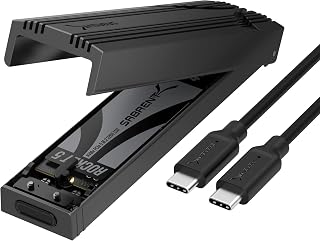
Anyone needing serious archival space alongside speed should note the 8 TB capacity paired with a 1250 MB/s transfer rate over USB. Built for both Mac and PC desktops, it suits users consolidating large media libraries or backups onto a single external drive without juggling multiple enclosures.
Pros
- 10Gbps USB-C performance
- Screwless flip-open installation
- Thermal-pad cooling design
- Compact 4.59-inch enclosure with up to 8TB support
Cons
- USB-A adapters reduce speed
- NVMe only, not M.2 SATA
Speed does not always require a Thunderbolt enclosure. The SABRENT EC-PNVO targets the 10Gbps USB-C class, with a rated data transfer rate of 1250MB/s, and puts equal attention on making that speed accessible in a small portable format. It supports one M.2 PCIe NVMe SSD with capacity listed up to 8TB, making it an option for creating fast external storage from a compatible drive. Its flip-open design eliminates screws and tools for installation. The cover fits tightly, according to the existing description, and opens by pulling from the end away from the USB-C port. Inside, an aluminum thermal-pad system contacts the SSD to manage heat through sustained jobs such as drive cloning or large video transfers. The exterior pairs a reinforced ABS frame with a machined aluminum-alloy top, while the charcoal enclosure measures 4.59 by 1.24 by 0.6 inches and weighs 2.62 ounces. A USB-C-to-C cable is included to enable its full 10Gbps capability. It can work through USB-A adapters, although speeds are lower, so a USB-C host is the better fit for the maximum rate. This is a strong mid-speed choice when straightforward drive access, compact dimensions, and thermal design matter alongside 10Gbps USB performance.
Connectivity: USB 3.2 Gen 2 (10Gbps), USB-C port
Compatibility: M.2 NVMe PCIe SSDs in 2230, 2242, 2260, and 2280 sizes, up to 8TB capacity
Performance: 1,250 MB/s data transfer rate with thermal stability management
Physical: 4.59 inches long, 1.24 inches wide, 0.6 inches tall, weighs 2.62 ounces
Materials: Aluminum alloy top with ABS reinforced frame and thermal pads
Included: USB-C to USB-C cable, spare thermal pad, user manual
Warranty: 1 year limited, 3 years with manufacturer registration
Compatibility: Windows PC and Mac systems, also works with gaming handhelds and any USB-C device
Buy this Sabrent enclosure if you need a compact 10Gbps USB-C home for an M.2 NVMe drive and want to install or remove it without screws. It is well suited to Mac or PC users moving large files, cloning drives, or carrying up to 8TB of compatible NVMe storage. Skip it if you need Thunderbolt-level transfer speeds, rely mainly on USB-A and expect maximum performance, or need an enclosure for an M.2 SATA SSD rather than NVMe.
NVMe Enclosure Buying Guide
Interface Speed: Match the Enclosure to Your Workflow
The single biggest factor in your purchase decision is interface speed. USB 3.2 Gen 2 tops out at 10Gbps, which is plenty for everyday file transfers and drive cloning. If you’re working with large RAW files or high-bitrate video, you’ll want a USB4 or Thunderbolt 4 enclosure running at 40Gbps or higher.
The UGREEN 80Gbps M.2 NVMe SSD Enclosure for Mac sits at the top of the speed ladder with its dual-chip Intel JHL9480 design, while options like the UGREEN USB-C M.2 NVMe SSD Enclosure for Mac and the SSK M.2 to USB NVMe SATA SSD Enclosure USB 3.2 offer reliable 10Gbps performance at a much lower investment. Match the enclosure’s speed tier to your host device’s port capability, otherwise you’ll leave performance on the table either way.
Thermal Management: Sustained Speed vs. Throttling
Heat is the quiet enemy of sustained NVMe performance. Passive aluminum housings handle light workloads fine, but during long sequential transfers your drive will throttle if heat has nowhere to go. A quality thermal pad between the SSD and the aluminum shell makes a meaningful difference.
For the most demanding workflows, the ACASIS 40Gbps M.2 NVMe SSD Enclosure with Cooling takes it further with an active built-in fan, specifically designed to prevent thermal throttling during heavy sustained loads. The Yottamaster M.2 NVMe SSD Enclosure 40Gbps also includes fan monitoring via its transparent cover, so you can confirm cooling is active at a glance. If you run long backups or transfer multi-terabyte archives regularly, active or enhanced passive cooling is worth prioritizing. Curious about other storage-adjacent gear? Our list of the best Black Friday external hard drive deals rounds up additional options worth considering.
SSD Compatibility: Form Factor and Protocol
Not every enclosure supports the same drives. Most options here accept 2230, 2242, 2260, and 2280 form factors, but you should confirm before buying, especially if you’re using a compact 2230 SSD from a laptop upgrade. Protocol matters too: the SSK M.2 to USB NVMe SATA SSD Enclosure USB 3.2 supports both NVMe and SATA M.2 drives, making it more versatile than NVMe-only enclosures.
The V VCOM M.2 NVMe SSD Enclosure USB C External and the SABRENT USB-C NVMe Enclosure & Reader are NVMe-only, which is fine if you know your drive’s protocol. Always double-check your SSD’s interface before purchasing. If you’re shopping for someone else and unsure of their drive type, a dual-protocol option is the safer gift, as noted in our guide to gifts for tech lovers.
Build Quality and Portability
If the enclosure lives on your desk, build quality is mostly about longevity and heat dissipation. But if you carry it in a bag daily, slim dimensions and a sturdy shell matter a lot. The ASUS ROG Strix Arion Aluminum Alloy M.2 NVMe SSD stands out here with its full aluminum ROG chassis, included thermal pads, and Aura Sync RGB, making it as much a style statement as a functional tool.
For travelers, the OWC Express 1M2 40Gb/s Portable NVMe SSD features a patented heat-dissipating design in a palm-sized, bus-powered package, no external power brick required. The UGREEN 10Gbps M.2 NVMe SSD Enclosure for Mac mini ships with a silicone sleeve for added protection on the move. If portability is your top priority, check what accessories pair well on the road in our guide to gifts for travelers.
Final Thoughts
There’s a strong NVMe enclosure for every type of user in this lineup. If you want the best balance of speed, active cooling, and broad compatibility without committing to the highest tier, the ACASIS 40Gbps M.2 NVMe SSD Enclosure with Cooling is a compelling choice for power users. For those who need maximum raw throughput and are working with a Mac mini or Thunderbolt 5 host, the UGREEN 80Gbps M.2 NVMe SSD Enclosure for Mac is in a class of its own, delivering speeds that rival internal drive performance.
Frequently Asked Questions
What is an NVMe enclosure used for?
An NVMe enclosure turns an internal M.2 NVMe SSD into a portable external drive you can connect via USB-C or Thunderbolt. Common use cases include transferring data between computers, cloning a drive before an upgrade, using a retired laptop SSD as fast portable storage, and running a fast external OS or scratch disk for creative work.
Do I need a Thunderbolt enclosure, or will USB 3.2 be enough?
It depends on your host device and workload. USB 3.2 Gen 2 at 10Gbps is sufficient for most everyday tasks, including backing up files, installing games, or transferring video projects under a few gigabytes. If you routinely move large media libraries, work with uncompressed 4K or 8K footage, or need consistent peak performance, a 40Gbps USB4 or Thunderbolt 4 enclosure is a worthwhile investment in 2026. Your host port also has to support the faster standard, otherwise the enclosure will fall back to a slower speed.
Can I use an NVMe enclosure with a gaming console or tablet?
Many of the enclosures reviewed here, including the V VCOM M.2 NVMe SSD Enclosure USB C External and the UGREEN USB-C M.2 NVMe SSD Enclosure for Mac, are confirmed compatible with Android tablets and USB-C devices. Compatibility with gaming handhelds like the Steam Deck is also supported by several options on this list. Always verify that your device’s USB-C port supports data transfer and not just charging before purchasing. For gift ideas pairing well with gaming setups, see our picks for the best gifts for gamers.
Does an NVMe enclosure work without installing drivers?
Yes, every enclosure in this roundup is plug-and-play on Windows, macOS, and Linux with no additional drivers required. Your SSD does need to be formatted before first use, and the file system must be one your operating system can read. For example, a drive formatted as APFS will not be readable on Windows without third-party software, so format accordingly for the platform you plan to use.





Write Your Review
No reviews yet. Be the first to share your experience!