

Adding several NVMe drives sounds simple until your motherboard detects only one of them, your array cannot boot, or sustained transfers slow down from heat. The right card can turn a spare PCIe slot into a fast scratch volume, media library, game storage pool, or redundant workspace.
This guide covers dedicated RAID controllers, PCIe switch cards, and lower-cost bifurcation adapters for creators, home-lab users, and performance-focused PC builders. If your storage upgrade supports a video workflow, pairing it with one of these 32-inch 4K monitor picks for editing can make large projects far easier to manage.
Quick answer
This guide compares 10 picks, with LinksTek PCIE-PEX8747M8 PCIe 3.0 x8 to 4-Port NVMe M.2 ranked first. SABRENT EC-P3X4 4-Drive M.2 NVMe to PCIe 3.0 x4 Adapter holds the highest customer rating among them. ASUS Hyper M.2 X16 Gen 4 PCIe 4.0 Expansion Card, 4 has the most customer reviews.

Pros
- Four physical NVMe M.2 slots expand storage capacity without requiring motherboard bifurcation.
- Onboard Broadcom PLX switching simplifies multi-drive compatibility on supported PCIe systems.
- Supports UEFI GPT boot from NVMe drives as well as software RAID configurations.
- Broad compatibility includes Windows, Linux, VMware ESXi, Proxmox VE, TrueNAS, Synology DSM, QTS, Unraid, and other platforms.
Cons
- The four drives share a 64Gb/s PCIe upstream connection, so aggregate throughput can be lower than the combined maximum of all four slots.
- No hardware RAID controller is included, so RAID management depends on the operating system or NAS platform.
- Requires an available PCIe x8-compatible slot and platform support, while macOS support is intended for storage expansion rather than booting.
The LinksTek PCIE-PEX8747M8 is a PCIe Gen 3.0 x8 expansion card designed to add four NVMe M.2 SSDs to desktop computers, NAS systems, workstations, and virtualization hosts. It is especially useful when a motherboard lacks native multi-drive bifurcation support.
Its Broadcom PLX PEX8747 switch converts the upstream PCIe connection into four PCIe x4 links, giving each M.2 slot link capacity of up to 32Gb/s. The shared 64Gb/s upstream connection is well suited to fast storage pools, editing workloads, gaming libraries, and virtual machines, although four drives cannot exceed the total host-side bandwidth.
The card supports M.2 2230, 2242, 2260, 2280, and 22110 NVMe drives using Key-M slots, along with NVMe protocols 1.3, 1.4, and 2.0. Its listed 7.8 x 4.72 x 0.71 inch dimensions and 110g weight provide a straightforward expansion-card format, while the supplied specifications do not detail additional cooling hardware.
Important limitations include the lack of hardware RAID, meaning RAID must be configured through the operating system or NAS software. It supports PCIe Gen 4.0 and Gen 5.0 systems but operates at its native Gen 3.0 performance, and macOS storage support is provided without recommending the card for boot use.
Overall, the PCIE-PEX8747M8 is a practical choice for users who need four NVMe slots and want to avoid motherboard bifurcation requirements. Its flexible operating-system support, UEFI boot capability, and PLX-based lane expansion make it a strong storage upgrade, provided the shared upstream bandwidth and software RAID design fit the intended workload.

Pros
- Extremely high storage throughput for professional video editing and workstation workloads
- Supports up to eight user-installed NVMe M.2 2280 SSDs
- Flexible RAID options and bundled SoftRAID management software
- Solid aluminum construction with active cooling for sustained performance
- Positive compatibility and low-noise feedback from Mac Pro and workstation users
Cons
- NVMe SSDs must be purchased separately, increasing the total system cost
- Actual speed depends on the host PCIe generation, installed SSDs, RAID configuration, and workload
- One review reported intermittent I/O and device-recognition issues in an enterprise SQL server environment
The OWC Accelsior 8M2 is a professional PCIe expansion card that supports up to eight NVMe M.2 2280 SSDs. It is designed for video editors, visual-effects artists, content creators, and workstation users who need much higher storage throughput than a conventional single-drive setup can provide.
Performance is the main attraction, with speeds of up to 12,000 MB/s on PCIe Gen 3 systems and up to 26,000 MB/s on compatible PCIe Gen 4 platforms. That bandwidth is aimed at demanding workflows such as multi-stream 8K and 12K ProRes editing, high-resolution EXR playback, and large project transfers.
SoftRAID makes it easier to build and monitor RAID arrays, with support for RAID 0, 1, 4, 5, 10, and JBOD configurations. The card uses a full PCIe x16 architecture, while its aluminum heat shield and integrated fan are intended to help maintain performance during sustained workloads.
There are important system considerations. The card does not include the NVMe drives, and real-world results vary with the selected SSDs, host system, PCIe generation, and RAID setup. Although Mac Pro and workstation feedback is strong, one review described intermittent I/O and device-recognition problems in an enterprise SQL server environment.
Overall, the Accelsior 8M2 is a powerful storage platform for compatible creative workstations and high-performance desktops. It is a particularly strong choice for users who can populate all eight slots with quality NVMe drives and need exceptional bandwidth, but enterprise buyers should validate compatibility and stability before deployment.

Pros
- Bootable RAID 0, RAID 1, and RAID 10 provide flexible choices for speed, redundancy, and system reliability.
- Four M.2 NVMe ports deliver high-density storage expansion on a single PCIe x16 card.
- Broad Windows and Linux compatibility supports workstations, servers, and virtualization platforms.
- Integrated temperature and TBW monitoring helps users manage SSD health and maintenance.
Cons
- Requires a free dedicated PCIe x16 slot and a compatible 64-bit operating system.
- Actual performance depends on the installed SSDs, RAID mode, motherboard, and workload, so the maximum speed is not guaranteed in every setup.
- Boot configuration may require platform-specific UEFI downloads, drivers, and installation steps.
The HighPoint SSD7105 is a four-port M.2 NVMe RAID controller designed for desktop PCs, workstations, servers, and advanced storage builds. It is especially well suited to users who need bootable high-speed storage on Windows or Linux.
Its main advantage is flexible bootable RAID support for up to four NVMe SSDs, including RAID 0, RAID 1, and RAID 10. With suitable drives and system hardware, the controller is rated for transfer performance up to 14,000 MB/s and supports capacity up to 32TB per controller.
The compact PCIe card accepts common 2242, 2260, 2280, and 22110 M.2 SSD formats. A low-noise cooling system, adjustable fan control, and integrated temperature and TBW monitoring add useful control for sustained workloads.
Installation requires a dedicated PCIe x16 slot, compatible NVMe drives, and a supported 64-bit operating system. Platform-specific drivers, UEFI downloads, and setup guides may add configuration work, particularly for bootable arrays and less common Linux environments.
The SSD7105 is a capable choice for professionals and enthusiasts who want bootable NVMe RAID with strong expansion potential and broad operating system support. Buyers seeking simple plug-and-play storage expansion without a suitable PCIe slot may prefer a less specialized solution.
Pros
- Supports four M-key NVMe SSDs from a single PCIe x16 slot.
- Solid heatsink helps manage SSD temperatures during use.
- Compatible with several common M.2 drive lengths.
- Individual LEDs provide useful drive activity feedback.
- Users report easy installation and reliable recognition on compatible servers and workstations.
Cons
- Requires motherboard PCIe x16 bifurcation support and BIOS configuration for all four drives to appear.
- Does not support SATA-based M.2 B+M key SSDs or hardware RAID.
- A suitable x16 slot and enough CPU PCIe lanes may not be available on every desktop platform.
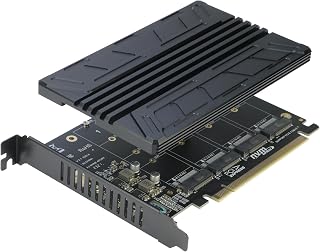
The RIITOP Quad NVMe PCIe Adapter is designed for users who want to install up to four M-key NVMe SSDs in a server, workstation, or enthusiast desktop. It is a practical expansion option when the motherboard provides an available PCIe x16 slot and supports lane bifurcation.
With the correct x4x4x4x4 BIOS configuration, the card can expose all four drives independently and support high-speed NVMe storage expansion. It accepts 2230, 2242, 2260, and 2280 M.2 NVMe drives, while individual LEDs help confirm each drive's operating status.
The included aluminum heatsink adds thermal mass over the installed SSDs and is designed to help limit heat-related performance loss. Customer feedback also points to straightforward installation, dependable operation on compatible servers, and a solid overall build.
Compatibility is the main limitation. The motherboard must support PCIe x16 bifurcation, the CPU must provide enough PCIe lanes, and the adapter only supports M-key NVMe drives, not SATA-based B+M key SSDs. It also provides software RAID support rather than hardware RAID.
For systems with the required bifurcation features, this adapter offers an affordable way to consolidate four NVMe drives into one expansion card. Buyers should verify the motherboard manual, BIOS options, slot layout, and available PCIe lanes before purchasing.

Pros
- Supports up to four NVMe SSDs on one PCIe adapter card
- Useful for software RAID and JBOD storage configurations
- Aluminum heatsink and thermal padding help manage drive temperatures
- Works in x4, x8, and x16 PCIe slots and supports older PCIe generations
- Installation hardware is included, and users report straightforward setup
Cons
- It supports M-Key NVMe SSDs only, not B-Key or B&M-Key drives
- Four-drive visibility depends on motherboard compatibility, PCIe lane configuration, and BIOS settings
- PCIe 3.0 x4 bandwidth is shared across the installed drives, which can limit simultaneous transfer speeds
The SABRENT EC-P3X4 is a storage expansion card for desktop PCs and workstations that need more NVMe capacity without adding several separate adapters. It accepts up to four M-Key 2280 SSDs and is a practical choice for software RAID, JBOD, project storage, and media workflows.
Its strongest benefit is the ability to consolidate multiple NVMe drives on one PCIe card. The PCIe 3.0 x4 connection provides useful bandwidth for everyday storage and random-access workloads, although simultaneous activity across four drives can share and limit available throughput.
An aluminum housing and integrated silicone thermal padding help transfer heat away from the installed SSDs while adding structure to the card. The package includes the required M.2 screws and a screwdriver, making installation relatively simple for compatible systems.
Compatibility requires careful attention before purchase. Only M-Key NVMe SSDs are supported, and whether all four drives appear depends on the motherboard, PCIe lane layout, and BIOS configuration. It also has no hardware RAID controller, so RAID and JBOD setup must be handled by Windows or macOS.
Overall, the EC-P3X4 is a capable and flexible way to add several NVMe drives to a compatible computer. It is especially well suited to users who value storage density and software-managed arrays, provided they confirm host compatibility and understand the shared PCIe 3.0 bandwidth.

Pros
- Four-drive NVMe capacity in a single PCIe card
- Excellent potential performance for video editing, large file transfers, and workstation workloads
- Supports multiple RAID modes for different storage and data protection needs
- Silent passive cooling design with strong thermal management
- Useful for upgrading older Mac Pro systems with faster storage
Cons
- M.2 NVMe SSDs are not included
- Actual speed depends on the installed SSDs, PCIe generation, RAID setup, and host computer
- Installation may require thermal pads and careful drive compatibility checks, while macOS RAID boot options can be limited
The Sonnet M.2 4x4 Silent Gen3 is a PCIe NVMe expansion card designed for users who need multiple high-speed SSDs in one desktop or Thunderbolt expansion system. It suits Mac Pro, Windows, and Linux workstations, especially those used for demanding storage tasks.
With four M.2 NVMe slots and support for RAID 0, 1, 5, and 10, the card offers a useful balance of speed, capacity, and data protection. Sonnet rates compatible RAID 0 configurations for sustained speeds up to 14,000 MB/s, although results depend on the SSDs and host PCIe interface.
The silent passive cooling design is a major advantage for quiet workstations. Dedicated thermal management and included mounting hardware help the card maintain stable performance, and customer feedback highlights strong cooling and substantial speed improvements in older Mac Pro systems.
Buyers should plan for a hands-on installation, including thermal pads and compatibility checks for the selected NVMe drives. The SSDs are sold separately, and macOS may restrict using a RAID array as a boot volume, while older PCIe buses can limit maximum throughput.
Overall, this is a well-built storage upgrade for professionals and enthusiasts who want four-drive NVMe flexibility without adding fan noise. It is most compelling for high-performance workflows where scalable capacity, RAID options, and dependable thermal control matter.
Pros
- Adds four M.2 NVMe slots without requiring four separate expansion cards
- High bandwidth supports storage-intensive workloads and RAID configurations
- Active cooling helps reduce M.2 drive throttling under sustained loads
- Broad M.2 size support and compatibility with Windows, macOS, and Linux
Cons
- Requires a compatible PCIe 4.0 motherboard and platform support for the intended RAID features
- The integrated fan adds an additional moving component and potential noise source
- Performance and drive visibility may depend on motherboard configuration and RAID support
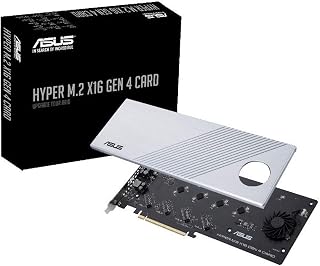
The ASUS Hyper M.2 X16 Gen 4 is a PCIe expansion card for builders who need more high-speed NVMe storage than their motherboard provides. It is aimed at workstation users, enthusiasts, and professionals creating RAID arrays on compatible AMD or Intel platforms.
Four M.2 slots share PCIe 4.0 bandwidth with a rated capacity of up to 256Gbps. Support for 2242, 2260, 2280, and 22110 drives makes the card suitable for a wide range of NVMe SSDs and storage-heavy workloads.
A built-in heatsink and blower-style fan help manage temperatures during sustained transfers, while support for drives using up to 14W accommodates newer performance-oriented SSDs. The server-grade low-loss PCB is designed to support reliable high-speed signaling.
The main limitation is platform compatibility, since the card requires an appropriate PCIe 4.0 system and may rely on motherboard or controller support for RAID operation and drive detection. The active fan can also introduce more noise than a passive expansion card.
Overall, this is a capable storage expansion solution for users who need four NVMe drives in one card. Its cooling, bandwidth, and RAID-oriented design make it a strong fit for compatible AMD TRX40, X570, AM4, and Intel VROC systems.

Pros
- Supports four M.2 NVMe SSDs from one PCIe x16 slot
- High potential throughput with compatible PCIe 4.0 hardware
- Flexible compatibility with multiple M.2 drive lengths
- Soft RAID support through Windows or Linux
- Includes full-height and low-profile mounting brackets
Cons
- Requires motherboard PCIe bifurcation because it has no onboard switch chip
- Only the first SSD may appear on unsupported boards, while x8x4x4 mode exposes just three drives
- Boot support varies by motherboard, and M.2 SSDs are not included
The GLOTRENDS PA41 is a quad M.2 NVMe to PCIe 4.0 x16 adapter designed for desktop PCs and servers that need more high-speed storage from a single expansion slot. It suits users building large storage pools, workstation arrays, or software RAID setups, provided their motherboard supports PCIe bifurcation.
With four compatible NVMe SSDs installed, the adapter can deliver up to 64Gbps per drive and 256Gbps combined under ideal PCIe 4.0 conditions. Actual results depend on the CPU, motherboard, PCIe configuration, and SSDs, while Windows and Linux users can create fast or redundant arrays with operating system tools.
The card supports M.2 lengths from 2230 through 22110, covering most common NVMe formats. Full-height and low-profile brackets are included, and driver support is available across Windows 8 and newer, Linux, and macOS, although Windows 7 and Mac Pro 5.1 are excluded.
Compatibility is the main limitation because the PA41 has no onboard switch chip. The motherboard must provide x4x4x4x4 bifurcation or Hyper M.2 x16 mode, otherwise only the first drive may work, and x8x4x4 mode detects only three drives. Booting from the card can also require OS reinstallation and BIOS configuration.
The GLOTRENDS PA41 is a practical, compact expansion option for experienced builders who have verified bifurcation support. It offers useful four-drive capacity and software RAID flexibility, but buyers with unsupported boards should choose a hardware-switching adapter instead.

Pros
- Adds four NVMe M.2 2280 drives through a single PCIe 4.0 x16 slot.
- Aluminum heatsink helps control SSD temperatures during heavy workloads.
- Independent power modules are designed to support high-power NVMe drives.
- RAID 0 can substantially increase sequential throughput with compatible drives and hardware.
- Driver-free design and included screwdriver kit simplify installation.
Cons
- Requires motherboard PCIe bifurcation and compatible lane-splitting settings, which are not available on every desktop.
- Some motherboards may support only configurations such as x8+x4+x4, preventing access to all four drives.
- NVMe SSDs are not included, and RAID 0 provides no data redundancy if one drive fails.
The KONYEAD KEDEC004 is a PCIe 4.0 x16 expansion card that adds four M.2 2280 NVMe slots to a compatible desktop. It is designed for storage enthusiasts, workstation builders, and users who need several high-speed SSDs without filling multiple PCIe slots.
Its main performance advantage comes from combining multiple drives in RAID 0, with advertised read speeds of up to 14,000 MB/s when the SSDs, motherboard, and RAID configuration support that result. Actual throughput will vary based on the installed drives, PCIe lane allocation, operating system, and workload.
The aluminum alloy heatsink helps dissipate heat from the SSDs during sustained transfers, while the independent 12V-to-3.3V power design is intended to provide stable power for demanding NVMe drives. The driver-free design, Windows, macOS, and Linux compatibility, plus the included screwdriver kit, make installation more convenient.
The most important limitation is motherboard compatibility. PCIe bifurcation is required, typically with x4x4x4x4 or 4x4 lane settings, and some boards support only arrangements such as x8+x4+x4. The card also does not include SSDs, and RAID 0 improves speed without protecting data from drive failure.
For a desktop with the right bifurcation controls, the KEDEC004 is a practical way to build a four-drive NVMe storage array with useful cooling and power management. Buyers should confirm their motherboard manual supports the required lane split before purchasing.

Pros
- Supports four M.2 NVMe drives in a single PCIe x16 expansion slot
- Active cooling helps maintain more consistent performance during extended transfers
- Compatible with both PCIe 4.0 and PCIe 3.0 M.2 storage
- Broad drive-size support includes 2242, 2260, 2280, and 22110 formats
- Useful for NVMe RAID and high-capacity workstation storage builds
Cons
- The number of usable SSDs depends on motherboard, CPU, BIOS bifurcation, and PCIe lane support
- Requires PCIe NVMe drives and does not support SATA-based M.2 storage
- The active fan adds noise and requires an available power connection
The ASUS Hyper M.2 x16 Gen 4 is a PCIe expansion card for desktop users who want to add multiple high-speed NVMe SSDs without installing separate adapter cards. It is aimed at workstation builders, content creators, and enthusiasts with a compatible motherboard that supports PCIe bifurcation or supported NVMe RAID features.
Its main advantage is the ability to accommodate up to four M.2 drives while supporting PCIe 4.0 and PCIe 3.0 storage. With platform support for the full configuration, the card can provide up to 256Gbps of aggregate bandwidth, making it suitable for large file transfers, storage pools, and demanding multi-drive workloads.
A large heatsink and active fan help control SSD temperatures during sustained use, while the two-phase power solution provides up to 14 watts for newer NVMe drives. The server-style PCB and support for 2242, 2260, 2280, and 22110 drive lengths add useful flexibility for different storage upgrades.
Compatibility requires careful checking before purchase because the number of usable drives varies by CPU, motherboard design, BIOS bifurcation settings, and available PCIe lanes. It supports PCIe NVMe devices only, so SATA M.2 drives are not compatible, and the active fan may introduce some additional noise.
Overall, the ASUS Hyper M.2 x16 Gen 4 is a strong expansion option for users building a compatible multi-drive NVMe system. Its four-drive capacity, active cooling, and support for PCIe 4.0 make it particularly appealing for high-throughput storage builds, provided the motherboard and processor support the intended configuration.
How to Choose an NVMe RAID Card
PCIe Lanes, Slot Width, and Bifurcation
Four NVMe drives need more than a physically long PCIe slot. Passive adapters generally require a motherboard and CPU that can split an x16 slot into four x4 links, usually configured as x4/x4/x4/x4 in BIOS or UEFI. Check the board manual before ordering, because an x16-shaped slot alone does not guarantee bifurcation support.
The ASUS Hyper M.2 models, GLOTRENDS PA41, RIITOP Quad NVMe PCIe Adapter, KONYEAD card, and SABRENT 4-Drive adapter depend on host bifurcation. In contrast, the PCIE-PEX8747M8 PCIE 3.0 x8 Interface to 4-Port uses an onboard PLX switch, making it a practical alternative for systems without bifurcation. Four active SSDs and a powerful graphics card can also increase system demand, so review these 80 Plus Gold power supply picks when planning a full workstation build.
RAID Method, Redundancy, and Boot Support
RAID is not a universal speed switch. RAID 0 combines drives for higher throughput but provides no fault tolerance, while RAID 1 mirrors data and RAID 10 blends speed with redundancy across four drives. Whichever layout you choose, RAID is not a replacement for a separate backup.
The HighPoint 4-Port M.2 SSD7105 PCIe Gen3 Bootable is designed for bootable RAID 0, 1, and 10 arrays in Windows and Linux. OWC Accelsior 8M2 8-Slot NVMe M.2 to PCIe 4.0 uses SoftRAID for array management, while cards such as the SABRENT and GLOTRENDS options present drives for operating-system or third-party software RAID. For editors building a cache drive around a capable display, our budget 1440p monitor recommendations offer useful screen options for a balanced creative setup.
PCIe Generation, Capacity, and Drive Fit
PCIe 4.0 x16 adapters can offer four x4 Gen 4 connections when the CPU, motherboard, slot configuration, and SSDs all support that standard. The stated 256Gbps figure on ASUS and GLOTRENDS cards is a theoretical link ceiling, not a promise that every workload will reach that number. A Gen 3 card can still be an excellent fit when your host platform or workload does not need Gen 4 bandwidth.
Confirm that the card accepts M-key NVMe drives and supports your chosen lengths, especially if you use 22110 enterprise-style SSDs. The Sonnet M.2 4×4 Silent Gen3 PCIe NVMe SSD Card supports four drives and high sustained RAID 0 throughput, while the OWC design expands to eight SSDs for large projects. Gaming builds should also weigh whether storage capacity, graphics performance, and display choice align, especially alongside a high-refresh 4K gaming display.
Cooling, Clearance, and Operating System Compatibility
Four tightly packed SSDs can generate substantial heat during long file transfers, rendering, or sustained game installs. Look for a full heatsink, thermal pads, and active airflow where possible. The ASUS Hyper M.2 cards use a large heatsink and fan, while the RIITOP card adds a heatsink and individual drive activity indicators.
Measure clearance around your graphics card, confirm whether you need a low-profile bracket, and leave room for airflow. Also verify platform support before you build an array, since boot behavior and RAID tools vary among Windows, Linux, macOS, NAS systems, and virtualization hosts. The LinksTek card supports storage expansion across a broad set of operating systems, but macOS boot use is not its intended role.
Final Thoughts
For maximum multi-drive capacity and flexible software-managed arrays, the OWC Accelsior 8M2 8-Slot NVMe M.2 to PCIe 4.0 is a standout choice. If your priority is a bootable Windows or Linux array with RAID 0, 1, or 10 support, the HighPoint 4-Port M.2 SSD7105 PCIe Gen3 Bootable is the more focused route. Choose based on your platform’s lanes, BIOS options, cooling space, and need for redundancy.
Frequently Asked Questions
Do I need PCIe bifurcation for a four-drive NVMe card?
Yes, for most passive four-drive adapters, your motherboard must support PCIe lane splitting and offer the required x4/x4/x4/x4 setting. Without it, the system may detect only one drive or fewer than the card’s full capacity. A switch-based card can avoid this requirement by managing downstream connections on the card itself.
Which RAID level is right for NVMe SSDs?
Choose RAID 0 only when performance matters more than fault tolerance and the data is protected elsewhere. RAID 1 is useful for mirrored data, while RAID 10 is a strong option for four drives when you need both speed and redundancy. Your operating system, controller, and motherboard firmware determine which layouts are available.
Can I boot Windows or Linux from an NVMe RAID card?
Booting depends on both the card and your motherboard’s UEFI support. Dedicated bootable controllers provide the clearest route, but some switch cards also support UEFI boot from an individual NVMe SSD. Update firmware, confirm drive detection in UEFI, and follow the card maker’s supported installation process before moving your operating system.
Can an NVMe RAID card work in a laptop?
These cards are intended for desktop PCIe slots or compatible external expansion chassis, not a typical laptop’s internal M.2 bay. A laptop can still access shared storage over a network or through suitable external hardware, but it cannot directly accept a full-size PCIe RAID card. If you use both systems at one desk, these vertical laptop stand options can help keep the notebook organized beside your storage workstation.





Write Your Review
No reviews yet. Be the first to share your experience!