

Building a high-performance PC means planning for heat. When your CPU and GPU push maximum clocks during gaming sessions or rendering workloads, stagnant air inside your case becomes the enemy. An airflow-focused enclosure removes hot air efficiently, maintains lower component temperatures, and reduces fan noise by eliminating the need for aggressive RPM curves.
This guide evaluates 10 cases built specifically for thermal efficiency. We’ve examined mesh density, fan mounting options, internal airflow paths, and compatibility with high-end cooling hardware to help you choose the right foundation for your build.
Quick answer
This guide compares 10 picks, with Lian Li V100 ATX Mid-Tower PC Case with 4 ARGB Fans ranked first. CORSAIR 4000D RS ARGB Modular Mid-Tower Case has the most customer reviews.

This mid-tower delivers robust cooling potential with support for four internal bays, giving you flexibility to configure multiple fans or radiators exactly where heat builds up. The built-in dust filters keep components clean during extended high-load sessions, while the ATX motherboard compatibility ensures you can pair it with full-size boards that benefit most from unrestricted airflow paths.
Pros
- Supports up to nine 120mm fans for maximum airflow scalability
- Four pre-installed PWM ARGB fans with hydraulic bearings included
- Tool-less tempered glass panels for quick filter maintenance
- Open internal layout minimizes airflow resistance
Cons
- Zero sound dampening with panoramic glass design
- Requires frequent dusting due to high air volume
The Lian Li V100 solves airflow needs through sheer fan capacity and intelligent layout. Supporting up to nine 120mm fans with four pre-installed ARGB units, this mid-tower pushes serious air volume through its panoramic glass design. The case accommodates 360mm radiators, GPUs up to 420mm, and CPU coolers up to 178mm, giving you room to build cooling around even heat-generating flagship components. The PWM fans use hydraulic bearings for quiet operation despite moving substantial air, and the angled PSU shroud keeps exhaust pathways clear. Cable routing stays behind the motherboard tray where it belongs, preventing obstructions that choke airflow in cheaper cases. Tool-less panels mean quick access for fan adjustments or filter cleaning. The stainless steel and tempered glass construction holds up to repeated maintenance without flexing or cracking. The open internal design creates minimal resistance between intake and exhaust, and the dust filters protect components without throttling airflow. For builders prioritizing thermal performance in a visually striking package, the V100 delivers measurable cooling advantage through smart engineering rather than gimmicks.
Form Factor: Mid-Tower ATX
Motherboard Support: ATX, Micro-ATX, Mini-ITX
GPU Clearance: Up to 420mm
CPU Cooler Height: Up to 178mm
Radiator Support: Top radiator up to 360mm
Fan Configuration: Supports up to nine 120mm fans
Pre-Installed Fans: 4x 120mm PWM ARGB fans
Fan Speed: 1800 RPM max
Airflow: 61.47-60.4 CFM
Air Pressure: 2.54-2.17 mm-H2O
Noise Level: 26.5-30.8 dBA
Bearing Type: Hydraulic
Lighting: Integrated 26-LED ARGB strip with full spectrum color control and daisy-chain connectivity
Materials: Tempered Glass, Stainless Steel, Plastic
Internal Bays: 4
Dust Filters: Yes
Weight: 8200g
Warranty: 1 Year

Pros
- Massive 400mm GPU support future-proofs the case for high-end graphics cards
- Flexible 360mm radiator support at multiple positions enables custom liquid cooling builds
- Four 140mm fans included out of the box with ARGB lighting and PWM controller
- 51% ventilation rate mesh panel dramatically improves thermal performance versus solid designs
- Spacious cable management routes and USB-C port enhance modern PC building convenience
Cons
- Zero user reviews available at launch makes it difficult to verify real-world thermal claims
- Larger dimensions may challenge fitting into compact desk spaces or tight cabinet areas
- Tempered glass design requires careful handling and adds weight compared to mesh-only cases
The MONTECH AIR 903 MAX is a mid-tower E-ATX case purpose-built for gamers and PC enthusiasts who refuse to compromise on cooling performance. This case targets builders running high-end components like the RTX 40 series graphics cards and custom liquid cooling loops who need maximum thermal efficiency and component support.
The standout feature is undoubtedly the innovative mesh front panel with a 51% ventilation rate. Combined with four included 140mm PWM fans, three of which feature ARGB lighting, this case delivers superior airflow compared to traditional solid-panel designs. The flexible radiator mounting supports 360mm AIO coolers at both the front and top, while maintaining 180mm clearance for large CPU air coolers. This dual-radiator approach enables ambitious custom cooling setups without sacrificing CPU cooling performance.
Build quality centers on a tempered glass side panel that showcases internal components and RGB lighting effects. The aluminum and steel construction feels robust at 9.14 kg, and the spacious interior accommodates graphics cards up to 400mm in length and 190mm in width, including flagship offerings like the RTX 4090. Cable management benefits from a USB-C port and dedicated routing, bringing the case into modern building standards.
The main consideration is the lack of user reviews that would validate thermal performance claims in real-world scenarios. Additionally, the case's substantial dimensions of 18.8 inches deep by 19.4 inches tall may not suit compact desk setups or tight cabinet installations.
The MONTECH AIR 903 MAX delivers a compelling package for enthusiasts prioritizing cooling capability and GPU support. With aggressive mesh ventilation, premium included fans, and flexible radiator support, this case enables high-performance builds at a competitive price point. The vertical GPU mounting and modern connectivity round out a well-rounded feature set for next-generation gaming systems.
Thermal management defines the AIR 903 MAX design philosophy. The 51% ventilation rate mesh front panel represents a significant engineering achievement, allowing substantially more air to flow compared to restrictive solid-panel alternatives. This mesh design functions as an integrated dust filter that remains easy to clean without sacrificing airflow efficiency.
The case includes four high-performance HP140 PWM fans: three ARGB models with LED/PWM controller and one standard PWM fan. This configuration delivers 21 distinct lighting effects for visual customization while maintaining optimal cooling. The 140mm fan size moves substantial air volumes compared to smaller 120mm alternatives, reducing noise while improving thermal performance. Support for 360mm radiator placement at both front and top positions enables custom liquid cooling enthusiasts to build extreme cooling configurations.
For air cooling, the 180mm CPU cooler clearance accommodates premium tower coolers from brands like Noctua and Be Quiet without compromise. The combination of mesh ventilation, multiple fan support, and radiator flexibility positions this case as a thermal performance leader in its class.
The AIR 903 MAX delivers exceptional component compatibility that future-proofs high-end builds. Graphics card support extends to 400mm length and 190mm width, accommodating virtually all modern GPUs including the NVIDIA GeForce RTX 40 series. This generous clearance eliminates the card fitment concerns that plague owners of smaller cases with limited GPU space.
The case supports Extended ATX, ATX, Micro ATX, and Mini ITX motherboards, offering flexibility across different build scales and performance tiers. Internal storage includes two 3.5-inch bays for traditional hard drives, with ample space for additional 2.5-inch SSDs throughout the case. The rear-mount power supply accepts units up to 240mm in length, covering virtually all modern PSU form factors.
Expansion capabilities include seven total slots and connectivity features USB-C and dual USB 3.0 ports on the front, plus dual USB 2.0 ports for legacy peripherals. Vertical GPU mounting support adds creative flexibility for custom builds and improves cable management aesthetics.
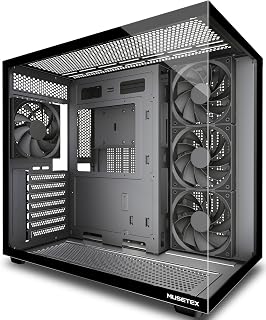
With four pre-installed fans moving air through a 270-degree tempered glass enclosure, this ATX mid-tower is built around airflow from the start. The bottom-mounted PSU keeps heat sources separated, and the included dust filters protect fan performance over time. Support for ATX, Micro-ATX, and Mini-ITX boards means it fits a wide range of airflow-focused builds without compromising the open interior that makes cooling effective.
Pros
- Four fans pre-installed with front-to-back airflow path
- Supports up to nine fans or 360mm radiators
- Dual-chamber PSU isolation keeps heat separated
- Magnetic dust filters maintain intake efficiency
Cons
- Reports of missing Micro-ATX standoff holes
- Large footprint requires dedicated desk space
The MUSETEX Y6 arrives ready to move air with four pre-installed 120mm fans configured for immediate thermal performance: three front intakes and one rear exhaust create a direct cooling path across your motherboard. The dual-chamber design isolates PSU heat in its own ventilation zone, keeping that thermal load away from CPU and GPU components. You can expand to nine total fans or mount radiators up to 360mm for liquid cooling, giving you room to scale cooling as your build demands. The case clears graphics cards up to 410mm and CPU coolers up to 160mm, accommodating high-performance hardware without clearance headaches. Magnetic dust filters on top and bottom openings prevent debris from choking airflow over time, maintaining intake efficiency without constant cleaning. The 270-degree tempered glass panels and black matte finish provide wide visibility for monitoring component temperatures visually. Cable management includes Velcro ties and a layout that keeps wiring out of the main airflow path. At 16.73 inches deep and over 13 pounds, it's a substantial mid-tower that stays planted during builds and operation.
Case Type: Mid Tower ATX
Motherboard Support: ATX, Micro-ATX, Mini-ITX
Cooling Capacity: CPU cooler up to 160mm, GPU up to 410mm, Radiator up to 360mm, PSU up to 230mm
Pre-Installed Fans: 4x 120mm (3 reverse on side, 1 forward on rear, non-LED)
I/O Ports: 1x USB 3.0, 1x USB 2.0, 1x Type-C, Audio, Microphone
Materials: Metal, Plastic, Tempered Glass
Dimensions: 16.73"D x 10.83"W x 15.67"H
Weight: 13.1 lbs
Color: Black Matte
Warranty: 10 Years
This case suits builders assembling air-cooled or AIO-cooled gaming and workstation systems who want cooling infrastructure in place from day one. The four included fans and nine-fan capacity make it a solid pick for multi-GPU or high-wattage builds that generate serious heat. Skip it if you're building Micro-ATX, as some units have reported missing standoff holes for that form factor. Also pass if desk space is limited, since the full depth and weight require dedicated placement.

Three pre-installed 120mm RS fans provide immediate cooling capacity without requiring additional purchases, while the InfiniRail mounting system lets you position fans precisely where your specific build generates the most heat. The modular design and support for back-connect motherboard standards keep cables out of the airflow path, further improving thermal efficiency.
Pros
- InfiniRail mounting system for flexible fan and radiator placement
- Supports dual 360mm radiators for extreme cooling configurations
- 3D Y-Pattern front panel channels direct intake airflow
- Removable internal panel for additional ventilation options
Cons
- Large footprint requires substantial desk or tower space
- Pre-installed fans may need directional verification for optimal flow
The CORSAIR 4000D RS ARGB tackles airflow through modular design and strategic fan placement. The InfiniRail mounting system eliminates fixed positions, letting you place fans and radiators exactly where your build needs them. Supporting dual 360mm radiators or complex multi-fan configurations, this case adapts to demanding cooling requirements rather than forcing compromises. The 3D Y-Pattern front panel channels intake air directly to components, and three pre-installed RS ARGB fans establish immediate airflow out of the box. Users report GPU temperatures hitting 29 degrees Celsius under load, demonstrating measurable thermal performance. The FRAME Modular System allows motherboard tray swaps and front I/O customization, future-proofing your cooling setup as hardware evolves. Cable management stays behind the motherboard tray with integrated shrouds and rear SSD mounting, preventing obstructions that throttle airflow. The removable internal side panel gives you the option to open additional ventilation paths or maintain clean aesthetics. Alloy steel and aluminum construction holds up to repeated disassembly for fan adjustments, and tool-less panels simplify filter cleaning or hardware swaps.
Case Design: Mid-tower ATX modular system with removable panels and customizable frame components
Motherboard Support: ATX, mATX, ITX
Cooling Capacity: Dual 360mm radiators, up to 10 total fans (120mm or 140mm)
Expansion Slots: 7 total slots for expansion cards and GPUs
Storage Bays: 3 internal bays with SSD mounting on motherboard tray rear and HDD mounting on case floor
Power Supply: Rear-mounted, supports up to 1600W
Pre-Installed Fans: 3x CORSAIR RS ARGB PWM with 8 LEDs each, daisy-chainable 4-pin connectors
USB Ports: 3x USB 3.0 ports
Material: Alloy steel and aluminum construction
Dimensions: 19.17" D x 9.41" W x 19.13" H
Weight: 22.7 pounds
Warranty: 2-year manufacturer coverage
Best for builders planning high-wattage gaming or streaming systems who want cooling flexibility without permanent commitments. The InfiniRail system and modular tray adapt as your thermal needs change, and the pre-installed RGB fans eliminate upfront hardware costs. Skip this if you need compact dimensions or prefer fixed, predictable layouts. This case is genuinely large and demands desk space, and inexperienced builders must verify pre-installed fan directions to optimize airflow. The modular features also add complexity that casual builders may not exploit.

Pros
- Outstanding airflow and thermals even under sustained heavy loads with high-end components
- Spacious interior accommodates large GPU coolers and tall CPU coolers without limitations
- Thoughtful cable management design with velcro straps, clips, and grooves keeps the build neat
- Modular I/O bracket allows repositioning from top to side for layout flexibility
- Excellent build quality and durability with premium materials and attention to detail
Cons
- Large form factor requires significant desk or case space compared to compact alternatives
- Case height could be taller for users wanting to install multiple graphics cards vertically
- Entry price point is higher than budget-oriented mid-tower cases on the market
The Lian Li LANCOOL 216 is a premium mid-tower case designed for gaming enthusiasts and PC builders who demand exceptional cooling and compatibility with high-end components. Built with a focus on airflow and practical functionality, it delivers the space and performance needed for modern RTX 4090 builds and water-cooling setups.
Cooling performance is the standout feature. Pre-installed 160mm ARGB front fans and a 140mm rear fan work together to create excellent positive airflow, with reviewers reporting near-silent operation even under heavy gaming loads. The modular motherboard mounting lets you optimize for your chosen cooling method, whether air-cooled or water-cooled. The mesh panels at the front, top, and PSU shroud ensure unobstructed ventilation without sacrificing dust filtration.
The case excels in build quality and design thoughtfulness. The 4mm tempered glass side panel showcases internals beautifully, while the removable panel with a single screw provides quick access. Cable management receives dedicated attention through dual-chamber design, velcro straps, clips, and convenient routing grooves. The pre-installed RGB header eliminates unnecessary cable runs, and the flexible front panel I/O bracket repositions from top to side as needed.
Component compatibility is generous. The case fits graphics cards up to 392mm long, easily accommodating NVIDIA RTX 4090 and equivalent options. Support for E-ATX, ATX, Micro-ATX, and Mini-ITX motherboards covers nearly every configuration. Storage flexibility includes 2x 3.5" HDD and 6x 2.5" SSD mounts, plus a removable top radiator bracket for custom cooling installations up to 360mm radiators.
The main tradeoffs are size and price. This is a full-size mid-tower requiring substantial desk or case space. The entry price sits higher than budget alternatives. However, for builders prioritizing thermal performance, component space, and build quality, the LANCOOL 216 delivers exceptional value and functionality.
The LANCOOL 216 prioritizes thermals through multiple design elements. The dual 160mm ARGB front intake fans and 140mm rear exhaust fan create positive airflow that keeps even high-end components running cool. Mesh filtration at the front, top, and PSU chamber maintains airflow without allowing dust buildup, a critical balance for long-term performance.
Reviewers running high-power systems like the RTX 3090 FE and Intel 13900KF report excellent temperature control and silent operation during gaming. The modular motherboard position allows fine-tuning of internal airflow patterns. A removable PSU fan screen on the bottom simplifies maintenance and ensures consistent airflow over the power supply.
Cable routing and installation are streamlined throughout the LANCOOL 216. The dual-chamber design isolates cables in a dedicated rear compartment, keeping the main compartment clean. Velcro straps, small clips, and grooved fan cable passages guide wires neatly without requiring expertise. The RGB header pre-installation eliminates multiple individual connector cables.
The front panel connector is a single modular plug rather than five separate connections, reducing installation time and error risk. The removable tempered glass side panel uses a single retained screw for tool-free access to internals. Users report surprisingly smooth cable management even on first build attempts, with ample space behind the motherboard tray for organization.

Pros
- Six PWM fans included with 12-fan expansion capacity
- Multi-directional vents support custom airflow paths
- Built-in temperature display for real-time thermal monitoring
- 90-degree PSU mount clears main airflow channel
Cons
- 29-pound weight and full-tower size limit placement options
- Excessive capacity for standard single-GPU builds
The Antec Flux Pro ships with six PWM fans already installed, delivering controlled airflow the moment you power on. Multi-directional vent placement supports up to 12 fans total, letting you build intake and exhaust configurations tuned to your component layout and thermal output. The PWM control gives you speed adjustment across the entire fan array, balancing noise against cooling demand without swapping hardware. E-ATX and full-tower dimensions provide clearance for oversized air coolers, extended graphics cards, and radiator mounts without airflow obstruction. The 90-degree iShift PSU mount rotates your power supply to keep cables out of the main cooling channel, reducing turbulence and dead zones. Ten internal bays and eight expansion slots leave room for storage drives and multi-GPU setups that increase total system heat load. A built-in dual temperature display tracks CPU and GPU readings in real time, giving you immediate feedback on cooling effectiveness without software overlays. The metal chassis, tempered glass panels, and walnut wood front combine durability with visibility. At 29 pounds and over 21 inches tall, this full-tower demands floor or deep desk placement.
This case excels in thermal management with support for up to 12 fans across multiple configurations. The 6 pre-installed Tranquil and P12R PWM fans provide excellent baseline cooling and can be daisy-chained for synchronized operation.
The dual radiator support (420mm front plus 360mm top) enables advanced liquid cooling loops for high-end CPUs and GPUs. Multi-directional venting ensures hot air escapes efficiently while cool air is drawn in strategically, maximizing cooling effectiveness across all system components.
This case is built for enthusiasts running high-wattage CPUs, multi-GPU arrays, or heavily overclocked systems that produce sustained thermal loads. The 12-fan capacity and PWM control make it ideal for builders who want precise thermal tuning across intake and exhaust zones. Skip it if you're working with standard ATX or smaller builds, as the full-tower size and weight are overkill for single-GPU systems. Also pass if you need portability or have limited floor space.

This compact mid-tower supports 120mm fans and seven expansion slots, providing a balance between space efficiency and cooling capacity for builders working within tighter desk constraints. The Micro-ATX and ATX motherboard compatibility covers most modern gaming and productivity builds, while the bottom-mounted PSU design keeps hot air from the power supply separate from component airflow.
Pros
- Ultra-fine mesh on front, top, and side panels maximizes unrestricted airflow
- Perforated PSU shroud directs bottom intake air toward the GPU
- Supports 360mm front and 240mm top radiators for cooling flexibility
- Wide cable routing channels keep cables clear of airflow paths
Cons
- Mesh panel design leaves rear cable routing visible from outside the case
- Only one 3.5-inch drive bay included by default
The H5 Flow earns its place on an airflow list through deliberate panel engineering rather than fan quantity alone. Ultra-fine mesh covers the front, top, and side openings, creating a genuinely open-air environment that lets heat exit with minimal restriction. The perforated PSU shroud on the side and bottom feeds cool air directly to the GPU, targeting one of the highest heat-generating components in a modern system. Two 120mm Quiet Airflow fans come pre-installed, so the baseline airflow setup is functional immediately, and the case accepts a 360mm radiator at the front and a 240mm at the top for builders planning a liquid cooling upgrade. The compact mid-tower footprint keeps the internal volume manageable without squeezing component clearances in ways that hurt airflow. Smooth interior edges, wide cable routing channels, and multiple anchor points make it straightforward to keep cables routed along the walls rather than across fan paths. ATX and Micro-ATX motherboards are both supported, giving the case range across common build sizes while retaining the same efficient thermal geometry.
Case Type: Compact ATX Mid-Tower
Motherboard Support: ATX, Micro-ATX, Mini-ITX, E-ATX compatible
Dimensions: 16.93in W x 18.31in H x 8.86in D
Weight: 8 kg
Material: Metal with tempered glass panel
Cooling Support: Front 360mm radiator, top 240mm radiator
Pre-installed Fans: Two 120mm Quiet Airflow fans (front intake, rear exhaust)
Fan Size Support: 120mm standard
Power Supply: Bottom mount
Internal Bays: 4 total
Drive Support: One 3.5-inch bay, two 2.5-inch bays
I/O Ports: Two USB 2.0, two USB 3.0
Expansion Slots: 7 total
Cable Management: Wide channels, hooks, and straps included
Warranty: 2-year manufacturer warranty
A strong pick for builders who want measurable airflow gains from mesh panel design in a compact footprint, including first-time builders who benefit from the clean interior layout. Works well for those planning liquid cooling upgrades thanks to dual radiator support. Less suitable for users who need multiple 3.5-inch hard drive bays by default, or anyone who wants rear cable routing completely hidden from view.
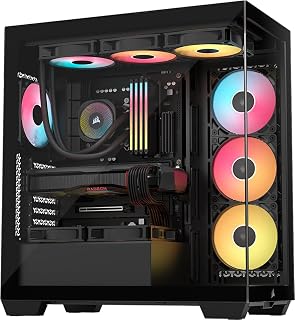
The panoramic glass design pairs with dust filters to maintain visibility while protecting intake channels, and Extended ATX motherboard support means you can build with larger boards that typically house more powerful components needing strong airflow. Two USB 3.0 ports and built-in RGB fans deliver both convenience and immediate cooling capability for performance-focused builds.
Pros
- Three RS120-R ARGB fans pre-installed for immediate airflow
- Magnetic dust filters on front, side, and top maintain intake efficiency
- Supports 360mm radiators and large tower coolers
- Cable routing keeps airflow paths clear of obstruction
Cons
- Nearly 20-inch depth demands significant desk or floor space
- No dedicated 3.5-inch hard drive mounting bays
Airflow performance defines the CORSAIR 3500X RS, with three pre-installed RS120-R ARGB fans working together to push cool air through the chassis efficiently. The case design prioritizes ventilation without sacrificing compatibility, supporting radiators up to 360mm for liquid cooling setups alongside spacious clearance for tower air coolers. Magnetic dust filters cover the front, side, and top panels, preventing debris from blocking intake zones while maintaining unrestricted airflow paths. The mid-tower layout accommodates motherboards from Mini-ITX through EATX, giving builders flexibility to maximize cooling potential across different platform sizes. Internal routing channels keep cables organized and away from primary airflow routes, reducing turbulence that can hinder cooling efficiency. The panoramic tempered glass construction allows users to monitor fan operation and component temperatures visually. Bottom-mounted power supply placement creates natural heat stratification, drawing cool air from below while expelling warm air through top and rear exhaust zones. For builds demanding sustained thermal performance under gaming or rendering loads, the 3500X RS combines ventilation capacity with the internal volume needed for effective component cooling across multiple fan configurations.
This case supports a broad range of motherboard form factors, from Mini-ITX compact builds to Extended ATX high-end platforms. Cooling capacity is impressive with support for up to 10x 120mm fans across side, roof, and PSU mounting points, allowing flexible thermal configurations. The case accommodates radiators up to 360mm, making it suitable for both air and all-in-one liquid cooling solutions.
The CORSAIR 3500X is compatible with the latest reverse-connection motherboards including ASUS BTF, MSI Project Zero, and Gigabyte Project Stealth, enabling cable-free interior builds for an exceptionally clean aesthetic. Storage flexibility includes multiple drive mounting options, though traditional 3.5-inch hard drive bays are limited. Front connectivity includes two USB 3.0 ports plus standard audio connectors for convenient access.
Model: CORSAIR 3500X RS-R ARGB (CC-9011322-WW). Case type: Mid-tower. Supported motherboards: Mini-ITX to Extended ATX. Dimensions: 18.11W x 19.92D x 9.45H inches, weighing 9.02 kg. Material: Tempered glass front and side panels with metal chassis. Power supply: Bottom-mounted. Includes 3x RS120-R ARGB fans with simple +5V motherboard header control.
Cooling capacity: 10x 120mm fan mounting points, supports radiators up to 360mm. Connectivity: 2x USB 3.0 ports. Features include removable glass panels, magnetic dust filters, GPU anti-sag stabilization arm, double-shot cable grommets, and rear cable storage. Warranty: 2-year manufacturer coverage. Best Sellers Rank: #13 in Computer Cases.

Seven pre-installed PWM ARGB fans create substantial airflow right out of the box, eliminating the need to source and install additional cooling components. The dual tempered glass panels with built-in dust filters maintain visibility while protecting intake areas, and support for both air and water cooling gives you flexibility to match your specific thermal management strategy.
Pros
- Seven PWM ARGB fans pre-installed, covering airflow from day one
- Supports 360mm radiators and GPUs up to 400mm for high-performance configurations
- Partitioned interior keeps cables away from airflow paths
- Dust filters on intakes help maintain consistent airflow over time
Cons
- Fans can become audibly loud at higher speeds
- RGB customization depends on motherboard software support, limiting standalone control
Seven pre-installed PWM ARGB fans is the headline number here, and for an airflow-focused build it matters immediately: you pull the K2 out of the box with a complete fan configuration already balanced across the case, no separate purchases required. The layout supports 360mm radiator mounting for builders who want to push further into liquid cooling, while the 400mm GPU clearance accommodates the longest modern graphics cards without restricting airflow paths. Dust filters on intake points help sustain that airflow over time by slowing debris accumulation during extended use. The internal layout separates the cable management zone from the component bay, which keeps routing tidy and avoids obstructing fan paths. ATX, Micro-ATX, and Mini-ITX motherboards all fit, and CPU coolers up to 165mm tall are supported, leaving room for large tower air coolers that rely on strong case airflow. The perforated and glass panel combination means the dual tempered glass wraps 270 degrees around the build, which keeps the interior visible without sealing off thermal pathways the way solid side panels do.
Case Dimensions: 16.73 inches (D) x 8.35 inches (W) x 18.5 inches (H), weighing 15 pounds
Motherboard Support: ATX, Micro-ATX, Mini-ITX
Cooling: 7 pre-installed 120x120x25mm PWM ARGB fans (600-1300 RPM, 24.72 CFM max airflow, 20.8dB noise level). Expandable to 10 total fans.
Component Compatibility: GPU up to 400mm (15.7 inches), CPU cooler up to 165mm (6.5 inches), top-mounted liquid cooler up to 360mm (14.2 inches), PSU up to 140-180mm with or without hard drive cage
Front Panel I/O: 1x USB Type-C, 2x USB 3.0, microphone and audio jacks, power and restart buttons
Storage: 8 internal bays supporting 3.5-inch hard drives
Materials: Metal frame, plastic accents, tempered glass front and side panels
Additional Features: Dust filters, RGB lighting with motherboard control, bottom-mounted power supply
Warranty: 10-year manufacturer warranty
Best suited for mid-range to high-end gamers and enthusiasts who want strong out-of-the-box airflow without sourcing fans separately, and who also want the interior on display. Builders running large GPUs or 360mm liquid cooling loops will find the clearances accommodating. Skip it if you need quiet operation at full fan speed, rely on standalone RGB controllers rather than motherboard software, or require more than a couple of hard drive bays.

The inclusion of dual 220mm fans plus a 180mm fan creates exceptional air volume movement straight out of the box, addressing the core concern for builders prioritizing thermal performance. Its E-ATX motherboard support and eight expansion slots accommodate high-end hardware configurations that generate significant heat, making it a practical choice for enthusiasts running multi-GPU or workstation setups.
Pros
- Dual 220mm intakes and 180mm exhaust move exceptional air volume
- Split-level cable management keeps wiring out of airflow paths
- Handles 430mm GPUs and 221mm CPU coolers without restriction
- MasterRail system optimizes component placement for cooling
Cons
- Nearly 22 inches deep requires significant desk space
- Limited SATA drive mounting despite large interior
The Cooler Master HAF II 500 attacks airflow with oversized fans that move massive air volumes at lower RPMs. The dual 220mm front intakes and 180mm rear exhaust create direct pathways through the 80-liter interior, and the Mighty40 fan system maintains quiet operation despite the scale. The split-level cable management design routes wiring away from airflow zones, a critical detail that prevents the turbulence and restriction found in cluttered cases. Modern flagship GPUs like the RTX 7900 XTX run at controlled fan speeds with exceptionally low temperatures, demonstrating real thermal advantage. The case handles 430mm graphics cards and 221mm CPU coolers, accommodating the largest air coolers without compromising intake or exhaust flow. The MasterRail system and Dual-Mode GPU Holder let you position components for optimal cooling rather than forcing compromises. Supporting ATX, E-ATX, and CEB motherboards with eight expansion slots, this case scales with demanding multi-GPU workstations where heat accumulation becomes a genuine problem. The industrial construction and removable panels simplify fan upgrades or filter cleaning without tools.
Form Factor: Mid-Tower ATX
Motherboard Support: ATX, E-ATX (up to 310mm wide), CEB-compatible
Dimensions: 21.93 inches deep, 21.57 inches wide, 10.32 inches high
Volume: Approximately 80 liters
Cooling System: 2x Mighty40 F220 (220x40mm front intake), 1x Mighty40 V180 (180x40mm rear exhaust)
Expansion: 8 total slots, MasterRail supports 3x 120/140mm or 2x 160/180mm fans at front/top
GPU Support: Up to 430mm graphics cards, dual-GPU support up to 72mm thick each
CPU Cooler Clearance: 221mm (Intel), 220mm (AMD)
Storage Compatibility: Supports 3.5-inch and 2.5-inch drives, accommodates PSUs up to 210mm (certain orientations)
I/O Ports: 3x USB 3.0
Fan Hub: 6x PWM, 6x ARGB
Materials: Metal and plastic construction
Weight: 21.3 pounds
Warranty: 2-year manufacturer coverage
Model: H500G2-KGNN-S00
Ideal for enthusiasts running multi-GPU setups, overclocked CPUs, or flagship graphics cards where thermal headroom matters. The oversized fans and direct airflow paths handle high-wattage components that throttle in smaller cases. Skip this if desk space is limited or you prioritize compact builds. At nearly 22 inches deep, this case demands real estate, and the industrial aesthetic lacks the refined look of glass showcase designs. SATA drive capacity is also surprisingly limited despite the massive interior.
What to Consider When Choosing an Airflow Case
Front Panel Ventilation
The front panel determines how much cool air reaches your components. Solid panels with minimal perforations restrict intake regardless of fan count, while ultra-fine mesh or honeycomb designs maximize airflow with minimal obstruction.
Look for cases advertising 50% or higher ventilation rates. The MONTECH AIR 903 MAX High Airflow E-ATX PC Case achieves 51% ventilation through its innovative metal mesh, delivering exceptional cooling without sacrificing dust filtration. Similarly, the CORSAIR 4000D RS ARGB Frame Modular Mid-Tower ATX uses a three-dimensional Y-pattern perforation that reduces restriction while maintaining structural integrity.
Pre-Installed Fan Configuration
Quality cases arrive with strategic fan placement that establishes positive or negative pressure immediately. Front intake combined with rear and top exhaust creates the most common configuration, pushing cool air across the motherboard and GPU before exiting.
The Lian Li V100-ATX Mid-Tower PC Case-Black-V100RX includes four PWM-controlled 120mm ARGB fans out of the box, eliminating the need for immediate upgrades. For builders prioritizing massive airflow volume, the Antec Flux Pro Full-Tower E-ATX PC Case ships with six fans including three 140mm units up front and reverse-mount fans beneath the PSU shroud. This configuration actively exhausts hot air trapped in the lower chamber, something budget GPU builds particularly benefit from when running mid-range cards that exhaust downward.
Radiator and AIO Support
Even if you start with air cooling, planning for liquid cooling expansion saves money later. Cases supporting 360mm radiators in both front and top positions offer the most flexibility, accommodating everything from modest AIOs to custom loops with thick radiators.
The Lian Li LANCOOL 216 Case-Black features a modular motherboard I/O panel that repositions vertically, optimizing clearance for either tower coolers or top-mounted radiators. This adaptability makes it suitable for builders who might transition from air to liquid as their motherboard and component upgrades demand better cooling. For extreme builds, the Antec Flux Pro Full-Tower E-ATX PC Case simultaneously accommodates 420mm and 360mm radiators, providing enough cooling capacity for overclocked CPUs and high-wattage graphics cards.
GPU Clearance and Ventilation
Modern graphics cards span 300–400mm in length and increasingly exhaust heat through side vents rather than solely through the rear bracket. Cases must provide physical clearance plus unobstructed airflow around the card.
The NZXT H5 Flow Compact ATX Mid-Tower PC Case addresses this with a perforated PSU shroud that allows bottom intake fans to feed cool air directly to the GPU’s underside. The Cooler Master HAF II 500 ATX PC Case goes further with a Dual-Mode GPU Holder supporting two cards up to 3.6 slots thick each, accommodating massive graphics cards with room for airflow between them.
Cable Management and Airflow Obstruction
Bundled cables behind the motherboard tray reduce turbulence and improve airflow consistency. Look for cases with dedicated routing channels, velcro straps, and sufficient depth in the cable management chamber.
The Lian Li LANCOOL 216 Case-Black provides cable grommet bars and small clips throughout, while its symmetrical design maintains routing space regardless of motherboard size. The CORSAIR 4000D RS ARGB Frame Modular Mid-Tower ATX takes this concept further with support for back-connect motherboards from ASUS, MSI, and Gigabyte, routing cables directly behind the motherboard for near-invisible management. This approach works particularly well in builds using high-end Z890 motherboards that already incorporate back-panel power connectors.
Final Thoughts
Choosing the right case determines how quietly and reliably your system runs under sustained loads. The Lian Li LANCOOL 216 balances price, cooling capacity, and build quality with its dual 160mm fans and modular layout, making it ideal for mainstream gaming builds. For builders who need massive radiator support or plan to house multiple high-wattage components, the Antec Flux Pro delivers professional-grade cooling infrastructure with room for simultaneous 420mm and 360mm radiators. Both cases prove that effective airflow design eliminates thermal throttling without requiring excessive fan noise.
Frequently Asked Questions
How many case fans do I actually need for good airflow?
Most builds perform well with three to four fans arranged in a balanced intake-exhaust configuration. Place two fans in front for intake and one or two in the rear and top for exhaust. This setup maintains positive pressure that reduces dust accumulation while removing hot air efficiently. High-performance systems with overclocked components or multiple GPUs benefit from six or more fans, particularly when using smaller 120mm units instead of larger 140mm models.
Does mesh front panel design sacrifice dust protection?
Quality mesh panels incorporate fine filtration that captures dust particles while maintaining airflow. Modern ultra-fine mesh designs achieve this balance by using tightly woven patterns that trap debris without significantly restricting air movement. The key is choosing cases with removable, washable filters that you can clean monthly. Solid panels with minimal vents actually accumulate more dust internally because restricted airflow creates negative pressure that pulls unfiltered air through every gap and seam in the case.
Will a high-airflow case make my PC louder?
Better airflow typically reduces noise because components run cooler and fans spin slower to maintain target temperatures. Cases with unrestricted ventilation allow fans to move more air at lower RPMs compared to restricted designs that require aggressive fan curves to compensate for poor airflow. PWM-controlled fans adjust speed dynamically based on temperature, running nearly silent during light workloads and ramping up only when needed. The combination of efficient case design and quality PWM fans often results in quieter operation than budget cases with solid panels and cheap fixed-speed fans.
What is the advantage of reverse-fan mounting in modern cases?
Reverse-mounted fans place the motor and frame hub on the visible side while hiding cables and mounting hardware behind. This creates a cleaner aesthetic through tempered glass panels while maintaining identical airflow performance. Some cases like the CORSAIR 3500X RS ARGB Panoramic Mid-Tower PC Case use reverse rotor designs specifically engineered for this orientation, delivering unobstructed RGB lighting effects alongside strong cooling. The functional benefit comes in builds where cable management space is limited, as reverse mounting eliminates fan cables from the visible chamber entirely.
Common questions
What are the best PC cases for cooling performance?
The best PC cases for cooling performance prioritize unobstructed airflow with mesh front panels, multiple fan mounting positions, and thoughtful internal layouts. Cases like the Lian Li LANCOOL 216 with large 140mm fans, the NZXT H5 Flow with its mesh design, and the CORSAIR 4000D RS ARGB with three pre-installed fans deliver strong thermal performance. Look for cases that support at least three intake fans and have clear exhaust pathways to prevent heat buildup around your CPU and GPU.
Which PC cases have the best thermals for gaming builds?
PC cases with the best thermals feature high-airflow designs with mesh panels, generous fan support, and spacious interiors that prevent hot air recirculation. The MUSETEX K2 with seven pre-installed PWM fans and the Lian Li LANCOOL 216 with 140mm fan support excel at moving air efficiently. Strong thermal performance keeps components like the RTX 5080 or RX 9070 XT running cooler under sustained gaming loads, which helps maintain boost clocks and reduces fan noise over time.
What are the best PC cases for air cooling setups?
The best PC cases for air cooling setups offer tall CPU cooler clearance, multiple fan mounting points, and direct airflow paths from intake to exhaust. Mid-towers like the CORSAIR 4000D RS ARGB and NZXT H5 Flow provide excellent air cooling support with room for tower coolers and optimal fan placement. Air cooling remains highly effective for most builds, including those with high-end GPUs and processors, as long as the case design prioritizes unrestricted airflow and adequate ventilation.





Write Your Review
No reviews yet. Be the first to share your experience!