

Few things are more frustrating than finishing a build only to open the side panel and see a tangled mess of cables blocking airflow and ruining the aesthetic. Whether you are putting together a high-performance gaming rig or a creator workstation, the case you choose has a massive impact on how clean and manageable your final build looks. If you are planning a new build around a powerful GPU, check out our best PC build for RTX 5070 ti guide for a complete component breakdown.
This guide covers ten of the best PC cases for cable management available right now. We evaluated each one for routing channels, tie-down points, back-connect motherboard support, and overall build quality. Whether you prefer a budget-friendly option or a premium modular system, there is something here for every builder.
Quick Comparison
Ratings reflect the most recent data pull. Check each listing for current price and availability.
Quick answer
This guide compares 10 picks, with MONTECH TG3 Black Mid-Tower PC Case, Pre-Installed RGB ranked first. Lian Li V100 ATX Mid-Tower PC Case with 4 ARGB Fans holds the highest customer rating among them. Alex Tech 10ft Wire Loom Cable Sleeve Split Sleeving has the most customer reviews.
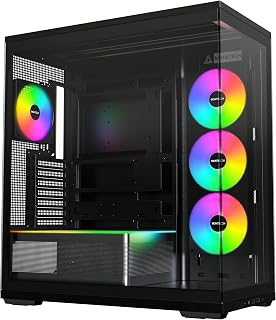
The back-connect ready design is the standout feature here for cable management enthusiasts, routing all motherboard power and data connections behind the board so the front chamber stays completely clean. With four pre-installed fans and dedicated cable management built into the spec list, this mid-tower handles both airflow and wire routing without requiring extra accessories or routing creativity from the builder.
Pros
- Back-connect motherboard compatibility (ASUS BTF, MSI Project Zero, GIGABYTE Project STEALTH) routes cables out of view by design
- Unibody fan frame design reduces individual fan cable count inside the chassis
- Supports up to 9 fans, allowing cooling expansion without sacrificing cable order
- Spacious interior with tempered glass panel makes a clean build visually rewarding
Cons
- No 3.5-inch drive bays, limiting mechanical storage options
- Full cable management benefits only apply when paired with a back-connect compatible motherboard
The MONTECH TG3 earns its place on a cable management list primarily because of its back-connect motherboard support. Compatible with ASUS BTF, MSI Project Zero, and GIGABYTE Project STEALTH platforms, it lets you route every modular cable behind the motherboard tray, eliminating the visible wiring that ruins an otherwise clean build. The unibody GF360 U and GF120 U fans compound this advantage: their single-frame construction cuts down on the individual fan cables that typically snake through the interior. Standard ATX/Micro-ATX/Mini-ITX flexibility means most builders can take advantage of these routing benefits without hunting for a specific board. The tiered interior platform also gives you a reason to keep things tidy since the interior is meant to be seen through the tempered glass panel. With support for up to nine fans total and optimized airflow pathways, you can scale cooling without sacrificing the clean aesthetic. The one real friction point for organization-focused builders is the lack of 3.5-inch drive bays, which limits storage options if you rely on mechanical drives.
Case Type: Mid-Tower ATX
Motherboard Support: ATX, Micro-ATX, Mini-ITX
Back-Connect Compatible: ASUS BTF, MSI Project Zero, GIGABYTE Project STEALTH
Pre-Installed Fans: 1x GF360 U REV side intake, 1x GF120 U rear exhaust
Maximum Fan Support: Up to 9 fans
Dimensions: 20.83"D x 18.31"W x 9.41"H
Color: Black
Special Features: Built-in fans, RGB lighting, cable management, tempered glass panel
Warranty: 1 year
Model Number: TG3B
The TG3 is the right pick for builders specifically planning a back-connect motherboard build who want cable clutter gone by design rather than managed after the fact. It also suits enthusiasts who want a large, visible interior that rewards a tidy build. Skip it if you run multiple mechanical hard drives, since the missing 3.5-inch bays will be a genuine limitation, or if your motherboard does not support a back-connect platform.

At 25.3 inches wide and requiring no drilling, this under-desk tray handles the exterior side of a clean PC setup by concealing the power strips, monitor cables, and peripheral wiring that cases cannot address. For a reader optimizing their full workstation for cable management, hiding desk-level clutter is the logical complement to a tidy tower build.
Pros
- Exceptionally easy installation without tools, drilling, or desk damage
- Sturdy stainless steel build feels premium and holds heavy power strips reliably
- Mesh design improves airflow and prevents overheating of plugged-in devices
- Generous 25.3 inch length accommodates multiple power strips and extensive cable runs
- Significantly improves workspace aesthetics and safety by eliminating visible cable chaos
Cons
- 25.3 inch size may feel crowded for setups with three or more monitors and multiple devices
- Clamp mounting limits placement options compared to adhesive or drill-based alternatives
- Limited to desks with accessible undersides, making it unsuitable for certain desk designs
The LOVJOYSE cable management tray is a stainless steel organizer designed for anyone frustrated with tangled cords, power strips on the floor, and messy desk setups. It serves home office professionals, remote workers, gamers, and anyone with multiple devices and charging needs who wants a cleaner, safer workspace.
The standout feature is the no-drill clamp system that mounts securely under desks without leaving marks or holes. Real-world testing shows it holds heavy power strips, surge protectors, charging bricks, and excess cable length with ease. The 15 lb weight capacity combined with open mesh construction means your devices stay cool and accessible, eliminating the risk of overheating while charging multiple items simultaneously.
Build quality is notably strong for the price point. The stainless steel frame feels solid and durable, with reinforced clamps that hold firm even under moderate load. The adjustable clamp design accommodates desks up to 2 inches thick, and soft rubber pads protect your desktop surface from scratches and marks. Included cable ties and adhesive holders add practical value to the package.
One limitation worth noting is capacity planning. Users with three monitors and multiple computers may find the 25.3 inch tray slightly crowded, though many successfully fit two power strips and extensive cabling. Additionally, the clamp mounting system requires accessible desk undersides, so it won't work on all desk styles.
Overall, this cable management tray delivers exactly what it promises: tool-free installation, durable construction, and genuine workspace improvement at an accessible price. It's highly recommended for anyone tired of cable clutter who wants an effective, damage-free solution.
Installation takes approximately 5 to 10 minutes and requires no tools or drilling. Simply position the tray underneath your desk, align the clamp mounts with the desk edge, and tighten the adjustable clamps until snug. The soft rubber pads automatically protect your desktop. Once mounted, use the two large access holes to route power cables and USB lines, then secure excess cord length with the included velcro cable ties and adhesive cable holders.
For best results, ensure your desk is no thicker than 2 inches at the mounting point and that the undersurface has adequate clearance. Test the clamp stability before loading heavy items like power strips. The tray accommodates desks up to 25.3 inches in width, though you can mount multiple trays for wider setups.
This cable management tray is ideal for remote workers, home office professionals, gamers with multiple monitors and consoles, students with multiple devices, and anyone in rental spaces where drilling isn't an option. It's perfect for standing desks where cable organization directly impacts usability and safety. Parents appreciate the safety benefits of containing cords away from children and pets.
It's less suitable for minimalist setups with only one or two devices, or for desks that don't have accessible undersurfaces for clamping. If you have fewer than three cables to manage, a simpler solution might suffice.

With four internal bays and a bottom-mount PSU layout, this Lian Li mid-tower physically separates the power supply cable runs from the main motherboard area, which is one of the most effective structural choices for keeping builds tidy. The included dust filter also protects those managed cables and components from debris, making long-term cleanliness easier to maintain.
Pros
- Dedicated PSU compartment with angled shroud physically isolates power cables from the visible main chamber
- Four pre-installed ARGB fans reduce the cable work required before first boot
- Rear routing options keep cable runs hidden behind the motherboard tray
- Tool-less side panels allow easy access to revisit and refine routing
Cons
- Open panoramic glass design puts any cable management shortcuts on permanent display
- Minimal sound dampening due to the large glass panel construction
Cable management in the Lian Li V100 centers on a practical combination of rear routing channels and a dedicated PSU compartment that keeps power supply cables fully separated from the main chamber. That separation alone does most of the heavy lifting: the area visible through the panoramic tempered glass stays clear of chunky power runs, and the angled PSU shroud reinforces that boundary between the two zones. Four pre-installed ARGB fans ship with the case, which removes a common source of added cable work since there is no need to buy and wire additional fans before the first boot. The tool-less side panels let you revisit routing without a full teardown, which matters when you are iterating on a build layout. Compatibility with GPUs up to 420mm, CPU coolers up to 178mm, and 360mm radiators means you are not forced into compromises that often produce workaround cable runs. The open glass design does mean the interior is always on display, so any routing shortcuts are immediately visible, which actually incentivizes cleaner work from the start.
Form Factor: Mid-Tower ATX
Motherboard Support: ATX, Micro-ATX, Mini-ITX
GPU Clearance: Up to 420mm
CPU Cooler Height: Up to 178mm
Radiator Support: Top radiator up to 360mm
Fan Configuration: Supports up to nine 120mm fans
Pre-Installed Fans: 4x 120mm PWM ARGB fans
Fan Speed: 1800 RPM max
Airflow: 61.47-60.4 CFM
Air Pressure: 2.54-2.17 mm-H2O
Noise Level: 26.5-30.8 dBA
Bearing Type: Hydraulic
Lighting: Integrated 26-LED ARGB strip with full spectrum color control and daisy-chain connectivity
Materials: Tempered Glass, Stainless Steel, Plastic
Internal Bays: 4
Dust Filters: Yes
Weight: 8200g
Warranty: 1 Year

Ten feet of split-loom sleeving at half-inch diameter fits neatly over USB cables, power cords, and audio-video runs, bundling loose wires into a single clean tube without permanently modifying anything. For cable management inside a PC case or along a desk setup, this kind of flexible protective sleeve is a practical way to group and route multiple cables together along the same path.
Pros
- Genuinely flexible and wraps cleanly around cables without visible gaps
- Split seam design makes adding or removing cables simple and quick
- High-quality polyethylene resists snags and sharp edges
- Works effectively for protecting cables from pet damage
- Delivers professional appearance for both functional and aesthetic needs
Cons
- Designed for single cable or light bundling; multiple thick cords may not fit comfortably
- Frayed ends require careful cutting or controlled melting to prevent unraveling
- May be slightly tight for applications requiring frequent cable changes
The Alex Tech 10-foot cable sleeve is a split-design wire loom that solves the common problem of messy, tangled cables. Whether you're managing a multi-monitor desk setup, protecting vehicle electrical systems, or safeguarding cables from curious pets, this product delivers a professional solution without requiring additional fasteners or tools.
The standout feature is the split design that lets you open the sleeve, slide cables inside, and let it naturally close around them. Real users report that cables stay secured without velcro or zip ties, and the flexible braided polyethylene material navigates tight corners better than rigid plastic alternatives. The industrial-grade construction handles temperature extremes from -103 to 257 degrees Fahrenheit, making it suitable for harsh automotive environments and high-vibration applications like police vehicle wiring.
Build quality is solid with no sharp edges or snags reported across reviews. The material is thick enough to resist abrasion and provides genuine protection against pet chewing. The black color provides a clean, professional look that blends well in most settings, and the sleeve can be cut to any length you need.
The main limitation is capacity. This half-inch diameter sleeve works best for single cables or light bundling. Users attempting to fit multiple thick cables together found it snug. Additionally, cut ends can fray slightly if scissors aren't sharp, though a brief application of heat from a lighter will melt the ends cleanly, note to do this carefully to avoid burns.
For anyone managing cable clutter or protecting wires from damage, the Alex Tech cable sleeve offers excellent value. It's particularly recommended for desk organization, automotive wiring projects, and protecting cables from pet damage. Installation is straightforward, results look professional, and the flexible design adapts to virtually any cable layout.
Dimensions: 120 inches length, 0.5 inches diameter
Material: Polyethylene braided sleeving
Color: Black
Design: Split sleeving for easy installation
Operating Temperature: -103 to 257 degrees Fahrenheit
Melt Temperature: 446 degrees Fahrenheit
UL Recognized: Yes
Installation Type: Self-closing, no adhesive required
Weight: 0.13 kg
Model Number: sr1/2inblack10ft
Home and Office: Bundle and organize cables behind desks, entertainment centers, and workstations for a cleaner appearance.
Automotive: Protect wiring harnesses in vehicles, particularly around engine compartments and high-vibration areas where abrasion protection matters.
Pet Protection: Safeguard phone chargers, laptop cables, and power cords from pets that chew through unprotected wires.
Audio and Video: Manage HDMI, speaker, and audio cables in home theater and professional audio setups.
Custom Projects: Use for cable protection in any application where heat resistance and flexibility are needed.
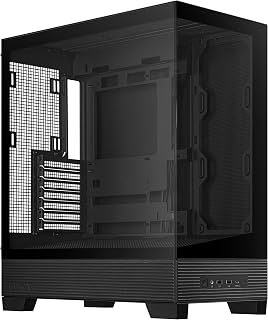
The rear-mount power supply placement routes the main ATX cables directly behind the motherboard tray, shortening the path to CPU and GPU connectors and reducing the slack that causes clutter. With two USB 3.0 ports on the front panel and an ATX-compatible layout, it covers the basics cleanly without unnecessary complexity for builders focused on a tidy interior.
Pros
- BTF hidden connector design routes all modular cables behind the motherboard tray, removing them from view entirely
- Dual frameless tempered glass panels display the clean interior from both sides
- Elevated PSU placement prevents power cables from crossing the main visible chamber
- Included cable ties and straps support tidy management of remaining secondary runs
Cons
- HDD storage limited to two mechanical drives
- Base fan configuration is minimal and additional fans should be budgeted separately
The ASUS A31 takes a more committed approach to cable management than most cases at its tier. The BTF hidden connector system routes all modular cables entirely behind the motherboard tray and connects them through concealed ports, so the front-facing interior is clean by architecture rather than by careful dressing. You are not tucking cables around grommets and hoping they stay put; the connectors themselves are out of sight. Dual tempered glass panels on both sides mean the tidy result is visible from multiple angles, and the frameless design removes the visual interruption that bezels usually introduce. The 8-degree angled base improves airflow circulation and positions ARGB lighting for better visibility, so the clean interior actually gets seen. Included cable ties and straps address the remaining secondary runs, and the elevated PSU placement keeps power supply cables from crossing the main chamber. Support for 360mm AIO coolers and multiple fan mounting positions means cooling hardware does not force awkward cable detours. The tradeoff is that HDD storage tops out at two drives, and the base fan configuration is minimal, so a budget for additional fans is worth factoring in.
Form Factor: ATX Mid-Tower
Motherboard Support: ATX, Micro-ATX, Mini-ITX
Cooling Support: Up to 360mm AIO coolers with 80mm clearance
GPU Compatibility: RTX 5090/4090 and equivalent length cards
Storage: 2x 3.5-inch HDD bays, multiple SSD mounting locations
Ports: 2x USB 3.0, USB-C ready
Connectivity: BTF hidden connector design with behind-motherboard cable routing
PSU Mounting: Rear mount (ATX standard)
Fans Included: Mounting points for multiple configurations
Materials: Alloy steel frame, tempered glass panels, reinforced plastic components
Dimensions: 17.13 inches deep, 9.37 inches wide, 20.12 inches high
Weight: 18.1 pounds
Features: Dual-sided tempered glass, frameless design, 8-degree angled base, ARGB-ready, easy dust filters
Warranty: 2-year manufacturer coverage
The A31 is the strongest option here for builders who want cable management solved at the hardware level rather than through careful routing technique. It is especially well suited to BTF platform builds where hiding connectors is the goal from the start. Skip it if you need more than two mechanical hard drives, or if you want pre-installed fans included so the out-of-box experience requires no additional purchases.

The InfiniRail mounting system is the key detail here: it lets builders reposition fan and radiator mounts without unscrewing and rerouting cables from scratch, which makes cable runs much easier to plan from the start. Three pre-installed RS fans mean the wiring is already handled out of the box, and compatibility with BTF, MSI Zero, and Gigabyte Stealth platforms supports connector-free motherboard aesthetics.
Pros
- Rear motherboard tray SSD mounting removes storage cables from the main interior view
- InfiniRail system lets fan and radiator placement align with your routing plan
- Removable internal side panel hides cable work when aesthetics are the priority
- Integrated shrouds and rear routing channels guide cables out of the visible build area
Cons
- The case is genuinely large and demands significant space, which can complicate workbench cable management during the build
- Daisy-chain magnetic fan cables may need replacement if integrating older-generation fans into the routing scheme
For builders who treat cable management as part of the build rather than an afterthought, the CORSAIR 4000D RS ARGB is engineered specifically with that mindset. The rear motherboard tray SSD mounting keeps storage drives hidden and off the main routing paths, while integrated shrouds and rear routing channels guide cables away from the visible interior. A removable internal side panel gives you the choice between exposing extra airflow or concealing the cable work entirely, depending on how clean you want the final result. The InfiniRail mounting system means fan and radiator cables can be positioned to match your routing plan rather than fighting a fixed layout. The FRAME Modular System goes further, letting you swap the motherboard tray if your build demands a different approach. Three USB 3.0 ports on the front I/O and seven expansion slots add cable volume, but the toolless panel removal makes it easy to get back in and refine the routing after the first build. Overall this is one of the more cable-management-aware cases available at this size.
Case Design: Mid-tower ATX modular system with removable panels and customizable frame components
Motherboard Support: ATX, mATX, ITX
Cooling Capacity: Dual 360mm radiators, up to 10 total fans (120mm or 140mm)
Expansion Slots: 7 total slots for expansion cards and GPUs
Storage Bays: 3 internal bays with SSD mounting on motherboard tray rear and HDD mounting on case floor
Power Supply: Rear-mounted, supports up to 1600W
Pre-Installed Fans: 3x CORSAIR RS ARGB PWM with 8 LEDs each, daisy-chainable 4-pin connectors
USB Ports: 3x USB 3.0 ports
Material: Alloy steel and aluminum construction
Dimensions: 19.17" D x 9.41" W x 19.13" H
Weight: 22.7 pounds
Warranty: 2-year manufacturer coverage
A strong fit for experienced builders putting together high-end gaming or content creation rigs who want both clean aesthetics and genuine routing flexibility. The modular system rewards builders who plan cable runs in advance. Skip it if desk or floor space is limited, since the case is physically large, or if you are a first-time builder who may overlook fan direction verification.

The front and bottom dual PSU mounting options give builders flexibility to position the power supply where cable lengths work best for their specific component layout, which directly reduces excess slack. Seven expansion slots accommodate high-end GPU setups, and the 170mm fan support means fewer fans are needed to move the same air volume, so there are fewer fan cables to manage overall.
Pros
- Pre-configured fan hub with SATA power consolidates five fan cables in one place
- Dual PSU mounting positions give flexibility for routing the most disruptive cable bundle
- Toolless fan mounts and removable side panels simplify access for re-routing
- Spacious internal layout supports deliberate, organized cable runs
Cons
- At 10.5 kg the case is heavier than most alternatives, complicating repositioning mid-build
- Wood accents require extra care during assembly, adding a step to what should be a straightforward process
Cable management in a premium build deserves a case that treats organization as a first-class feature, and the Lian Li LANCOOL 217 delivers on that front. Dual PSU mounting options let you position the power supply wherever your routing plan demands, while the pre-configured fan hub with SATA power connection keeps fan cables consolidated and out of the way. The removable side panels and toolless fan mounts mean you can access and re-route cables without fighting the chassis. Five pre-installed fans ship with their cabling already handled through the hub, so the interior stays tidy from the first boot. The steel frame provides plenty of anchor points, and the clean internal layout gives you the breathing room to run cables deliberately rather than cramming them behind a tray. Seven expansion slots and five internal bays add routing complexity, but the thoughtful engineering keeps it manageable. The real wood accents are a bonus for anyone who wants a build that looks as organized on the outside as it is on the inside.
The five-fan configuration provides impressive thermal capacity out of the box. The two 170mm front fans deliver substantial intake airflow, while the pair of 120mm reversed-blade fans and 140mm rear exhaust establish balanced pressure dynamics. Reviewers report that CPUs and GPUs remain cool during intensive gaming and workloads without audible noise.
The adjustable front fan positioning is genuinely useful. CPU mode positions both front fans high for direct processor cooling, while GPU mode distributes intake more evenly throughout the case. This flexibility means you can optimize thermals based on your specific component configuration. The pre-configured fan hub simplifies fan management, though connecting fans directly to the motherboard provides more granular control if desired.
Additional cooling expandability includes support for a 360mm radiator at the top and tool-free mounting points throughout. The case handles large graphics cards and thick liquid coolers without spatial conflicts, giving you room to grow your cooling solution if needed.
The LANCOOL 217 prioritizes builder experience. All side panels are completely removable, the PSU mount rotates for cable management flexibility, and internal layout provides ample working space even with larger components. Cable routing holes are thoughtfully positioned for clean, hidden wire management.
The toolless fan mounting system means you can reconfigure your cooling setup without screwdrivers. Front fans adjust vertically to switch between CPU and GPU cooling modes. The case supports ATX motherboards and PSUs up to 220mm in length, covering virtually all standard configurations.
Dual power buttons on the front panel accommodate different desk orientations and sitting positions. The included fan hub requires SATA power from your PSU, which is worth planning for during your cable management phase. Most builders complete their setup without complications, though the case's weight and size require careful handling during transport.
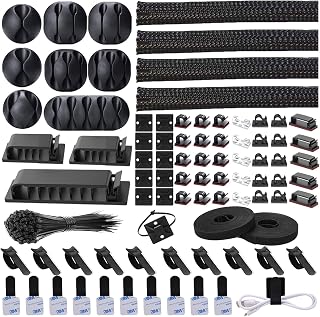
With 192 pieces across four wire organizer sleeve sizes, this polycarbonate kit covers the range of cable diameters found inside a typical ATX build, from thin fan headers to thicker GPU power runs. Having a large assortment on hand means builders can sleeve and bundle every run in a consistent style rather than leaving mismatched loose cables behind hard-to-reach motherboard tray cutouts.
Pros
- Comprehensive kit eliminates the need to buy cable organizers separately
- Works on diverse surfaces including desks, walls, baseboards, wood, and ceramic
- Strong self-adhesive backing keeps components securely in place long-term
- Braided sleeve is easy to open, load wires into, and close without fumbling
- Available in both black and transparent colors to match any decor
Cons
- Some users may find the adhesive backing requires careful initial placement since repositioning can be difficult
- The self-adhesive ties have a maximum 5.75-inch length, which limits use for very thick or bundled cable runs
- Product documentation could be clearer about which components work best for specific cable types
The NNOROCME cable management kit is a comprehensive solution designed for anyone drowning in desktop or home theater cables. Whether you're managing computer peripherals, charging cables, or entertainment system wires, this 192-piece system provides multiple tools to tackle cable clutter effectively and affordably.
What sets this kit apart is its versatility and ease of use. The split braided sleeves open easily to accommodate existing cables without requiring you to unplug everything. The 6 different types of adhesive clips give you flexibility to organize various cable sizes and routes, while reusable ties and mounts let you adapt your setup as needs change. The eco-friendly polyamide material feels sturdy and durable, suggesting this investment will manage your cables reliably for years.
The self-adhesive backing is genuinely strong, holding firmly on clean surfaces like desks, walls, and baseboards. Installation is refreshingly straightforward, no tools required. The system also serves a practical bonus function: the enclosed cables are protected from curious pets who might otherwise chew through them, adding genuine value beyond aesthetics.
One consideration is that the self-adhesive ties max out at 5.75 inches, which may not accommodate exceptionally thick cable bundles or very long runs. Additionally, once the adhesive sets, repositioning components can be challenging, so initial placement matters. The product would benefit from clearer labeling about which components work best for different scenarios.
This kit delivers exceptional value for cable management. It's particularly well-suited for desk setups, entertainment centers, and anyone seeking an organized cable system without permanent installation. Highly recommended for practical, temporary cable solutions.
This kit contains 192 pieces total: 4 braided cable sleeves (20 inches long), 20 reusable wire ties, 35 cable clips in 6 different styles, 11 cord holders, 2 self-adhesive tie rolls (118 inches each), 20 cable zip tie mounts, and 100 cable fastening ties. Available in black and transparent colors to blend with your setup.

Supporting both ATX and Micro-ATX motherboards, this compact mid-tower is a good fit for builders who want a smaller footprint without sacrificing standard cable management routing space. The bottom-mount PSU keeps power cables tucked low and away from the GPU and CPU area, and seven expansion slots ensure there is room for full-size graphics cards without forcing awkward cable detours.
Pros
- Multiple anchor points and wide routing channels make organized cable runs straightforward
- Spacious interior reduces crowding around cable connection points
- Bottom-mount PSU keeps the power bundle separated from the main component area
- Smooth interior edges protect cables during installation and future maintenance
Cons
- Mesh panel design makes rear cable routing visible from outside, requiring careful work for clean aesthetics
- Only one native 3.5-inch drive bay, which adds cable complexity if you need additional storage
Clean cable management starts with a well-engineered interior, and the NZXT H5 Flow gets that foundation right. Multiple cable management anchor points and wide routing channels are built into the layout, so cables follow deliberate paths rather than piling up behind the motherboard tray. The spacious internal volume keeps components from crowding each other, which directly reduces the frustration of routing cables around tight corners. Smooth interior edges protect cables and sleeves during installation. Bottom-mount PSU positioning keeps the power bundle contained at the base, away from the CPU and GPU zones. The case supports ATX and Micro-ATX motherboards, which means the routing logic holds across different build sizes. One honest trade-off: the mesh panel design means rear cable management is partially visible from outside, so the quality of your routing work is on display. That is actually an incentive to do it properly rather than a flaw. Two pre-installed 120mm fans arrive with their own cabling already handled, giving you a clean starting point for the rest of the build.
Case Type: Compact ATX Mid-Tower
Motherboard Support: ATX, Micro-ATX, Mini-ITX, E-ATX compatible
Dimensions: 16.93in W x 18.31in H x 8.86in D
Weight: 8 kg
Material: Metal with tempered glass panel
Cooling Support: Front 360mm radiator, top 240mm radiator
Pre-installed Fans: Two 120mm Quiet Airflow fans (front intake, rear exhaust)
Fan Size Support: 120mm standard
Power Supply: Bottom mount
Internal Bays: 4 total
Drive Support: One 3.5-inch bay, two 2.5-inch bays
I/O Ports: Two USB 2.0, two USB 3.0
Expansion Slots: 7 total
Cable Management: Wide channels, hooks, and straps included
Warranty: 2-year manufacturer warranty
Well suited to first-time builders who want guided routing built into the chassis, and to experienced builders who prefer a compact footprint without giving up cable management infrastructure. Also good for Micro-ATX builds that still want ATX-level organization. Skip it if you need more than one 3.5-inch drive bay natively, or if rear cable visibility concerns you and you are not prepared to route carefully.

The panoramic tempered glass design makes cable management a visible priority rather than an afterthought, since every routing decision inside the case is on display from multiple angles. Extended ATX and Mini ITX compatibility spans a wide range of builds, and the white colorway pairs with white cable sleeving for builders who want the interior wire routing to be part of the aesthetic rather than hidden from it.
Pros
- Bottom-mounted PSU separates power cables from the main build area
- Panoramic tempered glass on multiple panels keeps routing visible and accountable
- Supports Mini-ITX through EATX, reducing future case swaps
- Three pre-installed ARGB fans cut down loose cable clutter from the start
Cons
- Cable management space is adequate but not generous, requiring careful planning with larger PSUs or multiple drives
- Tempered glass panels on all sides require regular cleaning to maintain a tidy appearance
Cable management starts with case design, and the CORSAIR 3500X RS ARGB makes a strong case for itself here. The bottom-mounted power supply placement is the key feature for tidy builds: it tucks the PSU and its bundle of cables away from the main chamber, keeping airflow lanes clear and the interior looking clean. The panoramic wraparound tempered glass means every routing decision is on display, which actually encourages builders to take cable management seriously. Support for Mini-ITX through EATX motherboards gives you flexibility without swapping cases as your build evolves. Three RS120-R ARGB fans come pre-installed, reducing the loose cable count from day one, and the removable front and side glass panels make it straightforward to reach tight spots during the build. With mounting points for up to 10x 120mm fans spread across the front, top, and rear, you have plenty of options for routing fan cables along natural paths rather than forcing them across the board. The solid 9.02 kg frame suggests the kind of structural rigidity that makes cable routing stays in place over time.
Case Type: Mid-Tower
Motherboard Compatibility: Mini-ITX, Micro-ATX, ATX, Extended-ATX (EATX)
Material: Tempered Glass (front and side panels), Steel frame
Color: White
Fan Support: Up to 10x 120mm fans (front, top, rear, side mounting points)
Pre-Installed Fans: 3x RS120-R ARGB 120mm fans
Power Supply: Bottom-mount, supports standard ATX PSU
Cooling Method: Air cooling
Weight: 9.02 kg (approximately 19.8 lbs)
RGB Control: Motherboard control via 5V ARGB header
Best suited for first-time builders and upgraders who want a visually open case that rewards neat cable work, and who are already planning around a bottom-mounted PSU layout. The wide motherboard compatibility makes it a good long-term chassis. Builders who run very large power supplies with thick cable bundles or who add extensive storage drives may find the cable management space tighter than expected and should consider a larger case.
Buying Guide: What to Look for in a Cable Management PC Case
Routing Channels and Cable Tie Points
The single most important feature is how well a case routes cables behind the motherboard tray. Look for wide channels, pre-cut grommeted holes, and built-in velcro straps or hook points. Cases like the NZXT H5 Flow – Compact ATX Mid-Tower PC Case include dedicated hooks and straps that make routing genuinely effortless.
Generous depth behind the motherboard tray, ideally 25mm or more, gives you room to bundle cables without forcing the back panel shut. Thin cases with cramped rear chambers make even the cleanest builds look messy.
Back-Connect Motherboard Support
Back-connect motherboards such as ASUS BTF, MSI Project Zero, and Gigabyte Project Stealth route power and data connectors to the rear of the board, eliminating visible cables entirely on the front side. The MONTECH TG3 High Airflow ATX Mid-Tower PC Case and the Lian Li LANCOOL 217 ATX Mid-Tower PC Case both explicitly support this standard, giving you a practically cable-free showcase side.
If you are planning a next-generation build around one of these platforms, prioritizing a back-connect-compatible case is worth it. The visual payoff is significant, and it also improves airflow by reducing obstructions in the main chamber. Builders pairing one of these cases with a modern GPU should also read our best PC build for RX 9070 for compatible component recommendations.
PSU Shroud and Storage Compartments
A solid PSU shroud hides the power supply and its attached cables from view, keeping the main chamber clean. Some cases, like the Lian Li LANCOOL 217 ATX Mid-Tower PC Case, go further by offering two PSU mounting orientations so you can choose the angle that minimizes cable reach. The NZXT H5 Flow – Compact ATX Mid-Tower PC Case features a perforated PSU shroud that doubles as an intake path for additional airflow.
Dedicated drive bays and SSD mounts positioned behind the tray also help. Keeping storage hardware out of the main chamber removes one more source of cable clutter.
Modular and Expandable Design
Modular cases let you adapt the interior layout as your build evolves. The CORSAIR 4000D RS ARGB Frame Modular Mid-Tower ATX takes this concept further than most, with a swappable tray system, an optional internal side panel that doubles as a cable cover, and the InfiniRail fan mounting system for flexible airflow configuration.
If you anticipate upgrading components over multiple years, investing in a modular platform means you are not locked into a single cable routing strategy. It also gives you the option to add a clean cable cover panel without replacing the whole case. Builders planning long-term upgrades might also find our best PC build for RTX 5060 ti useful for future-proofing decisions.
Supplementary Cable Management Accessories
Sometimes the case alone is not enough. A kit like the N NOROCME 192 PCS Cable Management Kit 4 Wire provides sleeves, clips, zip ties, and adhesive mounts that let you tidy up any remaining loose runs inside or outside the case. The Alex Tech 10ft – 1/2 inch Cord Protector Wire Loom is another affordable option for bundling external cables neatly.
For a dedicated workspace setup, the Cable Management, 25.3” Under Desk Cable tray from LOVJOYSE clamps to any desk without drilling and can hold the power strips and adapters that pile up beneath your setup. Combining a well-designed case with a few targeted accessories gives you a complete solution from inside the tower to the desk surface.
Final Thoughts
Getting cable management right starts with choosing a case built for it, and the options in this list cover every type of builder. If you want a feature-rich, modular platform that grows with your setup, the CORSAIR 4000D RS ARGB Frame Modular Mid-Tower ATX is hard to beat for flexibility and clean routing. For builders who want a sleek, panoramic build with back-connect support and real wood accents, the Lian Li LANCOOL 217 ATX Mid-Tower PC Case delivers both style and practicality in a well-engineered package.
Frequently Asked Questions
What makes a PC case good for cable management?
The best cases for cable management combine wide routing channels behind the motherboard tray, multiple tie-down points or velcro straps, a deep rear chamber, and a PSU shroud to hide the lower cables. Back-connect motherboard support is a strong bonus if you want a virtually cable-free front chamber. In 2026, many mid-tower cases now include all of these features at competitive price points.
Do I need a back-connect motherboard to have clean cable management?
No, you do not. A standard ATX motherboard can still produce a very tidy build if the case has good routing channels and you take time to dress cables carefully. Back-connect boards like ASUS BTF and MSI Project Zero simply make the process faster and the result cleaner, since the connectors are hidden on the rear of the board. Cases like the ASUS A31 ATX Mid-Tower PC Case are designed specifically to complement that standard but also work perfectly with conventional motherboards.
Can I improve cable management in a case I already own?
Absolutely. Aftermarket accessories like the N NOROCME 192 PCS Cable Management Kit 4 Wire provide everything you need to bundle, clip, and sleeve cables in any existing build. Split loom tubing such as the Alex Tech 10ft – 1/2 inch Cord Protector Wire Loom is especially useful for grouping external runs neatly. You can make a significant improvement without buying a new case at all. For broader build upgrade ideas heading into 2026, our best PC build for RTX 5070 guide covers component pairings that also prioritize a clean build experience.
How many fans should a cable management-focused case support?
More fan slots mean more fan cables, so it is a balance. A case like the MONTECH TG3 High Airflow ATX Mid-Tower PC Case supports up to nine fans but includes unibody ARGB fans that reduce individual cable runs significantly. Daisy-chain fan connectors, found on cases like the Lian Li V100-ATX Mid-Tower PC Case-Black-V100RX, let multiple fans share a single header connection, which keeps the cable count low regardless of how many fans you install.





Write Your Review
No reviews yet. Be the first to share your experience!