

Late-night gaming sessions shouldn’t wake your household, and office work shouldn’t broadcast every click to your coworkers. A silent gaming mouse eliminates the audible clicking sound while maintaining the precision and responsiveness you need for both gaming and productivity tasks.
This guide covers eight silent gaming mice that deliver whisper-quiet operation without compromising on performance. You’ll find wireless and wired options across various budgets, each with features like programmable buttons, adjustable DPI, and ergonomic designs.
Quick answer
This guide compares 8 picks, with T-DAGGER Wireless Gaming Mouse with Silent Clicks, LED ranked first. TENMOS T12 Silent Wireless Gaming Mouse, Rechargeable has the most customer reviews.

Pros
- Genuinely silent clicking minimizes disturbance during office work, remote calls, or late-night gaming
- Reliable long-term performance with users reporting 3+ years of daily use without degradation
- Comfortable ergonomic shape suits various hand sizes and gaming styles
- Adjustable DPI sensitivity enables quick optimization for different gaming genres and productivity tasks
- Budget-friendly price delivers premium-feeling build quality and performance
Cons
- Battery drains quickly when LED backlighting is enabled, requiring frequent AA battery replacements
- Side buttons may not function on Mac OS systems, limiting programmable button options for some users
- Scroll wheel produces audible click unlike the silent main buttons, breaking the silent experience
The T-DAGGER wireless gaming mouse is a budget-friendly option designed for gamers and remote workers who need a reliable, quiet pointing device. At under $20, it punches above its weight class with a combination of thoughtful features that serve both casual gamers and productivity-focused users equally well.
The standout feature is undoubtedly the nearly silent clicking mechanism. Owners consistently praise how quiet the left and right buttons are compared to traditional gaming mice, making this a genuine solution for shared spaces like offices, libraries, and living rooms. The 5-level DPI adjustment (1000 to 4000) provides enough flexibility to handle everything from precision gaming to spreadsheet work, with the sensitivity button conveniently placed for in-game adjustments. Real-world testing from long-term owners confirms 3 to 4 years of heavy use without noticeable performance degradation.
Build quality feels solid for the price point, with an ergonomic shape that accommodates different hand sizes comfortably during extended sessions. The blue LED backlighting adds visual appeal for gaming setups, and the ability to disable it directly helps preserve battery life. Wireless connectivity offers good range at 33 feet, and the included USB receiver pairs instantly without drivers on most systems.
Battery life sits at approximately 3 months with typical use, though LED lights on dramatically reduce this timeframe. Mac OS compatibility exists but drops support for side buttons, which matters if you rely on programmable functions. The scroll wheel, unlike the main buttons, does produce an audible click that some users notice.
This mouse excels for value-conscious buyers seeking a quiet, reliable workhorse. It won't satisfy competitive esports players seeking tournament-grade responsiveness, but for gaming, office work, and home use, it delivers genuine performance backed by satisfied long-term owners.
Work-from-home professionals needing a mouse that won't disturb others during video calls or collaborative spaces.
Casual gamers seeking quiet performance without premium pricing, including living room gaming scenarios where noise matters.
Students in dorms or public study spaces who need reliable wireless input without clicking distractions.
Anyone requiring a comfortable, long-lasting mouse for mixed productivity and gaming use throughout the day.
Connectivity: 2.4G wireless with USB receiver, 33-foot range
Buttons: 7 total (5 silent main buttons, scroll wheel with click, DPI adjuster)
DPI Levels: 5 adjustable settings from 1000 to 4000
Sensor: Optical movement detection
Power: 1 AA battery, approximately 3 months per battery with normal use
Ergonomics: Right-hand oriented, 4.88 inches L x 2.8 inches W
Compatibility: Windows 7 through 10, Mac OS 10.X and later, Linux, Unix, PlayStation systems
Durability: Tested for up to 5 million clicks without mechanical failure
Weight: 2.94 ounces
Features: Blue LED backlighting, sleep mode after 8 minutes inactivity, energy-saving design

Pros
- Exceptionally quiet clicking mechanism, audibly quieter than professional gaming mice at higher price points
- Rechargeable battery with pass-through charging capability provides convenience and sustainability
- Responsive 2.4G wireless technology delivers lag-free tracking across gaming and productivity tasks
- Customizable RGB lighting with on/off toggle offers style without compromise
- Excellent build quality and durability for the price, with reliable performance after months of daily use
Cons
- Build quality feels slightly plastic compared to premium gaming brands, though adequate for the price point
- Right-handed ergonomics only, not suitable for left-handed users
- Some users report the mouse powers off after extended inactivity, requiring reconnection
The TENMOS M2 is a wireless gaming mouse designed for users who prioritize quiet operation without sacrificing performance. It appeals to competitive gamers, office workers, and anyone sharing a workspace who wants a responsive input device that won't create distracting clicking sounds.
The standout feature is its remarkably silent clicking mechanism, which multiple reviewers confirm is louder than a pin dropping on carpet. The 2.4G wireless connection provides stable lag-free tracking up to 10 meters, with adjustable CPI settings (800/1600/2400) covering both precision work and high-speed gaming. The rechargeable battery eliminates battery waste, and the 7-color RGB lighting adds visual appeal while remaining fully toggleable for professional settings.
Build quality is solid plastic construction that feels appropriate for the price. The ergonomic right-handed shape fits comfortably in the palm, and users report extended comfort during full workdays. The lightweight design makes it portable, and the included USB receiver pairs reliably without driver complications on most systems.
The primary drawback is its right-handed design only, limiting options for left-handed users. Some users note the plastic construction feels less premium than higher-priced competitors, though durability has proven reliable. The auto-shutoff feature after inactivity, while battery-conscious, occasionally requires re-pairing.
The TENMOS M2 delivers exceptional value for budget-conscious buyers seeking a quiet, reliable gaming or office mouse. Its silent clicking and solid wireless performance make it a strong alternative to premium brands, provided you prioritize quiet operation over feel-luxury aesthetics.
Connectivity: Wireless 2.4G USB receiver, 10-meter range
Tracking: Optical movement detection, adjustable 800/1600/2400 CPI
Design: Ergonomic right-handed, 5.1" x 2.8" dimensions, 150g weight
Battery: Rechargeable lithium (included), USB charging cable provided, pass-through charging supported
Lighting: 7-color RGB LED with on/off toggle switch
Compatibility: Windows Vista, Windows XP, macOS, laptops and desktop PCs
Included: USB charging cable, USB receiver, user manual, wireless mouse
Best For: Office workers, competitive gamers, streamers, students, and anyone in shared spaces who values quiet operation. Also ideal for users seeking a reliable gaming mouse without premium pricing.
Consider Alternatives If: You require left-handed ergonomics, prioritize luxury build materials, or need gaming-specific features like programmable buttons or ultra-high CPI settings beyond 2400.
Setup Tips: Fully charge the mouse for 2 hours before first use. The auto-shutoff feature conserves battery but requires occasional re-pairing during extended breaks. Toggle the LED switch on the bottom if using in professional environments where lighting isn't needed.

Pros
- Ultra-quiet buttons perfect for noise-sensitive environments like offices and libraries
- Rechargeable design saves money on batteries and reduces environmental impact
- Reliable 2.4GHz wireless connection with impressive 30-foot range
- Multiple DPI presets adapt to gaming and productivity needs
- Affordable price point offers excellent value for gamers on a budget
Cons
- LED colors cycle randomly and cannot be customized to a single color preference
- Limited to three DPI settings, which may feel restrictive for competitive gamers seeking finer adjustments
- Auto-sleep mode after 10 minutes of inactivity requires manual wake-up, which some users may find inconvenient
The TENMOS T12 is a budget-friendly wireless gaming mouse designed for gamers and office workers who prioritize quiet operation and convenience. Its rechargeable battery and silent-click technology make it an excellent choice for shared workspaces, libraries, or late-night gaming sessions where noise matters.
The standout features include reliable 2.4GHz wireless connectivity with a solid 30-foot range, ensuring minimal lag during gameplay or work. The adjustable DPI settings (800, 1600, 2400) handle most gaming scenarios and productivity tasks adequately. The 7-color LED lighting adds visual flair, though it cycles automatically rather than allowing single-color customization, which some users may find limiting.
Build quality feels solid for the price point. The rechargeable battery is a practical feature that eliminates constant battery swaps, and the 5-million-click durability rating suggests the switches will hold up well over time. Plug-and-play setup with no driver requirements makes getting started straightforward across Windows and Mac systems.
The main drawback is the random LED color cycling, which cannot be set to a specific hue. Additionally, the auto-sleep mode after 10 minutes requires pressing a button to reactivate, which some users find slightly inconvenient. Competitive gamers may also want more granular DPI control beyond the three preset levels.
Overall, the TENMOS T12 delivers reliable wireless performance and silent operation at an accessible price. It excels for office environments and casual gaming but lacks the customization and precision some serious gamers demand.
Brand: TENMOS
Model: T12
Color: Silver
Connectivity: 2.4GHz Wireless USB Receiver
Working Range: 30 feet (10 meters)
DPI Settings: 800, 1600, 2400
Special Features: Rechargeable battery, silent buttons, LED lighting (7 colors, auto-cycling), ergonomic design, optical movement detection
Compatibility: Windows XP, Vista, 7, 8, 10; Mac OS
Durability: 5-million-click keystroke test
Battery: Rechargeable (includes USB charging cable)
Additional: Auto-sleep mode after 10 minutes of inactivity
Best For: This mouse suits office workers, students, and casual gamers who value quiet operation and wireless convenience. It's particularly ideal for shared spaces where noise minimization matters and for anyone tired of replacing batteries.
Consider Another Option If: You need single-color LED customization, require more than three DPI presets, or are a competitive gamer demanding tournament-grade precision and response times. Those preferring larger ergonomic designs may also find other models more comfortable for extended sessions.
Setup Tips: Store the USB receiver in a safe place after connecting it. Use the bottom switch to toggle LED lighting off if you prefer a non-distracting appearance in office settings. Remember the auto-sleep feature activates after 10 minutes to conserve battery life, so press any button to wake the mouse if it becomes unresponsive.
Maintenance: Charge the mouse regularly via the included USB cable. Clean the sensor periodically with a soft, dry cloth to maintain tracking accuracy on different mouse pad surfaces.

Pros
- Exceptional build quality with premium metal scroll wheel and responsive switches
- Versatile connectivity supports Windows, Mac, and Linux without driver dependency
- Lightweight ergonomic design minimizes wrist strain during long work days
- Reliable sensor performance handles both productivity and casual gaming equally well
- On-board memory profiles make it ideal for professionals working across multiple devices
Cons
- No user reviews available yet to validate real-world performance and durability
- Limited to 4 programmable buttons, which may feel restrictive for MMO or complex gaming
- Plastic construction, while lightweight, may not feel as premium as metal alternatives at this price point
The Keychron M6 is a wireless gaming and productivity mouse designed for professionals and casual gamers who value precision without noise pollution. At just 86 grams, it prioritizes comfort and portability alongside performance, making it suitable for office workers, content creators, and esports players who share quiet spaces.
What sets the M6 apart is its combination of low-latency performance and versatile connectivity. The 1000Hz polling rate via 2.4GHz wireless ensures minimal input lag for gaming, while the PixArt 3311 sensor delivers consistent tracking at up to 12,000 DPI. Bluetooth 5.3 connectivity enables seamless switching between devices, and the 5 on-board memory profiles mean your custom DPI, macros, and button mappings stay saved regardless of which computer you're using.
Build quality feels solid for the price point. The metal scroll wheel offers a satisfying premium feel with switchable infinite and ratchet modes. The silent click mechanism is genuinely quiet without feeling mushy, a difficult balance most mice struggle with. The compact ergonomic shape favors right-handed users with medium to large hands and naturally supports palm and claw grip styles.
The main consideration is that with only 4 programmable buttons, power users accustomed to multi-button gaming mice may find customization options limited. Additionally, while the plastic enclosure keeps weight down, it lacks the durability guarantees of premium gaming brands. The lack of existing user reviews means you won't find detailed long-term reliability data yet.
For the price, the M6 delivers excellent value if you need responsive wireless performance across multiple devices without disturbing your environment. It's a smart choice for hybrid workers, quiet-space professionals, and entry-level gamers who don't need extensive macro support.
Connectivity: 2.4GHz wireless (1000Hz polling), Bluetooth 5.3, Wired via USB Type-C
Sensor: PixArt 3311 optical sensor, 12,000 DPI max, 300 IPS tracking speed
Design: 86g lightweight body, ergonomic right-handed shape, infinite metal scroll wheel
Controls: 4 programmable buttons, dual scroll modes, 5 on-board memory profiles
Compatibility: Windows 10+, macOS 12 Monterey+, Linux. Includes Type-A and Type-C receivers with adapters
Power: 1x AA battery included, wireless operation
Warranty: 1 year manufacturer warranty

Pros
- Exceptional multi-device support with 7 simultaneous connections means one mouse for your entire tech ecosystem
- 120-day battery life dramatically reduces charging frequency and adds convenience for mobile professionals
- 12K DPI with 2K polling ensures precision needed for graphic design, video editing, and fast-paced gaming
- NearLink technology outperforms standard Bluetooth with lower latency and better interference rejection
- On-board memory stores all settings locally, eliminating driver dependency and software bloat
Cons
- No customer reviews available yet limits real-world usage validation from actual buyers
- Wireless charging requires separate purchase of compatible P3 module, adding to total cost
- Right-hand ergonomic design only may not suit left-handed users despite multi-platform compatibility
The Rapoo MT760 PRO is a premium wireless mouse engineered for professionals and gamers who work across multiple devices. Its defining feature is the NearLink technology, a next-generation wireless standard that combines the reliability of traditional Bluetooth with WiFi-level performance. This mouse connects to up to 7 devices simultaneously across Windows, Mac, Linux, Chrome OS, and Android, making it an ideal hub for anyone managing multiple screens, computers, or tablets.
Performance-wise, the MT760 PRO excels with its 12K DPI optical sensor and 2K polling rate, delivering pixel-perfect precision for graphic design, photo editing, and competitive gaming. NearLink cuts latency to just 1/30th of traditional connections while consuming 60% less power and providing 7dB stronger anti-interference capability. The 11 programmable buttons with on-board memory allow you to program custom shortcuts and macros that persist without requiring driver software, reducing CPU overhead and configuration hassles.
Battery life is exceptional at 120 days per charge, and the USB-C quick charge provides a full day of use from just 5 minutes of charging. The mouse feels substantial at 110g with an ergonomic right-handed design that balances comfort for extended work sessions. The M+ cross-computer technology enables true seamlessness, letting you move the cursor across screen edges and transfer files by copying from one computer and pasting on another.
The main limitations are the lack of customer reviews for independent validation, the wireless charging capability requiring a separate module purchase, and the right-handed design that excludes left-handed users. The learning curve for customizing 11 buttons might overwhelm casual users, though professionals will appreciate the deep personalization options.
The Rapoo MT760 PRO stands as a premium choice for multi-device users who demand reliability, precision, and convenience. Its innovative NearLink technology and 120-day battery life set it apart from standard wireless mice, justifying the investment for power users and professionals with complex workflows.
Connectivity: NearLink (2 USB dongles + 1 wireless), Bluetooth (3 devices), USB wired, up to 7 total devices
Performance: 12K DPI optical sensor, 2K polling rate, 7 adjustable DPI levels (800-12000), 1/30ms latency
Design: Right-handed ergonomic, 110g weight, 6.73' x 4.4' dimensions, Light Grey color
Battery: 120-day battery life, USB-C charging, 5-minute quick charge for full day use, Qi wireless charging compatible
Buttons: 11 programmable buttons with on-board memory, macro support, media controls
Compatibility: Windows XP and newer, Mac, Linux, Chrome OS, Android, tablets, phones
Included: USB-C charging cable, 2 NearLink USB dongles, user manual, 1-year warranty
Best for: Power users managing multiple computers, creative professionals needing precision, gamers seeking low-latency response, remote workers with complex device ecosystems
Not ideal for: Left-handed users, budget-conscious buyers seeking basic functionality, those requiring wireless charging out of the box
Key Decision Factors: If you work across 3+ devices daily, the multi-device support justifies the investment. The 120-day battery life transforms convenience for mobile users. The 12K DPI and 2K polling rate matter only if you do design work or competitive gaming. On-board memory is valuable if you run custom macros or frequent different workstations without reconfiguration hassles.
Budget Consideration: This positions as a premium mouse. If base functionality is your need, standard Bluetooth mice cost less. However, the NearLink technology and multi-device support create unique value for professionals.

Pros
- Exceptional battery life (110 hours) among lightweight gaming mice, reducing charging interruptions
- Best-in-class PixArt PAW3950 sensor with 32,000 DPI and 8,000 Hz polling rate for competitive precision
- Extremely lightweight at 55g, minimizing arm and wrist strain over long sessions
- Versatile dual-mode connectivity with no performance loss between wireless and wired use
- Silent optical switches and fully customizable profiles for tailored gaming experiences
Cons
- Higher price point compared to standard gaming mice limits budget-conscious buyers
- Limited review data available, making real-world user experiences harder to assess
- May feel unfamiliar to users accustomed to heavier mice, requiring an adjustment period
The be quiet! Dark Perk Ergo is a premium wireless gaming mouse engineered for competitive players and esports enthusiasts who prioritize speed, precision, and endurance. At just 55g, it ranks among the lightest gaming mice available, targeting players who spend 8+ hours daily in high-intensity titles like Counter-Strike, Valorant, or Apex Legends.
The standout features are the PixArt PAW3950 sensor (considered industry-leading) paired with an 8,000 Hz polling rate and up to 32,000 DPI. This combination delivers pixel-perfect tracking and sub-millisecond response times in both wireless and wired modes. The 110-hour battery life at 1,000 Hz is remarkable for a lightweight wireless mouse, thanks to the Nordic Semiconductor nRF54H20 MCU and optimized firmware. You'll rarely need to charge mid-session.
Design-wise, the ergonomic shape suits claw, palm, and fingertip grips equally well. The silent optical 70m switches are exceptionally fast and responsive without the distracting click noise of mechanical switches. Two conveniently placed thumb buttons and a DPI cycle button at the bottom provide quick access to loadouts and sensitivities. The braided 1.8m USB-C cable ensures seamless wired gaming when desired.
The main drawback is the premium price, which may deter casual gamers or budget-conscious buyers. Additionally, the lack of substantial user reviews makes long-term durability harder to assess, though be quiet!'s reputation for quality builds confidence. The ultra-light weight, while a strength for competitive play, may feel unusual to players accustomed to heavier mice.
Verdict: The Dark Perk Ergo is a top-tier choice for serious gamers seeking a lightweight, high-performance wireless mouse with exceptional battery life. If precision, speed, and minimal fatigue matter more than price, this mouse delivers professional-grade performance justified by its engineering and component quality.
Connectivity: Wireless RF 2.4GHz, USB-C wired (1.8m braided cable)
Sensor: PixArt PAW3950 optical, up to 32,000 DPI, 8,000 Hz max polling rate
Weight: 55g
Battery Life: 110 hours at 1,000 Hz polling rate
Buttons: 2 main buttons (silent optical 70m switches), 2 thumb buttons, 1 DPI cycle button, 1 power slider. Fully programmable with 5 customizable DPI levels and profiles.
Build: Ergonomic ambidextrous design, suitable for Windows, macOS, and Linux
Model: be quiet! Dark Perk Ergo (BM007)
Best for: Competitive esports players, high-refresh gaming enthusiasts, and professionals who spend extended hours at a computer and need minimal fatigue with maximum precision.
Consider if: You play fast-paced shooters, MOBAs, or fighting games where millisecond response times and precise aim matter. You value battery longevity and dislike frequent charging. You prefer silent switches for focused environments.
Skip if: You're budget-conscious and prioritize value over performance. You prefer heavier mice for weight-based feedback. You need a mouse with extensive user reviews before committing.
Competition: Compare against the Razer DeathAdder V3 Pro, SteelSeries Prime Wireless, and Logitech G Pro X Superlight 2 for similar price-to-performance positioning in the premium lightweight segment.

Pros
- Exceptionally quiet operation, perfect for noise-sensitive environments and shared spaces
- Responsive and accurate sensor paired with high polling rate for competitive gaming
- Comfortable ergonomic shape reduces hand fatigue during long play sessions
- Extensive button customization and macro support for any game or workflow
- Strong build quality that users report lasting 2+ years of regular use
Cons
- Scroll wheel and click switches may degrade after extended use, potential for occasional button failure
- Windows 7 or higher required; no Mac or Linux support
- 6-month warranty is shorter than some competing gaming mice in this price range
The MOJO Pro Performance Silent Gaming Mouse is a wired gaming peripheral designed for players who want precision and stealth. It combines a high-end gaming sensor with a commitment to quiet operation, making it equally at home in a competitive esports setup or a shared living space where noise matters.
The standout feature is the near-silent click mechanism. Unlike traditional mice with sharp, audible switches, this mouse delivers muted tactile feedback that registers quietly even in silent rooms. The PMW3336 sensor handles up to 12000 DPI with 1000 Hz polling rate, ensuring smooth tracking and responsive aiming in fast-paced games. The 9 programmable buttons, including a dedicated sniper key for instant DPI drops, offer flexibility for MMO, FPS, and MOBA gaming styles.
The ergonomic design sculpts naturally to a right-hand grip, and users consistently praise the comfort during extended sessions. The cable measures 1.8 meters, providing reasonable freedom of movement. Software customization is robust, allowing you to adjust sensitivity curves, set up game-specific profiles, configure macros, and control the LED screen.
The main drawback is longevity. While some users report 2+ years of reliable use, others have experienced scroll wheel failure or intermittent left-click issues after several months. Build quality appears inconsistent across units. At this price point and with the 6-month warranty, this is a moderate concern worth acknowledging.
The MOJO Pro is a solid choice for gamers prioritizing quiet operation and customization over premium durability. It delivers real value for competitive players in noise-conscious settings, though budget for potential replacement after 18-24 months of heavy use.
Sensor and Performance: PMW3336 advanced gaming sensor, 12000 DPI maximum, 1000 Hz polling rate, optical movement detection.
Design: Right-hand ergonomic, dimensions 130 x 72 x 41mm, weight 127g, glossy black plastic finish with LED screen.
Buttons and Controls: 9 programmable buttons, includes dedicated sniper key, silent click mechanism throughout.
Connectivity and Power: Wired USB connection, 1.8m cable length, powered by connection, no batteries required.
Compatibility: Windows 7 or higher, PC only, requires downloadable software for full customization features.
Warranty and Accessories: 6-month manufacturer warranty, includes 1.8m USB cable, no additional accessories included.
Best For: Competitive gamers in shared spaces, late-night PC gamers, anyone bothered by mechanical keyboard and mouse noise, esports players who need precision and quiet operation, office workers seeking a silent gaming-grade mouse.
Consider Alternatives If: You need Mac or Linux support, require extended warranty coverage, prioritize maximum durability over quiet operation, prefer wireless connectivity, or want cutting-edge luxury gaming peripherals.
Real-World Use: This mouse excels when you need responsive gaming performance without the click-clack of traditional mechanical mice. Users report it as a game-changer for households where gaming sessions once caused frustration. It's a practical upgrade for anyone gaming in bedrooms, offices, or any environment where noise is a factor.
Pros
- Silent micro-switches outperform louder alternatives in offices and shared spaces without sacrificing responsiveness
- 5 onboard profiles eliminate setup friction when switching between work and gaming rigs, or different operating systems
- PixArt 3950 sensor with 30,000 DPI and 750 IPS tracking works reliably even on glass surfaces
- Tri-mode connectivity with instant device switching beats single-connection competitors for flexibility
- Web app customization avoids the bloat and privacy concerns of traditional mouse software
Cons
- Smaller overall size may feel cramped for users with larger hands or those accustomed to bigger mice like the Logitech G600
- Infinite scroll wheel loses momentum quickly and requires continuous spinning, unlike some premium competitors
- Bluetooth mode limits polling rate to 125Hz, which is adequate for office work but not ideal for competitive gaming
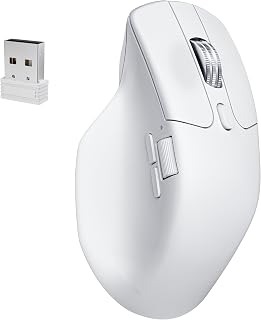
The Keychron M6 8K is a wireless mouse built for professionals and gamers who refuse to compromise. It targets users frustrated with Logitech's bloated ecosystem, creatives managing multiple devices, and anyone tired of loud clicking in quiet environments. The 8K version delivers the performance needed for both productivity and competitive gaming without requiring a separate gaming mouse.
What sets the M6 apart is its practical approach to customization. The onboard profiles, web-based launcher, and tri-mode connectivity create a friction-free experience across devices. The PixArt 3950 sensor with 30,000 DPI and 750 IPS tracking handles everything from precision design work to fast-paced gaming. The silent switches genuinely silence the clicking noise without sacrificing tactile feedback, making it exceptional for shared workspaces.
The ergonomic design feels natural during extended use, and the dual-mode scroll wheel adapts to context. Infinite scroll mode powers through long documents and code files, while ratchet mode provides precision when needed. Over 10 programmable buttons combined with macro support reward workflows for developers, video editors, and designers who invest time in setup.
The main drawback is size. If you have larger hands or prefer the substantial feel of a full-sized mouse, the M6 may feel cramped. Bluetooth mode caps polling at 125Hz, which works fine for office tasks but matters for competitive gamers. The infinite scroll wheel also loses momentum faster than some competitors, requiring occasional re-spinning during long scrolls.
The M6 8K represents genuine value for mixed-use professionals. It consolidates the best of productivity and gaming mice into one device, eliminates unnecessary software overhead, and adapts to virtually any workflow. It's the MX Master alternative that actually delivers.
Connectivity: 2.4GHz wireless (low-latency gaming), Bluetooth 5.3 (energy-efficient), USB-C wired. Pairs with up to 3 devices and switches instantly.
Sensor: PixArt 3950 with up to 30,000 DPI, 750 IPS tracking speed. Works on glass surfaces (minimum 4mm thick).
Polling Rate: Up to 8000Hz (2.4GHz mode), 125Hz (Bluetooth mode).
Buttons: Over 10 programmable buttons plus infinite/ratchet dual-mode scroll wheel.
Customization: Keychron Launcher web app, no software download required. 5 onboard memory profiles store DPI, polling rate, button mappings, and macros.
Design: Ergonomic right-hand design, silent micro-switches, lightweight, white plastic construction.
Compatibility: Mac, Windows, Linux. Works on laptops, desktops, tablets with macOS 13+ or Windows 11+.
Power: 1 AA battery (included), approximately 33-foot wireless range.
Warranty: 1 year manufacturer warranty.
Best For: Professionals juggling multiple devices, developers who value customization, gamers seeking precision without gaming-exclusive bloat, anyone tired of loud mouse clicks in offices.
Consider Alternatives If: You have very large hands and need a full-sized mouse, you game exclusively and want the absolute lowest latency above all else, or you're looking for a trackball or vertical ergonomic design.
Must-Have Features This Delivers: Silent switches for shared spaces, multi-device switching without re-setup, high-precision gaming-grade sensor, onboard profiles that travel with you, customization without mandatory software.
8K vs. 1K Decision: Reviews confirm the 8K polling model is worth the difference. The 1K version works for secondary mice or office-only use, but the 8K handles both work and gaming far better.
Setup Tips: Spend 15-20 minutes in the Keychron Launcher configuring profiles for each device. The initial investment pays off immediately with zero switching friction. The silent switches are noticeably quieter than standard mice, so adjust to the different feedback in the first few hours of use.
Buying Guide
Silent Click Technology
Silent gaming mice use specialized mechanical switches that eliminate the audible click while preserving tactile feedback. The left and right buttons typically feature this technology, though some models extend silent operation to side buttons as well.
Look for mice rated for millions of clicks, which ensures the silent switches remain reliable over time. Most quality options are rated for 5 million clicks or more, matching the durability of traditional switches.
Sensor Precision and DPI Range
The sensor determines tracking accuracy and responsiveness. PixArt sensors are widely recognized for consistent performance, with models like the PAW3950 offering up to 32,000 DPI for extreme precision.
Adjustable DPI settings let you switch between fast cursor movement for general navigation and slower speeds for precise aiming. Most users operate between 800 and 3200 DPI, so having preset levels in this range matters more than maximum specifications. If you’re building a complete setup, consider pairing your mouse with a silent mechanical keyboard for a fully quiet workspace.
Wireless Connectivity and Battery Life
Modern wireless mice use 2.4GHz technology for lag-free performance, with some models offering Bluetooth as a secondary connection option. Polling rates of 1000Hz or higher ensure responsive tracking without noticeable delay.
Rechargeable batteries eliminate the need for disposable cells, with battery life ranging from 30 hours to 120 days depending on usage patterns and power-saving features. Quick-charge capabilities let you continue using the mouse while it charges, which prevents workflow interruption.
Ergonomics and Weight
Ergonomic shaping reduces hand fatigue during extended sessions, with contoured designs supporting natural wrist positioning. Lightweight construction, typically between 55g and 127g, enables quick movements and reduces arm strain.
Consider how you grip your mouse when evaluating shape. Palm grips benefit from fuller back support, while claw and fingertip grips work better with more compact profiles. For MMO players who need extensive button mapping, check out our guide to the best mouse for MMO gaming.
Final Thoughts
Silent gaming mice deliver the quiet operation you need without sacrificing performance, making them ideal for shared spaces and late-night sessions. For budget-conscious buyers who want reliable wireless performance and LED backlighting, the TENMOS M2 Wireless Gaming Mouse provides rechargeable convenience and seven customizable lighting modes. If you need professional-grade precision with multi-device connectivity and extended battery life, the Rapoo MT760 PRO Wireless Mouse offers NearLink technology and 11 programmable buttons for seamless workflow across up to seven devices.
Frequently Asked Questions
Are silent gaming mice slower than regular gaming mice?
No, silent gaming mice use the same high-performance sensors and polling rates as traditional gaming mice. The silent switches affect only the audible click sound, not the electrical signal or response time. Many silent models feature polling rates of 1000Hz or higher and premium optical sensors that deliver professional-grade tracking.
Do silent mice work for competitive gaming in 2026?
Yes, modern silent gaming mice meet the performance requirements for competitive play. Models with PixArt sensors, high polling rates, and low-latency wireless connections provide the responsiveness needed for fast-paced games. The silent operation actually benefits competitive players who stream or participate in LAN events where ambient noise matters.
How long do silent mouse switches last?
Quality silent switches are rated for 5 million to 70 million clicks depending on the model. This matches or exceeds the lifespan of traditional mechanical switches. The silent mechanism doesn’t compromise durability, and many manufacturers back their silent mice with the same warranties as their standard gaming mice. For a complete quiet workspace setup, pair your silent mouse with options from our low profile keyboard roundup.
Can I use a silent gaming mouse with multiple devices?
Many silent gaming mice support multi-device connectivity through both 2.4GHz wireless and Bluetooth connections. Models with onboard memory profiles let you save different DPI settings and button configurations for each device, making it easy to switch between your gaming PC, work laptop, and tablet without reconfiguring settings each time.



Write Your Review
No reviews yet. Be the first to share your experience!