

If you spend hours at your desk gaming or working, your wrist takes the brunt of it. A traditional horizontal mouse forces your forearm into an unnatural rotated position, and over time that adds up to real discomfort. A vertical mouse holds your hand in a natural handshake position, which reduces forearm twisting and cuts down on muscle fatigue.
This guide covers five of the best vertical gaming mouse options available right now, ranging from budget-friendly daily drivers to premium productivity powerhouses. Whether you are a gamer, a designer, or someone who just wants to get through a long workday without wrist pain, there is a pick here for you. If you are building out a full ergonomic setup, pairing your mouse with a quiet mechanical keyboard is worth considering too.
Quick answer
This guide compares 5 picks, with AOC MS610 Ergonomic Vertical Mouse - 4800 DPI ranked first. Logitech MX Vertical Wireless Ergonomic Mouse with 4000 has the most customer reviews.
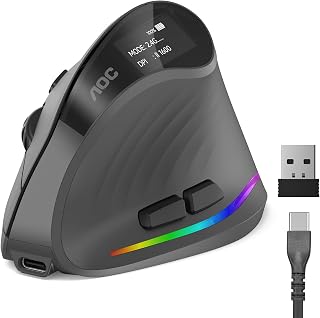
Gamers who log long sessions need a mouse that keeps up without cable drag or battery anxiety, and this AOC vertical option delivers on both fronts with tri-mode connectivity spanning 2.4 GHz, Bluetooth, and wired USB-A. The seven programmable buttons give competitive players enough macros to stay in control, while RGB accent lighting fits the aesthetic most gaming setups demand. The vertical angle helps reduce wrist strain over extended play.
Pros
- Exceptional ergonomic design with 52-degree vertical angle actively reduces wrist and forearm strain during long work sessions
- Industry-leading battery endurance delivers up to 200 hours per charge, minimizing charging interruptions
- Versatile connectivity options allow seamless switching between up to three devices via Bluetooth mode
- Whisper-quiet left and right clicks under 35dB won't disturb colleagues or classroom environments
- Fully customizable programmable buttons and RGB lighting adapt to individual workflow preferences
Cons
- Optimized only for small to medium hands; users with larger hands may find the vertical design uncomfortable
- Only the left and right buttons are silent, other buttons produce normal clicking sounds
- No customer reviews available yet to validate long-term durability and real-world performance claims
The AOC MS610 is a premium ergonomic vertical mouse engineered for professionals, designers, and office workers who spend extended hours at their desks. Its defining characteristic is the 52-degree vertical angle that positions your right hand in a natural handshake position, actively reducing wrist twisting and forearm tension that often leads to repetitive strain injuries.
Where this mouse truly excels is in its combination of comfort and productivity features. The precision optical tracking reaches 4800 DPI with five adjustable sensitivity levels, giving you pixel-perfect control whether editing photos, writing code, or designing graphics. Triple-mode connectivity via Bluetooth 5.4, 2.4GHz wireless, and USB wired connection means you can work across three devices seamlessly without switching hardware. The whisper-quiet operation at under 35dB on left and right clicks keeps your work environment peaceful without sacrificing responsiveness.
Battery performance is exceptional, delivering up to 200 hours per charge without RGB lighting, or over 40 hours with RGB active. The built-in LED battery indicator prevents unexpected downtime, and Type-C charging supports use-while-charging functionality. The mouse feels solidly constructed with matte ABS finish and includes seven programmable buttons, letting you customize shortcuts that match your workflow.
The main limitation is hand size compatibility. This mouse is optimized for small to medium hands and is not recommended for users with larger hands, which will narrow its appeal. Additionally, while the left and right clicks are silent, other buttons produce normal clicking sounds. These are minor trade-offs for an otherwise well-engineered ergonomic solution.
The AOC MS610 delivers genuine comfort improvements backed by solid build quality and AOC's reliable warranty support. It's an excellent investment for anyone prioritizing ergonomic health without compromising on precision and productivity features.
Connectivity and Compatibility: Bluetooth 5.4, 2.4GHz wireless receiver, and USB wired connection. Compatible with Windows, Mac, Linux, and Chrome OS devices. Supports connection to up to three devices simultaneously in Bluetooth mode.
Performance and Input: Optical movement detection with adjustable DPI levels: 1000, 1600, 2400, 3200, and 4800 DPI. Seven programmable buttons with customizable RGB lighting (adjustable via downloadable app). Silent left and right clicks under 35dB.
Power and Battery: 800mAh rechargeable battery provides 200 hours runtime without RGB or 40+ hours with RGB active. Type-C charging cable supports use-while-charging. LED battery percentage display included.
Physical Design: 52-degree vertical ergonomic angle, matte ABS construction, gray color finish. Dimensions: 4.33 inches length x 2.91 inches width. Weight: 3.68 ounces. Optimized for small to medium hands.
Package Contents: Ergonomic vertical mouse, 2.4GHz USB receiver, Type-C charging cable, quick start guide, user manual. Backed by 12-month warranty and 45-day return guarantee.

For gamers who switch between a desktop rig and other devices, this Uineer vertical mouse supports three-device pairing via Bluetooth and USB, cutting down on dongle swapping mid-session. The optical sensor keeps tracking precise on most surfaces, and the right-handed ergonomic vertical angle positions the wrist naturally to reduce fatigue during long gaming runs. Six buttons cover essential shortcuts without overwhelming the layout.
Pros
- Exceptional ergonomic design noticeably reduces wrist and forearm pain for all-day comfort
- Seamless multi-device switching via Bluetooth and USB provides unmatched workflow flexibility
- Lightweight construction makes it portable for remote workers and frequent travelers
- Long battery life with fast charging minimizes interruptions and maintenance
- Responsive optical tracking and precise clicks work reliably across different surfaces
Cons
- Sized for small-to-medium hands only, may feel cramped for users with larger hands
- Smooth plastic surface can be slippery during intensive work without a textured grip
- Mouse wheel may develop squeaking after extended use, though lubrication can resolve this
The UINEER vertical ergonomic mouse delivers a thoughtful solution for anyone spending long hours at a computer and experiencing wrist or forearm discomfort. Its natural handshake grip design immediately sets it apart from traditional flat mice by keeping your wrist straight and forearm relaxed. This is particularly valuable for office professionals, remote workers, and content creators who face daily RSI risks.
Performance-wise, the mouse excels with its dual connectivity approach. The combination of Bluetooth 5.0/4.0 and 2.4G USB wireless allows you to pair up to 3 devices simultaneously and switch between your laptop, desktop, and tablet with a single click. The 4-level DPI adjustment (800, 1200, 1600, 2400) handles everyday productivity tasks, design work, and casual gaming without lag. Real-world users consistently report crisp, responsive clicks and reliable tracking across various surfaces.
Build quality is respectable for the price point. The lightweight plastic construction at 120 grams makes the mouse portable and reduces hand fatigue during extended sessions. However, the smooth plastic surface can feel slippery during intensive work, and some users have reported wheel squeaking after weeks of heavy use, though light lubrication typically resolves this. The 7-color ambient lighting is a nice visual touch without being distracting.
One important consideration: this mouse is optimized for small-to-medium hands. Users with larger hands should verify the dimensions (4.8 inches long, 3.03 inches wide) before ordering to ensure comfort. Additionally, side buttons do not function on macOS systems, which may limit functionality for Apple users.
Overall, the UINEER vertical ergonomic mouse is a solid value for professionals seeking wrist strain relief with flexible multi-device connectivity. The 24-month warranty and 45-day refund policy provide confidence in your purchase. If you work at a desk for extended periods and experience any wrist discomfort, this mouse warrants serious consideration.
Vertical ergonomic mice like the UINEER model work by maintaining your hand in a neutral handshake position rather than forcing your wrist into the pronated (palm-down) position of traditional flat mice. This neutral alignment reduces strain on the extensor tendons and muscles in your forearm, helping prevent or alleviate conditions like carpal tunnel syndrome and tendinitis.
Users report noticeable relief within the first few days of use, with many noting that daily forearm and wrist pain diminishes significantly. The ergonomic design is especially beneficial for people who already experience discomfort, repetitive strain symptoms, or those working long shifts at a computer. For prevention-minded users, this mouse helps establish healthier long-term mouse habits before pain develops.
To maximize ergonomic benefits, pair this mouse with an ergonomic desk setup that keeps your keyboard and mouse at or slightly below elbow height. Taking regular breaks remains essential, but the UINEER's design removes much of the structural stress that makes breaks necessary.
The UINEER mouse supports three distinct wireless modes: Bluetooth 5.0, Bluetooth 4.0, and 2.4G USB dongle. This flexibility ensures compatibility with virtually any modern device, from Windows and Mac computers to Android phones and iPad tablets running iOS 13 or later. You can pair and store up to 3 devices in memory simultaneously.
Switching between paired devices is straightforward and requires no re-pairing. This feature transforms workflow efficiency for professionals juggling multiple screens. For example, you could pair your work laptop, personal desktop, and tablet, then switch between them instantaneously as your tasks change throughout the day.
The 33-foot wireless range covers most home and office environments. Bluetooth 5.0 offers improved stability compared to older Bluetooth versions, while the 2.4G USB option provides a wired fallback if needed. One limitation: side buttons function across all platforms except macOS, so Mac users should plan accordingly.

The ProtoArc EM11 NL targets gamers who want a clean, distraction-free vertical mouse with practical multi-device support across 2.4G USB-A and Bluetooth. Its rechargeable battery removes the cost and interruption of swapping disposable cells, which matters during marathon gaming sessions. The vertical design keeps the forearm in a neutral handshake position, directly addressing the repetitive strain that extended mouse use can cause.
Pros
- Effective ergonomic design demonstrably reduces wrist discomfort during extended use
- Multi-device connectivity simplifies switching between work computer, laptop, and tablet
- Built-in rechargeable battery eliminates waste from disposable batteries
- Quiet clicking allows focused work without audio distractions
- Affordable price point for an ergonomic mouse with wireless capabilities
Cons
- Steep learning curve requires 1-2 weeks of adjustment time before full comfort is achieved
- Not suitable for users with larger hands exceeding 7.5 inches in length
- Forward and back buttons incompatible with Mac OS systems, limiting navigation features on Apple devices
The ProtoArc EM11 NL is a rechargeable vertical ergonomic mouse purpose-built for desk workers, programmers, and remote professionals who spend extended hours at their computers. Its vertical design specifically targets the growing problem of repetitive strain injuries caused by traditional flat mice, making it ideal for anyone experiencing wrist discomfort or looking to prevent it.
The standout feature is the ergonomic vertical grip, which keeps your wrist naturally straight and your forearm in a relaxed position. The adjustable DPI settings (1000/1600/2400) provide responsive tracking for both precision work and general navigation. Multi-device connectivity via Bluetooth and USB-A receiver means you can seamlessly switch between your desktop, laptop, and tablet without reaching for another mouse. The quiet clicking technology is genuinely appreciated during video calls and open office environments.
Build quality is solid for the price point. The 500mAh rechargeable battery charges via USB-C and holds charge reliably throughout typical workdays. The compact sizing is deliberately optimized for small to medium hands, ensuring proper ergonomic benefit for the target user. The optical sensor provides consistent tracking across different surfaces without lag or calibration issues.
The primary drawback is the adjustment period. Vertical mice require genuine acclimation, typically 1-2 weeks, so expect initial awkwardness. The mouse also isn't suitable for large-handed users, and Mac users lose forward/back button functionality. These limitations are worth noting but don't significantly impact the right buyer.
Overall, the EM11 NL delivers real ergonomic benefits at an accessible price. It's highly recommended for anyone ready to transition away from traditional mice and genuinely motivated to reduce wrist strain. The learning curve is temporary, but the comfort improvements are lasting.
Vertical mice address a real workplace health issue. By positioning your hand vertically rather than flat, they reduce pronation of the forearm and keep your wrist in neutral alignment. This positioning directly reduces strain on the tendons and nerves that run through your wrist and arm, decreasing risk of carpal tunnel syndrome and other repetitive strain injuries.
The EM11 NL's design is particularly effective for users with hand lengths under 7.5 inches, as it fits naturally into smaller hands without requiring awkward gripping adjustments. Users report measurable reduction in end-of-day wrist pain and fatigue after the adjustment period. The manufacturer's recommendation to spend 1-2 weeks adapting is honest feedback, not a marketing excuse, so budget your transition time accordingly.
The EM11 NL supports three simultaneous connections across different devices through dual Bluetooth and a dedicated 2.4G USB-A receiver. Switch between your Windows desktop, MacBook, and Android tablet without manually pairing each time. Compatibility spans Windows 8+, macOS 10.12+, and Android 4.3+, covering most modern devices.
One limitation: the USB-A receiver only, so you'll need an adapter if your primary device uses USB-C. Forward and back buttons don't function on macOS systems, affecting web navigation on Apple computers. The USB-C cable included is for charging only, not data connection, so remember to use the physical receiver for USB connectivity.

Pros
- Dramatically reduces hand fatigue and wrist strain through advanced ergonomic engineering
- Exceptional battery life keeps the mouse powered for extended periods between charges
- 4000 DPI precision sensor delivers accurate tracking with significantly reduced hand movements
- Versatile connectivity with Bluetooth and USB receiver for multi-device compatibility
- Professional-grade build quality backed by Logitech reliability and warranty support
Cons
- Higher price point than standard mice may not appeal to budget-conscious buyers
- Vertical design requires an adjustment period for users accustomed to traditional mouse positioning
- Right-handed only, limiting options for left-handed users
The Logitech MX Vertical is a premium ergonomic mouse engineered for professionals and office workers who spend long hours at their desk. It combines Logitech's acclaimed MX Series performance with advanced ergonomic science to address real pain points like wrist strain, carpal tunnel syndrome, and repetitive stress injuries. This mouse is built for anyone serious about maintaining comfort and health during extended work sessions.
The standout feature is the distinctive 57-degree vertical angle that positions your hand in a natural handshake position rather than the flat, pronated posture of traditional mice. This design reduces muscular activity by 10% while the 4000 DPI high-precision optical sensor cuts hand movement by 75% compared to standard mice. The cursor speed switch lets you instantly adjust sensitivity, and the tactile textured grip fits various hand sizes comfortably. Real-world performance remains flawless across Windows, macOS, iPadOS, and Linux platforms.
Build quality reflects Logitech's premium positioning. The mouse features a contoured, ergonomic shape with a smooth rubberized surface that feels solid and responsive. The included USB receiver and Bluetooth connectivity provide flexible multi-device switching. Battery performance exceeds expectations, delivering up to four months per charge, with a one-minute quick charge providing three hours of immediate use when time is tight.
The main drawbacks are the learning curve when transitioning from a traditional mouse and the significant price premium over standard options. The right-handed-only design also excludes left-handed users. Some buyers may find the vertical angle takes a few weeks to feel natural, though this adjustment period pays dividends in reduced strain and improved posture.
The Logitech MX Vertical represents a meaningful investment in ergonomic health and productivity. If you experience wrist pain, work extended hours, or want to prevent repetitive strain injuries, this mouse delivers measurable benefits backed by ergonomist approval and real user satisfaction. The exceptional battery life, precision tracking, and cross-platform compatibility make it a standout choice for professionals willing to prioritize comfort.
This mouse addresses specific ergonomic concerns through science-backed design. The 57-degree vertical angle mimics a natural handshake position, which significantly reduces pronation strain on your forearm and wrist. Users experience 10% lower muscular activity compared to traditional mice, directly translating to reduced fatigue during long work sessions.
The high-precision 4000 DPI sensor enables accurate cursor control with minimal hand movement, further reducing strain and fatigue. For those prone to or recovering from carpal tunnel syndrome or repetitive stress injuries, the combination of improved posture and reduced hand movement creates a measurable difference in daily comfort. Logitech partnered with leading ergonomists to validate these benefits through user testing.
Connectivity: Bluetooth Low Energy with included USB receiver, 10-meter wireless range
Sensor: 4000 DPI high-precision optical tracking with adjustable speed switch
Buttons: 4-button layout optimized for right-handed use
Battery: Up to 4 months per charge, 1-minute quick charge yields 3 hours use, includes rechargeable lithium polymer battery
Compatibility: Windows 10+, macOS 10.15+, iPadOS 13.4+, Chrome OS, Linux, Android
Physical: 7.5 inches long, 6 inches wide, 8 ounces, graphite color with textured rubber surface
Package Contents: MX Vertical mouse, USB-C cable, USB receiver, quickstart guide

Pros
- Vertical orientation significantly alleviates carpel tunnel and wrist pain for extended users
- 30K sensor delivers gaming-grade precision while Synapse 4 software offers extensive customization
- Multi-device connectivity lets you control your entire workspace with a single mouse
- Ultra-long battery life eliminates constant charging concerns for busy professionals
- Responsive mechanical switches provide tactile feedback with proven durability
Cons
- Steeper learning curve as adjustment period needed when transitioning from traditional mouse design
- Taller profile design means occasional accidental knockovers during quick hand movements
- Premium pricing sits at higher end of ergonomic mouse market with limited budget alternatives
The Razer Pro Click V2 Vertical is a purpose-built ergonomic wireless mouse targeting professionals and gamers who experience wrist discomfort from extended computer use. Its innovative vertical grip design mimics a natural handshake position, supported by an elevated wrist rest that minimizes friction and strain. This mouse fills a genuine gap in the market where ergonomic options remain limited and rarely compromise on performance specs.
Performance-wise, the Focus Pro 30K optical sensor delivers gaming-grade precision with 99.8% accuracy, even on glass surfaces. The 1000Hz polling rate and responsive mechanical switches with 60-million click lifecycle provide the responsiveness expected from Razer's gaming lineage. The AI Prompt Master button adds genuine productivity value, letting you summarize text and draft emails in one click through Razer Synapse 4 integration, making it genuinely useful for knowledge workers beyond just gamers.
Battery life is exceptional at up to 6 months per charge, with the bonus of gaining 3 full working days from just 5 minutes of USB-C charging. The five-device connectivity across HyperSpeed Wireless, Bluetooth, and wired modes means seamless switching between your workstation, laptop, tablet, and phone. The 18-zone RGB lighting with reactive notifications adds personality without being essential to the core value proposition.
The main drawback is the learning curve, as the taller vertical profile requires adjustment if you're accustomed to traditional flat mice. Some users report the pinky finger lacks adequate support depending on hand size and shape. Additionally, the premium pricing reflects its specialized purpose, so budget-conscious buyers might explore cheaper alternatives despite missing the ergonomic benefits and multi-device features.
Verdict: The Razer Pro Click V2 Vertical delivers a compelling combination of ergonomic comfort, professional productivity features, and gaming-grade performance. If wrist pain impacts your workday or gaming sessions, the vertical design offers genuine relief that justifies the investment. For those without ergonomic concerns, a traditional mouse remains perfectly adequate and far more affordable.
This mouse is ideal for remote workers, office professionals, and gamers experiencing wrist pain, carpel tunnel symptoms, or repetitive strain injuries. The vertical ergonomic design provides immediate relief for anyone transitioning from traditional mice to a hand-position-friendly alternative. Its professional features like multi-device connectivity and AI shortcuts make it especially valuable for power users managing multiple devices simultaneously.
The Razer Pro Click V2 Vertical is also excellent for content creators and knowledge workers who benefit from the AI Prompt Master for email drafting and text summarization. However, it requires a commitment to the learning curve, so it's better suited for users willing to spend a few days acclimating rather than those seeking instant comfort without adjustment.
Skip this mouse if you prefer budget options, have very small hands that may not fit comfortably, or simply don't experience wrist discomfort with traditional mice. It's also not recommended for those who frequently move their mouse setup or prefer the compact, portable form factor of travel mice.
Connectivity: 2.4GHz HyperSpeed Wireless, Bluetooth (3 hosts), USB wired
Sensor: Focus Pro 30K Optical Sensor with 99.8% resolution accuracy
Buttons: 6 fully programmable buttons, mechanical switches rated for 60 million clicks
Battery: Up to 6 months battery life, fast charge 5 minutes for 3 working days
Lighting: 18-zone RGB with full underglow, customizable from 16.8 million colors
Compatibility: Windows 11 and PC platforms, Razer Synapse 4 software
Design: Vertical ergonomic with base wrist support, natural handshake grip
Weight: 0.41 kg
Warranty: 2-year manufacturer warranty
Polling Rate: 1000Hz
What to Look for in a Vertical Gaming Mouse
Ergonomic Angle and Hand Size Compatibility
The vertical angle is the core feature of this mouse type. Most models sit between 52° and 57°, which mimics a natural resting hand position. The AOC Ergonomic Mouse, 2.4GHz Wireless Bluetooth uses a 52° angle, while the Logitech MX Vertical Wireless Mouse Ergonomic goes a degree higher at 57°, which some users find even more comfortable.
Hand size matters more with vertical mice than with standard ones. Several options here, including the ProtoArc EM11 NL Wireless Ergonomic Vertical and the Uineer Vertical Ergonomic Mouse, are sized for small to medium hands. Measure your hand length before ordering to avoid a frustrating mismatch.
DPI Range and Tracking Precision
For gaming and design work, sensor quality is non-negotiable. The Razer Pro Click V2 Vertical Wireless Mouse leads the pack here with a Focus Pro 30K optical sensor that maintains 99.8% resolution accuracy, even on glass surfaces. That kind of tracking is a real advantage for fast-paced gaming or pixel-level design work.
If you need something more moderate, the AOC mouse offers up to 4800 DPI across five levels, while the ProtoArc and Uineer models top out at 2400 DPI. For general office use and casual gaming, 2400 DPI is plenty. For competitive gaming or high-resolution displays, you will want a higher ceiling. You can browse more high-performance peripherals in our keyboards and mice category.
Wireless Connectivity and Battery Life
Most vertical mice now offer multi-device Bluetooth support, which is a genuine quality-of-life upgrade if you switch between a desktop and a laptop. The Razer Pro Click V2 goes furthest here, supporting up to five devices across 2.4GHz HyperSpeed, Bluetooth, and wired mode. The AOC and Uineer options both handle three devices simultaneously.
Battery life varies significantly across this lineup. The AOC mouse delivers up to 200 hours without RGB active, while the Razer claims up to six months under standard conditions. The ProtoArc’s 500mAh cell is the smallest in the group, so it will need more frequent charges. If uninterrupted use is a priority, the AOC or Razer options are stronger choices. For a broader look at building out your peripherals setup, check out our guide to the best mouse for MMO gaming.
Extra Features: RGB, Silent Clicks, and Programmability
Not all vertical mice are purely utilitarian. The Uineer mouse includes a 7-color ambient light ring that adds a gaming aesthetic without being overbearing. The AOC mouse goes further with fully customizable RGB via a companion app, along with completely programmable buttons for workflow shortcuts.
Silent clicks are a smaller but useful detail. The AOC, ProtoArc, and Uineer all feature quiet left and right click buttons under 35dB, which keeps things civil in shared spaces like offices or libraries. The Razer Pro Click V2 skips the silent treatment but makes up for it with mechanical switches rated for 60 million clicks. If you are pairing this with a quiet workspace setup, our roundup of the best low-profile keyboards is worth a read.
Final Thoughts
Switching to a vertical mouse is one of the more effective ergonomic upgrades you can make to your desk setup, and this lineup covers a wide range of needs. If you want a capable, feature-rich option with long battery life and full programmability, the AOC Ergonomic Mouse, 2.4GHz Wireless Bluetooth delivers serious value. For those who demand top-tier sensor performance and multi-device flexibility across a full gaming and productivity rig, the Razer Pro Click V2 Vertical Wireless Mouse is the premium choice that justifies every feature it brings to the table.
Frequently Asked Questions
Is a vertical mouse actually better for gaming?
It depends on your priorities. A vertical mouse significantly reduces wrist and forearm strain during long sessions, which is a real advantage for endurance gaming and marathon work days. That said, the learning curve is real, especially for fast-paced games where muscle memory matters. Most users adapt within one to two weeks and find the ergonomic benefit is worth it.
What is the best vertical gaming mouse in 2026 for small hands?
The ProtoArc EM11 NL Wireless Ergonomic Vertical and the Uineer Vertical Ergonomic Mouse are both sized specifically for hands under 7.5 inches. If you have small to medium hands, either of these is a comfortable fit right out of the box. Always measure your hand length from the base of your palm to the tip of your middle finger before ordering a vertical mouse.
Do vertical mice work well for MMO or strategy gaming?
Yes, particularly models with programmable side buttons. The AOC Ergonomic Mouse, 2.4GHz Wireless Bluetooth and the Razer Pro Click V2 both offer programmable buttons that can be mapped to in-game actions or macros. For deeper MMO-specific guidance, our best mouse for MMO gaming guide covers what button layouts and sensor specs to prioritize.
How long does it take to get used to a vertical mouse?
Most people need one to two weeks before a vertical mouse starts feeling natural. The grip angle is noticeably different from a standard mouse, so everyday tasks like clicking and scrolling may feel slightly awkward at first. Sticking with it through that initial period is worth it, as many users report a clear reduction in wrist discomfort once they have fully adjusted. Starting with lower DPI settings during the adaptation phase can also help smooth the transition.



Write Your Review
No reviews yet. Be the first to share your experience!