

Building a clean, visually striking PC starts with the right foundation. White cases have surged in popularity among builders who want their hardware to stand out while maintaining a minimalist aesthetic that complements modern setups.
This guide evaluates five premium white mid-tower cases that balance stunning visuals with practical features like airflow optimization, cable management, and hardware compatibility. Whether you’re assembling a high-performance gaming rig or a content creation workstation, you’ll find options that deliver both form and function.
Quick Comparison
| Model | Link | Rating | Case Type | Motherboard Compatability | Cooling Method |
|---|---|---|---|---|---|
| 1 NZXT H6 Flow RGB Mid-Tower Case - Premium Airflow,...Highest ratedMost reviewed | Check price | 4.8 of 51,887 ratings | Mid Tower | ATX, micro-ATX, mini-ITX | Air |
| 2 Lian Li V100-ATX Mid-Tower PC Case with 4x ARGB Fans,... | Check price | 4.8 of 5597 ratings | Mid Tower | ATX, Micro ATX | Air |
| 3 CORSAIR FRAME 4500X RS ARGB Mid-Tower PC Case with... | Check price | 4.7 of 5313 ratings | Mid Tower | Mini ITX, Micro ATX, ATX,... | Air |
| 4 CORSAIR 3500X RS ARGB White Mid-Tower PC Case, Tempered... | Check price | 4.6 of 5563 ratings | Mid Tower | Mini ITX, Extended ATX | Air |
| 5 ANSAITE C9 Mid Tower ATX PC Case with 7 ARGB Fans,... | Check price | 4.6 of 5101 ratings | Mid Tower | ATX | Air, Water |
Ratings reflect the most recent data pull. Check each listing for current price and availability.
Quick answer
This guide compares 5 picks, with NZXT H6 Flow RGB Mid-Tower Case - Premium Airflow ranked first.
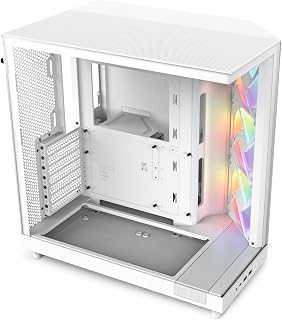
NZXT H6 Flow RGB Mid-Tower Case - Premium Airflow
Pros
- Dual-chamber design hides cables completely while improving GPU cooling
- Seamless wraparound glass showcases components in a pristine white frame
- Three RGB fans pre-installed with smart positioning for thermal performance
- Wide cable channels with Velcro straps simplify routing and cleanup
Cons
- RGB v2 connector system may require adapters for some motherboards
- Tight installation spots possible depending on specific component choices
White builds demand more than just color matching. The H6 Flow delivers pristine aesthetics through its seamless wraparound glass panel that puts your components on full display, while the dual-chamber architecture keeps cables and the power supply completely hidden from view. This separation isn't just visual; it creates superior GPU thermals by isolating heat sources and directing airflow exactly where it matters. Three pre-installed 120mm RGB fans handle intake duties with strategic positioning that keeps temperatures in check even during extended gaming sessions. The metal construction feels premium and substantial, while removable dust filters maintain that clean white finish over time. Front IO placement is smart and accessible, and the cable management system using wide channels with Velcro straps makes routing simple even for newcomers. Real-world thermal performance stays quiet under load, letting the white exterior remain the focus rather than distracting fan noise. The only catch is NZXT's RGB v2 connector system, which might need adapters depending on your motherboard's headers.
Case Type: Mid-Tower
Motherboard Support: ATX, micro-ATX, mini-ITX
Dimensions: 16.34 inches D x 11.3 inches W x 17.13 inches H
Weight: 9.4 kg
Material: Metal with panoramic glass panels
Cooling & Fans: Pre-installed 3x 120mm RGB fans, supports up to 9 total fans, 360mm radiator compatible
Storage: 1x 3.5 inch bay, supports 2.5 inch and 3.5 inch drives
Expansion Slots: 7 total
Connectivity: 2x USB 2.0, 2x USB 3.0, 3x USB total
Power Supply: Bottom-mounted
Warranty: 2 years manufacturer coverage
This case suits first-time builders who want a white showcase build without thermal compromises, gaming enthusiasts running powerful GPUs that generate serious heat, and anyone prioritizing visual cleanliness with functional cable hiding. Skip it if you need legacy RGB compatibility without adapters, prefer tool-free panels over the wraparound glass design, or if your motherboard and component combination creates tight installation clearances that complicate assembly in specific configurations.

Pros
- Stunning design with pillarless panoramic glass gives expensive case aesthetics at mid-range pricing
- Quiet included fans with clean airflow, supported by open layout and mesh ventilation
- Excellent cable management with dedicated routing space and large PSU shroud with extra room
- Highly modular with tool-less panels, GPU support bracket, and flexible cooling options up to 360mm radiator
- Great compatibility for high-end builds with 420mm GPU support and ample internal space
Cons
- Open design prioritizes aesthetics over sound isolation, so noise levels may be higher than closed cases
- White finish may show dust more visibly than darker color options
- Plastic components reduce durability compared to all-metal alternatives
The Lian Li V100 is a mid-tower ATX case designed for builders who want a showcase-quality aesthetic without the extreme price tag. It's ideal for streaming setups, desk displays, and anyone building a high-end gaming or workstation PC who values both form and function.
The standout feature is the panoramic tempered glass design that gives the case a premium look. Real-world performance is solid: the case supports nine 120mm fans and 360mm radiators, with pre-installed ARGB fans that remain quiet and powerful. Airflow is surprisingly good for a showcase chassis, thanks to the mesh ventilation and open internal layout that keeps temperatures under control.
Build quality impresses with stainless steel and tempered glass construction. The tool-less side panels make access effortless, and the included GPU bracket prevents card sagging during transport. Cable management is thoughtfully designed with dedicated routing and generous PSU shroud space.
The main drawback is sound isolation. The open design and glass panels don't dampen noise as effectively as enclosed cases, so if silence matters, this may not be your best choice. Additionally, the white finish shows dust more readily than darker options.
Verdict: The V100 delivers exceptional value for builders seeking a beautiful, functional mid-tower with excellent compatibility for high-end hardware. Its quiet fans, smart cable management, and modular design make it a gem for enthusiasts willing to prioritize aesthetics and build experience over sound dampening.
Form Factor: Mid-Tower ATX
Motherboard Support: ATX, Micro-ATX, Mini-ITX, back-connect ATX/Micro-ATX
Cooling Capacity: Up to 9x 120mm fans, 360mm radiator support
GPU Compatibility: Up to 420mm graphics cards
CPU Cooler Clearance: Up to 178mm
Internal Bays: 4 bays for drives and accessories
Power Supply: Rear mount, modular recommended
Fans Included: 4x 120mm PWM ARGB fans at 1800 RPM, 61.47-60.4 CFM, 2.54-2.17 mm-H2O pressure, 26.5-30.8 dBA noise
RGB Features: 26-LED integrated ARGB strip with daisy-chain connectivity and motherboard synchronization
Panel Type: Panoramic tempered glass with tool-less mounting
Materials: Plastic, stainless steel, tempered glass
Weight: 8200g (approximately 18 lbs)
Warranty: 1 year manufacturer warranty
Who Should Buy: The V100 is perfect for enthusiast builders wanting a premium showcase case, streamers who display their PC on camera or desk, and gamers building high-end systems with current-generation GPUs and cooling solutions.
Best For: Gaming builds, workstation PCs, streaming setups, desk displays, and first-time builders who want a case that's easy to work in and beautiful to look at.
Consider Alternatives If: You prioritize silent operation and sound dampening, prefer completely enclosed designs, or need a compact form factor smaller than mid-tower.
Build Compatibility: This case accommodates most modern components. Verify your GPU length is under 420mm and your CPU cooler height is under 178mm. The case ships with four fans pre-installed, so you may not need additional cooling unless building an extremely high-performance system.
Setup Tips: Take advantage of the daisy-chain ARGB connectivity to sync all fans and the integrated strip through a single motherboard header. Use the back-connect motherboard support for the cleanest cable routing. The included GPU bracket is useful even for stationary systems to prevent long-term sag.

Pros
- 270-degree wraparound glass with reverse-rotor RGB fans for stunning white builds
- Supports dual 360mm radiators and GPUs up to 460mm with anti-sag bracket
- Modular FRAME system allows internal reconfiguration without replacing chassis
- Improved cable routing and thick tempered glass with rigid steel construction
Cons
- Included fans lack direct iCUE control, require motherboard headers or external controllers
- Front panel cannot mount radiators, limiting some liquid cooling configurations
Premium white builds deserve premium features, and the FRAME 4500X brings them without apology. The single-piece wraparound tempered glass panel offers an unobstructed 270-degree view of your components, turning the white chassis into a proper display case for high-end hardware. Reverse-rotor RGB fans arrive pre-installed, creating immediate visual impact that complements the white exterior perfectly. Cooling flexibility is exceptional: air builds can mount up to 10 fans, while liquid cooling enthusiasts can install dual 360mm radiators for serious thermal control. Graphics cards up to 460mm fit comfortably, and the built-in GPU anti-sag bracket keeps everything aligned and looking sharp inside that glass showcase. The modular FRAME system adds long-term value, letting you reconfigure internal layouts as your needs change rather than replacing the entire case. Cable management routing is genuinely improved over typical designs, making clean builds achievable even with extensive RGB and cooling setups. The thick tempered glass feels substantial, the steel chassis is rigid and well-engineered, and the cascading industrial design gives this white case a distinctive professional appearance that separates it from generic alternatives.
Physical Dimensions: 19.65 inches deep x 10.08 inches wide x 18.54 inches high
Motherboard Support: Mini-ITX, Micro-ATX, ATX, E-ATX (up to 305mm x 277mm)
Cooling Capacity: Supports dual 360mm radiators or up to 10x 120mm fans or 5x 140mm fans using InfiniRail system. Pre-installed with 3x RS120R ARGB reverse-rotor fans.
Component Clearances: 460mm GPU length, 185mm CPU cooler height, 250mm power supply depth
Storage: 2x 2.5-inch SSDs and 1x 3.5-inch HDD capacity across 3 internal bays
Front I/O: 2x USB 3.2 Gen1 Type-A, 1x USB 3.2 Gen2 Type-C, headphone and microphone jacks
Construction: Tempered glass front and side panel, steel chassis, plastic accents with dust filters on bottom and right side
Warranty: 2-year manufacturer coverage
Perfect for enthusiasts building showcase white systems with flagship GPUs and advanced cooling, upgraders moving from budget chassis who want premium materials and thermal headroom, and modders who value future reconfiguration options through the FRAME system. Skip it if you need direct iCUE software control for included fans rather than motherboard headers, require front panel radiator mounting for specific liquid cooling layouts, or prefer compact cable routing over the spacious interior that demands disciplined management.

Pros
- Wraparound tempered glass creates panoramic views for white showcase builds
- Supports Mini-ITX through EATX motherboards for maximum flexibility
- Up to 10x 120mm fan mounting points for serious cooling expansion
- Three RS120-R ARGB fans pre-installed with bottom PSU mount for clean layout
Cons
- Only three fans included, maximizing cooling requires additional purchases
- Cable management space adequate but not generous for complex configurations
White gaming builds need visibility and expandability, and the 3500X RS delivers both without pretense. Wraparound tempered glass panels create that panoramic effect that shows off your hardware from nearly every angle, while compatibility stretches from Mini-ITX up to Extended ATX motherboards so your white build can grow with future upgrades. The cooling story is about potential: mounting points for up to 10x 120mm fans across front, top, and rear positions give you serious expansion room as your thermal needs increase. Three RS120-R ARGB fans come pre-installed to get you started, and the bottom-mounted power supply keeps cables tucked away while maintaining clean airflow paths through the chassis. The white finish stays consistent across the exterior, creating that cohesive look white builds demand. Removable front and side glass panels make assembly and future maintenance straightforward, and the 9.02kg weight suggests a frame that won't flex or feel flimsy during transport or upgrades. The design balances visual appeal with functional layout, avoiding unnecessary complications while giving RGB lighting room to shine through that panoramic glass.
Case Type: Mid-Tower
Motherboard Compatibility: Mini-ITX, Micro-ATX, ATX, Extended-ATX (EATX)
Material: Tempered Glass (front and side panels), Steel frame
Color: White
Fan Support: Up to 10x 120mm fans (front, top, rear, side mounting points)
Pre-Installed Fans: 3x RS120-R ARGB 120mm fans
Power Supply: Bottom-mount, supports standard ATX PSU
Cooling Method: Air cooling
Weight: 9.02 kg (approximately 19.8 lbs)
RGB Control: Motherboard control via 5V ARGB header
Ideal for gamers building their first white-themed high-end system, upgraders moving from basic cases who want glass aesthetics with room to expand cooling later, and builders prioritizing motherboard flexibility across multiple form factors. Skip it if you need maximum cooling fans included from day one rather than planning additions, prefer minimal glass for easier maintenance, or require generous cable management space for complex routing with oversized PSUs and numerous drives.

Pros
- Seven fans pre-installed deliver excellent cooling performance without additional purchase or installation
- Stunning RGB lighting creates immersive gaming atmosphere with motherboard synchronization capability
- Generous internal space accommodates high-end components and multiple cooling configurations
- Modern I/O including USB 3.2 Type-C ports and clean cable management system
- Solid build quality with tempered glass and alloy steel construction
Cons
- Some units arrive with shipping damage; verify condition upon delivery and contact support if needed
- Motherboard mounting screws may require inspection to ensure proper compatibility with flangeless screw requirements
The ANSAITE C9 is a mid-tower ATX case designed for gamers and PC builders seeking an affordable solution that doesn't compromise on cooling or aesthetics. This case targets budget-conscious enthusiasts who want to showcase their hardware while maintaining optimal system temperatures during gaming and intensive workloads.
The standout feature is the seven pre-installed PWM ARGB fans that deliver dual-channel airflow optimization for both CPU and GPU cooling. The reverse blade intake fans on the side efficiently pull cool air while three exhaust fans on top and one rear fan expel hot air. Real-world performance from customer builds shows significant improvements in system cooling, with users reporting lower fan noise and stable thermals even under stress testing.
Design and build quality are solid for the price point. The 270-degree panoramic tempered glass side panel displays your components beautifully while the magnetic dust filters keep internal components clean. The case measures 19.29 inches tall and supports graphics cards up to 440mm, CPU coolers to 180mm, and multiple radiator configurations. Cable management is thoughtfully designed with a back-connect layout that keeps the front panel clean while maintaining proper airflow.
Potential drawbacks include occasional shipping damage reported in reviews, so inspect your case upon arrival. Additionally, motherboard mounting screws should be verified as some users noted they need to be flangeless for proper fitment. The bright RGB lighting, while visually stunning, can be intense in darker rooms without an external controller for customization.
The ANSAITE C9 offers exceptional value for mid-tower cases. With seven fans included, modern USB 3.2 Type-C connectivity, and spacious cooling-friendly internals, it delivers performance and aesthetics at a price point that typically offers neither. Highly recommended for builders prioritizing airflow, lighting effects, and budget efficiency.
The C9 utilizes a sophisticated dual-channel airflow design that separates cooling paths for optimal thermal management. Three intake fans on the side with reverse blade design pull fresh air directly toward components, while three exhaust fans on the top and one rear fan create a vertical exhaust path. This configuration ensures hot air escapes efficiently without recirculation.
Magnetic dust filters on both top and bottom prevent dust accumulation while maintaining cooling efficiency. The case supports up to 9 total 120mm fans and 360mm radiator mounting on top, making it flexible for custom water cooling setups. Users report substantial temperature improvements when upgrading from smaller cases, particularly for CPUs and graphics cards during extended gaming sessions.
Seven prismatic ARGB fans create continuous gradient rainbow lighting with seamless color transitions that synchronize with compatible motherboards. The 270-degree panoramic tempered glass panel displays the full lighting effect, making the case a visual centerpiece. The white chassis complements the RGB effects while the back-connect design hides cables for a clean front appearance.
Customer feedback indicates the RGB lighting is exceptionally bright and vibrant, creating an immersive gaming atmosphere. An external RGB controller can be added for independent lighting customization without motherboard control, providing additional flexibility for effects and timing.
Buying Guide: What to Consider When Choosing a White PC Case
Airflow Architecture and Cooling Capacity
Effective thermal management prevents hardware throttling and extends component lifespan. Look for cases with perforated panels, mesh sections, or strategic ventilation that allows cool air intake and efficient heat exhaust.
Pre-installed fans provide immediate cooling without additional purchases. The NZXT H6 Flow RGB includes three 120mm RGB fans positioned at an optimal angle, while the Lian Li V100 ships with four PWM-controlled fans. Dual-chamber designs like the H6 Flow separate the GPU and motherboard areas, improving airflow by reducing internal congestion. For builders planning custom liquid cooling, verify radiator clearance at the top, front, and side mounting points.
If you’re pairing your case with a high-performance GPU, check out our best PC case for RTX 5090 builds for additional recommendations on thermal management.
Glass Panel Design and Internal Visibility
Tempered glass showcases your components while protecting them from dust and physical damage. Wraparound glass panels, like those on the CORSAIR Frame 4500X RS, eliminate seams and provide unobstructed viewing angles from multiple sides.
Single-piece curved glass creates a premium aesthetic but requires careful handling during installation. Side-panel-only designs offer easier access for maintenance and upgrades. Magnetic or tool-less mounting mechanisms simplify panel removal when you need to swap hardware or clean dust filters. The panoramic glass on the ANSAITE C9 extends 270 degrees, delivering an immersive view while maintaining structural integrity.
Cable Management and Build Cleanliness
Hidden cables improve airflow and create a professional appearance. Wide routing channels, Velcro straps, and dedicated PSU shrouds keep wiring organized behind the motherboard tray.
Reverse-connector motherboard support, available in cases like the CORSAIR Frame 4500X RS and Lian Li V100, routes cables behind the motherboard for an ultra-clean front view. This feature requires compatible motherboards but eliminates visible cabling entirely. Grommets protect cables from sharp edges during routing, while ample space behind the motherboard tray accommodates bulky connectors and excess cable length.
For builders focused on high-performance platforms, our best white Z890 motherboards guide covers reverse-connector options that pair perfectly with these advanced cable management features.
Hardware Compatibility and Expansion Options
Confirm clearance specifications before purchasing. GPU length, CPU cooler height, and radiator dimensions vary significantly between cases, and incompatibility forces costly returns or hardware compromises.
The ANSAITE C9 accommodates graphics cards up to 440mm, making it suitable for oversized GPUs with triple-fan coolers. CPU cooler clearance of 178mm or more supports tower air coolers and prevents interference with side panels. PSU length limits matter when installing fully modular units with thick cables. The CORSAIR 3500X RS supports motherboard form factors from Mini-ITX to EATX, offering flexibility for various build sizes.
Drive mounting options for SSDs and HDDs affect storage configuration. Tool-less drive trays speed up installation, while hot-swap bays allow drive replacement without powering down. PCIe slot count determines expansion card compatibility for capture cards, Wi-Fi adapters, or additional USB controllers.
Our best PC case for RTX 5080 and best PC case for RTX 5070 guides provide detailed clearance recommendations for specific GPU models.
Final Thoughts
The right white PC case depends on your build priorities and hardware requirements. For builders seeking panoramic glass with exceptional airflow and pre-installed RGB, the NZXT H6 Flow RGB delivers premium aesthetics and thermal performance in a compact dual-chamber design. If you need maximum flexibility with reverse-connector motherboard support and modular expansion, the CORSAIR Frame 4500X RS offers the FRAME system’s customization potential alongside stunning single-piece curved glass. Both options provide the clean, modern aesthetic white builds demand while ensuring your components stay cool and accessible.
Frequently Asked Questions
Do white PC cases show dust more than black cases?
White cases reveal dust differently than black ones. Dark dust particles contrast sharply against white surfaces, making buildup more visible. However, this visibility encourages regular cleaning, which benefits long-term component health. Magnetic dust filters on intake fans capture particles before they enter the case, reducing internal accumulation regardless of exterior color.
Can I use a white PC case with RGB components?
White cases enhance RGB lighting by reflecting colors throughout the interior. The neutral background allows RGB elements like RAM, fans, and GPU lighting to appear more vibrant and saturated. Many white cases, including the models reviewed here, include pre-installed RGB fans with daisy-chain connectivity for synchronized lighting effects controlled through your motherboard software.
What is a dual-chamber PC case design?
Dual-chamber cases separate the motherboard and GPU area from the PSU and storage compartment using an internal divider. This configuration isolates cable clutter and heat-generating components like the power supply, improving airflow around the CPU and graphics card. The NZXT H6 Flow uses this layout to prioritize GPU cooling while maintaining a clean front-facing aesthetic.
Are white PC cases more expensive than other colors in 2026?
White variants sometimes carry a slight premium compared to black versions of the same model, typically reflecting increased manufacturing complexity or special coatings. However, the price difference rarely exceeds a few dollars, and many manufacturers now offer white as a standard color option at identical pricing. Market availability varies by brand and model, with some white cases launching later than their black counterparts.





Write Your Review
No reviews yet. Be the first to share your experience!