

A laptop call starts, your microphone catches keyboard clatter, and you wonder whether a headset or a familiar pair of headphones with a mic would solve it. The headset vs headphones with mic choice is less about labels than how you work, play, listen, and move between devices.
This guide is for remote workers, students, gamers, and anyone who wants clear communication without choosing the wrong plug or fit. We compare boom mics, USB and 3.5 mm connections, earcup design, and gaming audio features. If your desk uses an external display, our guide to monitors for MacBook Pro setups can help you create a more streamlined video-call station.
Quick answer
This guide compares 10 picks, with Razer BlackShark V2 X Gaming Headset - 7.1 Surround ranked first. BENGOO G9000 Gaming Headset with 7.1 Surround Sound has the most customer reviews.
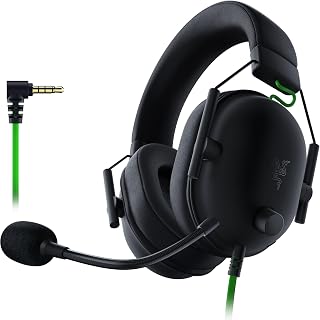
Readers deciding between a dedicated gaming headset and headphones plus a clip-on mic will appreciate the 50mm drivers paired with 7.1 surround sound, which deliver positional audio clip-on mics can't replicate. The memory foam cushion supports long sessions, and the 3.5mm jack keeps it compatible across PC, PS4, PS5, and Switch without extra adapters.
Pros
- Combines tuned drivers and a dedicated noise-isolating mic in one unit
- Lightweight at 240g for long sessions
- Memory foam cushions reduce fatigue versus bulkier combo setups
- Universal 3.5mm wired compatibility across PC, PS4, PS5, and Switch
Cons
- 7.1 surround sound only works on Windows 10 64-bit
- Wired connection only, no wireless option
If you are weighing a headset against headphones plus a separate mic, the BlackShark V2 X makes a strong case for going with the integrated route. Instead of juggling two devices, you get a single 240g unit that handles both sides of the equation well. The TriForce Titanium drivers split each 50mm driver into tuned sections, so you are not sacrificing audio detail the way some combo setups do, and the HyperClear cardioid mic is built specifically to isolate your voice from room noise, something a bolted-on clip mic often struggles with. Memory foam cushions keep the seal comfortable over long sessions without the clamping fatigue that can come from pairing bulky headphones with an external mic arm. The 3.5mm wired connection means it works across PC, PS4, PS5, and Switch without drivers or dongles, though full 7.1 surround is Windows-only. For anyone deciding between a mic-equipped headset and a headphones-plus-mic combo, this one shows why the single-unit approach can win on simplicity and voice clarity.
Audio Performance: TriForce Titanium 50mm dynamic drivers, 28 kHz frequency response, 100 Hz to 10 kHz frequency range, 100 dB sensitivity, 32 ohm impedance.
Microphone: HyperClear cardioid pattern with improved pickup toward the front and tapering toward rear and sides for noise reduction.
Design: Lightweight wired construction at 240g, over-ear with oval memory foam ear cushions, closed earcups for passive noise isolation. Materials include memory foam and titanium components.
Connectivity: Universal 3.5mm audio jack, wired only, includes audio and mic splitter extension cable. Compatible with PC, Mac, PS4, PS5, Xbox One (may require separate stereo adapter), and Nintendo Switch.
Software: 7.1 surround sound available on Windows 10 64-bit. Standard stereo output on other platforms.
Warranty: 2-year manufacturer coverage. Model RZ04-03240100-R3U1.
Buy this if you want one device that covers both game audio and clear team communication without assembling a separate mic setup. It suits PC players who want full surround and console players who are fine with stereo. Skip it if you specifically want a standalone mic you can position independently of your headphones, or if you need wireless freedom, since this is a wired-only design.

For gamers weighing an all-in-one headset against separate headphones and mic, the 7.1 surround sound and noise cancelling mic combo covers both needs in one device. Soft memory earmuffs and the LED accent make long multiplayer sessions comfortable, while broad console compatibility means no secondary purchase for mic input.
Pros
- All-in-one headset avoids buying separate headphones and a mic
- Omnidirectional mic filters background noise for teammates
- Works across PS4/PS5, Xbox, PC, and Nintendo platforms
- Built-in volume and mute controls on the cable
Cons
- Extended wear past 6 hours may cause discomfort for larger heads
- Older Xbox One controllers need a separate adapter not included
Choosing between a headset and headphones with a separate mic often comes down to cost and convenience, and the BENGOO G9000 leans hard into both. Rather than buying headphones and a standalone mic separately, this gives you an all-in-one unit with an omnidirectional microphone that filters background noise so teammates hear you clearly without extra hardware to manage. The 40mm neodymium drivers push 7.1 surround sound across PS4/PS5, Xbox One/Series X, PC, and Nintendo systems, which matters if you are trying to avoid buying platform-specific gear on top of a mic. Soft protein leather ear pads and an ergonomic headband keep things comfortable during long sessions, and the braided cable with built-in volume and mute controls means you are not reaching for a separate mic switch mid-match. The tradeoff is it is a budget unit, so people with larger heads may feel it after six hours, and older Xbox One controllers need a separate adapter. For anyone who just wants one affordable piece of gear instead of two, this covers the need directly.
PlayStation: Works natively with PS4 and PS5 via 3.5mm connection. RGB lighting power is independent from controller power, so lights remain active even when the controller battery is low. Simply connect the headset to the controller and plug the RGB power adapter into a USB port on your console.
Xbox: Compatible with Xbox One, Xbox Series X, and Xbox Series S. For older Xbox One controllers, a separate Microsoft adapter is required (not included with purchase). Newer Xbox controllers have built-in 3.5mm jacks that work directly without adapters. RGB lighting can be powered independently through console USB ports.
PC and Laptop: Connect via 3.5mm jack to any Windows PC, Mac, or Linux system. The microphone and audio will work immediately without driver installation. RGB lighting will illuminate when connected to power via included USB adapter, adding visual flair to your gaming desk setup.
Mobile and Tablet: Works with any device featuring a 3.5mm headphone jack or Bluetooth adapter. Nintendo 3DS, iPads, and PSP systems all support direct connection. Modern phones without 3.5mm jacks will require an external USB-C or Lightning adapter (not included).
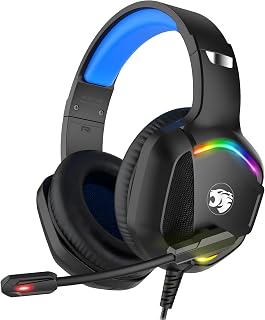
Someone comparing headset convenience to a headphones-plus-mic setup will value the included 1-to-2 3.5mm splitter cable, which lets this double as separate audio and mic lines when a device needs it. Backed by a 3-year limited hardware warranty, it's a steady middle-ground pick for PC and console switching.
Pros
- Single wired unit replaces separate headphones and a mic
- 50mm driver covers both dialogue clarity and bass
- Lightweight at 0.77lb with padded comfort
- Includes 1-to-2 splitter cable for shared audio
Cons
- No software or app for custom audio profiles
- Older Xbox versions require an adapter not included
For anyone trying to decide between a headset and a headphones-plus-mic setup, the IMYB A36 argues for the headset side by keeping everything in one wired unit. The 50mm neodymium driver handles both highs and lows for clear dialogue and immersive effects, while the omnidirectional mic uses noise isolation so your voice comes through without needing to position a separate boom or clip mic. Weighing just 0.77lb with soft ear cushions and a padded headband, it stays comfortable without the added bulk of strapping an external mic to a headphone band. The integrated mute button and volume knob mean controls are built into the headset itself rather than scattered across two devices. A 1-to-2 splitter cable is included for sharing audio, a nice extra if you are comparing setups for shared use. The main caveat is there is no software for custom audio profiles, and older Xbox versions need an adapter not included, so factor that in if platform flexibility matters.
Audio Performance: 50mm dynamic drivers, 20Hz-20kHz frequency response, 42dB sensitivity, 32 ohm impedance
Connectivity: Wired via 3.5mm jack, 6.5-foot braided cable, compatible with PC, PS4, PS5, Xbox One, Nintendo Switch, Nintendo 3DS, PSP, laptop, tablet, iPad, and mobile phones
Microphone: Omnidirectional, noise-isolating, integrated with mute button
Controls: Rotary knob volume control, push-button microphone mute
Design: Over-ear, adjustable headband with padding, soft faux leather ear cushions, lightweight at 0.77lb
Package Contents: IMYB A36 headset, 1-to-2 3.5mm audio jack splitter cable, user manual, 3-year limited hardware warranty
Fits gamers who want a single wired device instead of managing separate headphones and a microphone, especially those switching between PC, PlayStation, and Xbox. Also useful if you want to share audio via the included splitter. Skip it if you want wireless freedom or need software-based audio customization, since this relies entirely on hardware controls.
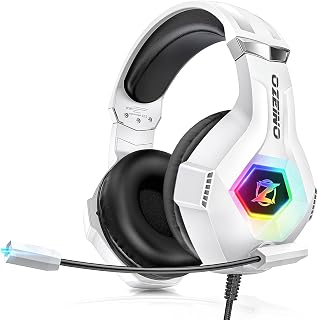
This model answers the headset-vs-headphones question by bundling noise canceling mic input with 7.1 surround sound in one over-ear unit, so there's no need to source a separate microphone. The included splitter cable and extension cord add flexibility for switching between laptop, console, and mobile setups.
Pros
- 7.1 surround sound aids directional awareness in games
- Rotating noise-canceling mic for clear team voice chat
- Lightweight 0.3kg design with breathable pads for long sessions
- Works across PC, PlayStation, Xbox, Switch, and mobile
Cons
- Wired 3.5mm connection needs a splitter cable on PC
- Plastic build feels budget-grade rather than durable
Choosing between a headset and headphones with a mic usually comes down to one question: do you need gaming-grade features like surround sound and team chat, or just basic voice capture? The Ozeino ZW1 answers firmly on the headset side. Its 7.1 surround engine gives directional cues that plain headphones with a bolt-on mic cannot replicate, which matters if you play FPS or tactical titles across PC, PlayStation, Xbox, Switch, or mobile. The 360-degree noise-canceling mic rotates out of the way when not needed, something most headphone-and-mic combos lack entirely. Add RGB lighting and a lightweight 0.3kg build with breathable pads, and you get a setup built for long sessions rather than occasional calls. The wired 3.5mm connection with a splitter cable for PC is the clear limitation, and the plastic shell signals budget construction rather than long-term durability. Still, if your deciding factor is immersive gaming audio over simple voice pickup, this tips the scale toward headset.
Audio Performance: 7.1 surround sound, 50mm dynamic drivers, 20 kHz frequency response, 42 dB sensitivity
Design: Over-ear, lightweight (0.3kg), adjustable headband, breathable protein over-ear pads, white color with RGB LED lighting
Microphone: 360-degree omnidirectional, noise-canceling, premium sound localization
Connectivity: Wired 3.5mm jack, includes 1-to-2 splitter cable and 1.55m extension cord, compatible with PC, PS5, PS4, Xbox One, Xbox Series X/S, Switch, laptops, and mobile phones
Build: Plastic enclosure, retractable cable, not water-resistant
Warranty: 3-year manufacturer warranty
Package Contents: Gaming headset, audio jack splitter cable, 1.55m extension cord, user manual
Buy this if you game across multiple platforms and want surround sound plus a dedicated mic without paying premium prices. Casual and entry-level competitive players benefit most. Skip it if you mainly need a mic for work calls or music listening, since the gaming-focused features and RGB lighting add cost and bulk you won't use. Those wanting wireless freedom or rugged build quality should also look elsewhere.

For readers specifically weighing headset options for calls over gaming, the double-sided boom mic with AI noise canceling via app stands out, since it's built for Teams and Zoom clarity rather than surround sound. At 140g with replaceable earcups, it stays comfortable through back-to-back meetings.
Pros
- AI noise cancellation filters background distractions on calls
- Double-sided boom mic stays clear in any position
- In-line mute and volume controls are easy to reach
- Lightweight 140g build with replaceable earcups
Cons
- USB-A wired connection limits desk mobility
- Full noise cancellation requires installing companion software
If the headset vs headphones with mic decision for you is really about work calls rather than gaming, the Lenovo USB-A Wired Stereo Headset is built for exactly that comparison. Unlike gaming headsets with bulky designs and extra features you won't use, this is a focused communication tool. The AI noise cancellation, managed through Lenovo's software, filters out background noise during Teams or Zoom calls, something basic headphones with an inline mic typically can't match. The double-sided boom mic stays clear regardless of how you position it, and in-line mute and volume controls mean you're not fumbling mid-meeting. At 140 grams it disappears during all-day wear, and replaceable earcups extend its usable life. The trade-off is the USB-A wired connection, which keeps you desk-bound, and getting full noise cancellation benefits means installing the companion software first. For anyone comparing dedicated headsets against plain headphones with a mic for professional use, this leans decisively toward the purpose-built headset.
Connectivity: USB-A wired, plug-and-play compatible with Windows and Mac computers.
Audio Performance: Stereo speakers with high-quality microphone and AI noise cancellation via LADM software.
Design: Lightweight construction at 140 grams, replaceable earcups, double-sided boom microphone, ergonomic ear cups.
Controls: In-line control box with volume adjustment, mute button, and call management functions.
Dimensions: 7.28 x 74.8 x 2.36 inches. Weight: 4.9 ounces.
Platform Compatibility: Teams, Zoom, Google Meet, Google Voice, Slack, GoTo Meeting, WeChat, Cisco Webex, and standard USB audio devices.
Model Number: 4XD1P83425. Manufacturer: Lenovo.
Buy this if you spend your day on video calls and want dependable mic clarity over a headphones-plus-mic workaround. Remote and hybrid workers on Teams or Zoom are the best fit. Skip it if you need mobility away from your desk, since the USB-A wired connection ties you down, or if you don't want to install software for full noise cancellation benefits.

Those leaning toward a simple headset over juggling headphones and a separate mic will find the USB-A connection straightforward for laptop or desktop calls. As a ClearChat model built specifically for voice chat, it skips gaming-oriented extras and focuses on getting mic input working reliably out of the box.
Pros
- Rotating noise-canceling mic reduces background interference
- In-line controls for quick mute and volume adjustments
- Padded leatherette cushions support all-day wear
- Sturdy plastic build despite the budget price point
Cons
- Cable is fixed length and cannot be detached or extended
- No water resistance, so unsuitable for humid or outdoor use
When weighing a headset against headphones with a separate mic, the appeal of an all-in-one option like the Logitech H390 is simplicity. Rather than pairing headphones with a clip-on or desktop mic, you get a rotating noise-canceling boom built in, one that genuinely cuts background interference during calls. That single-device convenience is the strongest argument for choosing a headset over a headphones-plus-mic setup, especially for video meetings or casual listening where consistent audio quality on both ends matters. In-line controls let you mute or adjust volume without digging through software, and the 6.23-foot USB cable balances desk mobility with manageable cable length. Padded leatherette cushions and an adjustable headband support full workday wear, and the plastic housing holds up despite its budget price. The compromises are a non-detachable cable and no water resistance, both reasonable for stationary desk use. For anyone who wants one device handling both audio and voice without extra hardware, this is a straightforward pick.
Buy this if you want a single device for calls and listening instead of juggling headphones and a separate mic. It suits remote workers and anyone in frequent virtual meetings on a practical budget. Skip it if you need a detachable or longer cable, use it in humid or outdoor settings, or specifically want gaming features like surround sound, since this is built for voice clarity, not immersive audio.

Pros
- Exceptional value at under $20 with features typically found in $50+ headsets
- Works across all major gaming platforms without requiring separate models
- Memory foam design minimizes fatigue during marathon gaming sessions
- Noise-canceling directional microphone isolates your voice for clear team communication
- Optional RGB lighting adds visual flair without requiring constant USB connection
Cons
- Wired connection limits mobility compared to wireless alternatives
- Virtual 7.1 surround is software-based rather than true multi-driver surround
- RGB lighting requires separate USB power, which may clutter desk setup
The BENGOO GD-900 is a wired gaming headset engineered for players seeking professional-grade audio without premium pricing. It targets budget-conscious gamers, streamers, and casual players who prioritize value and cross-platform compatibility across Xbox, PlayStation, Nintendo Switch, PC, and Mac ecosystems.
The standout feature is the virtual 7.1 surround sound powered by 50mm drivers, which creates convincing directional audio for footsteps, gunfire, and environmental cues. The directional noise-reducing microphone with 120-degree flexible positioning captures your voice clearly while filtering background noise, essential for multiplayer coordination and streaming. The flip-to-mute design and inline controls offer convenient quick-access features without reaching for the headset.
Build quality reflects the price point well. Memory foam ear cushions and the self-adjusting headband distribute weight evenly for multi-hour comfort, while the 2.4-meter braided cable resists tangling from daily use. The over-ear design reduces pressure on the ears compared to on-ear alternatives. Optional RGB lighting via USB adds personalization, though it remains optional if you prefer audio-only operation.
The main limitation is the wired 3.5mm connection, which eliminates wireless freedom but ensures universal compatibility and zero latency. Virtual surround sound, while effective, cannot match dedicated multi-driver surround implementations in premium headsets. USB-powered RGB lighting requires additional cable management if you want the visual effects.
The BENGOO GD-900 delivers exceptional value for casual and competitive gamers, streamers, and anyone needing a reliable multi-platform headset. The combination of comfortable design, decent audio, and cross-device support makes it a smart choice for those prioritizing budget and versatility over premium features.
Audio: Virtual 7.1 surround sound, 50mm drivers, balanced frequency response with enhanced bass and treble
Microphone: Directional noise-reducing, 120-degree flexible boom, flip-to-mute, inline mute button
Comfort: Memory foam ear cushions, self-adjusting headband, over-ear design, breathable materials
Connectivity: 3.5mm wired connection, 2.4-meter braided cable, inline volume and mute controls, PC splitter support
Lighting: Built-in RGB lighting with USB power option (optional, does not affect audio-only mode)
Compatibility: PS5, PS4, Xbox Series X/S, Xbox One, Nintendo Switch, PC, Mac, compatible mobile devices
Physical: Package dimensions 8.19 x 8.11 x 3.94 inches, weight 15.8 ounces, model GD-900
Ideal For: Budget-conscious gamers, console players using multiple platforms, streamers needing clear communication, players during extended gaming sessions, those seeking cross-device headset compatibility without purchasing multiple models
Consider Alternatives If: You require wireless connectivity, need true multi-driver surround sound instead of virtual surround, or prioritize premium build quality and materials over value. Professional esports players may want higher-end audio precision, though this headset performs admirably for competitive play.
Best Use Cases: Casual multiplayer gaming on any platform, online team-based games requiring clear voice chat, streaming with audience interaction, long-session RPGs or immersive single-player experiences, and as a backup headset for households with multiple gamers

Logitech H111 Stereo Headset with Noise-Cancelling
For anyone deciding a basic headset beats headphones without a mic, the 3.5mm audio jack covers voice and audio through a single cable on nearly any PC or laptop. It's a no-frills choice for readers who just need working mic input without surround sound or RGB extras.
Pros
- Noise-cancelling mic built specifically for calls and gaming
- Comfortable over-ear fit with adjustable headband
- Retractable cable for easy storage and travel
- Backed by a 2-year warranty
Cons
- No inline volume or mute controls
- Wired 3.5mm connection limits movement
Choosing between a headset and headphones with a mic usually comes down to one question: do you need dedicated voice clarity without added bulk or cost? The Logitech H111 answers that directly. It's a true headset, not headphones with a bolted-on mic, built around a noise-cancelling boom that filters room noise during calls, classes, and gaming sessions. The simplicity works in its favor here: stereo sound handles music and games fine, while the rotating boom and adjustable headband let you wear it comfortably for hours. There's no inline control and no wireless freedom, but for readers trying to decide if a headset justifies itself over plain headphones, the H111 makes the case with a dedicated mic, over-ear comfort, and Logitech's warranty backing. It's the straightforward, no-decision-fatigue option in this comparison.
Audio Specifications: Frequency response 20 Hz to 20 kHz, 32-ohm impedance, dynamic drivers for balanced sound reproduction.
Design: Over-ear headphones with faux leather and plastic construction. Rotating microphone boom adjusts for left or right wear. Adjustable headband for personalized fit. Weighs less than typical over-ear models for extended comfort.
Microphone: Noise-cancelling microphone reduces background noise during calls and recordings. Rotating boom positioning accommodates individual preferences.
Connectivity: Wired 3.5mm jack with retractable cable. Compatible with Windows 10, 8, 7, Vista; Mac OS X 10.5 and later; Chrome OS; Linux Kernel 2.6 plus; iOS; and Android devices.
Warranty and Support: 2-year manufacturer warranty. Model 981-000612. Includes user manual in standard packaging.
Buy this if you want a dedicated headset experience without wireless complexity or a learning curve, especially for calls, classes, or casual gaming. Skip it if you already own good headphones and just need a clip-on or USB mic add-on, or if you want inline volume controls and untethered movement. It suits budget-focused buyers who value a single, reliable all-in-one over mixing separate gear.

Readers choosing a lightweight headset over bulkier headphones with a bolted-on mic will notice the S30's lightweight build is the headline spec, easing strain during long PS5, Xbox, or PC sessions. The included cable and teen-friendly age range description make it approachable for younger gamers trying their first headset.
Pros
- Lightweight 198g frame reduces head and neck strain
- 40mm neodymium drivers for crisp stereo sound
- Omnidirectional mic blocks keyboard and fan noise
- Breathable earcups and glasses-friendly headband
Cons
- Wired 3.5mm connection limits mobility
- Not water-resistant, unsuitable for outdoor use
If the headset vs headphones decision for you hinges on comfort during long sessions, the WIRWTRU S30 is built around exactly that tradeoff. At 198g, it's noticeably lighter than mainstream 250g headsets, which matters when you're weighing a dedicated gaming headset against swapping in regular headphones plus a separate mic. The 40mm neodymium drivers give you real stereo sound for competitive and single-player games, and the omnidirectional microphone handles the headset side of the equation by blocking keyboard clicks and fan noise during team chat. Breathable earcups and a glasses-friendly headband reinforce the comfort angle, which is often the deciding factor between headset and headphones setups for marathon play. The wired 3.5mm connection ties it to console and PC setups without cable management flexibility, and it's not built for moisture exposure. For this article's audience, it's a clear case for choosing a purpose-built headset when comfort and mic clarity both matter.
Audio Performance: 40mm dynamic drivers, 20Hz to 20KHz frequency response, 105dB sensitivity, 20 ohm impedance
Design: Over-ear form factor, 198g weight, adjustable headband, breathable fabric earcups, plastic enclosure, glasses-friendly fit
Microphone: Omnidirectional noise-canceling mic with button control and remote
Connectivity: 3.5mm wired jack, tangle-free cable, plug-and-play operation
Compatibility: PS5, PS4, Xbox One, Xbox Series X|S, Nintendo Switch, Steam Deck, PC, Mac, laptops
Warranty: 12-month refund or replacement warranty
Included: S30 headset, cable, user manual
Buy this if long gaming sessions leave your head or neck sore and you want a headset that solves both comfort and voice clarity in one wired package for PS5, Xbox, or PC. Skip it if you need wireless freedom, water resistance, or you're set on using existing headphones with a separate mic. Best for console and PC gamers prioritizing extended comfort over premium materials.

For those deciding between a headset and headphones plus a separate mic for work calls, the in-line control with noise cancelling microphone simplifies muting mid-meeting. Offering both USB and 3.5mm connections, it adapts to whatever port a laptop or desktop has for Zoom or Skype use.
Pros
- 270-degree rotating noise-cancelling boom mic
- Dual USB and 3.5mm connectivity for broad compatibility
- Inline volume, mute controls, and work indicator light
- Memory foam earpads for extended comfort
Cons
- Wired connection restricts movement
- No carrying case included
For readers weighing a headset against headphones with a mic, the JIAMQISHI EH01 shows what a dedicated headset adds that headphones alone can't easily match: a 270-degree rotating boom mic that isolates your voice from keyboard clicks and background chatter on calls and classes. That's the core argument for choosing a headset in the first place. Dual USB and 3.5mm connectivity means it works across nearly any device, sidestepping the compatibility guesswork that comes with pairing separate headphones and a standalone mic. Inline volume and mute controls, plus a work indicator light, add the kind of convenience that generic headphones don't offer. The 40mm driver and built-in sound card keep calls stable across Zoom, Teams, and Skype, with enough quality left over for casual music or light gaming. The wired-only design and missing carrying case are the clear tradeoffs, but for the specific need of reliable voice clarity, this headset earns its place over a headphones-plus-mic combo.
Audio: 40mm dynamic driver, 20 Hz to 20 kHz frequency range, 32 ohm impedance, active noise cancellation microphone
Connectivity: Dual USB and 3.5mm jack, 9-foot retractable wired cable, compatible with PC, Mac, Chromebook, tablets, smartphones, PS4, PS5, Xbox One
Design: On-ear, adjustable headband, round earpieces, soft protein memory foam earpads, plastic enclosure, breathable materials, not water resistant
Controls: Button-based in-line volume control, microphone mute button, speaker mute button, work indicator light
Warranty: 24 months by JIAMQISHI, includes user manual, standard packaging
Buy this if you're deciding in favor of a headset specifically for frequent video calls, online classes, or meetings and want inline controls plus broad device compatibility via USB and 3.5mm. Skip it if you want wireless mobility or already have headphones you're happy with and just need an external mic. Ideal for remote workers and students who call clarity a priority.
Buying Guide: How to Choose Between a Headset and Headphones With Mic
Choose a microphone for how you communicate
A headset puts its microphone on a boom near your mouth, which generally helps your voice remain direct during calls, team chat, and online classes. Headphones with a mic may use an inline microphone or a smaller integrated design, which can be convenient for casual use but is not always as close to your voice.
For frequent desk calls, look for a flexible boom, physical mute control, and noise reduction. The Lenovo USB-A Wired Stereo Headset for PC/Laptop combines a double-sided boom, inline controls, and software-supported noise canceling. The Logitech H390 Wired Headset PC/Laptop Stereo adds a rotating left-side boom and cable controls, while the JIAMQISHI USB Headset with Microphone for PC uses a 270-degree unidirectional boom for flexible placement.
Match the connector to every device you use
USB-A is a straightforward choice for a stationary computer because it carries audio through one plug and often supports inline control functions. The Lenovo and Logitech H390 models suit this type of work setup. Before choosing USB, confirm that your laptop has the port available, especially if it is also used for accessories, docks, and charging.
A 3.5 mm connection is usually more adaptable for consoles, controllers, laptops, and mobile devices. The Logitech H111 Stereo Headset with 3.5 mm Audio, Razer BlackShark V2 X Gaming Headset, BENGOO G9000 Stereo Gaming Headset for PS4 PC Xbox, and IMYB A36 Gaming Headset with Mic Stereo Headphones use this familiar format. Students choosing a portable computer can also use our laptop guide for cybersecurity students to consider ports alongside performance needs, while our M.2 to USB adapter guide helps with a busier USB workspace.
Put long-session comfort ahead of decorative extras
Fit matters as much as sound when you wear a headset through meetings, lectures, or extended game sessions. Over-ear cushions can create a more enclosed feel and reduce distractions, while on-ear designs take up less space. Adjustable headbands, breathable materials, and enough room for glasses are practical details that become important after the first hour.
Weight is also worth checking. The Lenovo model is listed at 140 g, the Razer BlackShark V2 X Gaming Headset at 240 g, and the WIRWTRU Wired Gaming Headset for PS5, Xbox at 198 g. Memory foam, as found on the BENGOO Gaming Headset for Xbox Series X|S Xbox One PS5, can improve cushioning, but your head shape still determines the final fit. For a tidier desk around your headset cable and accessories, see these hard drive dock picks for backups and drive access.
Decide whether call efficiency or gaming immersion leads
Gaming headsets often prioritize larger drivers, closed earcups, flexible booms, and virtual surround features. These can make footsteps and directional effects easier to follow, but surround support can depend on the connected device or software. The Razer BlackShark V2 X Gaming Headset specifies software-enabled 7.1 surround on compatible Windows systems, so it is wise to match feature claims to your preferred platform.
The BENGOO G9000 Stereo Gaming Headset for PS4 PC Xbox and Ozeino Gaming Headset for PC, Ps4, Ps5 both emphasize 7.1-style gaming audio, while the WIRWTRU model focuses on clear stereo sound from 40 mm drivers. If you are planning a PC around competitive shooters or expansive role-playing games, our guides to the right GPU for Helldivers 2 and a smart GPU build for Baldur’s Gate 3 can help balance the rest of your setup.
Final Thoughts
Your decision can stay simple: choose the Lenovo USB-A Wired Stereo Headset for PC/Laptop if light comfort, clear desk-call controls, and USB-A connectivity set the priority, or choose the Razer BlackShark V2 X Gaming Headset when closed-ear isolation, a 3.5 mm connection, and gaming-focused positional audio better suit your routine.
Frequently Asked Questions
Is a headset better than headphones with a mic for work calls?
A headset is usually the more practical option when you make calls throughout the day because its boom microphone stays close to your mouth. That placement can help speech sound more consistent than an inline microphone located lower on the cable. For occasional calls and everyday music, headphones with a mic can still work well when their connection and microphone placement match your device.
Do USB headsets work with video-call apps and phones?
USB headsets are especially convenient for computers, and the Lenovo USB-A Wired Stereo Headset for PC/Laptop is designed for platforms including Teams, Zoom, Google Meet, Slack, and Webex. A USB-A plug is not as universal as a 3.5 mm jack for phones and console controllers. If you regularly switch devices, a model with USB and 3.5 mm options, such as the JIAMQISHI headset, gives you more connection flexibility.
Are gaming headsets good for music and meetings?
They can be, particularly if you want an attached microphone and over-ear comfort for several activities. Gaming-oriented models such as the IMYB A36 and Razer BlackShark V2 X pair larger drivers with adjustable boom microphones, making them useful for voice chat and general listening. Their sound tuning may favor bass impact and game effects, so people who prioritize a more understated music presentation may prefer a work-focused headset instead.
Can one wired headset handle PC and console gaming in 2026?
Yes, a wired 3.5 mm headset can cover both if your PC, controller, and console support the connector. The Ozeino Gaming Headset for PC, Ps4, Ps5 and WIRWTRU Wired Gaming Headset for PS5, Xbox support a broad selection of gaming devices, though some older Xbox controllers may need an additional adapter. Creators who also edit video from the same computer can compare system requirements in our guide to PC hardware for Premiere Pro before finalizing a multi-purpose setup.





Write Your Review
No reviews yet. Be the first to share your experience!