

When a bare hard drive holds old photos, project files, or a retired computer’s data, installing it inside another machine is rarely the easiest answer. A hard drive dock gives you direct, tool-free access for recovery, transfers, cloning, and rotation alongside a reliable external hard drive backup setup.
This guide to the best hard drive dock options focuses on drive compatibility, connection speed, cloning features, and sustained-use practicality. Whether you maintain a home archive or regularly swap media drives at your desk, a well-organized workspace, including one built around our custom keyboard kit picks, makes storage tasks far less cumbersome.
Quick answer
This guide compares 10 picks, with XIAOBI 3-Bay M.2 NVMe & SATA Hard Drive Docking ranked first. SABRENT USB 3.0 to SATA Hard Drive Docking Station holds the highest customer rating among them. SABRENT EC-DFLT USB 3.0 SATA Hard Drive Docking Station has the most customer reviews.

Pros
- Supports both M.2 NVMe and 2.5/3.5-inch SATA drives in one station
- Convenient offline cloning without requiring extra software
- USB-C 10Gbps interface supports fast data transfers
- Cooling fan improves heat management during prolonged use
- Includes a two-year manufacturer warranty
Cons
- Cannot clone an M.2 NVMe SSD to a SATA hard drive
- Not compatible with SATA NGFF or mSATA SSDs
- Offline cloning requires the target drive to have equal or greater actual capacity and the dock disconnected from the computer
The XIAOBI 3-Bay Docking Station is designed for users who regularly access, upgrade, back up, or clone storage drives. Its combination of two M.2 NVMe slots and a 2.5/3.5-inch SATA bay makes it especially useful for PC builders, IT technicians, and home users managing multiple drive formats.
Its standout feature is one-touch offline cloning, which supports SATA to NVMe and NVMe to NVMe transfers without a computer or cloning software. The USB-C 3.2 Gen 2 connection supports speeds up to 10Gbps for connected storage, although actual performance depends on the drive, host system, and file workload.
The black tool-free enclosure is practical for quick drive changes, while the independent power and clone controls simplify everyday operation. An 80mm foldable cooling fan helps reduce heat during long transfers, supporting more stable performance when high-speed NVMe or hard drives are under sustained load.
There are important compatibility limits to consider. The dock does not support SATA NGFF or mSATA SSDs, and it cannot perform reverse cloning from an M.2 NVMe SSD to a SATA hard drive. Offline cloning also requires a target drive with equal or greater actual capacity and the computer disconnected.
Overall, the XIAOBI dock is a versatile storage management tool for users who need both NVMe and SATA support in one station. Its flexible drive compatibility, offline cloning, USB-C connectivity, and active cooling make it a practical choice when its cloning direction and drive-format limitations fit your setup.

Pros
- Dual-bay design supports simultaneous access to two SATA drives.
- Offline cloning can be completed without a computer.
- USB 3.0 connectivity provides fast data transfers up to 5Gbps.
- Simple plug-and-play setup received positive feedback for drive recovery and everyday use.
- Compatible with multiple operating systems and both 2.5-inch and 3.5-inch SATA drives.
Cons
- Supports SATA drives only, so IDE and some adapter-connected drives may not work reliably.
- New drives may need to be initialized before the computer recognizes them.
- The plastic housing is lightweight, so it may feel less substantial than a metal drive enclosure.
The FIDECO YPZ04-S2 is a dual-bay SATA hard drive dock for accessing 2.5-inch and 3.5-inch HDDs or SSDs without installing them inside a computer. It suits home users, technicians, and anyone sorting through old drives or moving data between storage devices.
USB 3.0 supports transfer rates up to 5Gbps, while UASP can help compatible systems improve storage responsiveness. Its offline clone function copies data from one SATA drive to another without a computer, and user feedback highlights reliable plug-and-play access for drive recovery.
The compact ABS design takes up little desk space and weighs about 0.6 kg, making the dock easy to relocate between computers. Two open bays provide convenient access to drives, and the included power adapter and USB cable help get the station ready for use.
Compatibility is limited to SATA HDDs and SSDs, so IDE drives and some IDE-to-SATA adapter combinations may not be recognized. New drives may also require initialization before they appear in the operating system, and the lightweight plastic construction is less premium than a metal enclosure.
Overall, the FIDECO YPZ04-S2 offers practical value for data recovery, drive testing, backups, and offline cloning. Buyers who need a straightforward two-drive SATA reader with broad operating system support should find it a capable and convenient option.

Pros
- Supports both 2.5-inch and 3.5-inch SATA hard drives and SSDs.
- Fast USB 3.0 connectivity with UASP support.
- Simple plug-and-play design for temporary drive access.
- Includes the required power adapter and USB cable.
Cons
- Only supports SATA drives, not SAS or M.2 NVMe storage.
- New or unformatted drives must be initialized in Windows Disk Management or macOS Disk Utility before use.
- Requires an AC power connection, so it is less portable than a bus-powered adapter.
The SABRENT EC-UBLB is a powered USB 3.0 docking station that provides quick access to bare 2.5-inch and 3.5-inch SATA hard drives and SSDs. It is well suited to home users, technicians, and anyone who regularly transfers files, checks old drives, or performs backups.
USB 3.0 with UASP supports speeds of up to 5 Gbps, helping large file transfers move efficiently when the computer and drive can match that performance. Plug-and-play support works with Windows and Mac, while hot-swap functionality makes changing inactive drives straightforward.
The compact black housing keeps a bare drive upright and easier to handle than a loose SATA-to-USB cable. A blue power LED and flashing white activity LED provide useful visual feedback, and the included AC adapter supplies the power needed by 3.5-inch desktop drives.
There are a few setup limitations to keep in mind. This dock accepts SATA drives only, not SAS or M.2 NVMe models, and a new blank drive must first be initialized using Windows Disk Management or macOS Disk Utility. The 30-minute automatic sleep mode can also be mistaken for a connection problem until the drive is accessed again.
Overall, the EC-UBLB is a practical and affordable way to connect compatible SATA storage without installing an enclosure. It is a strong fit for routine file access, drive testing, recovery work, and backups, provided you have the required AC outlet and use supported SATA hardware.

Pros
- Works with both 2.5-inch and 3.5-inch SATA HDDs and SSDs
- Offline cloning simplifies drive replacement and upgrades
- USB 3.0 delivers up to 5Gbps transfer capability
- No drivers are needed for setup
- Supports drives up to 10TB
Cons
- Limited to SATA drives, so it does not support M.2 or NVMe storage
- Offline cloning speed is rated at up to 60Mbps, which is modest for very large drives
- The 10TB capacity limit may not suit users working with higher-capacity disks
The SABRENT EC-HD2B is a dual-bay SATA hard drive docking station designed for accessing, copying, and cloning bare 2.5-inch or 3.5-inch HDDs and SSDs. It is well suited to PC builders, technicians, home users, and anyone upgrading or backing up SATA storage.
Its standout feature is offline cloning, which allows users to copy one drive to another without connecting to a computer. When used as a dock, USB 3.0 supports transfer speeds up to 5Gbps, while compatibility with USB 2.0 and USB 1.1 adds flexibility for older systems.
The black enclosure measures 6.26 by 3.94 by 2.72 inches, providing a desktop-friendly footprint for a two-drive accessory. The dual-bay layout makes it convenient to work with two SATA drives at once, and plug-and-play operation keeps setup straightforward.
There are some important limitations. This dock supports SATA storage only, not M.2 or NVMe drives, and the maximum supported capacity is 10TB. Offline cloning is rated at up to 60Mbps, so copying very large drives may take considerable time.
Overall, the EC-HD2B is a practical, versatile choice for SATA drive access, backups, and basic drive migration. Buyers who need a simple dual-bay dock with offline cloning should find it useful, provided their drives fit its SATA and capacity requirements.

Pros
- Four-bay design supports convenient multi-drive management
- Works with both 2.5-inch and 3.5-inch SATA HDDs and SSDs
- Offline cloning reduces dependence on a computer during drive migration
- USB 3.0 connectivity is backward compatible with USB 2.0 systems
- Compact, tool-free trayless design simplifies occasional drive access
Cons
- Supports SATA drives only, with no stated compatibility for NVMe, IDE, or other drive interfaces
- Trayless slots leave installed drives exposed, so the dock is better suited to desktop use than protected long-term storage
- Drive insertion and removal should be performed with the dock powered off
The SABRENT DS-U3B4 is a four-bay SATA docking station designed for users who need quick access to several internal hard drives or SSDs. It suits home technicians, backup users, IT professionals, and anyone migrating data between compatible 2.5-inch or 3.5-inch SATA drives.
Its most useful feature is offline cloning, which copies data directly from one drive to another without requiring a computer, drivers, or cloning software. For everyday access and backups, the USB 3.0 connection supports transfers up to 5Gbps and remains compatible with USB 2.0 systems.
The trayless design keeps setup simple because drives slide directly into the dock without caddies, screws, or tools. A compact black enclosure and included external power adapter make it practical for a desktop workspace, while LED indicators provide visibility during cloning.
There are a few limitations to consider. This dock is intended for SATA drives and does not list support for NVMe or IDE hardware, and the open trayless slots provide less physical protection than a fully enclosed drive enclosure. Drives should also be inserted or removed only when the dock is powered off.
Overall, the DS-U3B4 is a versatile choice for multi-drive access, backups, and drive migration. Its four-bay layout and computer-free cloning make it especially valuable for users who frequently work with SATA storage devices.
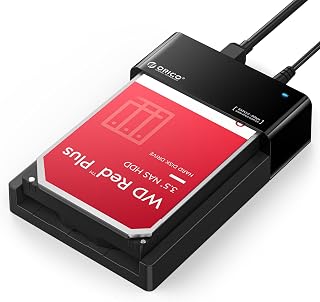
Pros
- Works with both 2.5-inch and 3.5-inch SATA HDDs and SSDs
- Simple tool-free installation for convenient drive testing and data access
- Lay-flat form factor is stable and easy to use beside a computer
- UASP support can improve USB transfer efficiency with compatible systems
- Includes the power adapter and USB data cable
Cons
- Real-world transfer speeds may be lower than direct SATA performance or the 5Gbps interface maximum
- Supports one drive at a time and does not provide a dedicated offline drive-to-drive cloning function
- The power button and drive removal process may take some familiarity
The ORICO lay-flat docking station is designed for anyone who needs quick access to bare 2.5-inch or 3.5-inch SATA hard drives and SSDs. It is especially useful for backups, drive testing, data migration, and retrieving files without opening a desktop computer.
USB 3.0 and UASP support provide a practical connection for large file transfers, with advertised interface speeds up to 5Gbps when the computer, drive, and cable support suitable conditions. Actual throughput can vary, and one user reported slower performance than a direct SATA connection, which is expected with USB interface overhead.
The low-profile lay-flat design makes drive insertion straightforward and keeps the dock stable on a desk. Its broad exposed layout is intended to encourage natural airflow, while the tool-free bay and included 12V adapter simplify setup for both desktop and laptop users.
There are a few limitations to consider: it handles only one drive at a time, and it does not include a dedicated offline cloning control. The power button is somewhat hidden, and users should safely eject drives before removal rather than relying on hot swapping without proper operating system support.
Overall, the ORICO dock is a convenient, broadly compatible solution for accessing individual SATA drives. Its simple design, 24TB capacity support, and complete accessory kit make it a strong fit for home backups, troubleshooting, and occasional drive recovery work.
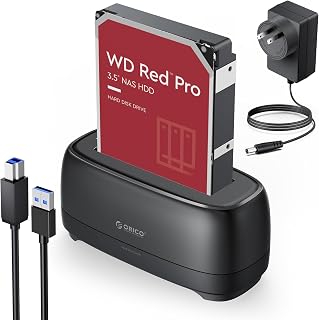
Pros
- Supports both 2.5 inch and 3.5 inch SATA drives in one compact dock.
- UASP compatibility can improve USB transfer efficiency with supported systems and drives.
- Tool-less design with hot-swap access simplifies drive changes.
- Dust-resistant details, LED activity indicators, and a stable anti-slip base improve usability.
Cons
- Supports only one drive at a time and is not designed for multi-drive cloning.
- Does not support IDE or SAS drives.
- New or unallocated drives must be initialized and formatted in Disk Management before the computer can recognize them.
The ORICO DD18U3-US is a single-drive SATA docking station for users who need quick access to bare 2.5 inch or 3.5 inch HDDs and SSDs. It is well suited to home backups, drive upgrades, disk imaging, data transfers, and basic drive testing.
USB 3.0 connectivity and UASP support provide a rated transfer rate of up to 5Gbps when paired with compatible hardware. The tool-free slot makes drive insertion straightforward, while hot-swapping helps users change drives without repeatedly installing them in a case.
The dock includes a 12V/2A power adapter and a 1-meter USB-A cable to support powered 3.5 inch drives. Its anti-slip pad, LED activity indicators, dust-resistant design, and automatic sleep mode after 10 minutes of inactivity add practical convenience.
There are some limitations to consider. This is a single-bay dock, it does not support IDE or SAS drives, and brand-new or unallocated drives may require initialization and formatting before they appear in Disk Management.
Overall, the ORICO DD18U3-US is a capable, compact option for accessing one SATA drive at a time. It offers broad operating system compatibility and useful UASP performance without the complexity of a permanent enclosure.

Pros
- Dual-bay design supports simultaneous use of two SATA drives.
- Works with both 2.5-inch and 3.5-inch HDDs and SSDs.
- Offline cloning does not require a computer or additional software.
- Tool-free setup, hot-swapping, and broad Windows, Mac OS X, and Linux compatibility simplify everyday use.
Cons
- Offline cloning requires the target drive to have equal or greater capacity than the source and does not support online cloning.
- The specified offline clone speed is up to 60Mbps, which is lower than the dock's maximum UASP transfer rate.
- Not compatible with M1 or M2-based Mac computers.
The WAVLINK WL-ST334UA is a dual-bay SATA hard drive docking station for users who need quick access to 2.5-inch or 3.5-inch HDDs and SSDs. It suits home users, IT technicians, and anyone upgrading, backing up, or recovering data from bare drives.
Its UASP support can deliver transfer rates up to 6Gbps with compatible drives and systems, while USB 3.0 supports speeds up to 5Gbps. The offline cloning function copies directly from a source disk to a target disk, although the target must have equal or greater capacity.
The tool-free design makes drive installation straightforward, with no dock drivers required and support for hot-swapping. A built-in power switch and 12V, 3A power source support stable operation, while automatic sleep after 30 minutes helps conserve energy.
The metal enclosure and compact 6.5 by 5.04 by 5.2-inch form factor provide a practical desktop setup, though the unit is intended for stationary use rather than travel. Compatibility is broad across Windows, Mac OS X, and Linux, but M1 and M2-based Macs are excluded.
Overall, the WL-ST334UA is a useful, flexible dock for SATA drive access and offline duplication. Its main limitations are the 60Mbps specified cloning speed, the need for a sufficiently large target drive, and the lack of online cloning support.

Pros
- Supports both 2.5 and 3.5 inch SATA hard drives and SSDs
- Simple tool-free access is useful for backups, upgrades, testing, and data recovery
- UASP support can improve USB 3.0 transfer performance with compatible systems
- Power adapter is included for dependable 3.5 inch drive operation
- Compact single-bay design is easy to place beside a desktop or laptop
Cons
- Only supports SATA drives, not IDE/PATA, M.2, SAS, or drives already inside USB enclosures
- The included host cable uses USB Type-A, so USB-C-only computers require a separate adapter
- S.M.A.R.T. diagnostics do not pass through the USB bridge, and macOS drives may need remounting after sleep
The SABRENT EC-DFLT is a single-bay, tool-free docking station for bare 2.5 and 3.5 inch SATA hard drives and SSDs. It suits home users, technicians, and anyone who needs convenient access for backups, drive testing, upgrades, or data recovery.
USB 3.0 and UASP support can provide efficient transfers with a compatible computer and drive. Mechanical hard drives typically remain limited by their own performance, while SSDs can make better use of the available USB bandwidth.
Its compact lay-flat design keeps drive insertion simple, and an LED shows power and activity. The included 12V/2A adapter is essential for 3.5 inch drives, while most 2.5 inch drives can operate from USB power, with external power recommended for stability.
Compatibility is limited to bare SATA I, II, and III drives, so IDE/PATA, M.2, SAS, and USB-enclosed drives are not supported. The host connection is USB Type-A rather than USB-C, and S.M.A.R.T. diagnostics do not pass through the bridge.
Overall, the EC-DFLT is a practical and affordable SATA drive reader for routine file transfers and maintenance. It is a strong fit for users who want quick, tool-free access, provided they have a compatible SATA drive and a USB Type-A connection or adapter.

Pros
- Offline 1-to-1 cloning does not require a computer.
- Supports both 2.5-inch and 3.5-inch SATA HDDs and SSDs.
- Dual bays can read and write two drives at the same time.
- Tool-free installation with plug-and-play Windows and Mac compatibility.
Cons
- Supports SATA drives only, not IDE, PATA, M.2, or NVMe storage.
- The included cable uses USB-C at the dock end, so a separate cable may be needed for computers without a USB-C port.
- Actual transfer speeds depend on the installed drives, and offline cloning is limited to up to 60MBps.
The SABRENT EC-CH2B is a dual-bay USB-C docking station for bare 2.5-inch and 3.5-inch SATA hard drives and SSDs. It suits home users, technicians, and anyone who needs a simple way to access, migrate, or back up SATA storage without installing each drive in an enclosure.
Its standout feature is offline cloning, which copies one SATA drive to another at the press of a button without a connected computer. When connected over USB, both bays appear as separate drives, allowing simultaneous access and file transfers, with USB 3.0 speeds up to 5Gbps depending on the drives and host system.
The tool-free design makes drive insertion and removal straightforward, while hot-swappable bays and separate activity LEDs improve everyday usability. The compact black enclosure includes a power adapter and USB-C cable, giving it a practical desktop footprint for routine storage work.
Compatibility is limited to SATA storage, so IDE, PATA, M.2, and NVMe drives cannot be used. Offline cloning also requires the target drive to be the same size as the source or larger, and mechanical drives will not reach the interface's maximum theoretical speed.
Overall, the EC-CH2B is a convenient and flexible choice for SATA drive upgrades, data recovery, and backups. Its dual-bay access and computer-free cloning make it especially useful for users who frequently work with bare 2.5-inch and 3.5-inch drives.
How to Choose a Hard Drive Dock
Match the Drive Interface and Bay Count
Start with the connector rather than drive capacity. Most options here work with bare 2.5-inch and 3.5-inch SATA HDDs or SATA SSDs, but they do not accept IDE, SAS, or M.2 drives. The M.2 NVMe & SATA Hard Drive Docking Station is the exception, combining a SATA bay with two M.2 NVMe slots, although it does not support M.2 SATA, mSATA, or NVMe-to-SATA reverse cloning.
Bay count should match your routine. A single-bay dock is ideal for occasional drive access, while the FIDECO External Hard Drive Docking Station, SABRENT USB 3.0 Dual Bay Hard Drive Docking, and WAVLINK USB 3.0 and USB C to SATA Dual-Bay make side-by-side transfers easier. Choose the SABRENT 4-Bay USB 3.0 Hard Drive Docking Station when you frequently manage several disks, especially if you maintain a collection of NAS hard drives for long-term storage.
Choose a Connection That Fits Your Computer
USB 3.0 docks commonly reach up to 5Gbps at the interface, and UASP support can improve efficiency with compatible hosts and SSDs. Mechanical hard drives are much slower than that ceiling, so a standard USB 3.0 dock is usually ample for archive drives, photo folders, and routine file copies.
The M.2 NVMe & SATA Hard Drive Docking Station uses USB-C 3.2 Gen 2 for up to 10Gbps, making it the stronger fit for NVMe-based work. The SABRENT Dual-Bay USB-C Hard Drive Docking Station is a practical choice for computers with Type-C ports, while the WAVLINK model adds UASP support for SATA drives. If your priority is compact solid-state storage rather than bare-drive access, compare these docks with our portable SSD picks for Mac.
Understand What Offline Cloning Can and Cannot Do
Offline cloning duplicates one compatible drive directly to another without a computer, making it useful before an upgrade or when creating a working duplicate. The FIDECO External Hard Drive Docking Station, SABRENT USB 3.0 Dual Bay Hard Drive Docking, SABRENT 4-Bay USB 3.0 Hard Drive Docking Station, and WAVLINK USB 3.0 and USB C to SATA Dual-Bay all include this function for supported SATA drives.
The destination drive must have equal or greater actual capacity than the source, and its existing contents will be overwritten. Disconnect the dock from your computer before starting an offline clone, follow the source and target bay labels carefully, and use the progress LEDs rather than removing either drive during the process. Cloning creates a duplicate, but it is still wise to keep a separate backup in another location.
Plan for Power, Heat, and Desk Space
Full-size 3.5-inch HDDs need stable external power, so choose a dock with its included AC adapter connected before inserting a drive. The single-bay SABRENT USB 3.0 to SATA Hard Drive Docking options, the upright ORICO dock, and the lay-flat ORICO model all use external power to support desktop drives reliably. Automatic sleep functions can also reduce idle energy use, though the drive may need a moment to wake before access resumes.
Heat matters during long transfers and repeated drive access. The M.2 NVMe & SATA Hard Drive Docking Station includes a foldable cooling fan, while the lay-flat ORICO design promotes natural airflow around the drive. Leave room around the dock on a firm surface, and if desk real estate is limited, a separate number pad for a compact workstation can help you keep the drive area clear.
Final Thoughts
For straightforward access to one bare SATA drive, the SABRENT USB 3.0 to SATA Hard Drive Docking is a simple, capable choice with broad drive support. If you need a more flexible station for SATA and NVMe media, the M.2 NVMe & SATA Hard Drive Docking Station adds multi-drive versatility, faster USB-C connectivity, and active cooling. Choose the dock that matches your drive types and how often you swap them.
Frequently Asked Questions
What is the best hard drive dock for cloning SATA drives in 2026?
A dual-bay model with offline cloning is the most convenient choice for SATA-to-SATA duplication. The FIDECO External Hard Drive Docking Station and SABRENT USB 3.0 Dual Bay Hard Drive Docking both support computer-free cloning, while the WAVLINK USB 3.0 and USB C to SATA Dual-Bay offers broad connection flexibility. Always use a destination drive with at least as much usable capacity as the source.
Can a hard drive dock use both 2.5-inch and 3.5-inch drives?
Yes, nearly every SATA model in this roundup accepts both 2.5-inch and 3.5-inch bare HDDs and SSDs. You will need the supplied power adapter for 3.5-inch hard drives because USB alone cannot provide enough power. Confirm that your drive has a SATA connector, since IDE, SAS, and M.2 drives require different hardware.
Can a hard drive dock replace an external backup drive?
A dock is excellent for making and accessing backups, but it is not a complete protection plan by itself. Keep important files on more than one drive and store at least one copy away from your main computer. A dock is especially useful for rotating those backup drives without repeatedly opening an enclosure.
How should I set up a hard drive dock on a compact desk?
Place the dock on a stable, open surface where its vents and drive bays are unobstructed, then use a direct USB connection instead of a crowded hub. A smaller keyboard layout can free up room for storage gear, so our tenkeyless keyboard recommendations may be useful when arranging a compact workstation.





Write Your Review
No reviews yet. Be the first to share your experience!